

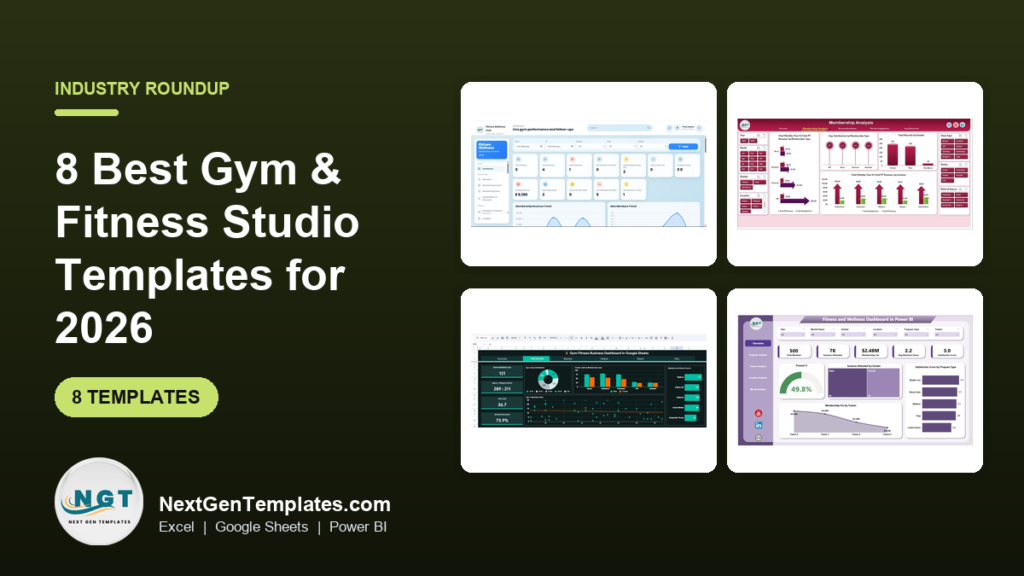
The best gym and fitness studio template for most owners in 2026 is the Gym and Fitness Center Membership Management System Web App ($24.99): it runs members, plans, check-ins, classes, payments and renewals in one system. If you want a gym management Excel template for reporting, start with the Gym Fitness Business Dashboard in Excel ($17.99).
Last updated: September 2026
Key takeaways
- Our top pick is the Gym and Fitness Center Membership Management System Web App ($24.99) — 25 connected screens covering leads, members, subscriptions, check-ins, classes, PT sessions, billing and renewals.
- The best gym management Excel template for analysis is the Gym Fitness Business Dashboard in Excel ($17.99), with five dashboard pages for membership, revenue, engagement and retention.
- Best value is the Gym Fitness Business Dashboard in Google Sheets at $9.99, a shareable six-tab dashboard with no software to install.
- All eight templates cost $9.99 to $24.99 once, against gym software that commonly bills around $100–$400+ every month.
- The list covers Excel, Google Sheets, Power BI, HTML and a Google Apps Script web app, so you can pick by the tools your front desk already uses.
Gym and fitness studio templates compared
| Template | Format | Best For | Price |
|---|---|---|---|
| Gym and Fitness Center Membership Management System (Best overall) | Web App (Google Sheets backend) | Running daily gym operations end to end | $24.99 |
| Gym Fitness Business Dashboard | Excel | Membership, revenue and retention analysis | $17.99 |
| Gym Fitness Business Dashboard (Best value) | Google Sheets | Shareable owner and branch reporting | $9.99 |
| Fitness & Wellness KPI Dashboard | Excel | Monthly targets, MTD and YTD tracking | $14.99 |
| Fitness and Wellness Dashboard | Power BI | Multi-location studios and chains | $17.99 |
| Fitness and Wellness Dashboard | Excel | Program and trainer performance | $13.99 |
| Gym Fitness Business Dashboard | HTML | Browser-only viewing, no Office licence | $12.99 |
| Fitness & Wellness KPI Dashboard | Power BI | KPI scorecard for Power BI users | $11.99 |
Gym and fitness studio teams share one operational pain: the numbers that decide whether the business survives — renewals due, members who stopped showing up, unpaid dues, class fill rates, trainer sessions — sit in different places. The front desk has a sign-in sheet, the accountant has a payment export, the trainers have their own notebooks. By the time an owner sees that attendance dropped, the member has already cancelled.
The paid fix is dedicated gym management software such as Mindbody, Glofox, Zen Planner or PushPress. These are capable products, but they bill every month — commonly somewhere around $100 to $400+ per month depending on plan, features and number of locations (check each vendor’s current pricing page). Over five years that is $6,000 to $24,000+ for a single site. A template you buy once for $9.99–$24.99 will not replace a full booking app with a member mobile app, but it covers the tracking and reporting that most independent gyms and studios actually need.
How we picked these
We searched the NextGenTemplates catalog of several thousand published templates for products built for gyms, fitness studios, health clubs and wellness centres, then kept only those that model real gym operations: memberships, renewals, attendance, classes, trainers and revenue — not generic sales charts relabelled “fitness”. Every pick needed a live product page, a working price and a clear description of what is inside.
We deliberately covered five formats, because a gym running on Microsoft 365 and a studio running on Google Workspace should not be forced into the same file. We excluded personal workout logs and diet trackers aimed at individual athletes, since this guide is for people running the business, not training in it. Ranking weighs breadth of coverage first, then fit for a specific job, then price.
The 8 best gym management Excel templates and fitness studio tools for 2026
1. Gym and Fitness Center Membership Management System Web App — best overall
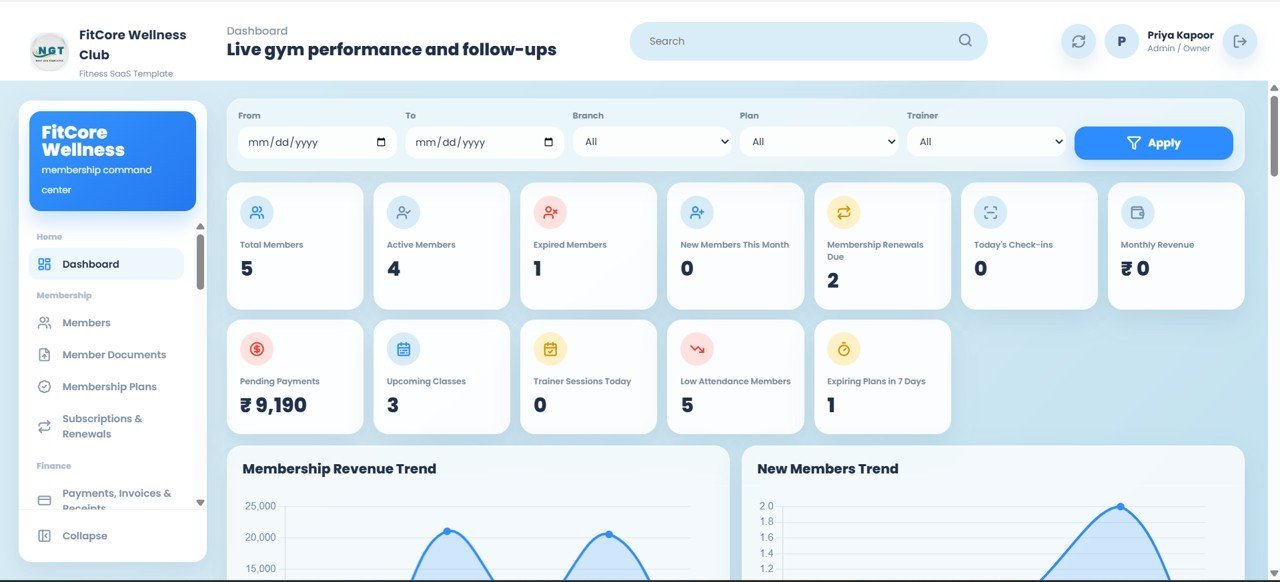
This is the only template on the list that runs the gym rather than just reporting on it, which is why it is our best overall. It is a web app built on Google Apps Script with a Google Sheets backend: 25 connected screens take a person from lead to member to subscription to renewal, with check-ins, classes, payments and expenses in between.
Who it is for: independent gyms, CrossFit boxes, yoga and pilates studios and small multi-branch chains that want one system for the front desk, trainers and the accountant.
What is inside:
- Role-based login for five roles — Admin, Front Desk, Trainer, Accountant and Manager — each seeing only their screens
- A 12-KPI dashboard: Total, Active, Expired and New Members, Renewals Due, Today’s Check-ins, Monthly Revenue, Pending Payments, Upcoming Classes, Trainer Sessions Today, Low Attendance Members and Plans Expiring in 7 Days
- Check-in by member code or mobile number, plus classes, batches and PT sessions with capacity limits
- Workout and diet plans with weight, BMI and body-fat progress tracking
- Invoices, receipts, expenses and merchandise sales, with branch filters for multi-location gyms
Concrete uses: call every member on the “Plans Expiring in 7 Days” list before they lapse; chase the Pending Payments total down each week; spot Low Attendance Members early, because members who stop visiting are the ones who cancel; and stop overbooking classes by enforcing capacity limits. Your data stays in your own Google Drive, and it works from any browser or phone. You deploy it yourself as a private web app — Google’s Apps Script documentation explains how deployment works.
Price: $24.99 — get the Gym and Fitness Center Membership Management System Web App.
Best for: owners who want membership, attendance and billing in one system without a monthly software bill.
2. Gym Fitness Business Dashboard in Excel — best gym management Excel template
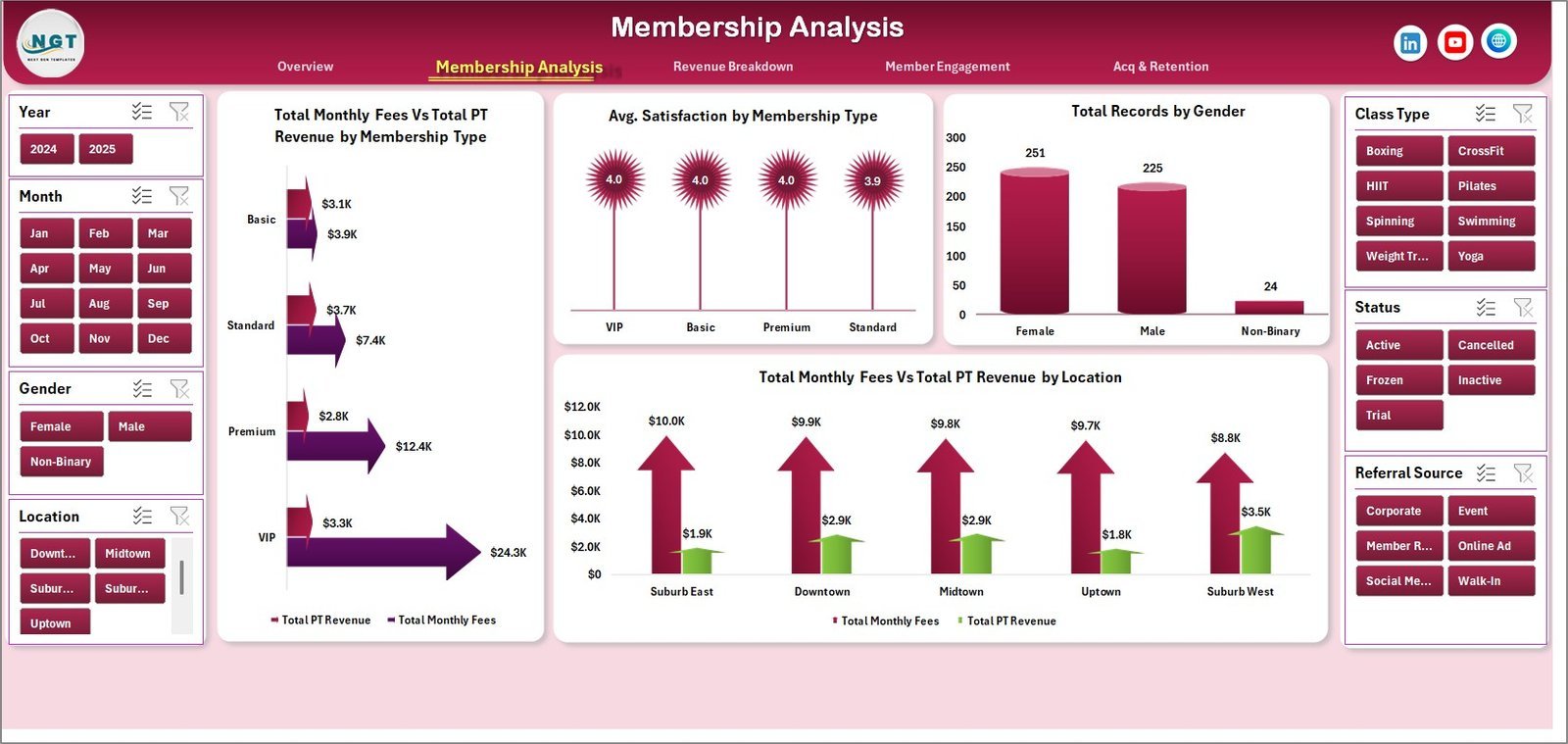
If your gym already lives in Excel, this is the gym management Excel template to buy. It is an analytics dashboard, not a data-entry system: you keep one structured data sheet and five dashboard pages, driven by pivot tables and slicers, turn it into answers.
Who it is for: gym owners, studio managers and health club operators — single-site or multi-branch — who want a 360-degree view of revenue, members and satisfaction.
What is inside:
- Five pages: Overview, Membership Analysis, Revenue Breakdown, Member Engagement, and Acquisition & Retention
- KPI cards for Total Revenue, Active Members, Average Satisfaction, Monthly Fees and Operating Cost
- Revenue vs Operating Cost by membership type and year
- Monthly fees vs PT revenue by membership type and location, plus revenue by class type and referral source
- Seven sheets in total, including the data sheet and a support sheet of pivot tables
Concrete uses: find out whether your premium tier actually earns more after operating cost; see which referral source brings the members who stay; compare satisfaction by trainer before a performance review; and check which location’s revenue is falling behind its costs.
Price: $17.99 — buy the Gym Fitness Business Dashboard in Excel.
Best for: Excel-first gyms that want deep membership and revenue analysis from one data sheet.
3. Gym Fitness Business Dashboard in Google Sheets — best value
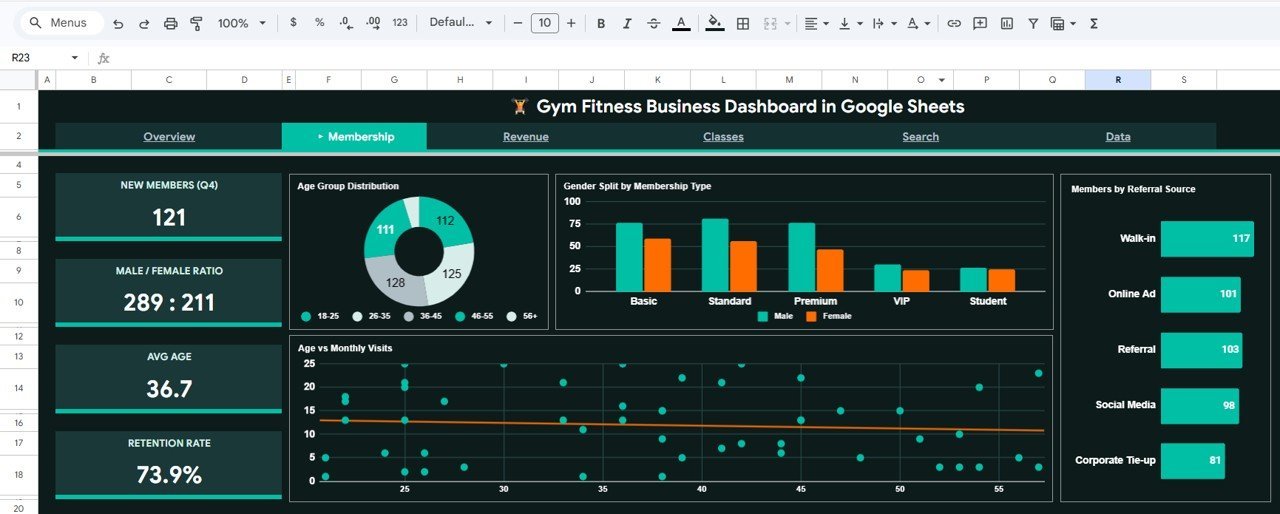
At $9.99 this is the cheapest template here and the best value. It is the same gym business idea as pick #2, built natively in Google Sheets, so it opens in a browser and can be shared with a link — ideal when a partner or branch manager needs to see the numbers.
Who it is for: studios and gyms on Google Workspace, and owners who want to check performance from a phone.
What is inside:
- Six tabs: Overview, Membership Analysis, Revenue Analysis, Classes Analysis, a Search sheet and the Data sheet
- KPI cards for Total Members, Total Revenue, Avg Monthly Fee, Avg Visits/Month and Active Rate
- Membership deep dive: new members, gender ratio, average age, retention rate and referral source
- Actual vs Target revenue, payment method mix, cumulative revenue and branch-level quarterly comparison
- Class popularity, members per trainer and a member search sheet
Concrete uses: track retention rate month by month; see whether card, cash or bank transfer dominates collections; find the classes that never fill; and look up any member’s record in seconds from the search sheet.
Price: $9.99 — get the Gym Fitness Business Dashboard in Google Sheets.
Best for: the tightest budget and anyone who needs a shareable, browser-based gym dashboard.
Not sure which to buy? If you need to run memberships, check-ins and billing, get the Membership Management System Web App at $24.99. If you only need reporting, the Gym Fitness Business Dashboard in Google Sheets is just $9.99.
4. Fitness & Wellness KPI Dashboard in Excel — best for targets and MTD/YTD tracking
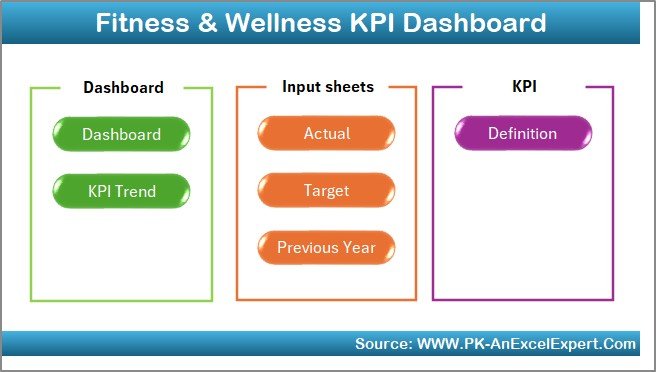
This is a KPI scorecard rather than a transaction dashboard. You enter monthly Actuals, Targets and Previous Year figures for each KPI, pick a month, and the dashboard compares MTD and YTD performance with arrows and colour-coded indicators.
Who it is for: gym owners, wellness managers and corporate wellness teams who set monthly targets and want to know, at a glance, which ones they missed.
What is inside:
- A month selector that refreshes every chart and comparison
- MTD and YTD views against both target and previous year
- Separate input sheets for Actuals, Targets and Previous Year data
- A KPI definition sheet documenting each formula and unit
Concrete uses: set a monthly new-member target and see the YTD gap; compare this September with last September instead of guessing about seasonality; hold a 15-minute monthly review from one screen; and give investors or partners a consistent scorecard every month.
Price: $14.99 — buy the Fitness & Wellness KPI Dashboard in Excel.
Best for: target-driven owners who review performance monthly against plan and last year.
5. Fitness and Wellness Dashboard in Power BI — best for multi-location studios
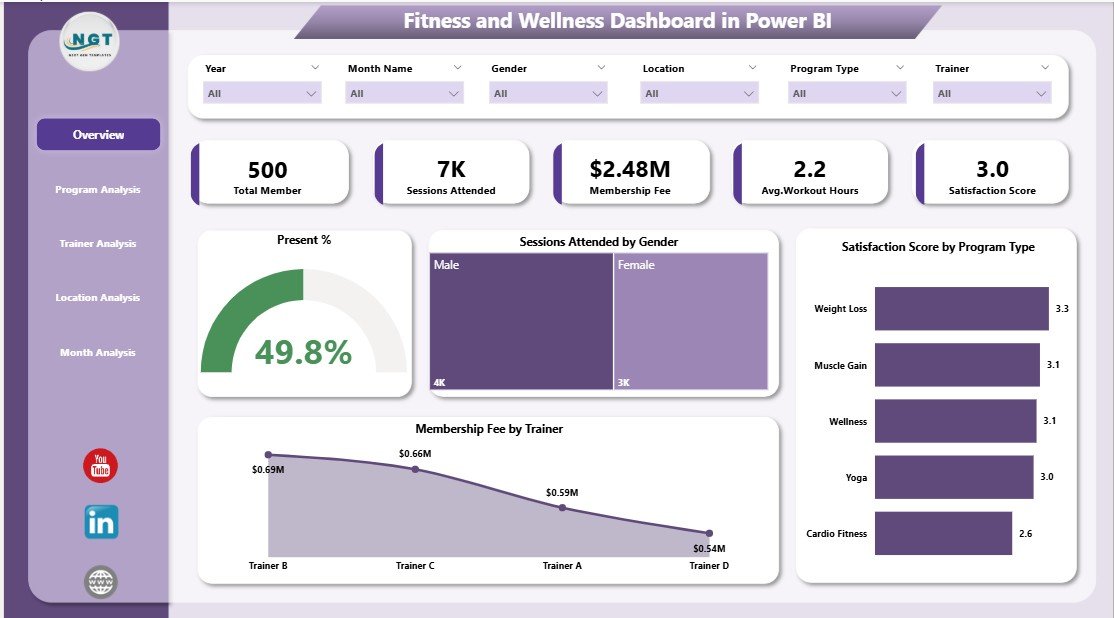
When you run several locations and want interactive analysis, Power BI beats a spreadsheet. This dashboard puts programs, trainers, locations, monthly trends and membership revenue into one .pbix file with slicers for program, trainer, gender, location and month.
Who it is for: fitness chains, wellness centres and corporate fitness programs already using Microsoft 365.
What is inside:
- Overview page with a high-level performance snapshot
- Program Analysis page for attendance, engagement and revenue by program
- Trainer Analysis page for trainer-wise engagement and satisfaction
- Location-wise comparison and monthly trend analysis
Concrete uses: find the programs that fill and the ones that do not; compare trainers on satisfaction rather than gut feel; see whether a new location is catching up with your flagship; and spot the seasonal dip before you plan your marketing spend.
Price: $17.99 — get the Fitness and Wellness Dashboard in Power BI.
Best for: multi-site operators who want drill-down analysis across programs, trainers and branches.
6. Fitness and Wellness Dashboard in Excel — best for program and trainer analysis
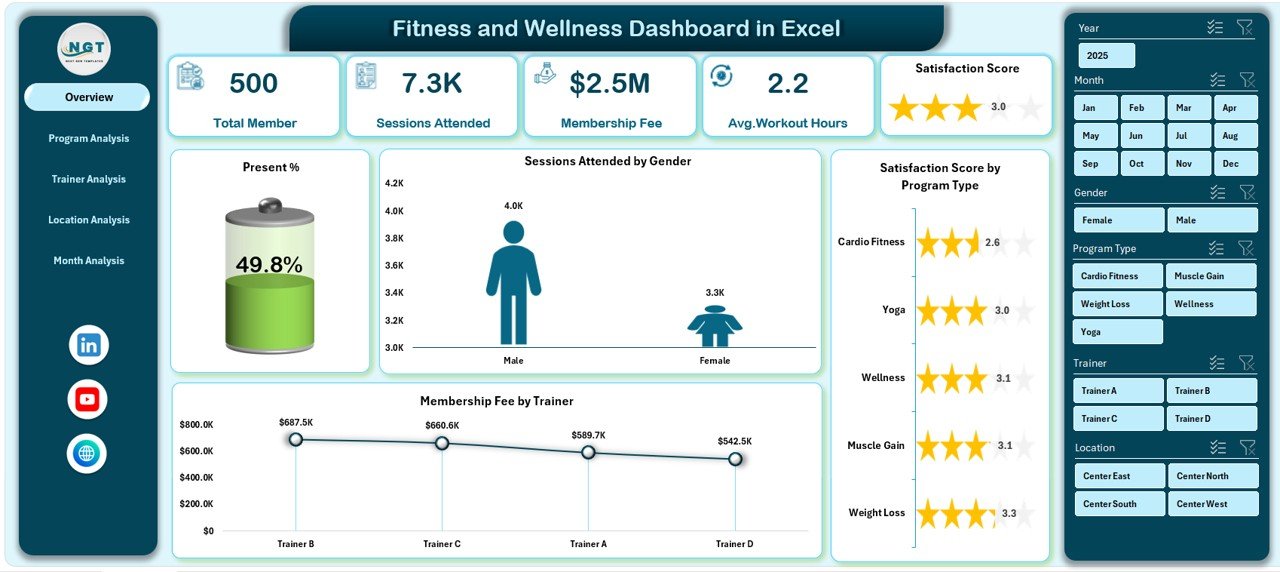
This is the Excel edition of pick #5 — the same program, trainer, location and revenue analysis, but in a workbook with a left-side page navigator and slicers. It is 100% Excel with no VBA, so it opens anywhere Excel does.
Who it is for: studio managers and wellness coordinators who want program-level insight without learning Power BI.
What is inside:
- Overview page with KPI cards for instant insight
- Program Analysis for attendance, calories burned and workout hours by program
- Trainer performance, location-wise comparison and monthly trends
- Slicers for month, program, trainer, location and gender
Concrete uses: decide which class to drop from the timetable using attendance data; reward the trainer whose sessions score highest on satisfaction; compare workout hours across locations; and show members’ aggregated progress in marketing without exposing personal data.
Price: $13.99 — buy the Fitness and Wellness Dashboard in Excel.
Best for: Excel users who care most about which programs and trainers perform.
7. Gym Fitness Business Dashboard in HTML — best for browser-only viewing
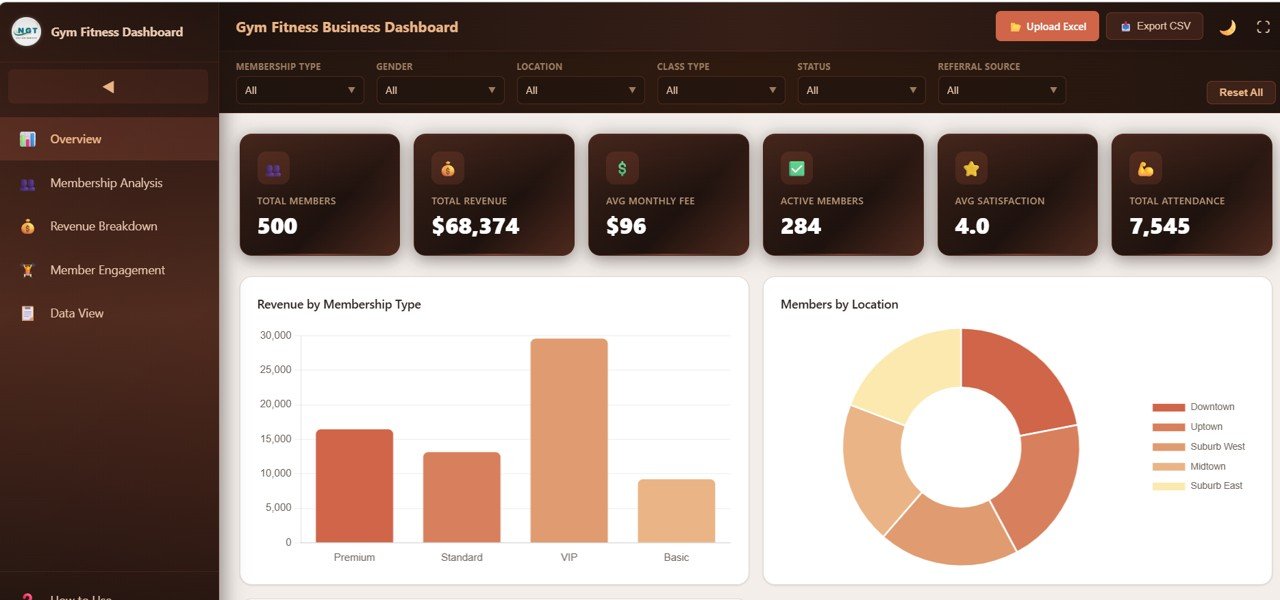
This version needs no Excel, no Google account and no Power BI — it opens in any modern browser. That makes it useful for staff computers without Office licences, or for putting a dashboard on a screen in the office.
Who it is for: gyms whose team does not use Office, and owners who want a lightweight, installation-free dashboard.
What is inside:
- Five pages: Overview, Membership Analysis, Revenue Breakdown, Member Engagement and a Data View
- Six KPI cards: Total Members, Total Revenue, Avg Monthly Fee, Active Members, Avg Satisfaction and Total Attendance
- Revenue by month, location and trainer, and operating cost by location
- Attendance and satisfaction by class type
Concrete uses: open the dashboard on a reception PC with no software installed; compare operating cost per location; check which class types drive attendance; and review the raw records in the Data View without a spreadsheet.
Price: $12.99 — get the Gym Fitness Business Dashboard in HTML.
Best for: teams that want a gym dashboard without any Office or Google dependency.
8. Fitness & Wellness KPI Dashboard in Power BI — best KPI scorecard for Power BI users
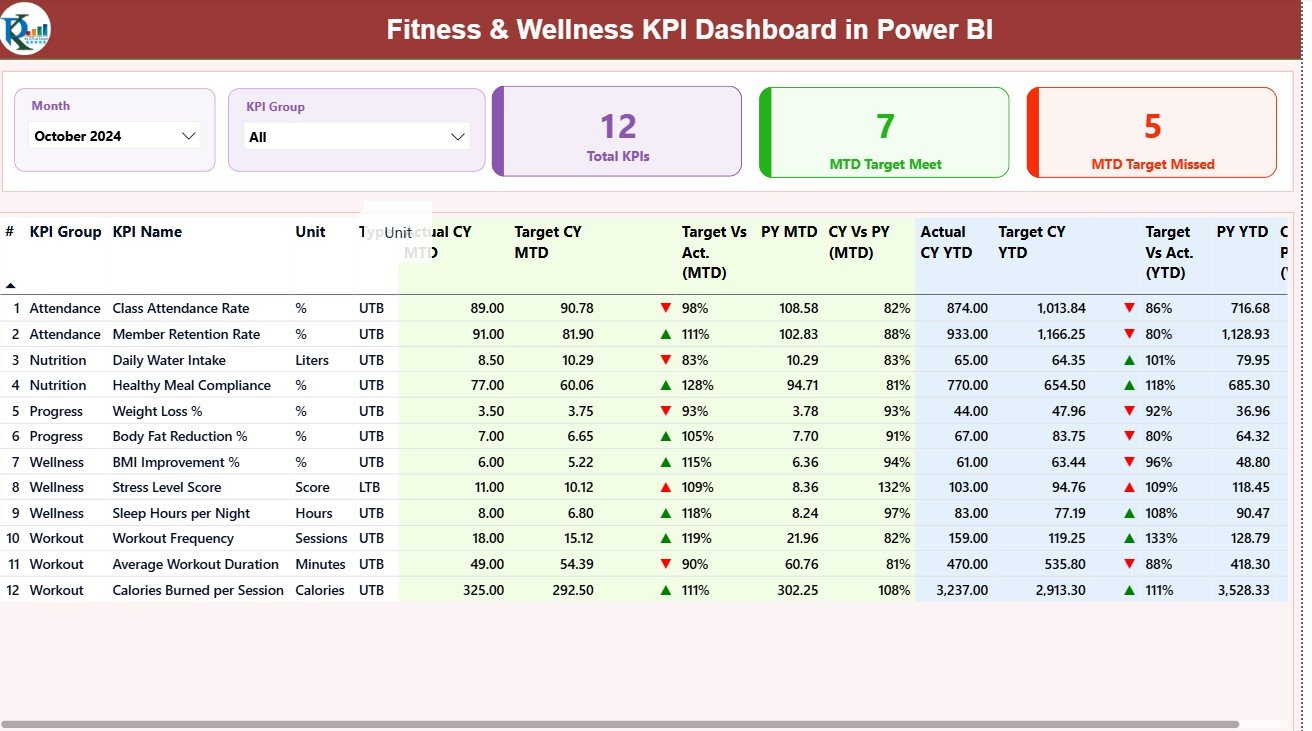
This is the Power BI twin of pick #4: a KPI scorecard fed from an Excel file with Actual, Target and KPI Definition sheets, presented in three Power BI pages. It is a compact, low-cost way to put your fitness KPIs into Power BI.
Who it is for: gyms, spas and wellness centres that report in Power BI and want a ready-made KPI structure.
What is inside:
- Three pages: Summary, KPI Trend and KPI Definition
- MTD and YTD comparison with conditional icons and colours
- Month and KPI Group slicers for membership, finance and operations
- Drill-through from any KPI to its definition and formula
Concrete uses: publish a monthly KPI summary to Power BI so managers can view it on mobile; group KPIs by finance and operations for separate reviews; drill through when someone asks how a KPI is calculated; and refresh straight from the Excel source each month.
Price: $11.99 — buy the Fitness & Wellness KPI Dashboard in Power BI.
Best for: Power BI users who want a ready-made target-vs-actual fitness scorecard.
Which gym KPIs should these templates track?
Whichever template you choose, the useful numbers are the same. Industry benchmarks vary by gym type and market, so treat the ranges below as commonly cited starting points and set targets from your own baseline.
| KPI | Formula | Commonly cited range |
|---|---|---|
| Monthly churn rate | Members lost in month ÷ members at start of month | About 3–5% a month for many gyms |
| Retention rate | (End members − new members) ÷ start members | Roughly 60–70%+ a year for well-run clubs |
| Revenue per member | Total revenue ÷ average active members | Depends on price tier; track the trend |
| Visits per member per month | Total check-ins ÷ active members | Falling visits are an early cancellation warning |
| Class fill rate | Attendees ÷ class capacity | Aim to keep most classes above ~70% |
| Non-dues revenue share | PT + merchandise + other ÷ total revenue | Many operators target 20–30%+ |
Churn deserves the most attention because it compounds: losing 4% of members every month means replacing almost half your base each year just to stand still. Our guide to churn and retention metrics to track in 2026 explains the formulas in more depth, and the trainer side of the business follows the same logic as our HR KPIs for 2026.
How to choose between them
Use this quick decision path:
- You need to run memberships, check-ins, classes and billing: Membership Management System Web App ($24.99).
- You want a gym management Excel template for analysis: Gym Fitness Business Dashboard in Excel ($17.99).
- Tightest budget, or you need to share by link: Gym Fitness Business Dashboard in Google Sheets ($9.99).
- You set monthly targets and review MTD/YTD: Fitness & Wellness KPI Dashboard in Excel ($14.99) or in Power BI ($11.99).
- You run several locations and use Microsoft 365: Fitness and Wellness Dashboard in Power BI ($17.99).
- You care most about programs and trainers: Fitness and Wellness Dashboard in Excel ($13.99).
- No Office, no Google account on staff PCs: Gym Fitness Business Dashboard in HTML ($12.99).
A common and sensible combination is the web app for daily operations plus one dashboard for the monthly owner review. Before you pay, our buying guide on how to evaluate an Excel dashboard template lists the checks that matter, and 7 reasons to use a quality KPI dashboard in Excel, Power BI and Google Sheets explains why the format should follow your stack.
Template vs gym software: what does it cost over five years?
The maths is simple. A gym software plan at an assumed $150 a month costs $1,800 a year and $9,000 over five years; at $300 a month it is $18,000. Buying the web app plus the Excel dashboard costs $42.98 once. Even if you pay a freelancer to customise the template, you are likely to stay far below one year of subscription fees.
That does not make subscriptions wrong — you are paying for hosting, support, a member app and payment processing. It does mean you should buy software for those features specifically, not for reporting you could own. Our breakdown of one-time purchase vs SaaS subscription costs walks through the same calculation for other business tools, and if price is the deciding factor, see our cheap Excel dashboard templates under $15.
When a template is NOT the right answer
A template is the wrong buy in four situations. First, if members must book classes and pay from their own phone app, you need dedicated booking software — none of these templates is a member-facing app. Second, if you need automatic recurring card billing through a payment processor, buy software with built-in payments; the templates record payments but do not charge cards. Third, if you want door access control tied to membership status, that requires hardware integration. Fourth, if you run dozens of locations with many staff editing at once, a governed platform will scale better than a shared file.
For everything short of that — a single gym or small chain tracking members, renewals, attendance, classes, trainers and revenue — a $10–$25 template does the job that a monthly subscription is oversized for. Be honest about which side of that line you sit on before you spend. Running more than a gym? Our Google Sheets templates for teams and project management dashboard templates use the same one-time-price model.
Running a hotel, resort or guesthouse instead? Our guide to the 8 best hotel and resort templates ranks revenue dashboards, KPI trackers and a booking web app on the same template-vs-software logic.
Running another kind of professional-services business? See our buyer guide to the best law firm dashboard template picks for 2026, which applies the same template-vs-software logic to billing, collections and attorney performance.
Salons and day spas share the same booking, package and retention problem as fitness studios. See our ranking of the 6 best salon management Excel template and dashboard options for appointment-based beauty businesses.
Frequently asked questions
What is a gym management Excel template?
A gym management Excel template is a pre-built workbook that organises gym data — members, memberships, attendance, classes, trainers and revenue — and turns it into dashboards and KPIs. You enter or paste your records into a data sheet, and charts and slicers show membership trends, revenue by plan and retention without building formulas yourself.
Can I manage gym memberships in Excel or Google Sheets?
Yes, for a small or mid-sized gym. Spreadsheet dashboards handle reporting well, while the Gym and Fitness Center Membership Management System Web App adds data entry screens, role-based login, check-ins, renewals and billing on a Google Sheets backend. For member-facing booking apps and automatic card billing, dedicated gym software is still the better fit.
What is the best free alternative to Mindbody or Glofox?
There is no free tool with the same booking and payment features, but a one-time template covers the tracking and reporting side. The membership web app on this list costs $24.99 once and runs members, classes, check-ins and payments, which suits independent gyms that do not need a branded member app or integrated card processing.
Which KPIs should a gym track every month?
Track active members, new members, cancellations, monthly churn rate, retention rate, revenue per member, visits per member, class fill rate and non-dues revenue such as personal training and merchandise. Churn and visits per member matter most, because members who stop attending are the ones most likely to cancel next month.
How do I calculate gym churn rate?
Divide the number of members who cancelled or lapsed during the month by the number of active members at the start of that month, then multiply by 100. For example, 12 cancellations from 300 starting members is a 4% monthly churn rate. Many gyms report monthly churn somewhere around 3–5%.
Do these templates work for yoga, pilates and CrossFit studios?
Yes. The templates track memberships, classes, trainers, attendance and revenue, which apply to any studio model. The web app supports classes, batches and PT sessions with capacity limits, which suits boutique studios, and the dashboards can filter by class type, program or trainer so you can analyse each discipline separately.
Excel, Google Sheets or Power BI — which format should a gym choose?
Choose the tool your team already uses. Excel suits owners who want one self-contained file; Google Sheets suits Workspace users who share by link and check numbers on a phone; Power BI suits multi-location operators who want interactive drill-down. The HTML version is for teams with no Office or Google account at all.
How much do these gym templates cost?
The eight templates range from $9.99 to $24.99 as one-time purchases with no subscription or per-member fees. Dedicated gym management software commonly bills around $100 to $400 or more each month depending on plan and locations, so a template typically costs less than a single month of software.
Can multiple gym branches use the same template?
Yes. The membership web app is multi-branch ready with branch filters on its operational screens, and the Google Sheets dashboard includes branch-level quarterly comparisons. The Excel and Power BI dashboards include location slicers, so you can compare branches side by side from one data source.
Do I need technical skills to set these up?
No advanced skills are needed for the dashboards: you enter data into a labelled sheet and the visuals update. The web app needs a one-time deployment from your Google account using Google Apps Script, which follows a documented set of steps. The Power BI files open in the free Power BI Desktop.
Get more gym and fitness studio templates
Ready to stop paying monthly for gym reporting? The Gym and Fitness Center Membership Management System Web App ($24.99) runs your members, check-ins, classes and billing in one place, and the Gym Fitness Business Dashboard in Excel ($17.99) is the gym management Excel template for your monthly review. On the tightest budget, the Google Sheets edition is $9.99.
See our dashboards in action on the YouTube channel, @NextGenTemplates, and browse more ready-made tools in our list of 25 best-selling business templates.