

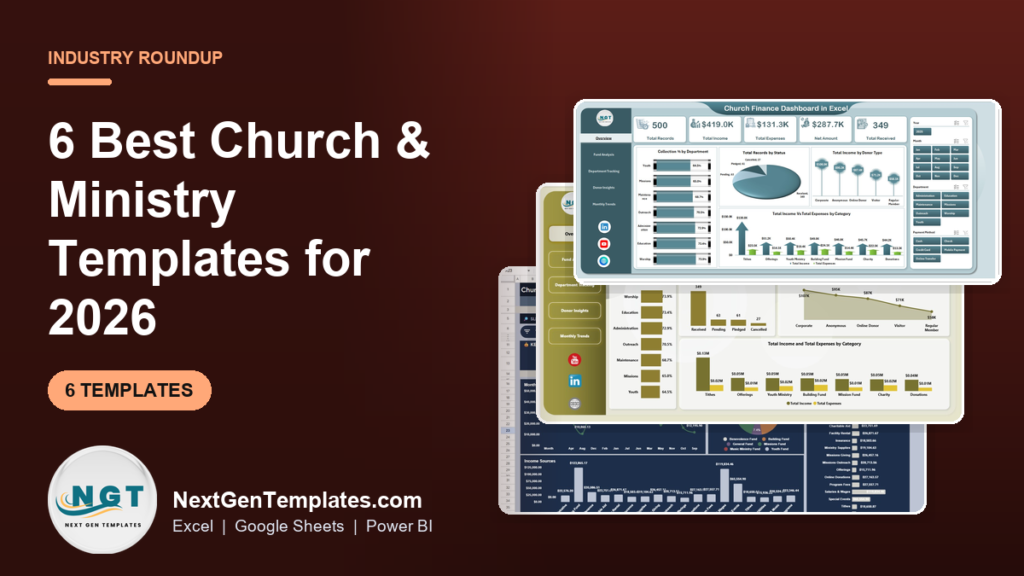
The best church management Excel template for most congregations in 2026 is the Church Finance Dashboard in Excel ($17.99): five pages track income, expenses, funds, departments, donors and monthly giving from one data sheet. For a shared, browser-based option at the lowest price, the Google Sheets edition costs $9.99. Four more ranked picks follow.
Last updated: September 2026
Key takeaways
- Best overall church management Excel template: the Church Finance Dashboard in Excel at $17.99, with Overview, Fund Analysis, Department Tracking, Donor Insights and Monthly Trends pages.
- Best value: the Church Finance Dashboard in Google Sheets at $9.99, shareable with the whole finance committee in any browser.
- All six templates are one-time purchases from $6.99 to $17.99; church management software is a monthly subscription.
- Four formats are covered (Excel, Google Sheets, Power BI and HTML), so you can match the tool your treasurer already uses.
- These are finance and giving templates, not member directories: for attendance, check-in and small groups you still need a church management system.
Church and ministry templates compared
| Template | Format | Best For | Price |
|---|---|---|---|
| Church Finance Dashboard | Excel | Best overall: funds, departments, donors and monthly trends | $17.99 |
| Church Finance Dashboard | Power BI | Larger churches and multi-campus boards presenting on screen | $17.99 |
| Church Finance Dashboard | Google Sheets | Best value: shared access for pastor, treasurer and committee | $9.99 |
| Church Transaction Analysis Dashboard | Google Sheets | Gift-level review: largest gift, average gift, transaction lookup | $9.99 |
| Church Finance Dashboard | HTML | Browser dashboard with budget and pledge cards, no software needed | $12.99 |
| Donation Request Tracker | Excel VBA | Logging and approving donation and benevolence requests | $6.99 |
How we picked these church templates
We searched the full NextGenTemplates catalogue of Excel, Google Sheets, Power BI and HTML products for church, ministry, tithe, offering, donation and faith-based tools, then kept the six that a church treasurer or finance committee would open every month. Every pick had to work from a real data sheet, show genuine church finance measures such as income by fund and expenses by department, and be editable without a consultant.
We dropped one template from our original shortlist, an organ donation network dashboard, because it matched the word “donation” but has nothing to do with running a church. Prices are the current one-time list prices on each product page. For the compliance side of church finance we point to the IRS Tax Guide for Churches and Religious Organizations (Publication 1828).
Why churches need a finance dashboard in the first place
Most small and mid-sized churches run their money through three disconnected places: an online giving export, a counting-team spreadsheet of Sunday cash and cheques, and the bookkeeper’s expense ledger. Before every finance committee meeting the treasurer spends an evening stitching them together, and the report still cannot answer simple questions such as “how is the building fund doing against last year?”
The usual alternative is a church management system (ChMS) or church accounting package: Planning Center, Breeze, Tithe.ly, Pushpay or a fund-accounting product. They are good tools, but they are subscriptions that grow with your congregation and your module list. A church management Excel template sits one layer above your records. It does not replace your bookkeeping; it turns the numbers you already keep into a clear, board-ready view for a one-time $6.99 to $17.99.
The real payoff is visibility. When income by fund, spending by department and month-by-month giving sit on one page, the committee sees a summer giving dip, an over-budget ministry or a missions fund that is running ahead of plan while there is still time to act, instead of discovering it at the annual meeting.
The 6 best church and ministry templates for 2026
1. Church Finance Dashboard in Excel: best overall
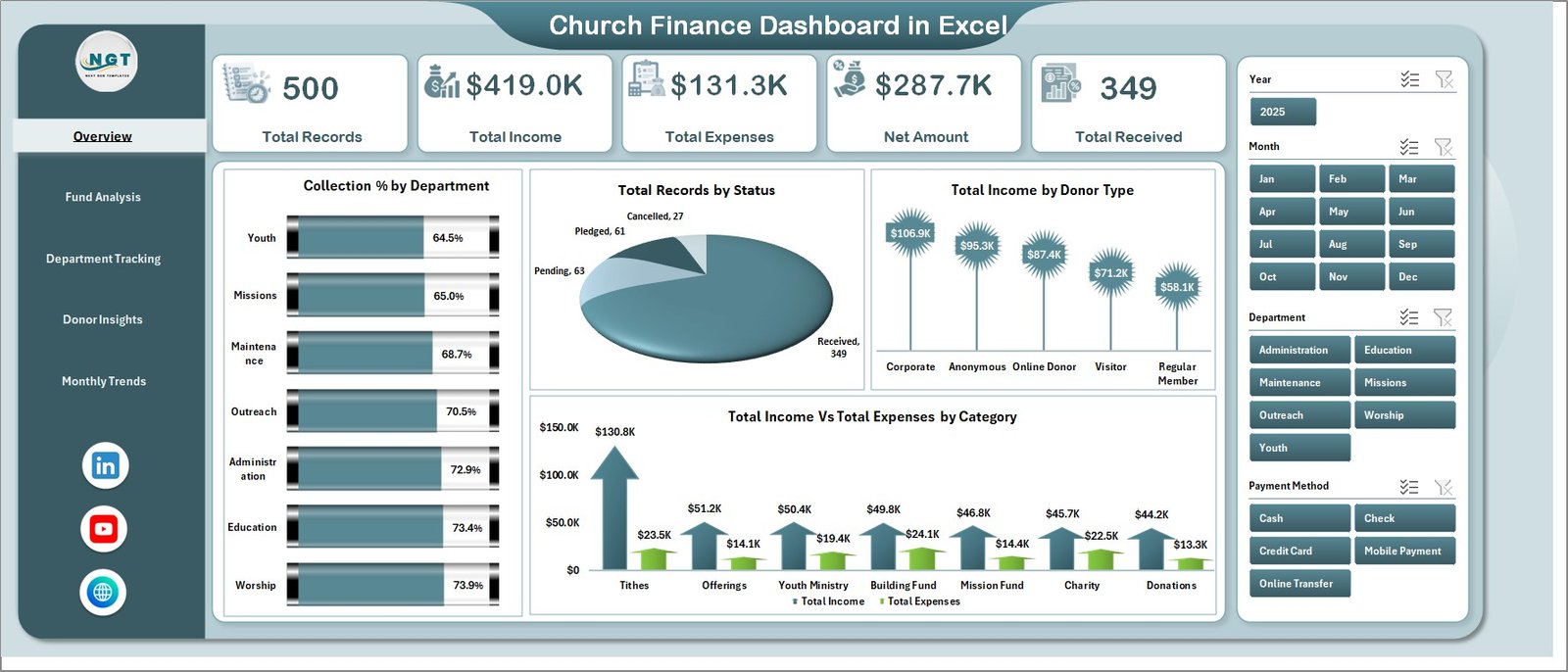
This is the most complete church management Excel template in the roundup, which is why it ranks first. It has seven sheet tabs: five interactive dashboard pages, a Data sheet for your records and a Support sheet of pivot tables that drive every chart. There are no macros and no formulas to edit.
Who it is for: church treasurers, administrators, pastors and finance committees who already work in Microsoft Excel (2016 or later) and report monthly or quarterly.
- Five KPI cards on the Overview: Total Records, Total Income, Total Expenses, Net Amount and Total Received.
- Fund Analysis with income, record count and net amount by fund type and sub-category.
- Department Tracking showing expenses, collections and net amount for ministries such as worship, youth, missions, outreach and maintenance.
- Donor Insights (collection % by donor type, income by payment method) and Monthly Trends, with 19 charts in total.
Concrete uses: show the committee that the youth department has spent 80% of its annual budget by August; compare how much of this year’s income arrived through online giving versus cash and cheque; and spot that December brings a large share of annual giving so you can plan the first-quarter cash flow. Price: $17.99. Get the Church Finance Dashboard in Excel →
Best for: the church that wants one complete Excel view of funds, departments, donors and monthly giving.
2. Church Finance Dashboard in Power BI
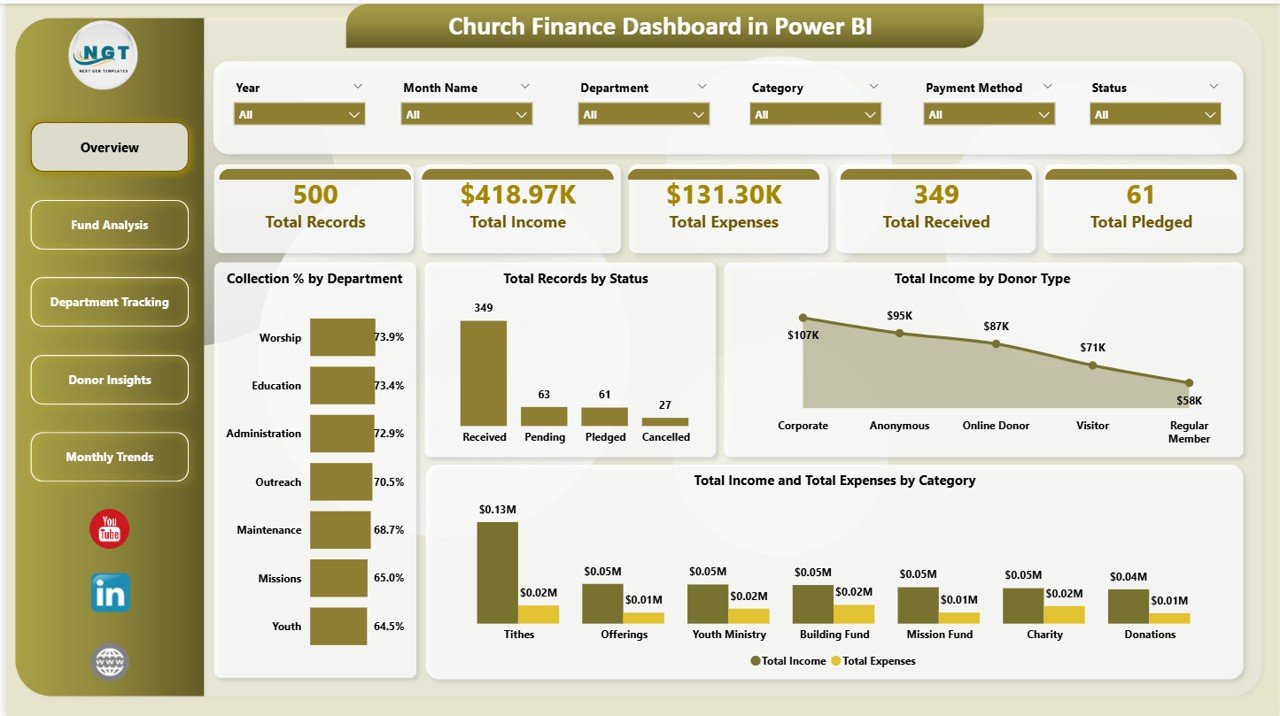
The same five-page structure (Overview, Fund Analysis, Department Tracking, Donor Insights and Monthly Trends) rebuilt for Power BI. Once your giving history runs to thousands of records, or several campuses feed one report, the Power BI model handles the volume and gives elders a drill-down that a workbook cannot.
Who it is for: larger congregations, multi-campus churches and denominational offices with a data-minded staff member or volunteer.
- KPI cards for Total Records, Total Income, Total Expenses, Total Received and Total Pledged, so pledges and actual receipts sit side by side.
- 16 analytical charts, including collection % by department, records by status and income and expenses by category.
- Slicers on every page for category, status, fund type, department and donor type.
- A ready-made file that opens in the free Power BI Desktop; replace the sample data and everything updates.
Concrete uses: track a capital campaign where pledged and received amounts diverge over three years; filter the whole report to one campus in a click; and replace a stack of printed reports at the annual business meeting with one live screen. Price: $17.99. See the Church Finance Dashboard in Power BI →
Best for: churches whose data has outgrown a spreadsheet and who present finances to a board or congregation on screen.
3. Church Finance Dashboard in Google Sheets: best value
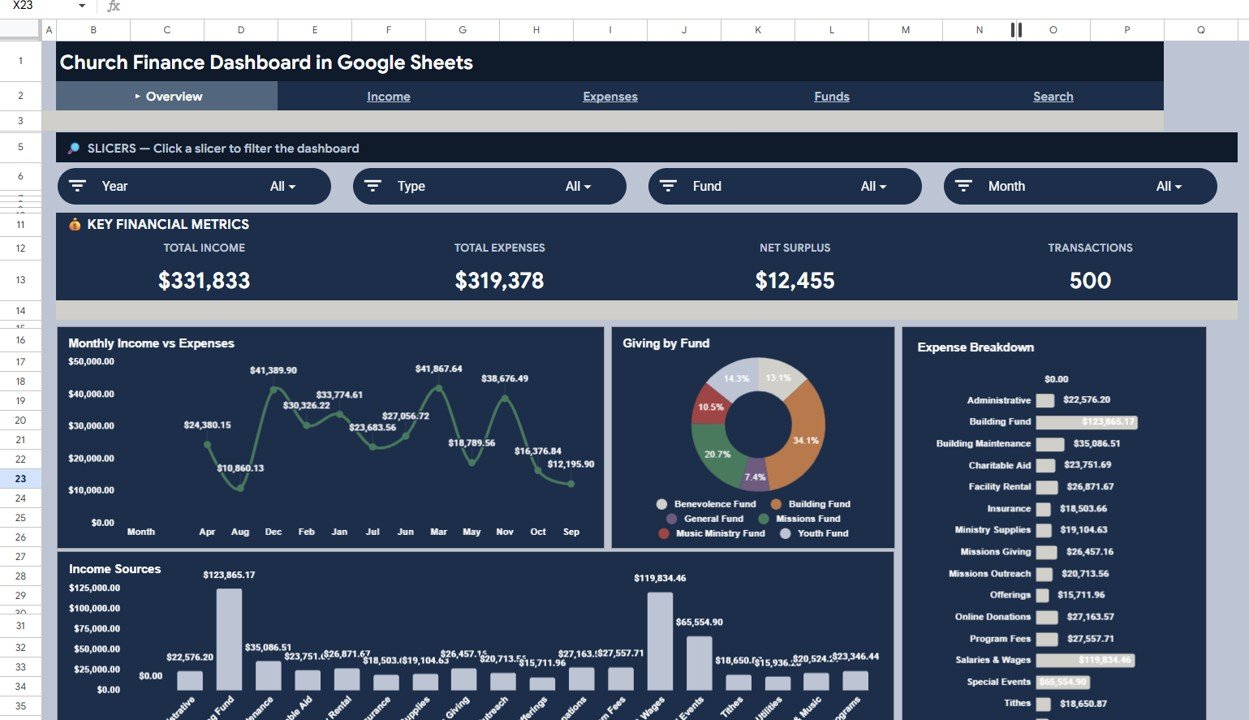
At $9.99 this is the best value in the list. It runs entirely in Google Sheets, so the pastor, treasurer, bookkeeper and finance committee can all open the same live file from any browser, with no software to install and nothing to email around.
Who it is for: small and mid-sized churches, church plants and volunteer-run ministries that already use Google Workspace.
- Four KPI cards: Total Income, Total Expenses, Net Surplus and Transactions.
- Five tabs: Overview, Income Analysis, Expense Analysis, Search and Data, with 10+ charts.
- Giving by Fund, breaking out tithes, offerings, missions, building fund and special collections.
- Slicers for category, fund, payment method and date, plus a Search tab that pulls up any transaction by ID.
Concrete uses: let the treasurer answer a member’s question about a missions gift in seconds with the Search tab; compare income and expenses month by month to see the summer giving dip coming; and share a view-only link with the elders instead of attaching a new file every month. The product documentation puts setup at under 10 minutes with 500 sample rows to replace. Price: $9.99. Get the Church Finance Dashboard in Google Sheets →
Best for: the small church that needs shared access at the lowest cost.
Not sure which format to start with? Most treasurers start with the Church Finance Dashboard in Excel ($17.99). If your team lives in Google Workspace, the Google Sheets edition ($9.99) is the lowest-cost way to put one finance dashboard in front of the whole committee.
4. Church Transaction Analysis Dashboard in Google Sheets
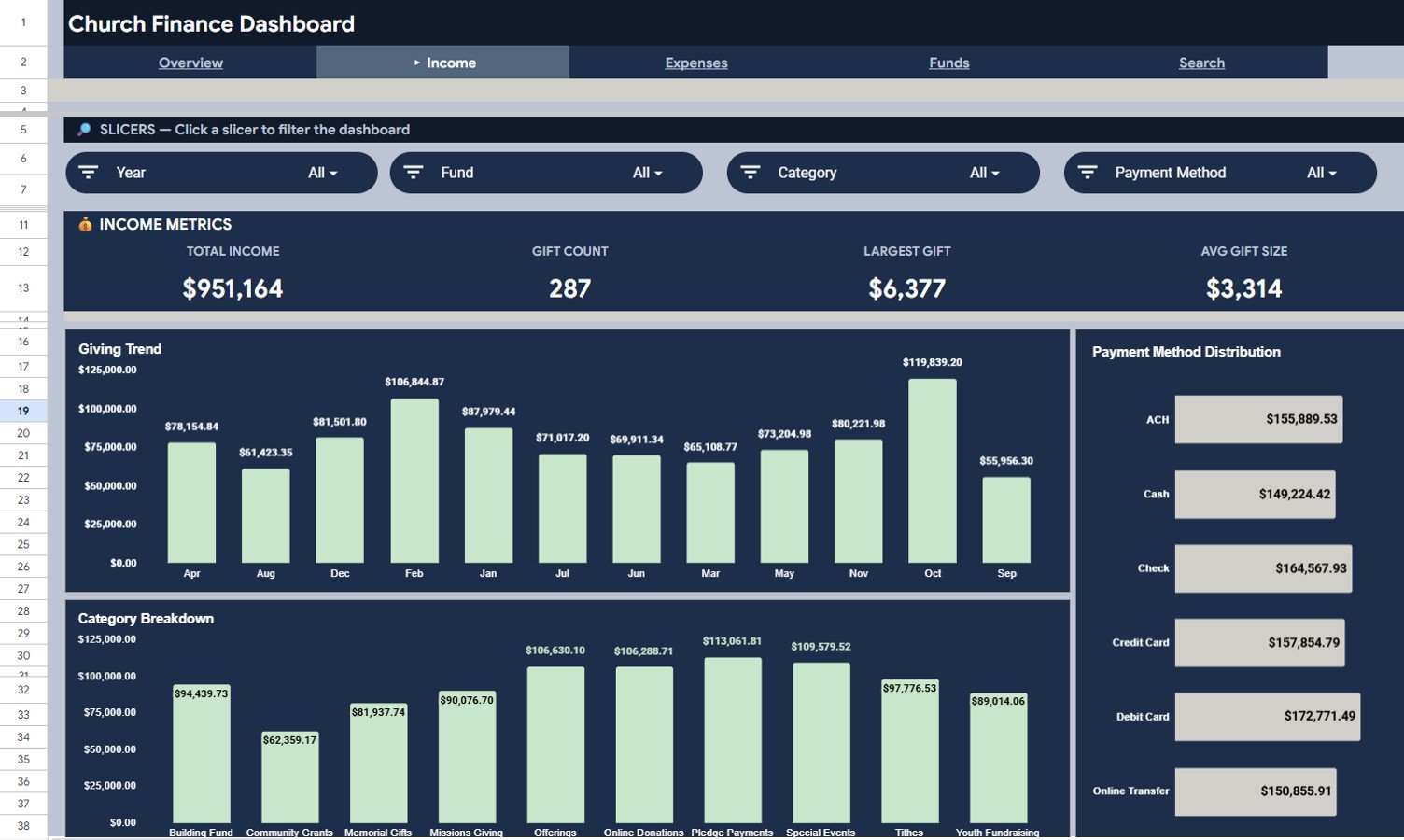
A Google Sheets dashboard that goes one level deeper than the headline totals. Alongside the four overview cards it analyses individual gifts and expenses, which suits treasurers who need to review transactions rather than only summaries.
Who it is for: treasurers, bookkeepers and finance committees that reconcile gifts and payments monthly and want to see the largest and average transactions at a glance.
- Six tabs: Overview, Income, Expenses, Search, User Guide and Data.
- Income analysis with Gift Count, Largest Gift and Average Gift Size, plus monthly giving trends, payment methods and categories.
- Expense analysis with Largest Expense, Average Expense, fund distribution and top expense categories.
- A Transaction ID lookup and a built-in User Guide tab explaining every page and slicer.
Concrete uses: check whether average gift size rose after you introduced recurring online giving; flag the three largest expenses of the quarter for the audit committee; and hand a new volunteer treasurer the User Guide tab instead of an hour of training. Price: $9.99. Get the Church Transaction Analysis Dashboard →
Best for: churches that review gift-level and expense-level detail, not just totals.
5. Church Finance Dashboard in HTML
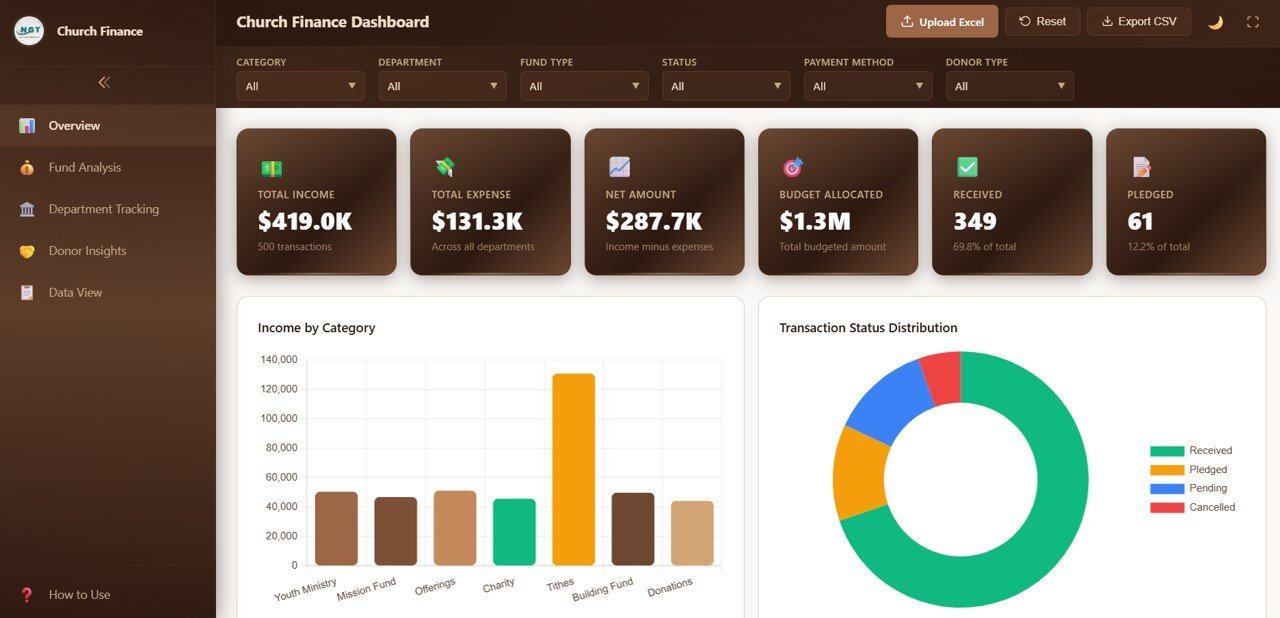
An interactive web dashboard that looks like a SaaS product without the subscription. It runs in Chrome, Edge or Firefox, so there is nothing to install and nothing to host, and it adds budget and pledge measures that the spreadsheet editions do not show as cards.
Who it is for: church administrators and executive pastors who want a modern, app-style dashboard to present but do not use Power BI.
- KPI cards for Total Income, Total Expense, Net Amount, Budget Allocated, Received and Pledged.
- 20+ charts across Overview, Fund Analysis, Department Tracking and Donor Insights.
- Filters for department, status, category, fund type and donor type on every page.
- A searchable Data View for looking up individual records.
Concrete uses: compare each department’s budget allocation with actual spending before the budget meeting; show pledged versus received for a building project; and present live figures from a laptop browser at a leadership retreat. Price: $12.99. See the Church Finance Dashboard in HTML →
Best for: teams that want a polished browser dashboard with budget and pledge tracking and zero software.
6. Donation Request Tracker in Excel
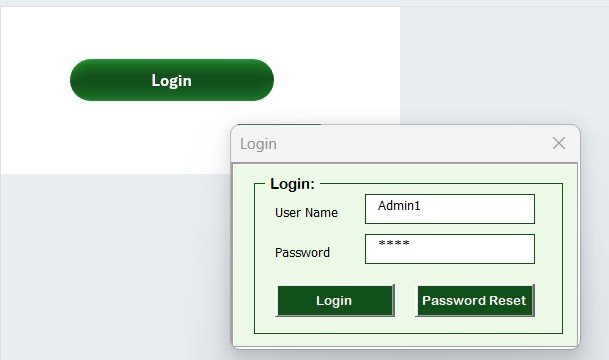
A different kind of tool: a macro-enabled Excel system for logging and managing donation requests, rather than a finance dashboard. Religious institutions are one of the groups it was designed for, and it fits benevolence funds, outreach drives and community donation events well.
Who it is for: church offices, outreach and benevolence teams that receive requests, assign them to staff and need an audit trail of who approved what.
- Secure login form with role-based access and an admin user-management panel.
- Main form to add, update and delete records: Donation ID, date, donor name, donation type, status, event, assigned staff and remarks.
- Dashboard charts by status, donation type and assigned staff that refresh with every entry.
- A Manage List sheet for your own donation types, staff names, statuses and events.
Concrete uses: log every benevolence request and see how many are pending, approved or closed; assign food-drive pickups to named volunteers; and give the deacons a record of each decision. Macros must be enabled. Price: $6.99. Get the Donation Request Tracker in Excel →
Best for: churches that need controlled, multi-user logging of donation and assistance requests.
The church finance KPIs every dashboard should show
Whichever template you choose, make sure your monthly report answers these questions. The formulas work in any of the dashboards above once your data is in the Data sheet.
| KPI | Formula | What good looks like |
|---|---|---|
| Net surplus | Total income minus total expenses | Positive across the year, even if some months dip |
| Giving by fund | Income per fund divided by total income | Designated funds spent only on their stated purpose |
| Pledge fulfilment | Received divided by pledged | 90% or more by the end of a campaign |
| Department spend vs budget | Actual expenses divided by budget allocated | Roughly in line with the share of the year elapsed |
| Average gift | Total income divided by number of gifts | Stable or rising year on year |
| Operating reserve | Unrestricted cash divided by average monthly expenses | A common rule of thumb is 3 to 6 months |
Designated giving matters most. If a member gives to missions or the building fund, the committee has to be able to show that money went where it was given. That is why every dashboard here separates income by fund, not only by month. For the gift-receipting rules behind year-end statements, see the IRS guidance linked above.
How to choose the right church management Excel template
Match the template to two things: the software your treasurer already uses and the question the committee asks most often.
- You want the fullest analysis in Excel: the Church Finance Dashboard in Excel ($17.99).
- Several people need the same live file: the Church Finance Dashboard in Google Sheets ($9.99), or the Church Transaction Analysis Dashboard ($9.99) if you review individual gifts and expenses.
- You have thousands of records or several campuses: the Power BI edition ($17.99).
- You need budget and pledge cards with no software: the HTML dashboard ($12.99).
- You manage benevolence or donation requests: the Donation Request Tracker ($6.99).
Running a volunteer-heavy ministry? Pair any of these with the Volunteer Program KPI Dashboard in Excel ($14.99) to track volunteer hours, attendance and retention. For fundraising and grants, our nonprofit dashboard template roundup ranks eight more tools, and the K-12 school administration templates suit churches that run a school. Comparing formats more broadly? See our shareable Google Sheets templates for teams and the premium Power BI templates under $20.
When a church template is NOT the right answer
A dashboard is a reporting layer, not a system of record. Be honest about where a church management Excel template stops:
- You need a member directory, attendance, child check-in or small-group management. That is ChMS territory: Planning Center, Breeze, Tithe.ly or similar. None of these templates store member profiles or run check-in.
- You need online giving and automatic receipts. Processing card and bank gifts, and issuing year-end contribution statements, belongs in a giving platform. Export its data into a dashboard for reporting.
- You need full fund accounting and audited statements. Double-entry books, payroll and restricted-fund accounting need accounting software or an accountant. The dashboards summarise; they are not a general ledger.
- Many people enter data at the same time with permissions. Google Sheets handles light collaboration and the Donation Request Tracker has logins, but high-volume multi-user entry needs dedicated software.
- You store sensitive member or pastoral data. Keep personal data in a secure system and use the templates for aggregated numbers.
If none of those apply, and for most small and mid-sized congregations they do not, a template is the faster, cheaper and more flexible choice, and you can graduate to software later.
Frequently asked questions
What is a church management Excel template?
A church management Excel template is a ready-made workbook that turns your church's income and expense records into KPI cards and charts. You enter tithes, offerings, fund gifts and department spending in a Data sheet, click Refresh All, and the dashboard shows income, expenses, net amount and giving trends without building reports by hand.
How much does church finance software cost compared with a template?
Church management and accounting platforms are subscriptions, typically tens to a few hundred dollars a month depending on congregation size and modules. The six templates in this guide cost $6.99 to $17.99 once, with no per-user fees, so a template usually costs less than one month of software.
Which is better for a church: Excel, Google Sheets or Power BI?
Choose Excel when one treasurer owns the monthly report, Google Sheets when the pastor, treasurer and finance committee all need the same live file in a browser, and Power BI when giving history runs to thousands of records or you present to a board on screen. HTML suits teams that want a dashboard with no software at all.
Can I track tithes and offerings separately?
Yes. The church finance dashboards categorise every record by fund and category, so tithes, offerings, missions, building fund and special collections appear as separate slices. The Fund Analysis pages and Giving by Fund charts show how much each fund received and how that mix changes month to month.
Do these templates produce year-end giving statements for donors?
No. They are reporting dashboards, not receipting tools. They can filter records by donor type, but they do not generate individual contribution statements. The IRS requires a written acknowledgment for any single gift of $250 or more, so use your giving platform or a mail-merge for statements.
Can a small church with no finance staff use these templates?
Yes. None of the dashboards need formulas or coding. You replace the sample rows with your own records in the same columns and refresh. A volunteer treasurer comfortable with basic spreadsheets can set up the Google Sheets edition in under 10 minutes, according to the product documentation.
Do I need macros enabled?
Only for the Donation Request Tracker, which is a macro-enabled VBA workbook with a login form and data-entry forms. The Church Finance Dashboard in Excel is pivot-driven and needs no macros, and the Google Sheets, Power BI and HTML editions do not use Excel macros at all.
Do I need Power BI Pro for the Power BI edition?
No. The Church Finance Dashboard in Power BI opens in the free Power BI Desktop application. A paid Power BI licence is only needed if you want to publish the report to the Power BI service and share it online with elders or board members.
Can I use these templates for a ministry or parachurch nonprofit?
Yes. Departments, funds and donor types are editable lists, so a youth ministry, mission agency, food pantry or campus ministry can rename them to match its own programs. For grant-funded ministries, pair them with a nonprofit fundraising or grant dashboard.
How do I get started after buying?
Download the file, open the Data sheet, and replace the sample records with your own income and expenses using the same columns. Refresh the pivots or the Power BI model, check the Total Income card against a bank statement total you trust, then share the dashboard with your finance committee.
Get more church and ministry templates
Ready to give your finance committee a clearer picture? Start with our best overall church management Excel template, the Church Finance Dashboard in Excel ($17.99), or the best-value Google Sheets edition ($9.99). Every option above is a one-time purchase between $6.99 and $17.99, with no subscription.
If your ministry also runs fundraising campaigns and grants, the Nonprofit & NGO Operations Bundle packs seven donation, fundraising, grant and KPI templates for $44.99 (46% off buying them separately). You can also browse the 25 best-selling business templates and our Power BI dashboard templates ranked by industry. Subscribe to the NextGenTemplates YouTube channel for setup tutorials.