

US small businesses often outgrow a basic attendance sheet before they are ready for a full HRIS. BambooHR lists Core at $10 per employee per month, or a flat monthly price starting at $250 for teams with 25 employees or fewer. Deputy lists workforce management plans from $5 to $9 per user per month, with a $30 monthly minimum. By contrast, the highest-priced template in this roundup is a one-time $17.99 Power BI dashboard.
This guide compares 8 attendance tracker templates from the NextGenTemplates catalog across Excel, Google Sheets, and Power BI. The goal is simple: help HR managers, school administrators, event coordinators, and SMB operators choose a practical attendance tracker Excel alternative, attendance sheet template, or employee attendance dashboard without paying for a larger HRIS module they may not need yet.
Why Attendance Tracking Still Matters for SMBs
- Absence is measurable business risk. The U.S. Bureau of Labor Statistics reported a 2024 absence rate of 3.2% for full-time wage and salary workers, with a 1.7% lost-worktime rate. Even a small attendance gap becomes expensive when it repeats across departments, locations, and pay periods. Source: BLS absence data.
- Recordkeeping is not optional. The U.S. Department of Labor says employers covered by the FLSA must keep accurate records for covered nonexempt workers, including hours worked each day and total hours worked each workweek. Source: DOL recordkeeping guidance.
- Employee engagement is under pressure. Gallup reported that only 31% of U.S. employees were engaged in 2024, matching the lowest level in a decade. Attendance patterns, meeting participation, and training attendance can be early warning signals for that detachment. Source: Gallup engagement research.
- Absenteeism has a national cost. The CDC Foundation cites CDC data estimating productivity losses linked to absenteeism at $225.8 billion annually in the United States, or $1,685 per employee. Source: CDC Foundation absenteeism cost report.
- Subscription costs compound quickly. A 30-person team on a $10 per-employee HRIS plan spends about $3,600 per year before implementation, add-ons, or payroll modules. A $6.99 or $17.99 attendance template will not replace every HRIS feature, but it can replace the attendance reporting layer for many SMB teams.
Compare the 8 Attendance Tracker Templates
| Template | Format | Best For | Price |
|---|---|---|---|
| Attendance Tracker in Google Sheets | Google Sheets | Daily employee and student attendance with annual summary | $6.99 |
| Attendance Tracking System for Events and Meetings in Google Sheets | Google Sheets | Meetings, workshops, training sessions, and recurring events | $6.99 |
| Attendance Tracking System for Events and Meetings in Excel | Excel | Offline event attendance tracking with structured data entry | $6.99 |
| Office Event Attendance Dashboard in Power BI | Power BI | Interactive HR event analytics and leadership reporting | $17.99 |
| Office Event Attendance Dashboard in Google Sheets | Google Sheets | Event attendance, event costs, feedback, venues, and planners | $6.99 |
| Employee Attendance Dashboard in Google Sheets | Google Sheets | Employee attendance, overtime, supervisors, and departments | $6.99 |
| Office Event Attendance Dashboard in Excel | Excel | In-person versus virtual office event attendance analysis | $17.99 |
| Weekly Attendance Sheet in Google Sheets | Google Sheets | Simple weekly attendance, leave, and absence tracking | $6.99 |
SMB shortcut
If you only need daily employee attendance, start with the Attendance Tracker in Google Sheets. If you need executive-style event analytics, choose the Office Event Attendance Dashboard in Power BI. Both are one-time purchases, and both avoid per-employee monthly billing.
The 8 Attendance Tracker Templates Reviewed
1. Attendance Tracker in Google Sheets
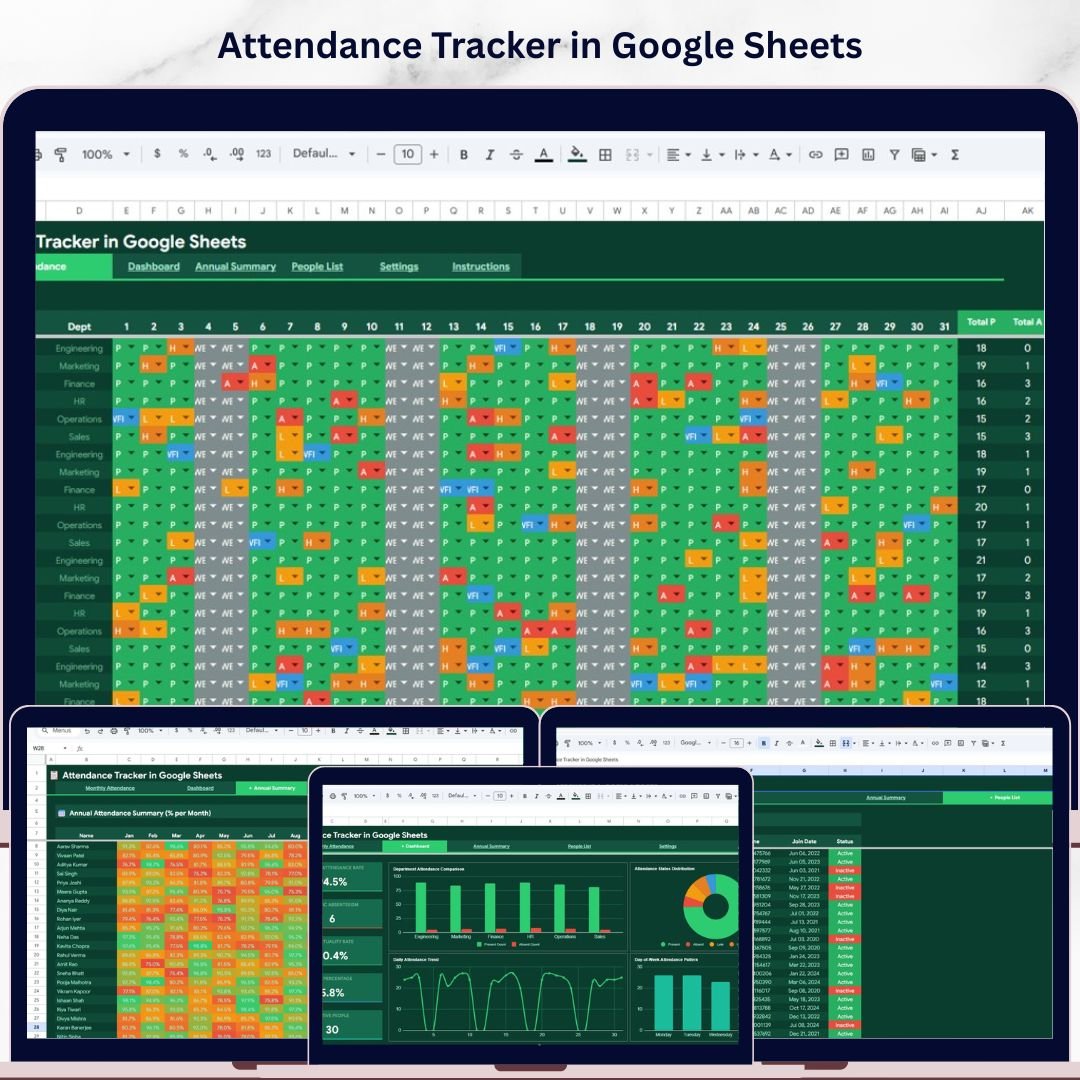
The Attendance Tracker in Google Sheets is the best starting point if your main problem is daily employee attendance. It is cloud-based, shareable, and built for HR teams that want more than a blank attendance sheet template. Instead of entering attendance in a simple list and calculating totals manually, you get a structured monthly attendance page, dashboard, annual summary, people list, and settings page.
Screenshot preview: The product screenshots show a monthly attendance grid with names down the left side, dates across the top, status codes inside the cells, and summary columns for Present, Absent, Late, Half Day, and WFH. The dashboard adds KPI cards for overall attendance rate, chronic absenteeism, punctuality rate, WFH percentage, and active people, plus charts for department and day-of-week patterns.
- Track employee attendance across departments without buying a full HRIS.
- Monitor student attendance for schools, coaching centers, or training institutes.
- Spot chronic absenteeism and late-arrival trends before payroll review.
- Share attendance tracking responsibility with supervisors in real time.
Price: $6.99 one-time. Get the Attendance Tracker in Google Sheets.
2. Attendance Tracking System for Events and Meetings in Google Sheets
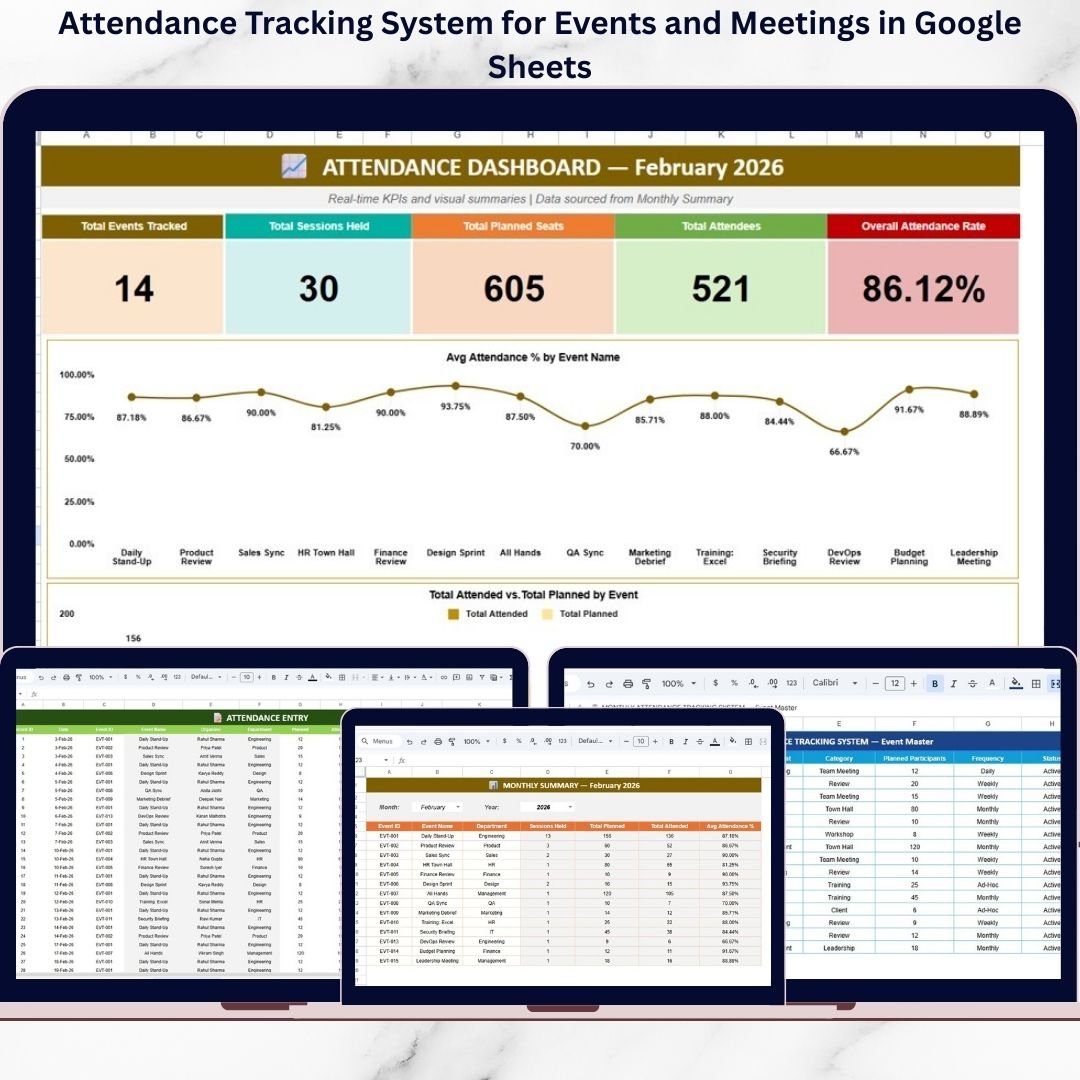
The Attendance Tracking System for Events and Meetings in Google Sheets is built for a different problem: tracking participation in meetings, workshops, training sessions, and organizational events. Daily employee attendance tells you who came to work. Event attendance tells you whether people joined the activities that build culture, compliance, and skill development.
Screenshot preview: The screenshots show an event attendance dashboard, monthly summary, attendance entry sheet, and event master sheet. The dashboard focuses on total events, sessions held, planned seats, attendees, and overall attendance rate. The event master page keeps organizer, department, category, and frequency data consistent, which reduces reporting errors when multiple coordinators update the same file.
- Track training attendance for compliance and certification programs.
- Measure town hall participation by department or organizer.
- Compare planned seats against actual attendees for workshops.
- Prepare monthly event engagement reports for HR leadership.
Price: $6.99 one-time. Get the Google Sheets event attendance system.
3. Attendance Tracking System for Events and Meetings in Excel
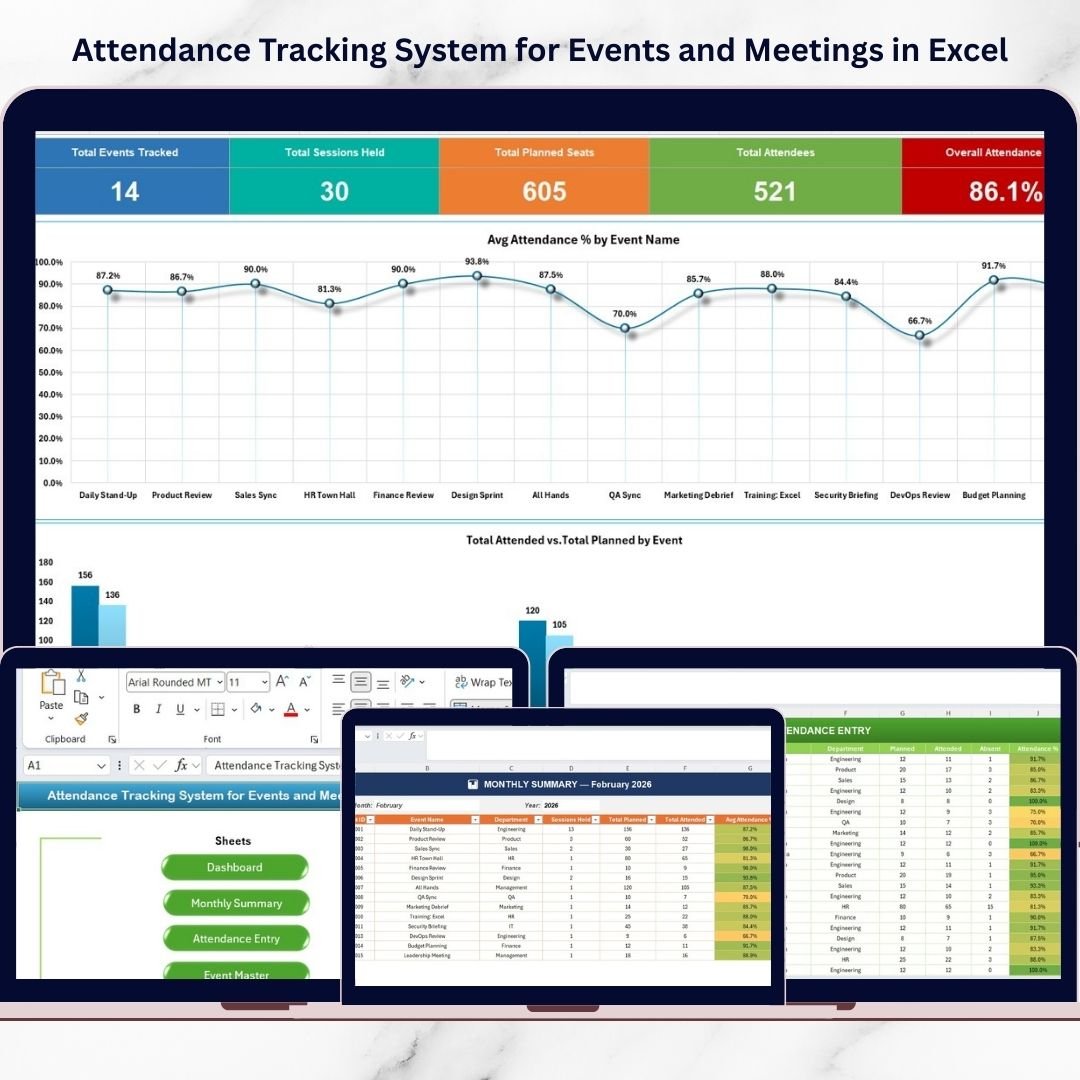
The Attendance Tracking System for Events and Meetings in Excel is the offline-friendly version for teams that prefer Excel files, shared drives, or local reporting. It is a strong attendance tracker Excel option when you need structured data entry, quick navigation, and automated summaries without moving event data into a cloud spreadsheet.
Screenshot preview: The workbook includes a home navigation sheet, dashboard, monthly summary, attendance entry sheet, and event master sheet. The dashboard shows Total Events Tracked, Total Sessions Held, Total Planned Seats, Total Attendees, and Overall Attendance Rate. Charts compare average attendance percentage by event and attended versus planned participants, while conditional formatting helps flag low-performing sessions.
- Record workshop attendance in offices with limited internet access.
- Standardize event names and organizers through master data validation.
- Review low-attendance events with conditional formatting alerts.
- Give HR teams an Excel-based reporting file they can customize.
Price: $6.99 one-time. Get the Excel event attendance system.
4. Office Event Attendance Dashboard in Power BI
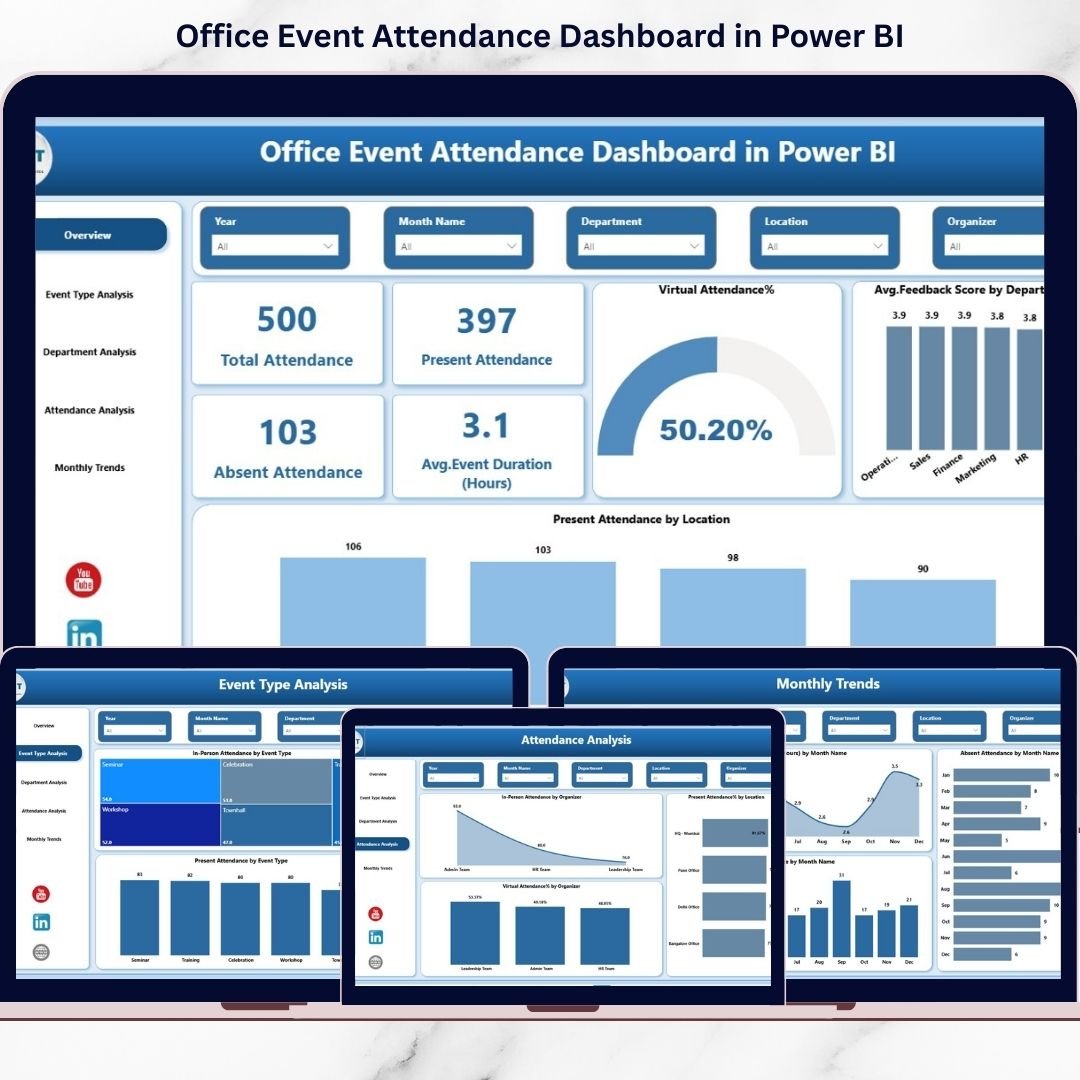
The Office Event Attendance Dashboard in Power BI is the most advanced analytics option in the roundup. It is designed for HR, admin, and leadership teams that want slicers, drill-down reporting, and executive-ready visual pages. If your company already uses Power BI, this template can turn raw event data into a polished employee engagement dashboard without custom development.
Screenshot preview: The screenshots show a Power BI dashboard with KPI cards for total attendance, present attendance, absent attendance, and average event duration. Pages cover overview, event type analysis, department analysis, attendance analysis, and monthly trends. Slicers allow filtering by event type, department, organizer, location, and month, which makes it useful for leadership reviews.
- Analyze attendance across town halls, onboarding, and training events.
- Compare virtual and in-person participation by event type.
- Identify departments or locations with low engagement.
- Build HR leadership reports without designing a Power BI model from zero.
Price: $17.99 one-time. Get the Power BI attendance dashboard.
Mid-post recommendation
Need a simple employee attendance tracker? Choose the Attendance Tracker in Google Sheets. Need leadership-ready event analytics? Choose the Office Event Attendance Dashboard in Power BI. Both are one-time purchases and can be implemented before your next payroll or event review cycle.
5. Office Event Attendance Dashboard in Google Sheets
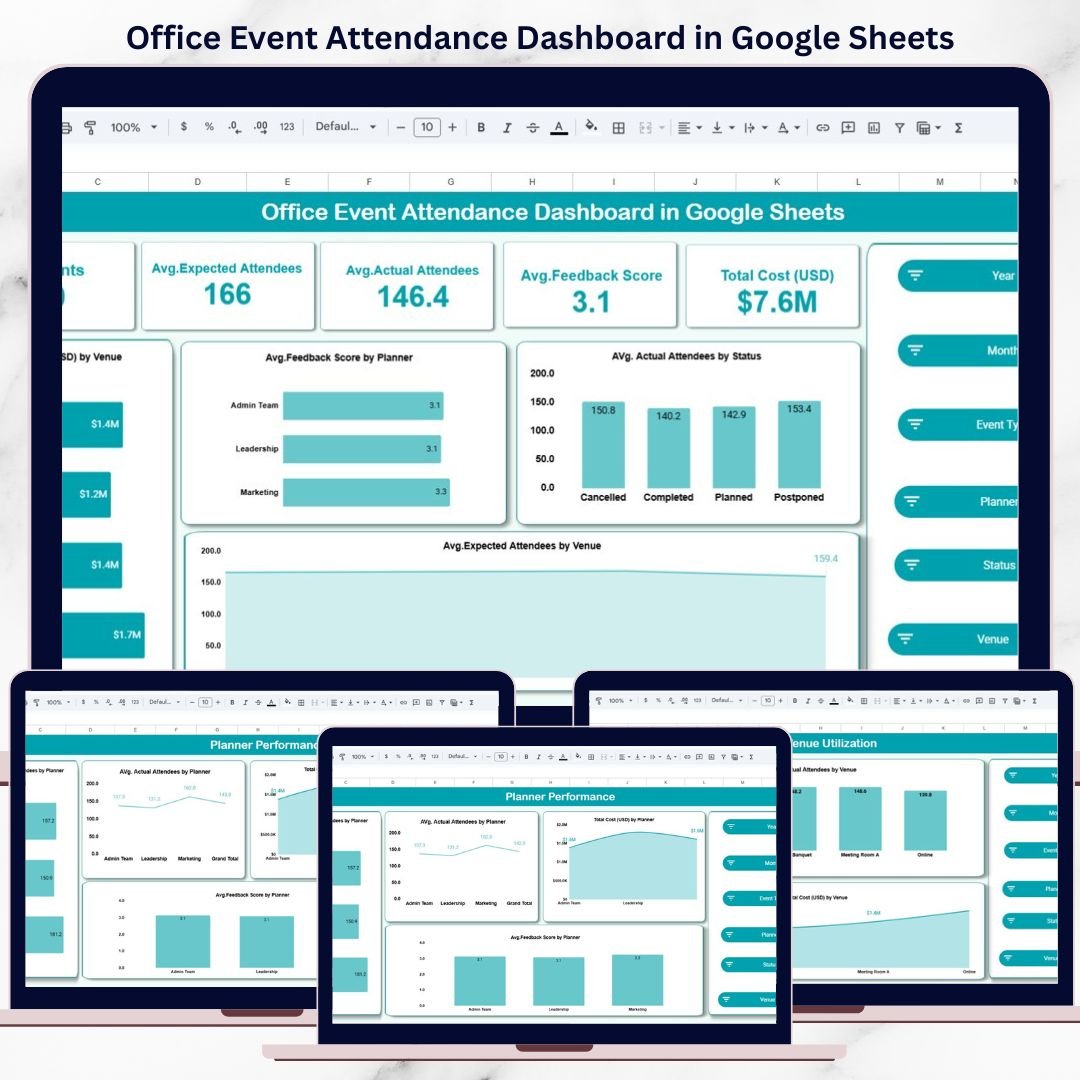
The Office Event Attendance Dashboard in Google Sheets is useful when attendance is only one part of event performance. It also tracks cost, feedback, planner performance, venue utilization, and event status. That makes it more valuable for HR and admin teams who need to justify event budgets, not just count who attended.
Screenshot preview: The screenshots show an overview sheet with KPI cards for number of events, average expected attendees, average actual attendees, average feedback score, and total cost. Charts break down total cost by venue, feedback score by planner, actual attendees by event status, and expected attendees by venue. Additional pages analyze event type, venues, planners, search results, and backend input data.
- Compare expected attendance against actual attendance by event type.
- Track total event cost by venue, planner, or category.
- Use feedback scores to see which events are worth repeating.
- Share a cloud-based event dashboard with HR and admin stakeholders.
Price: $6.99 one-time. Get the Google Sheets office event dashboard.
6. Employee Attendance Dashboard in Google Sheets
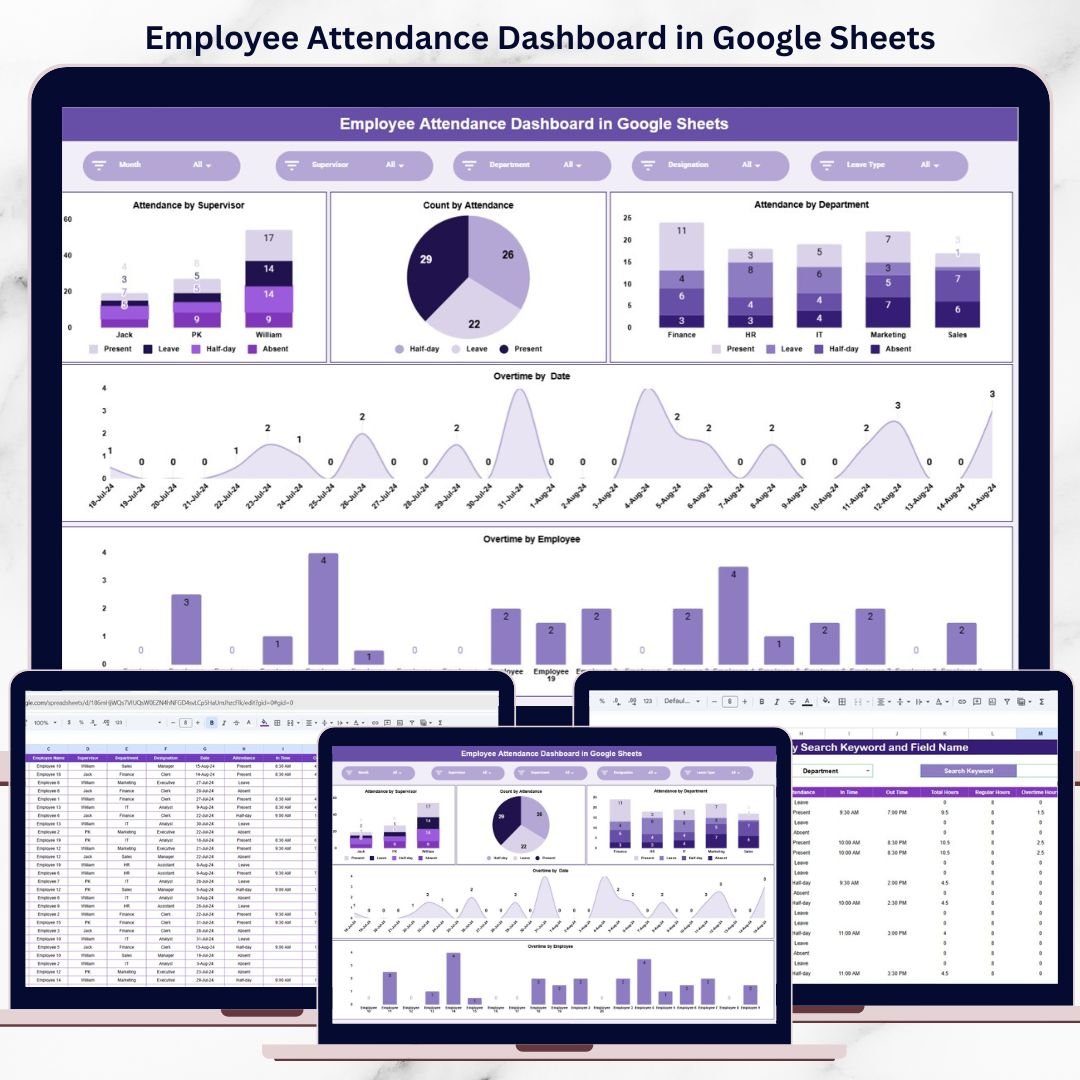
The Employee Attendance Dashboard in Google Sheets is a practical employee attendance option for teams that also care about overtime and supervisor-level accountability. It is less about event participation and more about day-to-day workforce visibility: present, absent, late, leave, overtime, departments, and supervisors.
Screenshot preview: The dashboard screenshots show attendance by supervisor, count by attendance status, attendance by department, overtime by date, and overtime by employee. A smart search feature lets HR find records by employee name, employee ID, department, supervisor, attendance status, or date. This is especially useful for payroll checks and attendance audits.
- Verify attendance records before payroll processing.
- Compare absenteeism by supervisor or department.
- Monitor overtime patterns to reduce labor cost surprises.
- Search individual records quickly during HR reviews.
Price: $6.99 one-time. Get the employee attendance dashboard.
7. Office Event Attendance Dashboard in Excel
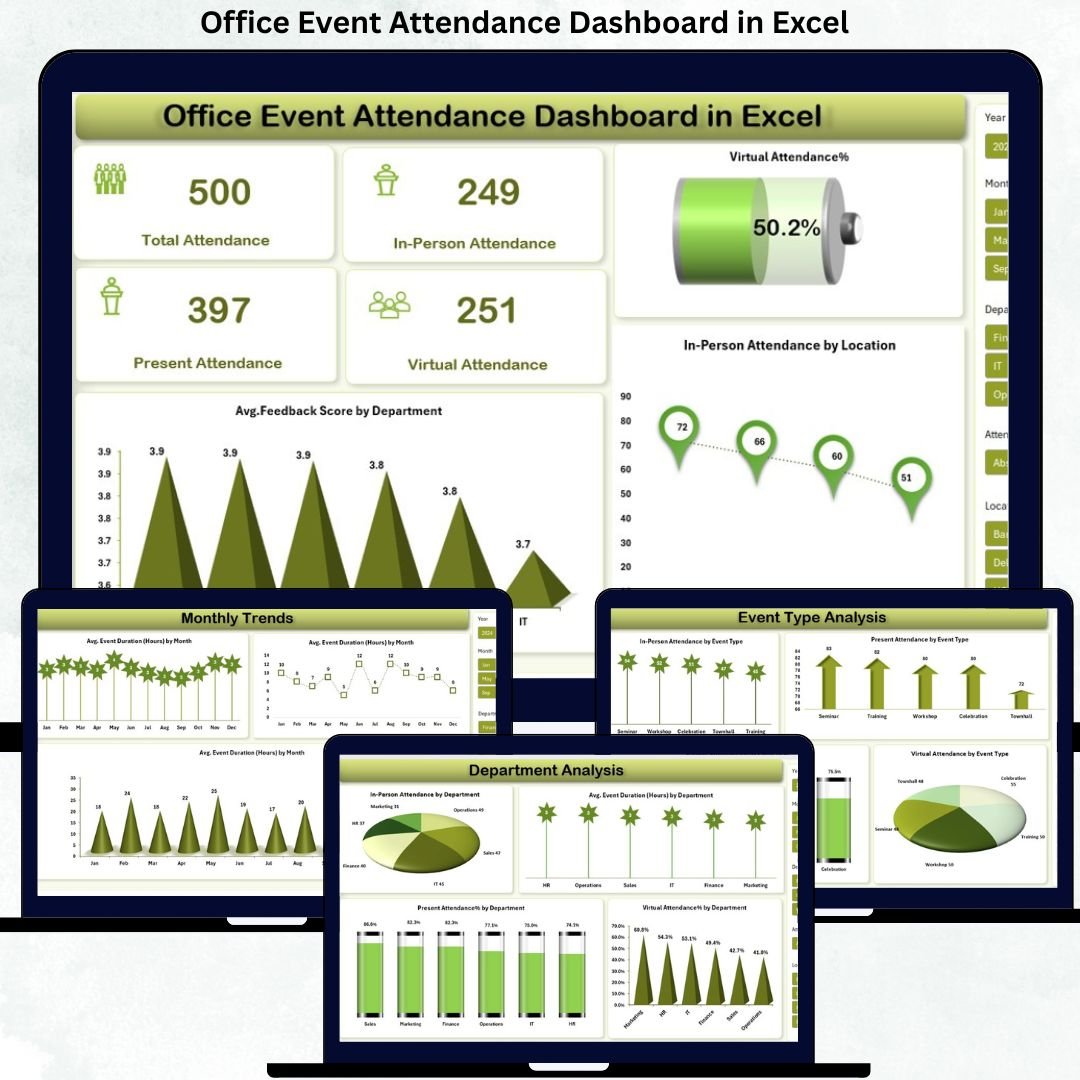
The Office Event Attendance Dashboard in Excel is the best attendance tracker Excel choice for organizations that manage both virtual and in-person office events. It gives you a structured Excel dashboard for tracking attendance mode, presence status, engagement level, event type, organizer, department, location, and feedback score.
Screenshot preview: The screenshots show five dashboard areas: overview, event type analysis, department analysis, attendance analysis, and monthly trends. The overview page includes total attendance, in-person attendance, virtual attendance percentage, feedback scores, and location-level insights. Slicers help users filter by event type, department, location, and month, which gives Excel users a dashboard feel without Power BI.
- Compare in-person and virtual participation after office events.
- Analyze engagement levels by department or location.
- Review monthly attendance trends in a familiar Excel environment.
- Support hybrid-work event planning with real attendance data.
Price: $17.99 one-time. Get the Excel office event attendance dashboard.
8. Weekly Attendance Sheet in Google Sheets

The Weekly Attendance Sheet in Google Sheets is the simplest option in the list. It is ideal when you do not need a full HR dashboard and only want a clean weekly view for employees, students, crews, or participants. For many small teams, this is enough to replace a paper register or a manually formatted spreadsheet.
Screenshot preview: The screenshots show a weekly attendance tracker with daily columns, leave and absence tracking, automatic attendance calculations, and visual trend graphs. It is intentionally lighter than the dashboard products, which makes it easy to train non-technical users and easy to adjust for different attendance codes.
- Track classroom, tutoring, or coaching attendance week by week.
- Manage small team attendance without a large dashboard file.
- Record leave, sick days, vacation, and absence totals.
- Give project managers a simple weekly availability sheet.
Price: $6.99 one-time. Get the weekly attendance sheet template.
How to Choose the Right Attendance Tracker
Choose Google Sheets when collaboration matters. If multiple supervisors, teachers, or coordinators need to update attendance at the same time, Google Sheets is usually the fastest option. Start with the Attendance Tracker in Google Sheets for daily employee attendance or the Attendance Tracking System for Events and Meetings in Google Sheets for meetings and training sessions.
Choose Excel when control and offline access matter. Excel is better for teams that need local file control, pivot-table workflows, or offline reporting. The Attendance Tracking System for Events and Meetings in Excel fits structured event tracking, while the Office Event Attendance Dashboard in Excel fits hybrid event analysis.
Choose Power BI when leadership reporting matters. If the output needs to look like an executive analytics report, choose the Office Event Attendance Dashboard in Power BI. It is the best option when stakeholders expect slicers, filters, multiple pages, and polished visual summaries.
Separate employee attendance from event attendance. Daily employee attendance answers, “Who was present, absent, late, or on leave?” Event attendance answers, “Who attended training, meetings, town halls, or workshops?” Many HR teams need both. A daily attendance tracker Excel or Google Sheets file handles workforce coverage; an event dashboard handles engagement and participation.
Start with the simplest file that solves the immediate problem. A 12-person team may only need the Weekly Attendance Sheet in Google Sheets. A 75-person SMB may need the full Employee Attendance Dashboard in Google Sheets. A multi-location HR team may need the Power BI version for consistent reporting.
Frequently Asked Questions
What is an attendance tracker Excel template?
An attendance tracker Excel template is a prebuilt workbook for recording attendance status, such as Present, Absent, Late, Leave, WFH, or Half Day. A good attendance tracker Excel file also calculates totals, percentages, and trends so HR teams can review attendance without building formulas from scratch.
What is the difference between an attendance sheet template and an attendance dashboard?
An attendance sheet template focuses on data entry: names, dates, attendance codes, leave, and totals. An attendance dashboard adds analytics, such as KPI cards, charts, slicers, department summaries, overtime trends, or event performance visuals. Small teams may only need the sheet; HR teams usually benefit from the dashboard.
Can these templates replace BambooHR, Deputy, or Paycom?
They can replace the attendance tracking and attendance reporting layer for many SMBs, but they do not replace every HRIS feature. Use these templates if your main need is employee attendance, attendance sheets, overtime review, or event participation reporting. Keep a full HRIS if you need payroll processing, benefits administration, onboarding workflows, or biometric time-clock integrations.
Which template is best for employee attendance?
The best general employee attendance option is the Attendance Tracker in Google Sheets because it includes monthly tracking, KPI cards, annual summary, people list, and settings. If overtime and supervisor reporting matter more, choose the Employee Attendance Dashboard in Google Sheets.
Which template is best for meetings and events?
For collaborative event tracking, choose the Attendance Tracking System for Events and Meetings in Google Sheets. For offline Excel users, choose the Excel version. For leadership dashboards with slicers and multiple analysis pages, choose the Office Event Attendance Dashboard in Power BI.
Can I use these templates for student attendance?
Yes. The Attendance Tracker in Google Sheets and Weekly Attendance Sheet in Google Sheets work well for student attendance. Replace employee names with student names, change departments to classes or batches, and adjust attendance codes to fit your school or training program.
Can the Google Sheets templates work with Google Forms?
Yes. Google Sheets templates can be connected to Google Forms when you want employees, students, or event attendees to submit attendance through a form. This is useful for QR-code check-ins, training attendance, and classroom participation tracking.
Do I need Power BI Desktop for the Power BI dashboard?
Yes. The Office Event Attendance Dashboard in Power BI is a Power BI file, so you need Power BI Desktop to open, edit, and refresh the report. It is suited for teams that already use Power BI or want a more polished HR event analytics experience.
How many employees can an attendance sheet template handle?
Google Sheets and Excel templates can support many SMB use cases, including teams with dozens or hundreds of employees, as long as the file is maintained cleanly. For very large datasets, multiple locations, or recurring leadership dashboards, Power BI is usually better because it handles heavier reporting workloads.
Are these templates one-time purchases?
Yes. The templates in this roundup are one-time purchases from NextGenTemplates. Prices in this post are $6.99 or $17.99 depending on the product, with instant download and no recurring monthly subscription.
About the author
Built by PK – Microsoft Certified Professional with 15+ years of Excel, Google Sheets, and Power BI experience. Founder of NextGenTemplates, reaching 300K+ subscribers across YouTube channels. Every template is hand-built and tested before release.
For walkthroughs and template tutorials, visit YouTube.com/@NextGenTemplates.
Final Recommendation
If you are replacing a paid attendance module, start with the template that matches your workflow rather than the one with the most features. A small team can get immediate value from the Weekly Attendance Sheet in Google Sheets. A growing SMB should use the Attendance Tracker in Google Sheets or Employee Attendance Dashboard in Google Sheets. HR teams reporting on events should choose the Excel, Google Sheets, or Power BI event dashboard based on how they already report to leadership.
Replace subscription attendance reporting with a one-time template
Choose your format, download the file, add your people or events, and start reporting attendance without waiting for HRIS implementation.
Start with the Attendance Tracker in Google Sheets or upgrade to the Power BI event dashboard.
Related reading: learn how to calculate the absenteeism rate and 7 more attendance metrics with ready-made dashboard templates.