

The best Salesforce alternatives for small teams in 2026 are spreadsheet and dashboard CRM templates that replace paid seats with a one-time file. NextGenTemplates offers 8 such tools in Excel, Google Sheets, Power BI and HTML from $4.99 to $39.99 – a full CRM and sales pipeline system, plus customer KPI dashboards – with no per-user fees, no unused modules and no admin overhead.
Last updated: August 2026
Related reading: moving off enterprise software to cut per-seat reporting costs? Compare our Oracle Fusion alternatives: 8 enterprise reporting templates in Excel & Sheets.
Key takeaways
- Salesforce Sales Cloud runs from $25/user/month (Starter) to $550/user/month (Agentforce 1 Sales), and every edition above Starter is billed annually – a five-seat Enterprise team pays roughly $10,500 a year.
- The closest one-time replacement is the CRM and Sales Pipeline Management System Web App at $39.99 once – contacts, deals, pipeline stages and login, with zero recurring seat cost.
- Small teams churn off Salesforce for three reasons: seat cost that scales with headcount, paid modules they never switch on, and the admin time a proper Salesforce org demands.
- The cheapest entry point is the Sales Customer Experience Calendar in Excel at $4.99; the whole 8-template set spans four formats – Excel, Google Sheets, Power BI and HTML.
- Salesforce still wins when you need real-time multi-user writes, a public API, or 50+ reps sharing one live record – honest limits are covered below.
 Launch offer
SUMIFS, XLOOKUP, FILTER, LAMBDA and checking AI-written formulas, with real business projects. 11h 47m of video by PK, with practice files, quizzes and a capstone.
Salesforce pricing in 2026 – and why small teams leave
Salesforce publishes its Sales Cloud editions openly, so the maths is easy to check. As of August 2026 the list price ladder is:
| Salesforce Sales Cloud edition | Price (per user / month) | Billing |
|---|---|---|
| Starter Suite | $25 | Monthly or annual |
| Pro Suite | $100 | Billed annually |
| Enterprise | $175 | Billed annually |
| Unlimited | $350 | Billed annually |
| Agentforce 1 Sales | $550 | Billed annually |
Enterprise rose about 6% in August 2025, and it is where most growing sales teams land. Run the numbers: five reps on Enterprise is 5 × $175 × 12 = $10,500 a year, before add-ons. You can confirm the current figures on the official Salesforce Sales pricing page.
Three churn triggers show up again and again with teams under about ten people:
- Seat cost scales with the team. Every hire adds another annual seat. A template costs the same for one user or twenty – you buy the file once.
- Paid modules you never switch on. Enterprise bundles forecasting, territory management, CPQ hooks and workflow that a five-person shop rarely touches, yet still pays for.
- Admin overhead. A real Salesforce org needs someone to configure objects, permissions, flows and reports. Small teams either hire that out or lose a rep’s week to it. A spreadsheet CRM opens and works.
Salesforce feature vs the NGT template that covers it
You do not need every Salesforce object to run a small sales team. Here is a head-to-head of the features small teams actually use, the NextGenTemplates tool that covers each one, and the one-time price.
| Salesforce feature | NGT template that covers it | Format | One-time price |
|---|---|---|---|
| Contact & account records | CRM and Sales Pipeline Management System Web App | Excel | $39.99 |
| Opportunity / deal pipeline (Kanban) | CRM and Sales Pipeline Management System Web App | Excel | $39.99 |
| Sales dashboards & charts | CRM Dashboard in HTML | HTML | $12.99 |
| Campaign / engagement tracking | Sales & Marketing Customer Engagement KPI Dashboard | Excel | $14.99 |
| Service Cloud CSAT / feedback | Customer Experience KPI Dashboard | Google Sheets | $12.99 |
| Loyalty / retention analytics | Customer Loyalty KPI Dashboard | Google Sheets | $12.99 |
| Executive BI / drill-down | Customer Experience KPI Dashboard | Power BI | $11.99 |
| Activity scheduling & cadence | Sales Customer Experience Calendar | Excel | $4.99 |
The pattern: buy the pipeline system as your record spine, then add the dashboards that match how you report. Total for the full stack is under $115 once – roughly what one Enterprise seat costs in a single week.
Salesforce alternative templates compared
| Template | Format | Best for | Price |
|---|---|---|---|
| CRM and Sales Pipeline Management System (Best overall) | Excel | Full CRM: contacts, deals, pipeline stages, login | $39.99 |
| CRM Dashboard in HTML | HTML | A shareable, browser-based CRM overview | $12.99 |
| Sales & Marketing Customer Engagement KPI Dashboard | Excel | Campaign, lead and engagement reporting | $14.99 |
| Customer Experience KPI Dashboard | Google Sheets | Cloud-based, shareable CX metrics | $12.99 |
| Customer Loyalty KPI Dashboard | Google Sheets | Retention, churn and repeat-purchase tracking | $12.99 |
| Customer Experience KPI Dashboard | Power BI | Executive drill-down and interactive BI | $11.99 |
| Finance & Accounting Customer Feedback KPI Dashboard | Excel | Feedback tied to finance operations | $14.99 |
| Sales Customer Experience Calendar (Best value) | Excel | Cheapest entry: activity & cadence planning | $4.99 |
How we picked these
NextGenTemplates publishes roughly 6,900 spreadsheet and dashboard products. We filtered that catalog for tools that map directly onto the jobs a small team hires Salesforce to do – storing contacts, moving deals through a pipeline, and reporting on customer and sales health. We kept only paid, production-grade files (no thin freebies), spread the shortlist across Excel, Google Sheets, Power BI and HTML so buyers can self-select their stack, and excluded single-metric widgets that could not stand in for a CRM section. Price and format are stated on every entry so you can compare against a Salesforce seat directly.
The 8 best Salesforce alternative templates for 2026
1. CRM and Sales Pipeline Management System Web App – best overall
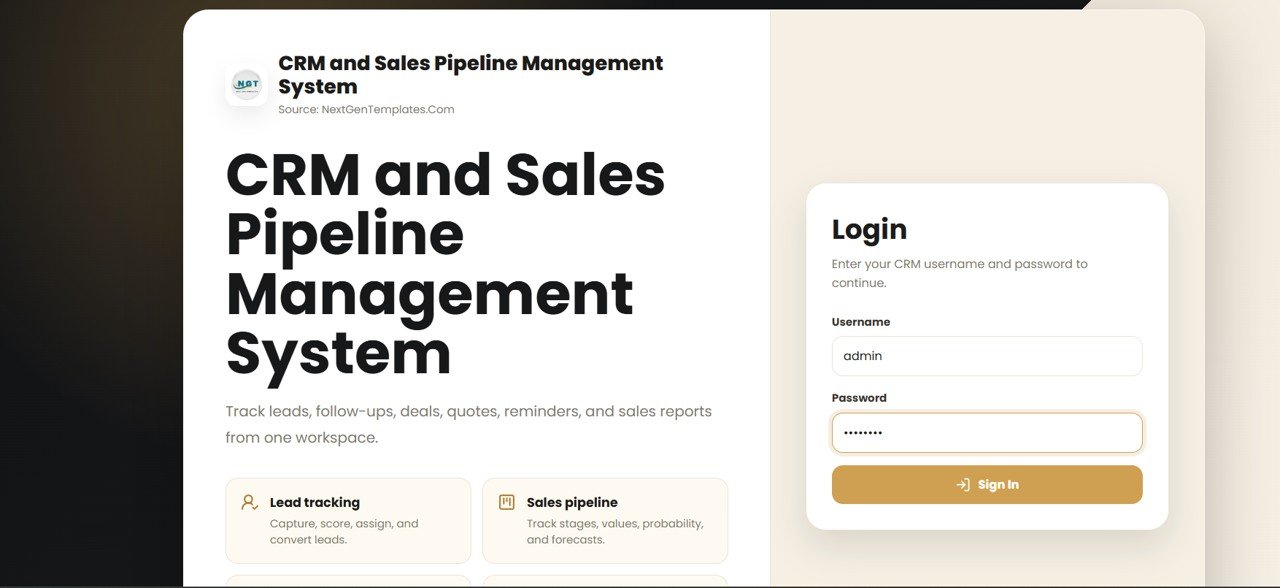
This is the closest thing to a drop-in Salesforce replacement in the catalog. It is a full CRM built as an Excel web-app-style system, with a login screen, contact and lead management, and a visual sales pipeline that moves deals through stages – the exact workflow small teams open Salesforce for.
Who it is for: founders and sales teams of 1-10 who want real CRM structure without a per-seat subscription.
What is inside:
- Contact, lead and customer records in one file
- Stage-based sales pipeline with deal values
- Login screen and structured data-entry forms
- Dashboard summarising pipeline health and revenue
Use cases: a 5-rep team replacing $10,500/year of Enterprise seats with one $39.99 file; a founder tracking 40 open deals worth $1.5M without learning Salesforce admin; an agency spinning up a client-ready pipeline in an afternoon.
Price: $39.99 – get the CRM and Sales Pipeline system. If you would rather build one by hand first, read our guide to tracking leads and opportunities in Excel without Salesforce.
Best for: teams that want the whole CRM, not just a report.
2. CRM Dashboard in HTML – most shareable

A CRM overview built in pure HTML, so it opens in any browser with no Excel, no Google account and no install. It shows customer KPIs, revenue and account health in a clean, presentation-ready layout you can host or share as a link.
Who it is for: teams that want a lightweight, portable CRM snapshot to put in front of clients or leadership.
What is inside:
- Browser-based CRM KPI cards and charts
- Account and revenue summaries
- No dependency on a spreadsheet app
Use cases: embedding a CRM snapshot on an internal wiki; sending a client a self-contained dashboard file; running a quick pipeline review on any device.
Price: $12.99 – get the CRM Dashboard in HTML.
Best for: a portable, install-free CRM view.
3. Sales & Marketing Customer Engagement KPI Dashboard – best for campaigns

This dashboard covers the ground Salesforce Campaigns and marketing reporting occupy – lead sources, engagement, conversion and channel performance – in a single Excel file with actual, target and previous-year comparisons.
Who it is for: teams running sales and marketing together who need campaign and engagement visibility without a marketing-cloud add-on.
What is inside:
- Engagement and conversion KPIs with actual vs target
- Channel and campaign breakdowns
- Input sheets separated from the dashboard view
Use cases: tracking cost-per-lead across three channels; reporting monthly conversion against target to a founder; comparing this quarter’s engagement to last year’s.
Price: $14.99 – get the Sales & Marketing Engagement dashboard.
Best for: combined sales-and-marketing reporting.
4. Customer Experience KPI Dashboard (Google Sheets) – best for shared teams
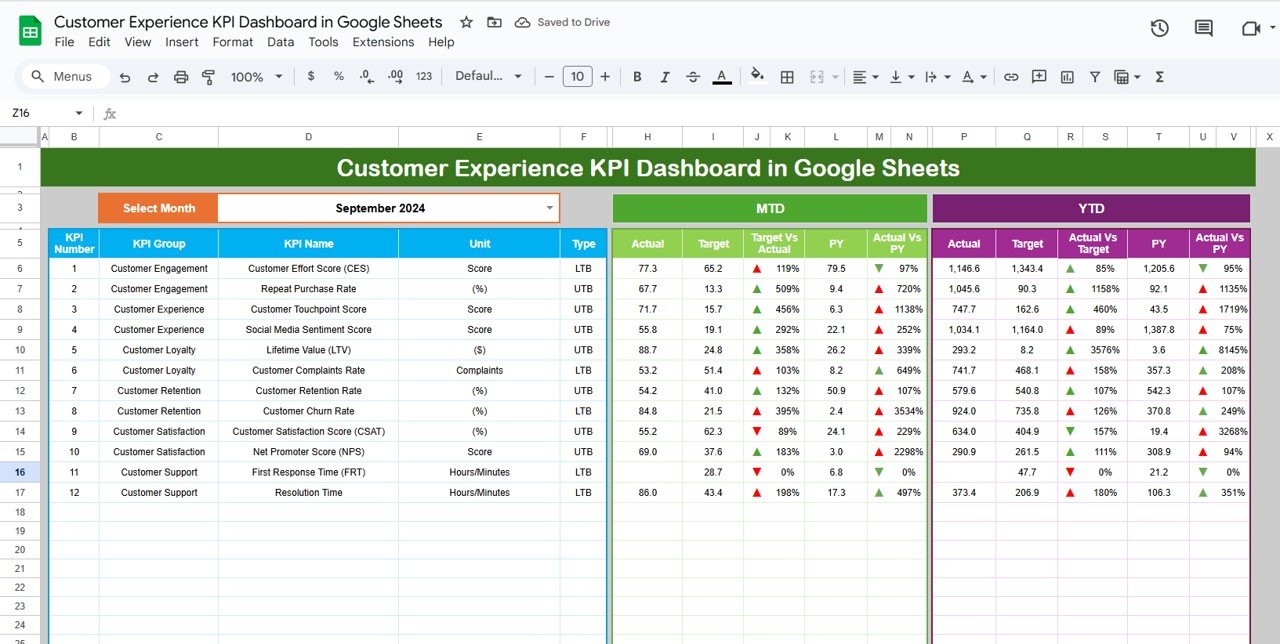
The Google Sheets format is the natural pick when more than one person needs to open the file at once – the multi-user editing that pushes teams toward Salesforce in the first place. It tracks CSAT, response times, NPS and other CX metrics that Salesforce Service Cloud would otherwise charge for.
Who it is for: distributed or remote teams that live in Google Workspace.
What is inside:
- CSAT, NPS and response-time KPIs
- Cloud-native sharing and simultaneous editing
- Trend and analysis views
Use cases: a support lead and two agents updating the same CX sheet live; sharing a read-only CX link with leadership; tracking NPS month over month.
Price: $12.99 – get the CX dashboard in Google Sheets.
Best for: real-time, multi-user CX tracking.
5. Customer Loyalty KPI Dashboard (Google Sheets) – best for retention

Salesforce’s loyalty and retention analytics sit behind higher tiers and add-ons. This Google Sheets dashboard delivers the core of it – repeat-purchase rate, churn, retention cohorts and lifetime value – for a one-time $12.99.
Who it is for: subscription, e-commerce and service businesses that live or die on retention.
What is inside:
- Retention, churn and repeat-purchase KPIs
- Customer lifetime value tracking
- Shareable Google Sheets format
Use cases: spotting a churn spike before it hits revenue; reporting repeat-purchase rate to investors; segmenting your most loyal cohort for a campaign.
Price: $12.99 – get the Customer Loyalty dashboard.
Best for: retention and churn analytics.
6. Customer Experience KPI Dashboard (Power BI) – best for executives

When you need interactive drill-down and a boardroom-grade view, Power BI is the format Salesforce’s own analytics tier competes with. This dashboard brings CX metrics into a fully interactive report with slicers and filters, at $11.99 – the cheapest dashboard in the set.
Who it is for: teams already using Power BI, or leaders who want to slice CX data by segment, region and time.
What is inside:
- Interactive CX KPIs with slicers and filters
- Drill-down by segment and period
- Refreshable data model
Use cases: a monthly exec review sliced by region; connecting CX data to an existing Power BI workspace; filtering satisfaction by product line on the fly.
Price: $11.99 – get the CX dashboard in Power BI.
Best for: interactive executive reporting.
7. Finance & Accounting Customer Feedback KPI Dashboard – best for finance-led teams

This Excel dashboard ties customer feedback to finance operations – useful when the person owning the customer relationship also owns the numbers, which is common in small businesses. It bridges the gap Salesforce would fill with a finance integration.
Who it is for: finance-led small teams and bookkeepers who field customer feedback directly.
What is inside:
- Feedback KPIs alongside finance metrics
- Actual vs target vs previous-year views
- Clean input-sheet-to-dashboard separation
Use cases: linking billing disputes to satisfaction scores; reporting feedback trends in the monthly finance pack; catching payment friction that shows up as complaints.
Price: $14.99 – get the Finance Customer Feedback dashboard.
Best for: feedback tied to the finance function.
8. Sales Customer Experience Calendar – best value

At $4.99 this is the cheapest way to start, and it covers the activity cadence that Salesforce Tasks and Activities manage – scheduling touchpoints, follow-ups and customer-experience checkpoints across the year in a simple Excel calendar.
Who it is for: anyone who wants to plan and never miss a customer touchpoint without paying for a CRM yet.
What is inside:
- Annual calendar for sales and CX activities
- Follow-up and touchpoint scheduling
- Lightweight, editable Excel format
Use cases: mapping quarterly check-in calls for 30 accounts; scheduling renewal reminders; planning a customer-experience cadence before you commit to a full CRM.
Price: $4.99 – get the Sales CX Calendar.
Best for: the lowest-cost first step off Salesforce.
How to choose between them
Match the tool to what you are actually replacing:
- You want a real CRM with a pipeline – start with the CRM and Sales Pipeline system ($39.99). It is the record spine.
- Your team edits together and lives in Google – pick the Google Sheets dashboards (CX and Loyalty, $12.99 each).
- You report to executives – add the Power BI CX dashboard ($11.99).
- You want the smallest possible first step – the Sales CX Calendar ($4.99) gets you organised today.
- You need a shareable, install-free view – the HTML CRM dashboard ($12.99) opens anywhere.
When Salesforce is still the right call
Templates are the right answer for most small teams, but not for everyone. Buy Salesforce (or a hosted CRM) instead when:
- You have 25+ reps writing to the same records all day. Spreadsheets handle a few simultaneous editors; a large sales floor needs a real multi-user database with row-level locking and audit trails.
- You need a live public API and deep integrations. If your CRM must sync in real time with marketing automation, a support desk, a data warehouse and billing, Salesforce’s ecosystem earns its price.
- Compliance requires granular permissions and field history. Regulated industries that need per-field access control, full audit logs and validated change history are better served by enterprise software.
- You want AI agents acting on your pipeline. Agentforce-style automation is genuinely beyond what a spreadsheet does.
If none of those describe you, a $39.99 file will do the job of a $10,500-a-year subscription. The honest rule: buy software when concurrency, integration or compliance forces your hand – otherwise a template is faster to start and far cheaper to run. Teams that outgrow a spreadsheet CRM often graduate to a purpose-built Excel VBA system before paying for Salesforce.
Frequently asked questions
What is the best free Salesforce alternative for a small team?
There is no truly free CRM without limits, but a one-time template comes closest to free in total cost. The $4.99 Sales Customer Experience Calendar or a $12.99 dashboard costs less than one day of a single Salesforce Enterprise seat and never charges again, which beats “free” tiers that cap contacts and features.
How much does Salesforce actually cost per user?
As of 2026, Salesforce Sales Cloud lists at $25/user/month for Starter, $100 for Pro, $175 for Enterprise, $350 for Unlimited and $550 for Agentforce 1 Sales. Every edition above Starter is billed annually, so a five-person Enterprise team commits to about $10,500 per year before add-ons.
Can an Excel template really replace Salesforce?
For teams under about ten people, yes. A structured Excel CRM handles contacts, a deal pipeline and reporting – the jobs most small teams hire Salesforce for. It cannot match Salesforce on real-time multi-user writes, a public API or granular compliance controls, so scale and integration needs are the deciding line.
Which format should I choose – Excel, Google Sheets, Power BI or HTML?
Choose Excel for a full offline CRM, Google Sheets when several people edit at once, Power BI for interactive executive drill-down, and HTML for a portable, install-free view you can share as a link. Many teams buy the Excel CRM as the spine and add a dashboard in whichever format they report in.
Do I pay monthly for these CRM templates?
No. Every template on this list is a one-time purchase between $4.99 and $39.99. You download the file and own it – there are no per-user fees, no annual renewals and no seat limits. That is the core difference from Salesforce’s subscription model.
Will I lose my data if I switch off Salesforce?
Export your Salesforce records to CSV before you cancel, then paste them into the template’s data sheet. The CRM and Sales Pipeline system uses structured input sheets designed for exactly this, so contacts, deals and stages map across cleanly without a migration tool.
How many users can share a template CRM?
The Google Sheets dashboards support genuine simultaneous editing for a handful of users. Excel and HTML files are best for one editor at a time or shared read-only. If you regularly have 20+ people writing to the same records at once, that is the point to consider hosted software.
What is the closest template to a full Salesforce CRM?
The CRM and Sales Pipeline Management System Web App ($39.99). It includes contact and lead management, a stage-based sales pipeline, a login screen and a summary dashboard – the core CRM workflow in a single file, without Salesforce’s per-seat pricing or admin setup.
Can I customise these templates?
Yes. All are editable files – change stages, fields, KPIs, colours and formulas to fit your process. The Excel and Google Sheets versions are fully open; the Power BI file uses a refreshable data model you can point at your own data.
Get more CRM and sales templates
Start with the CRM and Sales Pipeline Management System Web App at $39.99 – one file that replaces a stack of Salesforce seats – then layer on the dashboards that match how you report, from just $4.99. The full 8-template set spans Excel, Google Sheets, Power BI and HTML, so every member of the team works in the format they already know.
Browse more sales and CRM tools, and see them in action on our YouTube channel. Related reads: CRM in Excel without Salesforce, the best HR dashboard templates, and our project management dashboard templates.
Weighing other software switches? Our guide to Airtable alternatives covers 8 tracker and database templates in Excel and Google Sheets that replace a per-seat subscription.
If your team also runs on Notion, compare our Notion alternatives in Excel & Sheets for workspace and planner templates that replace Notion for a one-time fee.
Managing your workforce too? Compare our Workday alternatives — 8 HR and workforce templates in Excel, Google Sheets and Power BI.
Cutting software costs across the board? See our Gusto alternatives: 6 payroll templates in Excel & Sheets for the same buy-once approach applied to payroll and HR.
Cutting HR software costs too? See our BambooHR alternatives in Excel & Sheets — 8 one-time HR templates that replace per-seat HRIS billing.
Also worth reading: Cutting SaaS cost across the whole back office? Our guide to Xero alternatives — 8 accounting templates in Excel & Sheets applies the same one-time-purchase maths to bookkeeping and cash flow.
Also worth reading: Replacing the back office rather than the front office? Our NetSuite alternatives — 8 ERP reporting templates in Excel & Sheets applies the same one-time-purchase maths to financials, inventory and order fulfilment.
Comparing analytics platforms? See our guide to the best Tableau alternatives: 8 BI & analytics templates in Excel & Sheets.
Replacing another SaaS tool with a template? See our Qlik Sense alternatives: 8 BI dashboard templates for a bottom-line BI comparison.
Related: Still sending prices as one-off files? Our free quotation template guide lists 6 free quote and estimate forms, plus quote trackers that feed a spreadsheet CRM.
Related: Replacing a reporting platform as well as a CRM? Our Sisense alternatives guide covers six one-time analytics dashboard templates from $9.99, plus an honest look at when a quote-only BI platform is still worth it.
Comparing service tools too? See our guide to Freshdesk alternatives in Excel & Sheets.
Switching construction software too? See our guide to Buildertrend alternatives in Excel and Google Sheets for six home-builder templates that replace scheduling, budgeting and reporting for a one-time fee.
Once you have picked a CRM template, make sure you are measuring the right numbers: our guide to the 15 sales KPIs to track in 2026 gives the formula and benchmark for each metric these tools should surface.
Cutting more of your software stack down to templates? See our ServiceNow alternatives for ITSM teams.
In construction rather than sales? Read our roundup of Procore alternatives for construction teams — eight one-time templates that cover Procore’s cost, schedule and reporting jobs from $6.99.
Deciding between a bundle and single templates? Read our guide to Template Bundles vs Single Templates: the real math for small teams.
Related: 10 AR & AP metrics (DSO/DPO) to track in 2026 – the receivables and payables KPIs to watch, with formulas, benchmarks and 8 ready-made dashboard templates.