

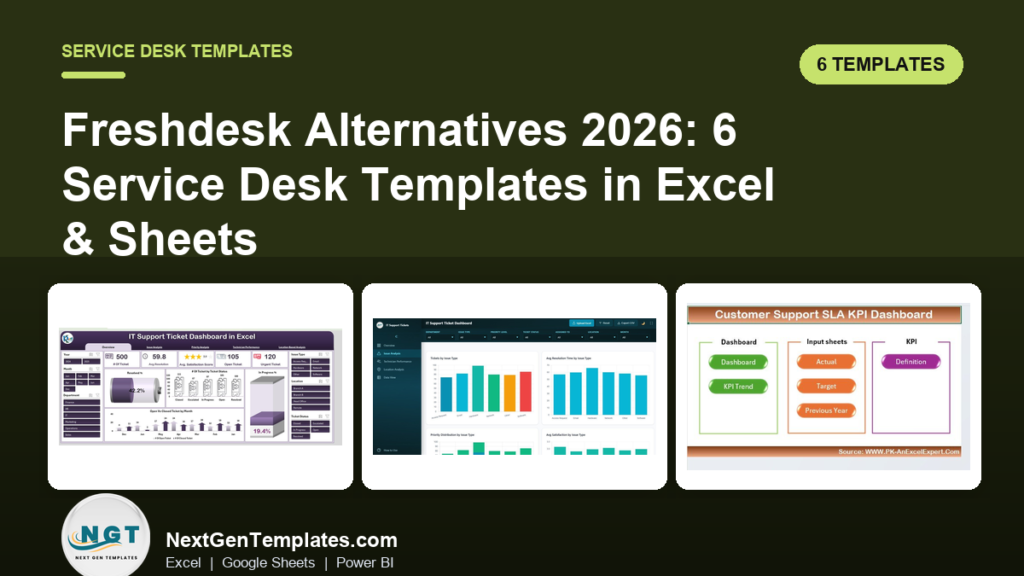
The best Freshdesk alternatives in 2026 are self-hosted service desk templates in Excel, Google Sheets and Power BI. They replace Freshdesk’s per-agent subscription with a one-time $6.99–$17.99 purchase, cover ticket logging, SLA tracking and reporting, and never charge you again as your team grows.
Last updated: August 2026
Key takeaways
- Freshdesk’s paid tiers run roughly $15–$79 per agent per month (billed annually) on its official pricing page — a five-agent team can pay $900–$4,740 a year.
- Our top pick, the IT Support Ticket Dashboard in Excel ($17.99), is a one-time buy that logs tickets and reports on them with zero recurring cost.
- Best value is the Tech Support Efficiency KPI Dashboard in Google Sheets ($9.99) — cloud-shared, multi-user, and closest to Freshdesk’s collaborative feel.
- All six templates cost less combined ($72.94) than one month of Freshdesk Pro for a five-agent team.
- Templates fit teams under ~15 agents; above that, keep reading for the honest case where Freshdesk still wins.
Why small teams churn off Freshdesk
Freshdesk is a capable cloud help desk, but three costs push small teams to look for an alternative — and none of them show up in the sticker price.
1. Per-agent seat cost that scales the wrong way. Freshdesk prices per agent, per month. At the time of writing its published plans sit at about $15 (Growth), $49 (Pro) and $79 (Enterprise) per agent per month on annual billing, and higher month-to-month. Add a seasonal hire or a second shift and the bill jumps in fixed steps, whether or not that agent closes many tickets.
2. Modules you pay for but never switch on. The features most small teams actually want — a ticket queue, SLA timers and a weekly report — sit low in the plan ladder. The AI copilot, custom objects, sandbox and advanced automation that justify the Pro and Enterprise prices often go unused, so you subsidise a feature set you never open.
3. Admin overhead. Someone has to own the instance: configure SLA policies, build automation rules, manage agent roles and keep the portal tidy. For a three-to-eight person team that is real, recurring time nobody budgeted for.
Put numbers on it. A five-agent team on Freshdesk Pro at roughly $49 per agent per month pays about $2,940 a year, and near $4,740 a year on Enterprise. The six templates in this guide total $72.94 as one-time purchases. Even buying every one of them costs less than a single month of Pro for that team — and there is no year-two renewal, no seat true-up and no price rise at contract renewal.
A spreadsheet or Power BI template removes all three. You buy it once, you own the file, and it does the 20% of the job that covers 80% of a small team’s support work. The trade-off — and it is a real one — is spelled out in the honest-limits section below.
Freshdesk feature vs the NGT template that covers it
| Freshdesk feature | NGT template that covers it | Format | Price |
|---|---|---|---|
| Ticket queue & status tracking | IT Support Ticket Dashboard in Excel | Excel | $17.99 |
| Agent / browser-based portal | IT Support Ticket Dashboard in HTML | HTML | $12.99 |
| SLA policies & breach alerts | Customer Support SLA KPI Dashboard in Excel | Excel | $12.99 |
| Collaborative cloud reporting | Tech Support Efficiency KPI Dashboard in Google Sheets | Google Sheets | $9.99 |
| Analytics & leadership dashboards | Tech Support Efficiency KPI Dashboard in Power BI | Power BI | $11.99 |
| Scheduled ticket reports | IT Support Ticket Report in Excel | Excel | $6.99 |
Freshdesk alternative templates compared
| Template | Format | Best for | Price |
|---|---|---|---|
| IT Support Ticket Dashboard in Excel (Best overall) | Excel | Full ticket logging + reporting in one file | $17.99 |
| IT Support Ticket Dashboard in HTML | HTML | A browser portal feel without a subscription | $12.99 |
| Customer Support SLA KPI Dashboard in Excel | Excel | Teams that live or die by SLA compliance | $12.99 |
| Tech Support Efficiency KPI Dashboard in Google Sheets (Best value) | Google Sheets | Distributed teams sharing one live file | $9.99 |
| Tech Support Efficiency KPI Dashboard in Power BI | Power BI | Leadership analytics and drill-down | $11.99 |
| IT Support Ticket Report in Excel | Excel | The cheapest way to leave Freshdesk | $6.99 |
How we picked these
We searched the full NextGenTemplates catalog of 900+ paid Excel, Google Sheets, Power BI and HTML products for tools that map onto a real Freshdesk job: capturing tickets, timing SLAs, measuring agent efficiency and reporting to leadership. We kept only paid, actively maintained templates priced $6.99–$17.99, and deliberately included all four file formats so you can match the tool to the software your team already runs. We excluded generic KPI scorecards and single-metric trackers that do not stand in for a help desk, and marketing-analytics dashboards that share the word “support” but not the workflow.
The 6 best Freshdesk alternative templates for 2026
1. IT Support Ticket Dashboard in Excel — best overall
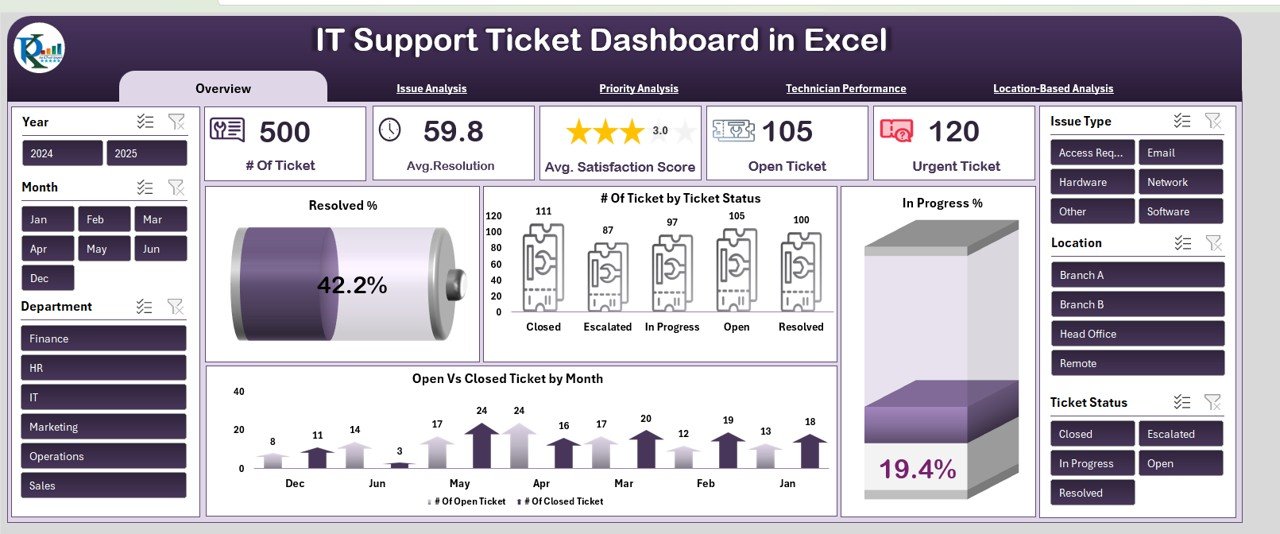
This is the closest single file to a working Freshdesk replacement: a ticket log and an interactive dashboard in one workbook. Log every ticket with priority, type, agent and status, and the dashboard updates its counts, resolution times and satisfaction score automatically.
Who it is for: IT and support teams of 2–15 people who want a queue and reporting without paying per seat.
What is inside:
- A structured ticket entry sheet with priority, type, location and agent fields
- Overview, satisfaction, performance and location-based analysis tabs
- Open-vs-closed and resolved-by-month tracking with slicers
- Average resolution time and average satisfaction score cards
Use it to run a daily stand-up off the open-ticket count, spot that “Network” tickets take 40% longer than “Access” tickets, show a 90%+ closed rate to your manager, or filter one agent’s queue in two clicks. At $17.99 once, it pays for itself against a single agent-month of Freshdesk Growth.
Price: $17.99 — get the IT Support Ticket Dashboard in Excel.
Best for: the team that wants one file to both capture and report on tickets.
2. IT Support Ticket Dashboard in HTML — closest to a hosted portal
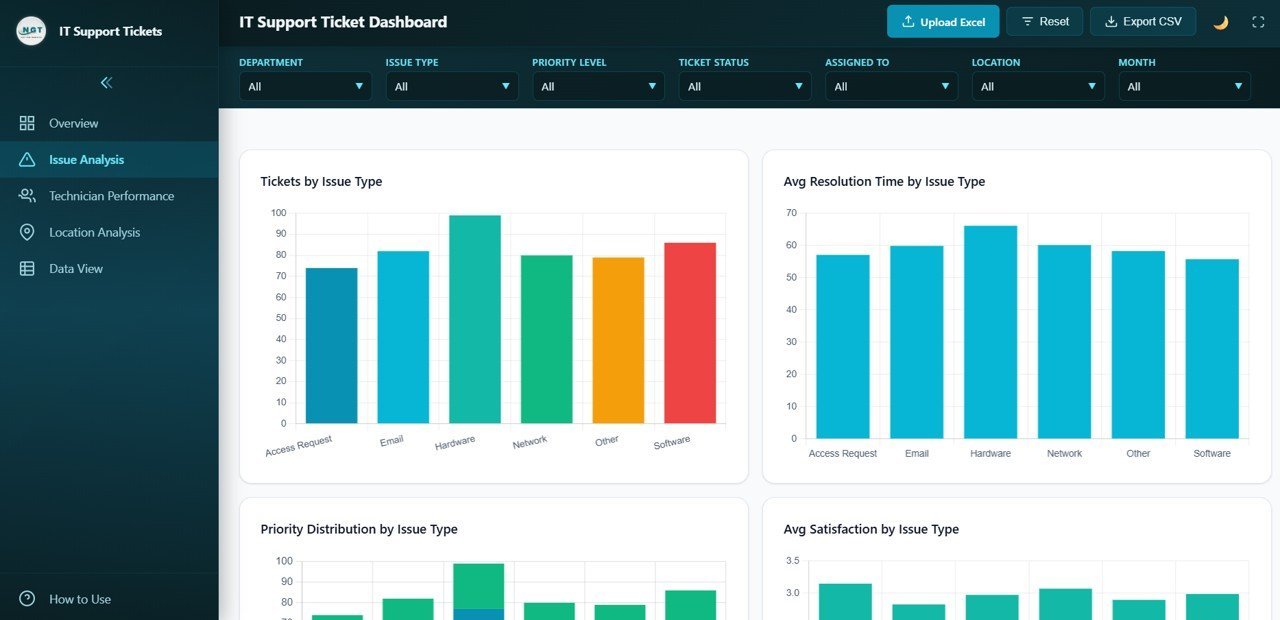
If what you miss about Freshdesk is the browser experience, this HTML build gives you a clean web dashboard that opens in any browser — no Excel licence, no login, no monthly bill. It reads like a hosted tool but lives as a file you own.
Who it is for: teams on mixed devices, or anyone who wants a shareable web view rather than a spreadsheet.
What is inside:
- A browser-based ticket dashboard with tickets by type and status
- Average resolution time and priority-distribution charts
- Upload and export controls built into the interface
- A layout that works on a laptop or a wall-mounted screen
Drop it on a shared drive so agents open the same view, cast it to a monitor for a live ticket board, hand a manager a link-free file they can open instantly, or use it as the front-of-house display while data lives in a spreadsheet behind it. It is the alternative that feels least like a downgrade from a SaaS UI.
Price: $12.99 — get the IT Support Ticket Dashboard in HTML.
Best for: a browser portal feel with none of the subscription.
3. Customer Support SLA KPI Dashboard in Excel — best for SLA compliance

SLA management is one of the features Freshdesk gates behind its higher tiers. This dashboard puts service-level tracking in a spreadsheet: set targets, log actuals, and watch first-response and resolution times against your promise, with prior-year comparison built in.
Who it is for: support teams with contractual or internal SLAs they must prove they hit.
What is inside:
- Actual, target and previous-year input sheets
- An SLA KPI definition tab so everyone measures the same thing
- A dashboard and a KPI-trend view
- First-response and resolution-time compliance tracking
Report a 95% first-response SLA to a client, catch a metric slipping before the quarter closes, benchmark this month against the same month last year, or hand an auditor a clean definition of every KPI. For teams whose renewals hinge on SLA numbers, this is the template that most directly protects revenue.
Price: $12.99 — get the Customer Support SLA KPI Dashboard in Excel.
Best for: teams that are measured on SLA compliance.
4. Tech Support Efficiency KPI Dashboard in Google Sheets — best value
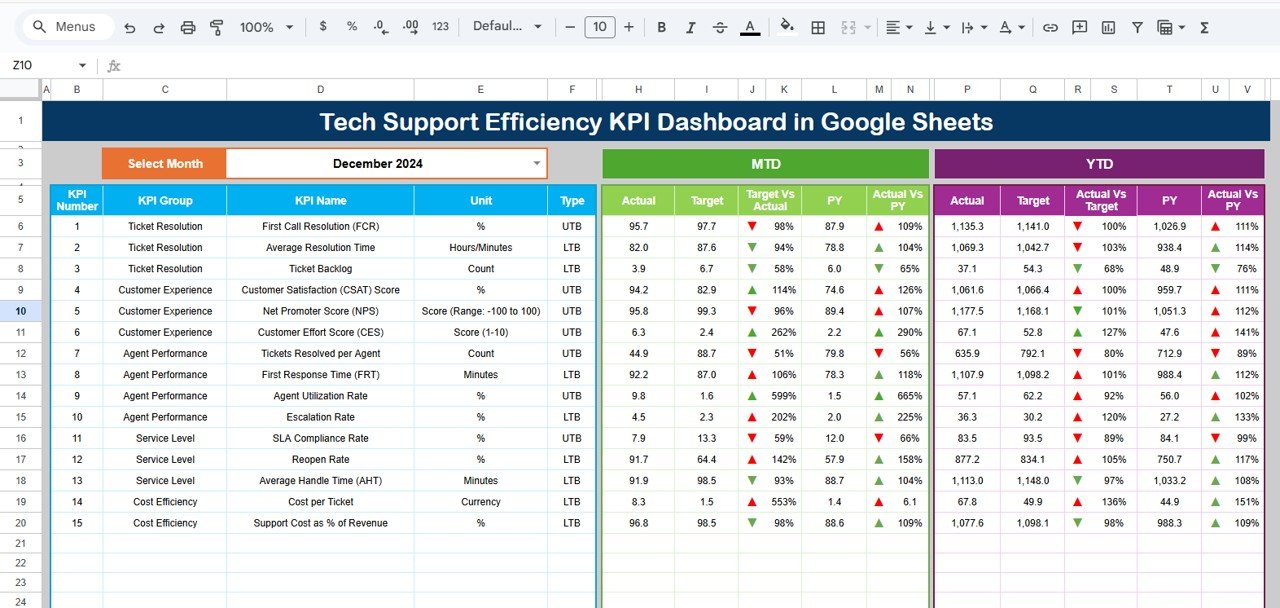
This is the pick that feels most like Freshdesk’s collaborative model: a live cloud file every agent can open at once, from any device, with no install. At $9.99 it is the best value on the list and the natural home base for a distributed team.
Who it is for: remote or multi-location support teams who need one shared, always-current file.
What is inside:
- Efficiency KPIs for ticket volume, resolution time and agent output
- Real-time collaboration — comments, shared editing, revision history
- Cloud access from browser, phone or tablet with no licence
- Charts that refresh as agents log activity
Let five agents update the same tracker without emailing versions, check the queue from a phone between calls, share a view-only link with leadership, or keep an always-live record for a team spread across time zones. It delivers the “everyone sees the same thing” benefit that pulls teams to SaaS in the first place.
Price: $9.99 — get the Tech Support Efficiency KPI Dashboard in Google Sheets.
Best for: distributed teams that want cloud collaboration on a budget.
5. Tech Support Efficiency KPI Dashboard in Power BI — best for analytics
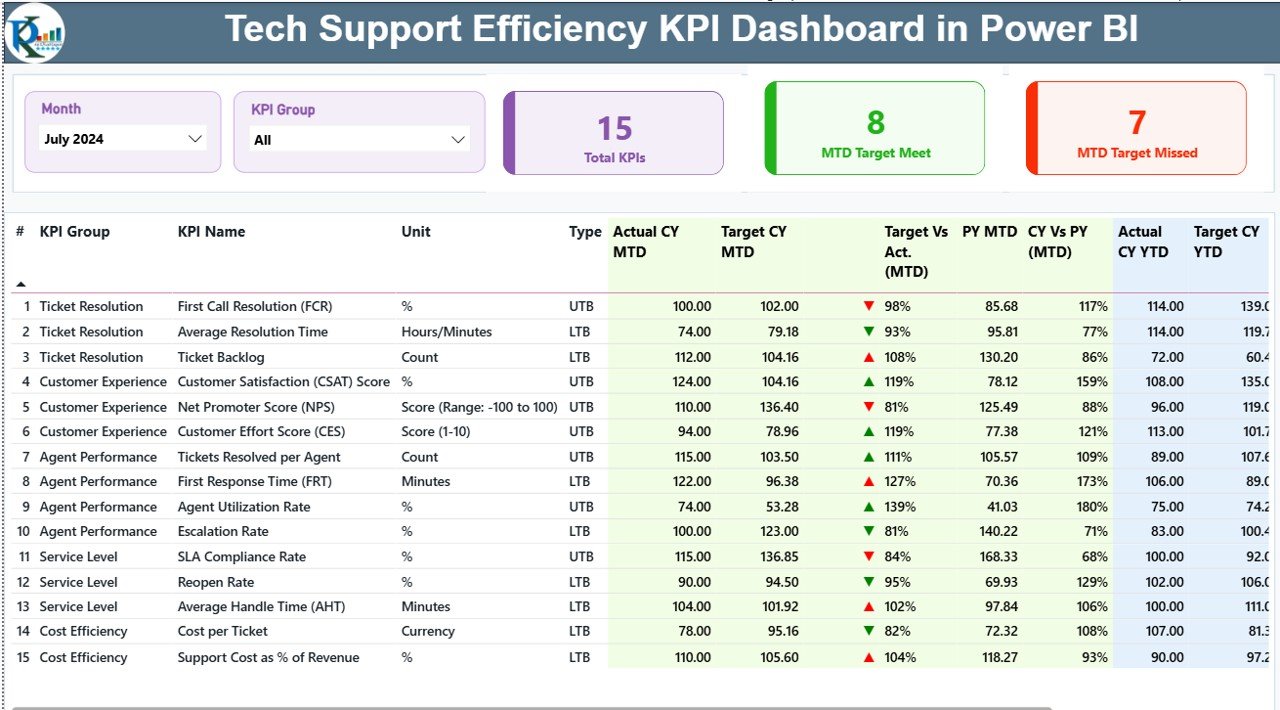
When leadership wants Freshdesk-grade analytics without the Enterprise price, this Power BI report delivers interactive, drill-down reporting on support efficiency. It is built for the person who has to explain the numbers, not just record them.
Who it is for: team leads and managers who present support performance to stakeholders.
What is inside:
- Interactive visuals for resolution time, backlog and agent efficiency
- Slicers to drill by period, category and team
- A refreshable data model you point at your own ticket export
- A clean layout suited to monthly business reviews
Present a trend deck without rebuilding charts each month, drill from a company total into one team’s numbers live in a meeting, connect it to an exported ticket feed for near-automatic refresh, or track backlog against capacity. It gives you the analytical depth of a paid BI add-on for a one-time $11.99.
Price: $11.99 — get the Tech Support Efficiency KPI Dashboard in Power BI.
Best for: leadership analytics and drill-down reporting.
6. IT Support Ticket Report in Excel — cheapest way to leave Freshdesk
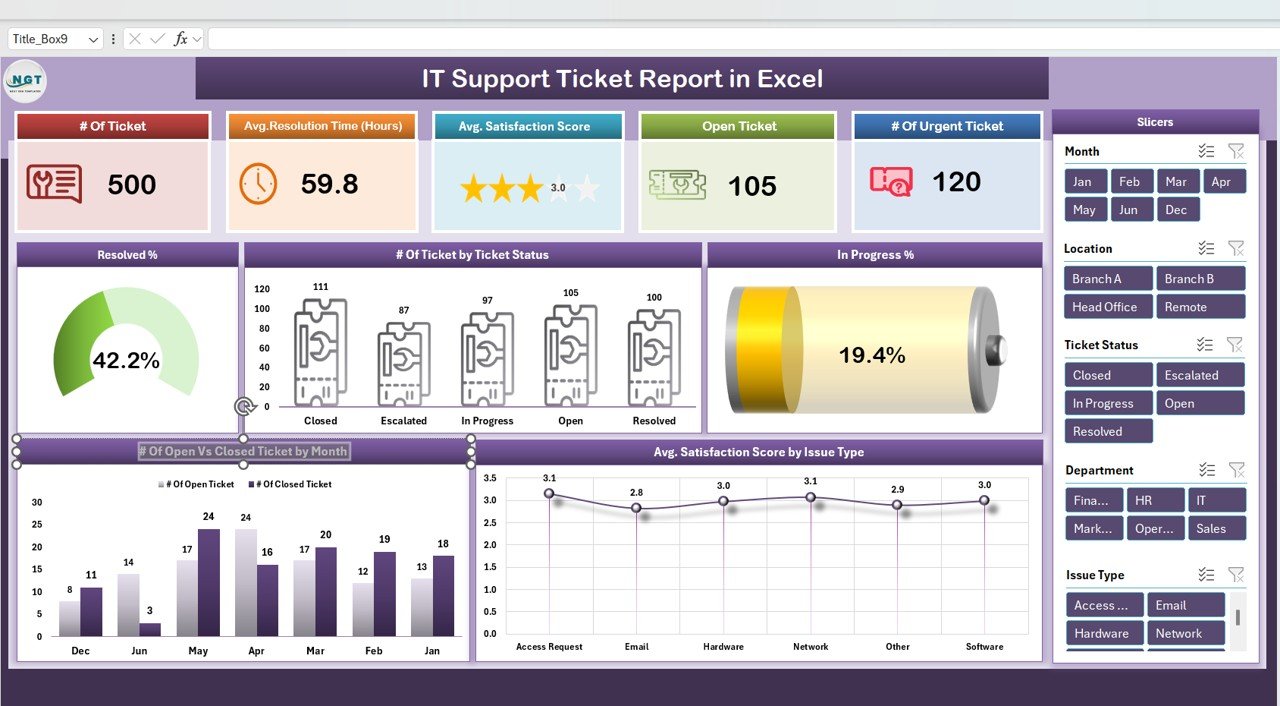
At $6.99 this is the lowest-cost entry point off Freshdesk. It is a focused reporting workbook — log tickets, summarise them, and produce the recurring report a manager asks for — without the dashboard complexity of the pricier options.
Who it is for: very small teams or solo IT owners who mainly need a clean ticket report.
What is inside:
- A simple, structured ticket log
- Ready-made summary tables by status, type and agent
- A report layout you can print or export each week
- An easy on-ramp you can upgrade from later
Produce a weekly ticket summary in minutes, hand a one-page report to a manager, keep a lightweight record when a full dashboard is overkill, or trial spreadsheet-based support before committing to the flagship Excel dashboard. It is the fastest, cheapest way to cancel a Freshdesk seat and still report properly.
Price: $6.99 — get the IT Support Ticket Report in Excel.
Best for: the smallest budget and the simplest reporting need.
How to choose between them
| If you need… | Choose | Price |
|---|---|---|
| One file to log and report on tickets | IT Support Ticket Dashboard in Excel | $17.99 |
| A browser portal look without SaaS | IT Support Ticket Dashboard in HTML | $12.99 |
| To prove SLA compliance | Customer Support SLA KPI Dashboard in Excel | $12.99 |
| Live cloud sharing across a team | Tech Support Efficiency KPI Dashboard in Google Sheets | $9.99 |
| Leadership analytics and drill-down | Tech Support Efficiency KPI Dashboard in Power BI | $11.99 |
| The cheapest possible exit | IT Support Ticket Report in Excel | $6.99 |
Short version: pick the format your team already works in. Excel-first teams start with the flagship dashboard; distributed teams start in Google Sheets; leadership-reporting teams add the Power BI build. Many teams buy two — a capture file plus a reporting file — and still spend less than one agent-month of Freshdesk Pro.
When a template is NOT the right answer — and Freshdesk still wins
These templates are the right call for small teams that live in files. They are the wrong call in specific situations, and pretending otherwise would cost you money. Freshdesk (or a hosted help desk) is genuinely the better buy when:
- Customers email you directly and expect ticket replies. A spreadsheet has no inbox. If tickets arrive by email or a web form and need threaded, tracked responses, you need real ticketing software with email piping and a customer portal.
- You run more than ~15–20 agents. Concurrent editing, permissions and audit trails at that scale are exactly what SaaS is built for. A shared file starts to strain.
- You need automation and routing. Auto-assignment, escalation rules, canned responses and round-robin routing are Freshdesk’s core strength. Templates track work; they do not route it.
- You require a self-service knowledge base or live chat. Deflecting tickets with help articles and chat is a hosted-tool job, not a spreadsheet one.
- Compliance demands full audit logging. Regulated environments that need immutable, per-user audit trails should stay on software built for it.
If two or more of those describe you, keep Freshdesk and check its current published pricing before you renew. If none of them do, a one-time template will do the job for a fraction of the annual cost. Many teams run a hybrid: Freshdesk for the front-line inbox, an NGT dashboard for the reporting Freshdesk does clumsily.
Frequently asked questions
What is the best Freshdesk alternative in 2026?
For small teams, the best Freshdesk alternative is the IT Support Ticket Dashboard in Excel ($17.99). It logs tickets and reports on them in one file with no per-agent fee. Distributed teams should choose the Google Sheets version ($9.99) for live cloud collaboration.
How much does Freshdesk cost?
At the time of writing, Freshdesk’s published plans run about $15 (Growth), $49 (Pro) and $79 (Enterprise) per agent per month on annual billing, with a limited free tier and higher month-to-month rates. Always confirm current numbers on Freshdesk’s official pricing page before deciding.
Is there a free Freshdesk alternative?
Freshdesk offers a limited free tier, and you can build a basic tracker in Excel or Google Sheets yourself for free. A paid template like these costs $6.99–$17.99 once and saves the hours of building, formatting and testing a reliable dashboard from scratch.
Can a spreadsheet really replace a help desk?
For teams under roughly 15 agents that mainly log, track and report on tickets, yes. A spreadsheet covers capture, SLA timing and reporting well. It does not replace email ticketing, automated routing or a customer portal — if you need those, keep hosted software.
Do these templates track SLAs like Freshdesk?
Yes. The Customer Support SLA KPI Dashboard in Excel ($12.99) tracks first-response and resolution times against targets with prior-year comparison. It does not send automated breach alerts, so you review compliance manually rather than getting a push notification.
Which format should I choose — Excel, Google Sheets, Power BI or HTML?
Pick what your team already uses. Excel suits desktop-first teams, Google Sheets suits distributed teams needing live sharing, Power BI suits leadership analytics, and the HTML build suits anyone wanting a browser-portal feel without a subscription. All four appear in this list.
Are these one-time purchases or subscriptions?
Every template here is a one-time purchase between $6.99 and $17.99. You download the file, own it permanently, and pay nothing again as your team grows — the opposite of Freshdesk’s recurring per-agent billing.
Can multiple agents use the same template at once?
The Google Sheets template supports true real-time multi-agent editing. The Excel and Power BI files can be shared on OneDrive or SharePoint for co-authoring, and the HTML dashboard can be opened by anyone on a shared drive. For heavy concurrent use, Google Sheets is the smoothest.
Will I lose my Freshdesk data if I switch?
No. Export your tickets from Freshdesk to CSV before you cancel, then paste or import them into the template’s ticket log. Your history stays intact, and you keep the export as a permanent backup you fully control.
When is Freshdesk still worth paying for?
Keep Freshdesk if customers email you tickets directly, you run more than about 15–20 agents, or you need automated routing, live chat or a self-service knowledge base. Those are hosted-software strengths a template cannot replicate. For everything else, a one-time template is cheaper.
Get more service desk templates
Buying two templates — a capture file and a reporting file — still costs less than a single agent-month of Freshdesk Pro. Start with the IT Support Ticket Dashboard in Excel ($17.99) for capture and add the Tech Support Efficiency KPI Dashboard in Google Sheets ($9.99) for shared reporting, and you have a full service desk stack for $27.98 once.
Explore more switcher guides in the same series: Jira alternatives for issue tracking, Salesforce CRM alternatives, Zoho CRM alternatives, Smartsheet work-management alternatives, BambooHR HR alternatives and NetSuite reporting alternatives.
Watch template walkthroughs on the NextGenTemplates YouTube channel to see each dashboard in action before you buy.