

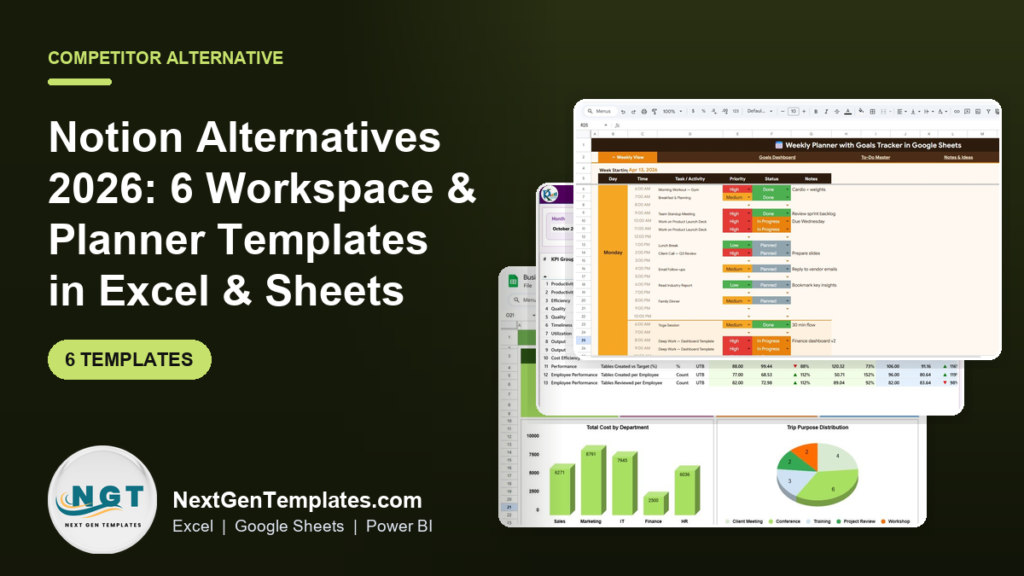
The best Notion alternatives in 2026 are spreadsheet and dashboard templates that replace the one workspace module you actually use — planning, tracking, or reporting — for a one-time price under $20 instead of a recurring per-seat fee. Our top pick is the Weekly Planner with Goals Tracker in Google Sheets at $4.99.
Last updated: August 2026
Notion is a beautiful all-in-one workspace. It is also a recurring bill that grows with every person you add. If your team opened Notion to run a weekly plan, log some records, and build a dashboard — but never touched half of its blocks, databases, and wiki features — you are paying for a suite to use a spreadsheet. This guide shows six paid Excel, Google Sheets, and Power BI templates that cover those real jobs for a one-time fee, plus an honest section on when Notion is still the better buy.
Key takeaways
- Notion’s paid plans start around $10 per seat per month (Plus, billed annually) and rise to about $15 per seat for Business — a five-person team runs roughly $600–$900 a year, every year.
- A one-time template such as the Weekly Planner with Goals Tracker in Google Sheets ($4.99) replaces the daily-planning job most teams open Notion for, with no per-seat cost.
- Small teams churn off Notion for three reasons: per-seat pricing, unused modules, and admin overhead — none of which apply to a spreadsheet everyone already knows.
- The six templates here span Google Sheets, Excel, Excel VBA, a web app, and Power BI, priced $1.99 to $19.99, so you can match the format your team already lives in.
- Best value is the KPI Tracking Planner Checklist in Excel at $1.99; best all-round Notion swap is the Weekly Planner with Goals Tracker.
 Launch offer
SUMIFS, XLOOKUP, FILTER, LAMBDA and checking AI-written formulas, with real business projects. 11h 47m of video by PK, with practice files, quizzes and a capstone.
Notion alternative templates compared
| Template | Format | Best for | Price |
|---|---|---|---|
| Weekly Planner with Goals Tracker (Best overall) | Google Sheets | Replacing Notion’s daily/weekly planner + goals | $4.99 |
| Daily Sales Purchase Tracker V1.0 | Excel VBA | Notion database + CRUD data entry | $19.99 |
| Productivity Tracker KPI Dashboard | Power BI | Team reporting and analytics views | $11.99 |
| Business Travel Plan Tracker & Dashboard | Excel | Project/trip planning with a live dashboard | $17.99 |
| Incident Tracker and Report Web App | Web App | Shared team log / issue database | $14.99 |
| KPI Tracking Planner Checklist (Best value) | Excel | OKR & KPI planning on a budget | $1.99 |
Why small teams churn off Notion
Before the list, it helps to name the problem. According to Notion’s published pricing, the Free plan covers individuals, but collaborative team features sit behind the Plus plan (about $10 per seat per month billed annually, more month-to-month) and the Business plan (about $15 per seat per month). Add five people and you are looking at $600 to $900 per year — a cost that never ends and climbs as you hire.
Three patterns push small teams to leave:
- Seat cost. Every collaborator, contractor, or view-only stakeholder is another line on the invoice. Spreadsheets share for free.
- Unused modules. Most teams use Notion for one or two jobs — a planner, a tracker, a dashboard — while paying for wikis, AI, and databases they never open.
- Admin overhead. Permissions, workspace settings, template governance, and onboarding all take time. A single Excel file has none of that.
The head-to-head is simple: for each Notion job below, there is a template that does it once, for a few dollars, in a tool your team already knows. If you are also evaluating project tools, our Monday.com alternatives in Excel & Sheets and Asana alternatives in Excel & Sheets cover the same trade-off for those platforms.
How we picked these
We searched the full NextGenTemplates catalog of 1,000+ paid Excel, Google Sheets, and Power BI templates and mapped each one to a specific Notion use case — planning, database/tracking, reporting, and goal-setting. We kept only paid, self-contained templates priced under $20 that a non-technical team member could open and use the same day. We excluded single-use checklists that do not scale, and any template that needed a paid add-on to function. Prices shown are the current published USD prices and were verified at the time of writing.
The 6 best Notion alternative templates for 2026
1. Weekly Planner with Goals Tracker in Google Sheets — best overall
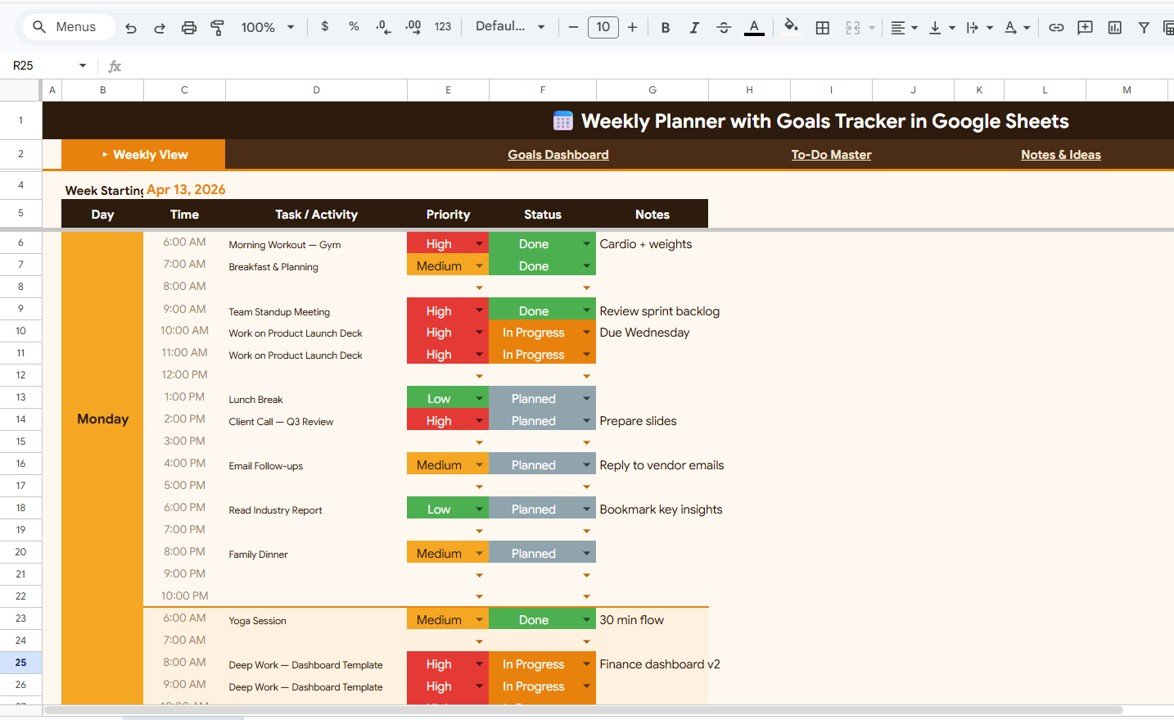
What it is: A collaborative weekly planner with a built-in goals dashboard, to-do master list, and notes area — the exact daily-driver setup most teams build in Notion, but native to Google Sheets.
Who it is for: Founders, small teams, and freelancers who opened Notion to plan the week and track goals, not to build a wiki.
What is inside:
- Weekly view with day, time, task, priority, and status columns
- Goals dashboard that rolls up progress automatically
- To-Do master and a dedicated Notes & Ideas tab
- Colour-coded priority and status so the week reads at a glance
Because it lives in Google Sheets, sharing is free and unlimited — invite the whole team, clients, or a virtual assistant with a link and no seat charge. Real-time collaboration, comments, and version history come built in. A five-person team that would pay roughly $600 a year for Notion Plus replaces the planning job here for a single $4.99 purchase. It is the closest one-to-one swap for how most people actually use Notion day to day, which is why it tops the list.
Best for: The team that mainly uses Notion as a shared planner and goal tracker. Price: $4.99. View the Weekly Planner with Goals Tracker →
2. Daily Sales Purchase Tracker V1.0 — best Notion database replacement

What it is: A fully working Excel VBA tracker with an add/update/delete form, a records table, and summary reporting — a purpose-built version of the “database with a form view” that Notion teams spend hours configuring.
Who it is for: Shops, resellers, and small businesses that use a Notion database to log daily sales and purchases and want something faster and offline.
What is inside:
- Data-entry form with one-click Add, Update, and Delete (VBA macros)
- Structured records table for every transaction
- Automatic sales, purchase, and profit summaries
- Dropdown-driven inputs to keep data clean
Notion databases are flexible but slow to load and fiddly to turn into a real data-entry app. This template is a CRUD system out of the box: type into the form, hit a button, and the record is stored and summarised. There is no per-seat fee and no internet dependency — it runs entirely inside Excel. For a business logging dozens of records a day, the speed difference alone justifies the one-time $19.99. If you need cleaner list-style task capture instead, see our task & to-do management templates.
Best for: Replacing a Notion database used for daily record-keeping. Price: $19.99. View the Daily Sales Purchase Tracker →
3. Productivity Tracker KPI Dashboard in Power BI — best for reporting
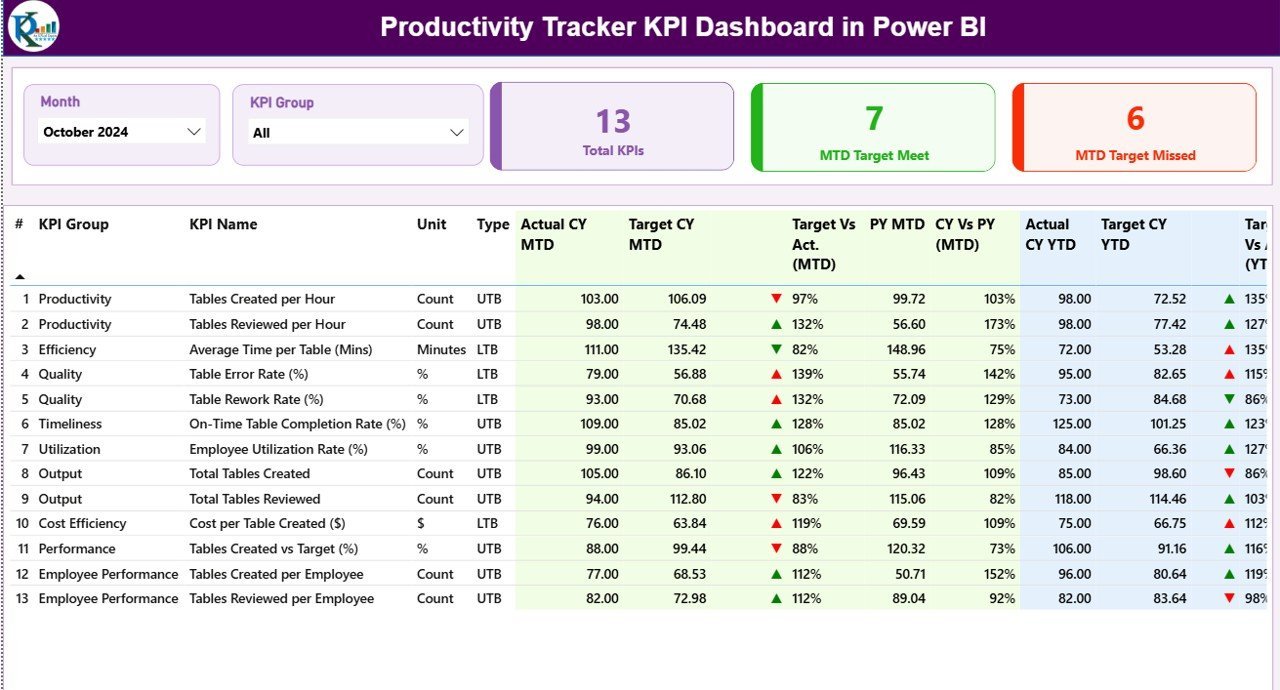
What it is: A ready-built Power BI dashboard that turns productivity and output data into interactive KPI cards, trends, and breakdowns — the analytics layer Notion charts cannot match.
Who it is for: Team leads and managers who tried to build reporting views in Notion and hit its ceiling.
What is inside:
- KPI cards for output, efficiency, utilisation, and quality
- Trend visuals and per-employee or per-team breakdowns
- Interactive slicers to filter by period, person, or category
- A clean, presentation-ready layout for stakeholder reviews
Notion’s simple charts are fine for counting tasks, but they fall apart when you need real analytics — measures, drill-downs, and month-over-month trends. Power BI is built for exactly that. Drop your data in and the dashboard refreshes; share a snapshot with leadership without giving anyone a Notion seat. At $11.99 one-time, it is far cheaper than adding reporting-only viewers to a Notion Business plan. For a sales-focused equivalent, our Pipedrive alternatives in Excel & Sheets cover pipeline reporting the same way.
Best for: Teams that need genuine dashboards, not block-based charts. Price: $11.99. View the Productivity Tracker KPI Dashboard →
4. Business Travel Plan Tracker and Dashboard — best for project planning
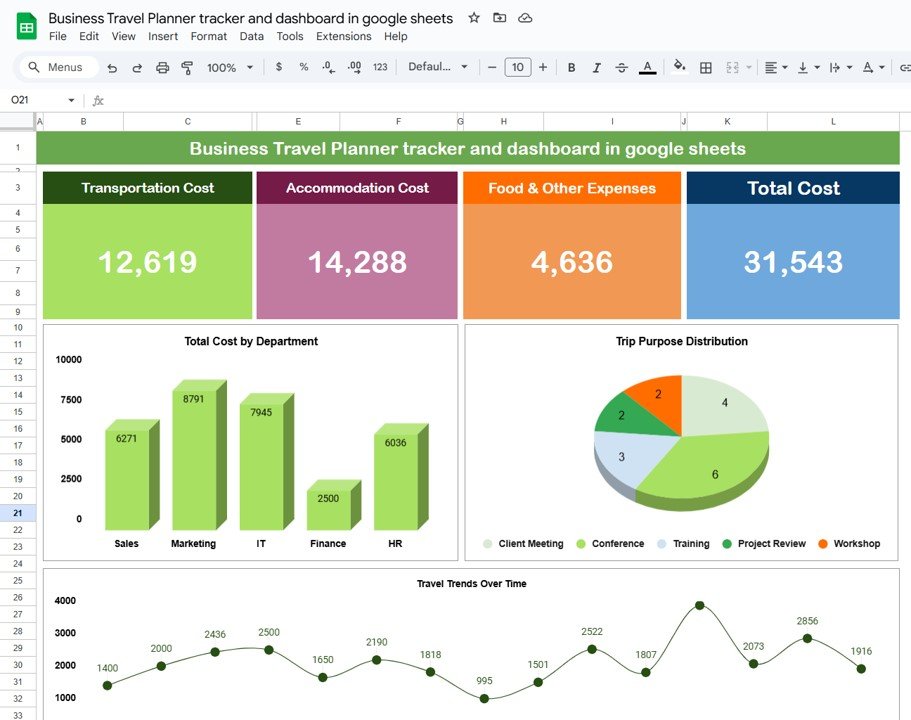
What it is: A planning-and-tracking template with an itinerary log, cost breakdowns, and a live dashboard — a structured stand-in for the project pages teams build in Notion for any multi-step plan.
Who it is for: Anyone using Notion to coordinate trips, events, or projects with dates, budgets, and status.
What is inside:
- Detailed plan/itinerary table with dates, owners, and status
- Cost-by-category and total-spend dashboard visuals
- Trip-purpose and department breakdown charts
- Summary KPIs that update as you fill the plan
Although it is named for travel, the structure — a planned list of items with dates, costs, owners, and a rollup dashboard — is exactly what a Notion project database does, and you can repurpose it for events, launches, or any budgeted plan. The advantage over Notion is the dashboard: charts and totals appear automatically instead of needing manual rollup properties. At $17.99 one-time it plans and reports in one file, with unlimited free sharing. It pairs well with the reporting dashboard above for teams that want both planning and analytics.
Best for: Budgeted, date-driven plans that need a dashboard. Price: $17.99. View the Business Travel Plan Tracker →
5. Incident Tracker and Report Web App — best shared team log
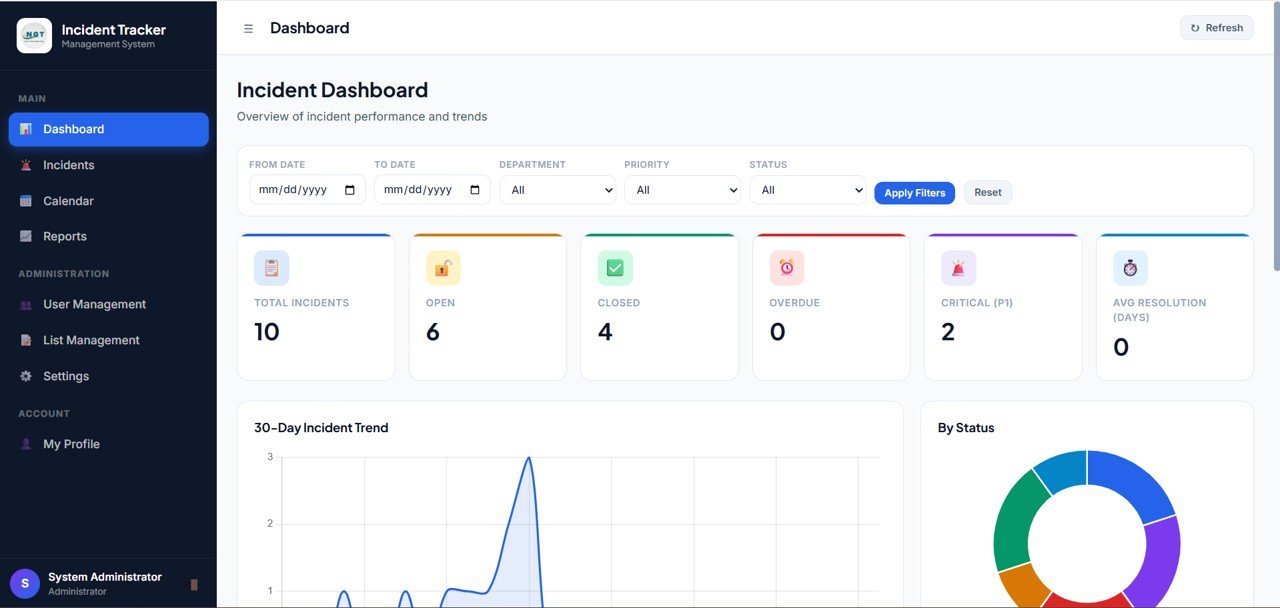
What it is: A hosted web app for logging incidents, issues, or requests with structured fields and reporting — the “shared database that anyone can add to” role Notion often plays for support and ops teams.
Who it is for: Teams that use a Notion database as a shared intake or issue log and want a proper app with roles.
What is inside:
- Web-based form for logging incidents and reports
- Structured records with status, priority, and category
- Reporting views and exportable summaries
- Access from any browser without a Notion seat per user
When a Notion database becomes your team’s intake queue, you quickly need permissions, a clean submission form, and reporting — the parts Notion makes you assemble by hand. This web app ships that as a finished product. Contributors log entries through a form, managers review and report, and there is no monthly per-seat charge for read-only stakeholders. At $14.99 one-time it replaces a recurring Notion Business seat cost for exactly the workflow small ops teams run most. If you are consolidating customer records too, compare our HubSpot alternatives in Excel & Sheets.
Best for: Shared intake, issue, and incident logging with roles. Price: $14.99. View the Incident Tracker Web App →
6. KPI Tracking Planner Checklist in Excel — best value
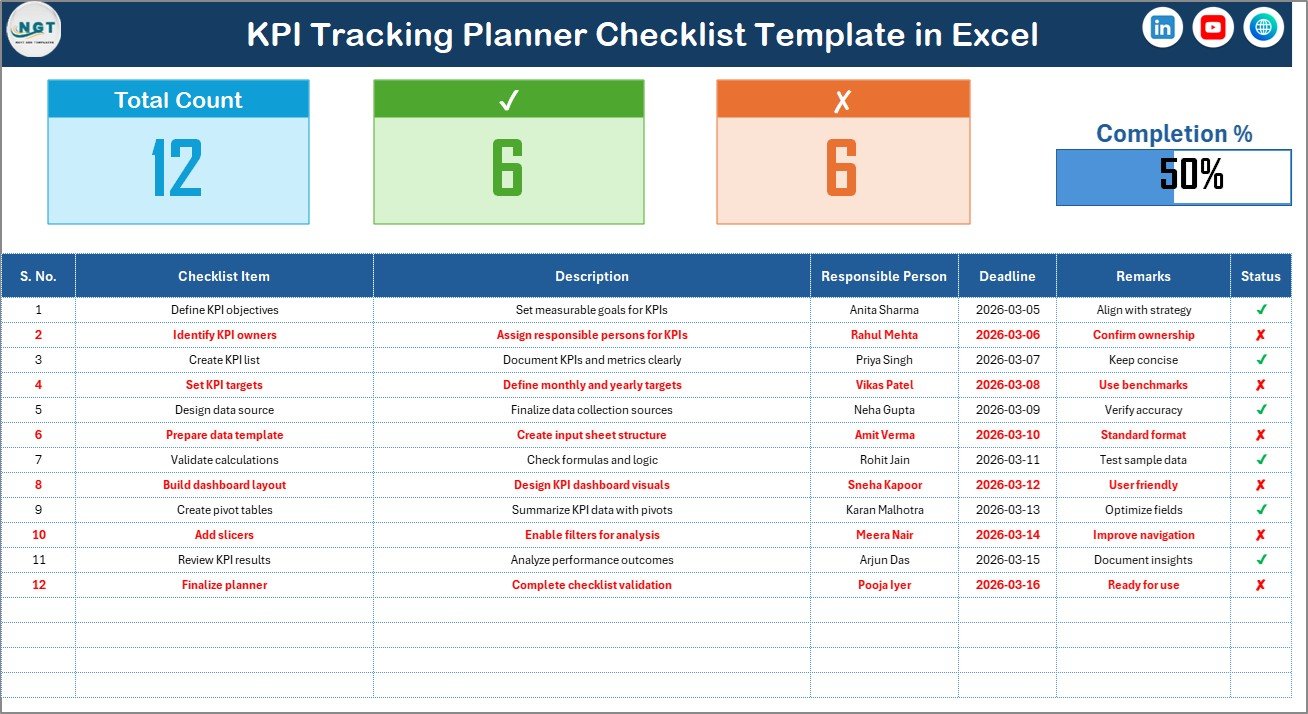
What it is: A lightweight Excel planner and checklist for setting KPIs and goals, tracking status, and reviewing progress — the OKR/goals view Notion teams build, for the price of a coffee.
Who it is for: Solo operators and lean teams who want structured goal tracking without any subscription.
What is inside:
- KPI and goal rows with target, actual, and status
- Checklist-style progress tracking
- Simple review layout you can duplicate per quarter
- Fully editable — add your own metrics in seconds
Notion’s goal and OKR templates are popular, but they still require a paid plan the moment you invite a collaborator. This Excel checklist does the same job — define KPIs, set targets, track status, review — for a one-time $1.99. It is the cheapest way on this list to leave Notion behind for goal-setting, which makes it the clear best-value pick. Because it is plain Excel, it works offline, opens instantly, and copies to a new tab for every planning cycle. It is a natural companion to the Weekly Planner at the top of this list.
Best for: Budget-conscious KPI and OKR planning. Price: $1.99. View the KPI Tracking Planner Checklist →
Quick pick: Want the fastest exit from Notion? Start with the Weekly Planner with Goals Tracker in Google Sheets ($4.99) for daily planning, then add the KPI Tracking Planner Checklist ($1.99) for goals. Under $7 total, one-time, replaces the two jobs most teams open Notion for.
How to choose between them
Match the template to the Notion job you actually do most:
- You mostly plan your week and track goals → Weekly Planner with Goals Tracker (Google Sheets, $4.99).
- You log records daily and want a form-driven app → Daily Sales Purchase Tracker V1.0 (Excel VBA, $19.99).
- You need real dashboards and analytics → Productivity Tracker KPI Dashboard (Power BI, $11.99).
- You run budgeted, date-driven plans → Business Travel Plan Tracker & Dashboard (Excel, $17.99).
- You run a shared intake or issue queue → Incident Tracker and Report Web App ($14.99).
- You want cheap, structured goal tracking → KPI Tracking Planner Checklist (Excel, $1.99).
Prefer Google Sheets if free real-time collaboration matters most; prefer Excel or Excel VBA if you work offline or want macro-driven forms; choose Power BI when the deliverable is a report for someone else. You can mix formats — most teams end up with two or three of these covering the jobs Notion used to.
When Notion is still the right call
Templates are not always the answer, and pretending otherwise would cost you money. Keep Notion — or another all-in-one workspace — when:
- You genuinely use the whole suite. If your team relies on linked databases, wikis, nested pages, and Notion AI together every day, a handful of spreadsheets will not stitch that back together.
- You need many-to-many relational data. Notion’s relations and rollups across databases are hard to replicate in a flat spreadsheet without real effort.
- Live multi-editor documents are core. For long-form collaborative docs and wikis with comments and mentions, a dedicated workspace still wins.
- You want everything behind one login and one permission model. Spreadsheets spread across Drive and Excel can be harder to govern at scale.
The honest rule: if you open Notion and use three or more of its modules deeply, stay. If you open it and use one — a planner, a tracker, a dashboard — a $2–$20 template will do that job better and stop the recurring bill. Many teams keep Notion for docs and move their planning and reporting to spreadsheets, which is a perfectly good hybrid. For CRM-heavy teams weighing the same decision, our Salesforce alternatives and Zoho CRM alternatives apply the same logic to sales tools.
Frequently asked questions
What is the best free Notion alternative?
Google Sheets is the strongest free Notion alternative for planning and tracking, because sharing and real-time collaboration cost nothing. A one-time $4.99 template like the Weekly Planner with Goals Tracker turns a blank sheet into a structured workspace instantly, giving you Notion-style organisation without the subscription or the setup time.
How much does Notion cost in 2026?
According to Notion’s published pricing, the Free plan covers individuals, the Plus plan is around $10 per seat per month billed annually, and the Business plan is around $15 per seat per month. Enterprise is custom-priced. Costs are per seat, so a five-person team typically spends $600–$900 per year, recurring indefinitely.
Can a spreadsheet really replace Notion?
For most small teams, yes — for the jobs they actually use. Notion is usually opened for one or two tasks: planning, tracking, or reporting. A spreadsheet or dashboard template covers those directly. It cannot replace deep wiki-and-database workflows, but if you use one or two Notion modules, a template does that job for a one-time fee.
Is Excel or Google Sheets better as a Notion alternative?
Google Sheets wins for free, unlimited real-time collaboration and link-based sharing, mirroring how teams work in Notion. Excel wins for offline use, heavier calculations, and macro-driven forms like the Daily Sales Purchase Tracker. Many teams use both — Sheets for shared planning, Excel for data entry and analysis — and pick templates in each format.
Do these templates work for teams or just individuals?
They work for both. Google Sheets templates share with an unlimited team for free, so collaborators, clients, and virtual assistants all get access without a per-seat charge. The Incident Tracker web app adds roles for larger groups, and Excel files can live on a shared drive. None of them charge extra as your team grows.
What do I lose by switching from Notion to templates?
You lose the single unified workspace, linked relational databases, wikis, and Notion AI in one place. What you gain is no recurring per-seat bill, faster load times, offline access, and tools your team already knows. The trade is worth it when you use one or two Notion modules, and not worth it when you use the whole suite deeply.
Are these Notion alternative templates one-time purchases?
Yes. Every template in this guide is a one-time purchase between $1.99 and $19.99 with no subscription. You download the file or receive web-app access and own it. There are no per-seat fees, no monthly renewals, and no charge for adding more people to a shared Google Sheet or Excel file.
Which Notion alternative is best for dashboards and reporting?
The Productivity Tracker KPI Dashboard in Power BI ($11.99) is the best choice for reporting. Notion’s built-in charts are limited to simple counts, whereas Power BI provides KPI cards, trends, drill-downs, and interactive slicers. You can share a report with stakeholders without paying for extra Notion viewer seats, which makes it cheaper at scale.
Can I use these templates offline?
The Excel and Excel VBA templates — the Daily Sales Purchase Tracker and KPI Tracking Planner Checklist — run fully offline with no internet needed. Google Sheets templates work offline once cached, and the Power BI dashboard refreshes locally. Only the Incident Tracker web app requires a browser and connection, which is expected for a hosted app.
Get more Notion alternative templates
Ready to drop the subscription? Start with the Weekly Planner with Goals Tracker in Google Sheets ($4.99) for day-to-day planning and the KPI Tracking Planner Checklist ($1.99) for goals — under $7 one-time to replace the two jobs most teams open Notion for. Need dashboards? Add the Productivity Tracker KPI Dashboard in Power BI ($11.99).
Browse hundreds more Excel, Google Sheets, and Power BI templates at NextGenTemplates.com, and watch setup walkthroughs on our YouTube channel.
Prices verified August 2026 and subject to change. Notion pricing figures are as published on Notion’s official pricing page.