

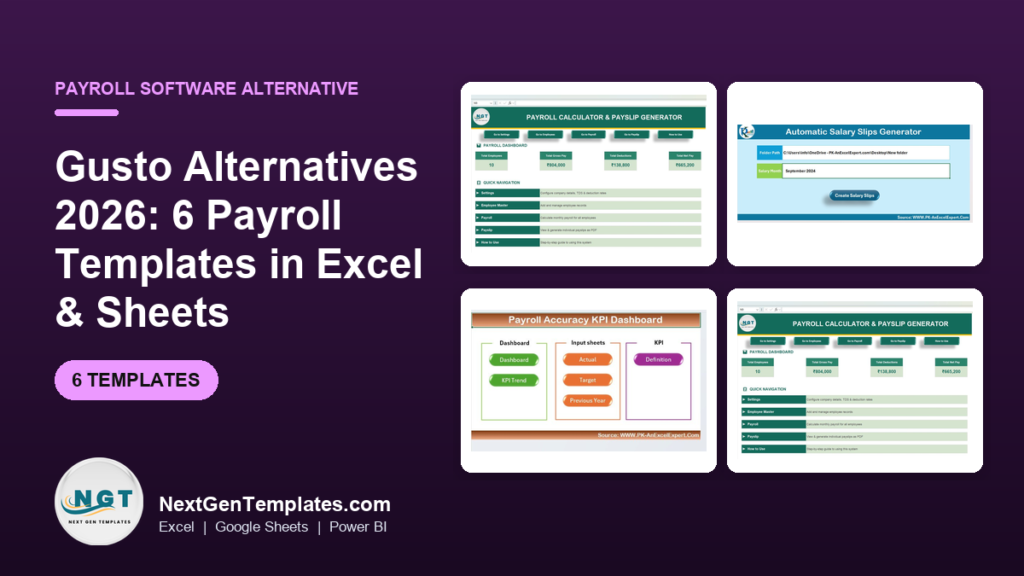
The best Gusto alternatives in 2026 are spreadsheet-based payroll templates that replace recurring per-employee software fees with a one-time purchase. For small teams, six Excel and Google Sheets templates from NextGenTemplates cover payroll calculation, payslip generation, timesheets, leave and attendance for $6.99–$14.99 each — no monthly subscription, no seat charges.
Last updated: August 2026
Key takeaways
- Gusto’s published pricing starts at roughly $40/month base plus $6 per employee on the Simple plan — a 10-person team pays about $100/month, or $1,200 a year, before any add-ons.
- The Payroll Calculator and Payslip Generator in Excel ($14.99, one-time) is our best overall Gusto alternative for teams that run their own numbers.
- The Automatic Bulk Salary Slips Generator ($6.99) is the best value — it produces every employee’s payslip PDF in one pass.
- Six templates covering payroll, timesheets, leave and attendance cost $58 total, once — less than one month of Gusto for a mid-size team.
- Templates do not file taxes for you. If you need automatic federal and state tax filing, Gusto still wins — we say exactly when below.
 Launch offer
SUMIFS, XLOOKUP, FILTER, LAMBDA and checking AI-written formulas, with real business projects. 11h 47m of video by PK, with practice files, quizzes and a capstone.
Why small teams switch away from Gusto
Gusto is a genuinely good full-service payroll platform. It runs payroll, files your payroll taxes automatically, handles direct deposit, and layers on benefits, onboarding and HR tools. For many growing companies that bundle is worth paying for.
But three specific costs push small and micro teams to look for a Gusto alternative:
1. Per-seat pricing compounds. Every plan charges a monthly base fee plus a per-employee fee. As you hire, the bill climbs even if your payroll workflow never changes. A five-person shop and a fifteen-person shop do essentially the same payroll math — but pay very different subscriptions.
2. You pay for modules you never open. Benefits administration, health insurance brokering, 401(k) integrations, applicant tracking — most micro teams use a fraction of the platform yet pay for the tier that includes it.
3. The admin work does not disappear. You still gather hours, approve time off, check the numbers and answer employee questions. The subscription automates filing, not judgement — so if you are hands-on anyway, a spreadsheet you control can be faster.
A one-time template flips that model: you own the file forever, there is no per-employee charge, and the logic sits in front of you where you can see and edit every formula. For contractors, seasonal teams, and anyone already comfortable in Excel or Google Sheets, that is often the smarter buy. If you want the underlying tax math explained first, read our guide to payroll calculation in Excel with US federal, state and FICA formulas.
Gusto pricing vs. NGT templates: the head-to-head
Here is what each Gusto capability costs on the platform versus the one-time NGT template that covers the same job. Gusto figures below are the published rates on the official Gusto pricing page at the time of writing — always confirm current rates there, as SaaS pricing changes.
| Gusto feature | Gusto plan / cost | NGT template that covers it | One-time price |
|---|---|---|---|
| Run payroll & produce payslips | Simple: ~$40/mo + $6/employee | Payroll Calculator & Payslip Generator | $14.99 |
| Bulk payslip / pay-stub delivery | Included in base subscription | Automatic Bulk Salary Slips Generator | $6.99 |
| Payroll reporting & error checks | Plus: ~$80/mo + $12/employee | Payroll Accuracy KPI Dashboard | $14.99 |
| Time tracking / billable hours | Plus tier or add-on | Automated Employee Timesheet Template | $6.99 |
| Time off & PTO tracking | Plus tier | Leave Management System | $6.99 |
| Attendance monitoring | Add-on / Plus tier | Attendance Tracker (Google Sheets) | $6.99 |
Six templates, $58.94 once, versus a recurring subscription that for a ten-person team on the Simple plan runs roughly $100/month — about $1,200 a year, every year. The trade-off is real and we spell it out in the “when Gusto still wins” section: templates do not file your taxes.
Gusto alternative templates compared
| Template | Format | Best for | Price |
|---|---|---|---|
| Payroll Calculator & Payslip Generator (Best overall) | Excel (VBA) | Running monthly payroll end to end | $14.99 |
| Automatic Bulk Salary Slips Generator (Best value) | Excel (VBA) | Producing every payslip PDF in one click | $6.99 |
| Payroll Accuracy KPI Dashboard | Excel | Catching payroll errors before payday | $14.99 |
| Automated Employee Timesheet Template | Excel | Turning hours into gross pay | $6.99 |
| Leave Management System | Excel (VBA) | Tracking PTO, sick days and accruals | $6.99 |
| Attendance Tracker | Google Sheets | Cloud attendance without a subscription | $6.99 |
How we picked these
We searched the NextGenTemplates catalog of 1,000-plus paid Excel, Google Sheets and Power BI products for tools that map directly onto a real Gusto workflow — calculating pay, generating payslips, tracking hours, managing leave and monitoring attendance. We excluded anything that only reports on payroll without producing it, anything priced as an enterprise system, and off-topic dashboards. Every template below is a paid, actively sold product with a real price and permalink; we did not include free downloads or loosely related files. Ranking weighs how completely each template replaces a Gusto job, how little manual setup it needs, and price.
The 6 best Gusto alternative templates for 2026
1. Payroll Calculator and Payslip Generator in Excel — best overall
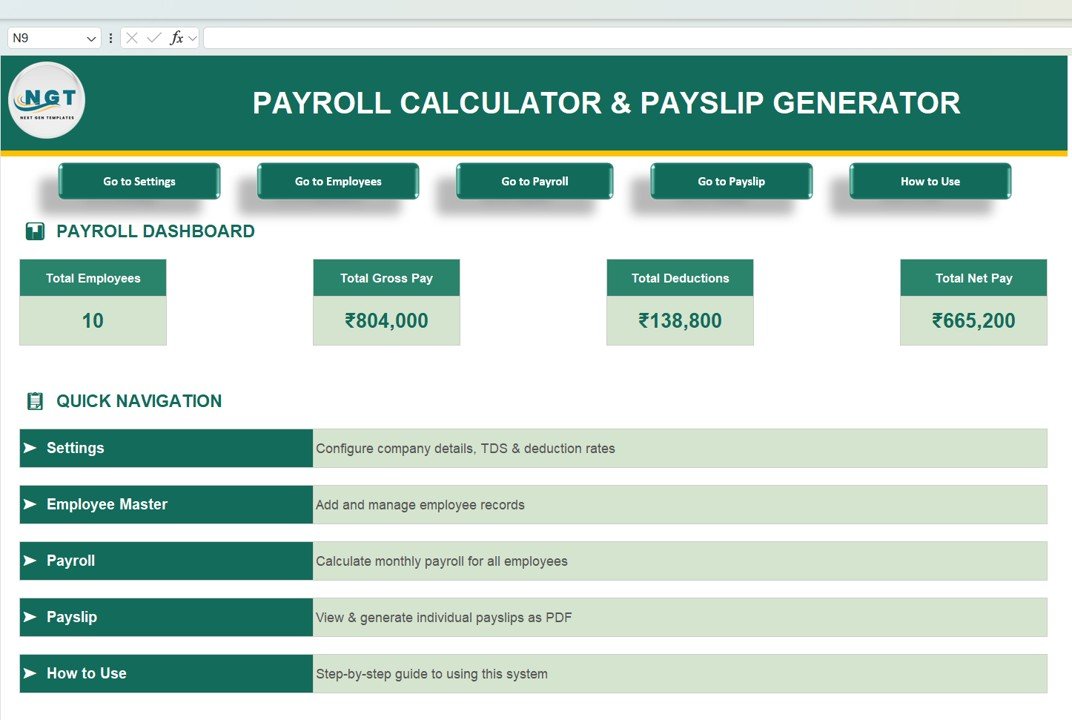
This is the single template that most directly replaces Gusto’s core job: it calculates each employee’s gross-to-net pay and generates the payslip. Enter your staff once, set deduction and tax lines, and the workbook does the arithmetic and produces a formatted payslip you can save as PDF.
Who it is for: owner-operators and office managers who run payroll monthly for up to a few dozen people and want to see every formula rather than trust a black box.
What is inside:
- Employee master sheet for salaries, allowances and deductions
- Automatic gross, deduction and net-pay calculation
- One-click payslip generation with company branding
- Payroll dashboard with headcount, gross pay and total net-pay tiles
- Guided navigation and a built-in how-to sheet
A ten-person team can run a full monthly cycle in under 30 minutes once the master sheet is filled: update any changed hours or bonuses, refresh, and export ten payslips. Compared with Gusto’s roughly $100/month for the same team, the $14.99 one-time cost pays for itself in the first pay run. It handles new starters by adding a row, and leavers by removing one — with no proration surprises on next month’s invoice.
Price: $14.99 (one-time). Get the Payroll Calculator & Payslip Generator →
Best for: the closest one-file replacement for Gusto’s run-payroll button.
2. Automatic Bulk Salary Slips Generator in Excel — best value

If your pay figures already live in a sheet and the pain is producing the payslips, this $6.99 tool is the best value on the list. Point it at your salary data, pick the pay month, click once, and it mail-merges an individual salary slip for every employee — the same bulk delivery Gusto bundles into its subscription, without the subscription.
Who it is for: teams that calculate pay elsewhere (an accountant, another sheet) but need clean, consistent payslip PDFs to hand out each month.
What is inside:
- Salary data sheet with a folder-path and pay-month selector
- One-click bulk generation of individual salary slips
- Consistent, print-ready slip layout for every employee
- Works alongside any payroll calculation you already do
For a 25-person business, generating slips by hand is an afternoon; this does it in seconds and never transposes a name onto the wrong slip. Pair it with template #1 (calculate) and you have Gusto’s payslip pipeline for under $22 total, once.
Price: $6.99 (one-time). Get the Bulk Salary Slips Generator →
Best for: mass-producing payslips when the numbers are already done.
3. Payroll Accuracy KPI Dashboard in Excel

Gusto’s higher tiers sell you payroll reporting; this dashboard delivers the report that actually matters — whether your payroll is right. It tracks payroll accuracy, error rates and correction trends so you catch a mis-keyed deduction before it reaches an employee’s bank account, not after.
Who it is for: finance leads and bookkeepers who process payroll across several people or entities and need an audit view.
What is inside:
- Actual vs. target accuracy KPIs with traffic-light status
- Error and correction trend tracking over time
- Definition sheet so every metric is documented for auditors
- Dashboard and KPI-trend views
One prevented payroll error — an overpayment you claw back, or a compliance penalty you avoid — typically covers the $14.99 many times over. It is the layer that keeps a spreadsheet workflow trustworthy at scale.
Price: $14.99 (one-time). Get the Payroll Accuracy KPI Dashboard →
Best for: proving payroll is correct, not just done.
4. Automated Employee Timesheet Template in Excel

Payroll starts with hours. Gusto charges for time tracking on its Plus tier or as an add-on; this $6.99 timesheet captures clock-in, clock-out and breaks and totals billable and payable hours automatically, ready to drop into your payroll calculator.
Who it is for: teams paying hourly or tracking billable time — agencies, trades, clinics, hourly retail.
What is inside:
- Daily and weekly hour capture with automatic totals
- Break and overtime handling
- Billable-vs-payable hour split
- A clean export that feeds the payroll calculator (#1)
For a five-person hourly team, accurate timesheets are the difference between paying for hours worked and paying for hours guessed — usually a bigger monthly swing than the template’s one-time price.
Price: $6.99 (one-time). Get the Automated Timesheet Template →
Best for: converting worked hours into accurate gross pay.
5. Leave Management System

Gusto ties time-off tracking to its Plus plan. This VBA-driven Leave Management System handles the same job standalone — logging leave requests, tracking balances and accruals, and giving you a clear record when payroll and PTO have to reconcile.
Who it is for: managers who need a defensible PTO ledger without upgrading their whole payroll plan for it.
What is inside:
- Leave request logging with approval status
- Automatic balance and accrual tracking by employee
- Leave-type categories (annual, sick, unpaid)
- Summary view for quick balance checks at pay time
When an employee disputes a leave balance, a clear ledger settles it in seconds. At $6.99 once, it is cheaper than a single month of the plan upgrade most platforms require to unlock time-off tracking.
Price: $6.99 (one-time). Get the Leave Management System →
Best for: a standalone PTO ledger that reconciles with payroll.
6. Attendance Tracker in Google Sheets
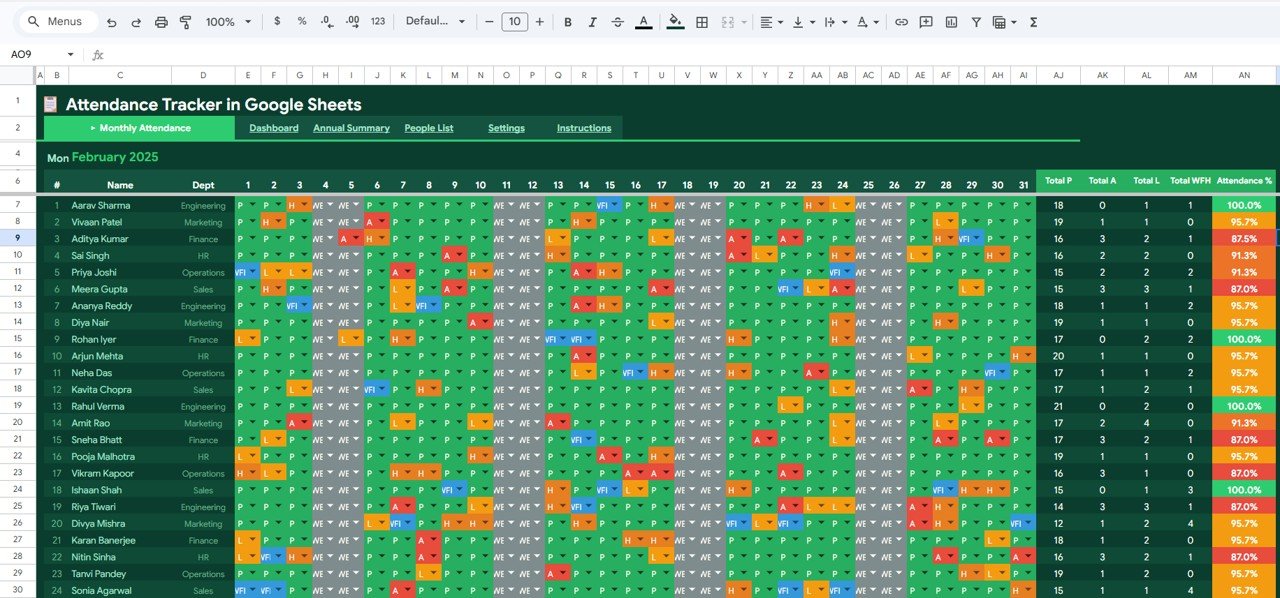
The only cloud-native pick on the list, and the answer for anyone who wants Gusto’s always-on, multi-user feel without the bill. Because it lives in Google Sheets, the whole team can update attendance from a browser or phone, and you get real-time sharing free.
Who it is for: distributed or shift-based teams who need shared, live attendance and already work in Google Workspace.
What is inside:
- Daily attendance marking with present/absent/leave states
- Monthly attendance summary per employee
- Cloud sharing and multi-user editing built in
- Feeds directly into payroll and leave reconciliation
For a shift team of a dozen, live shared attendance removes the “were you actually in on Tuesday?” argument entirely — and it costs $6.99 once instead of a per-seat monthly fee.
Price: $6.99 (one-time). Get the Attendance Tracker →
Best for: cloud, multi-user attendance without a subscription.
How to choose between them
Match the template to the job you are actually trying to take back from Gusto:
| If your main need is… | Start with | Price |
|---|---|---|
| Calculate pay and issue payslips | Payroll Calculator & Payslip Generator | $14.99 |
| Just produce lots of payslips fast | Automatic Bulk Salary Slips Generator | $6.99 |
| Track and reduce payroll errors | Payroll Accuracy KPI Dashboard | $14.99 |
| Pay by the hour | Automated Employee Timesheet | $6.99 |
| Manage PTO and leave | Leave Management System | $6.99 |
| Share live attendance in the cloud | Attendance Tracker (Google Sheets) | $6.99 |
Most small teams end up buying two or three: the Payroll Calculator to run the numbers, the Bulk Slips Generator to deliver them, and either the Timesheet or Leave system depending on how staff are paid. That full stack still lands under $30 — a fraction of one month of Gusto for a growing team. If you would rather have one connected system than several files, the Payroll and Salary Management System Web App ($39.99) bundles calculation, records and payslips into a single app.
When Gusto is still the right call
Being honest about this is the point — a template is not a drop-in replacement for full-service payroll in every case. Choose Gusto (or a comparable payroll service) when:
- You need automatic tax filing. This is the big one. Gusto calculates, files and pays your federal, state and local payroll taxes and issues year-end forms. Templates do the math and the payslip, but you remain responsible for filing and remitting. If you do not have a bookkeeper or the confidence to file, that automation is worth the fee.
- You run direct deposit at scale. Gusto pushes money to employee bank accounts automatically. A spreadsheet tells you what to pay; it does not move the money.
- You offer benefits and 401(k). If you administer health insurance or retirement plans through payroll, Gusto’s integrations save real time a spreadsheet cannot.
- Compliance risk is high. Multi-state teams, tipped wages, or complex garnishments are exactly where automated, audited software earns its price and reduces your liability.
- You are scaling past ~50 staff fast. Beyond a point, manual reconciliation costs more in hours than the subscription, and self-service portals matter.
The sweet spot for templates is the micro and small team — contractors, family businesses, seasonal crews, and lean startups — who are comfortable in a spreadsheet, handle filing themselves or through an accountant, and would rather own their tools than rent them. If that is you, the six templates above do the work for a one-time $6.99–$14.99 instead of a bill that grows with every hire. If it is not, keep Gusto and spend your energy elsewhere.
Frequently asked questions
What is the best Gusto alternative for a small business?
For most small businesses the best Gusto alternative is the Payroll Calculator and Payslip Generator in Excel ($14.99, one-time). It calculates gross-to-net pay and generates payslips — Gusto’s core job — without a monthly per-employee fee. Add the Bulk Salary Slips Generator ($6.99) if you issue many payslips each month.
How much does Gusto cost in 2026?
Gusto’s published pricing starts around $40/month plus $6 per employee on the Simple plan, rising to roughly $80/month plus $12 per employee on Plus, with Premium priced on request. A ten-person team on Simple pays about $100/month, or ~$1,200 a year. Confirm current rates on Gusto’s official pricing page, as they change.
Can an Excel template really replace Gusto?
For calculating pay, generating payslips, tracking hours, leave and attendance — yes. A spreadsheet does all of that for a one-time price. What it does not do is automatically file and pay your payroll taxes or run direct deposit. If you handle filing yourself or through an accountant, a template replaces Gusto’s day-to-day work.
Do these payroll templates file my taxes?
No. The templates calculate deductions and produce payslips, but they do not file or remit federal, state or local payroll taxes. You or your accountant remain responsible for filing. If automatic tax filing is essential, a full-service payroll platform like Gusto is the better fit — we say so plainly above.
Is a one-time template cheaper than Gusto over a year?
Almost always, yes. Six NGT templates covering the full payroll workflow cost about $58 once. A ten-person team on Gusto’s Simple plan pays roughly $1,200 in the first year alone, and again every year after. The savings grow with headcount because templates carry no per-employee charge.
Which template should I buy first?
Start with the Payroll Calculator and Payslip Generator ($14.99) — it covers the central task of running pay and issuing payslips. Then add the Automated Timesheet ($6.99) if you pay hourly, or the Leave Management System ($6.99) if PTO tracking is your pain point. Most teams settle on two or three templates.
Do the templates work on Mac and Google Sheets?
The Excel templates run in Microsoft Excel on Windows and Mac; VBA-driven ones need macros enabled. If you prefer the cloud, the Attendance Tracker is built natively for Google Sheets with live multi-user sharing. Choose the format that matches how your team already works.
Can I use these for contractors, not just employees?
Yes. The payroll calculator and bulk payslip generator work for contractor payments as well as salaried staff — you control the pay lines and deductions. Contractor-only teams are one of the clearest cases for a template over Gusto, since you avoid per-seat employee pricing entirely.
Are there Gusto alternatives for other business tools too?
Yes. NextGenTemplates publishes spreadsheet alternatives across categories — see our Salesforce alternatives, HubSpot alternatives and Asana alternatives for CRM, marketing and project-management templates that follow the same one-time-purchase model.
Get more payroll templates
Want the whole payroll and HR stack in one purchase? The HR Director Toolkit ($58.99) bundles ten premium Excel and Google Sheets templates — payroll, attendance, performance and more — for less than a single month of full-service payroll for a mid-size team. Or start small with the Payroll Calculator & Payslip Generator at $14.99 and build up as you need.
See every template in action on our YouTube channel: NextGenTemplates on YouTube. And if you want the payroll math behind these tools, our payroll calculation in Excel guide walks through the federal, state and FICA formulas step by step. Comparing other project and sales tools too? Our Monday.com alternatives and Pipedrive alternatives roundups apply the same buy-once logic.
Related: Hours have to be recorded before they can be paid. If rostering and time tracking are the step before your payroll run, see our Deputy alternatives: 6 shift scheduling templates in Excel & Sheets — one-time rota, attendance and timesheet templates from $6.99.
Related: Weighing an all-in-one that bundles payroll with HR and IT rather than a payroll specialist? Rippling is the usual candidate, and its module pricing is quote-only. See our Rippling alternatives — 6 HR & IT asset templates in Excel & Sheets for the one-time files that cover the onboarding and device-tracking side, from $1.99.
Related reading: Once you have chosen a payroll template, track its performance with our guide to the 10 payroll KPIs to track in 2026 — each metric with its formula and benchmark, plus 8 ready-made dashboard templates.
Related: Payroll is only part of the finance stack. QuickBooks Online repriced on 1 August 2026 — Plus went from $99 to $140 a month. See our QuickBooks alternatives — 8 accounting templates in Excel & Sheets for the one-time dashboards that take back the reporting layer from $8.99.