

The best Buildertrend alternative for a small home builder is a set of purpose-built Excel, Google Sheets and Power BI templates that cover scheduling, job-cost budgeting, approvals and client feedback for a one-time $1.99–$14.99 each — instead of Buildertrend’s $339–$1,099 per month. You keep the workflow you actually use and drop the seats and modules you never touch.
Last updated: September 2026
Key takeaways
- Buildertrend moved to volume-based custom quotes in 2026; its legacy Essential/Advanced/Complete tiers ran roughly $339–$1,099 per month, billed annually.
- Six NextGenTemplates construction templates replace the modules most small builders actually use, priced $1.99 to $14.99 one-time — buy all six for about $61.94, less than one month of the Essential plan.
- Best overall: the Construction and Real Estate Financial Health KPI Dashboard in Excel ($14.99) reproduces Buildertrend’s budget and job-cost reporting.
- Best value: the Construction Project Schedule Calendar in Google Sheets ($4.99) covers the scheduling module that keeps most teams on Buildertrend.
- Buildertrend still wins when you need live subcontractor collaboration, a branded client portal and integrated payments — a spreadsheet cannot do those, and this guide says so honestly.
 Launch offer
SUMIFS, XLOOKUP, FILTER, LAMBDA and checking AI-written formulas, with real business projects. 11h 47m of video by PK, with practice files, quizzes and a capstone.
Buildertrend alternative templates compared
| Template | Format | Best for | Price |
|---|---|---|---|
| Construction & Real Estate Financial Health KPI Dashboard | Excel | Budget & job-cost reporting (Best overall) | $14.99 |
| Construction Project Schedule Calendar | Google Sheets | Scheduling & timelines (Best value) | $4.99 |
| Construction Dashboard | HTML | All-in visual project overview | $12.99 |
| Road & Highway Construction KPI Dashboard | Power BI | Interactive analytics & reporting | $11.99 |
| Construction & Real Estate Customer Feedback KPI Dashboard | Excel | Client satisfaction tracking | $14.99 |
| Budget Approval Schedule | Excel | Change orders & sign-offs | $1.99 |
Why small builders churn off Buildertrend
Buildertrend is a capable, full-featured construction management platform — but three things push small home builders and remodelers to look for an alternative.
1. Seat and volume cost. In 2026 Buildertrend stopped publishing flat plan prices and switched to volume-based custom quotes tied to your annual construction volume. The legacy tiers still quoted by resellers ran about $339–$499 (Essential), $699–$799 (Advanced) and $829–$1,099 (Complete) per month. For a two- or three-person outfit closing a handful of homes a year, that is $4,000–$13,000 annually before you build anything.
2. Unused modules. Most small crews live in three or four screens: the schedule, the budget, change-order approvals and a client update. The warranty module, the lead pipeline CRM, the bid packages and the takeoff engine sit unused — but you still pay for the tier that unlocks them.
3. Admin overhead. A platform that does everything needs someone to keep it fed. Onboarding, template setup, training subs to log in, chasing daily logs — that is real hours a small builder rarely has. A spreadsheet you already understand has none of that ramp.
Buildertrend feature vs the template that covers it
Here is the honest head-to-head. Each row maps a Buildertrend capability to the NextGenTemplates file that reproduces it and the one-time price you pay for it.
| Buildertrend module | NGT template that covers it | Format | Price |
|---|---|---|---|
| Scheduling & Gantt timeline | Construction Project Schedule Calendar | Google Sheets | $4.99 |
| Budgets & job costing | Construction & Real Estate Financial Health KPI Dashboard | Excel | $14.99 |
| Change orders & approvals | Budget Approval Schedule | Excel | $1.99 |
| Owner/project reporting | Construction Dashboard | HTML | $12.99 |
| Advanced analytics dashboards | Road & Highway Construction KPI Dashboard | Power BI | $11.99 |
| Client portal & feedback | Construction & Real Estate Customer Feedback KPI Dashboard | Excel | $14.99 |
Total for the full stack: $61.94 once. That is less than a single month on Buildertrend’s cheapest legacy tier, and there is no annual contract to renew.
Run the math over a year and the gap is stark. Twelve months of the Essential tier at $339/month is $4,068; the Advanced tier at $799/month is $9,588. Against a one-time $61.94, the templates pay for themselves in the first four days of your billing cycle and save roughly 98% of a year-one Essential spend. Even if you buy only the two core files — schedule plus financial health for $19.98 — you break even before the first Buildertrend invoice clears.
How we picked these
We searched the full NextGenTemplates catalog of 500+ paid templates for files that map directly onto the Buildertrend modules a small builder actually uses — scheduling, budgeting, approvals, reporting and client feedback. We required each pick to be a finished, formula-driven product (not a blank shell), to run in Excel, Google Sheets, Power BI or HTML with no subscription, and to cover a distinct job so the six do not overlap. We excluded generic finance templates that were not construction-specific and single-use checklists that a builder would outgrow in a month.
The 6 best Buildertrend alternative templates for 2026
1. Construction & Real Estate Financial Health KPI Dashboard in Excel — best overall
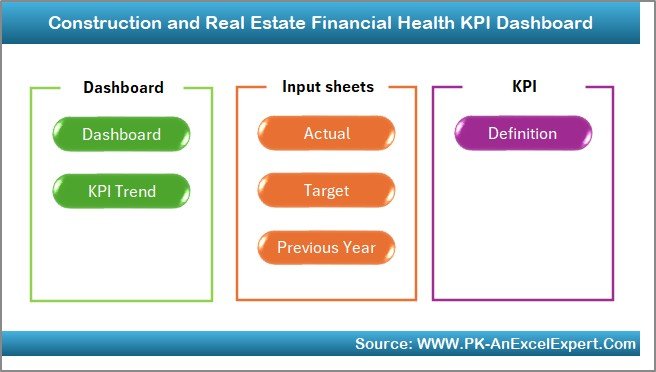
This is the closest single file to Buildertrend’s budget-and-reporting core. It tracks the financial KPIs a builder lives or dies by — gross margin, cash position, receivables, cost variance — with an Actual/Target/Previous-Year input model and a clean dashboard readout.
- Who it is for: owner-operators and office managers who need month-end numbers without a bookkeeper.
- What is inside: a KPI dashboard sheet, a KPI Trend view, separate Actual/Target/Previous-Year input tabs, and a KPI definition sheet so every metric is documented.
- Pure formulas — no macros, no Power Query, no subscription.
Use it to catch a job slipping from 22% to 14% margin before the drywall goes up, to see receivables aging past 45 days, or to compare this quarter’s overhead against last year’s. It answers the “are we actually making money?” question Buildertrend’s Complete tier charges four figures a month to show.
Price: $14.99 — get the Financial Health KPI Dashboard.
Best for: builders who want Buildertrend’s reporting insight without the platform.
2. Construction Project Schedule Calendar in Google Sheets — best value
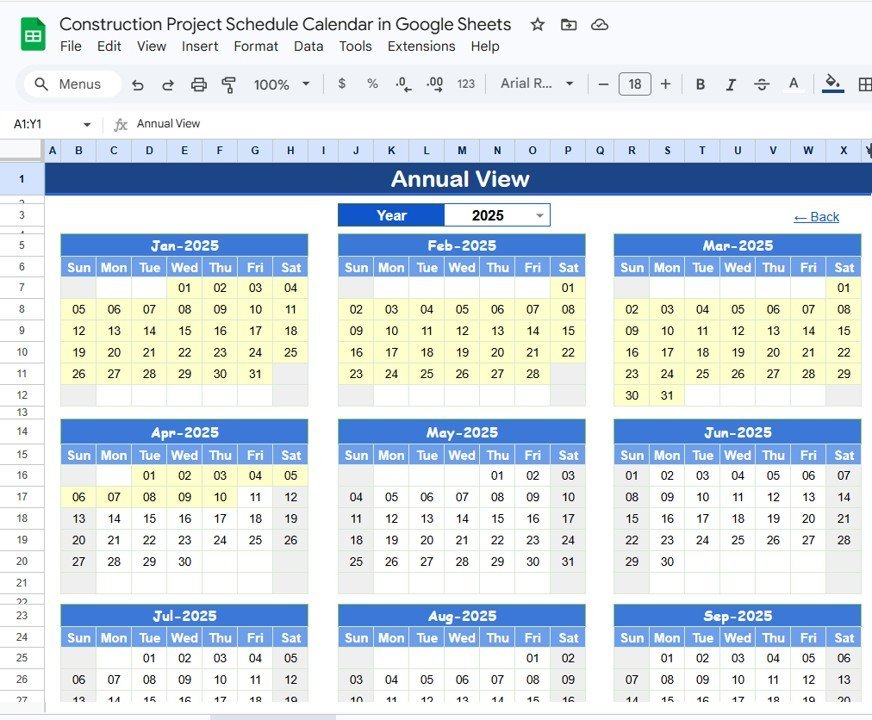
Scheduling is the module that keeps most teams tied to Buildertrend, and this Google Sheets calendar handles it for $4.99. It lays out tasks, trades and milestones on a shareable calendar your subs can open from a phone link — no login, no seat fee.
- Who it is for: builders juggling two to six active jobs who need a live, shareable timeline.
- What is inside: a colour-coded project calendar, task list with start/finish dates, and trade assignments that roll up to a month view.
- Lives in Google Sheets, so every update is instant for everyone with the link.
Share a framing-week calendar with your carpenter, block out the inspection window so nobody books concrete over it, or hand the homeowner a read-only view of their build. It is the cheapest way to replace the one screen your crew opens every morning.
Price: $4.99 — get the Construction Project Schedule Calendar.
Best for: replacing Buildertrend’s scheduling module on a budget.
3. Construction Dashboard in HTML — best all-in visual overview
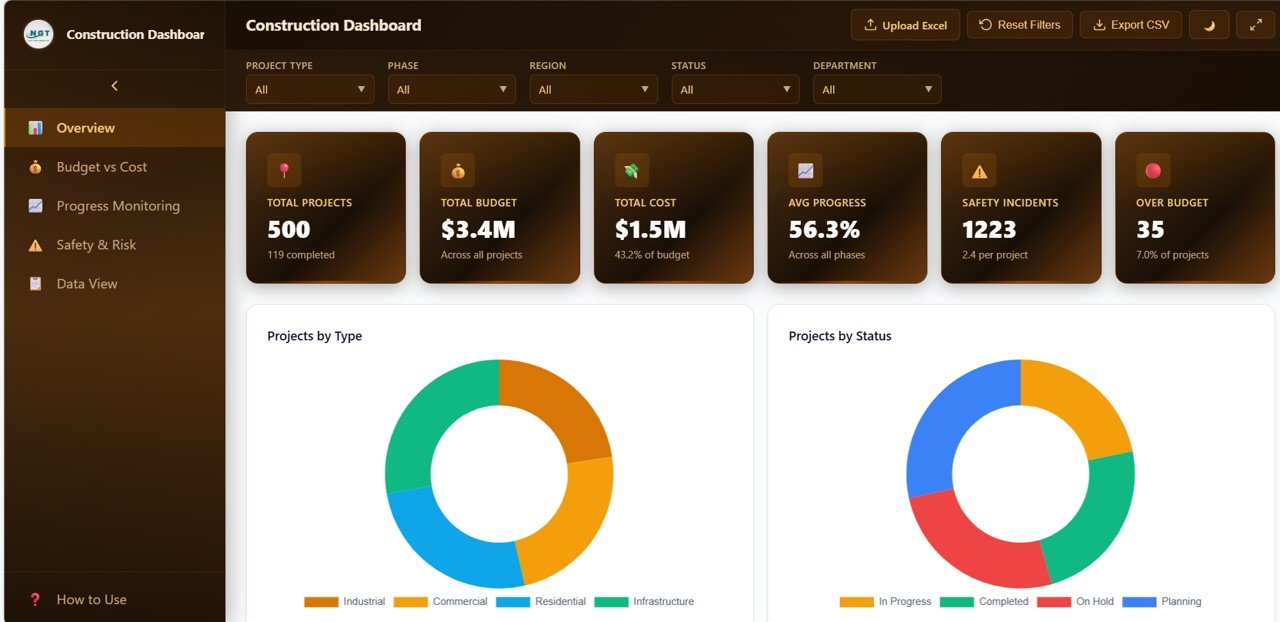
When you want a single at-a-glance project view to show an owner or a partner, this HTML dashboard opens in any browser — no Excel, no Google account, no software to install. It presents progress, cost and status in one branded page you can host or email.
- Who it is for: builders who present to clients or investors and want a polished, device-agnostic readout.
- What is inside: a responsive dashboard layout with KPI cards, progress charts and status sections you can rewire to your own data.
- Runs anywhere a browser does — laptop, tablet or job-site phone.
Drop it on a tablet at the site trailer, send a client a link instead of a PDF, or use it as the “big screen” summary above your working spreadsheets. It gives you Buildertrend’s clean owner-facing look without the owner-portal price.
Price: $12.99 — get the Construction Dashboard in HTML.
Best for: a shareable, install-free project overview.
4. Road & Highway Construction KPI Dashboard in Power BI — best for analytics
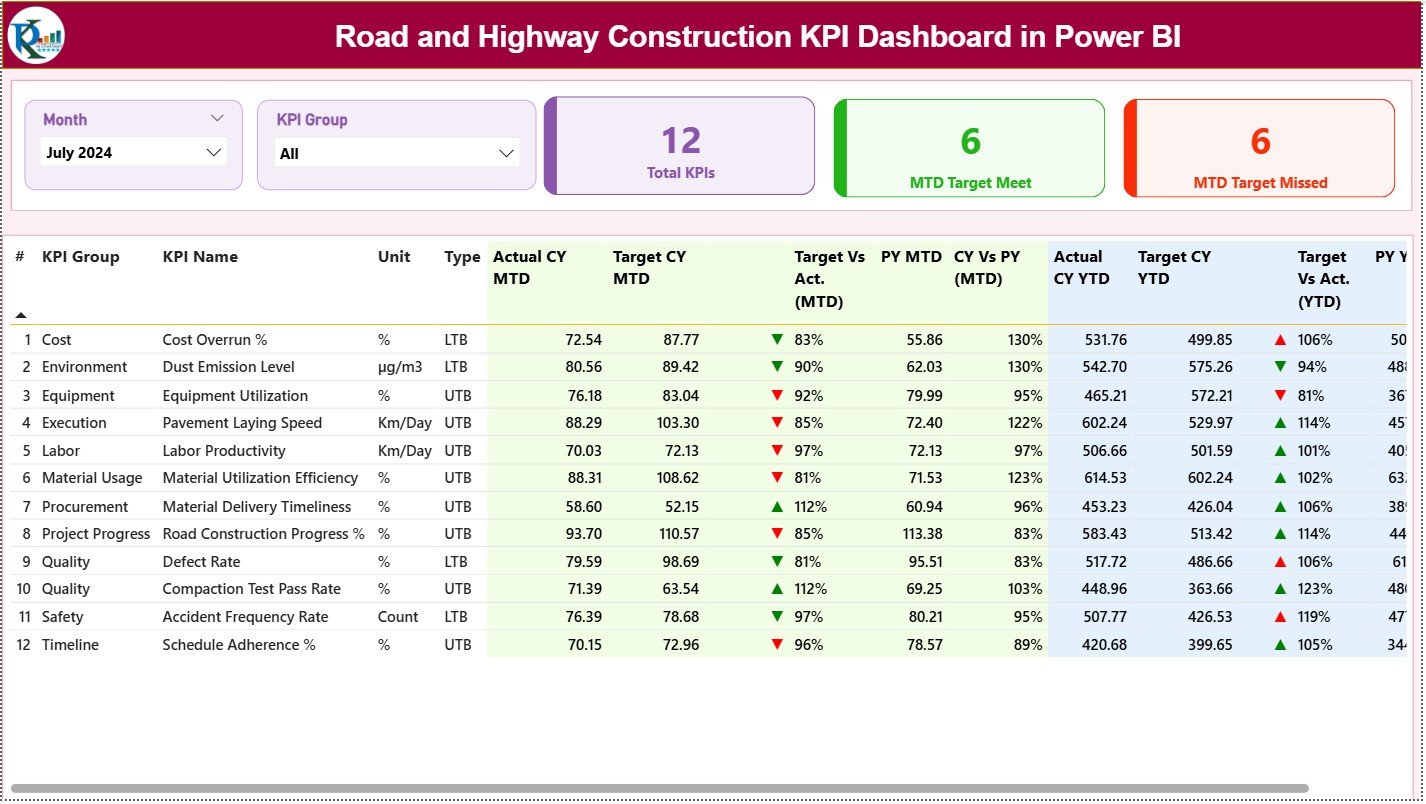
If your work runs past single-family homes into site, road or infrastructure jobs — or you simply want interactive, filterable analytics — this Power BI dashboard is the reporting engine Buildertrend’s Advanced tier tries to be. Slice by project, phase, contractor or period in a click.
- Who it is for: builders and PMs who want drill-down analytics rather than a static sheet.
- What is inside: a Power BI model with cost, progress and productivity KPIs, interactive slicers, and multi-project roll-ups.
- Refreshes against your own data source and exports clean visuals for stakeholder decks.
Compare cost-per-unit across three jobsites, filter to a single subcontractor’s productivity, or track schedule variance by phase. It is the most powerful reporting tool of the six and the natural pick once one spreadsheet stops being enough.
Price: $11.99 — get the Power BI Construction KPI Dashboard.
Best for: interactive, multi-project analytics.
5. Construction & Real Estate Customer Feedback KPI Dashboard in Excel

Buildertrend’s client portal exists largely to keep owners happy; this dashboard measures whether they are. It turns survey scores, complaint counts and response times into a satisfaction readout you can act on — the referral engine a home builder lives on.
- Who it is for: builders who compete on reputation and repeat referrals.
- What is inside: feedback KPI cards, trend charts, and Actual/Target inputs for satisfaction, NPS-style scoring and resolution time.
- 100% formula-driven Excel — open it, type your numbers, read the result.
Track post-handover satisfaction across your last ten builds, flag a jobsite where complaint resolution is creeping past a week, or prove a 90%+ satisfaction score to win the next bid. It is the customer-experience side of Buildertrend, standalone and cheap.
Price: $14.99 — get the Customer Feedback KPI Dashboard.
Best for: protecting your referral pipeline.
6. Budget Approval Schedule in Excel — cheapest pick
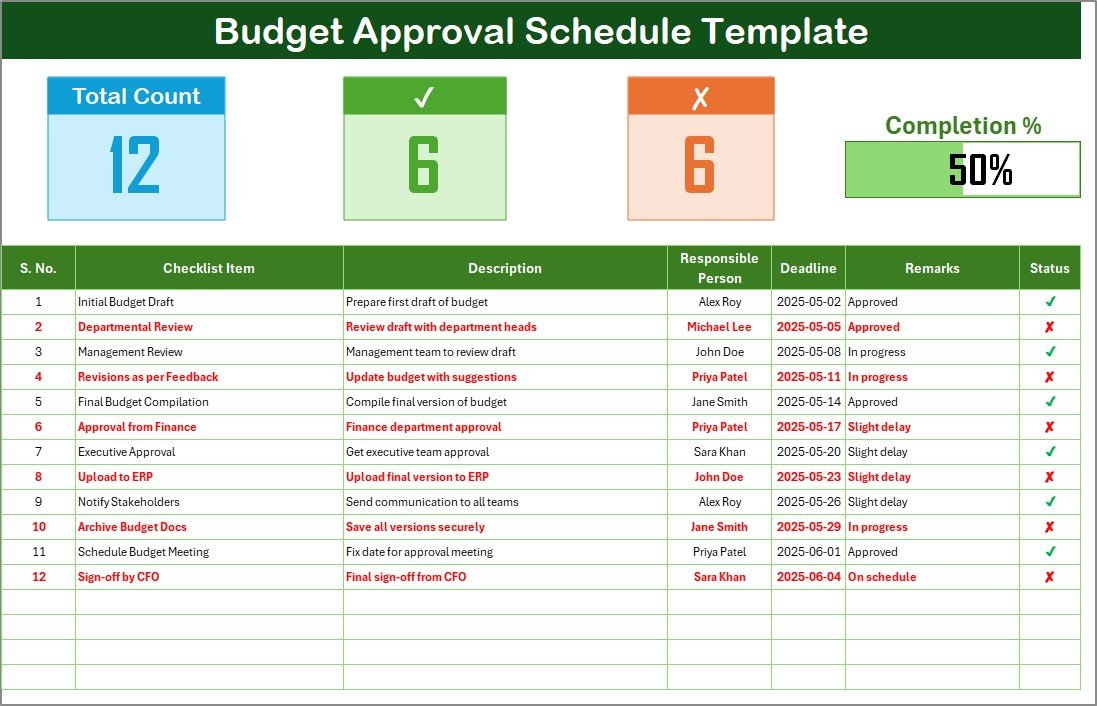
Change orders and budget sign-offs are where small jobs quietly lose money. At $1.99 this Excel schedule gives every budget line an owner, a status and an approval date, so nothing gets built before it is signed off.
- Who it is for: any builder who has ever eaten the cost of an unapproved change.
- What is inside: a line-item approval register with requester, approver, amount, status and date fields, plus a running summary.
- Drop-in Excel — no setup, works the moment you open it.
Log a $3,200 tile upgrade and hold it until the owner approves in writing, keep a paper trail for a disputed allowance, or run a weekly approvals stand-up off one tab. It is the cheapest insurance in this list against scope creep.
Price: $1.99 — get the Budget Approval Schedule.
Best for: killing unapproved change-order losses.
How to choose between them
Match the file to the pain, not the other way round:
- Cash flow is the worry → start with the Financial Health KPI Dashboard ($14.99).
- Missed deadlines are the worry → start with the Schedule Calendar ($4.99).
- Scope creep is the worry → start with the Budget Approval Schedule ($1.99).
- You present to clients or partners → add the HTML Construction Dashboard ($12.99).
- You run several jobs and want analytics → step up to the Power BI KPI Dashboard ($11.99).
Most small builders start with two files — schedule plus financial health — for under $20 and add the rest as they grow. For a broader look at swapping SaaS for spreadsheets, see our Salesforce alternatives in Excel and Domo dashboard alternatives guides.
When Buildertrend is still the right call
This is the honest part. Templates replace Buildertrend’s modules, not its platform, and there are situations where you should pay for the software instead.
- Live subcontractor collaboration at scale. If a dozen subs need to log daily updates, upload photos and get push notifications, a shared spreadsheet will not keep up. Buildertrend’s real-time collaboration is its strongest feature.
- A branded client portal with payments. If homeowners expect to approve selections, view invoices and pay online in one login, Buildertrend’s owner portal and integrated payments do what a spreadsheet cannot.
- Regulated documentation and audit trails. Larger builders needing warranty tracking, lien waivers and a defensible activity log across many users are better served by the platform’s built-in compliance features.
- You are scaling past ~15 concurrent jobs. At that volume the admin savings of an integrated system outweigh the subscription cost, and templates start to fragment.
If two or more of those describe you, keep Buildertrend — and use these templates alongside it for lightweight, offline analysis. If none do, the six templates above cover what you actually use for a fraction of the price.
Frequently asked questions
What is the best Buildertrend alternative for a small home builder?
For most small builders, a bundle of dedicated Excel and Google Sheets templates — the Financial Health KPI Dashboard ($14.99) plus the Construction Project Schedule Calendar ($4.99) — covers the budgeting and scheduling that keep teams on Buildertrend, for a one-time cost under $20 instead of $339+ per month.
How much does Buildertrend cost in 2026?
In 2026 Buildertrend replaced published pricing with volume-based custom quotes tied to your annual construction volume. Its legacy tiers, still quoted by resellers, ran roughly $339–$499 (Essential), $699–$799 (Advanced) and $829–$1,099 (Complete) per month on annual billing. You now request a quote for an exact figure.
Can a spreadsheet really replace Buildertrend?
It can replace the modules most small builders use daily — scheduling, budgeting, approvals, reporting and client feedback. It cannot replace live multi-user subcontractor collaboration, a branded client-payment portal or integrated document compliance. If you rely on those, keep the platform; if you do not, templates cover the rest for far less.
What do the NextGenTemplates construction templates cost?
The six templates in this guide range from $1.99 for the Budget Approval Schedule to $14.99 for the KPI dashboards. Buying all six costs about $61.94 as a one-time purchase — less than a single month on Buildertrend’s cheapest legacy plan, with no recurring fee.
Do these templates work in Excel and Google Sheets?
Yes. The Schedule Calendar is built in Google Sheets; the Financial Health, Customer Feedback and Budget Approval files are Excel; the Construction Dashboard is HTML and the analytics dashboard is Power BI. Most Excel files also open in Google Sheets, though heavy formula workbooks are best kept in Excel.
Are the templates a one-time purchase or a subscription?
Every template is a one-time purchase. You download the file, own it outright and use it on as many projects as you like with no renewal, seat fees or usage limits — the opposite of Buildertrend’s recurring monthly model.
Which template replaces Buildertrend’s scheduling module?
The Construction Project Schedule Calendar in Google Sheets ($4.99) replaces day-to-day scheduling. It gives you a shareable, colour-coded calendar of tasks, trades and milestones that subs open from a link with no login, covering the one screen most crews use every morning.
How do I track job-cost and budgets without Buildertrend?
Use the Construction & Real Estate Financial Health KPI Dashboard in Excel ($14.99). It tracks margin, cash position, receivables and cost variance with Actual/Target/Previous-Year inputs, reproducing the budget-and-reporting insight of Buildertrend’s higher tiers in a single formula-driven workbook.
Is there a free Buildertrend alternative?
Free general-purpose spreadsheet apps exist, but you would build every schedule, budget and dashboard from scratch. These paid templates cost $1.99–$14.99 because the construction-specific structure, formulas and KPIs are already done — usually cheaper than the hours of setup a free blank sheet demands.
Can I use these templates alongside Buildertrend?
Yes, and many builders do. Keep Buildertrend for collaboration and the client portal, and use these templates for fast, offline financial analysis, custom reporting and approval tracking that the platform makes cumbersome. They complement the software as much as they replace it.
Get more construction templates
Ready to drop the monthly bill? Start with the two core files — the Financial Health KPI Dashboard ($14.99) and the Schedule Calendar ($4.99) — for under $20, then add the others as you grow. Browse the full construction and real-estate library on NextGenTemplates, and compare more SaaS swaps in our Power BI Premium alternatives, Qlik Sense alternatives and Looker Studio alternatives guides.
Prefer to watch first? See the templates in action on the NextGenTemplates YouTube channel.