🎉 Black Friday Sale: 40% OFF everything with code BF40 · ends 1 Dec  Shop now →

Vendor Payment Dashboard in Power BI

Power BI - instant download

Original price was: ₹2,499.00.Current price is: ₹1,799.00.
Details, requirements and demo below
Sale!

Vendor Payment Dashboard in Power BI

Original price was: ₹2,499.00.Current price is: ₹1,799.00.

Take full control of your vendor payments with this powerful Vendor Payment Dashboard in Power BI 🚀

🔹 5 Interactive Dashboard Pages – Get complete visibility across Overview, Vendor, Category, Status & Trends.
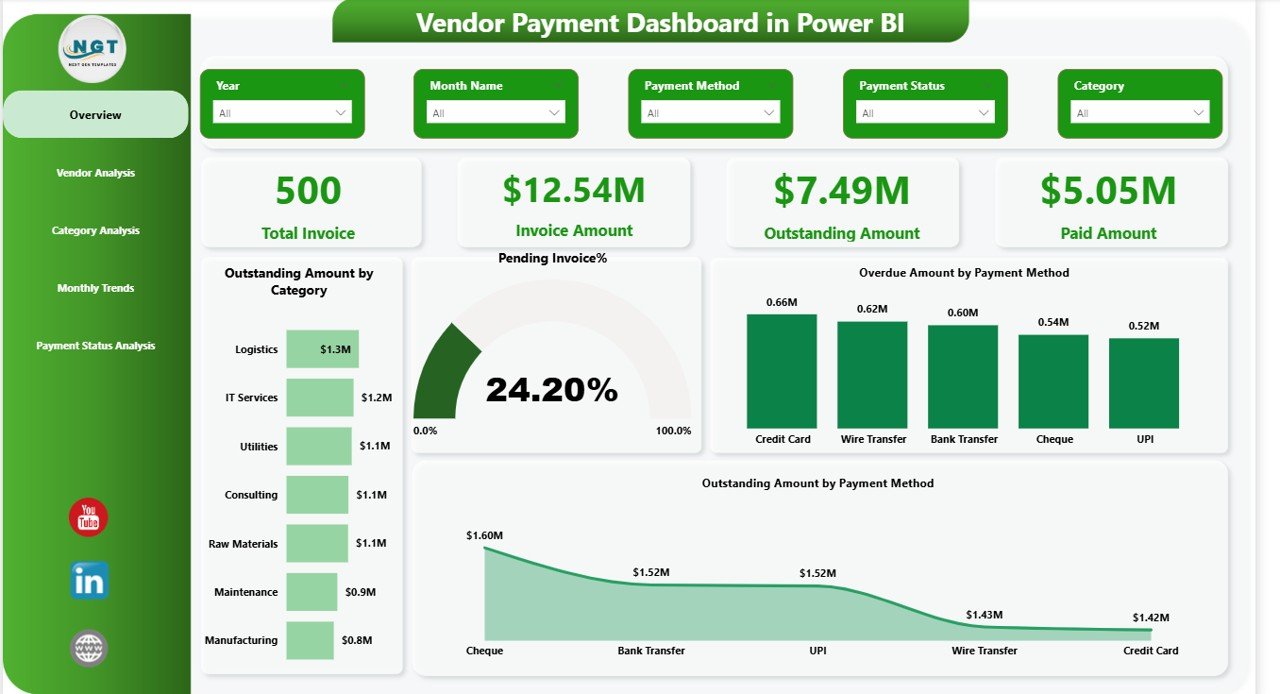
🔹 Real-Time KPI Cards – Track Total Invoices, Outstanding, Paid & Pending %.
🔹 Overdue Alerts – Instantly detect late payments and reduce penalties.
🔹 Vendor-Level Analysis – Monitor vendor-wise payment performance.
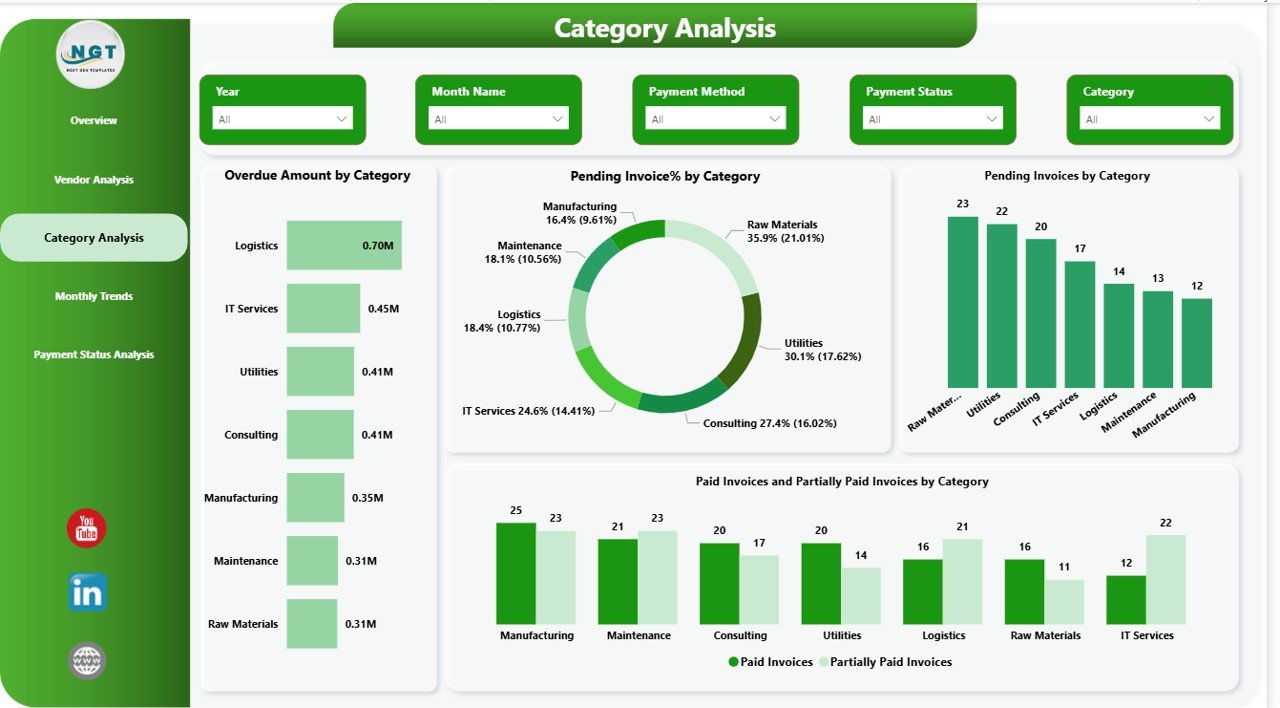
🔹 Category Insights – Identify high-risk spending categories.
🔹 Payment Method Tracking – Analyze outstanding by payment mode.
🔹 Monthly Trend Charts – Improve forecasting and budgeting.
🔹 Interactive Slicers – Filter data by vendor, date, or category in seconds.
🔹 Fully Customizable – Modify visuals and measures easily.

Upgrade your financial control today and eliminate payment chaos!

Customize this template for your business (optional)

Handled by email: we contact you within 1 business day. One revision round included. What is included

- +
Have your own data? Build a dashboard from your Excel, CSV or Google Sheets file free in Dashboard Studio →

💡 Buy any 2 templates and save 20% automatically at checkout.

Included in All-Access Templates. Get this plus 7,000+ templates for ₹4,999.00 a year. Compare plans →
Pricing country
Prices follow your selected country; checkout uses your billing country.
Power BI: Raw Data to Professional Business Dashboards courseLaunch offer
🎓 NEXTGENTEMPLATES ACADEMY
Like this Power BI dashboard? Learn to build your own.
Power BI: Raw Data to Professional Business Dashboards

Power Query, data modeling, DAX, time intelligence and dashboard design, from messy raw files to an executive dashboard. 9h 19m of video by PK, with practice files, quizzes and a capstone.

Are overdue invoices silently damaging your cash flow? Are vendor follow-ups becoming stressful and time-consuming? If yes, it’s time to upgrade your financial visibility with our powerful Vendor Payment Dashboard in Power BI.

This ready-to-use Power BI solution transforms complex invoice data into clear, interactive, and real-time insights. Instead of struggling with scattered Excel sheets, you can now monitor outstanding balances, overdue amounts, payment trends, and vendor performance — all from one centralized dashboard.

Take control of your vendor payments before they control your business.


🚀 Key Features of Vendor Payment Dashboard in Power BI

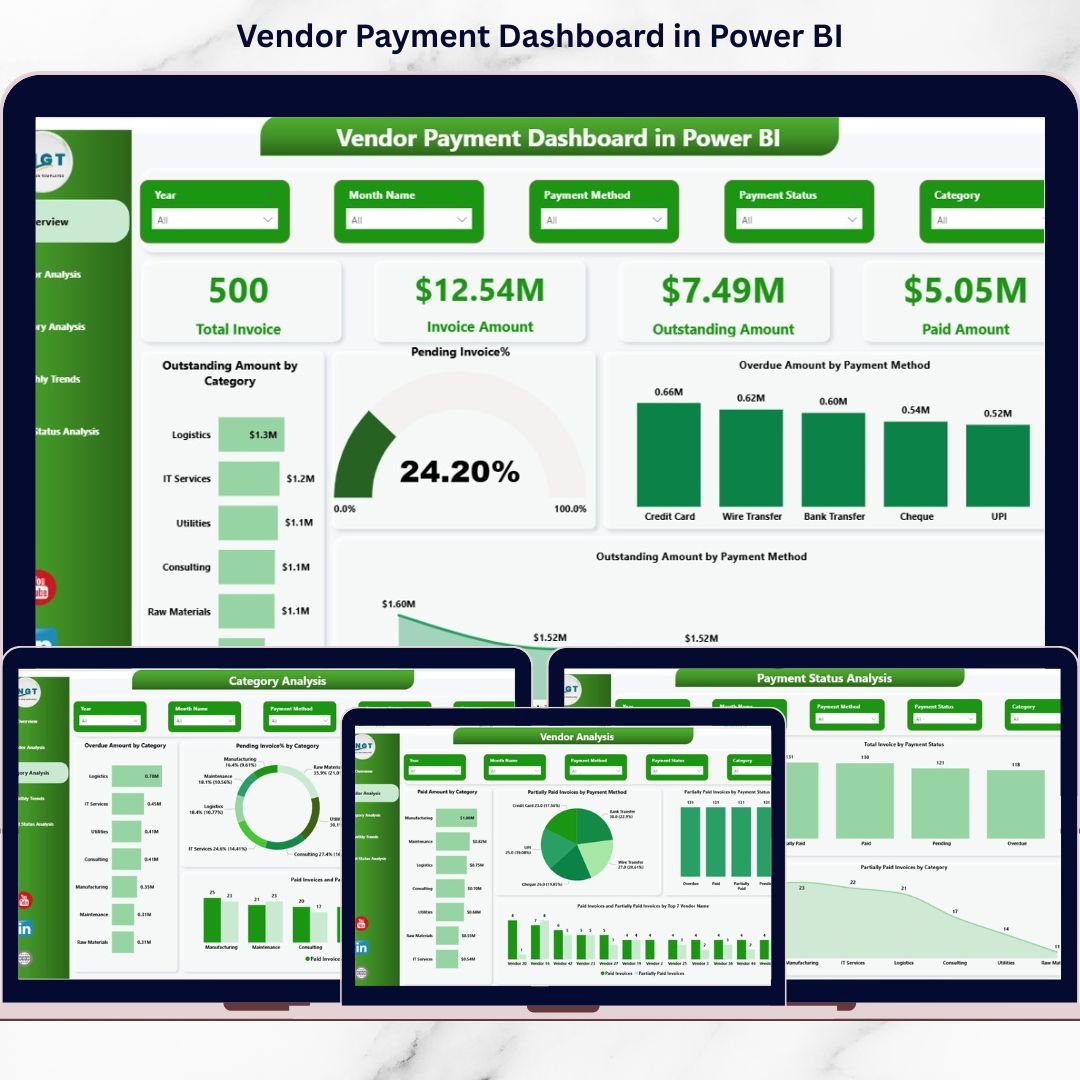
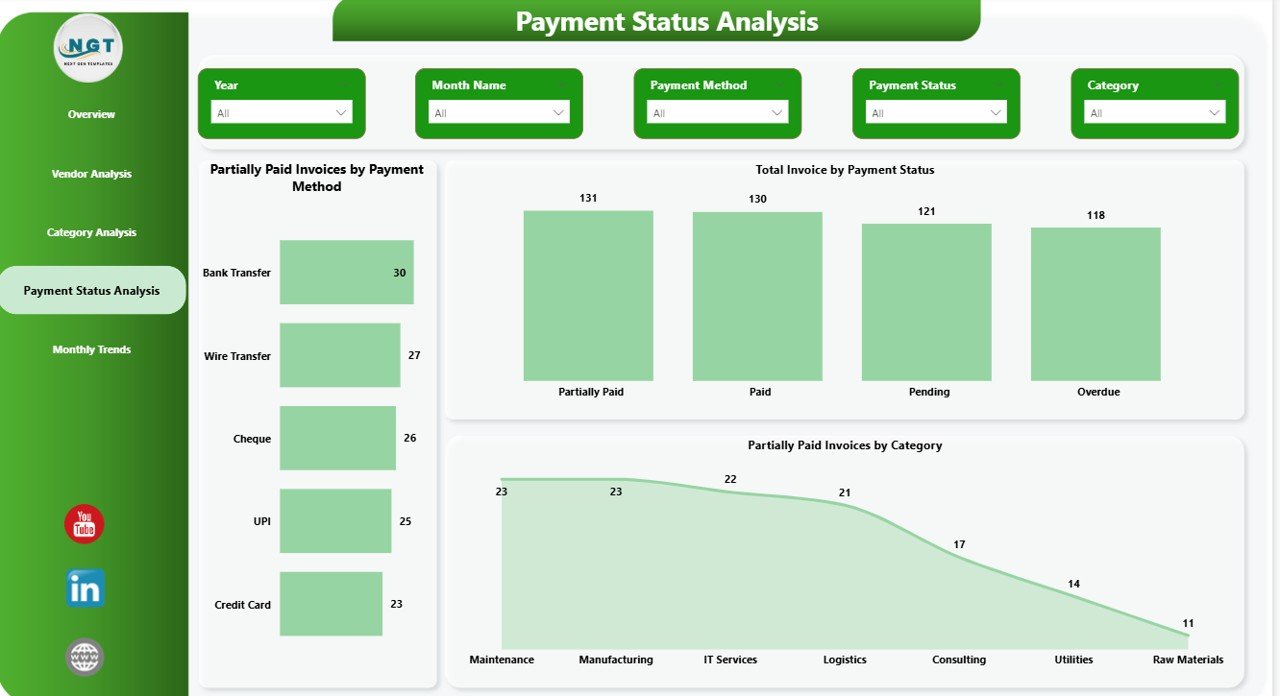
📊 5 Interactive Dashboard Pages – Overview, Vendor Analysis, Category Analysis, Payment Status Analysis, and Monthly Trends for complete visibility.

💳 Real-Time KPI Tracking – Instantly monitor Total Invoices, Invoice Amount, Outstanding Amount, Paid Amount, and Pending %.

⚠️ Overdue Invoice Alerts – Identify high-risk payments quickly using clear visual indicators.

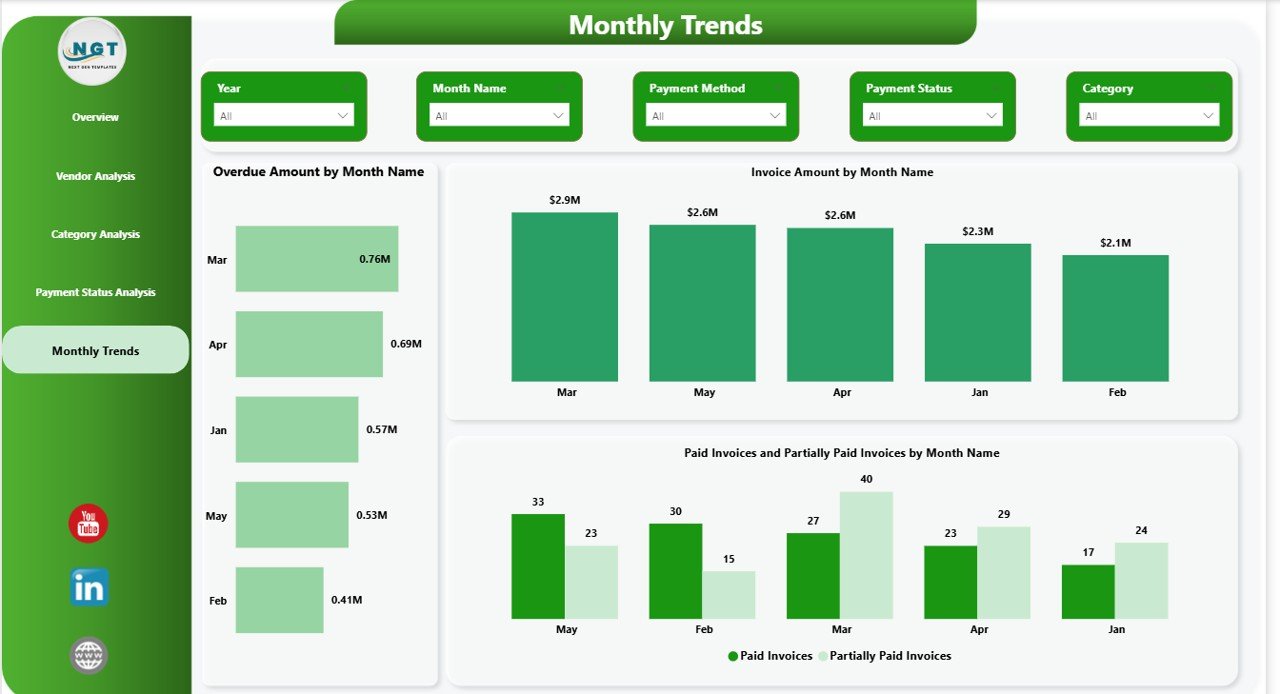
📈 Monthly Trend Analysis – Track invoice amounts, overdue payments, and payment behavior month by month.

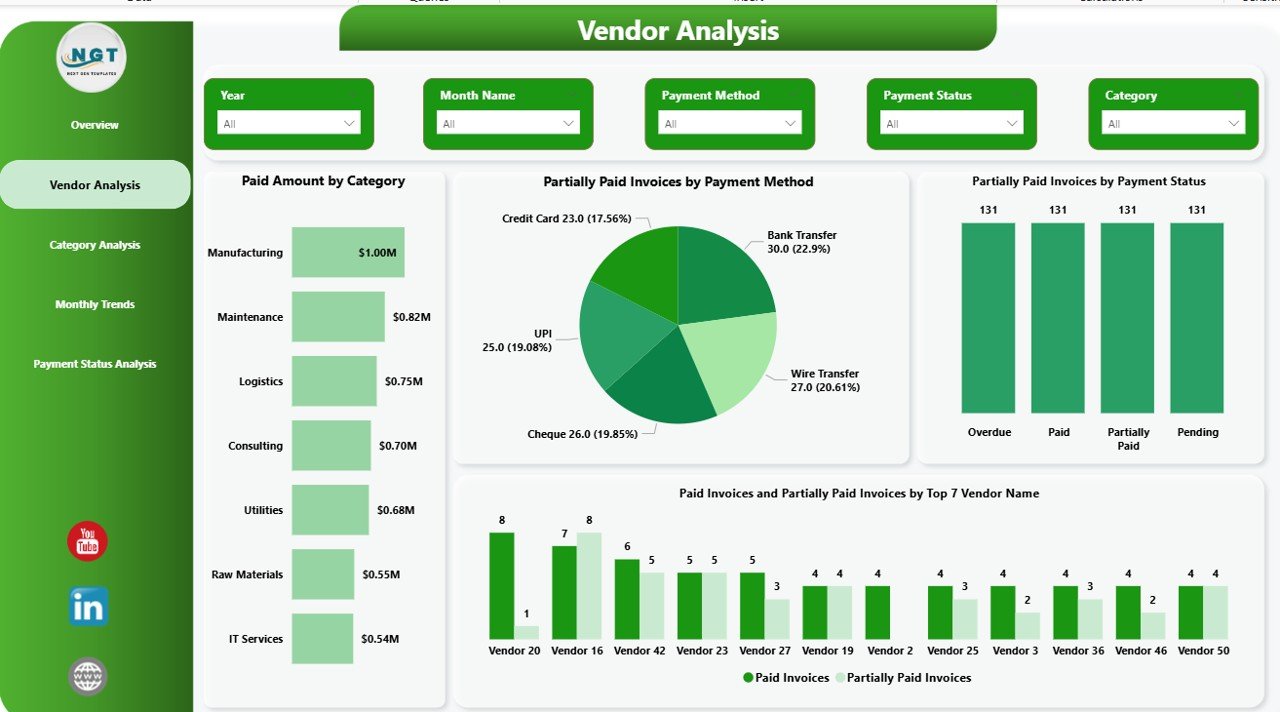
🏷️ Category & Vendor Insights – Analyze spending and payment performance by vendor and category.

🎯 Payment Method Analysis – Understand outstanding and overdue amounts by payment method.

🔎 Dynamic Slicers & Filters – Filter data by vendor, category, payment method, or date in seconds.
Vendor Payment Dashboard in Power BI

📦 What’s Inside the Vendor Payment Dashboard in Power BI

When you purchase this digital product, you get:

✔️ Fully designed Power BI (.pbix) file
✔️ 5 structured dashboard pages
✔️ Pre-built KPI cards and calculated measures
✔️ Interactive charts (Bar, Donut, Line, KPI Cards)
✔️ Clean data model structure
✔️ Ready-to-use visuals with slicers
✔️ Easy-to-edit layout for customization

This dashboard is designed for immediate implementation. Simply connect your data and start analyzing.


🛠️ How to Use the Vendor Payment Dashboard

Using this dashboard is simple and practical:

1️⃣ Import your invoice dataset into Power BI.
2️⃣ Ensure required fields like Invoice Number, Vendor Name, Invoice Date, Due Date, Invoice Amount, Paid Amount, Payment Status, and Payment Method are included.
3️⃣ Refresh the data model.
4️⃣ Use slicers to filter by vendor, category, or date.
5️⃣ Monitor overdue invoices and outstanding balances instantly.

You can also customize visuals, colors, and measures according to your business requirements.


👥 Who Can Benefit from This Vendor Payment Dashboard?

This dashboard is ideal for:

💼 Finance Managers
📊 Accounts Payable Teams
🏢 CFOs and Financial Controllers
🛒 Procurement Managers
📈 Business Owners
🏭 Small & Medium Enterprises

Whether you manage 50 invoices or 5,000 invoices per month, this solution scales with your business.


💡 Why This Dashboard Is a Game-Changer

Instead of spending hours preparing reports, you can now refresh your data and get instant clarity. Moreover, the dashboard highlights overdue invoices clearly, helping you reduce penalties and improve vendor relationships.

Because it centralizes payment data, leadership can forecast cash flow more accurately. As a result, businesses strengthen financial control and improve strategic planning.

Stop reacting to payment issues. Start managing them proactively.


 Click here to read the Detailed blog post

Watch the step-by-step video tutorial:


 Visit our YouTube channel to learn step-by-step video tutorials

YouTube Channel

Compatibility and Requirements

  • Works in Power BI Desktop, which is free. The file is a Power BI (.pbix) report.
  • Your invoice data needs Invoice Number, Vendor Name, Invoice Date, Due Date, Invoice Amount, Paid Amount, Payment Status and Payment Method. Microsoft explains how to get the app in Get Power BI Desktop.

Frequently Asked Questions

How many dashboard pages are included?

Five pages: Overview, Vendor Analysis, Category Analysis, Payment Status Analysis and Monthly Trends.

Which KPIs does it show?

Total Invoices, Invoice Amount, Outstanding Amount, Paid Amount and Pending %. Overdue invoices are marked with visual indicators.

What data do I need to load?

Invoice Number, Vendor Name, Invoice Date, Due Date, Invoice Amount, Paid Amount, Payment Status and Payment Method. Import the dataset into Power BI, refresh the data model and the visuals update.

Can I filter by vendor, category or date?

Yes. Slicers let you filter by vendor, category, payment method or date.

Is there an Excel or Google Sheets version?

Yes. See the Vendor Payment Dashboard in Excel and the Vendor Payment Dashboard in Google Sheets.

Related Vendor Templates

Browse all Power BI dashboards.
Frequently asked questions

What do I need to open it?
Power BI Desktop, which is free from Microsoft (Windows). No Power BI Pro licence is needed to open, edit or refresh the file.
Does it work on Mac?
Power BI Desktop runs on Windows only. On a Mac you can use a Windows virtual machine, or publish the report to the Power BI Service and view it in a browser.
What is in the download?
The .pbix report and the Excel data file that feeds it (newer products also include a PDF user manual).
How do I use my own data?
Paste your data over the sample rows in the Excel file (keep the column headers), then click Home > Refresh in Power BI Desktop. To use a different file, use Transform data to point the source to it.
Do I need Power BI Pro?
Only if you want to publish the report to the Power BI Service and share it online with colleagues. Opening and editing on your PC is free.
Can I edit the visuals?
Yes - every page, visual, measure and colour is editable in Power BI Desktop.
Is it a one-time payment or a subscription?
One-time payment. No subscription, no per-user fees and nothing to renew - the file is yours to keep.
How do I get the file after payment?
Instantly. The download link appears on screen after checkout, is emailed to you, and stays under My Account > Downloads on our website. If the email does not arrive within a few minutes, check your spam or promotions folder.
Is a user manual included?
Most of our newer products include a PDF user manual in the download. If yours does not have one, message us with your order number and we will send it.
Do I get free updates?
Bug fixes are always free - if something does not work as described, we fix it and send you the corrected file. New versions with new features are not included in the price, unless this product's description says otherwise.
Can you customise it for me?
Yes. Small changes to this template (your columns, categories, logo, colours, minor layout) cost the template price plus $40-80 (Rs 3,000-6,000 + GST), quoted once you send your list. A fully custom build is usually $100-200 (Rs 8,000-18,000 + GST) with two revision rounds. Email your requirements to [email protected] or message us on WhatsApp.
Can I use it for my business or my clients?
Yes, for your own personal or internal business use, for as long as you like. Reselling or redistributing the template is not allowed.
What is your refund policy?
Because these are digital downloads, they are non-refundable once delivered - except when the product does not match its description (report it within 48 hours of purchase) or there is a technical problem our team cannot fix within 72 hours. Email [email protected] with your order number.
How do I get help?
Email [email protected] (Mon-Fri, 10 AM-7 PM IST) or message us on WhatsApp +91 80770 90260 (chat only, no calls). Please include your order number.

Still have a question? Click Need help? at the bottom-left to ask our assistant, or message us on WhatsApp.

Application

Power BI

Template Type

Dashboard

Price

Paid

Business Or Department

Supply Chain and Procurement

You may also like…

Vendor Payment Dashboard in Power BIVendor Payment Dashboard in Power BI
Original price was: ₹2,499.00.Current price is: ₹1,799.00.
- +
Have your own data? Build a dashboard from your Excel, CSV or Google Sheets file free in Dashboard Studio →
Scroll to Top