

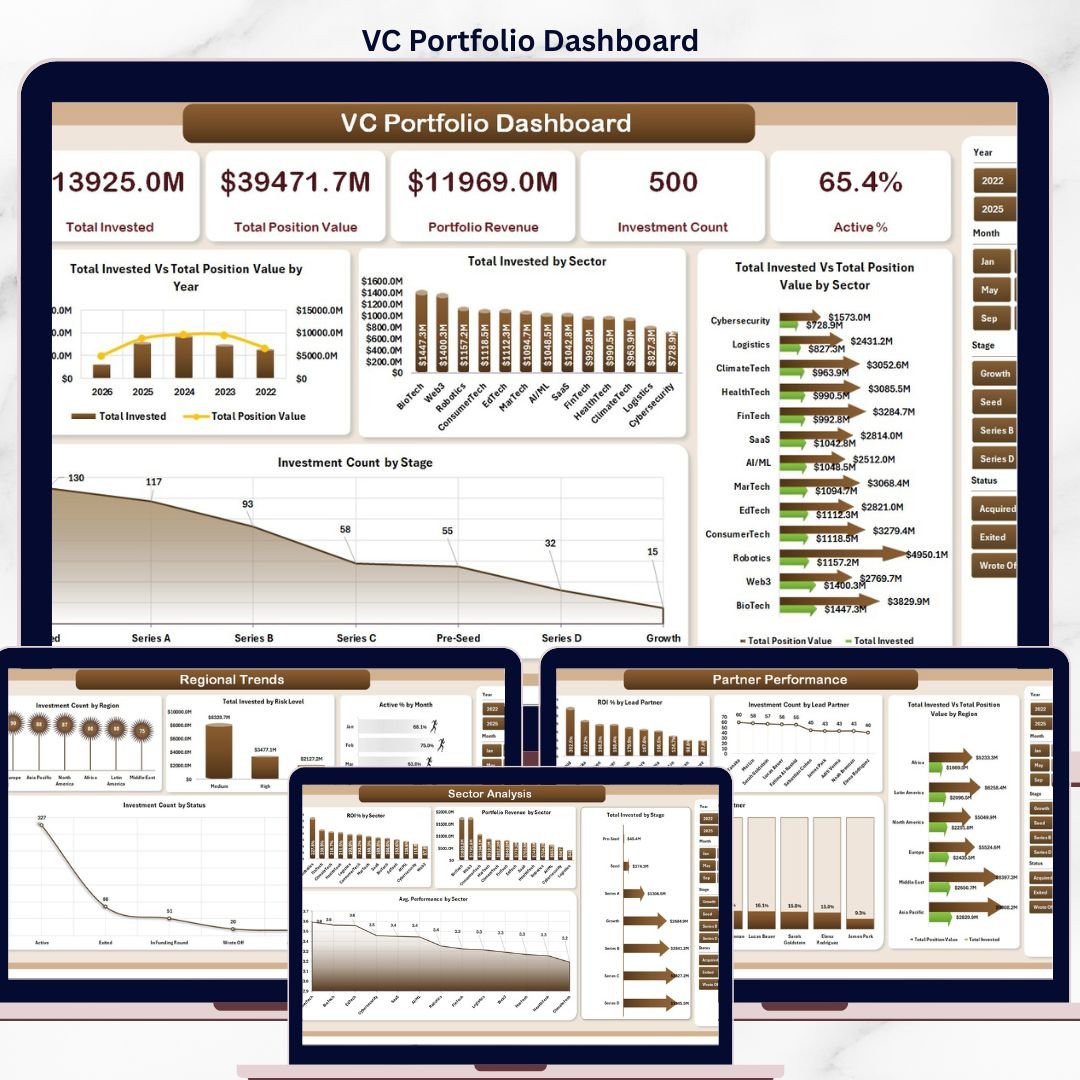



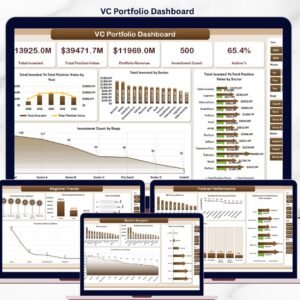
The VC Portfolio Dashboard in Excel tracks 5 fund-level KPIs and 20+ pivot-driven charts across 5 interactive analytics pages, covering every dimension a venture investor reviews monthly: invested capital, position value, portfolio revenue, ROI by sector and stage, lead partner performance, runway, monthly burn, and regional concentration. Setup takes under 10 minutes — paste your portfolio data into the Data sheet, hit Refresh All, and every chart, KPI card, and slicer updates automatically.
🌍 Join 10,000+ customers in 180+ countries using NextGenTemplates to replace paid SaaS tools with one-time-purchase Excel, Google Sheets, Power BI, and HTML templates.
✅ Instant download · One-time payment · No subscription · No per-user fees · Lifetime access
🔑 Key Features of the VC Portfolio Dashboard in Excel
🔹 5 fully-interactive analytics pages — Overview, Sector Analysis, Stage Analysis, Partner Performance, and Regional Trends — plus a structured Data sheet and a hidden Support sheet that holds the pivot engine.
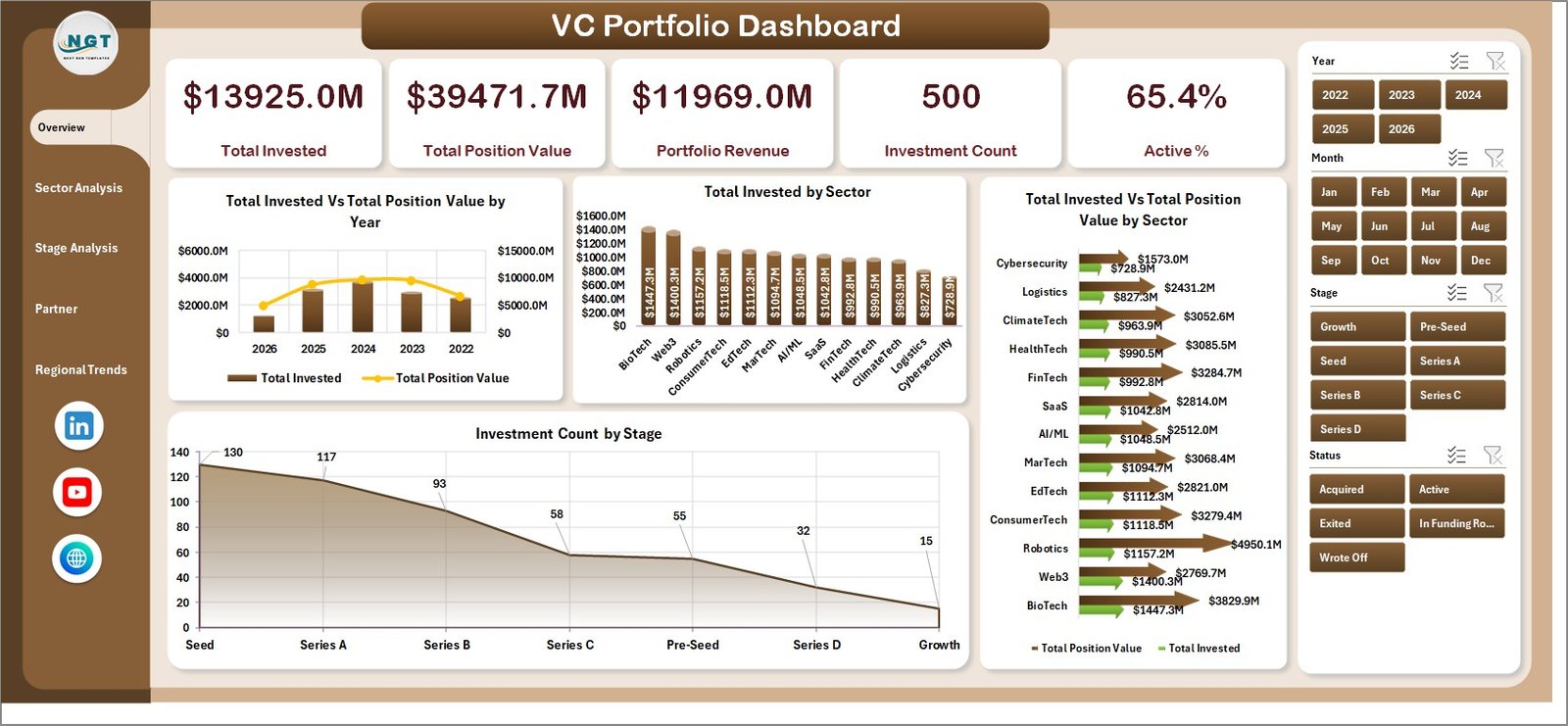
🔹 5 high-level KPI cards on the Overview page: Total Invested, Total Position Value, Portfolio Revenue, Investment Count, and Active % — all driven by pivot-table SUM, COUNT, and AVERAGE measures so the numbers respond instantly to slicer selections.
🔹 20+ pivot-driven charts covering Total Invested vs. Total Position Value by Year, ROI % by Sector, ROI % by Lead Partner, Avg. Monthly Burn by Stage, Avg. Runway Months by Stage, Total Invested by Risk Level, Active % by Month, Exit % by Lead Partner, and many more.
🔹 Slicers on every page for one-click filtering by sector, stage, lead partner, region, status, and risk level — perfect for LP reporting cuts and quarterly partner reviews.
🔹 Native Excel only — pivot tables, pivot charts, slicers, and KPI cards. No add-ins, no VBA macros, no Power Query required. Compatible with Excel 2016, 2019, 2021, Microsoft 365, and Excel for Mac.
🔹 One-click refresh system — update the Data sheet, click Data → Refresh All, and every page recalculates in seconds.
🔹 Fully unlocked — no protected sheets, no hidden formulas. Add custom KPIs, change colors, plug in extra fields. The file is yours forever.
🔹 Sample portfolio dataset included so you can explore the dashboard before loading your own data.
📦 What’s Inside the VC Portfolio Dashboard in Excel
The workbook is built around a 7-tab structure: 5 dashboard pages, 1 Data sheet, and 1 Support sheet (pivot engine). Every page uses the same slicer set so a single filter — for example, picking “Series A” on the Stage slicer — propagates across the entire dashboard.
VC Portfolio Dashboard in Excel
1. Overview Page — The fund-level command centre. The five KPI cards at the top (Total Invested, Total Position Value, Portfolio Revenue, Investment Count, Active %) are followed by four interactive charts: Total Invested vs. Total Position Value by Year (vintage-year value creation), Total Invested by Sector (capital allocation), Total Invested vs. Total Position Value by Sector (where the markups are), and Investment Count by Stage (deal-stage mix).
Sector Analysis
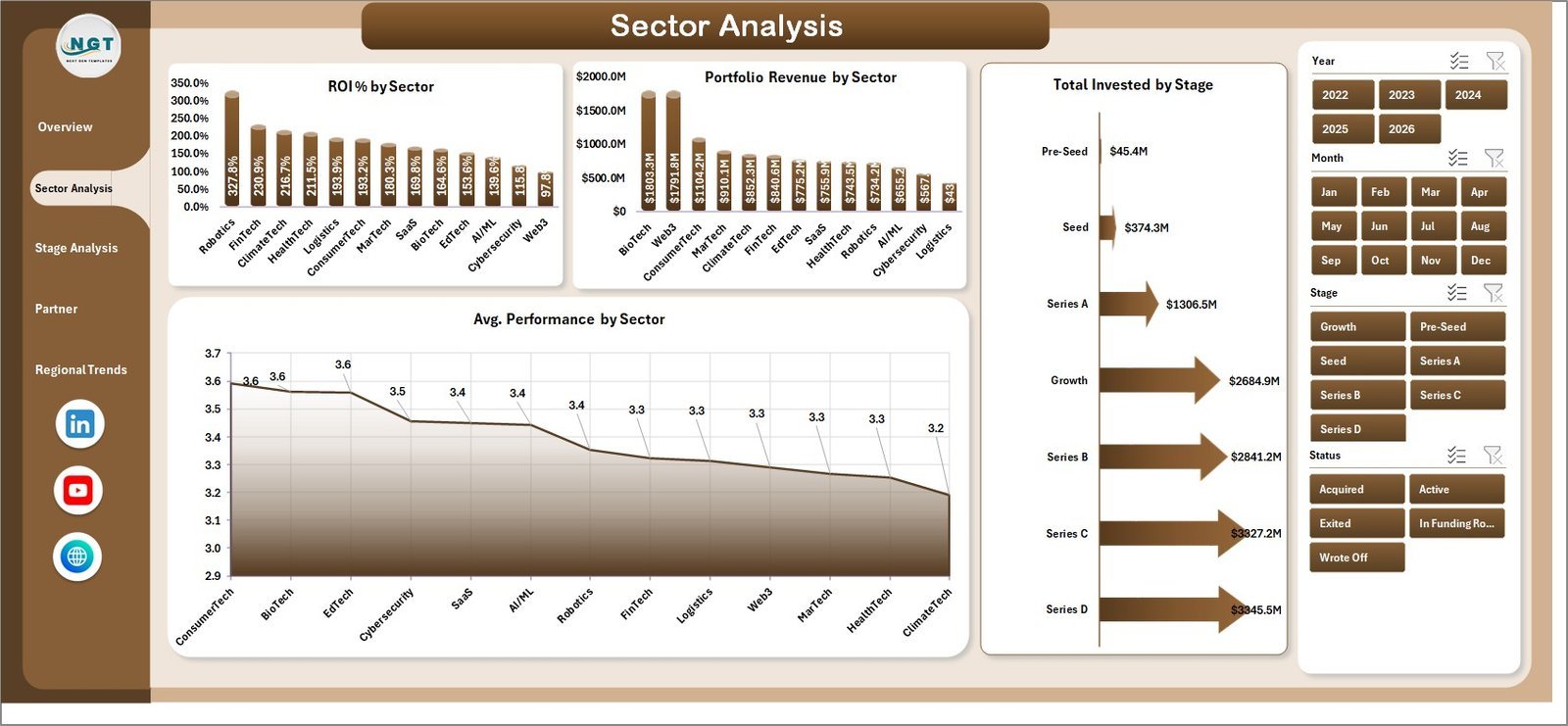
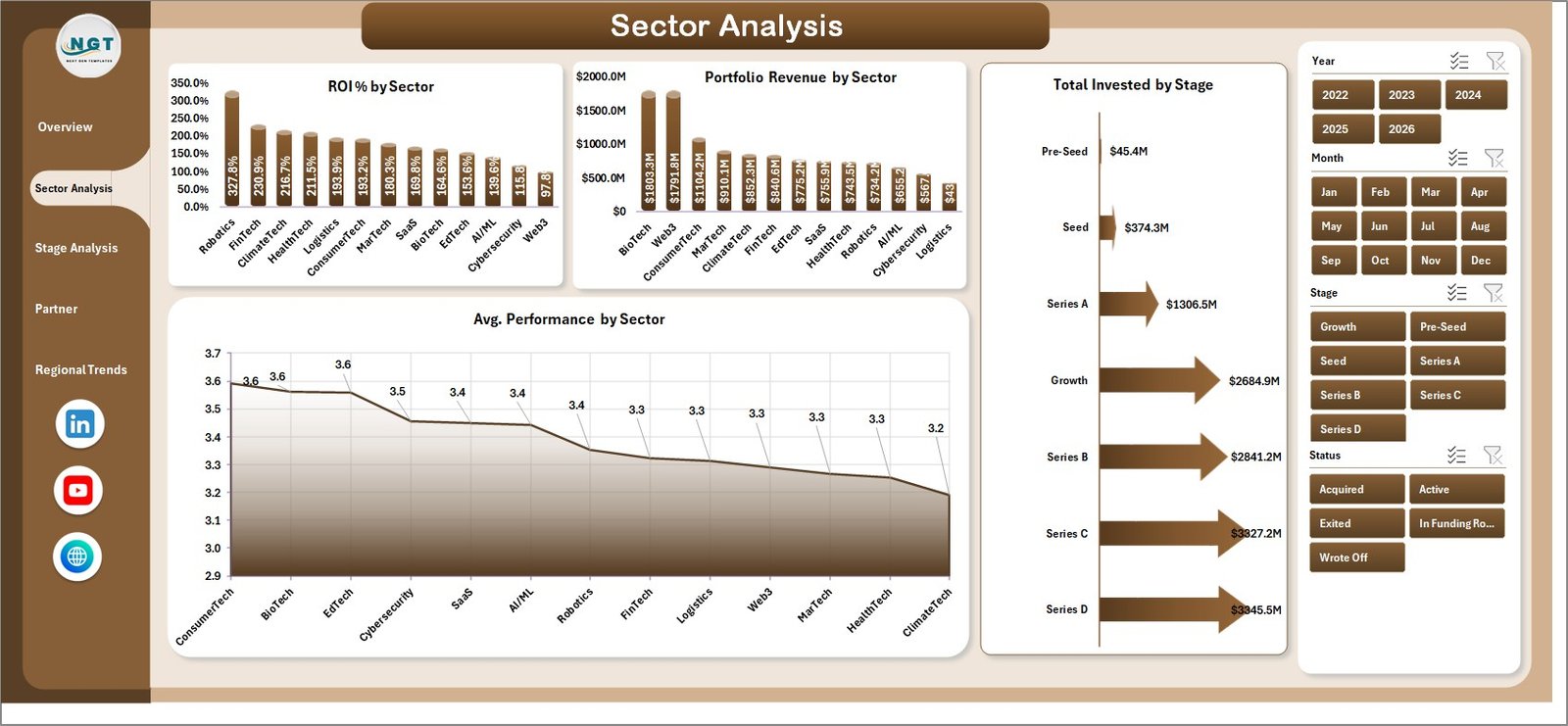
2. Sector Analysis — The page partners and IC members use to compare sector performance. Charts: ROI % by Sector, Portfolio Revenue by Sector, Total Invested by Stage, and Avg. Performance by Sector. Use this view to decide where to deploy the next fund, which sectors to double down on, and where to pause new commitments.
Stage Analysis
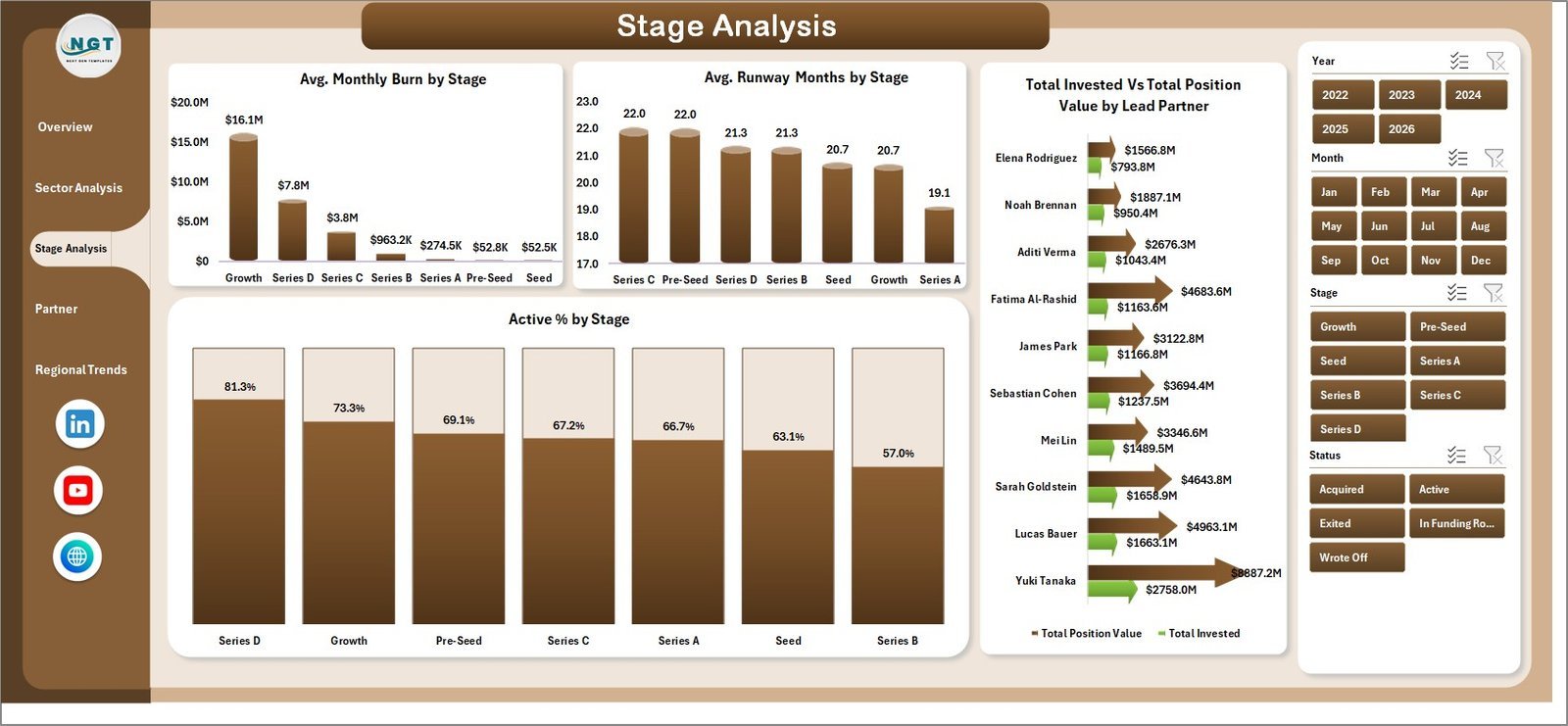
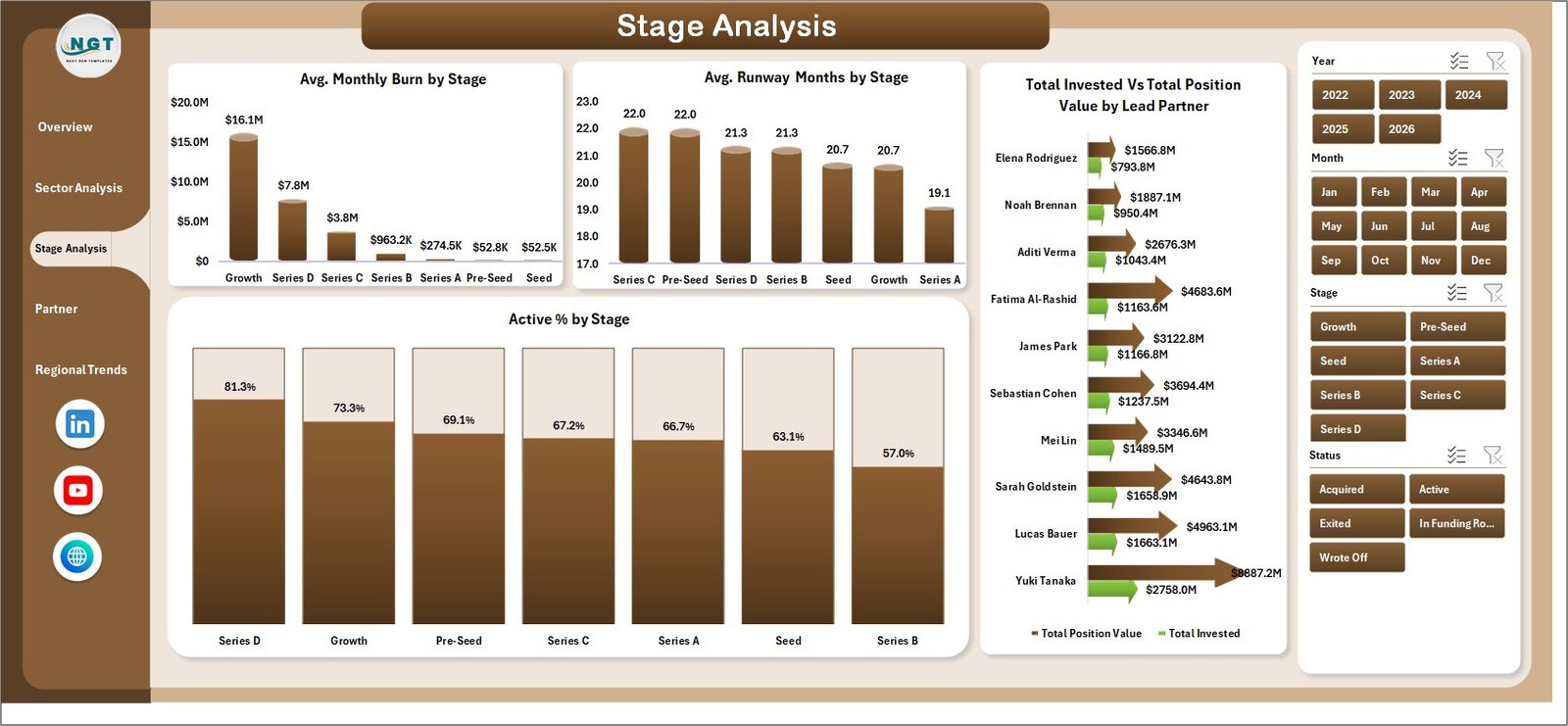
3. Stage Analysis — The operational health page. Charts: Avg. Monthly Burn by Stage (cash-out velocity), Avg. Runway Months by Stage (where the next funding pressure is), Total Invested vs. Total Position Value by Lead Partner (partner-level value creation), and Active % by Stage (survival rate by maturity). This is the page that catches Series A companies running out of runway before the partner meeting flags it.
Partner Performance
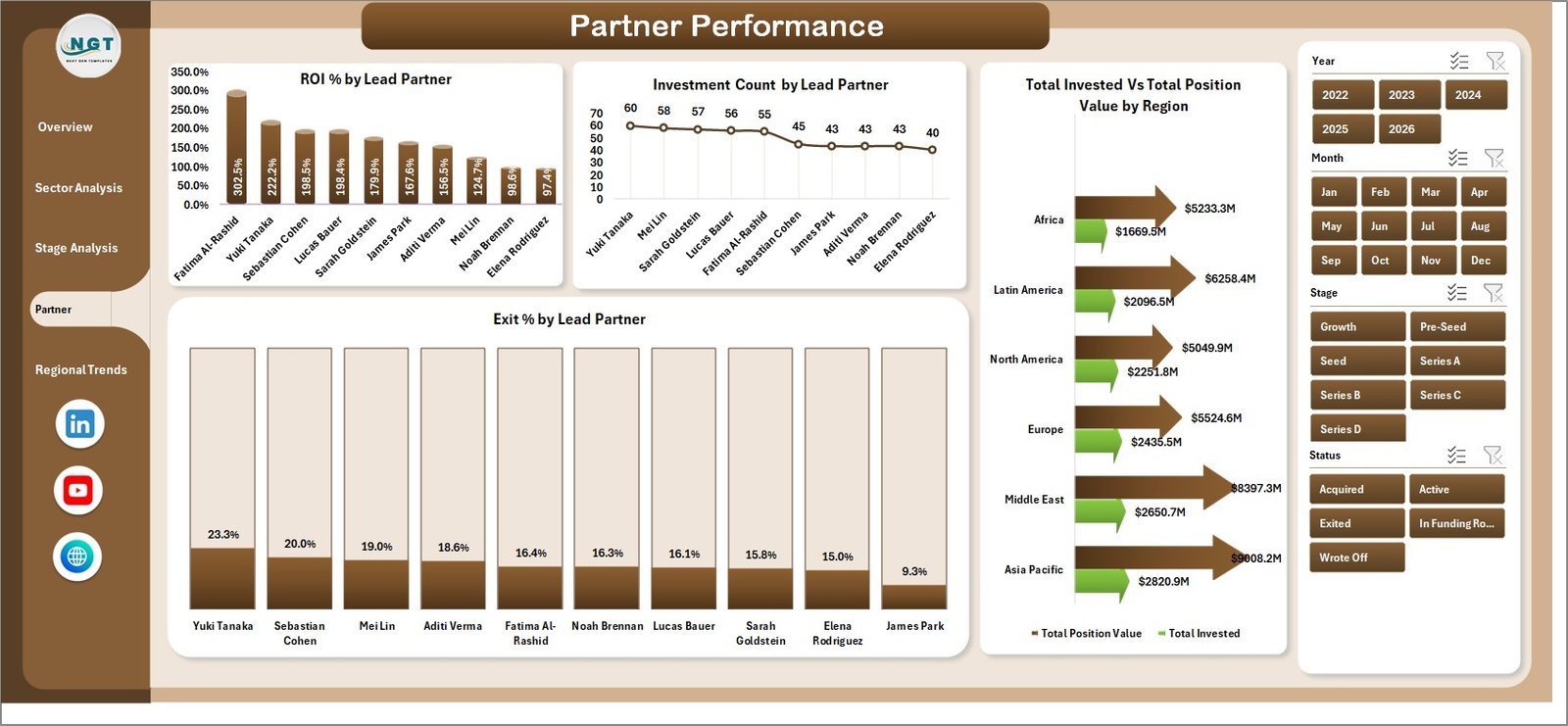
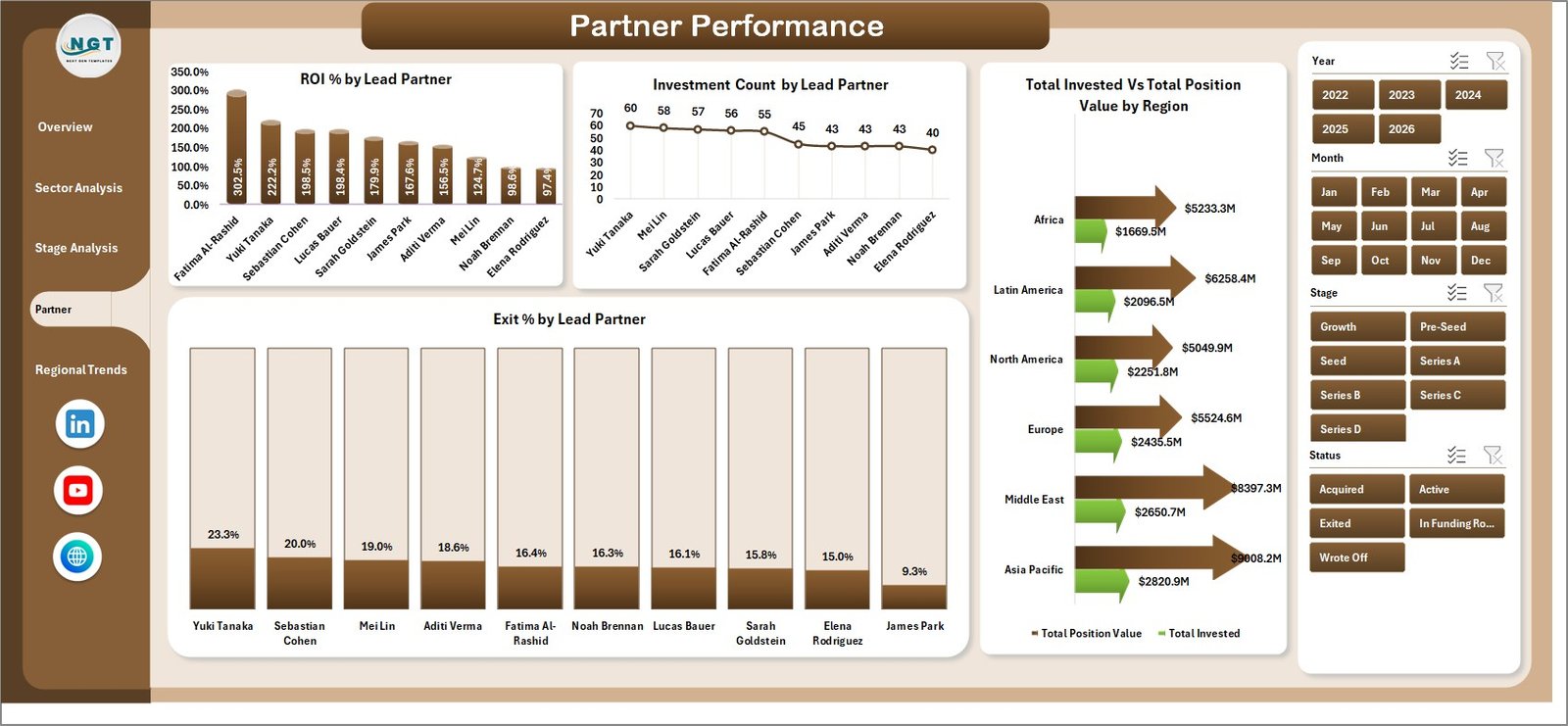
4. Partner Performance — The carry-allocation page. Charts: ROI % by Lead Partner, Investment Count by Lead Partner (deal volume per partner), Total Invested vs. Total Position Value by Region, and Exit % by Lead Partner. Managing partners and HR use this view for compensation reviews and for deciding which partners get larger discretionary budgets next vintage.
Regional Trends
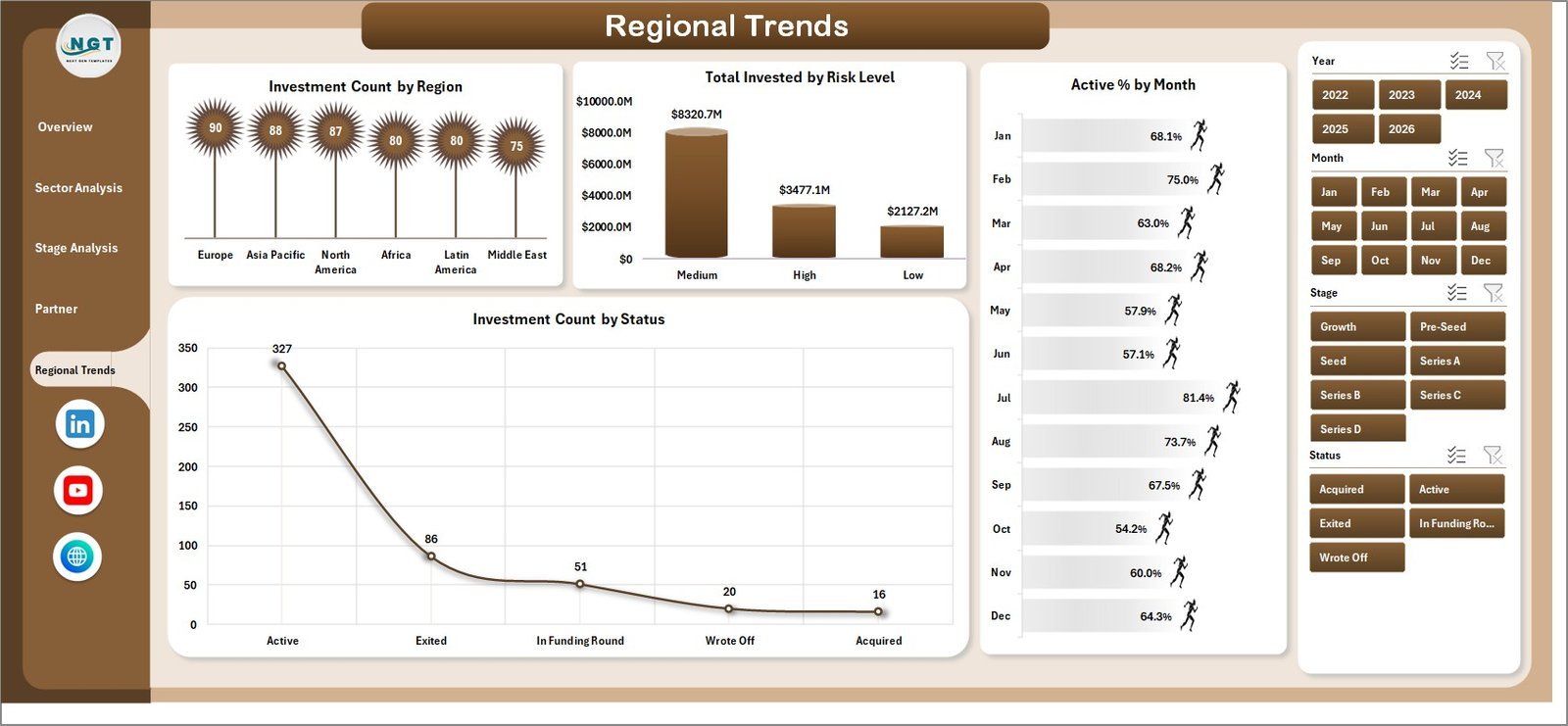
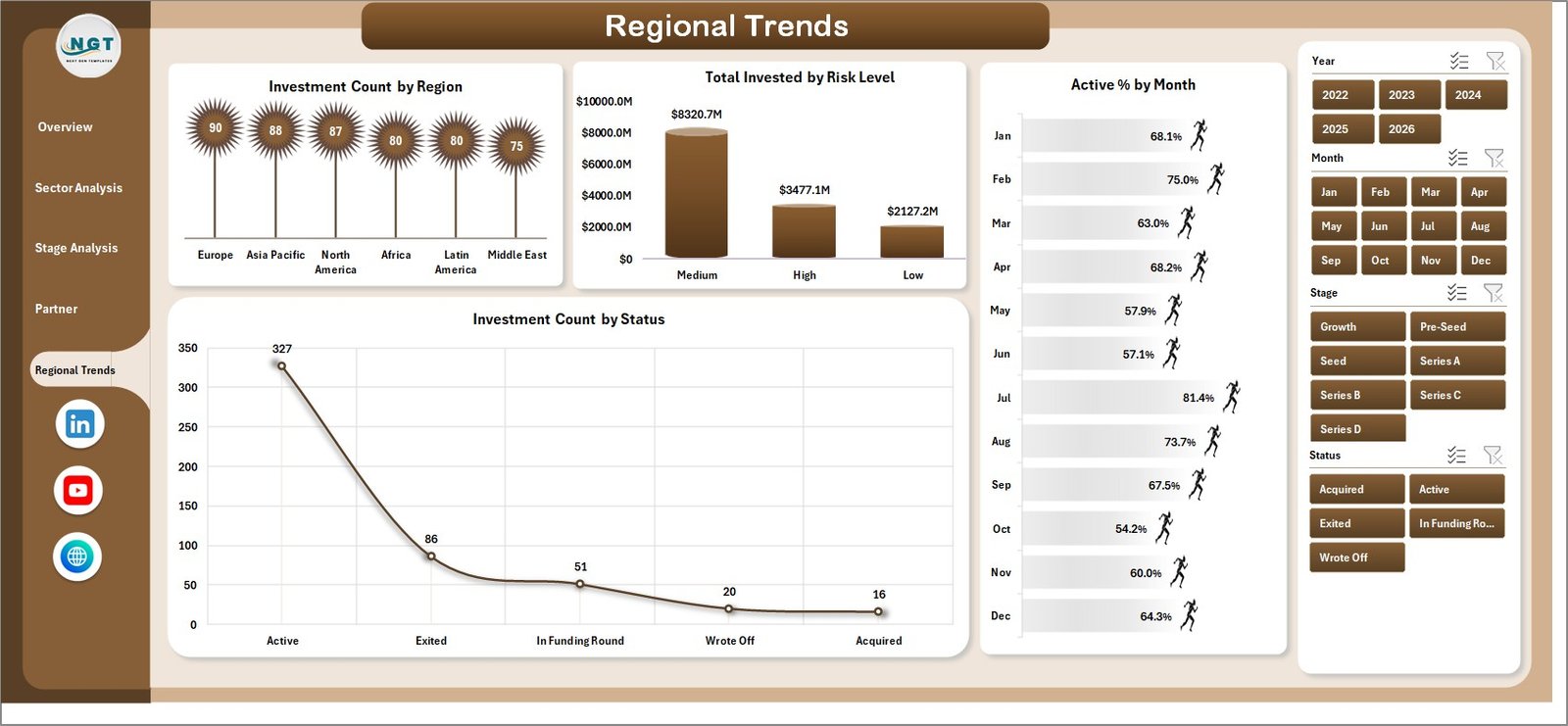
5. Regional Trends — The geographic exposure and risk page. Charts: Investment Count by Region, Total Invested by Risk Level, Active % by Month (cohort survival over time), and Investment Count by Status (Active, Exited, Written Off, Acquired, IPO). LPs ask for the regional concentration cut every quarter — this page produces it in one click.

Data Sheet tab
6. Data Sheet — The single input layer. Every column is pre-headered: Company Name, Sector, Stage, Region, Lead Partner, Invest Date, Invested Amount, Position Value, Portfolio Revenue, Monthly Burn, Runway Months, Status, Risk Level, Active Flag, and Exit Flag. Add as many rows as you need — the dashboard scales to thousands of portfolio companies.

Support sheet tab
7. Support Sheet — The pivot engine. After you update the Data sheet, click Data → Refresh All in the Excel ribbon and every pivot table on this sheet refreshes — and every chart and KPI card across the five dashboard pages updates instantly. You can keep this sheet hidden once the dashboard is live for end users.
📊 VC Portfolio Dashboard in Excel vs. Google Sheets vs. Paid VC Portfolio SaaS — Where This Fits
| Feature | VC Portfolio Dashboard in Excel | Google Sheets equivalent | Carta / AngelList / Visible |
|---|---|---|---|
| Cost | $17.99 one-time | $9 – $15 one-time | $2,400 – $24,000 / year |
| Platform | Microsoft Excel (Win + Mac) | Google Sheets (cloud only) | Cloud SaaS |
| Setup time | Under 10 minutes | Under 15 minutes | 4 – 12 weeks (data migration) |
| Data ownership | 100% yours (local file) | Google account | Vendor servers |
| Custom KPIs and charts | Unlimited — fully unlocked | Unlimited | Restricted to vendor templates |
| Works offline | ✅ Yes | ❌ No (cloud only) | ❌ No (cloud only) |
| Slicers and pivot-driven filters | ✅ Native Excel | Limited (slicers + filter views) | Locked / non-customisable |
| LP-ready PDF export | ✅ Print + PDF native | ✅ PDF export | Branded reports (paid tier) |
| Year-1 cost at 5 fund-team users | $17.99 | $9 – $15 | $12,000 – $120,000 |
For emerging managers and family offices that want LP-ready portfolio reporting without paying $20K/year for Carta or Visible, the VC Portfolio Dashboard in Excel sits in the sweet spot.
👥 Who This Template Is For — and Who It’s Not For
✅ This template is built for:
- Emerging-manager VC funds (Fund I – Fund III) tracking 10 – 80 portfolio companies in a single workbook
- Family offices and angel syndicates that need a clean, exportable view of invested capital, position value, and ROI by sector
- Corporate venture (CVC) teams reporting portfolio health to a parent-company finance committee
- Accelerator and incubator program managers tracking cohort progression, runway, and exit outcomes
- Startup advisors, fellows, and finance MBAs building a VC portfolio model for case studies
❌ This template is NOT for:
- Tier-1 funds with $1B+ AUM that need SOC 2-certified, multi-currency, multi-fund SaaS like Carta or Visible
- Funds requiring real-time SAFE/convertible-note valuation, cap-table modelling, or 409A integration — this is a portfolio reporting dashboard, not a cap-table tool
- Teams that don’t use Excel or Google Sheets at all
- Public-equity hedge funds — see our Excel Dashboard Templates library for trading and equity-research dashboards instead
⚙️ How to Use the VC Portfolio Dashboard in Excel
- Download and unzip the template from your purchase confirmation email.
- Open the file in Microsoft Excel (2016 or later) or Excel for Mac. Enable editing if prompted.
- Go to the Data sheet and replace the sample rows with your own portfolio company data. Keep the column headers exactly as they are — the pivot tables map to them by name.
- Click any pivot table on the Support sheet, then go to Data → Refresh All in the ribbon (or press Ctrl+Alt+F5 on Windows / Cmd+Option+R on Mac).
- Use the slicers at the top of each page to filter by Sector, Stage, Lead Partner, Region, Status, or Risk Level. KPI cards and charts update in real time.
- Hide the Support sheet (right-click the tab → Hide) before sharing the file with the IC, LPs, or external advisors.
- Save and share as .xlsx, or export individual pages as PDF for board decks and quarterly LP letters.
💼 Real-World Use Cases
Maya runs portfolio operations at a $120M emerging-manager VC fund. Every quarter she replaces the Data sheet with her latest portfolio export, hits Refresh All, and uses the Sector Analysis and Stage Analysis pages to build the LP letter. The Active % by Stage chart catches struggling Series A companies before the partner check-in, and the Total Invested vs. Total Position Value by Lead Partner chart feeds straight into the carry-allocation discussion. Replaces about 6 hours of manual reporting per quarter — and avoids the $24,000/year that Visible would cost her firm.
Arjun is the CIO at a single-family office allocating $40M across 35 angel investments. He uses the Overview page weekly to track Total Invested vs. Total Position Value by Year and the Regional Trends page to monitor concentration in any single geography. The Investment Count by Status chart lets him present a clean Active / Exited / Written Off split to the principal at the monthly review.
Lakshmi runs a corporate venture arm at a Fortune 500 industrial company. She maintains a 12-company portfolio and reports to the CFO every month. The Partner Performance page and Total Invested vs. Position Value by Region chart together give her a one-page view of value creation by deal lead and by geography — exactly the format the parent-company finance committee asks for.
❓ Frequently Asked Questions
What KPIs does the VC Portfolio Dashboard in Excel track?
The VC Portfolio Dashboard in Excel tracks 5 fund-level KPIs — Total Invested, Total Position Value, Portfolio Revenue, Investment Count, and Active % — alongside 20+ pivot-driven charts covering ROI %, Avg. Monthly Burn, Avg. Runway Months, Active %, and Exit % across sectors, stages, lead partners, and regions.
Will this dashboard work on Excel for Mac?
Yes. The VC Portfolio Dashboard in Excel uses only native Excel features — pivot tables, slicers, pivot charts, and KPI cards — that are fully supported on Excel for Mac (2016 onwards) and on Microsoft 365 for Mac. There are no VBA macros, no Power Query, and no platform-specific features.
How does this compare to Carta or Visible.vc?
Carta and Visible are full-stack VC portfolio SaaS tools costing $2,400 – $24,000 per year and require 4 – 12 weeks of data migration. The VC Portfolio Dashboard in Excel is a $17.99 one-time purchase that delivers the same portfolio-level KPI cards, sector/stage breakdowns, and partner ROI views — without the subscription, the migration project, or the vendor lock-in.
How many portfolio companies can the dashboard handle?
The dashboard has been tested with up to 5,000 portfolio rows. For typical emerging-manager and family-office use cases (10 – 200 companies, 4 – 8 quarters of history each), the VC Portfolio Dashboard in Excel refreshes in 1 – 3 seconds on standard hardware.
How long does setup take?
Setup takes under 10 minutes. Open the file, paste your portfolio data into the Data sheet, click Refresh All, and every page is live. The included sample dataset lets you explore the VC Portfolio Dashboard in Excel before loading your own numbers.
Can I add custom KPIs or change the chart colours?
Yes — the template is fully unlocked. You can add new KPI cards by inserting a pivot measure on the Support sheet and linking a cell on the Overview page to it. Chart colours and the slicer style can be changed via Excel’s standard Chart Design and Slicer Style ribbons.
Is this a one-time purchase or a subscription?
One-time purchase. Pay $17.99 once, download the file, use it forever. No recurring fees, no per-user seats, no usage caps. Use the VC Portfolio Dashboard in Excel on as many machines, funds, and client engagements as you want.
👤 About the Author
Built by PK — Microsoft Certified Professional with 15+ years of Excel, Google Sheets, and Power BI experience. Founder of NextGenTemplates, reaching 300K+ subscribers across YouTube channels (@PK-AnExcelExpert, @NextGenTemplates, @NeoTechNavigators). Every template is hand-built and tested before release — over 10,000 customers across 180+ countries already use templates from our library.
🔗 Explore Related Templates
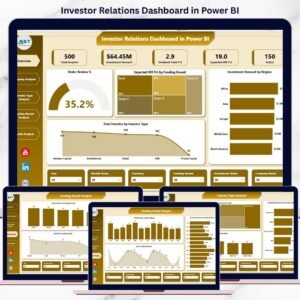
- Investor Relations Dashboard in Power BI — for funds and startups managing LP and shareholder communications
- Business Angel Networks KPI Dashboard in Excel — for angel syndicates and angel network managers
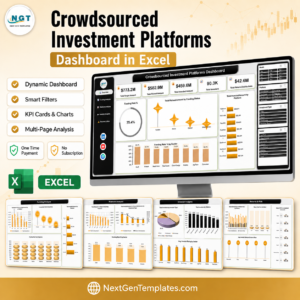
- Crowdfunding Platforms KPI Dashboard in Excel — for equity and rewards crowdfunding operators
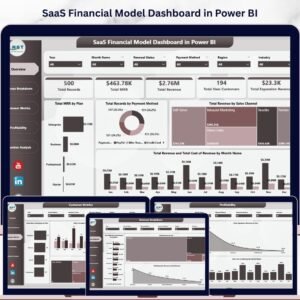
- SaaS Financial Model Dashboard in Power BI — pairs well for VC-backed SaaS portfolio companies
- Startup Hubs KPI Dashboard in Power BI — for startup ecosystem and accelerator program operators
- Browse all Excel Dashboard Templates or Power BI Dashboards on NextGenTemplates.
📖 Click here to read the Detailed Blog Post
🎥 Visit our YouTube channel for step-by-step video tutorials
👉 YouTube.com/@NextGenTemplates
Watch the step-by-step video tutorial:



















Reviews
There are no reviews yet.