



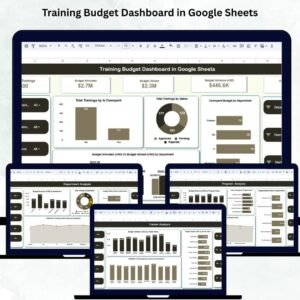
Training programs are essential for employee development, skill enhancement, and organizational growth — but managing the financial side of training can quickly become complicated. Departments run multiple training sessions, trainers charge different rates, budgets vary, and costs often exceed estimates. Without a structured system, it becomes difficult to track overspending, monitor budget utilization, or identify cost-heavy programs. That’s why the Training Financial Planning Dashboard in Google Sheets is a must-have tool for HR teams, L&D departments, and finance managers.Training Financial Planning Dashboard in Google Sheets
This ready-to-use dashboard brings together every training metric you need — budget allocation, budget utilization, variance, program performance, trainer efficiency, duration analysis, and overspending insights. With automated charts and real-time calculations, it gives teams complete financial visibility in a single, interactive Google Sheets dashboard. No more scattered spreadsheets, manual formulas, or confusing reports. Everything is organized, automated, and easy to interpret.Training Financial Planning Dashboard in Google Sheets

✨ Key Features of the Training Financial Planning Dashboard in Google Sheets
📊 1. Real-Time Financial Visibility
Get an instant overview of all training budgets and their utilization. View allocated budgets, actual spending, variances, and overspending indicators in one clean dashboard.
📈 2. Total Training Activity Summary
The Overview dashboard displays key financial and operational metrics:
Total Trainings
Budget Allocated
Budget Utilized
Budget Variance (USD)
Overspent Budget
Each KPI updates automatically as new data is added.
🏢 3. Department-Level Financial Insights
Identify which departments stay within budget and which consistently overspend. This is crucial for budget planning and allocation meetings.
📚 4. Program-Wise Cost & Duration Analysis
The Program Analysis tab reveals:
Which training programs exceed budget
Which programs deliver more sessions
Budget utilization patterns
Average training duration by program
Perfect for identifying high-value vs high-cost programs.
🎓 5. Trainer Performance Analysis
The Trainer Analysis tab helps you evaluate trainer contribution using:
Budget Variance by Trainer
Budget Utilized by Trainer
Average Training Duration
These insights highlight efficient trainers and those requiring cost reviews.
🔍 6. Smart Search Functionality
The Search Sheet lets you quickly locate any training entry using:
Keyword Search (e.g., “Leadership”, “Marketing”, “Trainer A”)
Field-Based Filters (Trainer Name, Department, Program Name, Status, Duration, etc.)
This feature saves hours of manual scrolling and speeds up reporting.
📁 7. Clean Data Management System
The Data Sheet stores all training-related entries, including:
Training Name
Department
Program
Trainer
Budget Allocated
Budget Utilized
Duration
Status
Month & Year
Overspent Indicator
All charts and dashboards refresh automatically based on this data.
📦 What’s Inside the Training Financial Planning Dashboard in Google Sheets
📊 Overview Sheet – Financial & Operational Summary
The main dashboard displays:
Total trainings
Budget allocation vs utilization
Overspent budgets
Trainings by status
Trainings by overspend status
Department-wise budget comparison
These visuals help organizations identify gaps instantly.
🏢 Department Analysis Sheet
Analyze training activity across departments:
Variance by Department
Trainings by Department
Budget Utilized
Average Training Duration
This supports accurate planning and resource distribution.
📚 Program Analysis Sheet
Deep insights into program-level performance:
Budget Variance by Program
Program Training Count
Budget Utilized by Program
Average Duration by Program
Perfect for identifying which programs bring the highest ROI.
🎓 Trainer Analysis Sheet
Understand trainer effectiveness using:
Variance by Trainer
Budget Utilization
Average Duration
Ideal for assessing trainer cost-performance alignment.
🔍 Search Sheet – Easy Record Finding
Find any training record instantly using smart search and field-based filtering.
📁 Data Sheet – Master Dataset
The heart of the dashboard where all data is stored and managed.
🛠️ How to Use the Training Financial Planning Dashboard in Google Sheets
1️⃣ Enter all training values in the Data Sheet
2️⃣ Update budgets and status regularly
3️⃣ Review the Overview Sheet for financial gaps
4️⃣ Use Department & Program Analysis for planning
5️⃣ Utilize Trainer Analysis to optimize trainer selection
6️⃣ Use Search Sheet for quick access during meetings or audits
🎯 Who Can Benefit from This Dashboard
👩💼 HR Teams & Learning & Development Departments
Track training performance, cost, and engagement.
📊 Finance Teams
Monitor budget utilization and spot overspending instantly.
🏢 Department Heads
Understand department-level training patterns and costs.
📘 Training Coordinators
Manage trainer assignments, program durations, and financial planning.
💼 Leadership Teams
Get full financial visibility for strategic decisions.
Click here to read the Detailed blog post
Watch the step-by-step video Demo:
Visit our YouTube channel to learn step-by-step video tutorials — Youtube.com/@NeotechNavigators
Compatibility and Requirements
- Works in Google Sheets. You need a free Google account and a web browser.
- All charts and KPIs update from the Data Sheet. Google explains how charts work in Add and edit a chart or graph.
Frequently Asked Questions
Which sheets are included?
The dashboard has six sheets: Overview, Department Analysis, Program Analysis, Trainer Analysis, Search and Data.
Where do I enter my training data?
Enter every training in the Data Sheet. Each row holds the training name, department, program, trainer, budget allocated, budget utilized, duration, status, month and year, and the overspent indicator. The charts and KPIs refresh from this data.
How do I see which trainings went over budget?
The Overview sheet shows budget allocated, budget utilized, budget variance and overspent budget, plus a chart of trainings by overspend status. The Department, Program and Trainer sheets show variance for each group.
Can I compare trainers?
Yes. The Trainer Analysis sheet shows budget variance by trainer, budget utilized by trainer and average training duration.
How do I find one training record quickly?
Use the Search sheet. Type a keyword such as a program or trainer name, or filter by field such as trainer name, department, program name, status or duration.
Is there an Excel or Power BI version?
This exact dashboard is sold in Google Sheets. For related training and financial planning dashboards, see the Training Budget Dashboard in Excel and the Training and Development Dashboard in Power BI.
Related Training and Financial Planning Templates
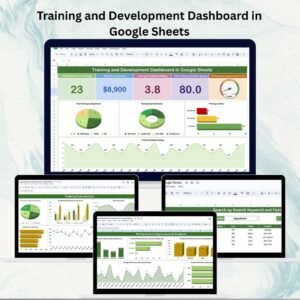
- Training and Development Dashboard in Google Sheets: training activity and results in Google Sheets
- Training Budget Dashboard in Excel: training budgets in Excel
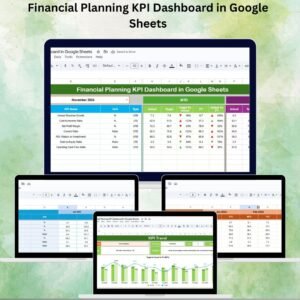
- Financial Planning KPI Dashboard in Google Sheets: financial planning KPIs in Google Sheets
- Training Completion Certification Tracker in Google Sheets: track who finished each training
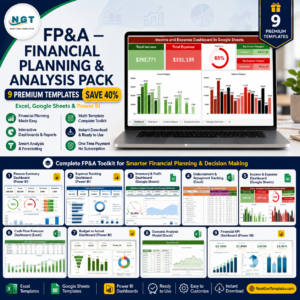
- FP&A Financial Planning & Analysis Pack: a bundle of financial planning templates
Browse all Google Sheets dashboards.









Reviews
There are no reviews yet.