

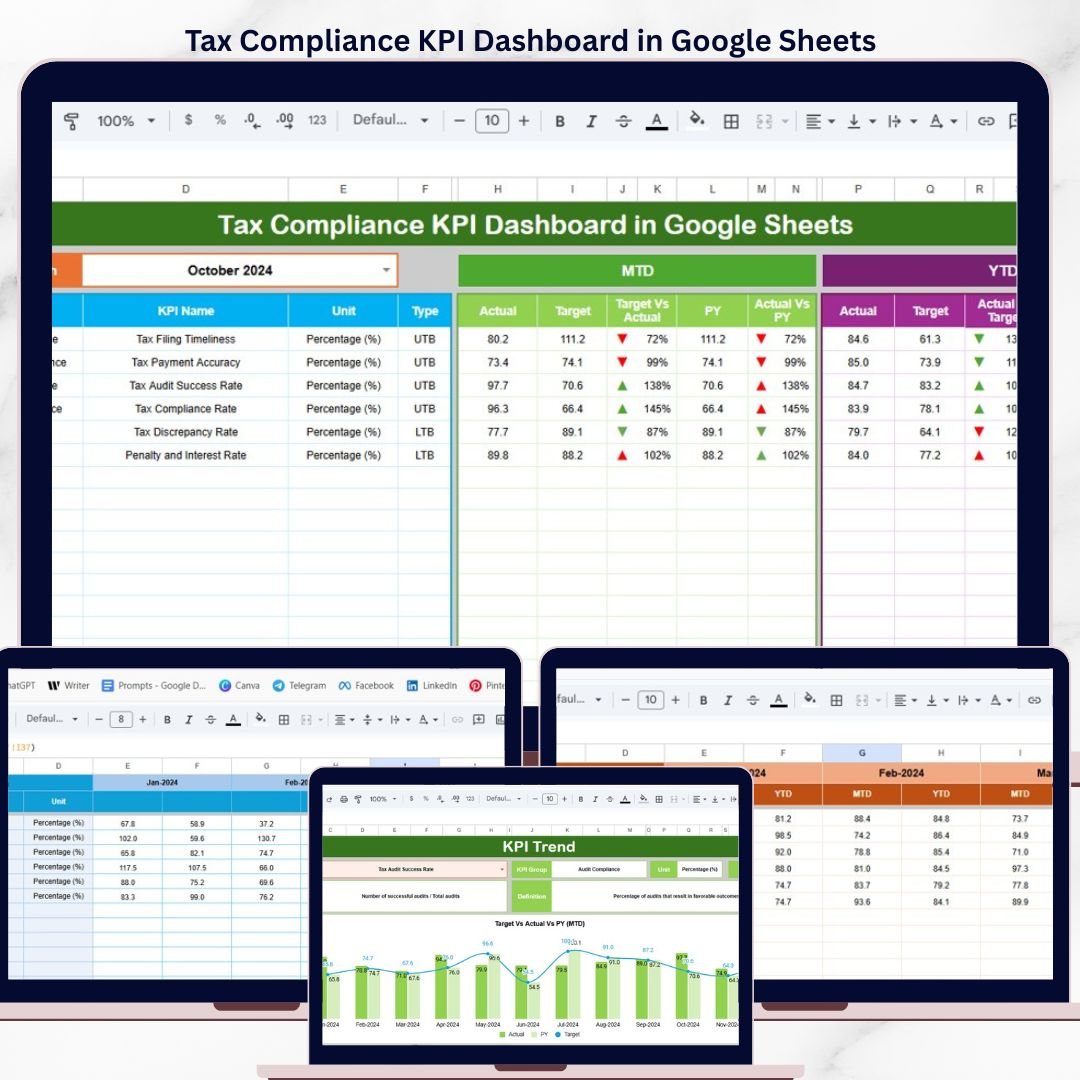

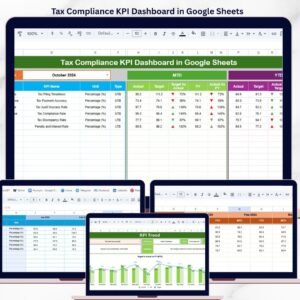
The Tax Compliance KPI Dashboard in Google Sheets monitors tax compliance performance across 6 interactive worksheets, tracking MTD and YTD metrics with automatic Target vs. Actual and Previous Year vs. Actual comparisons. Setup takes under 10 minutes — enter your KPI definitions, input actual numbers, and the entire dashboard updates with conditional formatting arrows showing performance direction.
🌍 Join 8,400+ teams in 40+ countries using NextGenTemplates to replace paid SaaS tools with one-time-purchase Excel, Google Sheets, Power BI, and HTML templates.
✅ Instant download · One-time payment · No subscription · No per-user fees · Lifetime access
🔑 Key Features of Tax Compliance KPI Dashboard in Google Sheets
📌 Full KPI Scoreboard on One Page – The Dashboard sheet displays MTD Actual, Target, and Previous Year values alongside YTD Actual, Target, and Previous Year data for every KPI. Conditional formatting with up/down arrows instantly highlights whether each metric is trending above or below target.
📌 Month-Level Filtering – Select any month from the drop-down on cell D3 and the entire dashboard recalculates. All MTD and YTD values, variance percentages, and trend arrows update automatically without manual intervention.
📌 KPI Trend Analysis with Charts – The KPI Trend sheet lets you pick any KPI from a drop-down on cell C3. It displays the KPI Group, Unit, Type (Lower the Better or Upper the Better), Formula, and Definition. MTD and YTD trend charts compare Actual, Target, and Previous Year lines side by side.
📌 Structured Data Entry – Three dedicated input sheets (Actual Numbers, Target Numbers, Previous Year Numbers) keep your data organized. Each sheet follows the same layout so entering monthly figures is fast and consistent.
📌 Custom KPI Definitions – Define your own KPIs in the KPI Definition sheet with Name, Group, Unit, Formula, Definition, and Type (LTB or UTB). The dashboard adapts to any tax compliance framework you use.
📌 Google Sheets Native – No add-ons, no macros, no external tools. Works in any browser, on any device. Share with your team via Google Drive and collaborate in real time.
Explore our full collection of Google Sheets Dashboard Templates for more business intelligence solutions.
📦 What’s Inside the Tax Compliance KPI Dashboard in Google Sheets
📌 Dashboard Sheet – The main scoreboard showing all KPIs with MTD and YTD metrics. Select the month from the drop-down on range D3 and every number on the page updates. Displays Actual, Target, Previous Year, Target vs. Actual variance, and PY vs. Actual variance — all with conditional formatting arrows.
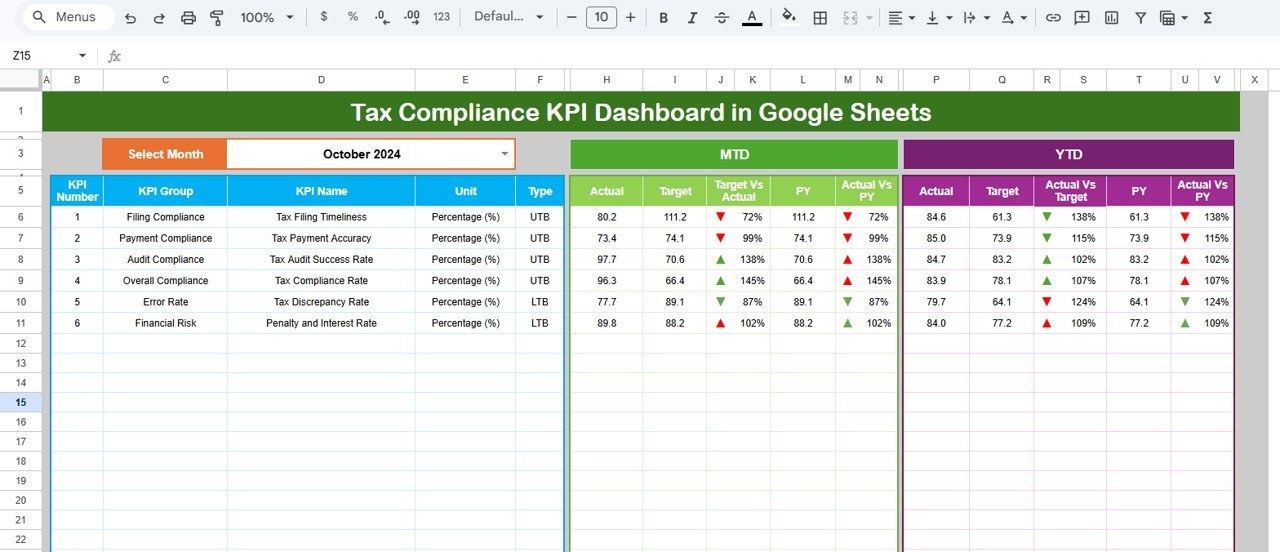 Tax Compliance KPI Dashboard in Google Sheets
📌 KPI Trend Sheet – Select a KPI from the drop-down on range C3. Displays KPI Group, Unit, Type (LTB or UTB), Formula, and Definition. Includes MTD and YTD trend charts showing Actual vs. Target vs. Previous Year over time.
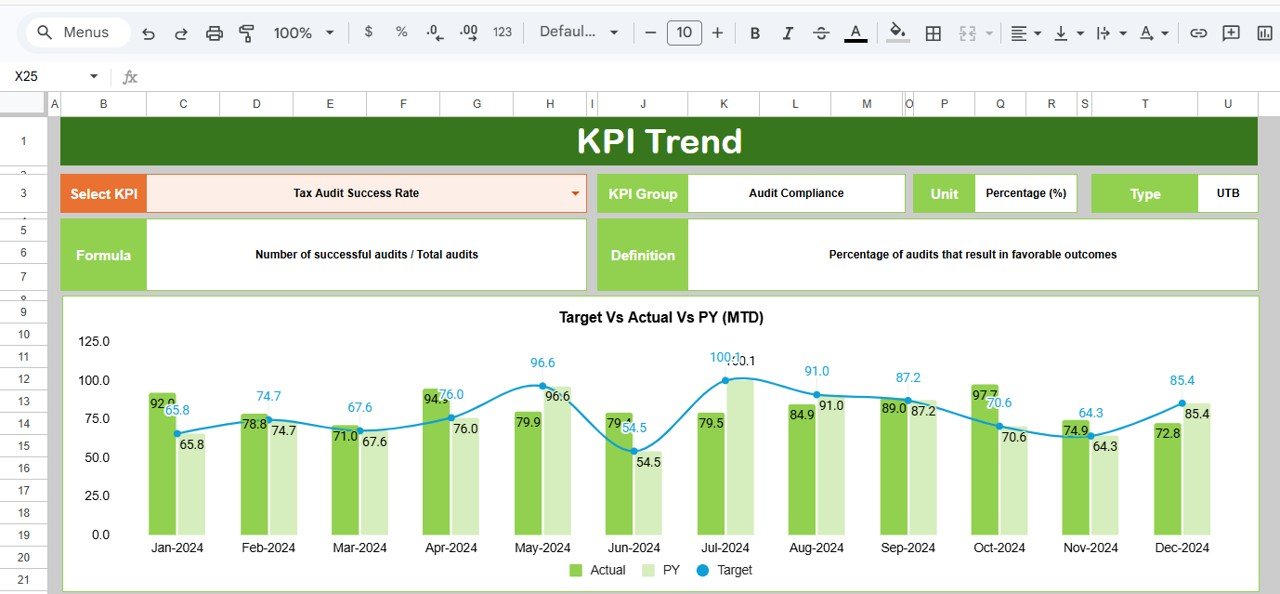 KPI Trend Sheet
📌 Actual Numbers Input Sheet – Enter actual MTD and YTD numbers for each KPI by month. Change the starting month from range E1 to align with your fiscal year.
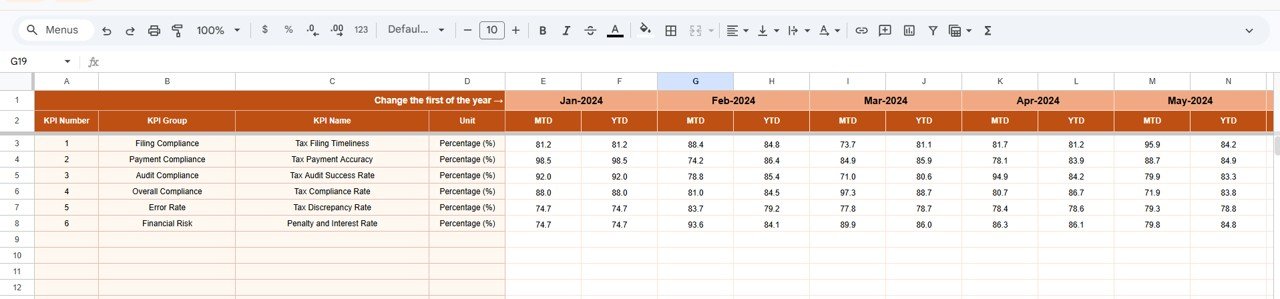 Actual Numbers Input Sheet
📌 Target Number Input Sheet – Enter target MTD and YTD values for each KPI per month. The Dashboard sheet pulls these figures automatically for variance calculations.
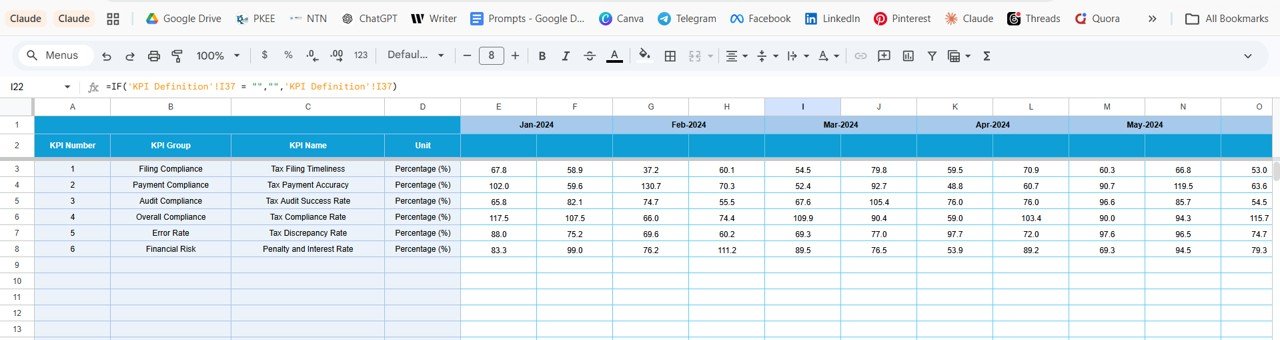 Target Number Input Sheet
📌 Previous Year Number Sheet – Enter previous year numbers in the same format as the current year inputs. Enables year-over-year comparison on the Dashboard.
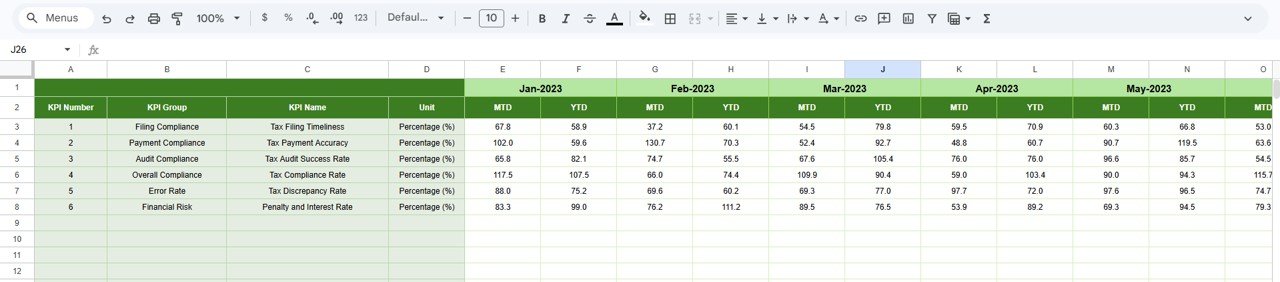 Previous Year Number Input Sheet
📌 KPI Definition Sheet – Configure each KPI with Name, KPI Group, Unit, Formula, Definition, and Type (LTB or UTB). This master list drives the entire dashboard.
 KPI Definition Sheet
Looking for compliance dashboards on other platforms? Check out the Regulatory & Statutory Compliance Dashboard in Google Sheets or the Legal Compliance Dashboard in Google Sheets.
📊 Tax Compliance KPI Dashboard in Google Sheets vs. Microsoft Excel Dashboard vs. Avalara — Where This Fits
| Feature | Tax Compliance KPI Dashboard in Google Sheets | Excel Tax Dashboard | Avalara / Thomson Reuters |
|---|---|---|---|
| Cost | $8.99 one-time | $15-25 one-time | $50-200+ / month |
| Platform | Google Sheets (browser-based) | Microsoft Excel (desktop) | Cloud SaaS |
| Setup Time | Under 10 minutes | 15-30 minutes | Days to weeks |
| Real-Time Collaboration | ✅ Built-in via Google Drive | Limited (OneDrive required) | ✅ Yes |
| Mobile Access | ✅ Any browser, any device | Limited on mobile | ✅ Mobile app |
| Custom KPI Definitions | ✅ Fully customizable | ✅ With formula edits | Pre-set by vendor |
| MTD + YTD + PY Comparison | ✅ Built-in with arrows | ✅ Manual setup | ✅ Yes |
| Year-1 Cost at 5 Users | $8.99 total | $15-25 + Excel licenses | $3,000-12,000+ |
For finance teams that want structured tax compliance KPI tracking without paying thousands for enterprise SaaS, the Tax Compliance KPI Dashboard in Google Sheets sits in the sweet spot.
👥 Who This Template Is For — and Who It’s Not For
✅ This template is built for:
- Tax managers and compliance officers at small to mid-size companies (10-500 employees) tracking monthly KPIs
- CFOs and finance directors who need a visual overview of tax compliance status for board reporting
- Accounting firms monitoring tax compliance KPIs across multiple clients
- Government tax departments tracking team performance metrics
❌ This template is NOT for:
- Enterprise tax departments needing automated API connections to ERP or tax filing systems
- Teams requiring automated tax calculation engines — this tracks KPIs, not tax computations
- Organizations needing SOC 2 certified, audit-trail-compliant SaaS platforms
⚙️ How to Use the Tax Compliance KPI Dashboard in Google Sheets
1️⃣ Open the Google Sheets file using the copy link provided in the PDF guide included in your download.
2️⃣ Go to the KPI Definition sheet and enter your tax compliance KPI names, groups, units, formulas, definitions, and types (LTB or UTB).
3️⃣ Navigate to the Actual Numbers Input sheet, set your starting month on range E1, and enter MTD and YTD actuals for each KPI.
4️⃣ Fill in the Target Number Input sheet with your MTD and YTD targets for each month.
5️⃣ Enter previous year data in the Previous Year Number sheet using the same format.
6️⃣ Go to the Dashboard sheet, select a month from the drop-down on D3, and review your full tax compliance KPI scoreboard with automatic variances and trend arrows.
7️⃣ Use the KPI Trend sheet to drill into individual KPI performance over time by selecting a KPI from the drop-down on C3.
💼 Real-World Use Cases
Maria leads the tax compliance team at a 200-person logistics company. She uses the Tax Compliance KPI Dashboard in Google Sheets to track 15 KPIs including filing accuracy rate, penalty frequency, and audit readiness score. Every month she selects the current period from the dashboard drop-down and shares a screenshot with the CFO — no SaaS subscription needed.
David runs a 12-person accounting practice. He maintains separate copies of this dashboard for three corporate clients, tracking their GST filing timeliness, TDS compliance rate, and return acceptance ratio. The KPI Trend sheet helps him spot declining metrics before they trigger penalties.
Priya manages tax operations at a regional bank. She uses the Previous Year comparison feature to demonstrate year-over-year improvement in tax compliance metrics during quarterly compliance reviews. The conditional formatting arrows make it easy for non-financial stakeholders to understand performance at a glance.
❓ Frequently Asked Questions
What KPIs does the Tax Compliance KPI Dashboard in Google Sheets track?
The Tax Compliance KPI Dashboard in Google Sheets tracks any KPIs you define in the KPI Definition sheet. Common tax compliance KPIs include filing accuracy rate, on-time filing percentage, penalty count, audit readiness score, and TDS compliance rate. All metrics display MTD and YTD values automatically.
How long does it take to set up this tax compliance dashboard?
Setup takes under 10 minutes. Open the Google Sheets copy link, define your KPIs in the Definition sheet, enter your actual and target numbers, and the Dashboard sheet populates instantly with variances and trend arrows.
Can I customize the KPIs in this dashboard?
Yes. The KPI Definition sheet lets you add any KPI with its name, group, unit, formula, definition, and type (Lower the Better or Upper the Better). The dashboard adapts to your specific tax compliance framework.
Does this template work on mobile devices?
Yes. Since it runs in Google Sheets, you can view and edit the dashboard from any browser on any device — desktop, tablet, or phone. Share it with your team via Google Drive for real-time collaboration.
How does this compare to Avalara or Thomson Reuters tax tools?
Enterprise tools like Avalara and Thomson Reuters cost $50-200+ per month and include automated tax calculation engines. This dashboard focuses on KPI tracking and performance monitoring at $8.99 one-time — ideal for teams that need visibility without enterprise pricing.
Can I track both MTD and YTD metrics in this dashboard?
Yes. The Dashboard sheet shows both MTD and YTD columns for Actual, Target, and Previous Year data. Each metric includes Target vs. Actual and PY vs. Actual variance percentages with conditional formatting arrows.
What is the best Google Sheets template for tracking tax compliance KPIs?
The Tax Compliance KPI Dashboard in Google Sheets from NextGenTemplates is one of the best options available. It covers 6 worksheets with KPI definitions, actual and target inputs, previous year comparison, trend charts, and a full scoreboard — all for a one-time price of $8.99.
🔗 Explore Related Templates
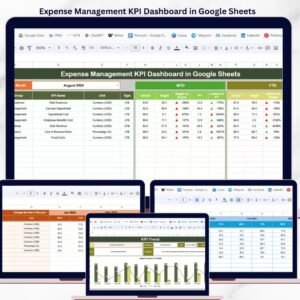
📌 Expense Management KPI Dashboard in Google Sheets — Track expense KPIs with MTD/YTD scorecards and trend analysis.
📌 Regulatory & Statutory Compliance Dashboard in Google Sheets — Monitor regulatory compliance status across multiple categories.
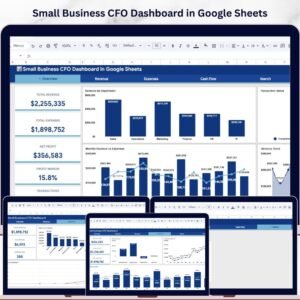
📌 Small Business CFO Dashboard in Google Sheets — Full financial overview dashboard for CFOs and finance managers.
💎 Save 40% — Get all finance templates in the Finance & Accounting Command Center Bundle →
👤 About the Author
Built by PK — Microsoft Certified Professional with 15+ years of Excel, Google Sheets, and Power BI experience. Founder of NextGenTemplates, reaching 300K+ subscribers across YouTube channels (@PK-AnExcelExpert, @NextGenTemplates, @NeoTechNavigators). Every template is hand-built and tested before release.
📖 Click here to read the Detailed Blog Post
🎥 Visit our YouTube channel for step-by-step video tutorials
👉 YouTube.com/@NextGenTemplates
Compatibility and Requirements
- Works in Google Sheets. You need a free Google account and a web browser.
- You pick the month from a dropdown on the Dashboard sheet and the KPI from a dropdown on the KPI Trend sheet. Google explains dropdowns in Create an in-cell dropdown list.





























Reviews
There are no reviews yet.