



Skill development programs decide the future of a nation’s workforce. However, managing large-scale skill development missions without clear performance tracking leads to delays, inefficiencies, and missed targets. That is why the Skill Development Missions KPI Dashboard in Power BI is designed as a powerful, ready-to-use performance monitoring solution.
This professionally designed Power BI dashboard converts raw skill development data into clear KPIs, interactive visuals, and actionable insights. Instead of struggling with manual Excel reports, you gain instant visibility into performance, trends, and gaps—all in one centralized dashboard.
Built for governments, training institutions, NGOs, and development agencies, this dashboard helps decision-makers move from guesswork to data-driven execution.
🚀 Key Features of Skill Development Missions KPI Dashboard in Power BI
📊 Interactive Summary Dashboard
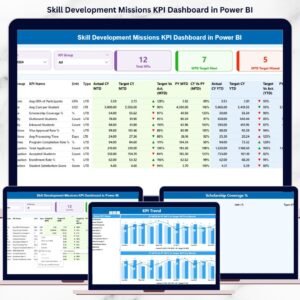
Get an instant overview of mission performance with dynamic KPI cards, slicers, and a detailed KPI table.
🎯 MTD & YTD Performance Tracking
Monitor Month-to-Date and Year-to-Date actuals against targets and previous year values with automatic calculations.
📈 KPI Status Indicators
Green and red arrow icons instantly highlight target achievement and performance gaps.
🔍 Flexible KPI Group & Month Slicers
Analyze performance by KPI category and reporting month without technical complexity.
📉 Trend Analysis with Combo Charts
Track KPI movement over time using MTD and YTD trend charts for deeper insights.
📘 Dedicated KPI Definition Page
Ensure clarity with drill-through access to KPI formulas, definitions, units, and KPI types.
⚡ Excel-Powered Data Input
Simply update Excel sheets—Power BI refreshes everything automatically.
📦 What’s Inside the Skill Development Missions KPI Dashboard in Power BI
🧩 Summary Page
Month and KPI Group slicers
Total KPIs count card
MTD Target Meet count
MTD Target Missed count
Detailed KPI table with MTD & YTD metrics
📊 KPI Trend Page
MTD Actual vs Target vs Previous Year chart
YTD Actual vs Target vs Previous Year chart
KPI selection slicer for focused analysis
📘 KPI Definition Page
KPI Formula
KPI Definition
Unit of Measurement
KPI Type (LTB / UTB)
📂 Excel Data Source Files
Input_Actual sheet
Input_Target sheet
KPI Definition sheet
🛠️ How to Use the Skill Development Missions KPI Dashboard in Power BI
1️⃣ Enter actual KPI values in the Input_Actual Excel sheet
2️⃣ Define monthly and yearly targets in the Input_Target sheet
3️⃣ Maintain KPI clarity using the KPI Definition sheet
4️⃣ Refresh the Power BI file
5️⃣ Instantly analyze performance using slicers, tables, and charts
No advanced Power BI skills required. This dashboard is ready to use from day one.
🎯 Who Can Benefit from This Skill Development Missions KPI Dashboard
🏛️ Government Skill Development Departments
🎓 Training & Vocational Institutes
🤝 NGOs & Development Agencies
📊 Program Managers & Policy Planners
📈 Monitoring & Evaluation Teams
📑 Data Analysts & MIS Professionals
If your organization manages skill development programs, this dashboard becomes a mission-critical performance tool.
Click here to read the Detailed Blog Post
Watch the step-by-step video tutorial:
Visit our YouTube channel to learn step-by-step video tutorials
Compatibility and Requirements
- Works in Power BI Desktop, which is free to download from Microsoft. Microsoft explains the download in Get Power BI Desktop.
- Data is entered in Excel sheets (Input_Actual, Input_Target and KPI Definition), so you also need Microsoft Excel to edit them.
Frequently Asked Questions
Which pages are included?
Three pages: Summary, KPI Trend and KPI Definition. The Summary page has Month and KPI Group slicers, a Total KPIs card, MTD Target Meet and MTD Target Missed counts, and a detailed KPI table.
Where do I enter my data?
Enter actual values in the Input_Actual Excel sheet and targets in the Input_Target sheet. Refresh the Power BI file and the dashboard updates.
How do I know whether a KPI met its target?
Green and red arrow icons in the KPI table show whether each KPI reached its target. The Summary page also counts how many KPIs met or missed their MTD target.
Can I see trends over time?
Yes. The KPI Trend page has MTD and YTD combo charts that compare Actual, Target and Previous Year. A slicer lets you pick one KPI.
Where can I see how each KPI is calculated?
The KPI Definition page shows the KPI formula, definition, unit of measurement and KPI type (LTB or UTB). You can reach it by drill-through from the Summary page.
Is there an Excel version?
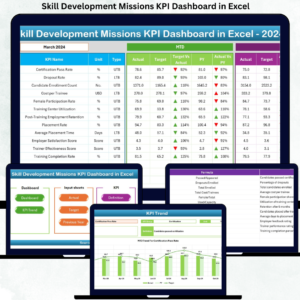
Yes. See the Skill Development Missions KPI Dashboard in Excel.
Related Skill Development Templates
- Skill Development Missions KPI Dashboard in Excel: the same KPI dashboard for Excel
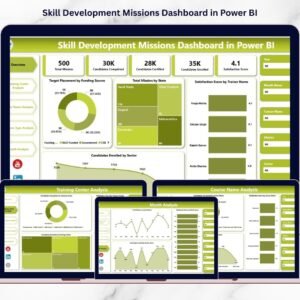
- Skill Development Missions Dashboard in Power BI: another Power BI dashboard for skill missions
- Training and Development Dashboard in Power BI: a Power BI view of training programs
- Skill Development Checklist in Google Sheets: a checklist for skill development tasks
Browse all Power BI KPI dashboards and Power BI templates.































Reviews
There are no reviews yet.