



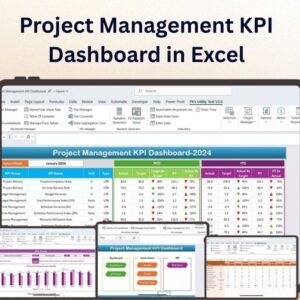
The Project Management Customer Engagement KPI Dashboard in Excel is a powerful tool designed for project managers, customer engagement teams, and businesses to track and manage customer interactions throughout project execution. This Excel-based dashboard helps you monitor key customer engagement metrics, including response times, satisfaction levels, and communication efficiency, ensuring that customer relationships are optimized and project goals are met with precision.
Whether you’re managing a client project, overseeing a service contract, or tracking customer feedback during project delivery, this dashboard provides a comprehensive view of customer interactions. By using visual tracking, real-time data, and customizable KPIs, you can make data-driven decisions to improve customer satisfaction and project outcomes.
Key Features of the Project Management Customer Engagement KPI Dashboard in Excel

📊 Customer Engagement Metrics Tracking
Track customer interactions such as emails, calls, and meetings. Measure the frequency, response times, and overall engagement to ensure timely communication and strong relationships.
📈 Customer Satisfaction & Feedback Monitoring
Measure customer satisfaction levels with survey results and feedback ratings. Identify areas for improvement and take action to address any concerns.
🔄 Project Timeline Integration
Align customer engagement metrics with project timelines to ensure that communication and customer satisfaction are tracked at every stage of the project. Monitor whether delays or issues are affecting engagement and satisfaction.
⚙️ Real-Time Data Updates
Integrate real-time data to automatically update customer engagement metrics and project status, so you can stay on top of changes and track KPIs in real-time.
📅 Customizable KPIs & Metrics
Customize the dashboard to suit the specific needs of your project or client engagement, ensuring that all relevant KPIs, such as customer queries, support tickets, or response times, are included.
🔑 User-Friendly Interface
The dashboard is designed to be simple and intuitive, making it easy to navigate through the various metrics, charts, and KPIs. Quickly access important insights to keep customer engagement on track.
Why You’ll Love the Project Management Customer Engagement KPI Dashboard in Excel
✅ Improved Customer Interaction Tracking
Easily track all customer touchpoints to ensure effective communication throughout the project lifecycle, leading to better customer relationships and outcomes.
✅ Enhanced Decision-Making
Make data-driven decisions by monitoring customer feedback, engagement levels, and communication patterns, which help identify issues early and optimize project management strategies.
✅ Customizable & Scalable
Tailor the dashboard to match your specific project requirements. Add or remove KPIs, set unique customer engagement goals, and adjust the layout to fit your needs.
✅ Streamlined Project and Customer Management
Integrate key project milestones and customer interactions into one dashboard, ensuring that no detail is missed and that you have complete visibility into the entire project’s customer engagement.
✅ Real-Time & Visual Analytics
Monitor customer engagement through visual charts, graphs, and performance indicators that automatically update as new data is entered, providing you with real-time insights.
What’s Inside the Project Management Customer Engagement KPI Dashboard in Excel?
Customer Engagement Metrics: Track emails, calls, and meetings with clients.
Customer Satisfaction Monitoring: Monitor feedback ratings and satisfaction levels.
Project Timeline Integration: Align engagement metrics with key project milestones.
Customizable KPIs: Tailor the dashboard to include specific engagement goals and KPIs.
Real-Time Data Updates: Automatically update KPIs and engagement metrics in real-time.
How to Use the Project Management Customer Engagement KPI Dashboard in Excel
1️⃣ Download the Template: Instantly access your Project Management Customer Engagement KPI Dashboard in Excel.
2️⃣ Input Customer Data: Add customer engagement information, such as calls, emails, and meetings.
3️⃣ Track KPIs: Monitor customer satisfaction, response times, and engagement efficiency.
4️⃣ Analyze Trends: Use visual charts to identify trends and areas needing attention.
5️⃣ Customize as Needed: Adjust the dashboard’s KPIs and layout to meet your unique project needs.
Who Can Benefit from the Project Management Customer Engagement KPI Dashboard in Excel?
🔹 Project Managers
🔹 Customer Engagement Teams
🔹 Account Managers
🔹 Customer Support Teams
🔹 Service Providers & Consultants
🔹 Marketing & Sales Teams
🔹 Business Analysts & Strategists
Ensure your customer relationships are optimized, and project outcomes are delivered on time with the Project Management Customer Engagement KPI Dashboard in Excel. Track, analyze, and improve customer interactions with this simple yet powerful tool.
Click here to read the Detailed blog post
Visit our YouTube channel to learn step-by-step video tutorials
Youtube.com/@PKAnExcelExpert
Compatibility and Requirements
- Works in Microsoft Excel desktop (Excel 2016 or later, or Microsoft 365).
- The dashboard uses standard Excel charts. Microsoft explains charts in Create a chart from start to finish.
Frequently Asked Questions
What does the dashboard track?
Customer interactions such as emails, calls and meetings, response times, satisfaction levels from survey results and feedback ratings, and communication efficiency.
Can I link engagement to project milestones?
Yes. The dashboard lines up engagement and satisfaction metrics with your project timeline, so you can see whether delays affect them.
Can I add my own KPIs?
Yes. You can add or remove KPIs, such as customer queries or support tickets, and adjust the layout.
Do the charts update when I add data?
Yes. The charts and indicators update as you enter new data.
Related Customer Engagement and Project Templates
- Customer Engagement KPI Dashboard in Excel: customer engagement KPIs for any business
- Customer Engagement KPI Scorecard in Excel: a scorecard view of engagement KPIs
- Project Management KPI Dashboard in Excel: core project KPIs in one dashboard
- Customer Engagement KPI Dashboard in Power BI: the Power BI edition of the engagement KPIs
- Project Management Pro Bundle: project templates for Excel and Google Sheets in one pack
Browse all Excel KPI dashboards or the Excel project management templates.


































Reviews
There are no reviews yet.