

Outlet stores run on speed—speed of selling, speed of restocking, speed of hitting targets, and speed of reacting to competitors. But here’s the reality: many retail teams still rely on scattered Excel sheets and manual reporting. That’s where profit leaks quietly. When performance gaps stay hidden, decisions come late, and targets get missed before you even realize there’s a problem.
That’s why we built the Outlet Stores Dashboard in Power BI 🏬📊
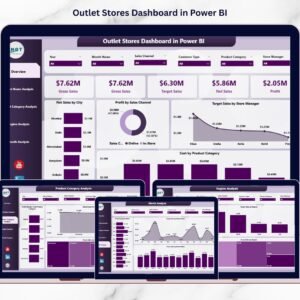
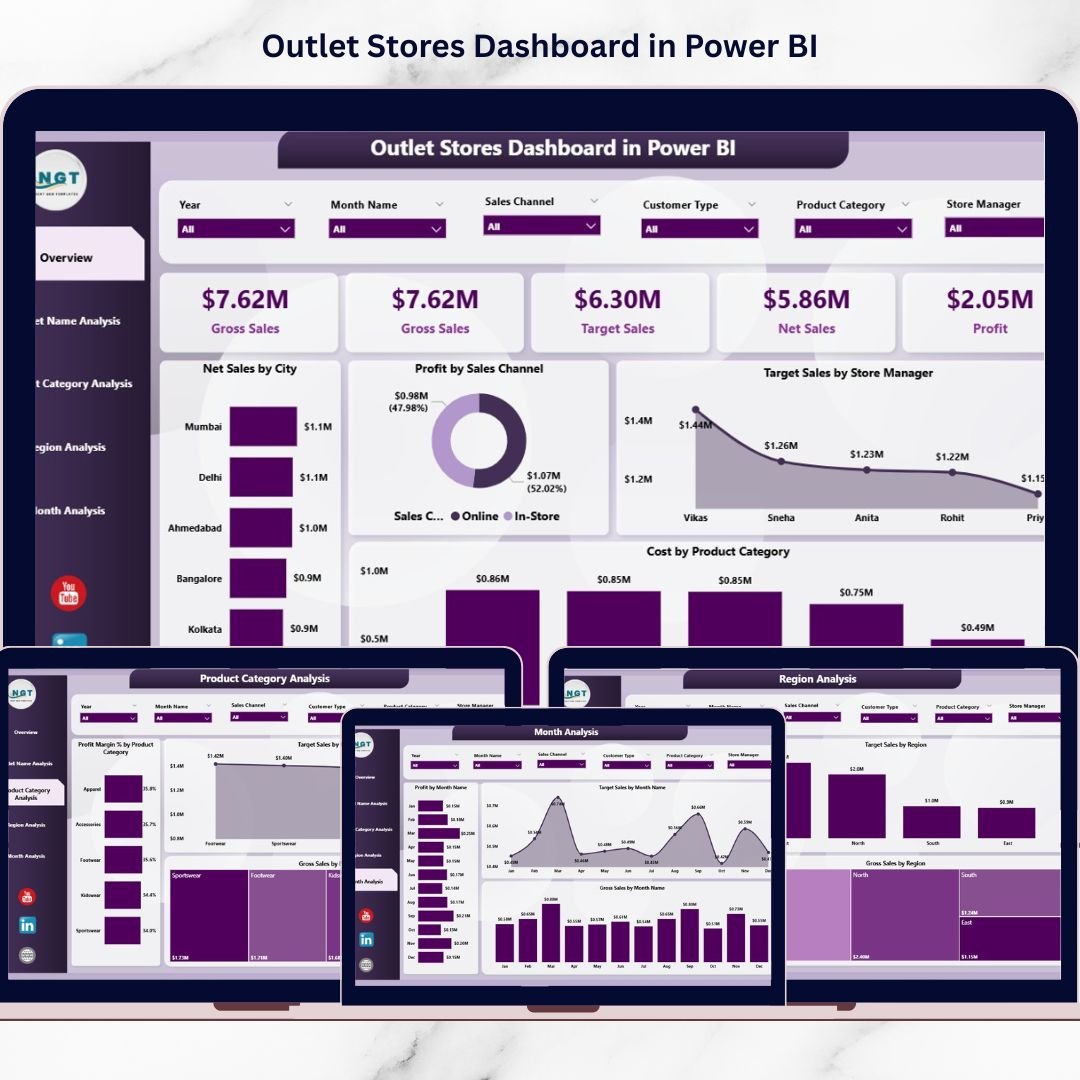
It’s a ready-to-use, interactive analytics solution that brings your retail KPIs into one powerful platform—so you can track Net Sales, Gross Sales, Profit, Costs, Profit Margin %, and Target Achievement across outlets, product categories, regions, sales channels, and months.
Instead of reading multiple reports, you get a single dashboard that answers the questions every retail leader asks daily:
Which outlets are performing best?
Where are targets being missed?
Which categories generate profit (not just sales)?
Which regions are growing—and which are struggling?
What’s happening month-by-month, and where are trends heading?
With slicers, filters, and interactive visuals, Power BI makes outlet analytics simple, fast, and decision-ready—even for non-technical users.
Key Feature of Outlet Stores Dashboard in Power BI
🚀 Ready-to-use Power BI dashboard built for outlet store performance tracking
🎛️ Interactive slicers to filter data instantly by time, region, outlet, category, and more
📌 Five KPI cards for quick executive-level performance visibility
📈 Actual vs Target monitoring to keep teams accountable and results-focused
💰 Profit + Profit Margin % insights to reveal true business performance
🏬 Outlet-wise store comparison to identify top outlets and weak locations fast
📦 Product category analytics to highlight profit-driving and low-margin categories
🌍 Region performance analysis for smarter resource allocation and expansion planning
📅 Monthly trend tracking to detect seasonality and campaign impact
🔄 Fast refresh + centralized reporting to reduce manual work and errors
What’s Inside the Outlet Stores Dashboard in Power BI
This dashboard includes five analytical pages, each designed to answer a specific retail question:
📌 1) Overview Page (Complete Business Snapshot)
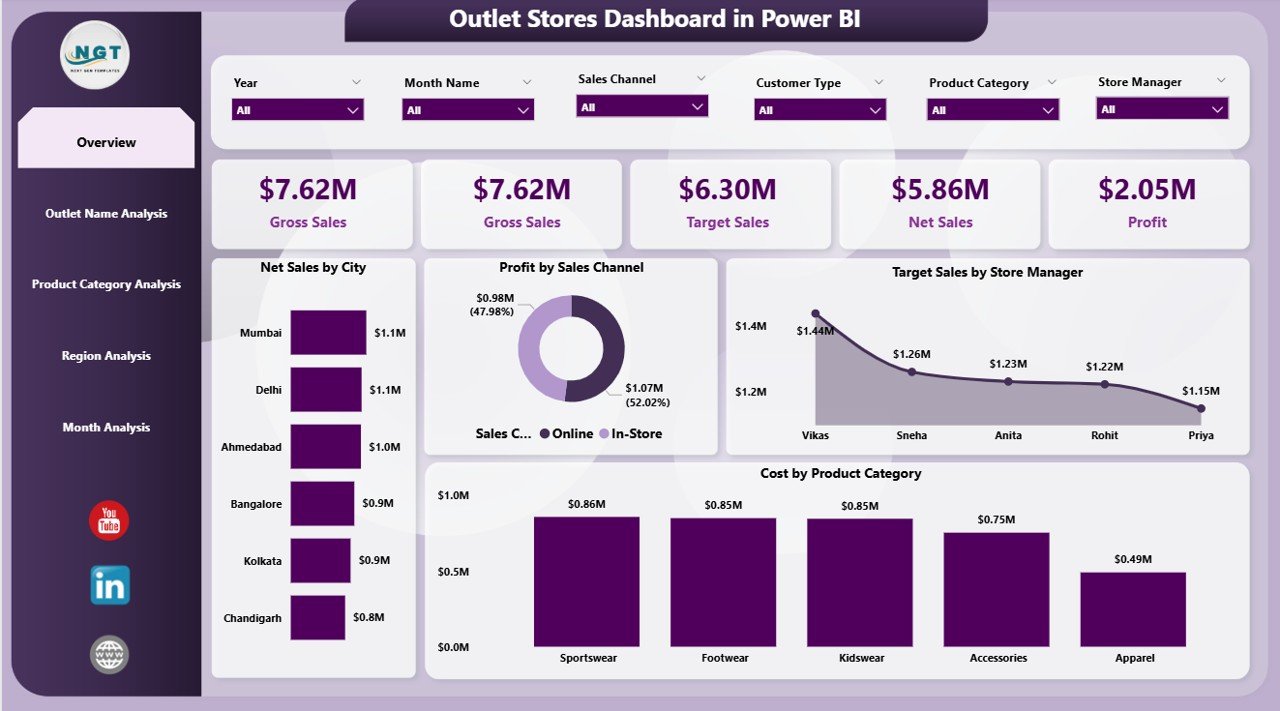
Your main control center with interactive slicers, KPI cards, and high-impact visuals such as:
Net Sales by City
Profit by Sales Channel
Target Sales by Store Manager
Cost by Product Category
Summary KPI cards (quick performance pulse)
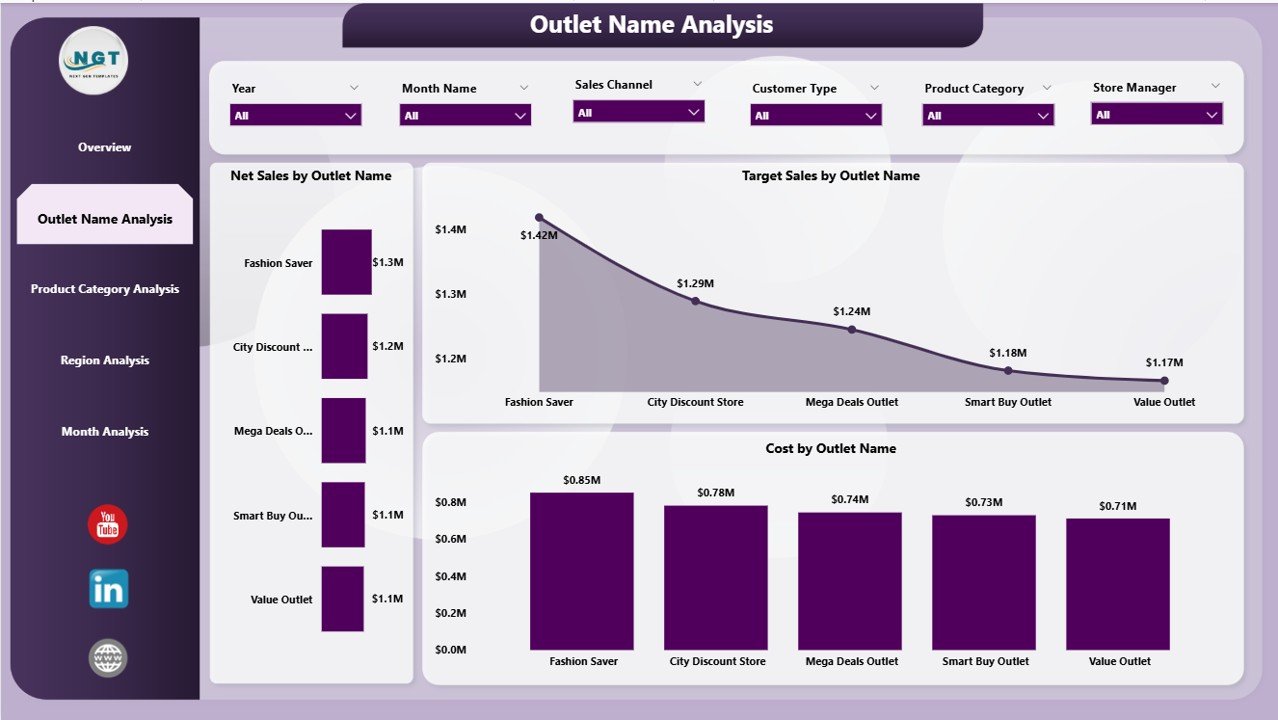
🏬 2) Outlet Name Analysis (Store Performance Comparison)
Compare outlets quickly and identify target gaps and cost-heavy locations:
Net Sales by Outlet Name
Target Sales by Outlet Name
Cost by Outlet Name
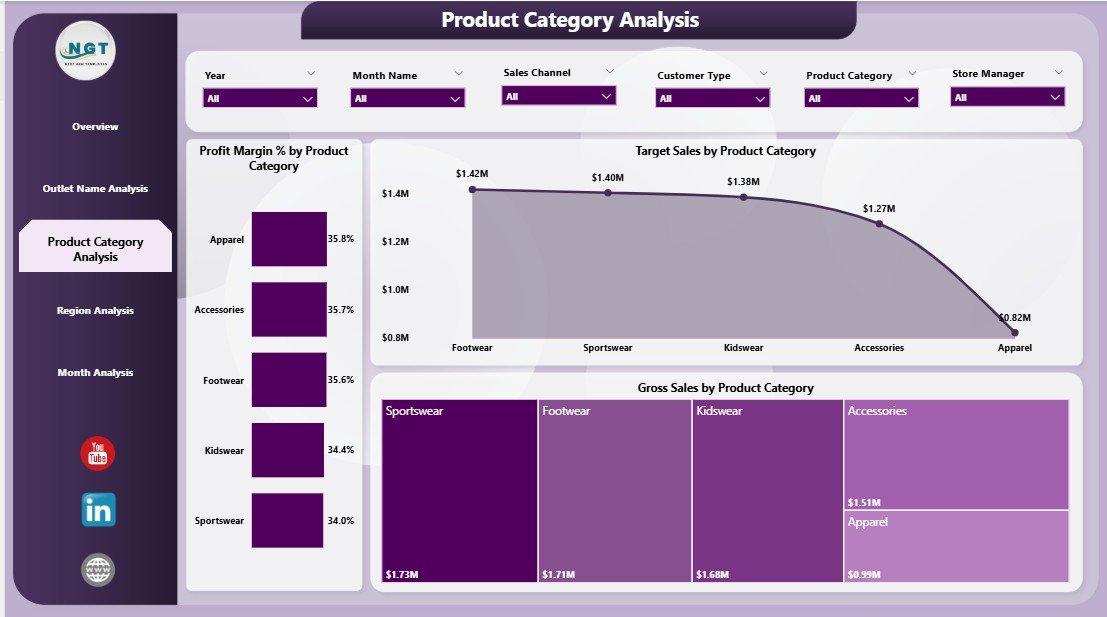
📦 3) Product Category Analysis (Product Performance & Margin)
Know which categories deserve investment—and which need pricing or promotion fixes:
Profit Margin % by Product Category
Target Sales by Product Category
Gross Sales by Product Category
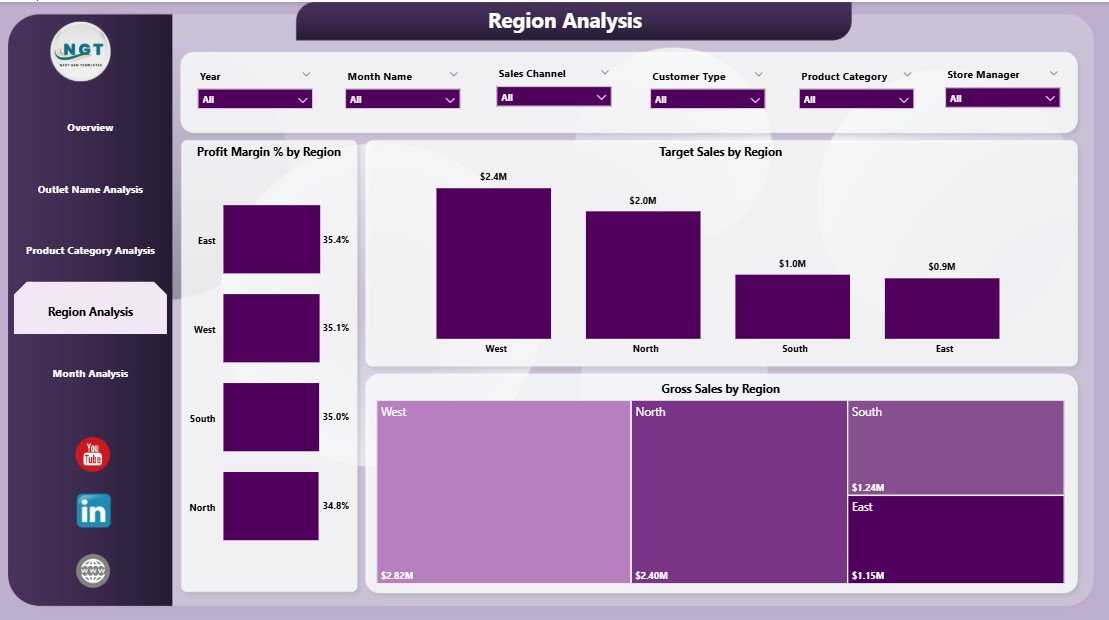
🌍 4) Region Analysis (Geographic Performance)
Measure regional demand and profitability to plan smarter:
Profit Margin % by Region
Target Sales by Region
Gross Sales by Region
📅 5) Month Analysis (Trends Over Time)
Track business trends and seasonality with:
Profit by Month
Target Sales by Month
Gross Sales by Month
Together, these pages provide full visibility across outlet operations—without overwhelming users.
How to Use the Outlet Stores Dashboard in Power BI
You don’t need advanced Power BI skills to use this dashboard:
1️⃣ Collect your outlet data (sales, costs, targets, outlet names, categories, regions, dates, etc.)
2️⃣ Import the data into Power BI (Excel and databases work perfectly)
3️⃣ Refresh the dashboard to update visuals instantly
4️⃣ Use slicers and filters to analyze by region, outlet, category, channel, and time
5️⃣ Take action faster by spotting target misses, low-margin categories, and weak outlets before they become bigger problems
Who Can Benefit from This Outlet Stores Dashboard in Power BI
This dashboard is ideal for:
🏬 Retail Owners & Multi-Outlet Chains
👨💼 Store Managers & Outlet Supervisors
🌍 Regional Managers
📊 Retail Analysts & MIS Teams
💰 Finance & Profitability Teams
🧠 Operations Executives
🤝 Retail Consultants
If you want a clean, centralized view of performance with fast insights, this dashboard is built for your day-to-day decisions.
Click hare to read the Detailed blog post
Visit our YouTube channel to learn step-by-step video tutorials
Youtube.com/@PKAnExcelExpert
Watch the step-by-step video tutorial:
Compatibility and Requirements
- Works in Power BI Desktop, which is free. Microsoft explains how to get it in Get Power BI Desktop.
- Your outlet data can come from Excel or a database, then you refresh the dashboard to update the visuals.
Frequently Asked Questions
How many pages does the dashboard have?
Five pages: Overview, Outlet Name Analysis, Product Category Analysis, Region Analysis and Month Analysis.
Which KPIs does it track?
Net Sales, Gross Sales, Profit, Costs, Profit Margin % and Target Sales, shown as KPI cards and charts across outlets, categories, regions, sales channels and months.
Can I compare outlets against their targets?
Yes. The Outlet Name Analysis page shows Net Sales, Target Sales and Cost by outlet, so you can see which locations miss their targets.
How do I update it with my own data?
Collect your sales, cost, target, outlet, category, region and date data, import it into Power BI (Excel and databases both work), then refresh the dashboard. Slicers and filters let you view the results by region, outlet, category, channel and time.
Is there an Excel version?
Yes. See the Outlet Stores Dashboard in Excel.
Related Retail Dashboards
- Outlet Stores Dashboard in Excel: the same outlet dashboard in Excel
- Store Operations KPI Dashboard in Power BI: store operations KPIs in Power BI
- Shopify Store Dashboard in Power BI: sales tracking for an online store
- DIY Home Improvement Stores Dashboard in Power BI: a store dashboard for home improvement retail
- Retail & Store Analytics Bundle: 8 retail templates in one download
Browse all Power BI dashboards.