



Key Features of Music Festival KPI Scorecard
Introducing the Music Festival KPI Scorecard, a ready-to-use, comprehensive digital template designed to streamline your event performance tracking. This scorecard empowers festival organizers and managers to monitor critical KPIs with ease, enabling data-driven decisions that drive successful outcomes. Whether you’re analyzing ticket sales, attendee satisfaction, or operational efficiency, this scorecard presents all key metrics clearly and concisely.
Our template offers 4 interactive worksheets that cover every aspect of KPI tracking and analysis:
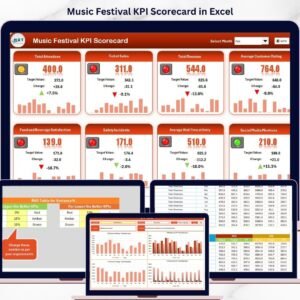
- 🎯 Scorecard Sheet: The central dashboard provides an intuitive interface to view overall KPI performance. Featuring dropdown menus to select Month, MTD (Month-to-Date), or YTD (Year-to-Date) views, it allows you to compare actual vs target values at a glance. Visual indicators use color-coded formatting to highlight performance status quickly, making it easy to identify areas needing attention.
- 📈 KPI Trend Sheet: Track the progression of each KPI over time by selecting from a dropdown menu. This sheet displays KPI Group, Unit, Type (whether lower or upper values are better), formula, and definitions, along with dynamic trend charts for MTD, YTD actuals, targets, and previous year comparisons.
- 📝 Input Data Sheet: The backbone for your KPI tracking, this sheet lets you enter actual values, targets, and other important metrics. It’s designed for easy data updates, ensuring your scorecard always reflects the latest results.
- 📚 KPI Definition Sheet: Define and document each KPI’s name, group, unit, calculation formula, and detailed explanation. This ensures clarity and consistency in how KPIs are understood across your team.
This scorecard template is designed for ease of use and maximum utility, allowing you to focus less on manual tracking and more on strategic analysis.
What’s Inside the Music Festival KPI Scorecard
The digital download includes a fully functional Excel-based template with the following components:
- 🎯 Scorecard Sheet: Main dashboard with performance metrics and visual cues.
- 📊 KPI Trend Sheet: Interactive trend analysis with charts and KPI details.
- 📝 Input Data Sheet: User-friendly data entry for actuals, targets, and other KPI inputs.
- 📚 KPI Definition Sheet: Comprehensive KPI documentation for clarity and standardization.
Each sheet is professionally formatted and optimized for intuitive navigation, helping you track, analyze, and report on your festival’s performance efficiently.
How to Use the Music Festival KPI Scorecard
Getting started with the Music Festival KPI Scorecard is simple and straightforward:
- 🚀 Step 1: Open the template and familiarize yourself with each worksheet.
- 🖊️ Step 2: Enter your KPI data in the Input Data Sheet. Input actual figures, targets, and relevant metrics for each KPI.
- 🔍 Step 3: Use the Scorecard Sheet to select the timeframe (Month, MTD, YTD) and instantly see how your festival is performing against targets.
- 📈 Step 4: Explore the KPI Trend Sheet to analyze trends and patterns over time, helping identify growth or problem areas.
- 📖 Step 5: Refer to the KPI Definition Sheet to ensure everyone on your team understands each KPI’s purpose and calculation.
This template requires no advanced technical skills, making it accessible for festival managers, marketing teams, and event coordinators alike.
Who Can Benefit from This Music Festival KPI Scorecard
The Music Festival KPI Scorecard is perfect for a wide range of users involved in festival planning and execution:
- 🎤 Event Organizers: Monitor overall event health and make informed decisions to boost attendance and satisfaction.
- 📊 Marketing Teams: Track campaign effectiveness and ticket sales trends to optimize promotions.
- 💼 Operations Managers: Evaluate staffing, vendor performance, and logistical efficiency with clear KPIs.
- 📅 Festival Directors: Oversee all performance metrics in one place to ensure the event meets strategic goals.
- 📈 Analysts & Consultants: Provide actionable insights based on detailed KPI tracking and historical trend data.
Whether you’re running a small local festival or a large international event, this scorecard delivers the clarity and control you need to maximize success.
Click here to read the Detailed blog post.
Visit our YouTube channel to learn step-by-step video tutorials.
Compatibility and Requirements
- Works in Microsoft Excel desktop (Excel 2016 or later, or Microsoft 365).
- You pick the Month, MTD or YTD view and the KPI from dropdown lists. Microsoft explains them in Create a drop-down list.
Frequently Asked Questions
Which sheets are included?
Four sheets: Scorecard, KPI Trend, Input Data and KPI Definition.
How do I update the scorecard?
Enter your actual values, targets and other metrics in the Input Data sheet. Then choose Month, MTD or YTD on the Scorecard sheet and it shows actual against target.
Can I see the trend for one KPI?
Yes. Pick a KPI from the dropdown on the KPI Trend sheet. It shows the KPI group, unit, type (whether lower or upper values are better), formula and definition, with charts for MTD and YTD actuals, targets and the previous year.
How do I know if a KPI is on track?
The Scorecard sheet uses color-coded formatting to show how each KPI is performing against its target.
Is there a Google Sheets or Power BI version?
There are dashboard editions for this topic: see the Music Festival KPI Dashboard in Google Sheets and the Music Festival KPI Dashboard in Power BI.
Related Music and Event Templates
- Music Festival KPI Dashboard in Excel: a dashboard view of the same festival KPIs
- Music Festivals Dashboard in Excel: festival reporting in one Excel dashboard
- Event Management KPI Scorecard in Excel: a scorecard for general event KPIs
- Music Industry KPI Scorecard in Excel: a scorecard for music businesses
- KPI Dashboard Library (Excel): 15 KPI templates in one download
Browse all Excel KPI dashboards.












Reviews
There are no reviews yet.