

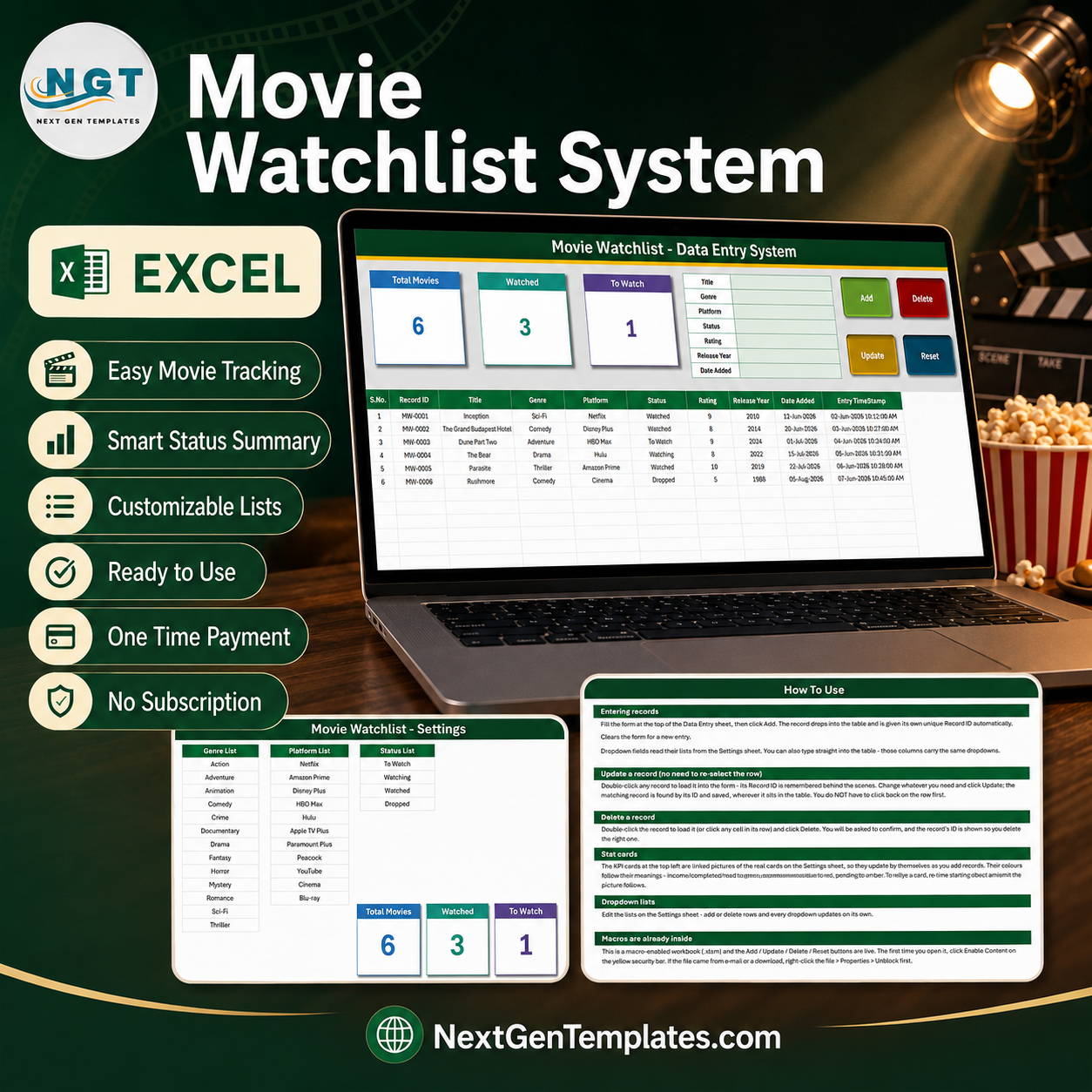
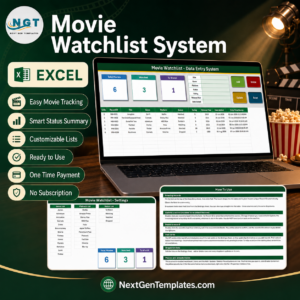
The Movie Watchlist Data Entry System in Excel is a macro-enabled workbook that keeps every film and series you plan to watch, are watching, or have already finished in one typed record. It ships with a 7-field entry form, four working VBA buttons (Add, Update, Delete, Reset), automatic MW-0001 style Record IDs, an automatic entry timestamp, three live summary cards and three editable dropdown lists covering 13 genres, 11 platforms and 4 statuses. Six sample records are already inside so you can see how it behaves before you type anything. It is a one-time purchase, it opens in desktop Excel for Windows, there is no account and no subscription, and if it does not suit you the NextGenTemplates refund policy applies. Movie Watchlist Data Entry System in Excel
Key Features of the Movie Watchlist Data Entry System in Excel
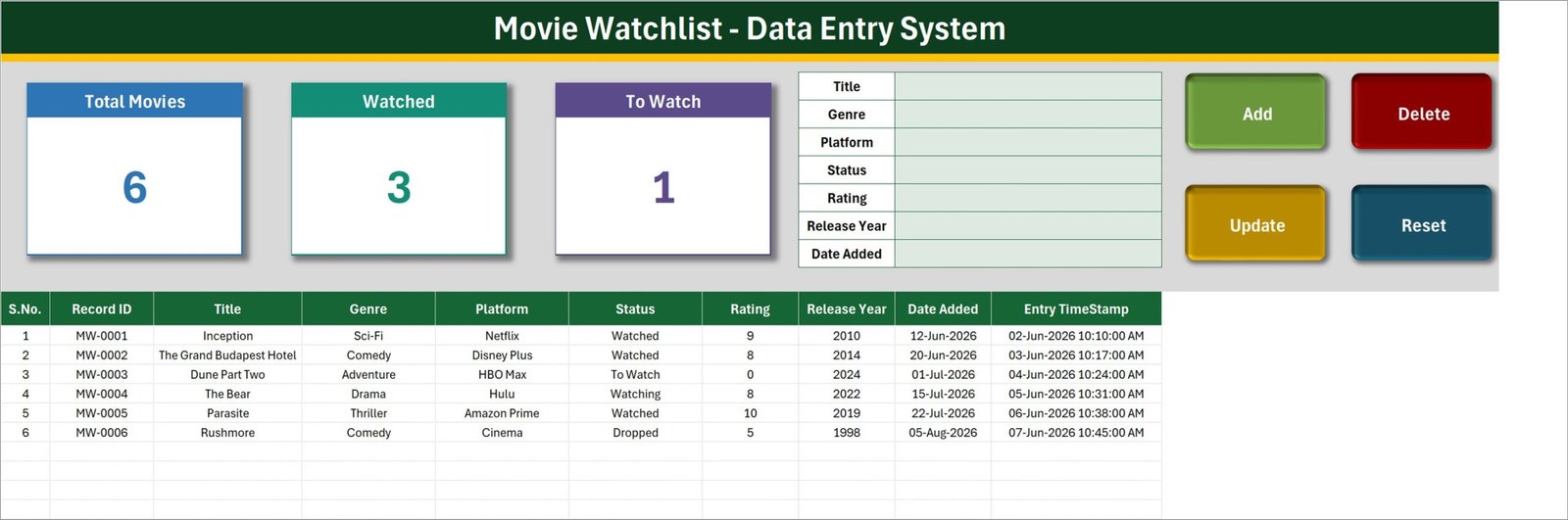
- A 7-field entry form – Title, Genre, Platform, Status, Rating, Release Year and Date Added sit in a single block at the top of the Data Entry sheet.
- Four live VBA buttons – Add, Update, Delete and Reset are wired to the
Add_Record,Update_Record,Delete_RecordandReset_Formmacros inside the file. - Automatic Record IDs – each row is stamped
MW-0001,MW-0002and so on. The workbook remembers the highest number used, so IDs stay unique even after you delete rows. Movie Watchlist Data Entry System in Excel - Automatic Entry TimeStamp – column J records the date and time the row was typed, so you always know when a title entered the list.
- Edit without re-selecting the row – double-click any record to load it into the form. The Record ID is held behind the scenes, so Update finds and rewrites the right row wherever it has moved to.
- Three summary cards – Total Movies, Watched and To Watch update themselves as you add records. They are linked pictures of the real cards on the Setting sheet, so restyling the card restyles the picture.
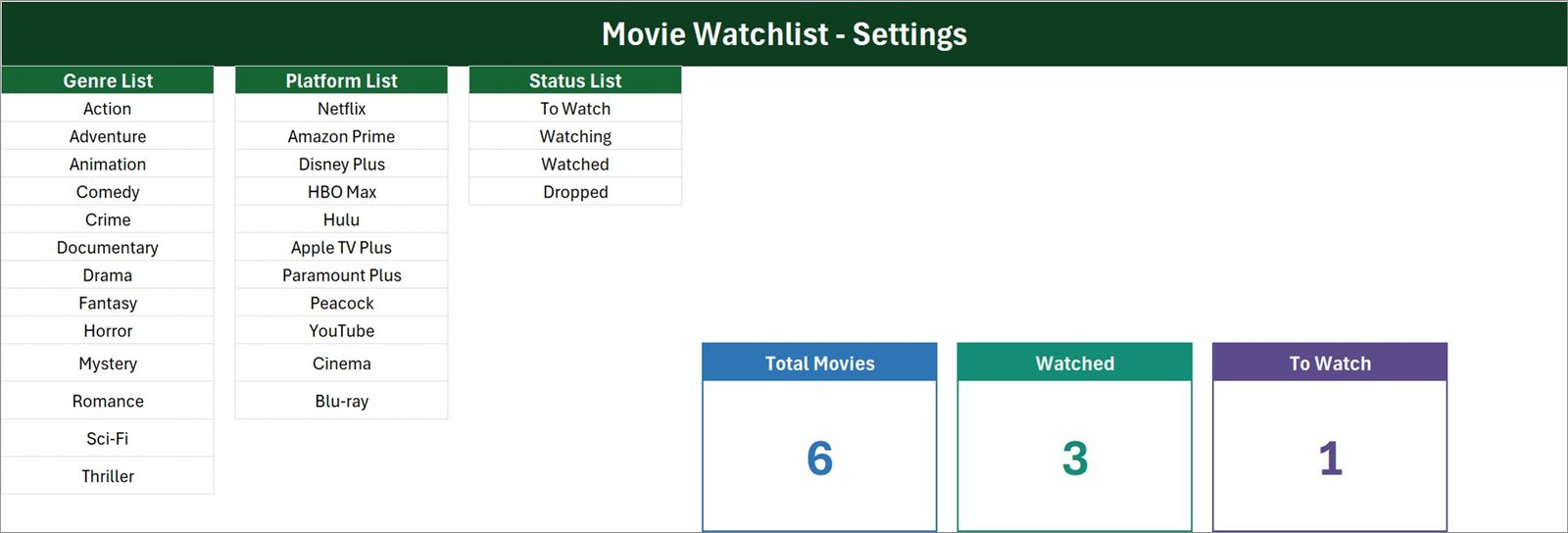
- Three editable dropdown lists – 13 genres, 11 platforms and 4 statuses live on the Setting sheet. Add or delete a row there and every dropdown follows.
- Dropdowns in the table too – the Genre, Platform and Status columns carry the same validated lists, so you can type straight into the grid instead of using the form.
- 10-column record table – S.No., Record ID, Title, Genre, Platform, Status, Rating, Release Year, Date Added and Entry TimeStamp.
- No subscription – one file, one payment, yours to keep and to edit. Movie Watchlist Data Entry System in Excel
What’s Inside the Movie Watchlist Data Entry System in Excel
The download is a single ZIP containing one macro-enabled workbook, Movie_Watchlist_System.xlsm, with four sheets.
Data Entry. The working sheet. Three summary cards across the top left, the seven-field form to their right, the four buttons on the far right, and the records table starting at row 15. The Genre, Platform and Status dropdowns are pre-applied down to row 214, which covers 200 records out of the box.
Setting. Three list columns – Genre List, Platform List, Status List – plus the master copies of the three summary cards. The genre list ships with Action, Adventure, Animation, Comedy, Crime, Documentary, Drama, Fantasy, Horror, Mystery, Romance, Sci-Fi and Thriller. The platform list ships with Netflix, Amazon Prime, Disney Plus, HBO Max, Hulu, Apple TV Plus, Paramount Plus, Peacock, YouTube, Cinema and Blu-ray. The status list is To Watch, Watching, Watched and Dropped. All three are yours to rewrite. Movie Watchlist Data Entry System in Excel
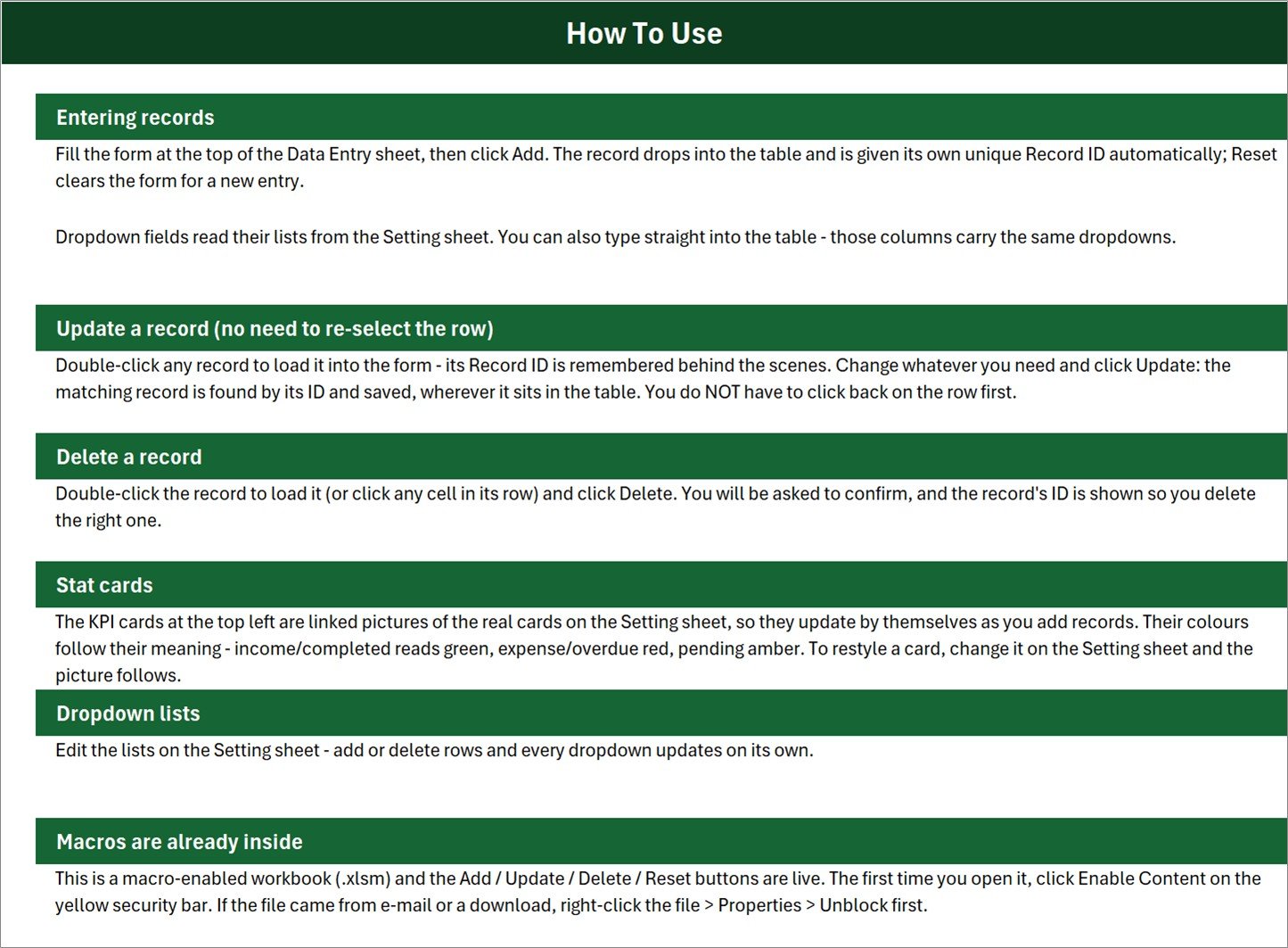
Instructions. A one-page How To Use sheet covering entering records, updating, deleting, the stat cards, the dropdown lists and enabling macros.
Get More Templates. A short links page pointing back to the NextGenTemplates store.
Movie Watchlist Data Entry System in Excel vs. Google Sheets vs. a Paid Watchlist App – Where This Fits
| This template (Excel) | Google Sheets watchlist | Paid watchlist app (Letterboxd Pro, Trakt VIP) | |
|---|---|---|---|
| Cost | $6.99 once | Free, but you build it | $19 – $60 per year |
| Platform | Desktop Excel for Windows | Any browser | Web and mobile apps |
| Setup time | Under 5 minutes – unzip, enable macros, type | Hours of building | Minutes, after creating an account |
| Real-time team collaboration | No – single-user file | Yes | Yes, on paid tiers |
| Mobile access | No – VBA does not run on mobile or Mac | Yes | Yes |
| Customizable fields | Yes – edit the sheet directly | Yes | Rarely – fixed schema |
| Share with link | No – send the file | Yes | Yes |
| Year-1 cost at 5 users | $6.99 (one file, copied) | $0 | $95 – $300 |
| Fetches posters, cast and runtimes automatically | No – you type every field | No, without scripting | Yes |
| Works with no internet connection | Yes | No | No |
| Your data leaves your machine | No | Yes – stored by Google | Yes – stored by the vendor |
Who This Template Is For – and Who It’s Not For
It is for you if you want a private, offline list of what you plan to watch and what you already watched; if you already live in Excel and would rather not sign up for another app; if you want your own genre and platform vocabulary rather than someone else’s; or if you want to see, at a glance, how much of your list is still unwatched.
It is not for you if you want posters, synopses, cast lists, runtimes or critic scores pulled in automatically – this workbook fetches nothing, and every field is typed by you. It does not connect to IMDb, TMDb, Rotten Tomatoes, Letterboxd, Trakt or JustWatch, and it does not sync with Netflix, Prime Video, Disney+, HBO Max or Hulu. It does not tell you where a title is streaming, it does not recommend anything, and it does not play or store video. It is a single-user desktop file with no accounts and no sharing, so a household that wants one shared list on phones is better served by Google Sheets. And because it runs on VBA, it needs desktop Excel for Windows – Excel for Mac, Excel for the web and Google Sheets will not run the buttons.
How to Use the Movie Watchlist Data Entry System in Excel
- Unzip and unblock. If the file arrived by e-mail or download, right-click it, choose Properties and tick Unblock before opening.
- Enable macros. Open the workbook in desktop Excel for Windows and click Enable Content on the yellow bar. The Add, Update, Delete and Reset buttons will not run otherwise.
- Make the lists yours. On the Setting sheet, rewrite the Genre, Platform and Status columns to match what you actually watch and where.
- Delete the six sample rows. Inception, The Grand Budapest Hotel, Dune Part Two, The Bear, Parasite and Rushmore are demonstration data.
- Add a title. Fill the seven form fields and click Add. The row drops into the table with its own Record ID and an entry timestamp.
- Update as you watch. Double-click the row, change Status from To Watch to Watching to Watched, add your Rating, and click Update.
- Watch the cards. Total Movies, Watched and To Watch recalculate on their own.
Real-World Use Cases
Priya, who keeps losing track of recommendations. Friends send her four or five titles a month across three chat apps. She types each one in as To Watch with the platform it is on, and the To Watch card tells her how deep the backlog is before she adds another.
Daniel, who runs a Friday film night. He logs every film the group has already seen with its genre and the group’s rating out of 10, so nobody suggests a repeat and he can see that the group has drifted into Thrillers for two months running.
The Okonkwo household, deciding which subscriptions to keep. They record the platform on every title they finish. At renewal time they sort the table by Platform and see plainly that HBO Max carried two titles all year while Netflix carried nineteen.
Frequently Asked Questions
Does this look up film details automatically?
No. Every field is typed by you. There is no IMDb, TMDb, Rotten Tomatoes, Letterboxd, Trakt or JustWatch lookup, no poster or cast fetch, and no “where to watch” search. It is a manual record, and that is the whole design.
Do the Watched and To Watch cards add up to Total Movies?
No, and that is expected. The status list has four values – To Watch, Watching, Watched and Dropped – but only two of them have a card. In the shipped sample, Total Movies is 6 while Watched is 3 and To Watch is 1; the missing two are the Watching and Dropped rows. If you want cards for those as well, copy one of the existing Setting-sheet cards and point its COUNTIF at the status you want.
How many records can it hold?
The summary formulas read the whole column, so there is no practical cap on the count. The Genre, Platform and Status dropdowns are pre-applied from row 15 to row 214, which is 200 records. Past that, select an existing cell in the column and copy the validation down.
Will it work on a Mac, on my phone, or in Excel for the web?
No. The Add, Update, Delete and Reset buttons are VBA macros, and VBA does not run in Excel for Mac’s sandbox, in Excel for the web, on mobile, or in Google Sheets. Use desktop Microsoft Excel for Windows.
Does it average my ratings?
No. Rating is stored per row and can be sorted or filtered, but nothing in the workbook totals or averages it. Adding an AVERAGE formula on the Setting sheet is a one-line change if you want one.
Can I change the genres and platforms?
Yes – that is what the Setting sheet is for. Add, rename or delete rows in any of the three lists and every dropdown, in the form and in the table, updates on its own.
What happens to Record IDs if I delete a row?
The number is retired. The workbook tracks the highest ID it has issued, so a new record always gets a fresh number and you never end up with two rows sharing an ID.
About the Author
Built by PK – Microsoft Certified Professional with 15+ years of Excel, Google Sheets, and Power BI experience. Founder of NextGenTemplates, reaching 300K+ subscribers across YouTube channels. Every template is hand-built and tested before release.
Explore Related Templates
- Book Reading Log Data Entry System in Excel – the same form-and-cards build for books instead of films.
- Subscription and Membership Tracker in Google Sheets – once the watchlist shows which platform you actually use, this one tracks what each renewal costs.
- Film and Television Dashboard in Google Sheets – the industry-side view, for anyone working in film rather than watching it.
- Media and Entertainment Dashboard in Google Sheets – a broader media analytics build.
- Hobby Progress Checklist in Excel – a lighter, formula-only alternative if you do not want macros at all.
- Browse every Excel VBA Tool or the full MS Excel catalogue.
Start Your Watchlist Today
Add the Movie Watchlist Data Entry System in Excel to your cart, unzip it, enable macros and type your first title. No account, no subscription, no data leaving your machine – just a list that finally lives in one place.
Last updated: 26 August 2026.
Watch the demo video:
Compatibility and Requirements
- Works in Microsoft Excel desktop for Windows with macros enabled. The Add, Update, Delete and Reset buttons are VBA macros, so the file does not run in Excel for the web, Google Sheets or on mobile.
- Excel explains how to turn macros on in Enable or disable macros in Microsoft 365 files.











Reviews
There are no reviews yet.