

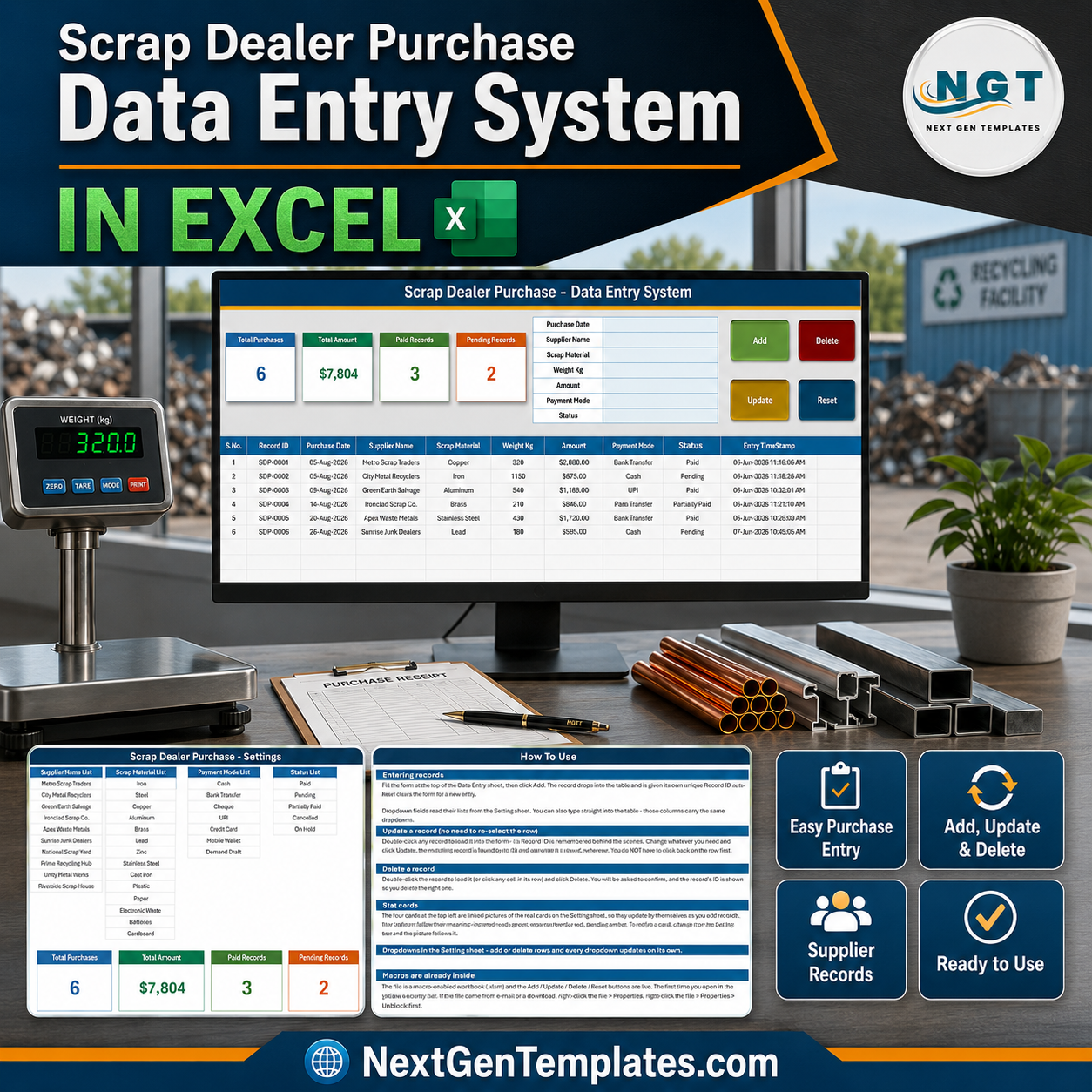

The Scrap Dealer Purchase Data Entry System in Excel is a four-sheet macro-enabled workbook for logging scrap you buy in, one purchase at a time. A seven-field form feeds a records table of ten columns, every purchase is filed with its own SDP-0001 style Record ID and an automatic entry timestamp, and four live stat cards sit above the form – Total Purchases, Total Amount, Paid Records and Pending Records – recalculating from the table itself. Built by PK, a Microsoft Certified Professional, and hand-tested before release. Instant download, lifetime access, no subscription, and support if the workbook does not work as this page describes.
This is a purchase register, not a compliance system. It does not verify seller identity, does not produce or store waste transfer notes, does not check or record a waste carrier or scrap metal dealer licence, does not report anything to police or any regulator, does not enforce cash-transaction limits, and is not a tax, accounting or audit-ready record. Scrap dealing is a regulated trade in many places; whatever your jurisdiction requires of you, this workbook provides none of it. What it does is keep a tidy, timestamped list of what you bought, from whom, at what weight and for how much.
Key Features of the Scrap Dealer Purchase Data Entry System in Excel
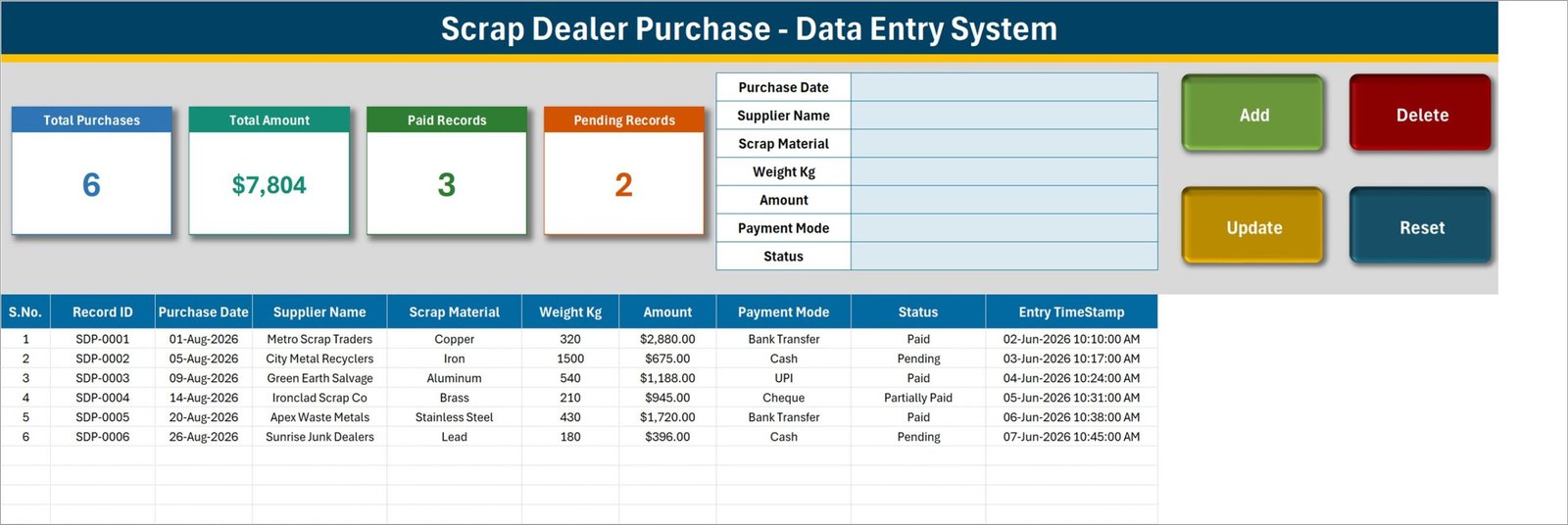
- Seven-field entry form – Purchase Date, Supplier Name, Scrap Material, Weight Kg, Amount, Payment Mode and Status, stacked down the middle of the Data Entry sheet.
- Four VBA buttons – Add (green), Delete (red), Update (gold) and Reset (teal), wired to the macros
Add_Record,Update_Record,Delete_RecordandReset_ForminModule1. - Automatic Record ID – each purchase is filed as SDP-0001, SDP-0002 and onward, so two loads from the same supplier on the same day never merge.
- Entry TimeStamp column – the date and time the row was saved is written for you, to the second.
- Update by ID, not by row – double-click any record to pull it back into the form; the macro finds it again by its Record ID wherever it has been sorted to, and Delete names the ID before it removes anything.
- Four live stat cards – Total Purchases, Total Amount, Paid Records and Pending Records, built as linked pictures of the real cards on the Setting sheet so they update themselves.
- Four dropdown lists you own – 10 supplier names, 14 scrap materials, 8 payment modes and 5 statuses, all edited on the Setting sheet.
- A materials list that already fits the trade – Iron, Steel, Copper, Aluminum, Brass, Lead, Zinc, Stainless Steel, Cast Iron, Plastic, Paper, Electronic Waste, Batteries and Cardboard.
- Payment modes for a cash-and-transfer yard – Cash, Bank Transfer, Cheque, UPI, Credit, Debit Card, Mobile Wallet and Demand Draft.
- 200 pre-formatted record rows – rows 15 to 214 already carry the dropdowns, the dd-mmm-yyyy date format and the currency format.
- A How To Use sheet inside the file – six short sections covering entry, update, delete, the cards, the lists and enabling macros.
What Is Inside the Scrap Dealer Purchase Data Entry System in Excel
The download is a ZIP containing one macro-enabled workbook, Scrap_Dealer_Purchase_System.xlsm (65 KB). It has exactly four sheets and nothing else – no separate data file, no add-in, no external links.
1. Data Entry. The working sheet. A navy title banner reading “Scrap Dealer Purchase – Data Entry System”, the four stat cards, the seven-field form, the Add / Delete / Update / Reset buttons, and below them the records table: S.No., Record ID, Purchase Date, Supplier Name, Scrap Material, Weight Kg, Amount, Payment Mode, Status, Entry TimeStamp. S.No. is a formula that renumbers itself, so sorting the table never leaves gaps. Six sample purchases ship with it – 320 kg of Copper from Metro Scrap Traders at $2,880.00 marked Paid, 1,500 kg of Iron from City Metal Recyclers at $675.00 marked Pending, and four more – so you can watch Add, Update and Delete work before clearing them out.
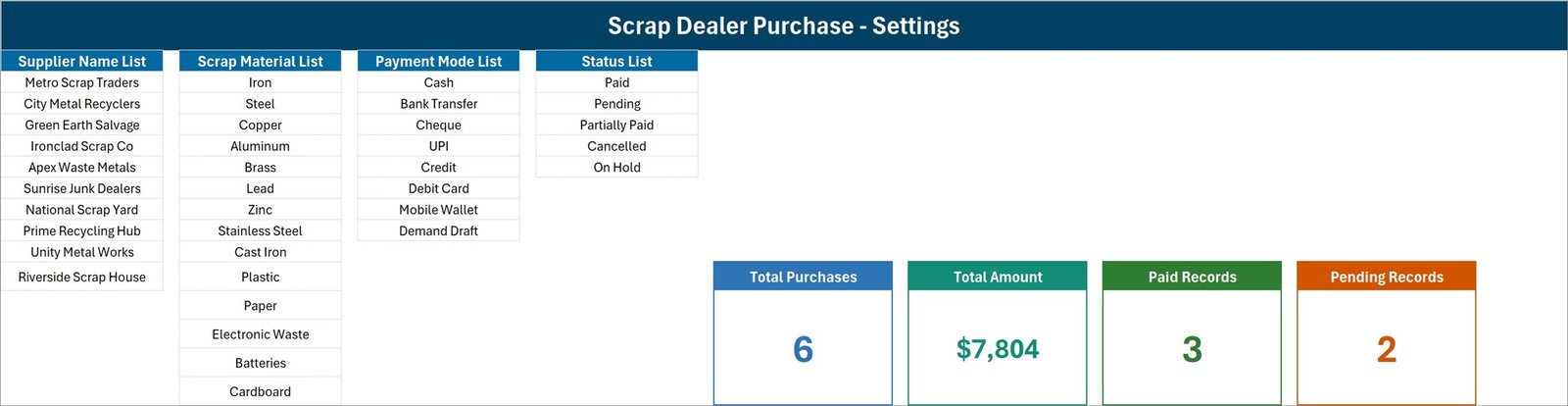
2. Setting. Four editable lists and the four real stat cards. Supplier Name List ships with Metro Scrap Traders, City Metal Recyclers, Green Earth Salvage, Ironclad Scrap Co, Apex Waste Metals, Sunrise Junk Dealers, National Scrap Yard, Prime Recycling Hub, Unity Metal Works and Riverside Scrap House. Scrap Material List holds the fourteen materials above. Payment Mode List holds the eight modes above. Status List is Paid, Pending, Partially Paid, Cancelled and On Hold. Replace any of them with your own yard’s suppliers and grades and every dropdown follows.
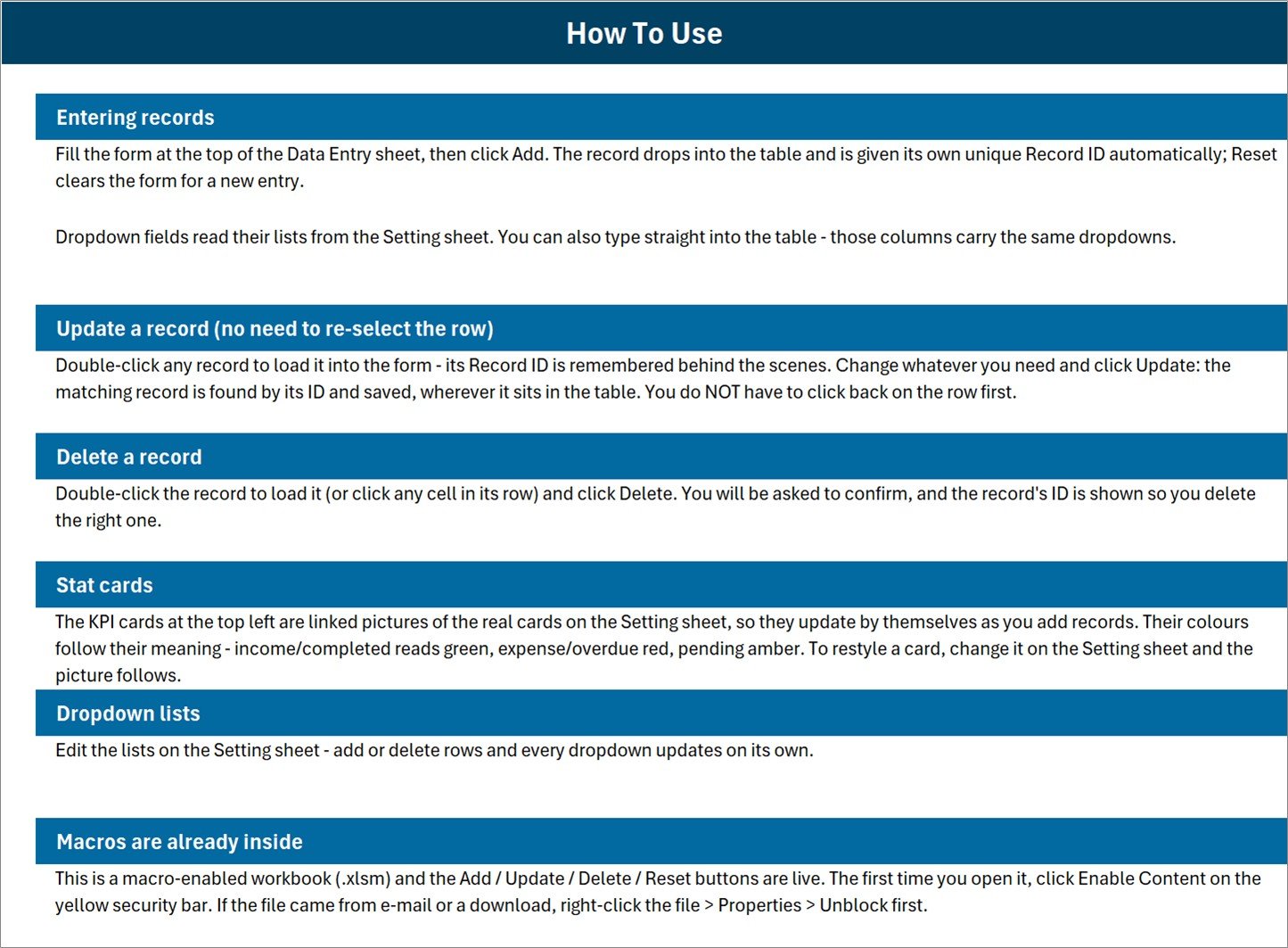
3. Instructions. The sheet tab is called Instructions; its banner reads “How To Use”. Six sections – entering records, updating without re-selecting the row, deleting, how the stat cards work, editing the dropdown lists, and enabling macros.
4. Get More Templates. Links back to the NextGenTemplates store.
Exactly What the Four Stat Cards Count
The cards are honest arithmetic, but they are simple arithmetic, and it is worth knowing what each one does before you quote a number off it. These are the formulas as they are written on the Setting sheet:
| Card | Formula | What that means in practice |
|---|---|---|
| Total Purchases | COUNTA of the Purchase Date column | Counts rows that have a date. It counts the date column, not the Record ID column, so a row saved without a purchase date is stored but never counted. |
| Total Amount | SUM of the Amount column, unfiltered | Every row, whatever its status. In the shipped sample it reads $7,804 – but only $5,788 of that sits on Paid rows; $1,071 is Pending and $945 is Partially Paid. Cancelled and On Hold rows would be added in too. |
| Paid Records | COUNTIF Status = “Paid” | A correct count of the Paid rows. |
| Pending Records | COUNTIF Status = “Pending” | A correct count of the Pending rows. |
Two consequences follow. First, the status list has five values but only two of them have a card, so Paid plus Pending will not reconcile to Total Purchases whenever anything is Partially Paid, Cancelled or On Hold – in the sample, 3 + 2 does not make 6, because SDP-0004 is Partially Paid and appears on neither card. Second, Weight Kg is never totalled anywhere in the workbook. If you want a tonnage figure or a paid-only spend figure, add your own SUMIF beside the cards; the sheet is unprotected and the formulas are in plain view.
Scrap Dealer Purchase Data Entry System in Excel vs. Google Sheets vs. Scrap Yard Software – Where This Fits
| This Excel system | A Google Sheets form | Yard management software | |
|---|---|---|---|
| Cost | $6.99 once | Free, build it yourself | Typically $50-$500 per month |
| Platform | Excel for Windows, desktop | Browser, any device | Browser, often with a mobile app |
| Setup time | About 10 minutes to swap the four lists | Hours of building | Days, plus onboarding |
| Real-time team collaboration | No – one file, one editor | Yes | Yes |
| Mobile access | No – the VBA buttons need the desktop app | Yes | Yes |
| Customizable fields | Dropdown lists yes; the seven form fields need VBA edits | Yes | Within the vendor’s model |
| Weighbridge or scale integration | No – Weight Kg is typed in by hand | No | Usually yes |
| Seller ID, address or vehicle capture | No – no such field exists | Build it yourself | Often yes |
| Reporting to police or regulators | No | No | Sometimes, by region |
| Charts and trend analysis | No – four number cards, no charts | Build it yourself | Yes |
| Supplier balance or amount-owed ledger | No – Status is a label, not a balance | Build it yourself | Usually yes |
| Year-1 cost at 3 users | $6.99 | $0 | $600-$6,000 |
Who This Template Is For – and Who It Is Not For
It is for a small scrap yard, a junk or salvage dealer, a metal recycler, a waste-paper or e-waste buyer, or the purchase clerk in any business that buys scrap in by weight and currently keeps it in a notebook or a plain worksheet. One person, one file, on a Windows PC, who wants a form, a unique ID per load and four counts they do not have to re-add by hand.
It is not for anyone who needs a compliance record. There is no seller identity field, no address, no phone number, no photo ID, no vehicle registration and no licence number anywhere in the workbook – Supplier Name is a single field, and the ten names shipped in it are trading names, not individuals. There is no waste transfer note, no consignment note, no police reporting, no cash-limit enforcement and no ledger of what you still owe a supplier. It is also not for teams typing at once, not for phones or Excel for the web, and it has no charts: if you want trends and visuals rather than a register, start with an Excel dashboard instead.
Not the Same as Our Scrap Record Data Entry System
We sell two scrap workbooks and they face opposite directions. Scrap Record Data Entry System in Excel is the producer side: it logs scrap your own process generated, with fields for Scrap Reason and Department. This one is the dealer side: it logs scrap you bought in, with fields for Supplier Name, Payment Mode and payment Status. Different fields, different lists, different Record ID series. If you run a yard you probably want this one; if you run a factory and are tracking your own waste, you want that one.
How to Use the Scrap Dealer Purchase Data Entry System in Excel
- Unzip the download and open the .xlsm in Excel on Windows. Click Enable Content on the yellow bar. If the file came by e-mail, right-click it first, choose Properties and tick Unblock.
- Go to the Setting sheet and replace the four lists with your own suppliers, grades, payment modes and statuses. Each list range is currently sized exactly to the values already in it, so if you add a row below the last item, widen the named range to match (Formulas > Name Manager).
- Back on Data Entry, delete the six sample rows once you have seen the buttons work.
- Fill the form and click Add. The purchase lands in the table with its own Record ID and timestamp; Reset clears the form for the next load.
- To change a purchase, double-click its row, edit the form and click Update. To remove one, load it and click Delete, then confirm the Record ID shown.
- Watch the four cards. They recalculate from the table on their own – nothing to refresh – but read the card table above so you know what each one is and is not counting.
Real-World Use Cases
Farooq, who runs a two-man scrap yard. Eight or nine loads come over the scale on a busy morning. He types the date, picks the supplier, picks the grade, keys the weight off the scale display and the amount he settled at, marks Cash and Paid, and clicks Add. At close he reads Pending Records off the card to see who he still has to settle with.
Anita, purchase clerk at a metal recycler. She replaced the ten shipped supplier names with the twenty-two yards her firm actually buys from, and uses Status to separate the loads finance has released from the ones still on hold. She added her own SUMIF beside the cards for paid-only spend, because Total Amount includes everything.
Sam, a waste-paper and e-waste buyer. He kept Paper, Cardboard, Electronic Waste and Batteries from the shipped material list, deleted the metals, and files every collection with a timestamp so he can settle weekly with the households and offices he collects from.
Frequently Asked Questions
Does this make me compliant with scrap metal dealer or waste carrier rules?
No, and please do not treat it as if it does. It has no seller identity field, no ID or licence capture, no waste transfer or consignment notes, no cash-transaction limit, and it reports nothing to anyone. It is a purchase register. Check what your own jurisdiction requires and keep those records separately.
Do I have to enable macros?
Yes. Add, Update, Delete and Reset are VBA. Without macros enabled the buttons do nothing, though you can still type directly into the table because those columns carry the same dropdowns.
Will it work on a Mac, on Excel for the web, or in Google Sheets?
It is built and tested for Microsoft Excel on Windows desktop. Excel for the web does not run these macro buttons, and Google Sheets cannot run VBA at all.
Does Total Amount show me what I have actually paid out?
No. Total Amount is an unfiltered SUM of the Amount column, so it includes Pending, Partially Paid, Cancelled and On Hold rows as well as Paid ones. In the shipped sample it reads $7,804 while only $5,788 sits on Paid rows. If you want a paid-only figure, add a SUMIF next to the cards.
Why do Paid Records plus Pending Records not equal Total Purchases?
Because only two of the five statuses have a card. Partially Paid, Cancelled and On Hold rows are counted in Total Purchases but appear on neither status card. The sample shows it: 6 purchases, 3 Paid, 2 Pending, and one Partially Paid row on no card at all.
Does it total the weight I bought?
No. Weight Kg is stored per record and shown in the table, but nothing in the workbook adds it up. There is no tonnage card and no per-material or per-supplier summary. A SUM or SUMIF of that column takes about a minute to add yourself.
If I add a new supplier or material, does the dropdown pick it up automatically?
Not as shipped. The How To Use sheet says the lists update on their own, but the four named ranges are currently sized exactly to the values already in them – Supplier_NameList is A3:A12 with ten names, Scrap_MaterialList is C3:C16 with fourteen, Payment_ModeList is E3:E10 with eight and StatusList is G3:G7 with five. Overtyping an existing entry works instantly; adding an eleventh supplier below the tenth needs the range widened in Name Manager first. It takes seconds once, and then it is right.
How many purchases can it hold?
Rows 15 to 214 are pre-formatted with the dropdowns and formats, which is 200 records out of the box. You can carry on past row 214, but you would need to extend the data validation yourself.
Can I add my own fields, such as a vehicle number or a phone number?
You can add columns to the table by hand. The form and its four buttons are fixed at the seven fields shown unless you edit the VBA, which is unlocked and readable. If you do add anything that identifies a person, treat the file like any other personal-data record: it is an ordinary unencrypted workbook and makes no compliance claim under GDPR or any other regime.
Can I change the stat cards?
Yes. The four cards on the Data Entry sheet are linked pictures of the real cards on the Setting sheet, so editing the formula or the colour there updates the picture.
About the Author
Built by PK – Microsoft Certified Professional with 15+ years of Excel, Google Sheets, and Power BI experience. Founder of NextGenTemplates, reaching 300K+ subscribers across YouTube channels. Every template is hand-built and tested before release.
Explore Related Templates
- Scrap Record Data Entry System in Excel – the producer side: scrap your own process generated, by reason and department.
- Gate Pass Register Data Entry System in Excel – log the vehicles and visitors coming through the yard gate.
- Recycling Infrastructure Dashboard in Excel – charts and trends rather than a register.
- Waste Reduction KPI Dashboard in Google Sheets – a KPI view of waste and recovery.
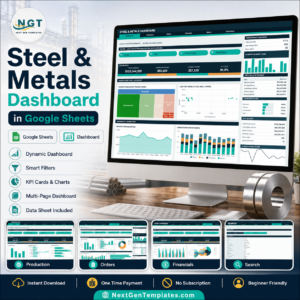
- Steel & Metals Dashboard in Google Sheets – the wider metals market in one sheet.
- Browse every Excel VBA tool in the store.
Add the Scrap Dealer Purchase Data Entry System in Excel to your cart and your first load will be filed, with a Record ID and a timestamp, about ten minutes after the download finishes. Instant download, lifetime access, free bug fixes to this file.
Last updated: 1 September 2026.
Watch the demo video:
Compatibility and Requirements
- Works in Microsoft Excel on a Windows desktop, with macros enabled. The Add, Update, Delete and Reset buttons are VBA, so the workbook does not run in Excel for the web, Google Sheets or on mobile.
- Excel shows a yellow Enable Content bar when you open the .xlsm. Microsoft explains the setting in Enable or disable macros in Microsoft 365 files.





























Reviews
There are no reviews yet.