



The Hobby Progress Checklist in Excel is the perfect tool for anyone looking to organize, track, and make steady progress in their personal hobbies. Whether you’re learning a new skill, pursuing a passion project, or engaging in a creative activity, this customizable checklist helps you stay focused, set goals, and measure your success.
With this easy-to-use Excel template, you can break down your hobby-related tasks, set deadlines, and track your achievements. Whether it’s learning a musical instrument, crafting, or working on a fitness goal, this checklist helps you stay on top of your progress and reach your hobby goals faster.
Key Features of the Hobby Progress Checklist in Excel
🎨 Comprehensive Hobby Tracking
Track any hobby or passion project in one place. From learning a language to DIY projects, categorize and organize your activities to stay on top of your goals.
⚡ Real-Time Progress Monitoring
Monitor your progress with visual indicators and completion statuses, allowing you to track how far you’ve come and what tasks remain.
📅 Goal Setting & Task Scheduling
Set achievable goals and deadlines for each hobby task. Plan your activities, and break down larger goals into smaller, manageable tasks to keep you motivated.
🔄 Customizable for Your Hobby Goals
Tailor the checklist to suit your specific hobbies. Modify categories, tasks, and goals based on what you’re working toward, whether it’s skill development or personal achievement.
📊 Hobby Progress Dashboard
Visualize your hobby progress with an interactive dashboard that tracks your activities, completed tasks, and goals achieved.
🖥️ Simple & User-Friendly Interface
The intuitive design makes it easy to track your hobbies, set goals, and stay organized, even for those new to Excel.
Why You’ll Love the Hobby Progress Checklist in Excel

✅ Track Your Progress with Ease
Stay organized and motivated by tracking your progress for each hobby. Celebrate small wins as you achieve milestones along the way.
✅ Set Clear Goals & Deadlines
Set clear, achievable goals for your hobby and stay focused by creating timelines and deadlines for each task.
✅ Visualize Your Achievements
Use the dashboard to visualize your progress, identify completed tasks, and set new goals for continued development in your hobbies.
✅ Customizable to Fit Your Hobbies
Whether you’re focused on painting, fitness, or reading, customize the checklist to fit your specific hobby-related goals and tasks.
✅ Maintain Motivation & Consistency
Track your progress regularly, stay motivated, and ensure that you continue to dedicate time and effort to your hobbies.
What’s Inside the Hobby Progress Checklist in Excel?
- Hobby Overview: A list of hobbies with tasks, goals, deadlines, and categories.
- Real-Time Progress Tracker: Visual indicators and progress bars for each task to help you monitor your achievements.
- Goal Setting & Task Scheduling: Sections to set hobby-specific goals and deadlines.
- Progress Dashboard: A summary dashboard that visualizes your hobby progress, helping you track completed tasks and upcoming goals.
- Customizable Sections: Modify tasks, goals, and categories based on your specific hobbies and progress.
How to Use the Hobby Progress Checklist in Excel
1️⃣ Download the Template: Instantly access your hobby progress checklist.
2️⃣ Set Your Goals: Enter your hobby goals, set deadlines, and break them into actionable tasks.
3️⃣ Track Progress: Use the progress tracker and dashboard to monitor your accomplishments.
4️⃣ Reflect & Adjust: Regularly update your checklist and adjust your tasks or goals as needed to stay on track.
Who Can Benefit from the Hobby Progress Checklist in Excel?
🔹 Hobbyists & Enthusiasts
🔹 Students & Learners Focusing on Skill Development
🔹 Fitness Buffs Tracking Workout Progress
🔹 DIY Crafters & Artists
🔹 Musicians & Language Learners
🔹 Anyone Looking to Stay Organized with Their Hobbies
Stay organized, motivated, and on track with this customizable, easy-to-use hobby progress checklist.
Click here to read the Detailed blog post
Visit our YouTube channel to learn step-by-step video tutorials
Youtube.com/@PKAnExcelExpert
Compatibility and Requirements
- Works in Microsoft Excel desktop (Excel 2016 or later, or Microsoft 365).
- New to Excel? Microsoft has a beginner course in Excel for Windows training.
Frequently Asked Questions
What does the template include?
A hobby overview, a progress tracker, goal setting and task scheduling sections, a progress dashboard and customizable sections.
Can I track more than one hobby?
Yes. The hobby overview lists several hobbies, each with its own tasks, goals, deadlines and category.
Is it hard to use if I am new to Excel?
No. The layout is simple, so you can add tasks and mark progress without advanced Excel skills.
Is there a Google Sheets version?
Yes. The Hobby Progress Checklist in Google Sheets works in a browser with a free Google account.
Related Hobby and Skill Templates
- Hobby Progress Checklist in Google Sheets: the same checklist in Google Sheets
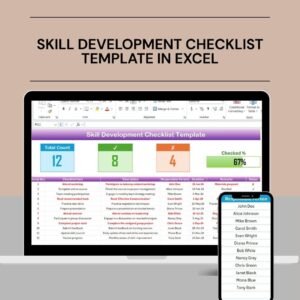
- Skill Development Checklist Template in Excel: build a new skill step by step
- Personal Development Checklist in Excel: steps for personal growth
- Goal Setting Checklist in Excel: break bigger goals into tasks
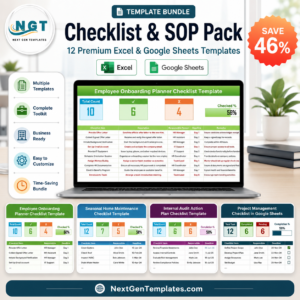
- Checklist & SOP Pack: 12 Excel and Google Sheets checklists in one download
Browse all Excel checklists.






Reviews
There are no reviews yet.