



In the world of microfinance, every number tells a story—of impact, growth, and sustainability. The Microfinance KPI Dashboard in Google Sheets is a powerful, ready-to-use tool that empowers Microfinance Institutions (MFIs) to monitor critical performance metrics with ease. Whether you are tracking client growth, loan performance, or financial sustainability, this dashboard brings clarity to your operations through real-time data insights.
Built in Google Sheets for simplicity and accessibility, this dashboard enables finance leaders and teams to make smart, data-driven decisions that promote operational efficiency and financial health.

⚙️ Key Features of the Microfinance KPI Dashboard
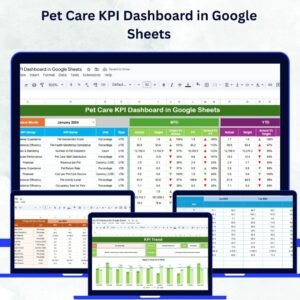
🖥️ Dashboard Sheet – Instant KPI Overview
Displays Month-to-Date (MTD) and Year-to-Date (YTD) actuals, targets, and prior year comparisons
Uses conditional formatting with 🔼🔽 arrows for visual performance tracking
Highlights deviations from targets and historical trends
📈 KPI Trend Sheet – Visualize Long-Term Progress
Dropdown to select any KPI and analyze it over time
Displays KPI Group, Unit, Formula, Type (Lower/Upper the Better), and Definition
Enables clear trend analysis and forecasting
📝 Actual Number Sheet – Central Data Entry Hub
Enter current month’s performance values
Sheet automatically updates all visuals and metrics across the dashboard
Ensures real-time performance reflection
🎯 Target Sheet – Set and Measure Performance Goals
Input both MTD and YTD target values
Enables side-by-side comparison of Actual vs Target for strategic evaluation
🕒 Previous Year Number Sheet – Year-Over-Year Comparison
Store last year’s values for each KPI
Assess growth, setbacks, and trends by comparing current performance to historical data
📘 KPI Definition Sheet – Clarity for Every Stakeholder
Clearly defines each KPI with its group, formula, unit, and strategic importance
Helps teams align on what’s being measured and why
📦 What You Get with This Dashboard
✅ 6 Fully Functional Sheets
📊 Real-time synced data across all tabs
🔄 Instant KPI comparison with dynamic visuals
🔧 Customizable structure for your institution’s needs
📥 No coding or scripting required—just use Google Sheets
🌐 Cloud-based collaboration for distributed teams
👥 Who Is This Dashboard For?
💼 Microfinance Managers – Track loan performance, client metrics, and repayment
🧮 Finance Officers – Monitor sustainability, costs, and profitability
📈 Operations Teams – Optimize workflow, outreach, and resource allocation
🧑💼 Donors & Investors – Use insights to report on impact and ROI
🏢 NGOs & Cooperatives – Ensure transparency and efficiency in financial programs
🧠 How to Use the Dashboard
Go to the Actual Number Sheet and input this month’s data
Enter monthly and yearly Targets in the Target Sheet
Add previous year’s numbers for comparison and trends
Switch to Dashboard Sheet for real-time MTD & YTD visuals
Use the KPI Trend Sheet to analyze performance over time
Refer to the KPI Definition Sheet for clarity and collaboration
💡 Best Practices for Effective KPI Monitoring
✅ Update data regularly to reflect timely progress
📉 Focus on mission-critical KPIs like Portfolio at Risk, Loan Recovery, and Client Retention
📊 Leverage the Trend Sheet to forecast and plan
🔄 Use PY comparisons to track institutional growth
🔧 Customize KPIs and groups to match your internal framework
Read the detailed blog post
Watch the step-by-step video Demo:
📺 Watch Tutorial on Our YouTube Channel
Youtube.com/@NeotechNavigators
Compatibility and Requirements
- Works in Google Sheets. You need a free Google account and a web browser.
- You choose the KPI to review from a dropdown on the KPI Trend sheet. Google explains dropdowns in Create an in-cell dropdown list.
Frequently Asked Questions
Which sheets are included?
Six sheets: Dashboard, KPI Trend, Actual Number, Target, Previous Year Number and KPI Definition.
How do I update the dashboard?
Enter this month’s figures in the Actual Number sheet and your MTD and YTD goals in the Target sheet. The Dashboard sheet then shows the current MTD and YTD results against targets.
Can I compare this year with last year?
Yes. Add last year’s values for each KPI to the Previous Year Number sheet and the Dashboard shows them next to your actuals and targets, with arrow markers for the direction of performance.
How do I see the trend for one KPI?
Open the KPI Trend sheet and pick a KPI from the dropdown. It shows the KPI Group, Unit, Formula, Type (Lower the Better or Upper the Better) and Definition.
Is there an Excel or Power BI version?
Yes. See the Microfinance KPI Dashboard in Excel and the Microfinance KPI Dashboard in Power BI.
Related Microfinance Templates
- Microfinance KPI Dashboard in Excel: the same KPI dashboard in Excel
- Microfinance KPI Dashboard in Power BI: the Power BI edition
- Microfinance Institutions KPI Dashboard in Excel: a KPI dashboard for institutions in Excel
- Microfinance KPI Scorecard in Excel: a scorecard view of microfinance metrics
- Google Sheets Business Pack (Pro): 14 business templates for Google Sheets in one download
Browse all Google Sheets KPI dashboards.












Reviews
There are no reviews yet.