



Revolutionize Your Community Growth Strategy with the Community Management KPI Dashboard in Google Sheets! 🚀
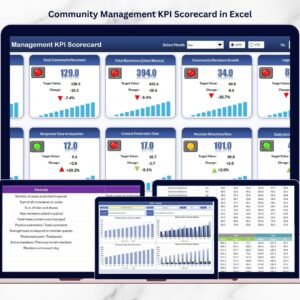
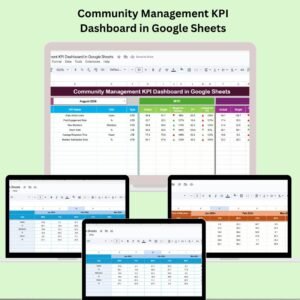
Managing an online or internal community takes more than just engagement—it requires strategy, measurement, and optimization. Whether you’re running a Facebook group, Discord server, internal user group, or customer forum, our Community Management KPI Dashboard in Google Sheets is the ultimate solution to track performance, drive engagement, and make informed decisions—all without expensive software!Community Management KPI Dashboard in Google Sheets

✨ Key Features of the Community Management KPI Dashboard in Google Sheets
🔍 All-in-One Dashboard View
Track MTD, YTD, and Previous Year metrics with dropdown filters. Instantly compare performance with smart conditional formatting and arrows showing trends—no guesswork needed!
📈 KPI Trend Monitoring
Select any KPI from a dropdown and watch the monthly trend unfold with structured visuals and clear formulas. Stay ahead of drops or spikes in engagement.
📝 Fully Editable KPI Definition Sheet
Each KPI comes with predefined units, formulas, types (UTB or LTB), and a short explanation—so your team always knows what they’re tracking and why.
🗂️ Structured Data Tabs
Separate sheets for Actual Numbers, Target Setting, and Previous Year’s Data allow clean data entry and robust year-over-year comparisons.
🧩 No Coding Required
No need to be a spreadsheet wizard—this dashboard is prebuilt and plug-and-play ready!
📦 What’s Inside the Community Management KPI Dashboard?
This template comes with 6 thoughtfully designed worksheet tabs:
1️⃣ Dashboard Tab – One-click month selector for instant KPI updates with MTD and YTD views
2️⃣ KPI Trend Tab – Drill down into individual KPI trends across months
3️⃣ Actual Number Tab – Input your actual performance for each KPI
4️⃣ Target Tab – Enter and adjust MTD/YTD targets
5️⃣ Previous Year Tab – Enter last year’s performance to track growth
6️⃣ KPI Definition Tab – Customizable KPI repository with formula logic
These components work in harmony to provide a live, transparent, and strategic overview of your community management success.
🛠️ How to Use the Community Management KPI Dashboard
✅ Step 1: Open the file and go to the KPI Definition tab to review or modify your KPIs
✅ Step 2: Enter actual data in the “Actual Number” sheet every month
✅ Step 3: Set your goals in the “Target” tab for MTD/YTD progress tracking
✅ Step 4: Update previous year data for historical benchmarking
✅ Step 5: Use the Dashboard and KPI Trend tabs to analyze your insights and present to your team
This dashboard works right out of the box, but it’s also fully customizable to fit your organization’s unique goals!
👥 Who Can Benefit from This Dashboard?
🎯 Community Managers – Gain a data-driven edge in managing community growth, participation, and retention.
📢 Marketing Teams – Track the performance of brand-led communities and engagement-driven campaigns.
📈 Startups & SMEs – Achieve big results with a small budget using a smart, Google Sheets-based system.
🏢 Enterprise Teams – Share real-time performance metrics across departments and stakeholders.
📊 Nonprofits & NGOs – Understand volunteer and member engagement levels to optimize community outreach.
🧠 Agencies – Use it as a client-facing report tool for monthly community insights.
🔥 Why Choose This Over Other Tools?
💸 No subscription fees
🌐 Cloud-based collaboration
🧠 Intuitive structure
📱 Mobile-accessible
🛠️ Customizable formulas and charts
🎯 Actionable insights with conditional formatting
✅ Click here to read the Detailed blog post Community Management KPI Dashboard in Google Sheets
Watch the step-by-step video Demo:
✅ Visit our YouTube channel to learn step-by-step video tutorials
👉 Youtube.com/@PKAnExcelExpert
Compatibility and Requirements
- Works in Google Sheets with a free Google account and a web browser.
- Make a copy to your own Google Drive, then share it with your team if you want to work on it together.
- New to Sheets? Google’s guide How to use Google Sheets covers the basics.
Frequently Asked Questions
What tabs are in the Community Management KPI Dashboard in Google Sheets?
Six tabs: Dashboard, KPI Trend, Actual Number, Target, Previous Year and KPI Definition.
How do I switch the month?
Use the month selector on the Dashboard tab. The MTD and YTD views and the comparisons with target and previous year update for that month.
Can I change the KPIs?
Yes. The KPI Definition tab is fully editable. Each KPI has a unit, formula, type (UTB or LTB) and a short explanation you can change.
Can my team work in it together?
Yes. It runs in Google Sheets, so you can share the file with your team and work on it in the browser.
Related Community Templates
- Community Management KPI Dashboard in Excel: the same KPI dashboard in Excel
- Community Management KPI Dashboard in Power BI: the same KPI dashboard in Power BI
- Community Engagement KPI Dashboard in Excel: measure member engagement in Excel
- Community Services Dashboard in Google Sheets: a community services dashboard in Google Sheets
- Google Sheets Business Pack (Pro): 14 Google Sheets business templates in one bundle
Browse all Google Sheets KPI dashboards or the Google Sheets dashboards.





Reviews
There are no reviews yet.