



In today’s fast-paced world, mental health management is more important than ever. Clinics, therapy centers, and wellness organizations need smart tools to measure service quality, patient satisfaction, and financial performance. That’s where the Mental Health Services Dashboard in Excel steps in — a ready-to-use, data-driven, and interactive solution that helps mental health professionals transform data into actionable insights. 📊💡
This Excel-based dashboard brings together all essential KPIs — such as Patient Satisfaction, Session Fees, Discounts, Insurance Coverage, and Profitability — giving you a complete picture of your organization’s health in just one click. Whether you manage a single clinic or multiple branches, this dashboard helps you make confident, data-backed decisions.
💎 Key Features of the Mental Health Services Dashboard in Excel
📊 Comprehensive Overview Page:

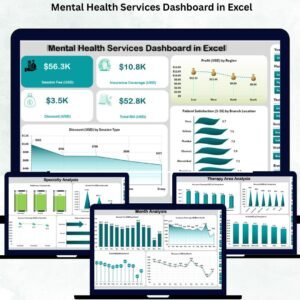
View your organization’s performance at a glance with clean, professional visuals. Monitor profit, satisfaction, and discount metrics using intuitive charts and summary cards.
🏥 Five Analytical Pages:
Navigate easily through dedicated pages — Overview, Branch Location, Specialty, Therapy Area, and Month Analysis — using the left-side page navigator. Each page offers powerful insights across different service areas.
💡 Dynamic Data Filters:
Use slicers and dropdowns to analyze data by time period, branch, specialty, or therapy area. The dashboard updates instantly — no complex setup required.
💰 Profit and Cost Insights:
Quickly identify your most profitable regions, therapy areas, or session types. See how discounts and insurance coverage impact your bottom line.
🧾 Insurance Analysis:
Track insurance claims, coverage percentages, and unpaid invoices to ensure smooth billing and improved revenue management.
⚙️ Automatic Data Refresh:
Simply paste your latest data into the Data Sheet — charts and KPIs refresh automatically.
🎨 Visually Engaging Design:
The dashboard uses clean visuals, vibrant charts, and performance cards that make your data easy to interpret and present.
🖥️ No Extra Software Needed:
Runs entirely on Excel — offline, secure, and 100% customizable.
📦 What’s Inside the Mental Health Services Dashboard
When you download this Excel file, you’ll get a complete analytical setup designed for mental health organizations of any size:
📘 Overview Page: Displays four summary cards and three key charts to track profit, satisfaction, and discounts.
🏢 Branch Location Analysis: Compares performance across centers — from session fees to profit margins.
🧠 Specialty Analysis: Evaluates therapy disciplines such as counseling, psychiatry, or psychotherapy.
💬 Therapy Area Analysis: Breaks down insurance, discounts, and total billing by therapy type.
📅 Month Analysis: Reveals monthly trends, seasonal patterns, and promotional impacts.
📊 Data & Backend Sheets: Store patient records, session details, and KPIs — all linked automatically to dashboard visuals.
Each sheet is built for usability and professional reporting.
🧭 How to Use the Mental Health Services Dashboard in Excel
🪄 Step 1: Open the Excel file and navigate through the sidebar menu.
🪄 Step 2: Paste your clinic’s latest data into the Data Sheet.
🪄 Step 3: Use filters to select the desired branch, therapy area, or time period.
🪄 Step 4: Review interactive visuals and KPIs that update automatically.
🪄 Step 5: Export graphs for reports, presentations, or management meetings.
No technical skills needed — everything works with Excel’s built-in features! 🧩
👥 Who Can Benefit from This Dashboard
This dashboard is perfect for:
👩⚕️ Therapists & Counselors: Monitor session performance and satisfaction levels.
🏥 Clinic Managers: Evaluate profit and operational efficiency across branches.
💰 Finance Teams: Track invoices, discounts, and insurance claims.
📈 Healthcare Administrators: Benchmark performance and improve service delivery.
📋 Policy Makers & NGOs: Measure the impact of mental health initiatives.
Whether you’re running a private clinic or managing a large wellness network, this Excel tool simplifies analytics and reporting.
🌟 Why Choose This Excel Dashboard
✔️ Saves time with automated reporting
✔️ No expensive software or subscriptions needed
✔️ 100% customizable and beginner-friendly
✔️ Secure offline use with password protection
✔️ Beautiful visuals and professional layout
✔️ Designed by experts in healthcare analytics
The Mental Health Services Dashboard in Excel empowers you to deliver better care, achieve transparency, and manage operations more efficiently — all from the comfort of Excel. 💻💚
### Click here to read the Detailed blog post
Visit our YouTube channel to learn step-by-step video tutorials
Watch the step-by-step video tutorial:
Compatibility and Requirements
- Works in Microsoft Excel desktop (Excel 2016 or later, or Microsoft 365).
- Slicers and dropdowns filter the pages by time period, branch, specialty or therapy area.
- Microsoft’s guide Use slicers to filter data explains the Excel feature this file is built on.
Frequently Asked Questions
What pages are in the Mental Health Services Dashboard?
Five pages: Overview, Branch Location, Specialty, Therapy Area and Month Analysis, reached from the left-side page navigator, plus the data and backend sheets.
What does the Overview page show?
Four summary cards and three charts that track profit, patient satisfaction and discounts.
Can I analyze insurance coverage?
Yes. The dashboard tracks insurance claims, coverage percentages and unpaid invoices, and the Therapy Area page breaks down insurance, discounts and billing by therapy type.
How do I update the numbers?
Paste your latest data into the Data Sheet. The charts and KPIs refresh from it.
Related Mental Health and Therapy Templates
- Mental Health Services Dashboard in Power BI: the same dashboard in Power BI
- Mental Health Services Dashboard in Google Sheets: a browser version for shared use
- Mental Health Services KPI Dashboard in Excel: MTD and YTD service KPIs
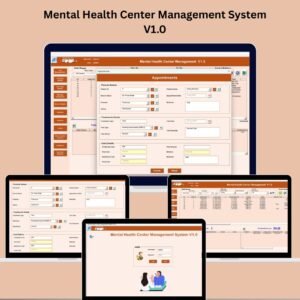
- Mental Health Center Management System V1.0: day to day records for a center
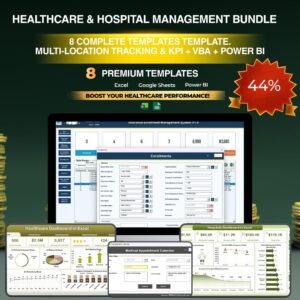
- Healthcare & Hospital Management Bundle: 8 healthcare templates in one download
Browse all Excel dashboards or the Excel KPI dashboards.






Reviews
There are no reviews yet.