



Key Features of Speech Therapy KPI Dashboard
Unlock the full potential of your speech therapy practice with the Speech Therapy KPI Dashboard – a comprehensive, easy-to-use digital solution designed to track and analyze your key performance indicators (KPIs) efficiently. This dynamic dashboard integrates seven meticulously crafted worksheets, enabling you to gain real-time insights, compare monthly and yearly data, and visualize trends effortlessly.
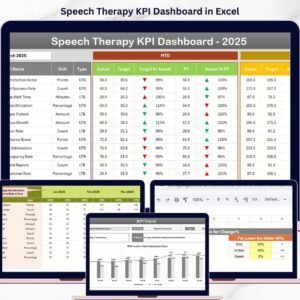
Navigate seamlessly with the Home Sheet, featuring six intuitive buttons that jump you directly to essential sections. The heart of the dashboard lies in the Dashboard Sheet, where you can select any month and instantly view critical data such as Month-to-Date (MTD) Actual vs Target, Previous Year (PY) comparisons, and Year-to-Date (YTD) summaries – all enhanced with conditional formatting and up/down arrows for quick performance evaluation.
The KPI Trend Sheet offers a deep dive into individual KPIs. Select any KPI from the dropdown to see its group, unit, formula, and definition, alongside visually appealing trend charts displaying Actual, Target, and PY data for both MTD and YTD periods. This feature empowers you to detect patterns and make data-driven decisions.
Accurate data input is made simple with dedicated sheets for Actual Numbers, Target Numbers, and Previous Year Numbers. Easily update monthly figures and compare your progress over time. Lastly, the KPI Definition Sheet allows you to manage and customize your KPIs, defining whether a lower or higher value is better for each metric.
What’s Inside the Speech Therapy KPI Dashboard
- 🗂️ 7 Fully Editable Worksheets: Home, Dashboard, KPI Trend, Actual Numbers Input, Target Numbers Input, Previous Year Numbers, KPI Definition
- 📅 Dynamic Month Selection: Filter KPI data by month for precise, timely reporting
- 📊 Interactive Dashboard: Visualize MTD and YTD Actual vs Target and Previous Year comparisons with conditional formatting
- 📈 KPI Trend Analysis: View detailed KPI definitions and formulas plus trend charts for performance monitoring
- ✍️ Easy Data Entry: Input actual, target, and previous year numbers effortlessly to keep your dashboard updated
- 🔍 Customizable KPI Definitions: Define KPI types as Lower The Better (LTB) or Upper The Better (UTB) to suit your goals
- 🚀 User-Friendly Interface: Navigate quickly with index buttons and dropdown menus
- 💡 Conditional Formatting: Instant visual cues for KPI performance improvement or decline
How to Use the Speech Therapy KPI Dashboard
Getting started with the Speech Therapy KPI Dashboard is straightforward and requires minimal setup:
- 🔢 Step 1: Input Initial Data – Begin by entering your baseline actual numbers, target goals, and previous year data into their respective sheets.
- 📅 Step 2: Select the Month – Use the dropdown on the Dashboard sheet to select the month you want to analyze. The dashboard will automatically update all KPIs accordingly.
- 📊 Step 3: Analyze KPIs – Review MTD and YTD performance with clear, color-coded indicators and arrows highlighting whether your KPIs are achieving their targets or need attention.
- 📈 Step 4: Track Trends – Head to the KPI Trend sheet to select individual KPIs and explore detailed charts that help you identify patterns and areas for improvement.
- ⚙️ Step 5: Customize – Adjust KPI definitions, units, and types on the KPI Definition sheet to match your unique clinical or organizational requirements.
- 🔄 Step 6: Update Regularly – Keep your dashboard current by entering monthly actual and target numbers to monitor ongoing performance effectively.
Who Can Benefit from This Speech Therapy KPI Dashboard
- 👩⚕️ Speech Therapists: Track therapy outcomes and optimize client progress with data-driven insights.
- 🏥 Clinics & Healthcare Centers: Monitor team performance, identify trends, and ensure goals are consistently met.
- 📊 Practice Managers: Gain a comprehensive overview of operational KPIs to improve efficiency and client satisfaction.
- 🎓 Educators & Researchers: Analyze therapy effectiveness and present data in a visually compelling format.
- 💼 Consultants: Use this dashboard as a powerful tool to advise speech therapy providers on performance management.
Click here to read the Detailed blog post.
Visit our YouTube channel to learn step-by-step video tutorials

Compatibility and Requirements
- Works in Microsoft Excel desktop (Excel 2016 or later, or Microsoft 365).
- You pick the month and the KPI from dropdown lists. Microsoft explains them in Create a drop-down list.
Frequently Asked Questions
Which worksheets are included?
Seven worksheets: Home, Dashboard, KPI Trend, Actual Numbers Input, Target Numbers Input, Previous Year Numbers and KPI Definition.
How do I update the dashboard each month?
Enter your actual and target numbers in their input sheets, then select the month on the Dashboard sheet. The MTD and YTD figures update for the month you choose.
Can I compare this year with last year?
Yes. Add last year’s figures to the Previous Year Numbers sheet. The Dashboard shows them next to your actuals and targets.
How do I see the trend for one KPI?
Open the KPI Trend sheet and pick the KPI from the dropdown. It shows the group, unit, formula and definition, plus trend charts for Actual, Target and Previous Year.
Can I change what counts as good performance for a KPI?
Yes. On the KPI Definition sheet you set each KPI as Lower The Better (LTB) or Upper The Better (UTB), and the up and down arrows follow that setting.
Is there a Power BI version?
Yes. See the Speech Therapy KPI Dashboard in Power BI.
Related Therapy and Healthcare Templates
- Speech Therapy KPI Dashboard in Power BI: the same KPIs as a Power BI report
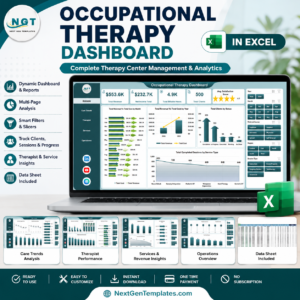
- Occupational Therapy KPI Dashboard in Excel: the same layout for occupational therapy
- Physiotherapy & Rehabilitation KPI Dashboard in Excel: KPI tracking for rehab clinics
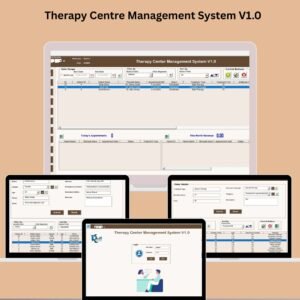
- Therapy Centre Management System V1.0: day-to-day management for a therapy centre
- Healthcare & Hospital Management Bundle: 8 healthcare templates in one download
Browse all Excel KPI dashboards.




















Reviews
There are no reviews yet.