

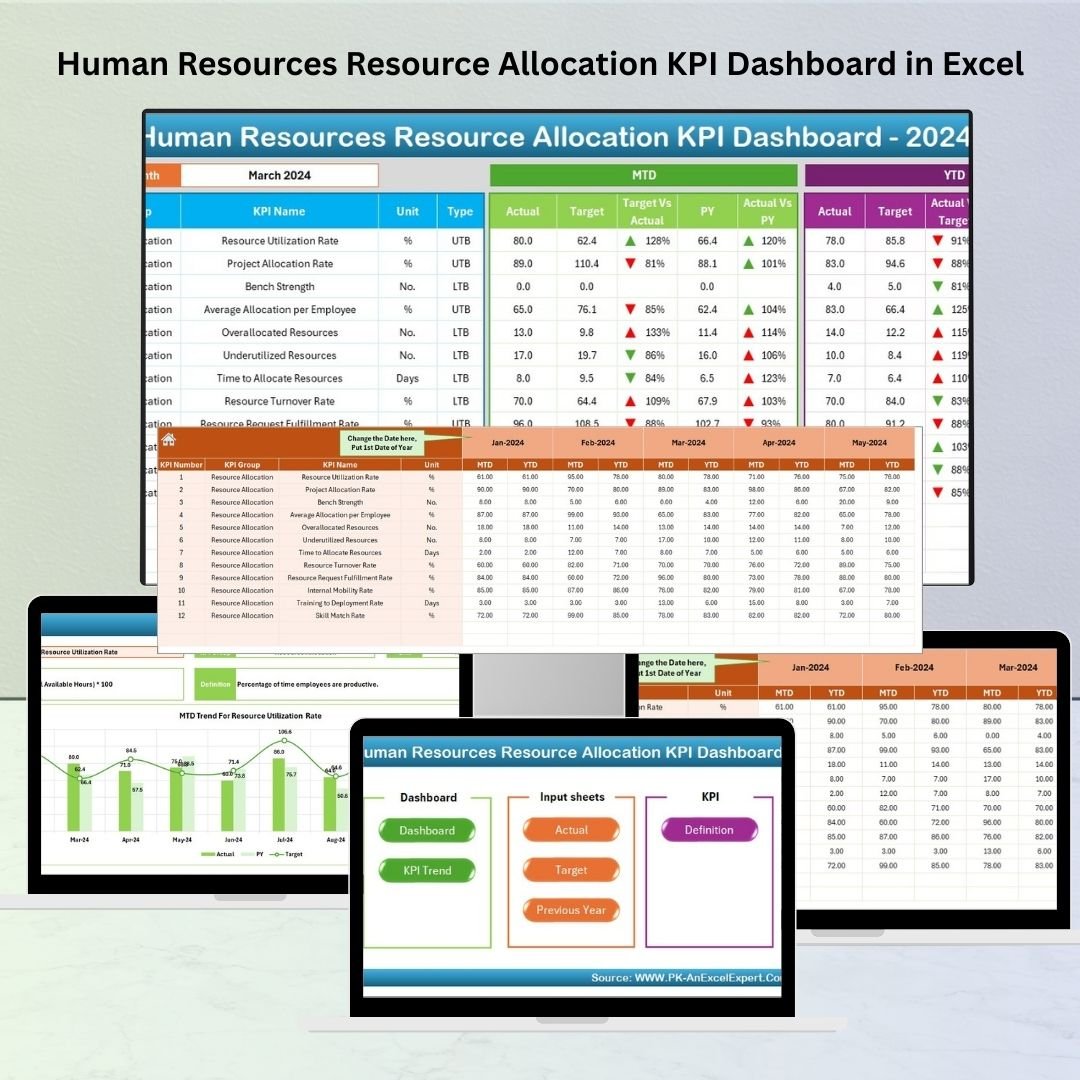




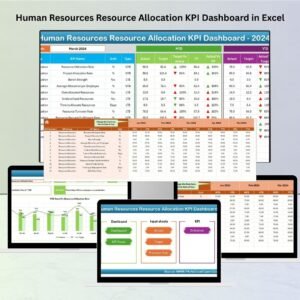
The Human Resources Resource Allocation KPI Dashboard in Excel is an essential tool designed to help HR teams and business leaders track, manage, and optimize resource allocation within an organization. This Excel-based dashboard provides a comprehensive view of how human resources are being utilized across different teams, departments, and projects, allowing businesses to make data-driven decisions that maximize productivity and operational efficiency.
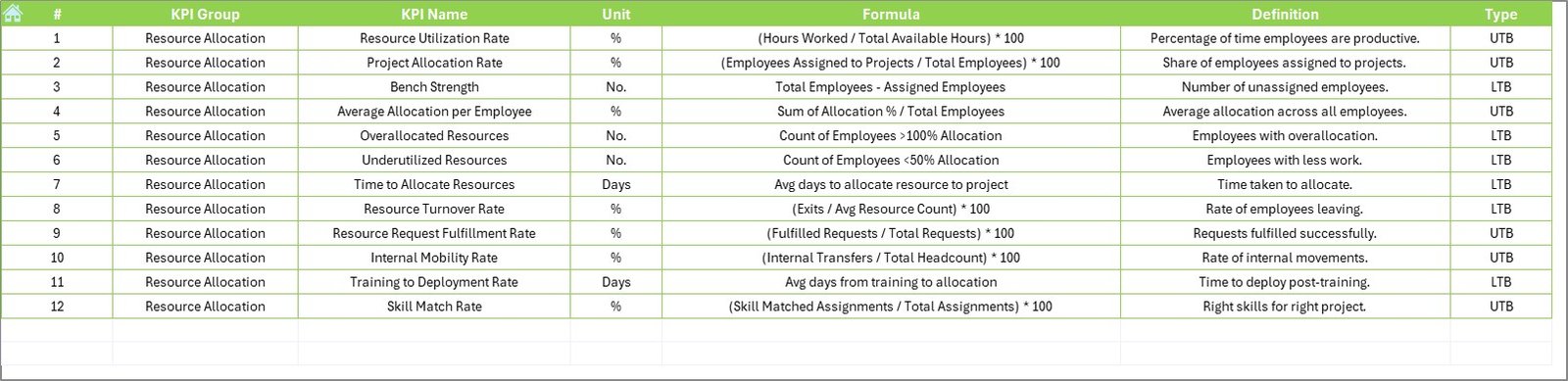
By tracking key performance indicators (KPIs) such as resource utilization rate, employee availability, allocation efficiency, and project performance, this dashboard helps HR managers allocate resources effectively, ensuring that no department or project is under-resourced or overburdened. This tool is crucial for maintaining balance and optimizing workforce management in dynamic business environments.
Key Features of the Human Resources Resource Allocation KPI Dashboard in Excel
📊 Resource Utilization Tracking
Monitor how effectively human resources are being allocated across different teams and projects. Track the utilization rate of employees to ensure that resources are being used efficiently.
📅 Employee Availability & Allocation Monitoring
Keep track of employee availability, working hours, and assigned tasks. This feature helps you ensure that each employee is working on the right project, maximizing productivity while avoiding overwork.
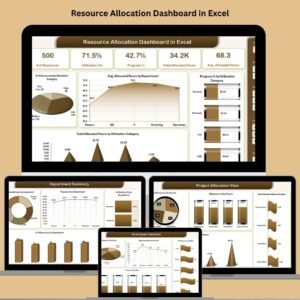
📈 Department & Project Allocation Overview
Analyze the allocation of resources across departments and projects. Get a clear overview of how employees are being distributed and identify any areas that require additional staffing or reallocation.
⚙️ Time-Based Performance Analysis
Track resource allocation performance over different time periods. Analyze how resource allocation changes over time and identify trends in workforce distribution and project progress.
🔑 Project & Task Performance Tracking
Monitor the progress and performance of tasks and projects to ensure that resources are being allocated effectively. Evaluate whether the allocated resources are sufficient to meet project deadlines and goals.
📊 Customizable KPIs & Metrics
Customize the dashboard to track the KPIs that are most relevant to your organization’s resource management goals. Adjust metrics, timeframes, and categories based on specific business needs.
Why You’ll Love the Human Resources Resource Allocation KPI Dashboard in Excel

✅ Optimize Resource Allocation
Track how resources are allocated across teams and projects to ensure optimal utilization and avoid resource shortages or overwork.
✅ Improve Project Performance
Monitor the effectiveness of resource allocation on project success. Adjust resource allocation based on real-time performance data to ensure projects stay on track.
✅ Enhance Workforce Productivity
Ensure that employees are assigned the right tasks at the right time. This helps improve productivity, reduce idle time, and maintain a balanced workload for your workforce.
✅ Make Data-Driven Decisions
Use insights from the dashboard to make informed decisions about staffing, resource reallocation, and project priorities. Improve resource efficiency with accurate data at your fingertips.
✅ Customizable & Scalable
The dashboard is fully customizable to meet your specific needs, making it scalable for businesses of all sizes—from small businesses to large enterprises.
What’s Inside the Human Resources Resource Allocation KPI Dashboard in Excel?
Resource Utilization Tracking: Monitor how effectively resources are being utilized across teams and departments.
Employee Availability & Allocation: Track employee availability and ensure they are assigned to the right projects.
Department & Project Allocation Overview: Get a complete view of resource distribution across different departments and projects.
Time-Based Performance Analysis: Track resource allocation over various periods to identify trends and adjust allocations as needed.
Project & Task Performance Monitoring: Track project and task progress to ensure resource allocation is optimized for success.
Customizable KPIs: Tailor the dashboard to fit your organization’s resource management goals.
How to Use the Human Resources Resource Allocation KPI Dashboard in Excel
1️⃣ Download the Template: Access the Human Resources Resource Allocation KPI Dashboard in Excel instantly.
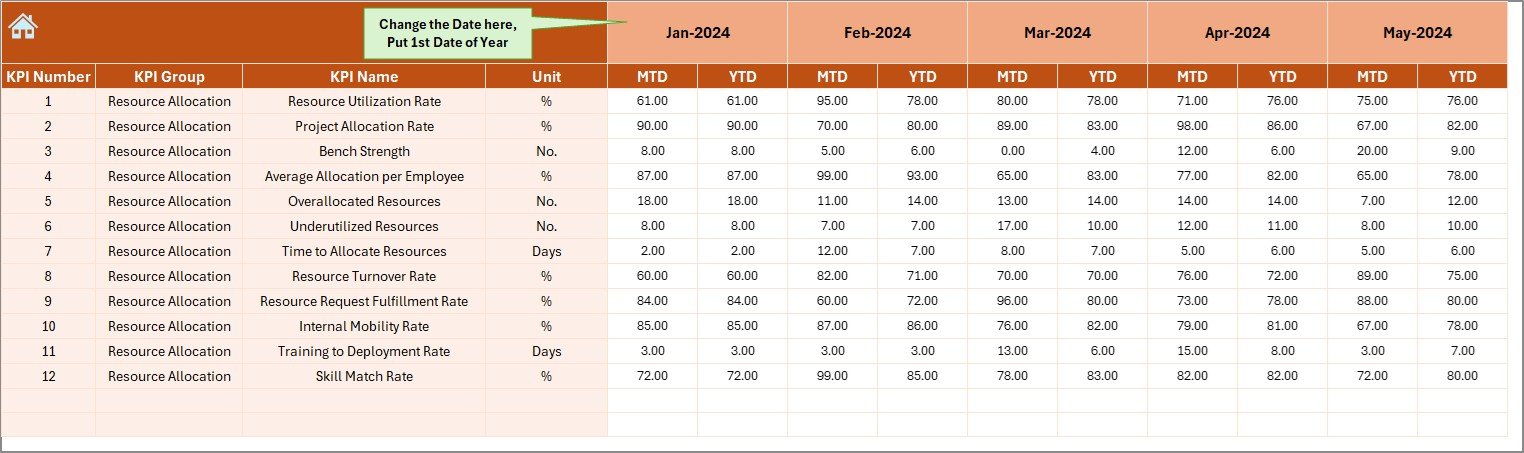
2️⃣ Input Resource Data: Add employee availability, allocation details, and project assignments to the dashboard.
3️⃣ Monitor Resource Utilization: Track how efficiently resources are being used across different teams and departments.
4️⃣ Analyze Performance: Use time-based tracking to assess how well your resources are allocated over time and identify areas for improvement.
5️⃣ Optimize Resource Allocation: Make informed decisions based on the dashboard’s insights to improve resource utilization and project performance.
Who Can Benefit from the Human Resources Resource Allocation KPI Dashboard in Excel?
🔹 HR Teams & Managers
🔹 Project Managers & Team Leaders
🔹 Business Owners & Executives
🔹 Small & Medium Enterprises (SMBs)
🔹 Large Enterprises with Complex Resource Management
🔹 Data Analysts & Workforce Management Consultants
Ensure that your human resources are optimally allocated and make data-driven decisions with the Human Resources Resource Allocation KPI Dashboard in Excel. Track resource utilization, monitor project performance, and improve workforce efficiency across your organization.
Click here to read the Detailed blog post
Visit our YouTube channel to learn step-by-step video tutorials
Youtube.com/@PKAnExcelExpert
Watch the step-by-step video Demo:
Compatibility and Requirements
- Works in Microsoft Excel desktop (Excel 2016 or later, or Microsoft 365).
- New to Excel? Microsoft’s free Excel for Windows training.
Frequently Asked Questions
Which resource allocation KPIs does this dashboard track?
It tracks employee utilization, availability and working hours, allocation across departments and projects, and the progress of projects and tasks.
Can I see where more staff are needed?
Yes. The department and project overview shows how employees are spread, so you can spot areas that need more staff or a change in allocation.
Can I look at trends over time?
Yes. Time-based analysis shows how allocation changes across periods.
Can I change the metrics?
Yes. You can adjust the KPIs, timeframes and categories to match your resource management goals.
Related Resource Allocation Dashboards
- Resource Allocation KPI Dashboard in Excel: general resource allocation KPIs
- Resource Allocation Dashboard in Excel: a full resource allocation dashboard
- Project Management Resource Allocation KPI Dashboard in Excel: allocation across projects
- Human Resources Operations KPI Dashboard in Excel: wider HR operations KPIs
- HR & Workforce Analytics Bundle: 10 HR templates in Excel, Google Sheets and Power BI
Browse all Excel KPI dashboards or the Excel HR and payroll templates.



Reviews
There are no reviews yet.