





Monitoring HR performance is vital for every organization striving for operational excellence. The HR KPI Scorecard in Google Sheets offers a ready-to-use, fully automated solution for tracking and analyzing key HR metrics — all in one place.
This smart, interactive scorecard helps HR professionals and business leaders evaluate employee engagement, recruitment efficiency, training effectiveness, and workforce stability — all using clear visuals, color-coded indicators, and trend charts. Built in Google Sheets, it provides real-time collaboration and instant updates, ensuring everyone in your HR team stays aligned with organizational goals. 🌐💼
🔑 Key Features of the HR KPI Scorecard in Google Sheets
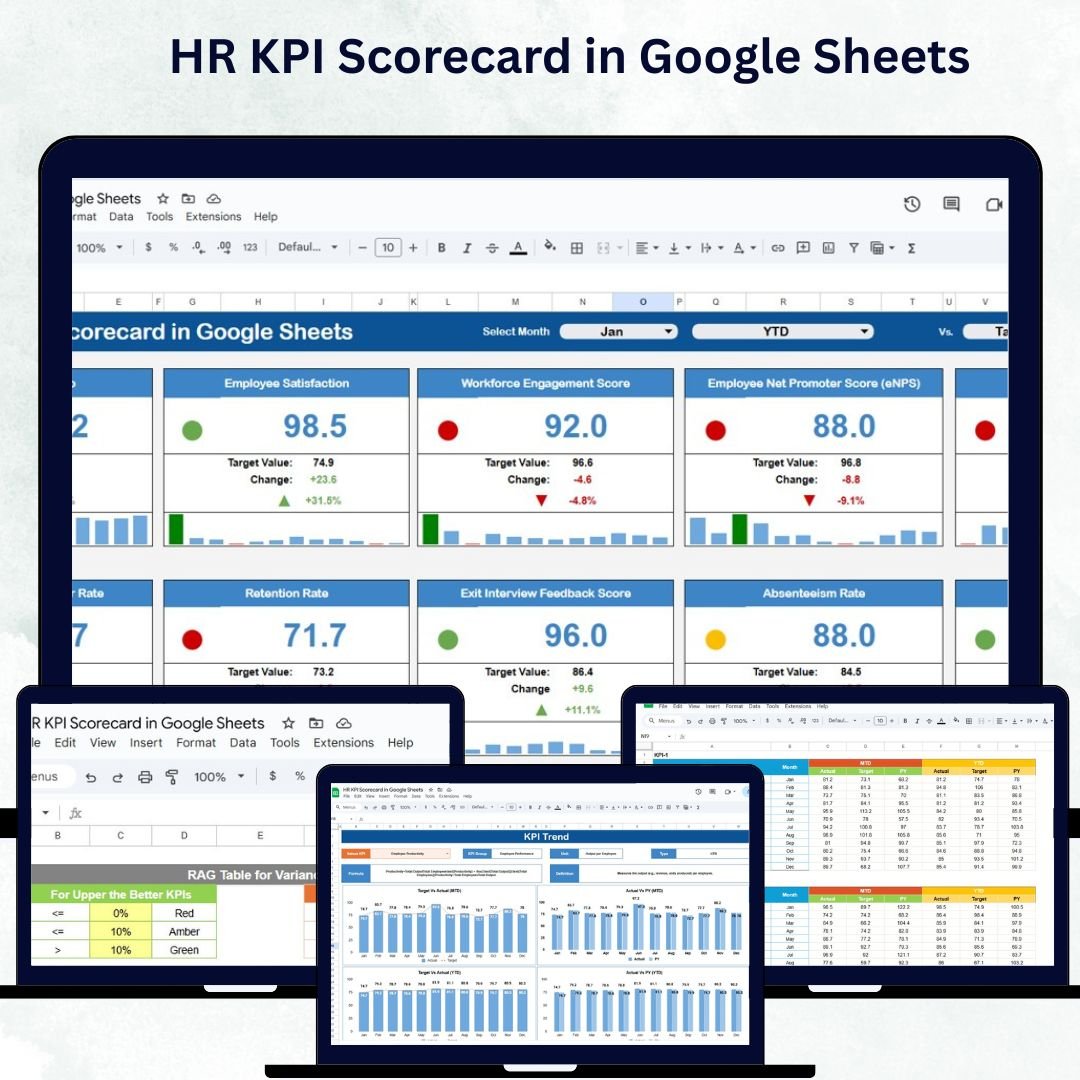
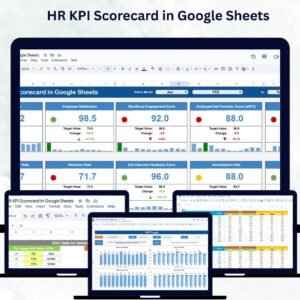
📊 Scorecard Sheet (Main Dashboard)
Get a complete overview of your HR department’s performance with dynamic visual insights:
Dropdown Menus: Select Month, MTD, or YTD views for flexible analysis
Actual vs Target Comparisons: See performance gaps instantly
Color-Coded Visual Indicators: Instantly identify strong or weak KPIs
Comprehensive KPI Display: Monitor up to 10 KPIs simultaneously
MTD & YTD Analysis: Quickly evaluate short-term and long-term performance trends
This sheet provides HR teams with a clear and intuitive dashboard to assess progress, identify bottlenecks, and plan improvements effectively.
📈 KPI Trend Sheet Tab
Dive deeper into each KPI:
Choose a KPI from a dropdown menu (Range C3)
View KPI Group, Unit, Type (UTB or LTB), Formula, and Definition
Visualize performance through MTD and YTD trend charts
Compare Actual vs Target vs Previous Year for data-driven insights
Ideal for HR analysts and decision-makers who want detailed visibility into patterns and trends over time.
🧾 Input Data Sheet
Centralize your HR data:
Record actual performance values, targets, and other HR metrics
Update anytime to keep your dashboard refreshed and accurate
Supports flexible data structures for department-level or organization-wide tracking
This sheet ensures data accuracy and easy updates, eliminating the need for complex tools.
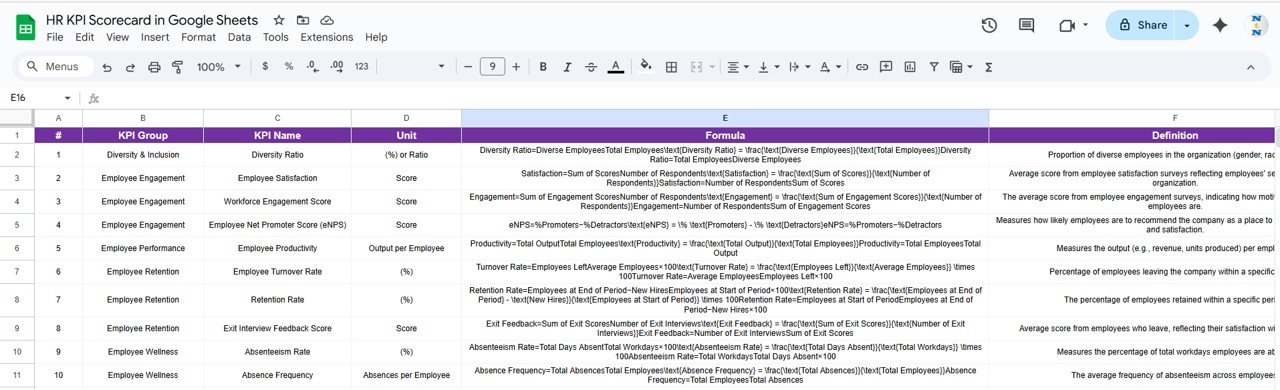
📘 KPI Definition Sheet Tab
Define every metric clearly:
Includes KPI Name, Group, Unit, Formula, and Definition
Ensures all stakeholders understand how each KPI is calculated
Promotes consistency and transparency in HR reporting
Perfect for maintaining documentation across departments and ensuring clarity during audits or reviews.
🎨 Color Settings Tab
Customize your visuals!
Modify color codes for better readability and brand alignment
Highlight KPIs that meet, exceed, or fall short of expectations
📦 What’s Inside the HR KPI Scorecard?
✅ Scorecard Sheet – Real-time visual dashboard with MTD & YTD comparison
✅ KPI Trend Sheet – Trend analysis for each HR KPI
✅ Input Data Sheet – Centralized data entry and performance logging
✅ KPI Definition Sheet – Detailed definitions for all tracked KPIs
✅ Color Settings Sheet – Customizable visual preferences
✅ Sample Data Included – Preloaded for easy understanding and quick setup
The scorecard is plug-and-play — no coding, no setup, just enter your HR data and start tracking immediately. 🚀
👥 Who Can Benefit from This Scorecard?
👩💼 HR Managers – Monitor employee turnover, training hours, and engagement rates
🏢 Business Leaders – Align HR goals with corporate objectives
🧾 Recruitment Teams – Track hiring metrics and cost per hire
📈 Learning & Development Teams – Evaluate training effectiveness
👨💻 HR Analysts – Gain deep insights through visual trend analysis
Designed for small to large organizations, this scorecard simplifies HR data monitoring, performance review, and strategic planning.
🧠 How to Use the HR KPI Scorecard
Enter KPI Data: Update actual and target values in the Input Data Sheet.
Select Month/Period: Use dropdowns in the Scorecard sheet to filter data.
Review Trends: Check the KPI Trend sheet for performance visualization.
Analyze Variances: Compare MTD, YTD, and previous year data for insights.
Customize Definitions: Modify KPI names or formulas as needed.
Collaborate in Real Time: Share the sheet with your HR team for simultaneous updates.
With automation, conditional formatting, and clean design, your HR team can track, review, and improve with zero technical effort.
🌟 Why Choose This Scorecard?
Centralized HR performance tracking
Real-time visualization with MTD/YTD analysis
100% customizable to your KPIs
Collaborative and cloud-based
Promotes accountability and clarity
Ideal for HR reviews, dashboards, and reports
Empower your HR team with the HR KPI Scorecard in Google Sheets — the smarter, simpler, and faster way to evaluate human resource performance and strategy effectiveness. 🏆📈
🔗 Click here to read the Detailed blog post
🔗 Visit our YouTube channel to learn step-by-step video tutorials
Watch the step-by-step video tutorial:
Compatibility and Requirements
- Works in Google Sheets with a free Google account and a web browser. Nothing to install.
- The Month, MTD and YTD selectors are in-cell dropdowns. Google explains them in Create an in-cell dropdown list.
Frequently Asked Questions
How many KPIs does the scorecard show?
The Scorecard sheet shows up to 10 KPIs at the same time, with actual vs target comparisons.
Can I switch between monthly and year-to-date views?
Yes. Dropdowns let you pick a Month and switch between MTD and YTD views.
What does the KPI Trend sheet show?
Pick a KPI to see its group, unit, type, formula and definition, plus MTD and YTD trend charts for actual, target and previous year.
Where do I enter my HR data?
Enter actual and target values in the Input Data sheet. The scorecard and trend charts read from it.
Can I change the colors?
Yes. The Color Settings tab lets you change the color codes used for KPIs that meet, exceed or miss their targets.
Related HR KPI Templates
- HR KPI Scorecard in Excel: the same scorecard for Excel users
- HR KPI Dashboard in Google Sheets: a dashboard view of HR KPIs
- HR KPI Dashboard in Power BI: HR KPIs in Power BI
- HR Dashboard in Excel: a full HR dashboard
- KPI Scorecard Mega Pack: 12 Excel and Google Sheets KPI scorecards in one bundle
Browse all Google Sheets KPI dashboards or the Google Sheets HR and payroll templates.




























Reviews
There are no reviews yet.