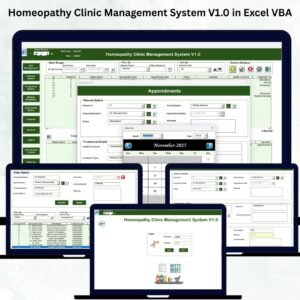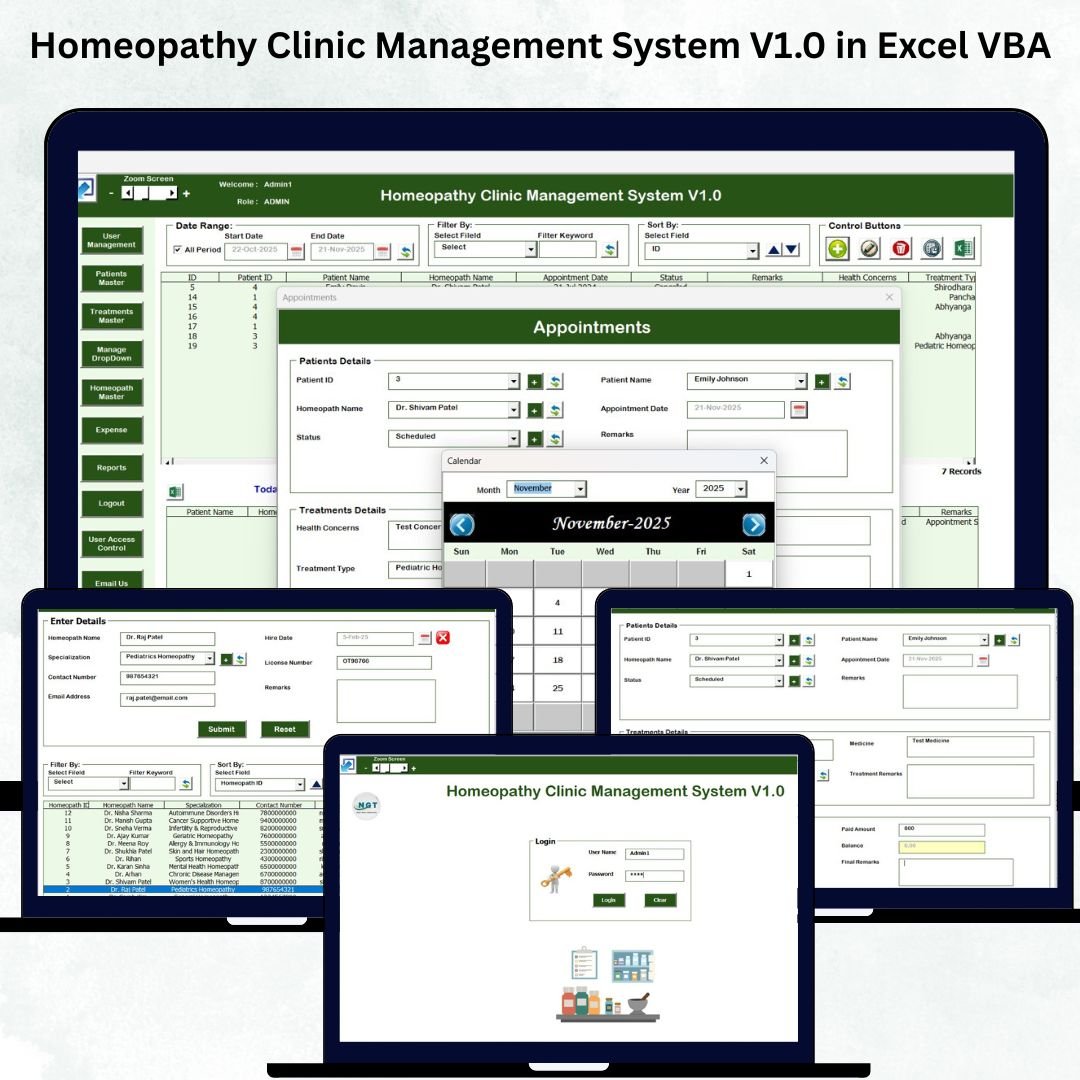

Homeopathy Clinic Management System V1.0 in Excel VBA

MS Excel - instant download

Original price was: ₹2,999.00.Current price is: ₹1,999.00.
Details, requirements and demo below
Sale!

Homeopathy Clinic Management System V1.0 in Excel VBA

Original price was: ₹2,999.00.Current price is: ₹1,999.00.

  • 🏥 All-in-One Clinic System – Manage appointments, patients, treatments, and expenses in one file.

  • 🔐 Secure Login – Protect patient data with password-based access.

  • 🧑‍⚕️ Patient Master – Store complete patient history and personal details.

  • 📅 Appointment Scheduler – Track daily appointments and doctor availability.

  • 💊 Treatment Master – Save medicines, dosage, and treatment details.

  • 👨‍⚕️ Homeopath Directory – Maintain doctor profiles for appointment assignment.

  • 💵 Expense Manager – Track clinic expenses for better financial control.

  • 👥 User Management – Add, edit, delete, or reset clinic staff accounts.

  • 🔒 Access Control – Restrict sensitive modules for specific users.

  • 📊 Auto Reports – Generate reports instantly with built-in automation.

- +
,

💡 Buy any 2 templates and save 20% automatically at checkout.

Pricing country
Prices follow your selected country; checkout uses your billing country.
Excel + AI Mastery: 100 Essential Formulas courseLaunch offer
🎓 NEXTGENTEMPLATES ACADEMY
Want to build templates like this yourself?
Excel + AI Mastery: 100 Essential Formulas

SUMIFS, XLOOKUP, FILTER, LAMBDA and checking AI-written formulas, with real business projects. 11h 47m of video by PK, with practice files, quizzes and a capstone.

Running a Homeopathy Clinic Management System V1.0 in Excel VBA involves a lot of moving parts—appointments, patient records, treatment details, expense tracking, user access, reports, and more. When these details are stored in multiple files or handwritten registers, managing daily operations becomes slow, confusing, and error-prone. That’s why we created the Homeopathy Clinic Management System V1.0 in Excel VBA, a fully automated and easy-to-use clinic management tool built entirely in Excel.

This system gives homeopathy professionals a complete clinic management setup without purchasing expensive software. It works with the familiar Excel environment, includes powerful automation, and allows you to manage the entire clinic from one unified platform. Whether you run a new clinic or a busy practice with multiple staff members, this system makes your work faster, more organized, and more professional.
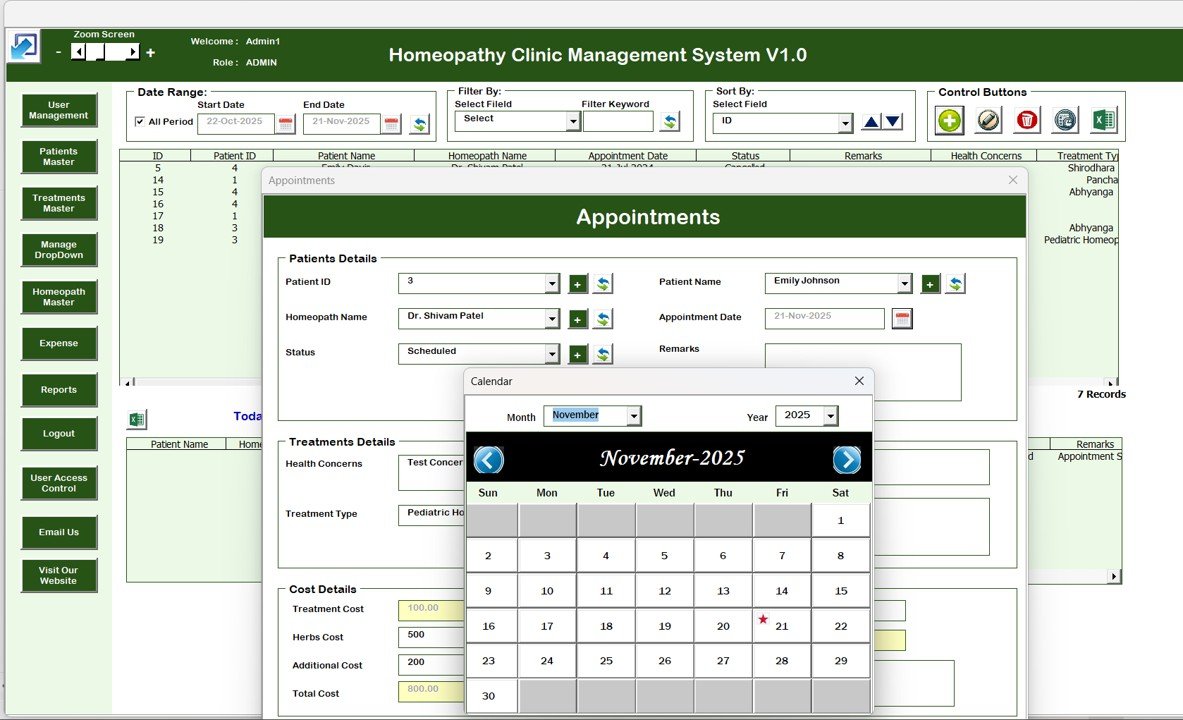
Homeopathy Clinic Management System V1.0 in Excel VBA

✨ Key Features of the Homeopathy Clinic Management System V1.0 in Excel VBA

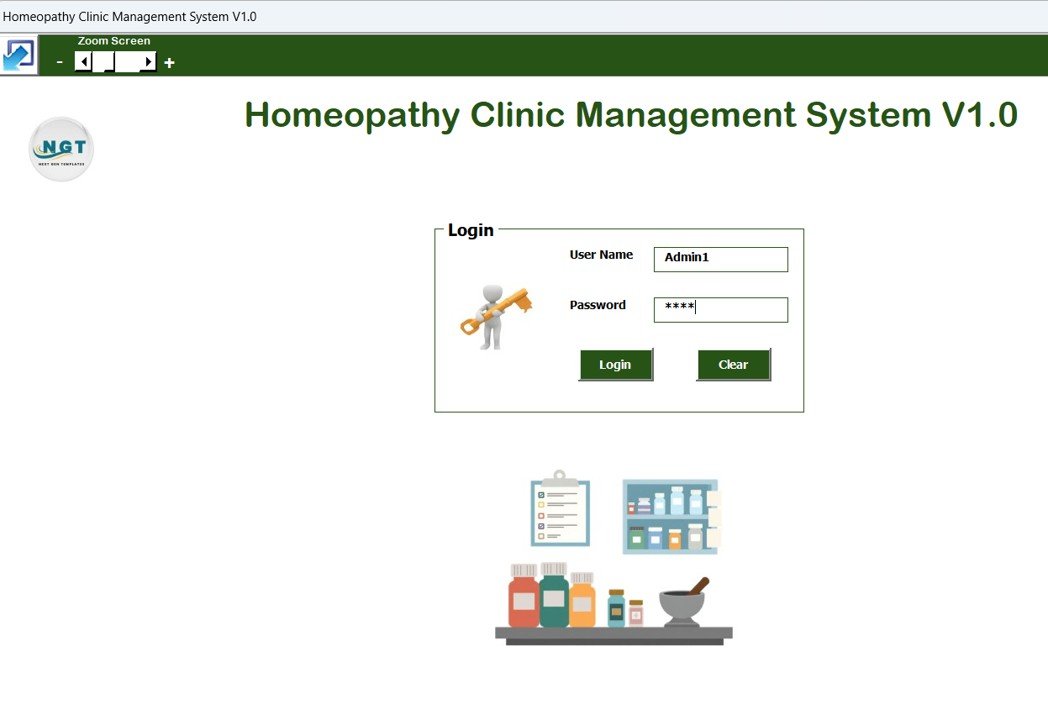
🔐 1. Secure Login System

The tool begins with a secure login form designed to protect patient data and clinic records. Each user must enter a User ID and Password to access the system.

  • Default credentials included

  • Multi-user capability

  • Prevents unauthorized access

This ensures your clinic maintains confidentiality and complies with data protection guidelines.

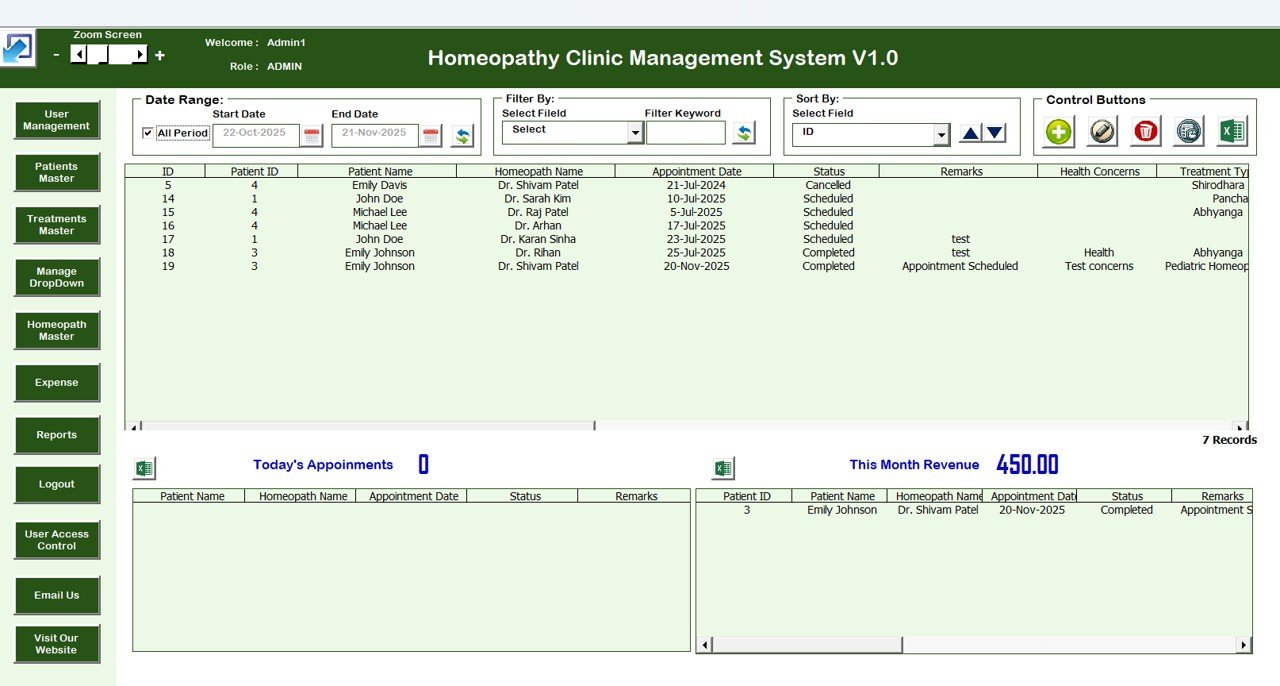
📋 2. Centralized Main Dashboard (Control Panel)

Once logged in, you reach the Main Form—a smart dashboard that allows you to manage all clinic operations.
Core actions include:

  • Add New Record

  • Update Existing Record

  • Delete Records

  • Show Record History

  • Export to Excel

The built-in List Box displays all clinic data in a structured, searchable, and sortable format, making it easy to manage daily tasks without touching backend sheets.

📅 3. Appointments Manager

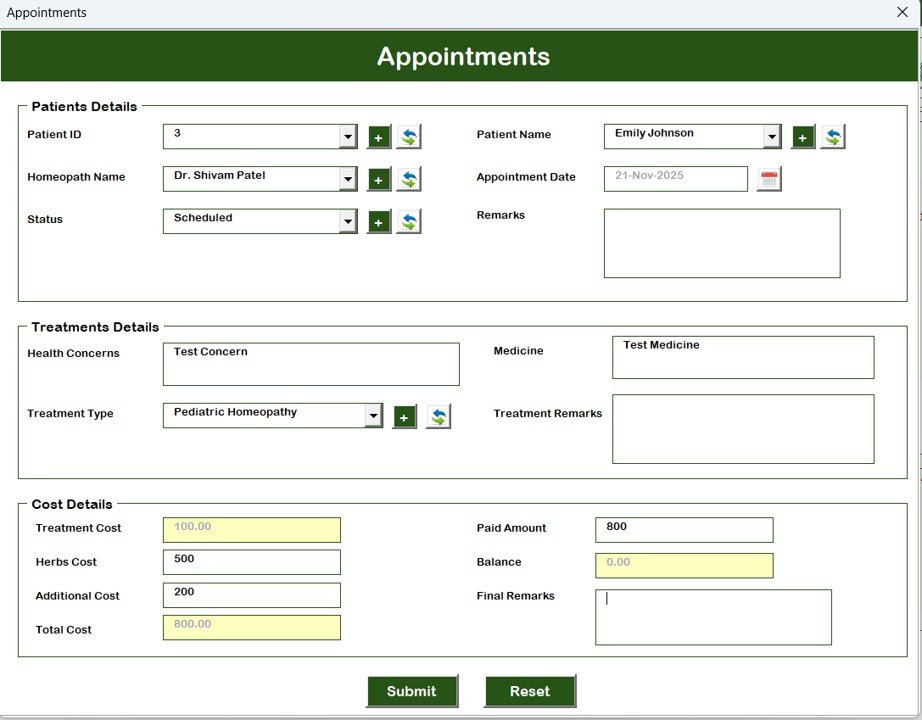
Stay in control of your clinic’s daily schedule with the Appointments Form.
Record details such as:

  • Patient name

  • Appointment date

  • Time

  • Consulting doctor

  • Purpose

  • Status (Scheduled / Completed / Cancelled)

This module ensures the clinic always runs smoothly and no appointment is missed.

🧑‍⚕️ 4. Patient Master – Complete Patient Records

Store all patient details in one place, including:

  • Personal information

  • Address

  • Medical history

  • Contact details

This makes patient follow-ups easier, faster, and more informed.

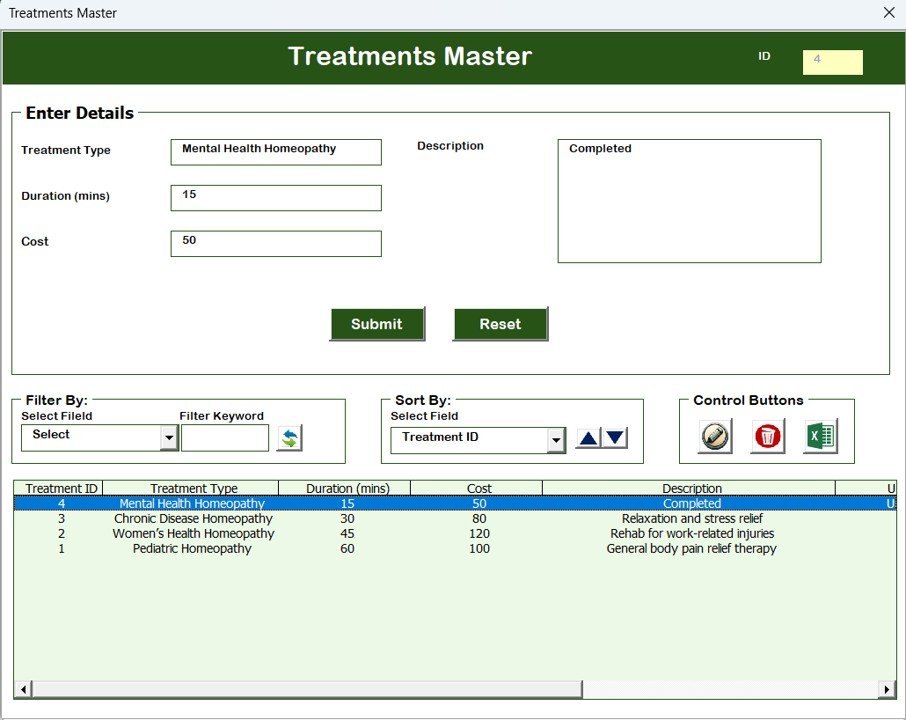
💊 5. Treatment Master

Keep treatment plans organized with a dedicated form that records:

  • Treatment name

  • Category

  • Medicine

  • Dosage

  • Follow-up instructions

  • Notes

Perfect for maintaining consistency across all treatment activities.

👨‍⚕️ 6. Homeopath Master (Doctor Details)

Maintain doctor information such as:

  • Name

  • Qualification

  • Experience

  • Specialty

  • Contact details

This list helps assign doctors during appointment creation.

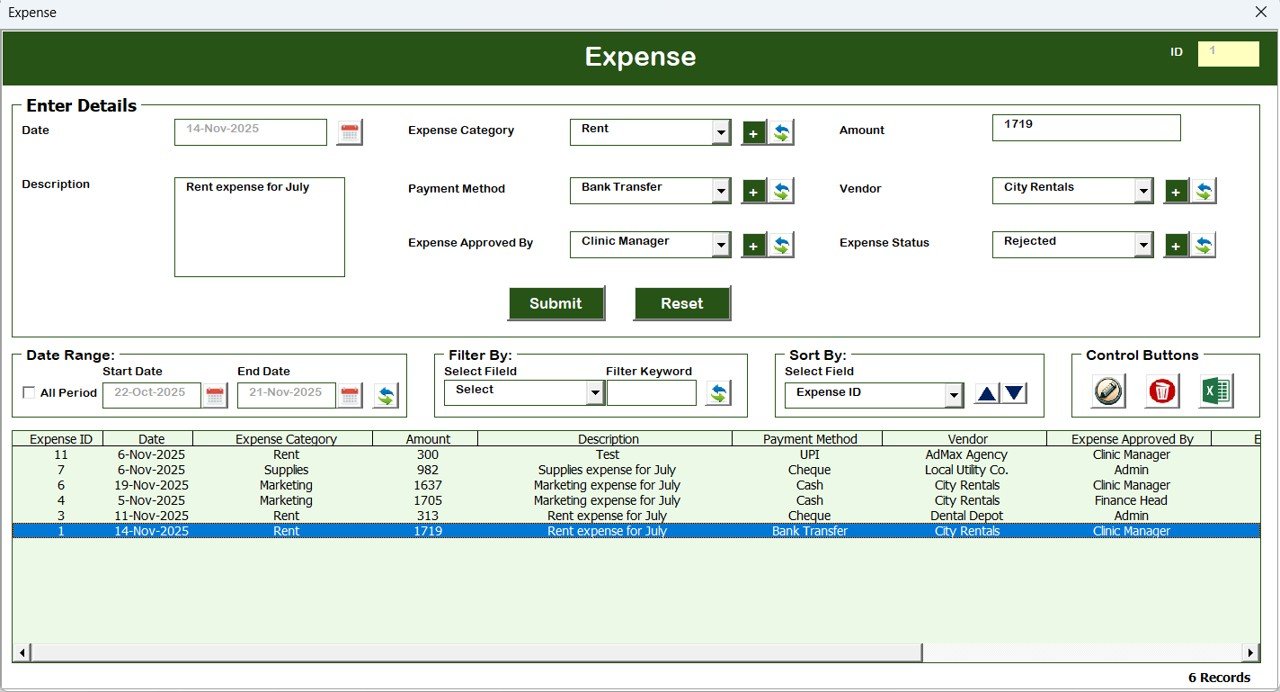
💵 7. Expenses Manager

Track all clinic expenses—medicine stock, utilities, equipment, rent, salaries, and more. This feature helps clinics analyze expenses and plan budgets effectively.

👥 8. User Management System

Add, edit, remove, or reset users easily.
You can:

  • Assign access

  • Change passwords

  • Control permissions

This is ideal when multiple receptionists, assistants, or doctors use the system.

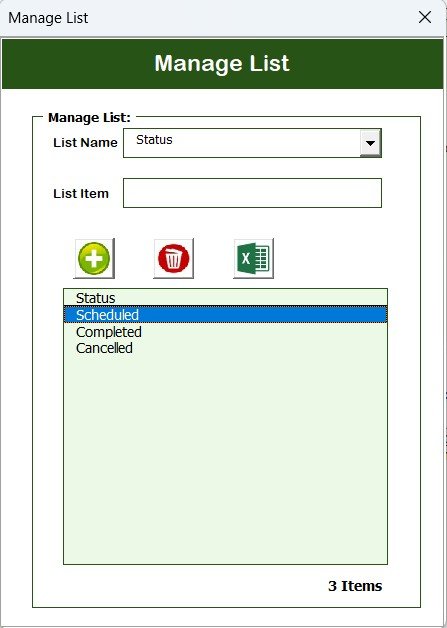
🗂 9. Manage Lists (Dropdown Settings)

Customize dropdown lists for items like doctors, expenses, treatment types, etc.
Add or remove list items in seconds—no coding required.

📝 10. Log Form History (Modification Tracking)

Every modification made by users is recorded for:

  • Auditing

  • Monitoring

  • Accountability

This ensures transparency across your clinic operations.

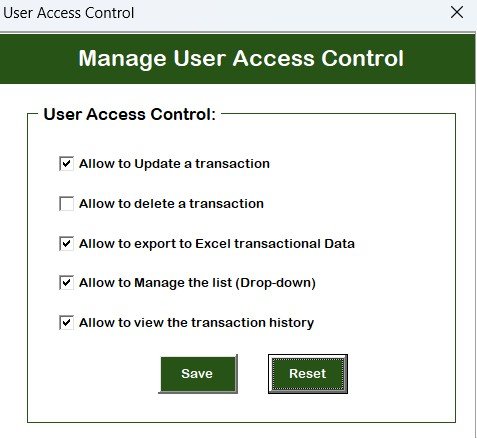
🔐 11. User Access Control Module

Control which users can access:

  • Appointments

  • Patient Master

  • Treatment Master

  • Expenses

  • Reports

  • User Management

A powerful feature that allows you to restrict sensitive modules based on staff roles.

📊 12. Reports Module

Generate clinic expense reports automatically.
Use these insights for planning, audits, or financial reviews.

🔚 13. Logout & Support

Log out securely anytime.
The Email Us button allows you to contact support quickly.


📦 What’s Inside the Homeopathy Clinic Management System V1.0 in Excel VBA

Inside the downloadable file, you get:

  • Secure Login Screen

  • Automated Main Dashboard

  • Appointments Form

  • Patient Master

  • Treatment Master

  • Homeopath Master

  • Expenses Form

  • User Management Module

  • User Access Control

  • Dynamic List Manager

  • Modification Log History

  • Auto-generated Reports Module

  • Export to Excel Feature

  • Fully automated VBA backend

  • Clean, professional interface

Everything is built and designed for real clinic operations.


🛠 How to Use the Homeopathy Clinic Management System V1.0

Using the system is easy—even if you’re not an Excel expert.

  • Step 1: Open the file and enable macros
  • Step 2: Log in using your credentials
  • Step 3: Use the Main Dashboard to add or manage clinic data
  • Step 4: Update Appointments, Patients, Treatments, and Expenses daily
  • Step 5: Review reports and export backups regularly
  • Step 6: Manage users and control access as needed

Because the system is button-based, users can operate it with zero technical training.


🎯 Who Can Benefit from This Homeopathy Clinic Management System V1.0 in Excel VBA

This tool is ideal for:

  • Homeopathy practitioners

  • Small & medium homeopathy clinics

  • Multi-doctor homeopathy centers

  • New clinics shifting from paper to digital

  • Assistants or receptionists managing patient flow

  • Homeopathy students managing practice data

If your clinic needs an affordable, automated, and easy-to-use management tool—this system is perfect.


Click here to read the detailed blog post

Watch the step-by-step video Demo:


Visit our YouTube channel to learn step-by-step video tutorials – PK An Excel Expert

Frequently asked questions

Does it work on Mac?
No - please use Windows. Our VBA tools use forms with controls such as ListBox, which work only in Microsoft Excel for Windows. They do not work on Mac Excel, Excel Online (browser), Google Sheets or the Excel mobile app.
Which Excel version do I need?
Microsoft Excel 2016, 2019, 2021 or Microsoft 365 for Windows (the desktop app).
The macros do not run or I see a yellow security bar. What do I do?
Unzip the download first. Right-click the .xlsm file > Properties > tick Unblock > OK. Open it and click Enable Content on the yellow bar. If Excel still says macros are blocked, check File > Options > Trust Center > Macro Settings.
Is there a login? What are the default details?
Systems with a login screen come with default admin login details in the user manual (or message us and we will send them). Sign in as admin and change the password straight away. Where the system has User Management, the admin can change user names and passwords and add or edit users.
Are the sheets or the VBA code protected?
Data sheets are protected so the forms and reports keep working - you enter data through the forms. In some tools the VBA code is also protected. If you need to edit the code, email [email protected] with your order number and we will share the password.
Can I enter back-dated (past) records?
Yes, you can enter records with past dates.
Can more than one person use it at the same time?
It is a single-user desktop workbook. For shared, multi-user access from anywhere, see our Google Apps Script web apps.
How many records can it handle?
It has been tested with several thousand records and suits normal small-business volumes.
Is it a one-time payment or a subscription?
One-time payment. No subscription, no per-user fees and nothing to renew - the file is yours to keep.
How do I get the file after payment?
Instantly. The download link appears on screen after checkout, is emailed to you, and stays under My Account > Downloads on our website. If the email does not arrive within a few minutes, check your spam or promotions folder.
Is a user manual included?
Most of our newer products include a PDF user manual in the download. If yours does not have one, message us with your order number and we will send it.
Do I get free updates?
Bug fixes are always free - if something does not work as described, we fix it and send you the corrected file. New versions with new features are not included in the price, unless this product's description says otherwise.
Can you customise it for me?
Yes. Small changes to this template (your columns, categories, logo, colours, minor layout) cost the template price plus $40-80 (Rs 3,000-6,000 + GST), quoted once you send your list. A fully custom build is usually $100-200 (Rs 8,000-18,000 + GST) with two revision rounds. Email your requirements to [email protected] or message us on WhatsApp.
Can I use it for my business or my clients?
Yes, for your own personal or internal business use, for as long as you like. Reselling or redistributing the template is not allowed.
What is your refund policy?
Because these are digital downloads, they are non-refundable once delivered - except when the product does not match its description (report it within 48 hours of purchase) or there is a technical problem our team cannot fix within 72 hours. Email [email protected] with your order number.
How do I get help?
Email [email protected] (Mon-Fri, 10 AM-7 PM IST) or message us on WhatsApp +91 80770 90260 (chat only, no calls). Please include your order number.

Still have a question? Click Need help? at the bottom-left to ask our assistant, or message us on WhatsApp.

Application

MS Excel

Template Type

VBA Tool

Price

Paid

Business Or Department

Healthcare and Medical Services

Reviews

There are no reviews yet.

Only logged in customers who have purchased this product may leave a review.

Homeopathy Clinic Management System V1.0 in Excel VBAHomeopathy Clinic Management System V1.0 in Excel VBA
Original price was: ₹2,999.00.Current price is: ₹1,999.00.
- +
Scroll to Top