



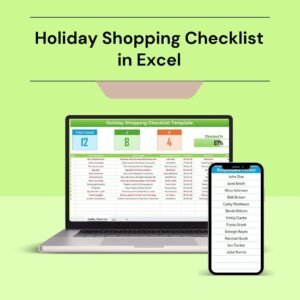
The Holiday Shopping Checklist in Excel is your perfect companion for a stress-free holiday shopping experience. Whether you’re shopping for Christmas, New Year’s, or any special occasion, this Excel-based checklist ensures that you stay organized, within budget, and on track with your shopping list. It’s designed to help you manage gifts, track spending, and avoid the last-minute holiday rush.
With clear categories, budget tracking, and a built-in itemized list, you can easily stay on top of who you need to buy for, what you’re buying, and how much you’ve spent. This customizable tool helps you save time, reduce stress, and ensure that you don’t forget any important gifts or purchases.

Key Features of the Holiday Shopping Checklist in Excel
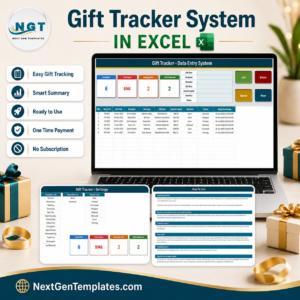
🎁 Gift Tracking
Track all the gifts you’re purchasing for family, friends, and colleagues. Easily mark off items as purchased and ensure that you’re not missing any gifts.
💰 Budget Management
Set a budget for each recipient or for the entire holiday season. Track the actual spending and compare it against your set budget to stay on top of your finances.
📅 Timeline & Deadlines
Plan ahead with timeline tracking. Set purchase deadlines for each gift to ensure everything is bought on time, leaving you stress-free during the holidays.
🔑 Category Organization
Organize gifts by category, such as family, friends, work colleagues, or charity donations. This makes it easier to stay focused and ensures you cover everyone on your list.
📊 Spending Summary & Report
Monitor your total spending across all gifts and categories. The built-in summary report shows how much you’ve spent, helping you keep your finances in check.
⚙️ Customizable & Scalable
Customize the checklist according to your personal preferences. Add or remove columns, categories, or adjust the budget fields to match your unique shopping needs.
Why You’ll Love the Holiday Shopping Checklist in Excel
✅ Stay Organized During the Holiday Rush
Keep all your holiday shopping details in one place with an easy-to-follow checklist. Stay organized and avoid missing any gifts.
✅ Manage Your Budget Effectively
Set a budget for each person or for the entire season and track your actual spending in real-time to ensure you stay within budget.
✅ Plan Your Purchases in Advance
Ensure timely purchases by setting deadlines and tracking progress. Avoid last-minute stress and get everything bought well before the holidays.
✅ Track Everything Easily
With categories and clear fields, managing multiple gifts for various people is easier. You’ll know exactly what you’ve purchased and what’s still pending.
✅ Customizable to Your Needs
Tailor the checklist to fit your specific shopping list. You can add categories, adjust spending limits, or track extra details like shipping or wrapping.
What’s Inside the Holiday Shopping Checklist in Excel?
Gift Tracking: Track all your holiday gifts and mark items as purchased.
Budget Management: Monitor your holiday shopping spending and compare it against your budget.
Timeline & Deadlines: Stay on track with deadlines for each gift purchase.
Category Organization: Organize gifts into categories such as family, friends, work, and charity.
Spending Summary & Report: Get a total spending summary and keep track of your finances.
Customizable Layout: Tailor the checklist to your needs with custom fields and categories.
How to Use the Holiday Shopping Checklist in Excel
1️⃣ Download the Template: Access the Holiday Shopping Checklist in Excel instantly.
2️⃣ Set Your Budget: Input your planned budget for each recipient or category.
3️⃣ Add Gifts & Track Purchases: List all the gifts you plan to buy and check them off as you make purchases.
4️⃣ Track Your Spending: Monitor your spending in real-time to ensure you stay on budget.
5️⃣ Complete Your Shopping on Time: Use the timeline feature to plan purchases and meet your deadlines.
Who Can Benefit from the Holiday Shopping Checklist in Excel?
🔹 Holiday Shoppers & Gift Givers
🔹 Parents & Families
🔹 Work & School Gift Exchanges
🔹 People with Large Gift Lists
🔹 Budget-Conscious Shoppers
🔹 Businesses & Organizations Organizing Holiday Gift Giving
🔹 Anyone Looking to Avoid Last-Minute Shopping Stress
Stay organized and on track this holiday season with the Holiday Shopping Checklist in Excel. Keep your gifts, budget, and timeline all in one place to ensure a smooth and enjoyable holiday shopping experience.
Click here to read the Detailed blog post
Visit our YouTube channel to learn step-by-step video tutorials
Youtube.com/@PKAnExcelExpert
Compatibility and Requirements
- Works in Microsoft Excel desktop (Excel 2016 or later, or Microsoft 365).
- New to Excel? Microsoft’s Excel for Windows training covers the basics.
Frequently Asked Questions
What does the checklist track?
It tracks each gift and whether it is purchased, your spending against budget, purchase deadlines, gift categories such as family, friends, work and charity, and a total spending summary.
How does the budget work?
Enter a planned budget for each recipient or category, then log purchases to see your spending against it.
Can I plan when to buy each gift?
Yes. The timeline lets you set a deadline for each purchase.
Can I add my own categories?
Yes. The layout is customizable with your own fields and categories.
Does it work for occasions other than Christmas?
Yes. You can use it for Christmas, New Year or any special occasion.
Related Holiday and Gift Templates
- Gift Wrapping Checklist in Excel: wrap every gift on time
- Christmas Decor Checklist in Excel: plan holiday decorations
- Holiday Card Sending Checklist in Excel: track holiday cards
- Online Shopping Checklist in Excel: keep online orders organized
- Checklist & SOP Pack: 12 Excel and Google Sheets checklists in one download
Browse all Excel checklists or the Google Sheets checklists.

























Reviews
There are no reviews yet.