

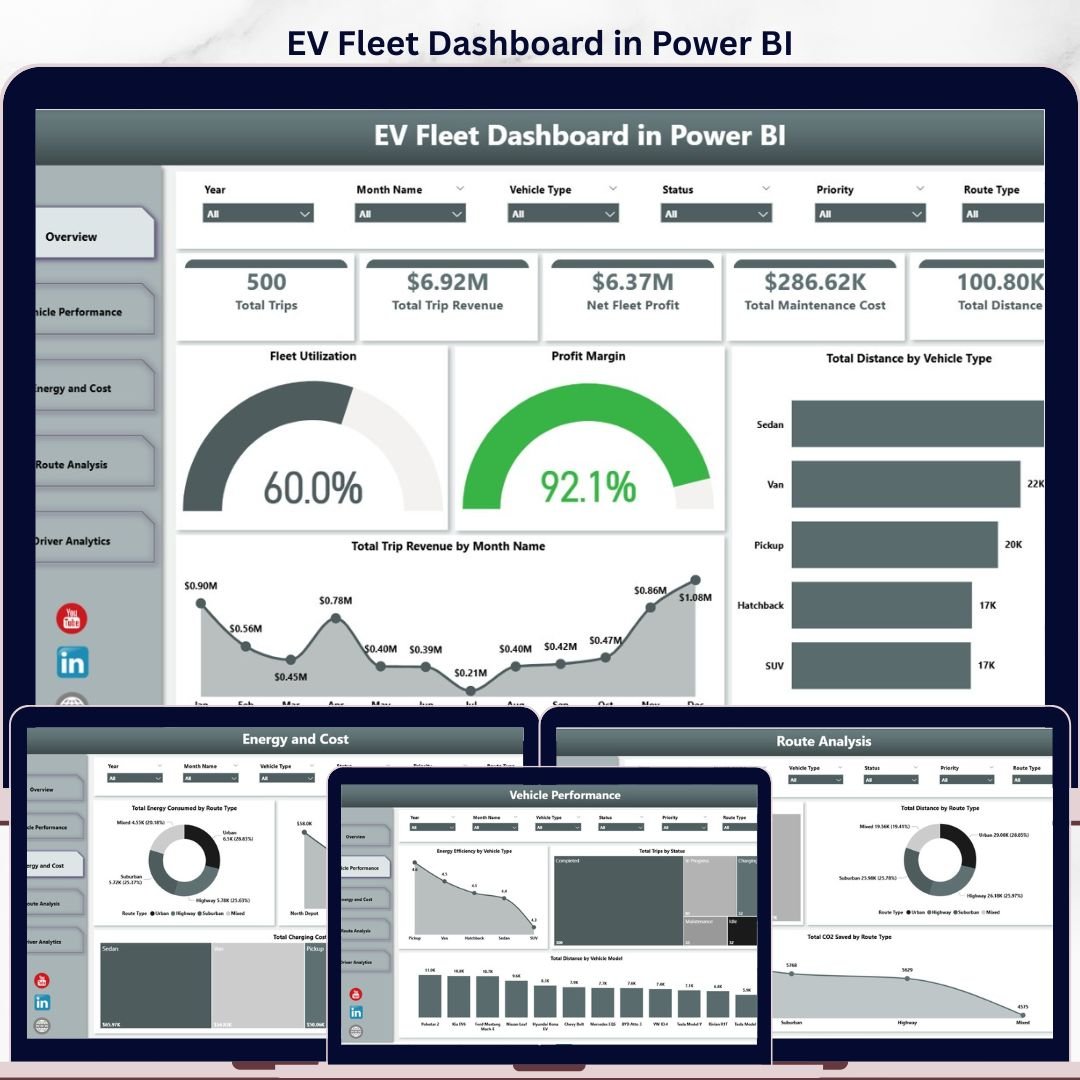
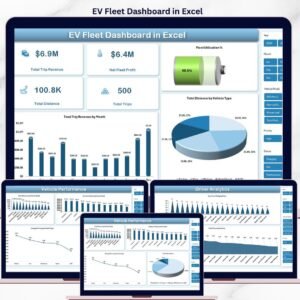
The EV Fleet Dashboard in Power BI tracks 22 fleet KPIs across 5 interactive pages — covering trips, revenue, energy consumption, charging cost, CO2 savings, and driver performance. Built in Power BI Desktop with native slicers, drill-through filters, and DAX measures, the dashboard updates every visual when you replace the sample data with your own. Setup takes under 10 minutes — connect your data source, refresh, and you have a board-ready electric fleet report.
🌍 Join 8,400+ teams in 40+ countries using Nextgen Templates to replace recurring SaaS fleet platforms (Verizon Connect, Geotab, Samsara) with one-time-purchase Excel, Google Sheets, Power BI, and HTML templates.
✅ Instant download · One-time payment · No subscription · No per-vehicle fees · Lifetime access
🔑 Key Features of the EV Fleet Dashboard in Power BI
- 22 fleet KPIs across 5 Power BI pages — every visual is native Power BI with DAX measures and slicer-driven filtering, no third-party visuals required.
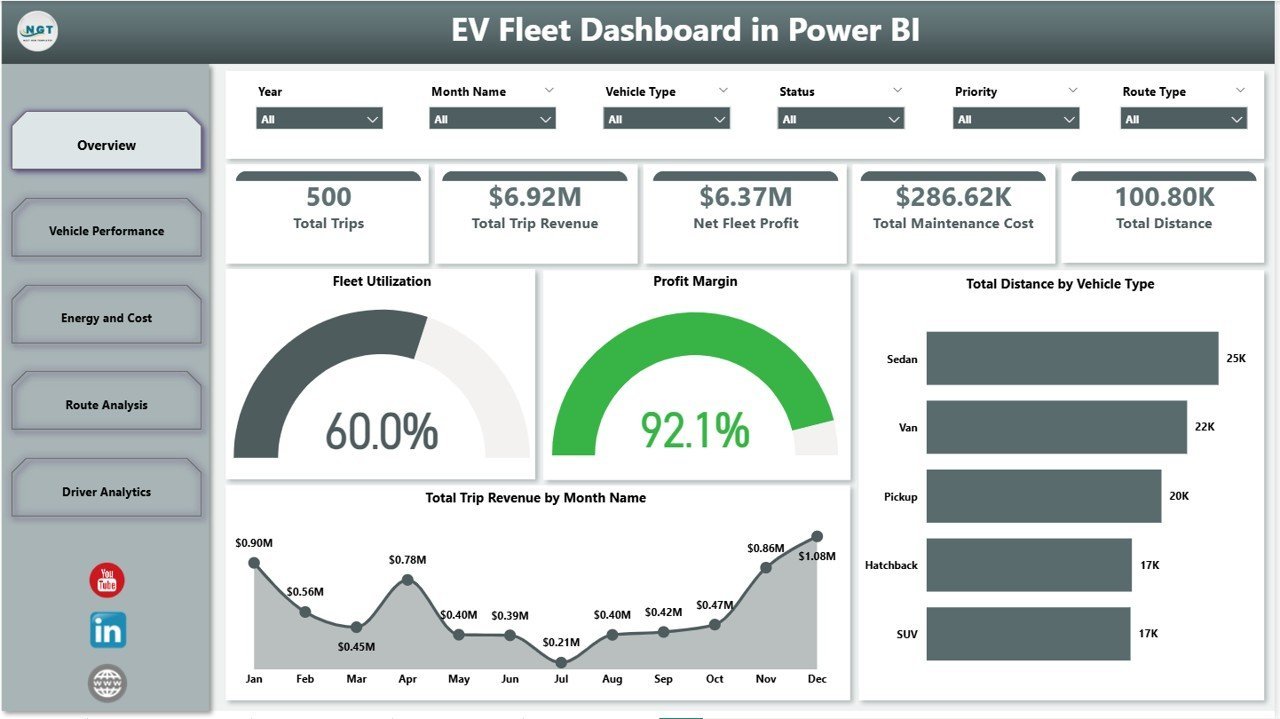
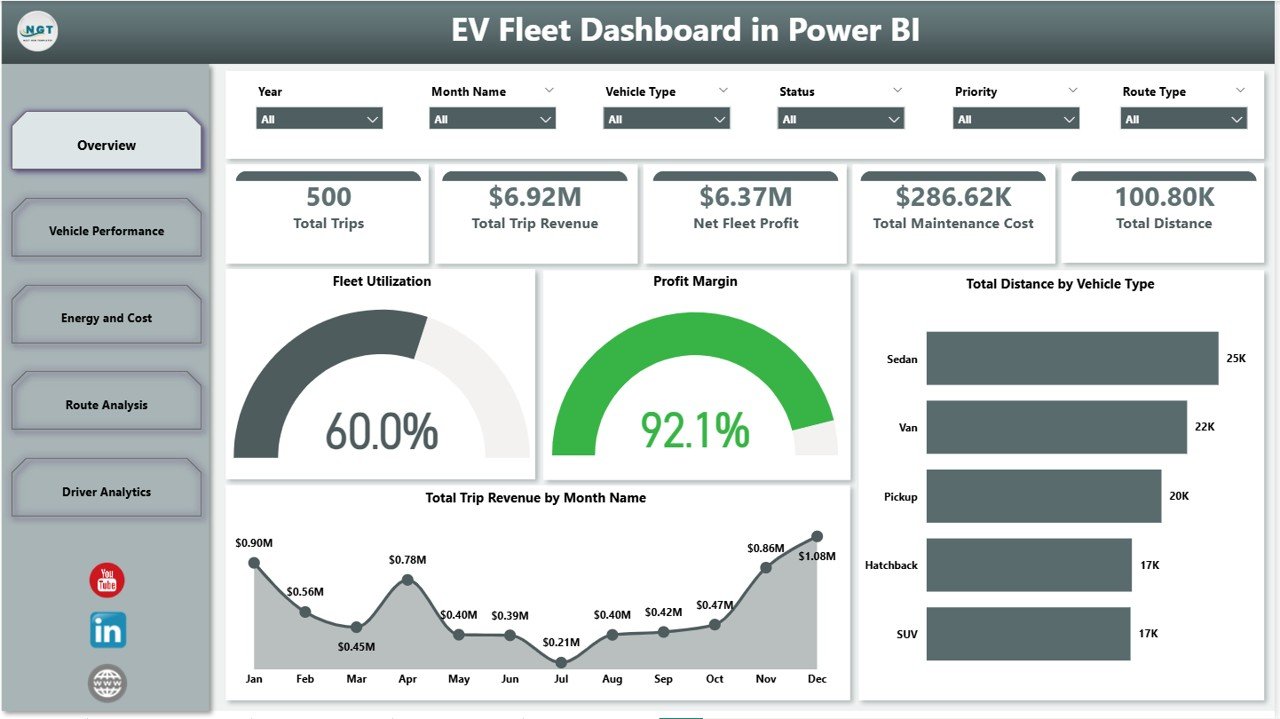
- 5 executive cards on the Overview page — Total Trips, Trip Revenue, Net Fleet Profit, Maintenance Cost, and Total Distance render the full operating picture in one glance.
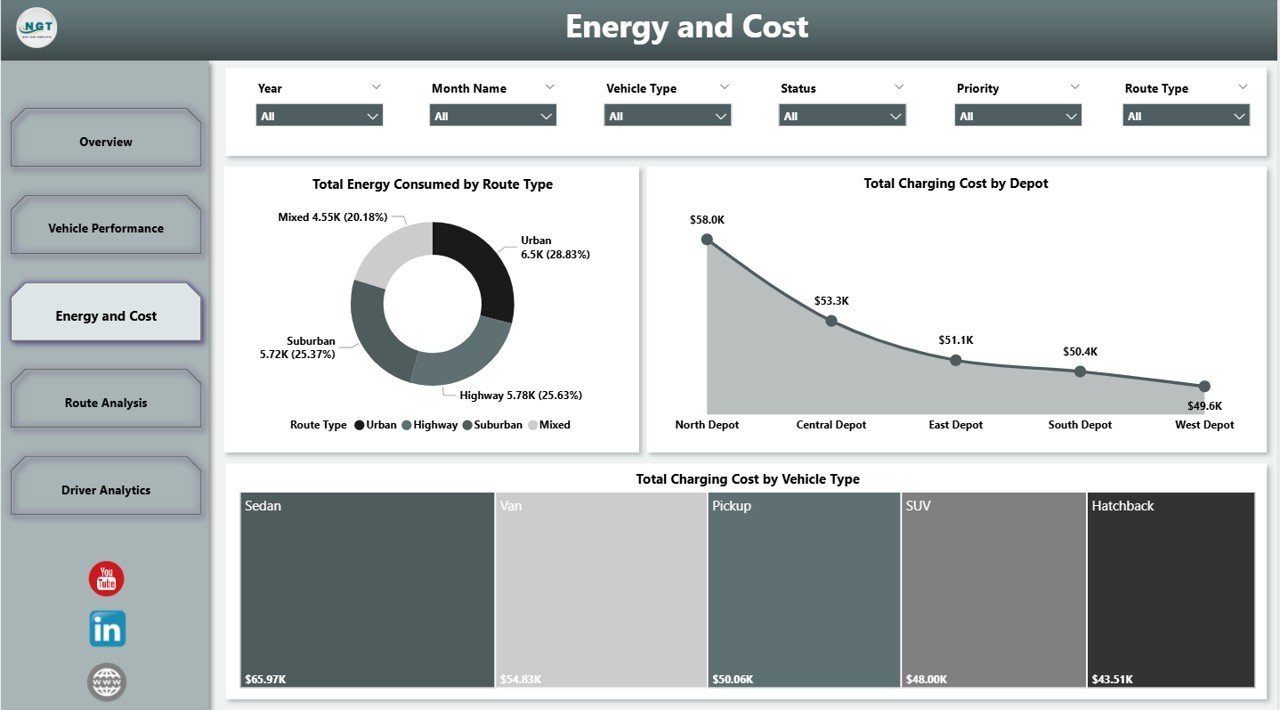
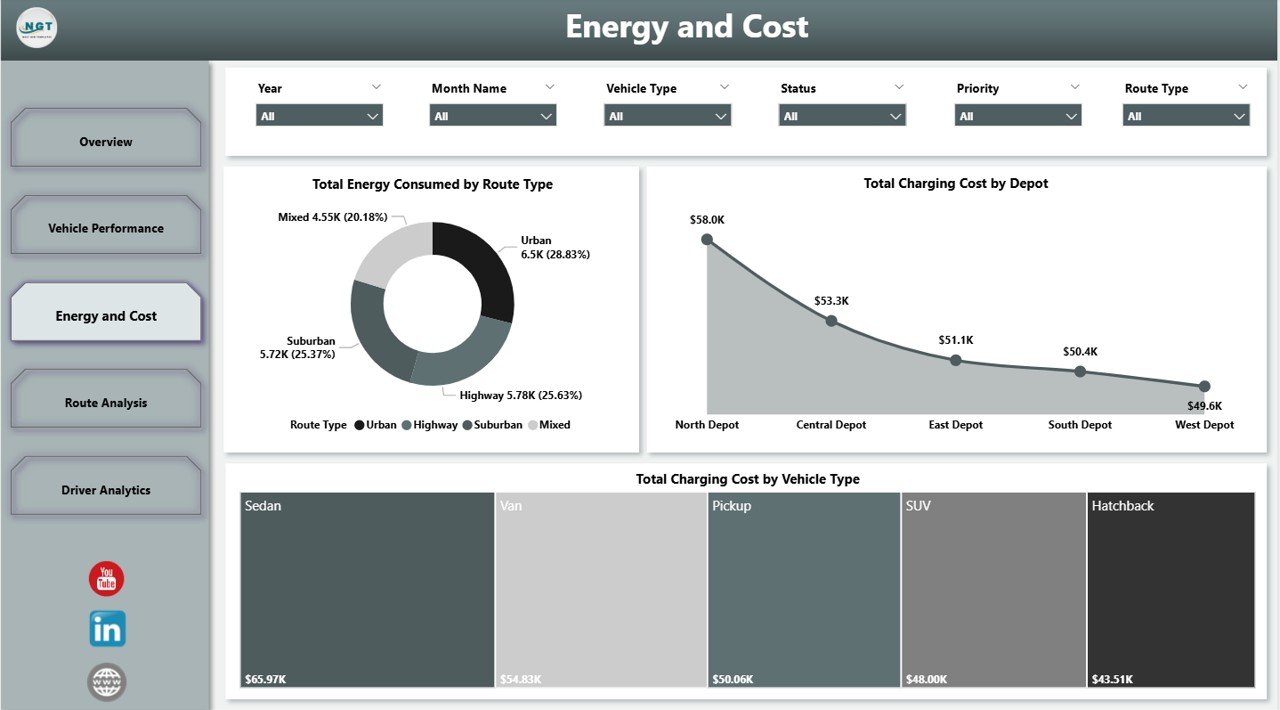
- Dedicated Energy and Cost page tracks Total Energy Consumed by Route Type, Total Charging Cost by Depot, and Total Charging Cost by Vehicle Type — the three metrics that decide whether an EV fleet beats diesel.
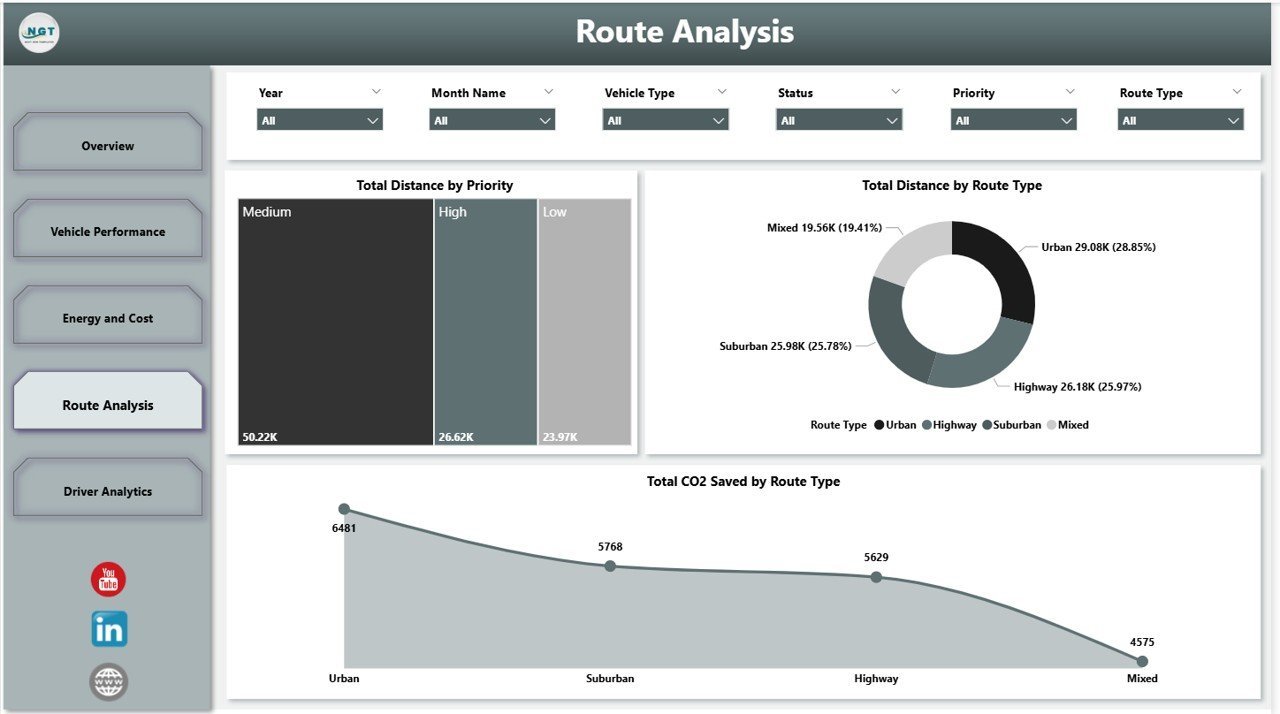
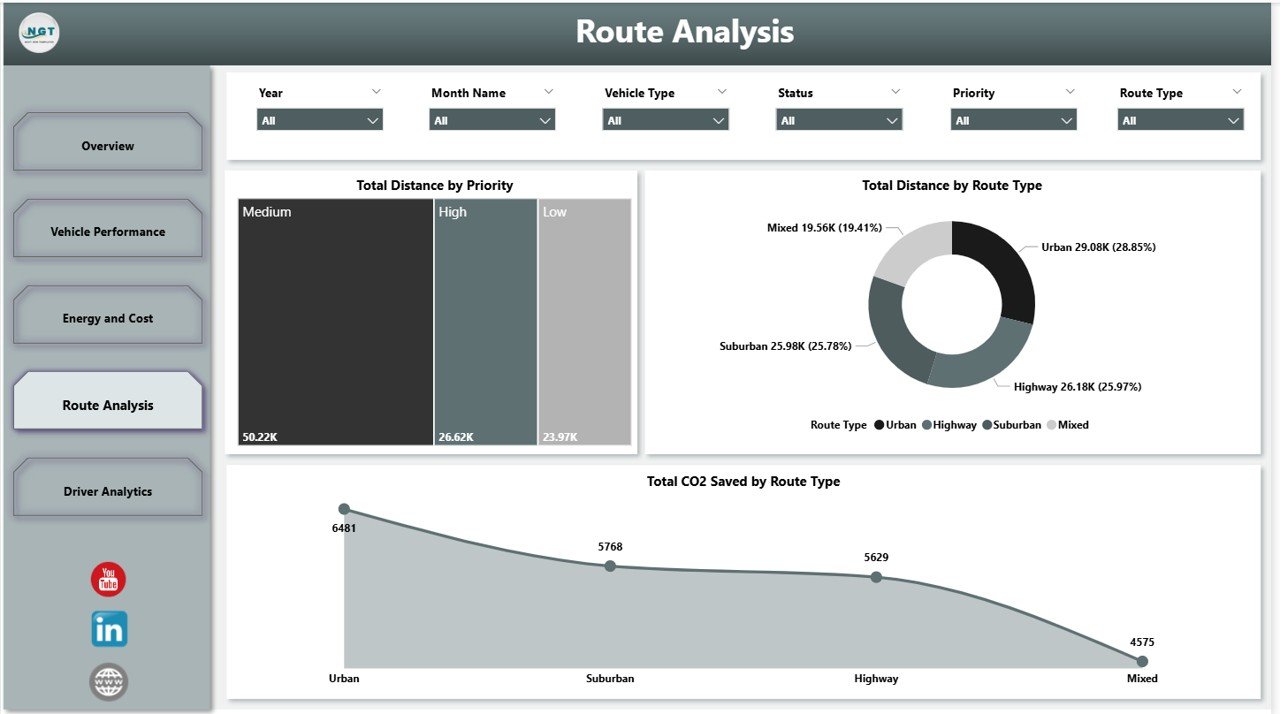
- CO2 saved by route type on the Route Analysis page — quantifies kilograms of carbon avoided versus a diesel baseline for ESG and investor reporting.
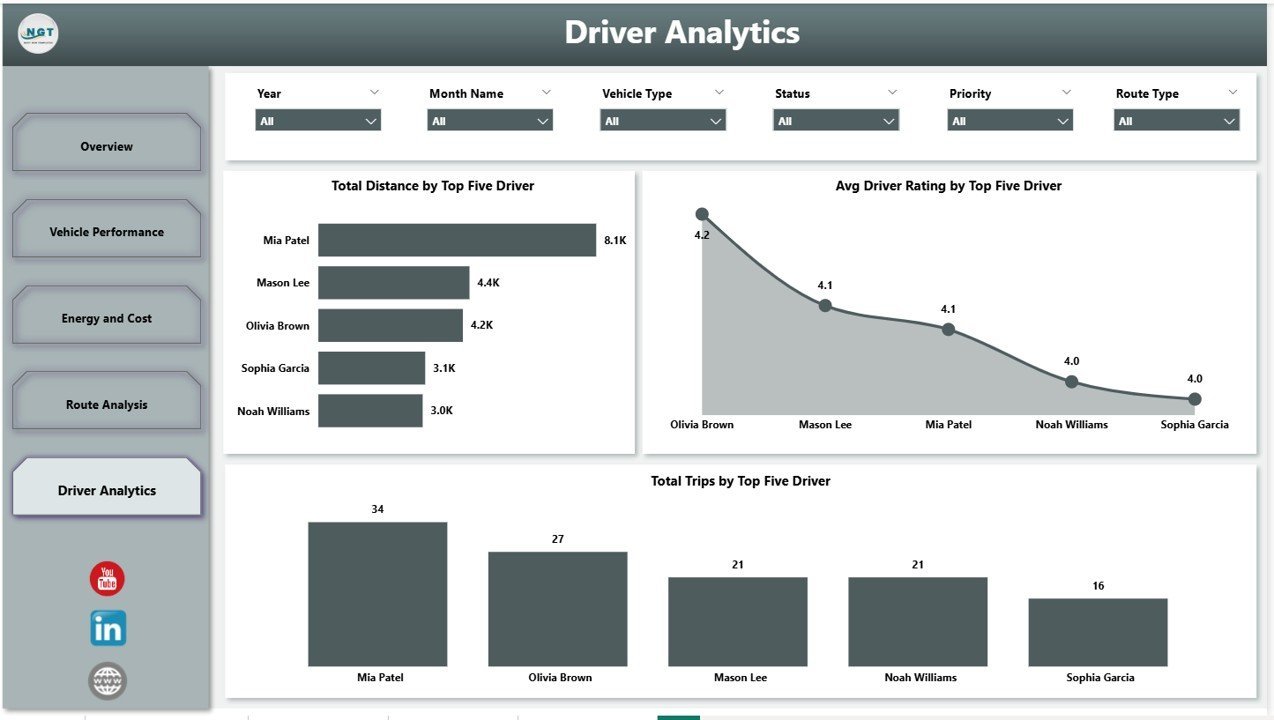
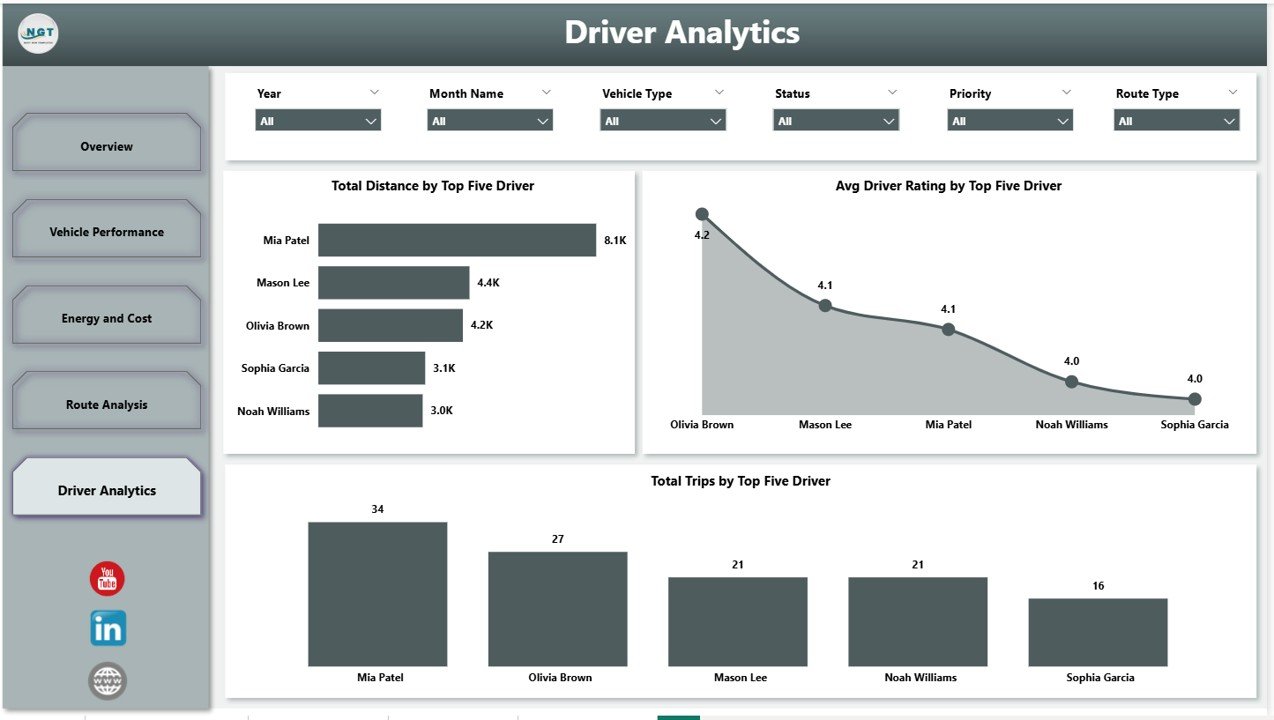
- Top-five Driver Analytics exposes Total Distance, Avg Driver Rating, and Total Trips — designed for coaching, bonuses, and customer-feedback triage.
- Native Power BI slicers cascade across every page — filter by depot, vehicle type, route priority, and date with one click.
- One-time $17.99 replaces $25-$60-per-vehicle-per-month telematics SaaS — a 10-vehicle fleet saves $3,000+ in year one.
📦 What’s Inside the EV Fleet Dashboard in Power BI
The dashboard ships as a single .pbix file containing five fully linked Power BI report pages. Open it in Power BI Desktop (free download from Microsoft), point the data model at your own table, refresh, and every visual on every page updates simultaneously.
Page 1: Overview
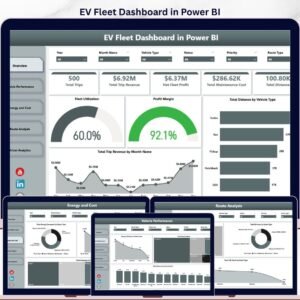
The Overview page presents five high-level cards — Total Trips, Total Trip Revenue, Net Fleet Profit, Total Maintenance Cost, and Total Distance — plus four charts: Fleet Utilization, Profit Margin, Total Distance by Vehicle Type, and Total Trip Revenue by Month Name. Top slicers filter by depot, vehicle type, and date range.
Page 2: Vehicle Performance
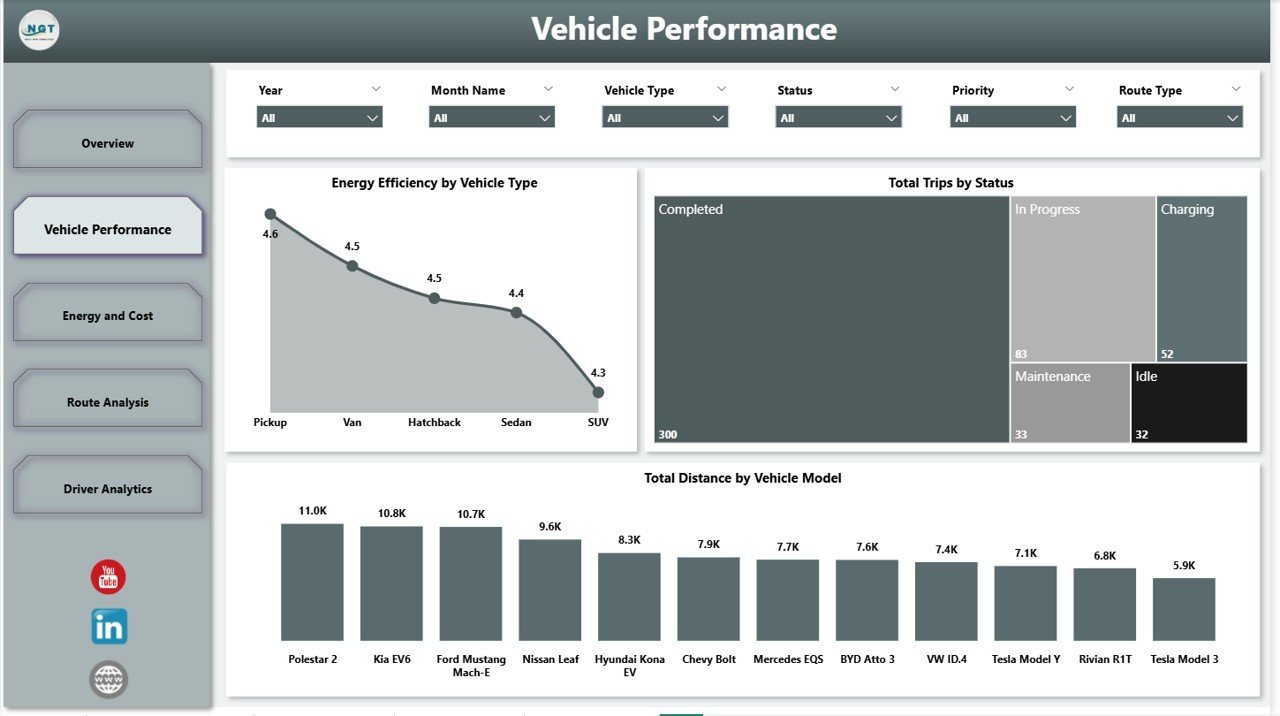
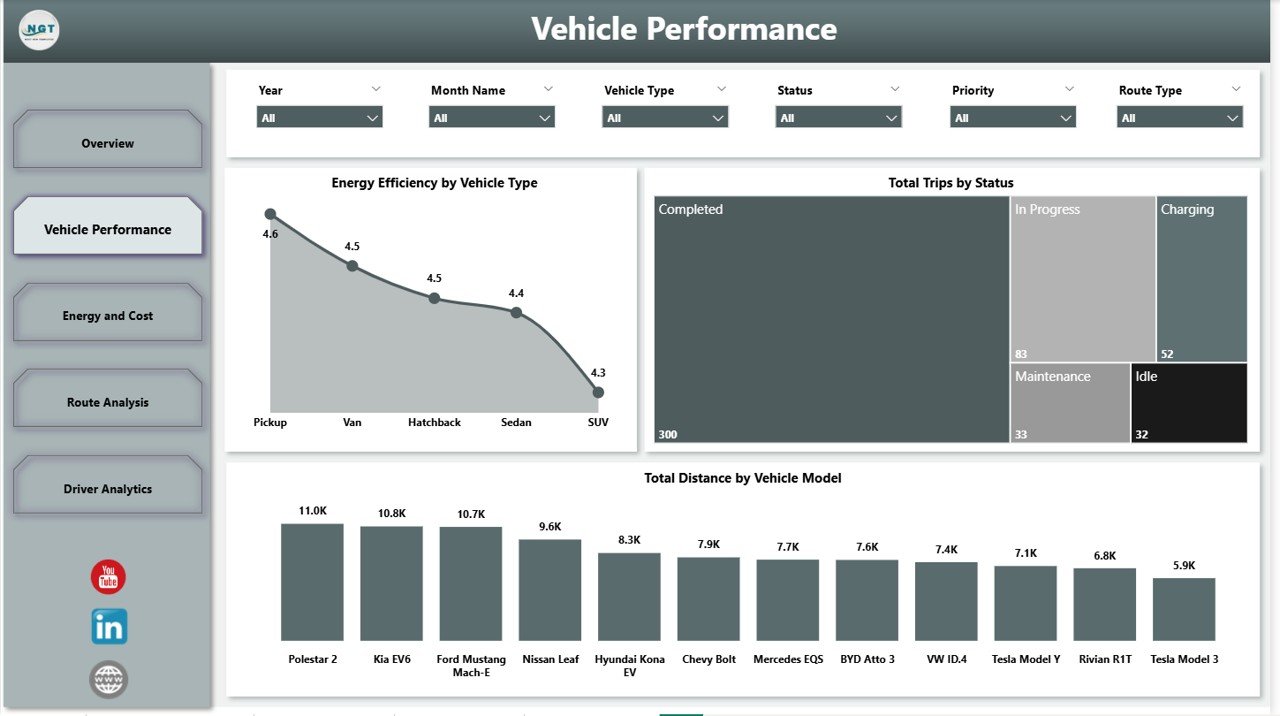
The Vehicle Performance page shows Energy Efficiency by Vehicle Type, Total Trips by Status, and Total Distance by Vehicle Model. Use it to spot under-utilised vehicles, compare efficiency across electric vans, trucks, and bikes, and flag models that over-run planned trip counts.
Page 3: Energy and Cost
The Energy and Cost page controls the single largest EV operating expense — charging. Charts include Total Energy Consumed by Route Type, Total Charging Cost by Depot, and Total Charging Cost by Vehicle Type. Compare depot kWh usage and benchmark cost-per-kWh across vehicle classes.
Page 4: Route Analysis
The Route Analysis page links operations to ESG. Charts include Total Distance by Priority, Total Distance by Route Type, and Total CO2 Saved by Route Type — the page you bring to ESG reviews and board meetings to prove how many kilograms of CO2 your fleet has avoided versus a diesel baseline.
Page 5: Driver Analytics
The Driver Analytics page surfaces the top-five drivers on Total Distance, Avg Driver Rating, and Total Trips. Use it to reward consistent performers, identify drivers who pair high distance with low ratings, and build a coaching pipeline that improves customer feedback.
📊 EV Fleet Dashboard in Power BI vs. Tableau / Qlik vs. Verizon Connect / Geotab / Samsara — Where This Fits
| Feature | EV Fleet Dashboard in Power BI | Tableau / Qlik EV dashboard | Verizon Connect / Geotab / Samsara |
|---|---|---|---|
| Cost | $17.99 one-time ✅ | $70-$150 / user / month | $25-$60 / vehicle / month |
| Platform | Power BI Desktop (free) ✅ | Tableau Desktop / Qlik Sense | Vendor-hosted SaaS |
| Setup time | Under 10 minutes ✅ | 2-4 weeks consultant project | 2-6 weeks onboarding + hardware install |
| Data ownership | Your file, your model ✅ | Your file, vendor licence | Vendor cloud, contractual access |
| EV-specific KPIs (kWh, CO2) | Built-in ✅ | Build yourself | Yes, vendor-defined |
| Customisable visuals | Full DAX + visual edits ✅ | Yes | Limited to vendor UI |
| Share with link | Power BI Service / OneDrive | Tableau Server | Built-in ✅ |
| Driver scoring page | Yes — Top 5 drivers ✅ | Build yourself | Yes |
| Year-1 cost (10-vehicle fleet) | $17.99 total ✅ | $840+ | $3,000-$7,200+ |
For fleet managers who want depot-level, vehicle-type-level, and driver-level visibility without paying $3,000+ per year per fleet to a telematics SaaS vendor, the EV Fleet Dashboard in Power BI sits in the sweet spot — board-ready visuals at a one-time price.
👥 Who This Template Is For — and Who It’s Not For
✅ This template is built for:
- Fleet managers operating 5-250 electric vehicles who want one Power BI file as the single source of truth for trips, revenue, energy, and emissions
- Last-mile delivery operators (e-grocery, parcel, food, pharma) running mixed depots and needing route-type CO2 reporting
- Logistics analysts who already use Power BI and want a ready-made model to connect to their telematics export or fleet ERP
- ESG and sustainability teams who need auditable CO2-saved numbers segmented by route type for annual reports
- Fleet consultants and EV-transition advisors who deliver client reports and want a polished, editable starting point
❌ This template is NOT for:
- Enterprise fleets above 1,000 vehicles needing real-time GPS telematics, live driver coaching alerts, and SOC 2 hosted infrastructure
- Teams that have not yet installed Power BI Desktop and don’t want to download the free Microsoft application
- Users looking for an Excel-only solution — the matching EV Fleet Dashboard in Excel is the right pick
⚙️ How to Use the EV Fleet Dashboard in Power BI
- Download the
.pbixfile from your purchase and open it in Power BI Desktop. - Open the sample data table and replace it with your own fleet records — keep column names identical.
- Click Refresh on the Home ribbon; the model recalculates and all five pages update simultaneously.
- Adjust the top slicers — depot, vehicle type, route priority, date range — to filter the view for your audience.
- Publish to Power BI Service or share the
.pbixthrough OneDrive/SharePoint for read-only leadership access. - Review the Energy and Cost page weekly and the Driver Analytics page monthly to catch cost and coaching trends.
💼 Real-World Use Cases
Priya runs operations for an 80-vehicle electric delivery fleet across three depots in Manchester. She opens the Energy and Cost page every Monday, compares charging cost per kWh across depots, and flags the depot running 18% above benchmark for a tariff review — saving roughly £1,400 every quarter without paying a recurring telematics fee.
Marcus is a sustainability analyst at a national logistics group. He uses the Route Analysis page to source the CO2-saved-by-route-type numbers that go directly into his ESG annual report and investor briefings. The Power BI file lives on the corporate OneDrive, so the audit team can re-open the same model and trace every figure to its source rows.
Aisha is an EV-transition consultant for mid-market last-mile carriers. She uses the Driver Analytics page in pitch meetings to show prospective clients how easily they can move from spreadsheets to a Power BI-based fleet review process — winning two retainer contracts in the first quarter of using this template as her demo asset.
❓ Frequently Asked Questions
What KPIs does the EV Fleet Dashboard in Power BI track?
The EV Fleet Dashboard in Power BI tracks 22 fleet KPIs across five pages — Total Trips, Trip Revenue, Net Fleet Profit, Maintenance Cost, Total Distance, Fleet Utilization, Profit Margin, Energy Efficiency by Vehicle Type, Total Charging Cost by Depot, Total CO2 Saved by Route Type, and the top-five Driver Analytics metrics.
Do I need a paid Power BI licence to use this dashboard?
No. The EV Fleet Dashboard in Power BI opens, edits, and renders fully in Power BI Desktop — a free Microsoft download. A Power BI Pro licence is only required if you want to publish the report to Power BI Service for cloud sharing.
How long does setup take?
Under 10 minutes. Download the .pbix file, paste your fleet records into the data table while keeping column headers identical, click Refresh, and all five pages of the EV Fleet Dashboard in Power BI re-render with your numbers.
How does this compare to Verizon Connect, Geotab, or Samsara?
Telematics SaaS platforms cost $25-$60 per vehicle per month and include live GPS and hardware. The EV Fleet Dashboard in Power BI is a one-time $17.99 reporting layer that you can run alongside or instead — ideal when you already have data exports and just need board-ready visuals.
Is there an Excel version of the EV Fleet Dashboard?
Yes — the matching EV Fleet Dashboard in Excel covers the same KPI set on Microsoft Excel for teams that prefer spreadsheets. Many customers buy both to keep a single KPI definition across tools.
Can I modify the visuals and DAX measures?
Yes. The EV Fleet Dashboard in Power BI ships as an editable .pbix file — every visual, DAX measure, slicer, page background, and colour theme is fully customisable inside Power BI Desktop. There are no locked elements.
Will it work with my telematics provider’s data export?
Yes — as long as your export contains columns for trip date, vehicle, depot, route type, distance, energy consumed, charging cost, revenue, and driver. Most Geotab, Verizon Connect, Samsara, and FleetComplete exports include these fields and can be pasted into the EV Fleet Dashboard in Power BI directly.
👤 About the Author
Built by PK — Microsoft Certified Professional with 15+ years of Excel, Google Sheets, and Power BI experience. Founder of NextGenTemplates, reaching 300K+ subscribers across YouTube channels (@PK-AnExcelExpert, @NextGenTemplates, @NeoTechNavigators). Every template is hand-built and tested before release.
🔗 Explore Related Templates
- 💡 Also available as: EV Fleet Dashboard in Excel — same KPI set on Microsoft Excel for teams that prefer spreadsheets.
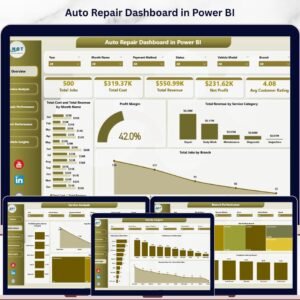
- Auto Repair Dashboard in Power BI — pair with the EV Fleet dashboard for vehicle workshop visibility.
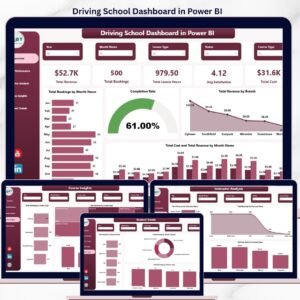
- Driving School Dashboard in Power BI — adjacent driver-training analytics in the same Power BI style.
- Supplier Performance KPI Dashboard in Power BI — track the suppliers behind your charging, maintenance, and parts spend.
- Warehouse Efficiency Dashboard in Google Sheets — complete the upstream logistics view.
- 📂 Browse the full Power BI Dashboards collection on NextGenTemplates.
📖 Click here to read the Detailed Blog Post
🎥 Visit our YouTube channel for step-by-step video tutorials
👉 YouTube.com/@NextGenTemplates
📅 Last updated: May 2026
Watch the step-by-step video tutorial:
YouTube





















Reviews
There are no reviews yet.