



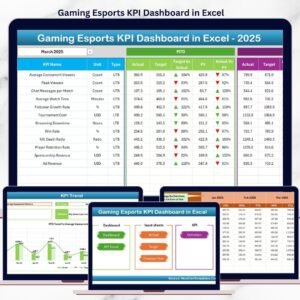
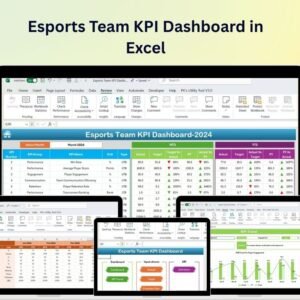
The Esports Team KPI Dashboard in Excel is a dynamic and interactive tool designed for esports team managers, coaches, and analysts to track key performance indicators (KPIs) and optimize team performance. Whether you manage a competitive gaming team, esports organization, or individual players, this Excel-based dashboard provides real-time insights into player stats, match performance, revenue, sponsorships, and overall team progress.
With customizable features and easy-to-use tracking, this dashboard allows you to monitor player performance, team dynamics, financial health, and progress toward goals, ensuring that your esports team operates at its highest potential.

Key Features of the Esports Team KPI Dashboard in Excel:
🎮 Player Performance Tracking
Track individual player performance in various metrics such as kills, assists, deaths, win rate, and overall ranking to evaluate player contributions and development.
💰 Revenue and Sponsorship Management
Monitor revenue streams from sponsorships, tournaments, and merchandise sales to ensure the financial sustainability of your esports team.
📊 Match Performance Analysis
Track match results, win/loss ratios, and overall performance across different tournaments to analyze the effectiveness of strategies and training.
🎯 Goals and Milestones Tracking
Set goals for individual players and the team, track progress toward milestones, and ensure that your esports team stays focused on long-term success.
📈 Team Dynamics and Collaboration
Monitor team performance as a whole, track communication metrics, and ensure that your team is collaborating effectively to achieve success in tournaments.
🚀 Why You’ll Love the Esports Team KPI Dashboard in Excel:
✅ Track Player Performance – Monitor player stats like kills, assists, and win rates to assess individual progress and contribution to team success.
✅ Evaluate Financial Health – Track revenue from sponsorships, tournaments, and merchandise to ensure financial sustainability and growth.
✅ Monitor Match Results – Track wins, losses, and overall performance in matches to evaluate strategies and training effectiveness.
✅ Set and Track Goals – Set specific performance goals for players and the team, track milestones, and ensure consistent progress toward success.
✅ Optimize Team Dynamics – Monitor team collaboration, communication, and teamwork to ensure a cohesive and efficient gaming environment.
✅ Fully Customizable and Interactive – Tailor the dashboard to your team’s unique needs with dynamic features and real-time tracking of key performance metrics.
What’s Inside the Esports Team KPI Dashboard in Excel:
Player Performance Metrics: Track key performance indicators for individual players, such as kill/death ratio, win rate, and overall ranking, to assess player contributions.
Match Results and Performance: Track results from different tournaments and matches, including wins, losses, and individual match performance.
Revenue and Sponsorship: Monitor revenue streams, including sponsorship deals, tournament earnings, and merchandise sales to ensure financial stability.
Goals and Milestones: Set specific goals for individual players and the team, track progress toward those goals, and ensure consistent improvement.
Team Collaboration Metrics: Monitor team dynamics, communication, and collaboration to ensure that players work together effectively during training and competitions.
Custom Reports: Generate custom reports summarizing player performance, financials, match results, and goals to inform future strategies and decisions.
How to Use the Esports Team KPI Dashboard in Excel:
1️⃣ Download the Template – Instantly access your Excel file upon purchase.
2️⃣ Input Player Data – Enter player stats, match results, and financial details to begin tracking your team’s KPIs.
3️⃣ Monitor Player Performance – Track individual player stats and progress towards goals to evaluate player contributions and performance.
4️⃣ Track Match Results – Monitor wins, losses, and overall match performance to assess the effectiveness of team strategies.
5️⃣ Manage Financials and Sponsorships – Track sponsorships, merchandise sales, and tournament revenue to ensure financial health and growth.
6️⃣ Generate Reports – Create detailed reports summarizing team performance, player stats, financial performance, and goals to inform future strategies.
Who Can Benefit from the Esports Team KPI Dashboard in Excel:
Esports Team Managers
Coaches and Analysts
Player Development Teams
Esports Organizations
Sponsorship and Marketing Teams
Event Organizers
Financial Analysts in Esports
Content Creators and Streamers
Tournament Organizers
Gaming Enthusiasts and Community Managers
The Esports Team KPI Dashboard in Excel is the perfect tool for tracking performance, managing finances, and optimizing your esports team’s strategies. By monitoring key metrics such as player performance, match results, revenue, and goals, this dashboard helps ensure your team achieves success both in and out of the gaming arena.
Click here to read the Detailed blog post
https://www.pk-anexcelexpert.com/esports-team-kpi-dashboard-in-excel/
Visit our YouTube channel to learn step-by-step video tutorials
Youtube.com/@PKAnExcelExpert
Compatibility and Requirements
- Works in Microsoft Excel desktop (Excel 2016 or later, or Microsoft 365).
- Enter your player stats, match results and revenue in the sheets. Microsoft explains how to build charts in Create a chart from start to finish.
Frequently Asked Questions
What can I track with this dashboard?
You can track player performance (kills, assists, deaths, win rate and ranking), match results, revenue from sponsorships, tournaments and merchandise, goals and milestones, and team collaboration metrics.
Can I set goals for players and the team?
Yes. You set goals for individual players and for the whole team, then track progress toward each milestone.
Does it cover sponsorship and revenue?
Yes. It tracks revenue streams from sponsorship deals, tournament earnings and merchandise sales.
Can I create reports from the data?
Yes. You can generate custom reports that summarize player performance, financials, match results and goals.
Is there a Google Sheets or Power BI version?
Yes. See the Esports Team KPI Dashboard in Google Sheets and the Esports Team KPI Dashboard in Power BI.
Related Esports and Team Templates
- Esports Team KPI Dashboard in Google Sheets: the same dashboard for Google Sheets
- Esports Team KPI Dashboard in Power BI: the Power BI edition
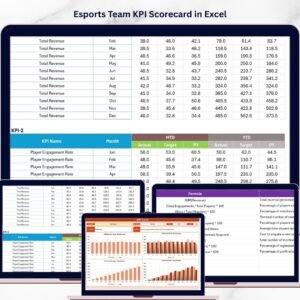
- Esports Team KPI Scorecard in Excel: a scorecard view of team KPIs
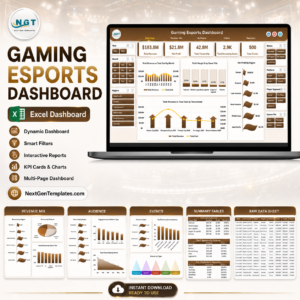
- Gaming Esports Dashboard in Excel: a wider gaming and esports view
- Team Performance Dashboard in Excel: team performance tracking
Browse all Excel KPI dashboards.






























Reviews
There are no reviews yet.