



The Energy Efficiency Checklist Template in Excel is an essential tool for businesses, property managers, and homeowners aiming to reduce energy consumption and improve overall energy efficiency. This easy-to-use checklist helps track energy-saving tasks, monitor progress, and identify areas for improvement, ensuring that your property or business operates in a more sustainable and cost-effective manner.
Whether you’re performing a building energy audit, managing energy usage for commercial purposes, or simply looking to optimize household energy consumption, this checklist will guide you through energy-saving actions, track energy usage patterns, and provide clear insights on where to focus your efforts for maximum savings.
Key Features of the Energy Efficiency Checklist Template in Excel
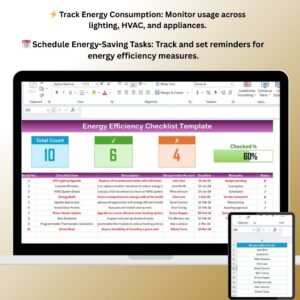
⚡ Track Energy Usage & Consumption
Monitor energy consumption across various areas, including lighting, HVAC systems, and appliances. Identify energy-intensive areas and track improvements over time.
📅 Energy Efficiency Tasks & Action Plan
Create a list of energy-saving tasks such as sealing gaps, upgrading insulation, and switching to energy-efficient lighting. Set deadlines and track the completion of each task.
📝 Track Energy-Saving Measures
Log energy-saving measures such as switching to LED lights, optimizing HVAC settings, and implementing energy-efficient appliances. Track savings and calculate the ROI of each energy-saving initiative.
📊 Energy Consumption Visualization
Use visual graphs and charts to compare energy consumption before and after energy-saving measures are implemented. Gain insights into the overall efficiency of your property or business.
🔄 Customizable Checklist
Tailor the checklist to suit your specific needs. Add new categories for energy-saving initiatives or modify existing ones to reflect your energy goals.
📈 Monitor & Report Energy Savings
Track and report your energy savings with clear data on how much energy has been saved and how much has been invested in energy efficiency measures. Share reports with stakeholders or management to showcase improvements.
Why You’ll Love the Energy Efficiency Checklist Template in Excel

✅ Reduce Energy Costs
By tracking and improving energy usage, this checklist helps reduce overall energy costs, leading to long-term savings for your business or household.
✅ Improve Sustainability
Make your operations or home more environmentally friendly by identifying and implementing energy-saving actions that reduce your carbon footprint.
✅ Increase Operational Efficiency
Optimize energy usage and enhance operational efficiency across your property or business. Efficient energy use can also extend the life of your appliances and systems.
✅ Comprehensive Energy Monitoring
Monitor all aspects of energy consumption, from lighting and HVAC to appliances and insulation, ensuring that you don’t miss any opportunities for energy savings.
✅ Customizable & Scalable
This checklist is fully customizable, allowing you to adjust it to your specific needs, whether you’re managing a small office or a large commercial property. Scale the template as your energy efficiency efforts grow.
What’s Inside the Energy Efficiency Checklist Template in Excel?
- Energy Consumption Tracking: Log energy usage for various systems, appliances, and devices.
- Energy-Saving Tasks: Track tasks like upgrading to energy-efficient appliances, improving insulation, or sealing leaks.
- Energy Savings Calculation: Calculate the energy savings and ROI for each energy-saving initiative.
- Visual Reports & Charts: Use charts and graphs to visualize energy consumption before and after improvements.
- Customizable Checklist: Add tasks and categories to match your unique energy goals and initiatives.
- Progress Tracking: Stay on track by monitoring the completion of energy-saving tasks.
How to Use the Energy Efficiency Checklist Template in Excel
1️⃣ Download the Template: Instantly access the Energy Efficiency Checklist in Excel.
2️⃣ Enter Your Energy Data: Input energy consumption data for your property, including energy usage by type (lighting, HVAC, etc.).
3️⃣ Track Energy-Saving Tasks: Add energy-saving actions and set deadlines for their completion.
4️⃣ Monitor Progress: Track the completion of tasks and calculate savings.
5️⃣ Generate Reports & Share Insights: Visualize energy savings and generate reports to share with stakeholders.
Who Can Benefit from the Energy Efficiency Checklist Template in Excel?
🔹 Property Managers & Homeowners
🔹 Facilities & Operations Managers
🔹 Environmental Consultants
🔹 Energy Auditors
🔹 Small Business Owners
🔹 Corporate Sustainability Teams
Make your property or business more energy-efficient with the Energy Efficiency Checklist Template in Excel. Track consumption, implement energy-saving measures, and see the difference in cost savings and sustainability.
Click here to read the Detailed blog post
Visit our YouTube channel to learn step-by-step video tutorials
Youtube.com/@PKAnExcelExpert
Compatibility and Requirements
- Works in Microsoft Excel desktop (Excel 2016 or later, or Microsoft 365).
- Microsoft’s guide Create a chart from start to finish explains the Excel feature this file is built on.
Frequently Asked Questions
What can I track with the Energy Efficiency Checklist Template in Excel?
You log energy use for lighting, HVAC, appliances and other systems, list energy saving tasks with deadlines and track their completion.
Does it calculate savings?
Yes. It calculates the energy savings and ROI for each energy saving measure you log.
Can I compare usage before and after changes?
Yes. Charts compare energy consumption before and after each measure.
Can I add my own categories?
Yes. You can add new categories and tasks to match your energy goals.
Related Energy Templates
- Energy Efficiency Checklist in Google Sheets: the same checklist in your browser
- Energy Efficiency KPI Dashboard in Excel: track energy KPIs over time
- Energy and Utility Dashboard in Excel: utility usage and cost analysis
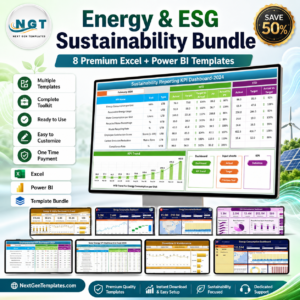
- Energy and ESG Sustainability Bundle: eight energy and ESG templates
Browse all Excel checklists or the Excel KPI dashboards.

































Reviews
There are no reviews yet.