

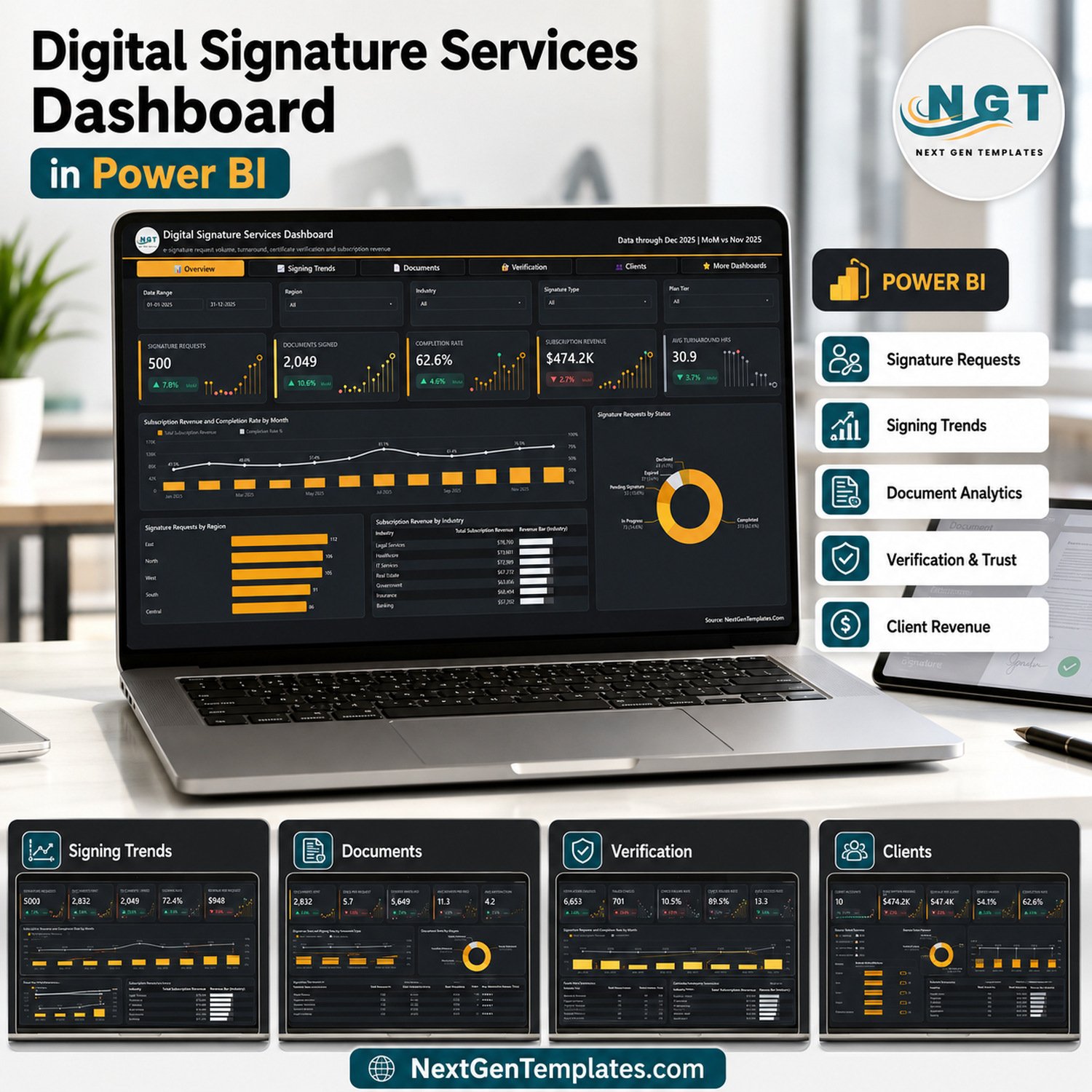

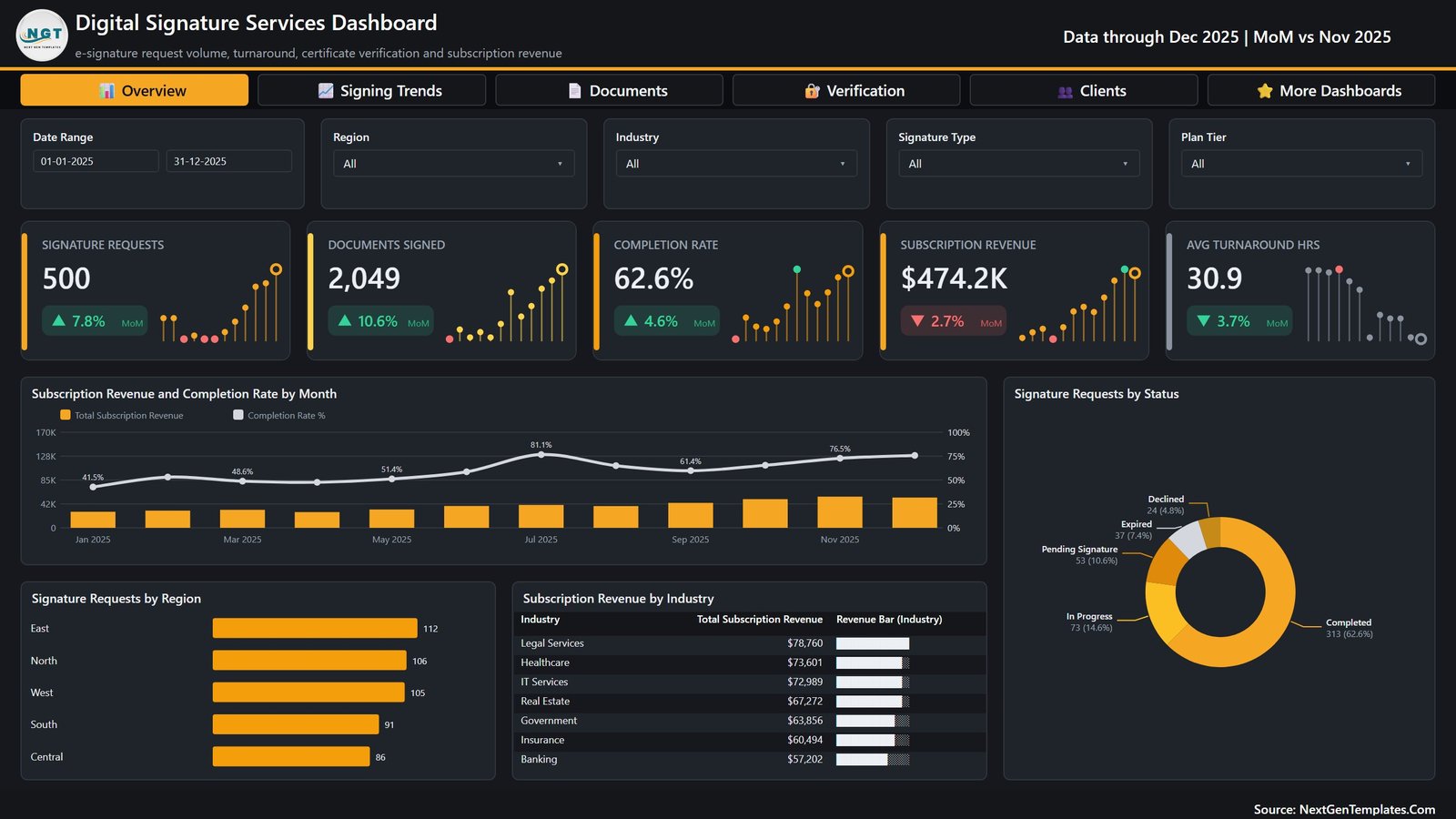
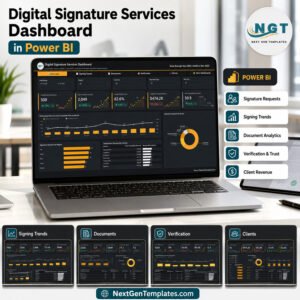
The Digital Signature Services Dashboard in Power BI turns 500 signature requests, 2,832 documents sent and 6,653 certificate verification checks into five report pages you can read in about a minute. The sample model ships showing a 62.6% completion rate, a 72.4% signing rate, 30.9 average turnaround hours and $474.2K of subscription revenue across 10 client accounts – every one of those figures recalculated from a single 500-row table you replace with your own. It is a one-time $17.99 (regular $29.99), it opens in the free Power BI Desktop, nothing is locked, and if anything does not work as described our team will help.
Key Features of the Digital Signature Services Dashboard in Power BI
- Five analysis pages, one shared filter bar. Overview, Signing Trends, Documents & Signatures, Verification & Trust and Clients & Channels. Date Range, Region, Industry and Signature Type are synced across all five; each page adds a fifth slicer of its own – Plan Tier, Status, Document Type, Certificate Authority and Channel respectively.
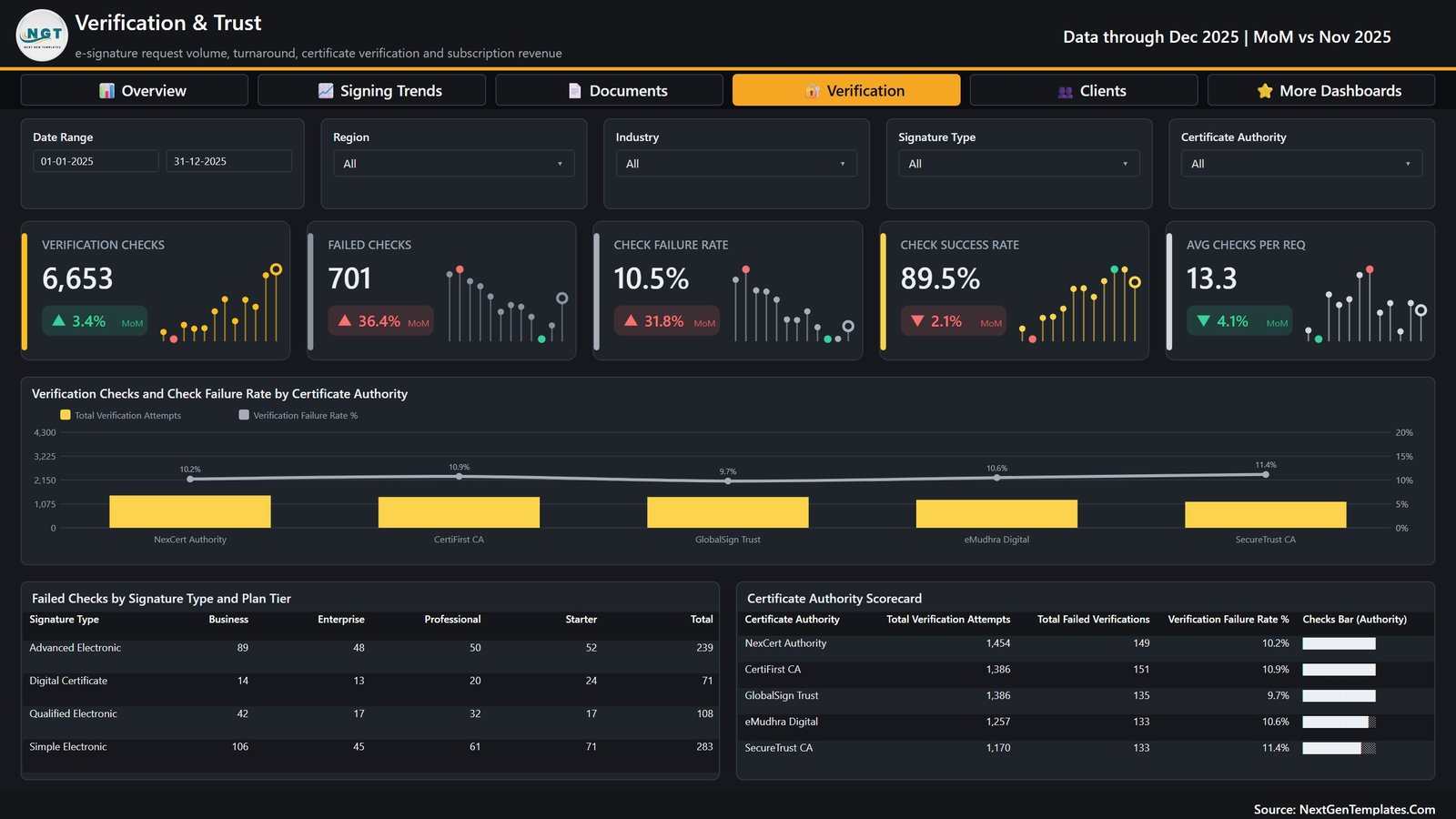
- 25 KPI cards with month-on-month deltas. Every card carries a coloured delta against the prior month and a sparkline, so Failed Checks reading 701 with a red +36.4% is visible without opening a second page.
- Completion rate and signing rate reported separately. 62.6% of requests reach Completed; 72.4% of documents sent get signed. Most vendor exports collapse those into one number, and the two answer different questions.
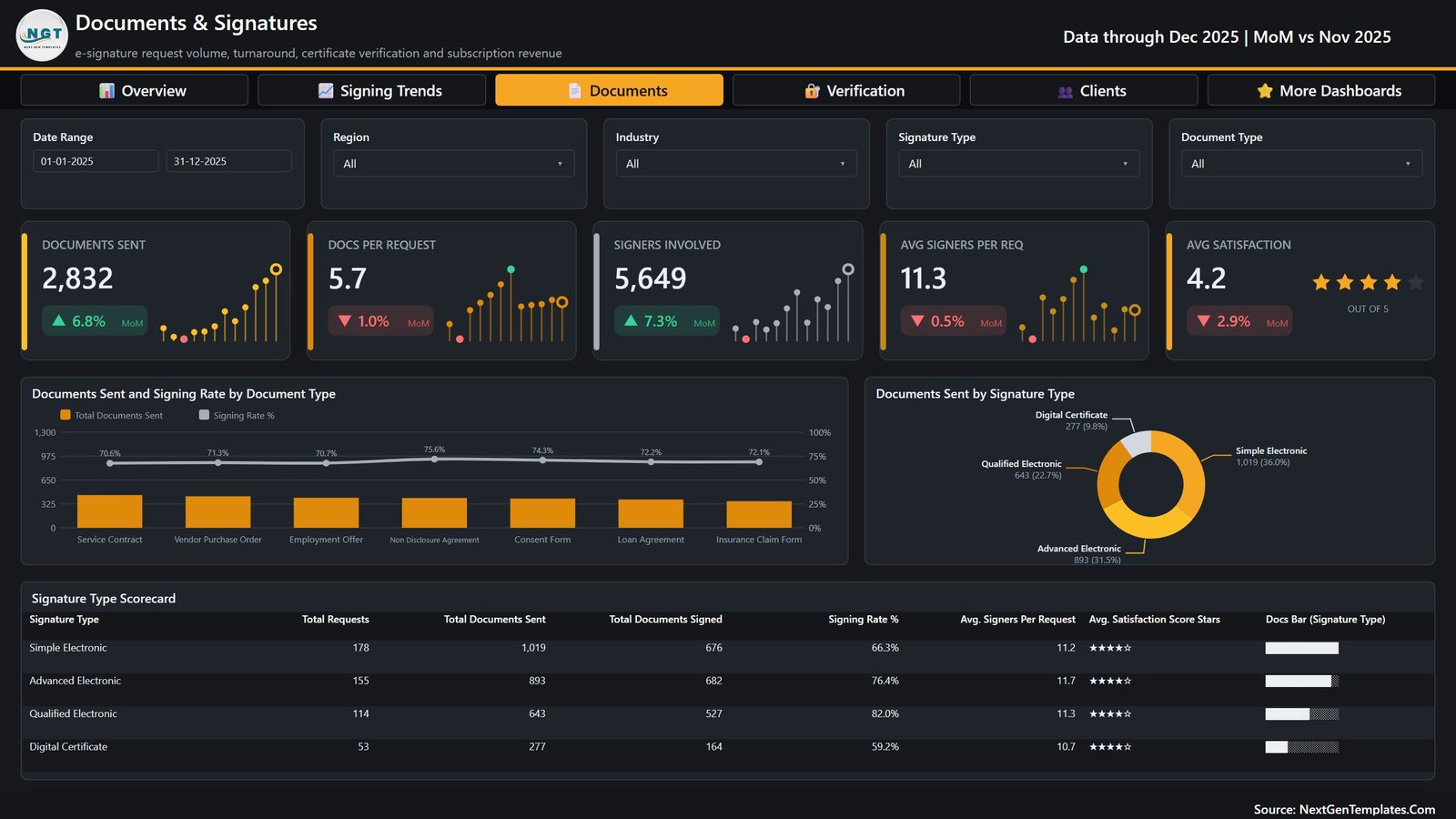
- Four signature tiers scored side by side. Simple Electronic, Advanced Electronic, Qualified Electronic and Digital Certificate, each with requests, documents sent, documents signed, signing rate, average signers and a star satisfaction score – 82.0% signing on Qualified Electronic against 59.2% on Digital Certificate in the sample.
- Certificate authority scorecard. Five authorities compared on verification attempts, failed verifications and failure rate, from GlobalSign Trust at 9.7% to SecureTrust CA at 11.4%.
- A failure matrix, not just a failure count. Failed checks are cross-tabbed by signature type against Starter, Professional, Business and Enterprise plan tiers, so a 283-failure Simple Electronic total breaks down to the tier that is actually generating it.
- Hidden drillthrough on ten fields. Right-click almost any visual and drill to a Details page filtered by Industry, Region, Country, Document Type, Signature Type, Certificate Authority, Plan Tier, Channel, Status or Client Account.
- Two report-page tooltips. Metric Detail and Trend Detail are built as 280×360 hidden pages and appear on hover rather than as the default Power BI tooltip.
- Nothing is locked. More than 35 named DAX measures, every visual, every colour and the NGT theme file are all editable.
What’s Inside the Digital Signature Services Dashboard in Power BI
The download is a single ZIP holding three files: the .pbix report, Data.xlsx with the 500-row sample table, and a Power BI Dashboard user manual PDF.
Overview pairs a Subscription Revenue and Completion Rate by Month combo chart with a Signature Requests by Status donut – Completed 313, In Progress 73, Pending Signature 53, Expired 37, Declined 24 – plus requests by region (East 112 down to Central 86) and a subscription revenue table by industry led by Legal Services at $78,760.
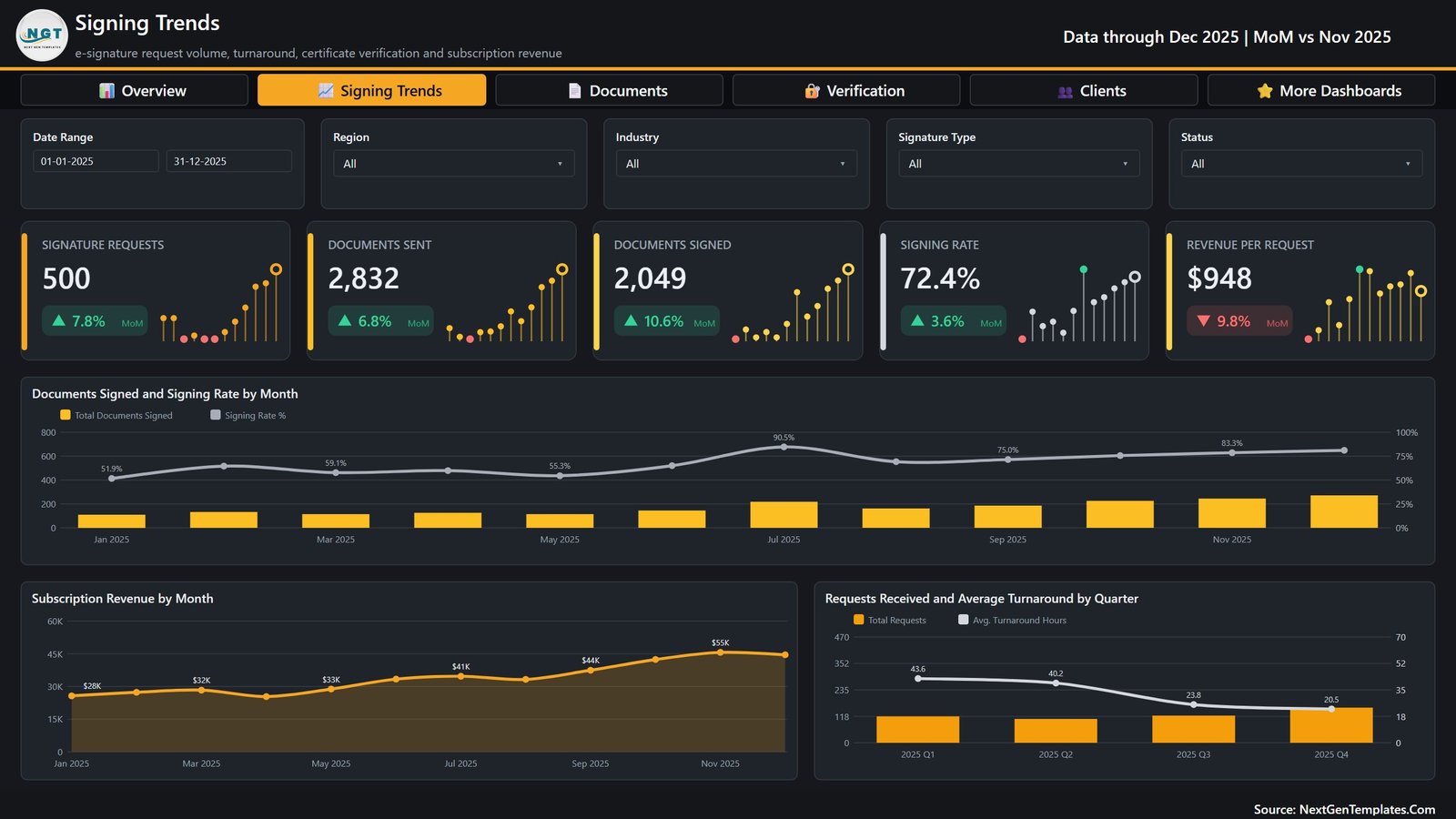
Signing Trends tracks Documents Signed and Signing Rate by Month (51.9% in January climbing to 90.5% in July), Subscription Revenue by Month ($28K to $55K) and Requests Received and Average Turnaround by Quarter, where turnaround falls from 43.6 hours in Q1 to 20.5 in Q4.
Documents & Signatures reports 5.7 documents per request and 11.3 signers per request, ranks signing rate across seven document types from Non Disclosure Agreement at 75.6% down to Service Contract at 70.6%, and splits volume by signature type in a donut and a full scorecard.
Verification & Trust holds the certificate authority chart and scorecard, the failed-checks matrix, and the five verification KPIs including a 89.5% check success rate.
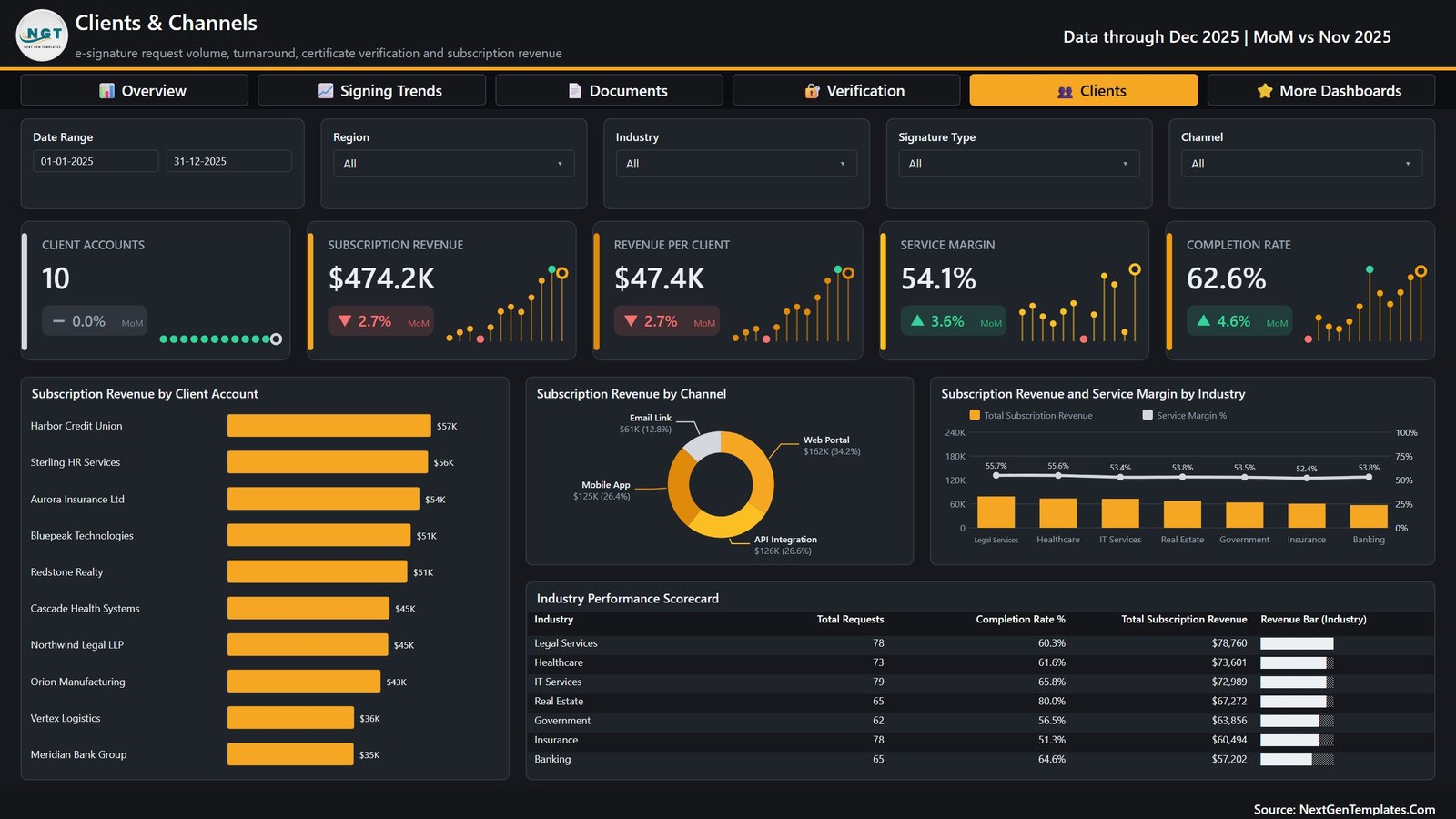
Clients & Channels ranks all ten client accounts by revenue (Harbor Credit Union $57K to Meridian Bank Group $35K), splits revenue across Web Portal, API Integration, Mobile App and Email Link, and closes with an industry performance scorecard carrying requests, completion rate and revenue per industry.
Digital Signature Services Dashboard in Power BI vs. Tableau vs. an E-Signature Vendor Analytics Add-On – Where This Fits
| This template (Power BI) | Tableau or Qlik Sense | Vendor analytics add-on | |
|---|---|---|---|
| Cost | $17.99 one time | Per-creator subscription | Bundled into a higher plan tier |
| Platform | Power BI Desktop (free) | Desktop plus a hosted server | Inside your signing platform |
| Setup time | Under 15 minutes | Days, plus a data source build | Instant, but fixed |
| Editable visuals and measures | Yes – all of them | Yes | No |
| Works across two signing vendors at once | Yes – it reads your table, not an API | Yes, with connector work | No |
| Certificate authority failure analysis | Built in, five authorities | Build it yourself | Rarely exposed |
| Mobile access | Power BI mobile app after publishing | Yes | Yes |
| Share with a link | Publish to the Service (Pro licence) | Server licence | Yes |
| Year-1 cost for a 5-person team | $17.99 plus optional Pro seats | Five creator seats | Plan upgrade for the whole account |
Who This Template Is For – and Who It’s Not For
It fits an e-signature or trust-services provider reporting to clients, an in-house legal or contract operations team that exports envelope data monthly, a RegTech or document-workflow vendor that resells signing, and anyone who has to explain a rising verification failure rate to a certificate authority.
It does not fit if you want a live API connection – this file connects to no signing platform, certificate authority, identity provider or payment gateway, and every number in it is sample data. It is not an audit trail, an evidence package or a compliance certification: the Simple / Advanced / Qualified / Digital Certificate labels are reporting categories in your own data, not an eIDAS, ESIGN or UETA conformance claim. It is also not per-signer analytics – the model is request-level, with no signer names, email addresses, IP addresses or document contents anywhere in it.
How to Use the Digital Signature Services Dashboard in Power BI
- Unzip and open the .pbix in Power BI Desktop. Everything is already populated, so look around first.
- Open Data.xlsx and read the 21 headers – Request ID, Request Date, Client Account, Industry, Region, Country, Document Type, Signature Type, Certificate Authority, Plan Tier, Channel, Documents Sent, Documents Signed, Signers Involved, Turnaround Hours, Verification Attempts, Failed Verifications, Certificate Cost, Subscription Revenue, Satisfaction Score, Status.
- Export your own envelope or request data and paste it under those headers, one row per request. Keep the header spelling exactly as it is.
- In Power BI Desktop choose Transform data, point the query at your file, then Close & Apply.
- Check the Status values match your own vocabulary – Completed, In Progress, Pending Signature, Expired, Declined drive the donut and the completion rate.
- Publish to the Power BI Service if you want to share a link, or export to PDF for a client pack.
Real-World Use Cases
Priya, operations lead at a trust-services provider. Her monthly client review used to be three exports stitched together. She now filters to one client account and screenshots the Clients & Channels page – revenue, service margin and completion rate for that account, in one frame.
Daniel, contract operations manager at a legal services firm. He watched Qualified Electronic sign at 82.0% while Digital Certificate sat at 59.2% and moved his high-value agreements onto the higher-completing tier.
Ana, vendor manager at an insurer. Failed checks jumped 36.4% month on month. The failure matrix showed the increase concentrated in one plan tier rather than one authority, which changed the conversation she had with the vendor.
Frequently Asked Questions
Does this connect to DocuSign, Adobe Acrobat Sign or any other platform?
No. There is no API connection, no connector and no live refresh from any signing service. You export your data to a spreadsheet and the report reads that. The upside is that it works the same way across two vendors at once.
Do I need a paid Power BI licence?
No, not to use it. Power BI Desktop is free from Microsoft. A Power BI Pro licence is only needed if you want to publish and share the report through the Power BI Service.
Is a user manual included?
Yes. The ZIP contains a Power BI Dashboard user manual PDF alongside the .pbix and Data.xlsx.
Can I add my own logo and colours?
Yes. Nothing is locked. The NGT theme file, every visual and every DAX measure can be edited, and the commercial licence lets you rebrand it for your own team or clients.
Does it prove my signatures are legally valid?
No, and it does not claim to. It reports on the request data you feed it. Legal validity, evidence packages and audit trails come from your signing platform and your certificate authority, not from a Power BI file.
What if my data has more or fewer columns?
Extra columns are fine – they simply sit unused. Missing a column that a measure depends on will break the visuals that use it, so keep the 21 headers and leave a column blank rather than deleting it.
Is there an Excel version?
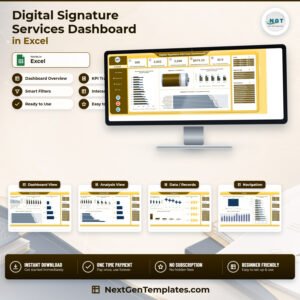
Yes. The Digital Signature Services Dashboard in Excel covers the same subject with pivot tables and slicers instead of a semantic model.
About the Author
Built by PK – Microsoft Certified Professional with 15+ years of Excel, Google Sheets, and Power BI experience. Founder of NextGenTemplates, reaching 300K+ subscribers across YouTube channels. Every template is hand-built and tested before release.
Explore Related Templates
- Digital Signature Services Dashboard in Excel – the same subject, built in Excel.
- Digital Compliance Tools Dashboard in Power BI – for the compliance tooling around the signing workflow.
- Compliance Monitoring Dashboard in Power BI – obligation tracking and control testing.
- Cyber Risk Management Dashboard in Power BI – the security side of a trust-services business.
- Digital Asset Custodians Dashboard in Power BI – custody operations reporting.
- Document Management Dashboard in Excel – document lifecycle rather than signing.
- Browse the full Power BI templates catalogue or the Power BI dashboards category.
Get the Digital Signature Services Dashboard in Power BI for $17.99 – instant download, free Power BI Desktop, commercial licence, and support if anything does not work as described.
Last updated: 6 September 2026.
Watch the demo video:
Compatibility and Requirements
- Works in Power BI Desktop, which is free from Microsoft. Download it from Get Power BI Desktop.
- Your data goes into Data.xlsx, so you also need Microsoft Excel or another program that can edit .xlsx files.
- A Power BI Pro licence is only needed if you want to publish and share the report through the Power BI Service.





















Reviews
There are no reviews yet.