



The Medical Appointment Calendar in Excel is a must-have tool for healthcare providers, clinics, and individuals looking to organize and manage medical appointments efficiently. Whether you’re scheduling appointments for doctors, specialists, or other medical services, this customizable Excel template ensures that you never miss an important appointment and helps you stay organized.
With this interactive and easy-to-use calendar, you can keep track of patient appointments, manage schedules, and quickly visualize upcoming visits. The template allows you to schedule appointments for multiple patients, track appointment status, and monitor appointment history with ease, ensuring smooth and efficient management of healthcare schedules.
Key Features of the Medical Appointment Calendar in Excel
📅 Comprehensive Appointment Tracking
Track patient appointments with details such as appointment date, time, physician, and reason for visit. Keep all essential appointment information in one centralized place.
⚡ Real-Time Schedule Monitoring
Easily view upcoming appointments, ensuring that you stay on top of your medical schedule. Track changes or cancellations and avoid overbookings.
📈 Patient History Tracking
Monitor each patient’s appointment history, including previous visits, diagnoses, and treatments. This helps to manage follow-up visits and maintain comprehensive patient records.
📅 Customizable Appointment Slots
Easily customize the calendar to suit your needs, whether you’re scheduling for a single doctor, a team of medical professionals, or managing appointments for multiple departments.
🖥️ Interactive & User-Friendly Interface
Designed for ease of use, this Excel-based calendar is intuitive and easy to navigate, allowing you to schedule, edit, and view appointments with just a few clicks.
Why You’ll Love the Medical Appointment Calendar

✅ Efficient Scheduling & Appointment Management
Track patient appointments with ease, helping you stay organized and on top of your busy medical schedule. Avoid double-bookings and missed appointments with clear visibility.
✅ Streamline Patient Record Keeping
Monitor patient history and appointment details in one place. This allows for better continuity of care and makes it easier to follow up on patient needs.
✅ Reduce Appointment Scheduling Errors
The intuitive design and real-time updates minimize scheduling mistakes, helping to ensure appointments run smoothly.
✅ Save Time & Improve Patient Satisfaction
By organizing your medical appointments in an easy-to-use Excel calendar, you reduce administrative work and improve overall patient satisfaction.
✅ Customize for Your Needs
The template is highly customizable, enabling you to adjust appointment slots, calendar views, and tracking fields based on your specific requirements.
What’s Inside the Medical Appointment Calendar Template?
- Appointment Tracking: Monitor details like date, time, patient name, physician, and reason for visit.
- Patient History: Track appointment history to maintain accurate medical records for each patient.
- Scheduling Flexibility: Customize your calendar to suit the needs of your medical practice.
- Interactive Interface: Easily add, edit, or view appointments with intuitive Excel features.
- Printable View: Print your appointment calendar for easy reference and office display.
How to Use the Medical Appointment Calendar
1️⃣ Download the Template: Instantly access your Medical Appointment Calendar.
2️⃣ Input Patient Data: Add appointment details including patient names, physicians, and reasons for visits.
3️⃣ Track Appointments: Use the calendar to track upcoming, completed, or cancelled appointments.
4️⃣ Analyze & Optimize: Use the calendar’s overview to spot scheduling gaps and improve appointment management efficiency.
Who Can Benefit from the Medical Appointment Calendar?
🔹 Healthcare Providers & Medical Offices
🔹 Physicians, Dentists, and Specialists
🔹 Clinic Managers & Administrators
🔹 Individual Patients Who Need Appointment Management
🔹 Any Medical Professional Looking for an Organized Scheduling Solution
Keep your medical appointments organized, reduce administrative workload, and improve patient management with the Medical Appointment Calendar in Excel. Ensure timely appointments, improve patient satisfaction, and streamline your scheduling process.
Click here to read the Detailed blog post
Visit our YouTube channel to learn step-by-step video tutorials
Youtube.com/@PKAnExcelExpert
Compatibility and Requirements
- Works in Microsoft Excel desktop (Excel 2016 or later, or Microsoft 365).
- The calendar has a printable view, so you can print it for the front desk or office wall.
Frequently Asked Questions
What appointment details can I record?
Each appointment holds the date, time, patient name, physician and reason for visit.
Can I see a patient’s past visits?
Yes. The template keeps an appointment history for each patient, which helps when you plan follow-up visits.
Can I track cancelled appointments?
Yes. You can mark appointments as upcoming, completed or cancelled.
Does it work for more than one doctor?
Yes. You can set it up for a single doctor, a team of medical professionals or several departments.
Related Healthcare Scheduling Templates
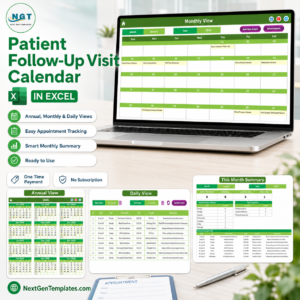
- Patient Follow-Up Visit Calendar in Excel: plan return visits after treatment
- Client Appointment Calendar in Excel: a general appointment calendar for client meetings
- Dental Clinic Management System V1.0: a fuller system for running a dental clinic
- Clinics KPI Dashboard in Excel: track clinic performance figures
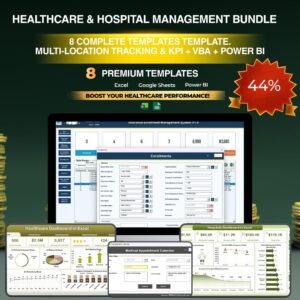
- Healthcare and Hospital Management Bundle: 8 healthcare templates in one download
Browse all Excel calendar templates or the template bundles.



















Reviews
There are no reviews yet.