

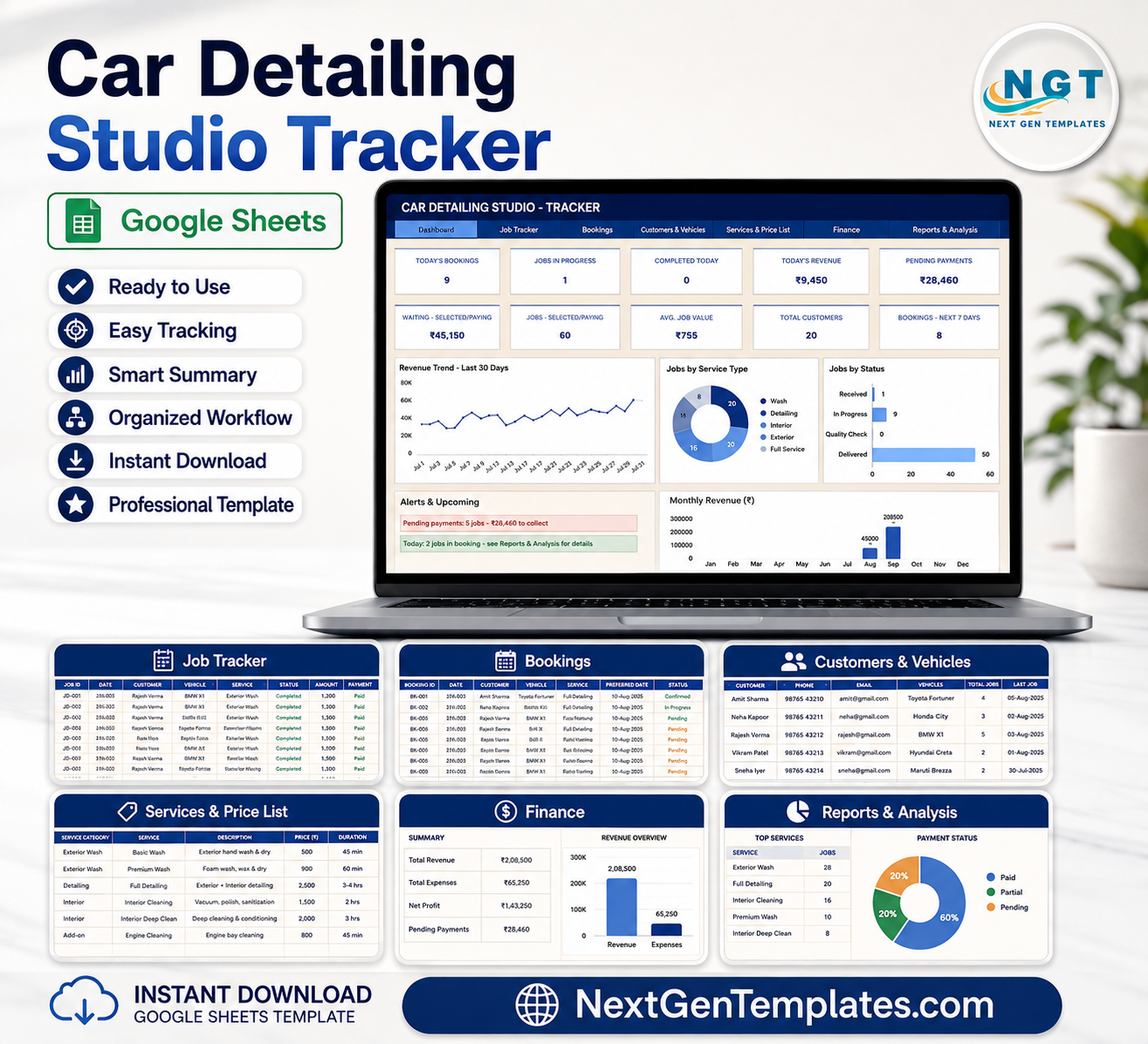
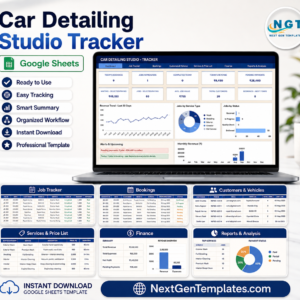
Car Detailing Studio Tracker in Google Sheets gives a detailing studio 7 connected sheets, 10 top-line cards, 6 overview chart groups, and 23 deeper analysis views for bookings, jobs, customers, vehicles, services, price lists, revenue, expenses, and pending collections. For a $9.99 sale price, it gives owner-operators a one-time Google Sheets tracker instead of another monthly app. Built by PK, founder of NextGenTemplates with 300K+ YouTube subscribers, it is designed for practical review before team rollout: open the file, replace sample data, and keep control of your own copy in Google Drive.
Key Features of Car Detailing Studio Tracker in Google Sheets
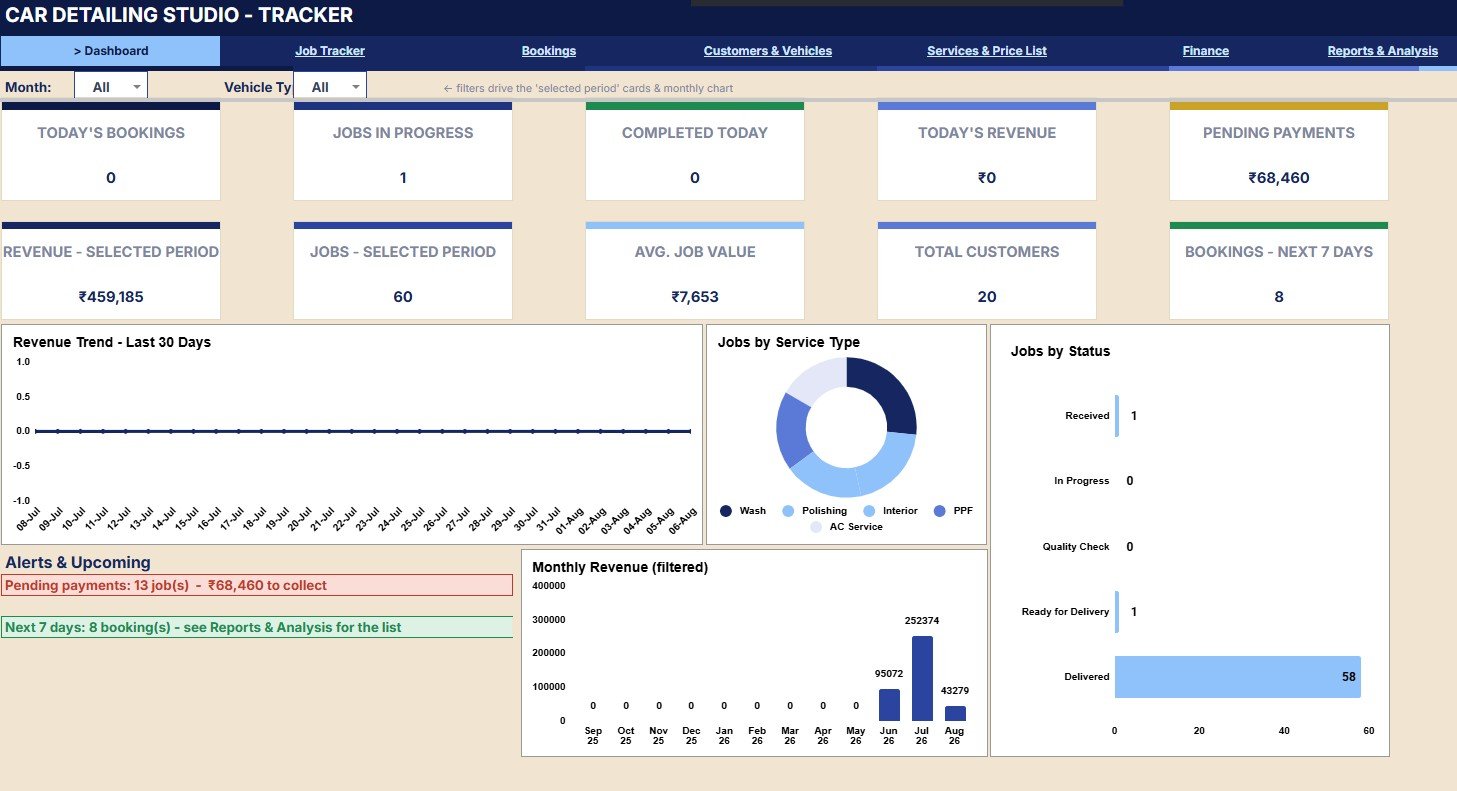
- Daily operating cards: Review today’s bookings, jobs in progress, completed work, today’s revenue, pending payments, selected-period revenue, selected-period jobs, average job value, customer count, and next 7-day bookings.
- Booking and job visibility: Track each appointment from upcoming booking to in-progress job, completed service, payment status, and customer follow-up.
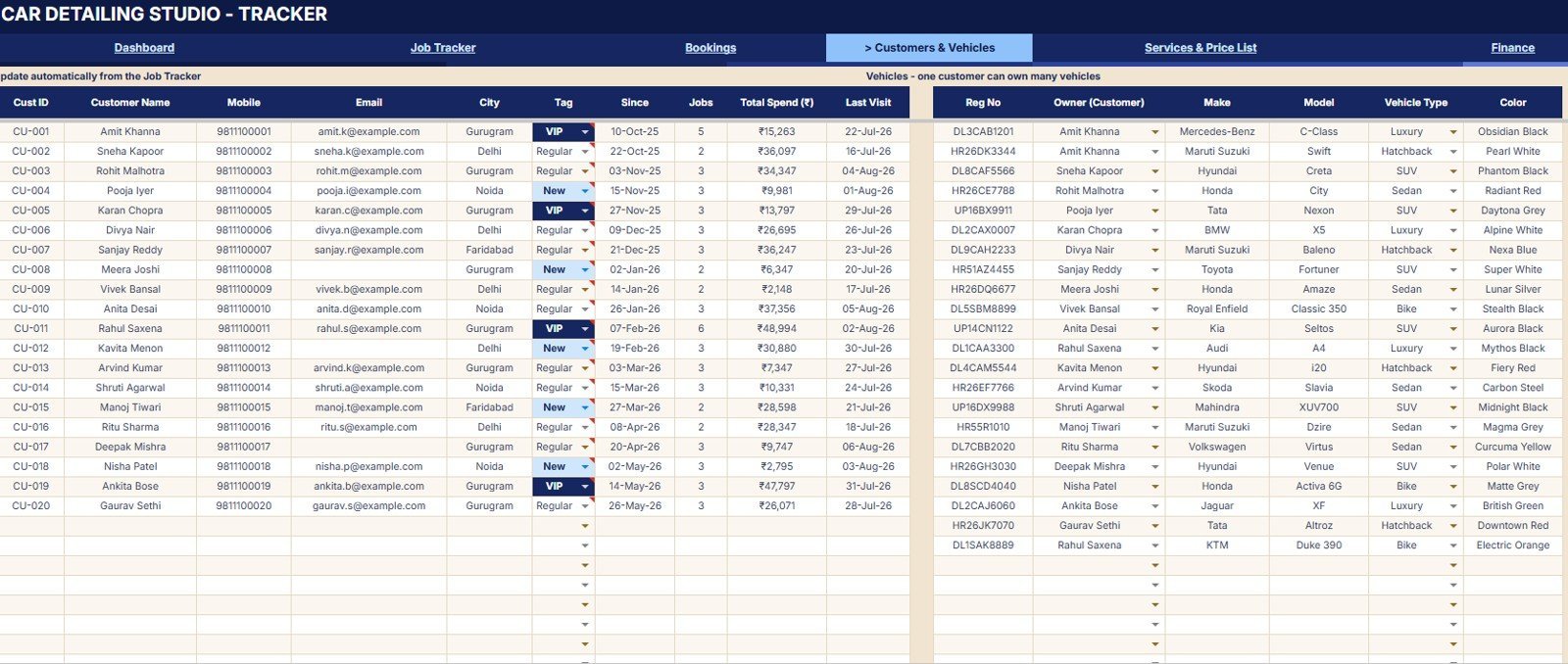
- Customer and vehicle records: Review jobs, total spend, last visit, vehicle type, make, color, and registration details.
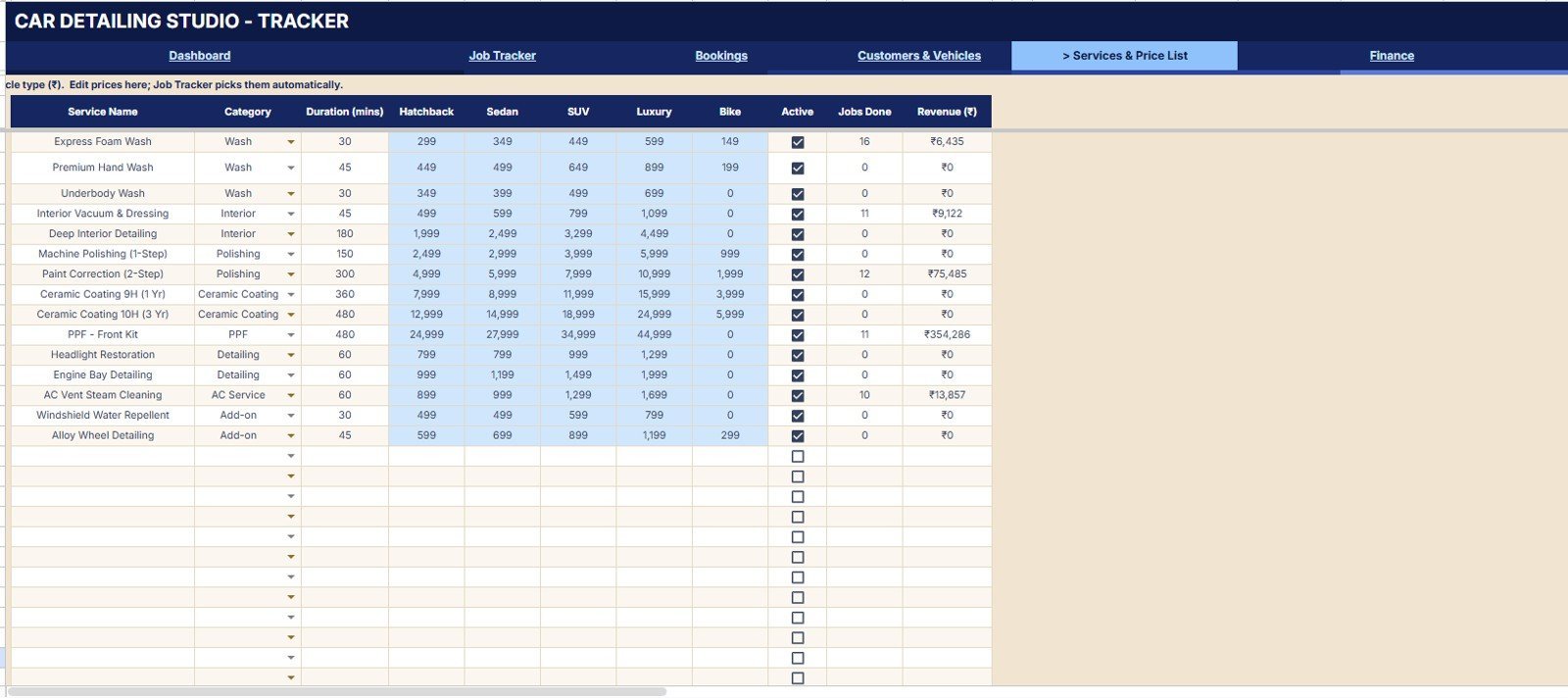
- Service price control: Keep services, categories, active status, vehicle-type pricing, duration, jobs done, and revenue in one page.
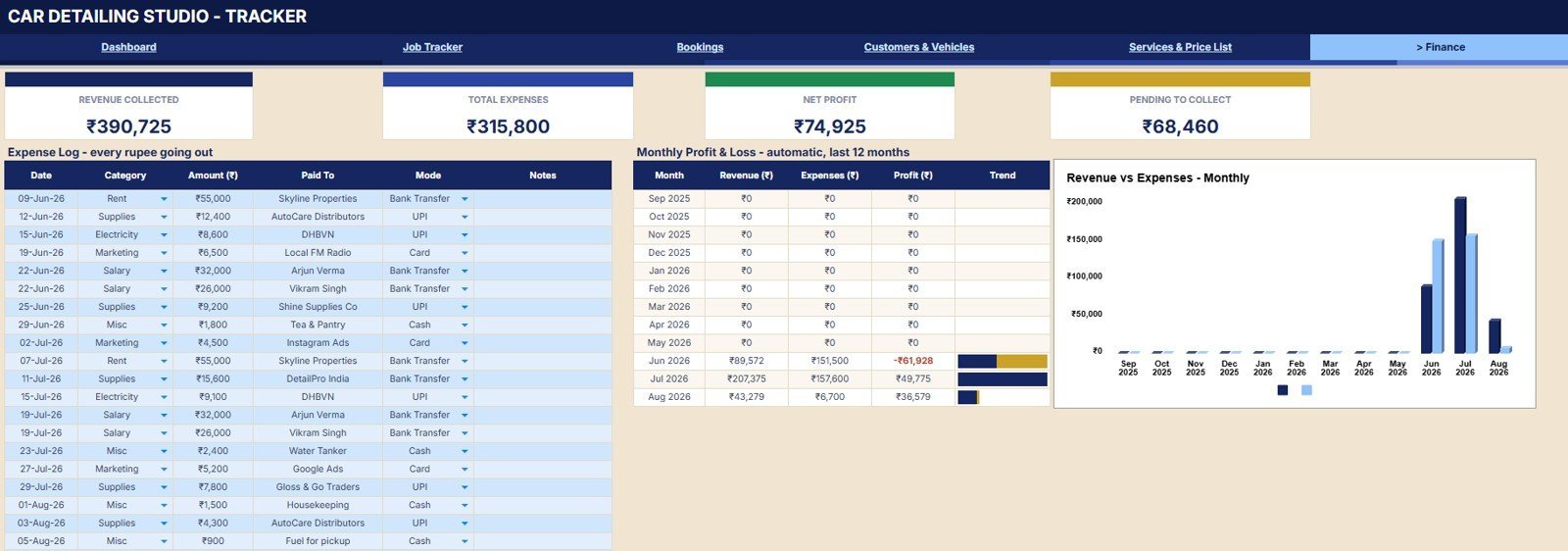
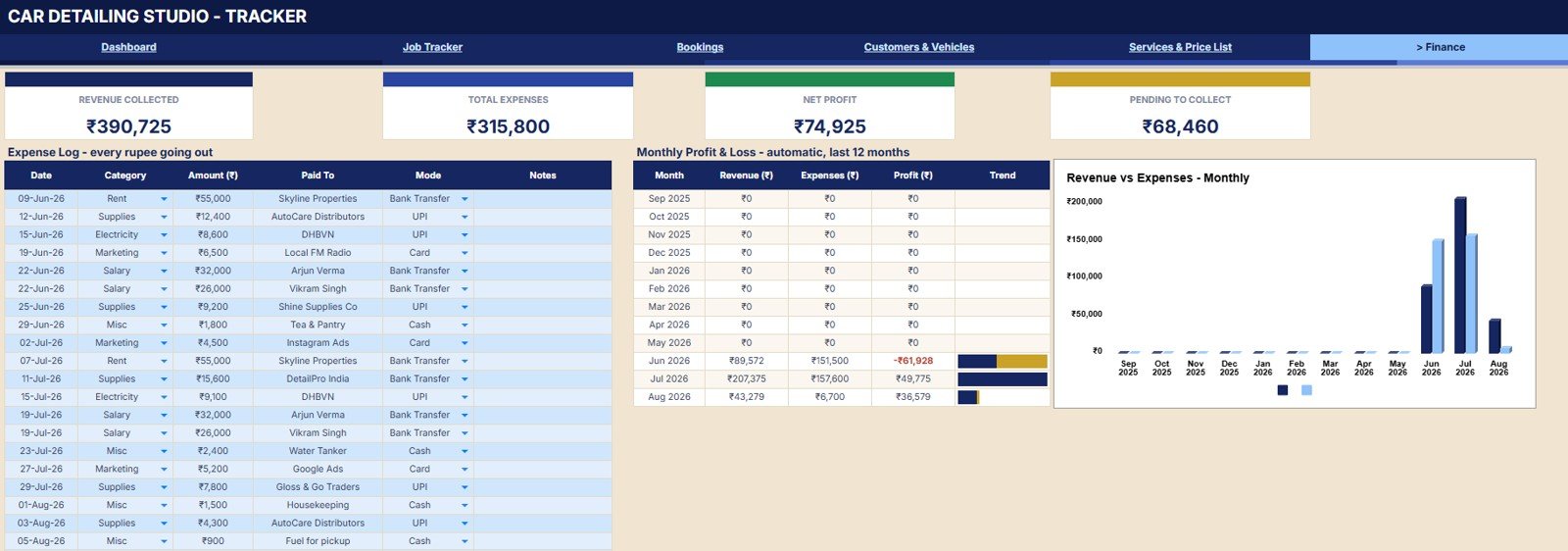
- Finance page: Monitor revenue collected, expenses, net profit, pending collections, revenue vs. expenses, and profit by month.
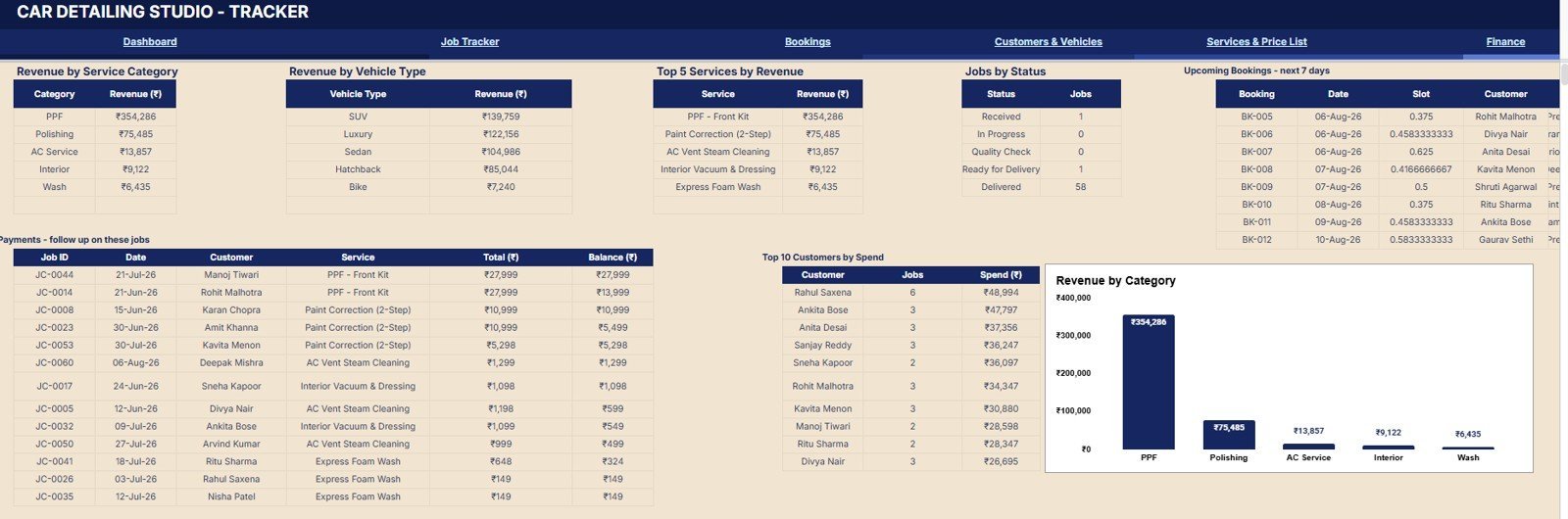
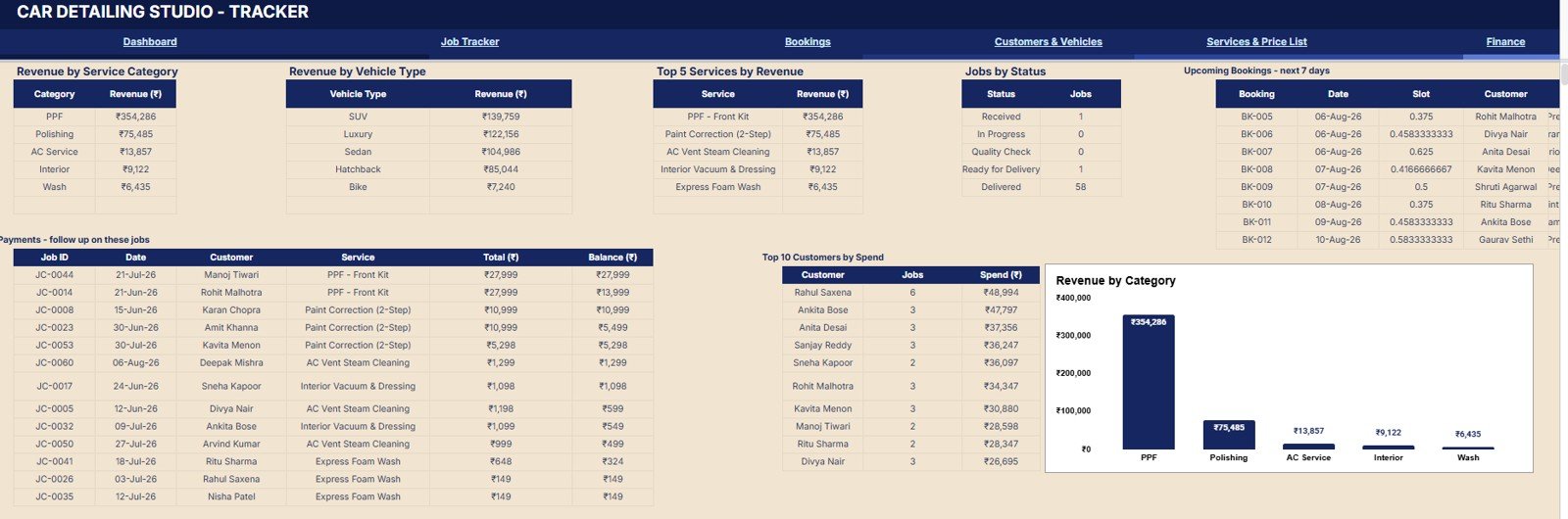
- Reports page: Compare service category revenue, vehicle-type revenue, top services, job status, upcoming bookings, pending payments, and top customers.
- Slicer-based filtering: Use dashboard slicers to narrow the view by period, status, service, customer, or other workbook dimensions.
What’s Inside the Car Detailing Studio Tracker in Google Sheets
The workbook is arranged around seven pages that match a detailing studio workflow: daily overview, job tracker, bookings, customers and vehicles, services and price list, finance, and reports. Each page turns operational data into simple analysis tables and charts so the owner, front desk, and operations lead can review the same version of the business.
Overview Page
The Overview Page is the first stop for daily control. The cards show today’s bookings, jobs in progress, completed today, today’s revenue, pending payments, selected-period revenue, selected-period jobs, average job value, total customers, and bookings for the next 7 days.
Revenue by Day shows how income moves across the selected date range. It helps spot slow days, peak days, and the impact of promotions or weather changes.
Jobs by Service Type compares detailing, wash, coating, interior, and other services. It helps decide which services deserve more staff time, bundles, or price review.
Jobs by Status separates booked, in-progress, completed, cancelled, and other job states. It gives the front desk a quick view of workflow pressure.
Monthly Revenue by Month shows month-to-month income movement. It is useful for reviewing seasonal demand and setting monthly targets.
Pending Payments by Job highlights jobs with open balances. It supports faster collection and cleaner end-of-day reconciliation.
Upcoming Bookings by Date lists future workload by date. It helps plan staff, bays, and service slots before the calendar gets crowded.
Job Tracker
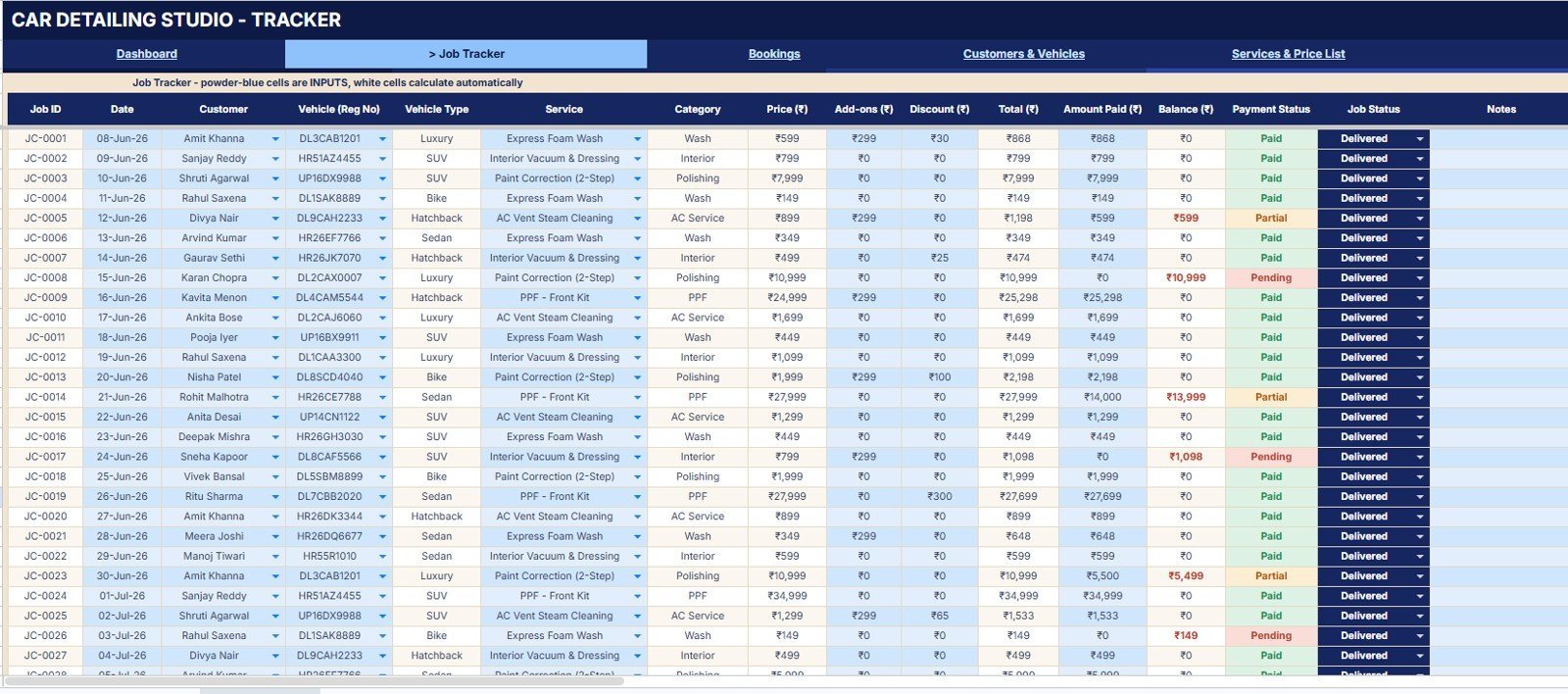
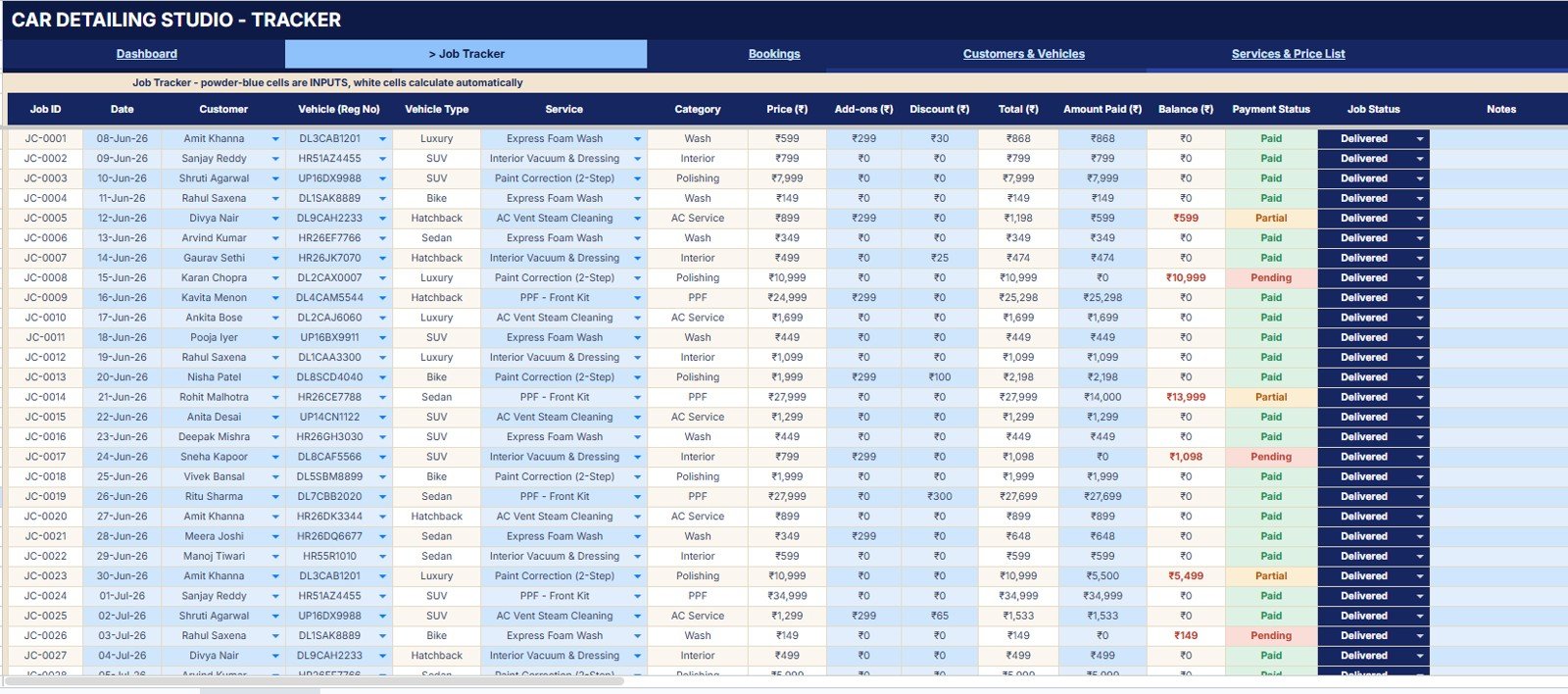
The Job Tracker page focuses on work already booked or completed. It analyzes jobs by customer, vehicle type, service category, total amount, amount paid, balance by payment status, and job status by job.
Bookings
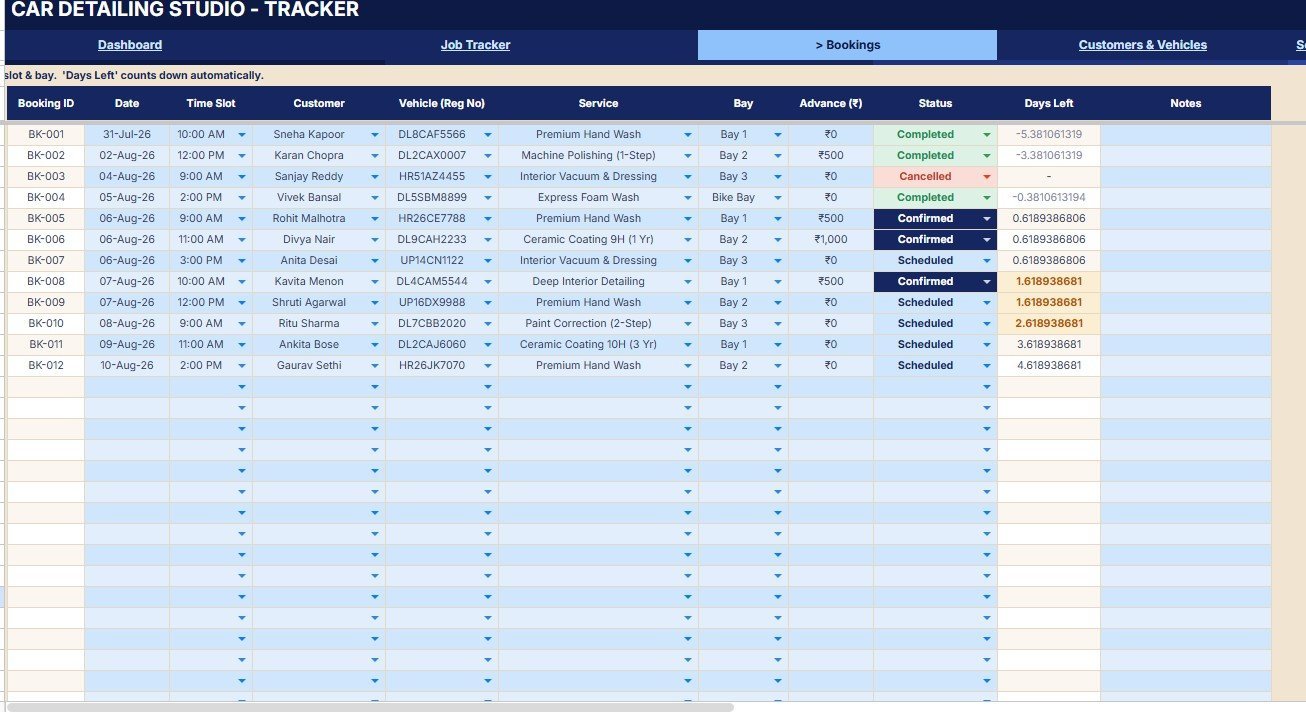
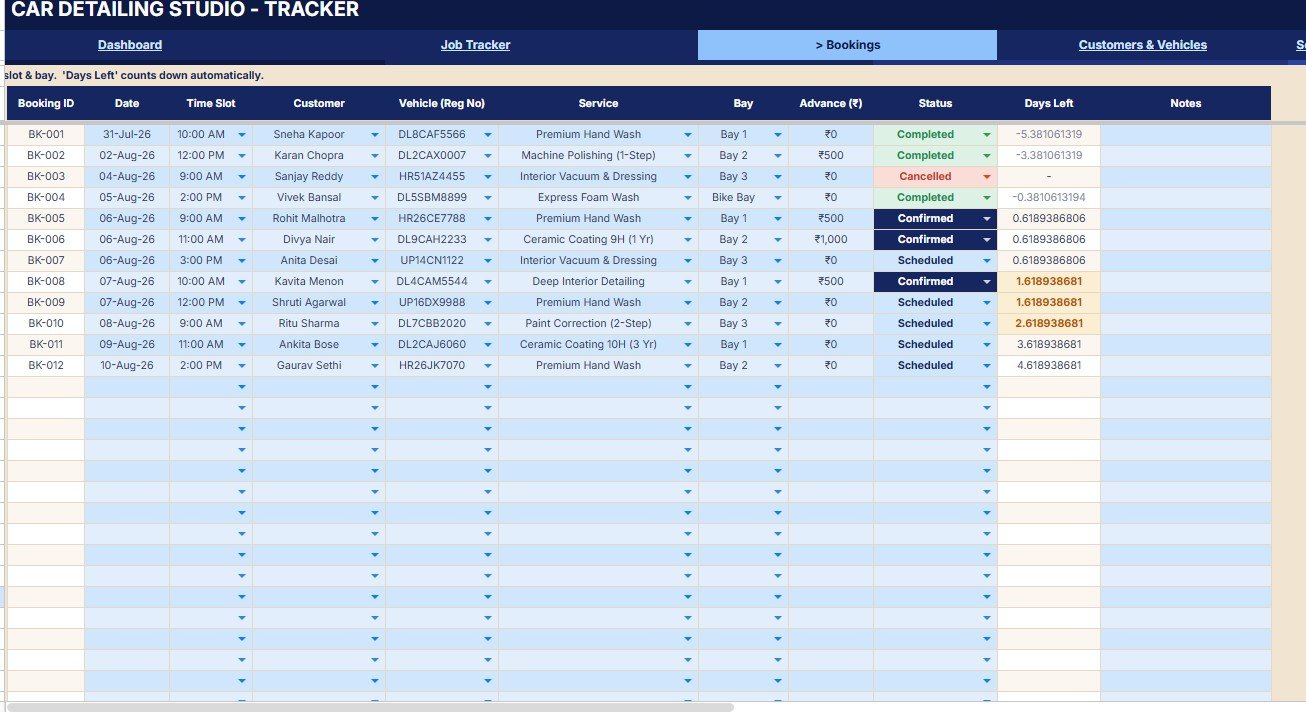
The Bookings page covers booking status, time slot by date, service by customer, bay assignment, advance amount, days left, and upcoming schedule by customer. This makes it easier to prepare the day before customers arrive.
Customers and Vehicles
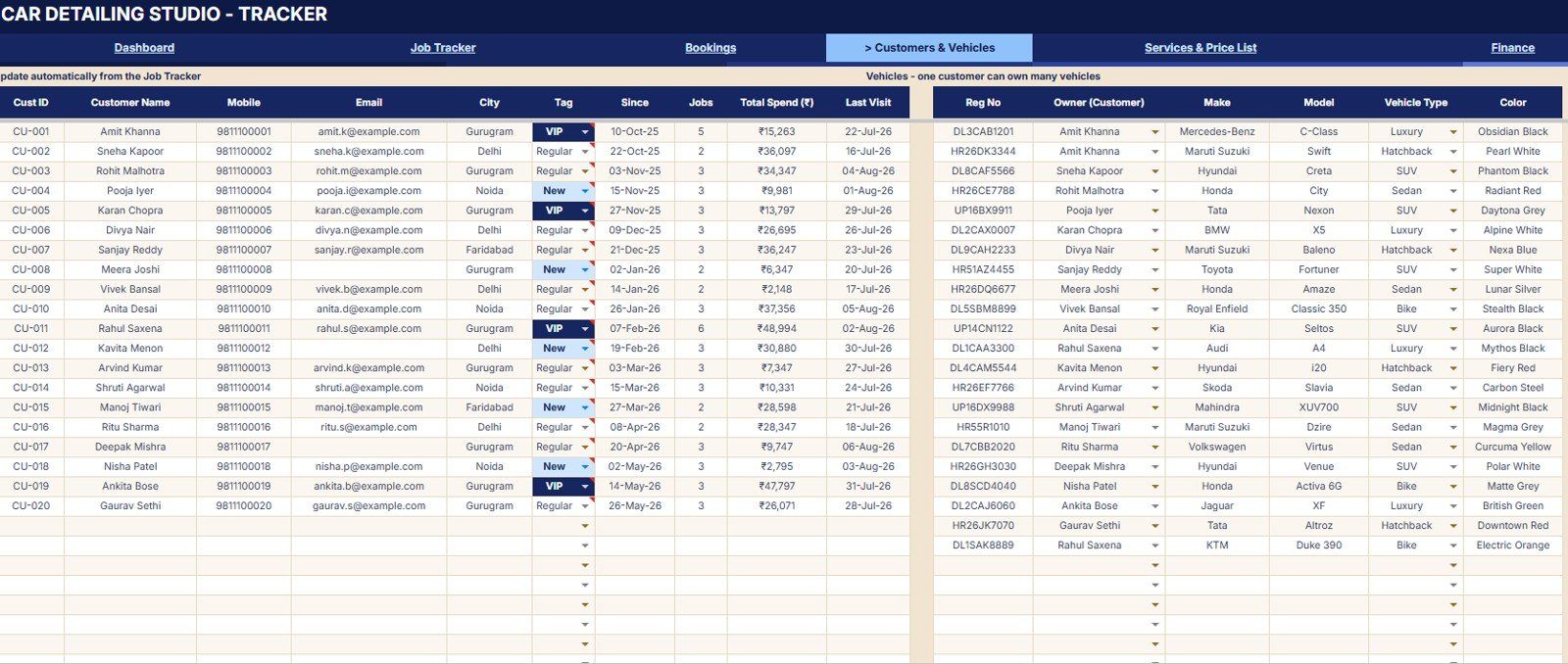
The Customers and Vehicles page connects each customer with spend, last visit, customer tag, vehicle type, owner, vehicle make, color, and registration number. It gives repeat-customer context without searching through separate files.
Services and Price List
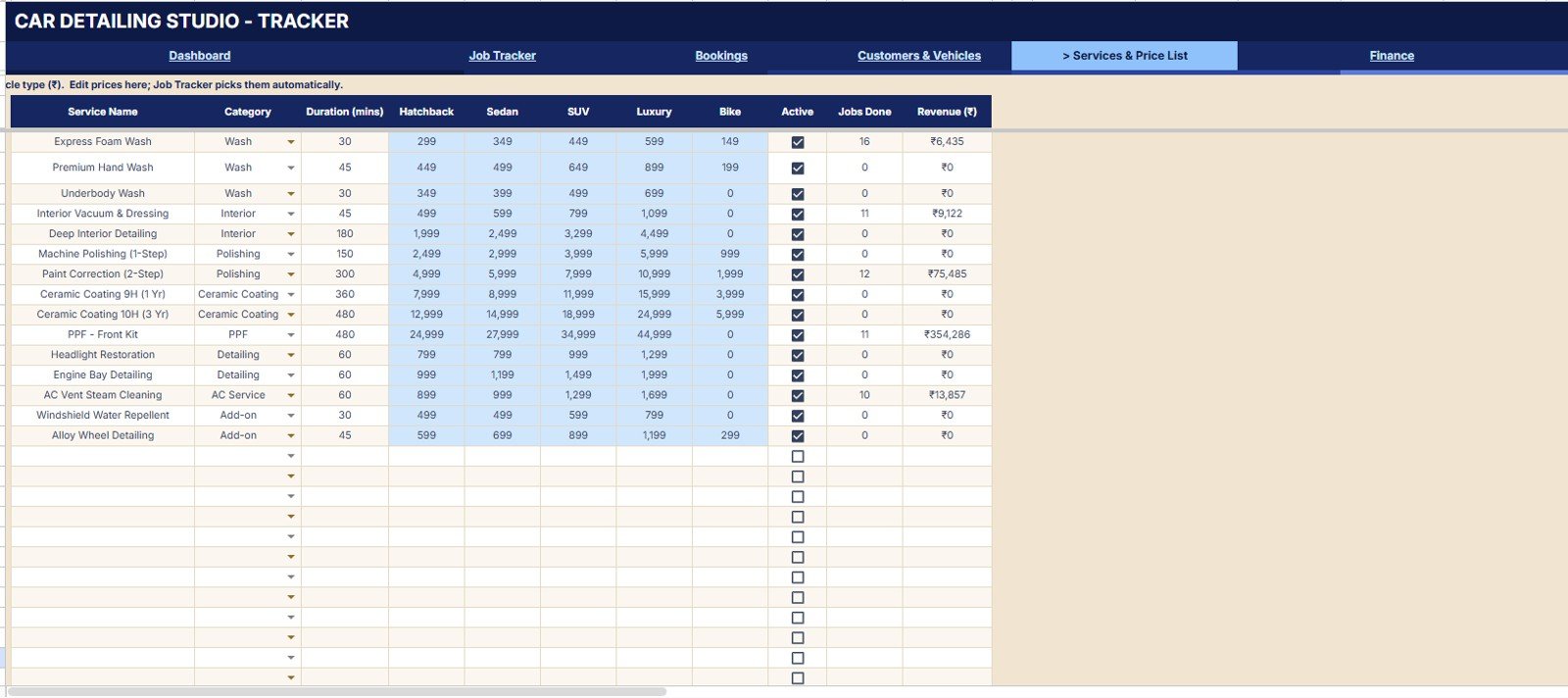
The Services and Price List page tracks price by vehicle type, duration by service, jobs done by service, revenue by service, active status, and service category. It is the page to use when prices, packages, or service mix need review.
Finance
The Finance page brings cash movement into the same tracker. It reviews revenue collected by period, expenses by category, net profit by month, pending collections, expense amount by paid to, revenue vs. expenses, and profit by month.
Reports and Analysis
The Reports and Analysis page summarizes business performance by revenue by service category, revenue by vehicle type, top services by revenue, jobs by status, upcoming bookings by date, pending payments by customer, and top customers by spend.
Car Detailing Studio Tracker in Google Sheets vs. Microsoft Excel Tracker vs. Paid CRM/SaaS – Where This Fits
| Feature | This Google Sheets tracker | Microsoft Excel tracker | Paid CRM/SaaS |
|---|---|---|---|
| Cost | $9.99 sale price | Template cost plus desktop file sharing limits | Recurring monthly subscription |
| Platform | Google Sheets in Drive | Microsoft Excel workbook | Vendor-hosted web app |
| Setup time | Copy, edit sample data, and start tracking | Open file and adjust sharing | Vendor setup and plan selection |
| Real-time team collaboration | Built into Google Sheets sharing | Depends on OneDrive or local file habits | Usually included by user seat |
| Mobile access | Works through Google Sheets mobile and browser | Depends on Excel mobile layout | Usually available |
| Customizable fields | Editable sheets, services, jobs, and finance tables | Editable but easier to break if formulas are changed | Depends on plan and permissions |
| Share with link | Yes, through Google Drive sharing | Yes, if stored in cloud | Yes, through account invites |
| Year-1 cost at 5 users | One-time template price, plus any Google Workspace plan already used | Template price plus Microsoft licensing if needed | Often much higher because pricing scales by plan and users |
| Detailing workflow | Bookings, jobs, vehicles, services, payments, finance, and reports in one tracker | Possible, but often needs custom setup | Usually deeper, but less flexible for spreadsheet edits |
Who This Template Is For – and Who It’s Not For
This tracker is for car detailing studios, auto spas, ceramic coating shops, mobile detailing teams, and owner-led car wash businesses that want quick visibility in Google Sheets. It is a strong fit when the business needs better tracking but is not ready for a recurring software subscription.
It is not the best fit if you need native POS payments, automated SMS reminders, VIN scanning, barcode stock control, multi-branch permissions, or a fully managed customer portal.
How to Use the Car Detailing Studio Tracker in Google Sheets
- Open the Google Sheets copy link from the download guide.
- Make your own editable copy in Google Drive.
- Replace sample customers, vehicles, services, bookings, jobs, payments, and expenses.
- Update the service price list and vehicle-type pricing for your studio.
- Use slicers on the Overview Page to review selected periods and filtered performance.
- Review finance and reports weekly to spot pending payments, high-value services, and top customers.
Real-World Use Cases
Ravi, owner of a two-bay detailing studio, uses the Overview Page each morning to see booked jobs, active work, revenue, and pending collections before assigning staff.
Meera, front desk lead at an auto spa, uses Bookings and Customers and Vehicles to confirm time slots, customer history, vehicle details, and advance amounts.
Daniel, manager of a ceramic coating shop, uses Services and Finance to compare high-ticket services, monthly profit, and unpaid balances.
Frequently Asked Questions
Is this template built in Google Sheets?
Yes. It is a Google Sheets tracker for car detailing studio bookings, jobs, customers, vehicles, services, payments, finance, and reports.
Can I customize the service list and prices?
Yes. The Services and Price List page is designed for service names, categories, vehicle-type pricing, duration, active status, jobs done, and revenue review.
Does it track pending payments?
Yes. Pending payments appear in the Overview Page, Job Tracker, Finance page, and Reports and Analysis page so balances are visible from more than one angle.
Can this work for a mobile detailing business?
Yes, if the team manages bookings, jobs, customers, vehicles, services, and finance in Google Sheets. You can adapt labels and services to mobile operations.
Does this replace paid detailing software?
It can replace a manual tracker for many small teams, but it does not include native payment gateways, automated reminders, or vendor-managed support.
Do I need advanced spreadsheet skills?
No. You mainly replace sample data, review slicers, and use the built-in pages. Formula and layout changes should be made carefully.
About the Author
Built by PK – Microsoft Certified Professional with 15+ years of Excel, Google Sheets, and Power BI experience. Founder of NextGenTemplates, reaching 300K+ subscribers across YouTube channels. Every template is hand-built and tested before release.
Explore Related Templates
- Browse Google Sheets templates for more spreadsheet-based tools.
- Browse Trackers in Google Sheets for more operational trackers.
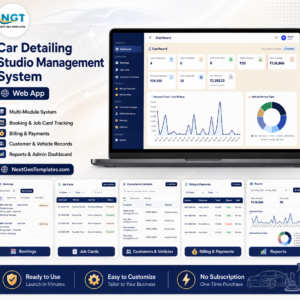
- Car Detailing Studio Management System Web App for a browser-based detailing workflow.
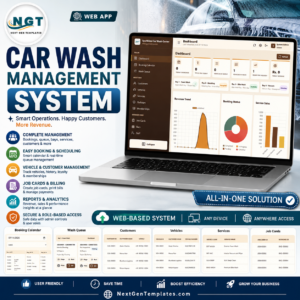
- Car Wash Management System Web App for wash queues, packages, billing, and inventory.
- Service Center and Repair Shop Management System Web App for repair jobs, estimates, delivery, and parts.
Download the Car Detailing Studio Tracker in Google Sheets to bring bookings, jobs, customers, services, payments, expenses, and reports into one editable Google Sheets file.
Watch the step-by-step video Demo:
Last updated: August 6, 2026.



























Reviews
There are no reviews yet.