

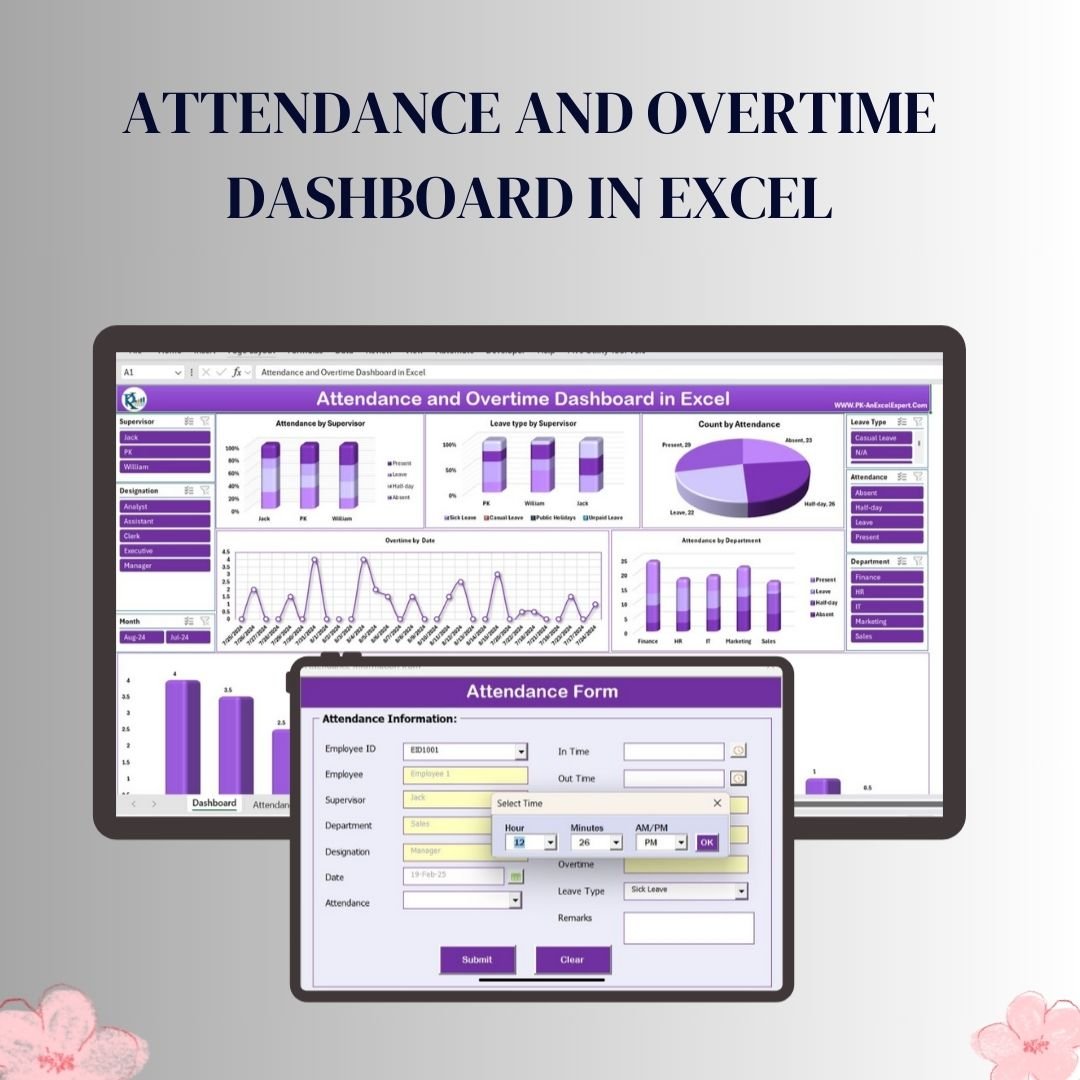

The Attendance and Overtime Dashboard in Excel combines an attendance entry form, an Employee Master sheet and dashboard charts. Records include attendance status, in and out times, regular hours, overtime and leave type; slicers support review by supervisor, designation, department and month.
Key Features & Functionalities Attendance and Overtime Dashboard in Excel
1. Interactive Dashboard for Attendance Monitoring
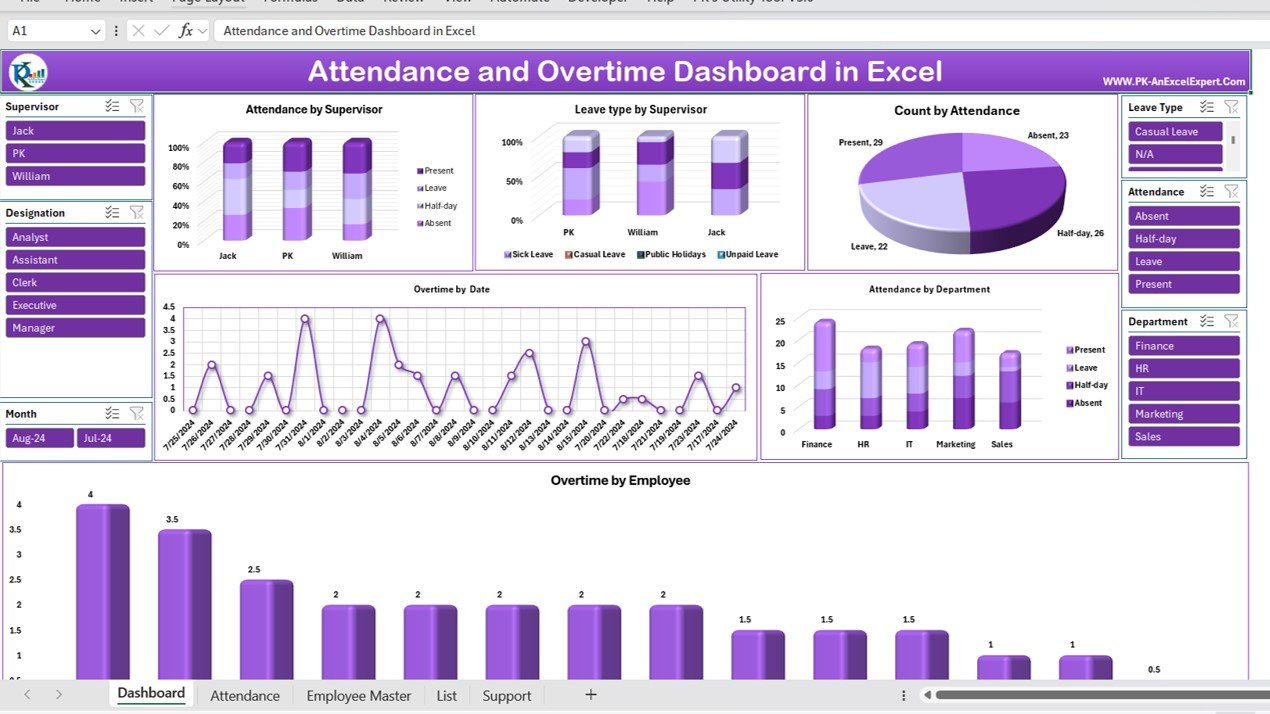
The heart of this tool is the Dashboard Sheet, where all attendance-related data is visually represented through dynamic charts and slicers. Users can gain insights into employee attendance trends, leave types, and overtime records. The dashboard includes:
- Attendance by Supervisor: A column chart displaying the attendance status (Present, Leave, Half-day, Absent) categorized by supervisors.
- Leave Type by Supervisor: A stacked bar chart that differentiates various leave types such as Sick Leave, Casual Leave, Public Holidays, and Unpaid Leave.
- Count by Attendance: A pie chart that provides an overview of the employee attendance distribution across the organization.
- Overtime by Date: A line chart illustrating overtime trends, allowing managers to assess workload distribution.
- Attendance by Department: A column chart that visualizes attendance across different departments (Finance, HR, IT, Marketing, Sales).
The dashboard includes interactive slicers for easy filtering based on supervisor, designation, leave type, attendance status, department, and month, making data analysis seamless.
2. Easy Attendance Data Entry & Management
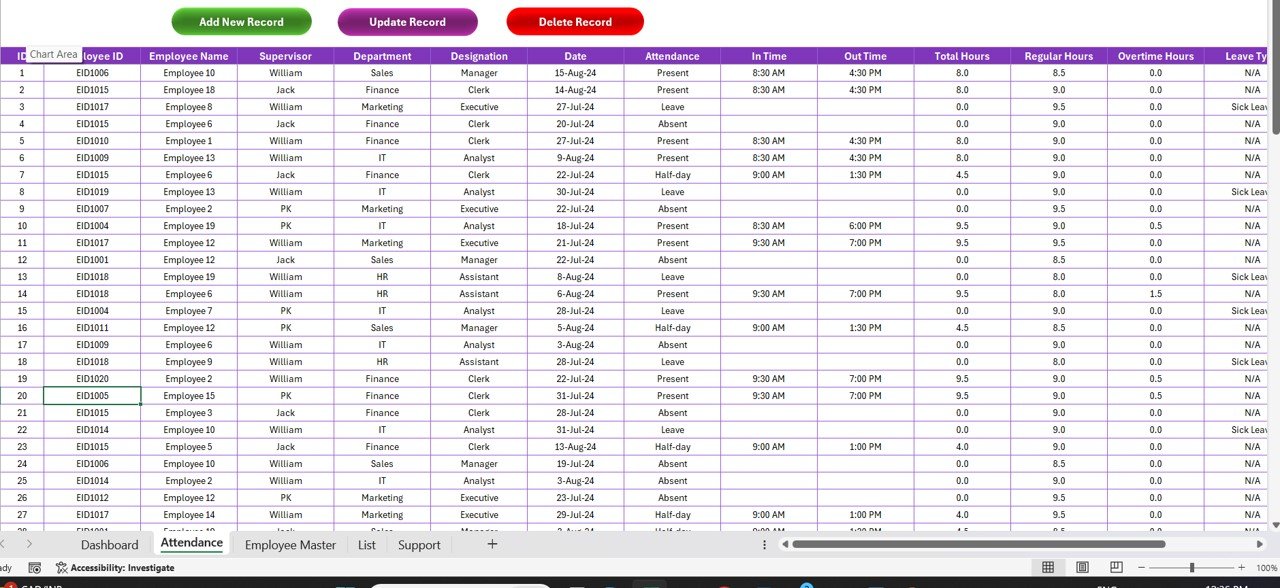
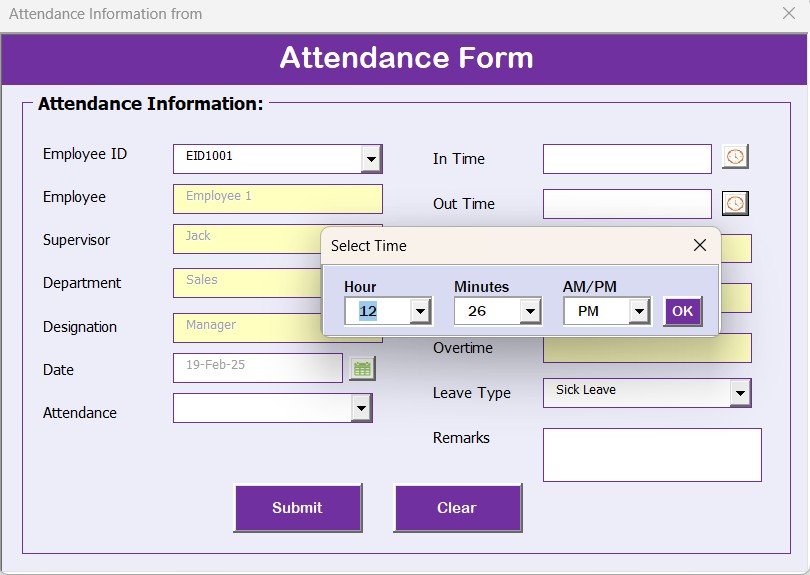
The Attendance Sheet serves as the primary data entry area where all attendance records are stored. The tool provides an automated Data Entry Form to streamline attendance tracking. It allows users to:
✔ Add New Record – Open a form to enter a new attendance entry.
✔ Update Record – Modify existing records as needed.
✔ Delete Record – Remove incorrect or outdated records with a single click.
The attendance sheet includes key columns such as:
- Employee ID, Employee Name, Supervisor, Department, Designation
- Date, Attendance Status, In Time, Out Time
- Total Hours, Regular Hours, Overtime Hours, Leave Type, Remarks, and Month
With structured data management, HR teams can ensure accurate attendance tracking without any manual errors.
3. Employee Master Sheet for Workforce Insights
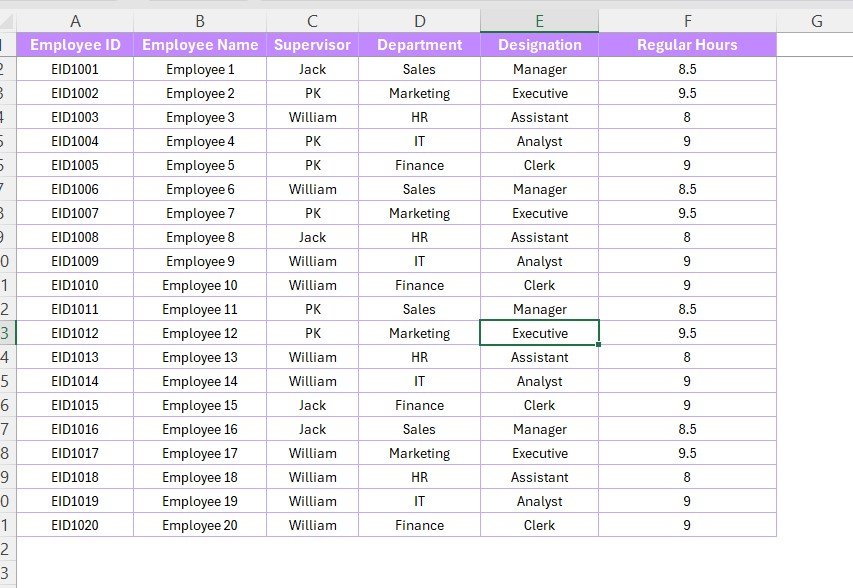
The Employee Master Sheet contains essential employee details, including:
- Employee ID & Name – Unique identifier and full name of employees.
- Supervisor & Department – Hierarchical reporting structure and department allocation.
- Designation – Job title of employees.
- Regular Working Hours – Standard working hours assigned to employees.
This sheet helps in organizing employee records systematically, ensuring streamlined workforce management.
4. Leave & Attendance Categorization
A separate List Sheet is included, containing:
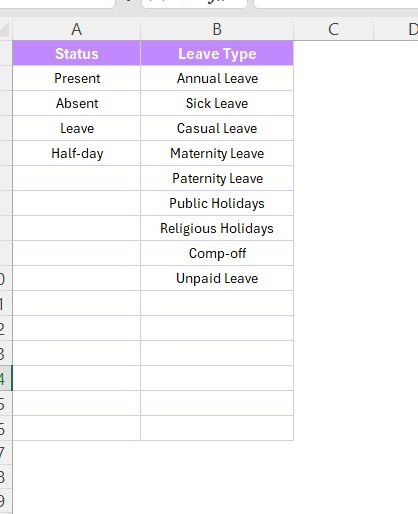
- Attendance Status – Present, Absent, Leave, Half-day.
- Leave Types – Annual Leave, Sick Leave, Casual Leave, Maternity Leave, Paternity Leave, Public Holidays, Unpaid Leave.
HR teams can modify this list as per company policies, making it a fully customizable solution.
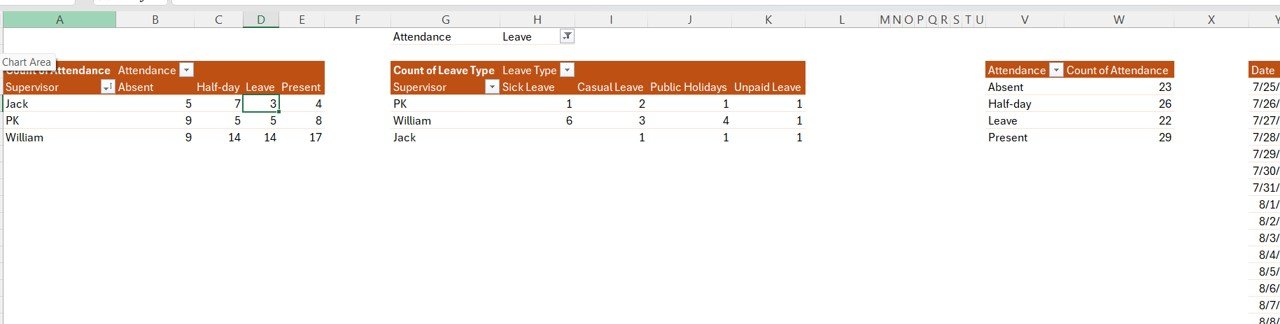
5. Automated Pivot Tables for Data Analysis
The Support Sheet (Hidden) contains pre-built Pivot Tables that power the dashboard’s visualizations. These tables allow: ✔ Faster data processing
✔ Dynamic charts and slicers
✔ Automated calculations for insights
With this backend automation, users don’t need advanced Excel skills—everything is pre-configured for real-time data updates!
Why Choose This Attendance and Overtime Dashboard?
✔ Saves Time: Automates attendance tracking, reducing manual data entry.
✔ Enhances Accuracy: Eliminates errors in attendance and overtime calculations.
✔ Improves Decision-Making: Provides real-time insights into employee attendance and workload trends.
✔ Fully Customizable: Adaptable for any organization’s attendance and overtime policies.
✔ User-Friendly Interface: Simple navigation with interactive filters and easy record management.
Who Can Use This?
✅ HR Managers – Monitor employee attendance, overtime, and leave trends.
✅ Team Leads & Supervisors – Track team performance and optimize workforce scheduling.
✅ Business Owners & Administrators – Ensure compliance with company policies and labor laws.
✅ Payroll & Finance Teams – Use accurate overtime data for payroll processing.
This Excel-based Attendance and Overtime Dashboard is an all-in-one solution for maintaining a transparent, error-free, and automated attendance system.
Click here to read the detailed blog post
After downloading and unzipping this file, ensure that macros are enabled before use. Refer to our below tutorial link for step-by-step instructions on enabling macros in Excel.
https://www.pk-anexcelexpert.com/4-easy-ways-to-enable-macros-in-excel-vba/
Visit our YouTube channel to learn step-by-step video tutorials
Watch the step-by-step video tutorial:
Also check our Project Management Dashboard in Excel
Questions about this template
What details belong in the Employee Master sheet?
Maintain Employee ID, Employee Name, Supervisor, Department, Designation and Regular Working Hours. These details support the attendance records and help keep employee information consistent.
For help comparing reporting tools for this area, see our HR and payroll template guide.
Compatibility and Requirements
- Microsoft Excel desktop on Windows (Excel 2016 or later, or Microsoft 365).
- Macros must be enabled, because the forms and buttons run on VBA. Microsoft shows how in Enable or disable macros in Microsoft 365 files.
- It does not run in Excel for the web, Google Sheets or the Excel mobile apps.
More Questions About This Template
Which charts are on the dashboard?
Attendance by Supervisor, Leave Type by Supervisor, Count by Attendance, Overtime by Date and Attendance by Department.
How do I add or change attendance records?
Use the Data Entry Form. It has Add New Record, Update Record and Delete Record options.
Which leave types are included?
Annual, Sick, Casual, Maternity, Paternity, Public Holidays and Unpaid Leave. You can edit the list on the List Sheet to match your policy.
How can I filter the dashboard?
Slicers filter by supervisor, designation, leave type, attendance status, department and month.
🎁 Try Before You Buy: 7-Day Free Trial
Download the free trial of the Attendance and Overtime Dashboard in Excel and use the complete system for 7 days. Every form, register, dashboard, printable document and setting works exactly as in the full version, so you can test it with your own records before you decide.
How the free trial works
- Click Get the 7-Day Free Trial below, enter your email and download the ZIP from the email we send you. Unzip it.
- Open it in Microsoft Excel for Windows (the desktop app, not Excel Online or Mac) and click Enable Content on the yellow bar. If there is no yellow bar, right-click the file, choose Properties, tick Unblock and open it again.
- Your 7 days start the first time the file opens with macros on. A banner on the Dashboard page shows how many days are left.
- After 7 days the trial locks and shows a Buy Full Version button. Buy the full version to keep working with no time limit.
| Free Trial | Full Version | |
|---|---|---|
| Every feature, form and dashboard | Yes | Yes |
| Time limit | 7 days | None, lifetime use |
| Trial banner | Yes | No |
| Editable (unlocked) VBA code | No, locked | Yes |
Enter your email and we send the download link straight to your inbox.
The trial runs once per computer: downloading it again does not restart the 7 days. Records you enter during the trial can be copied into the full version.
Related Attendance Templates
- Attendance Management System: a full attendance system in Excel.
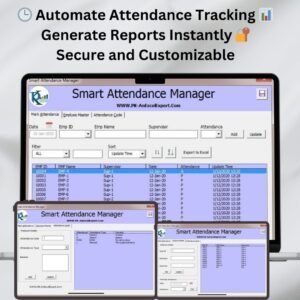
- Smart Attendance Manager in Excel VBA: manage attendance with a VBA form.
- Leave Management System: track leave requests and balances.
- Employee Attendance Tracker in Google Sheets: track attendance in Google Sheets.
- Monthly Attendance sheet in Excel with Check boxes: a free monthly sheet with check boxes.
Browse all Excel HR and payroll templates or the Excel VBA tools.
































Reviews
There are no reviews yet.