



Cruise Booking Management System Web App brings reservations, guests, cabins, sailings, payments, excursions, agent commissions, and reporting into one deployable Google Apps Script system. Its seeded demonstration business contains about 13,879 rows across 31 operational tables, including 8 ships, 376 cabins, 1,047 bookings, 2,078 passengers, and 2,109 payment records. You receive the source code, HTML interface, and PDF manual, backed by help within 72 hours if anything does not work.
Operations Dashboard
The real dashboard is the control centre, with live seeded KPIs for fleet activity, occupancy, active bookings, collected revenue, outstanding balances, average fare, ancillary revenue, commissions, and waitlisted parties.

Dashboard with fleet, reservation, revenue, and occupancy indicators
Try the Live Demo
Open the seeded web app, choose a role, and test the workflow before buying.
Demo Credentials
| Role | Username | Password |
|---|---|---|
| Administrator | admin | Cruise@2026 |
| Reservations Manager | rmanager | Voyage@2026 |
| Reservations Manager | rmanager2 | Compass@2026 |
| Reservations Agent | agent1 | Harbour@2026 |
| Reservations Agent | agent2 | Anchor@2026 |
| Reservations Agent | agent3 | Seabird@2026 |
| Finance Officer | finance | Ledger@2026 |
| Port Operations | portops | Gangway@2026 |
| Port Operations | portops2 | Terminal@2026 |
| Read Only | viewer | Lookout@2026 |
Shared demo: these are public seeded accounts in a demonstration environment. Do not enter real guest, passport, payment, or business data. Demo content may be reset.
Key Features of the Cruise Booking Management System Web App
- End-to-end reservation records: bookings, passengers, cabin assignments, boarding, waitlists, cancellations, and refunds.
- Fleet and product setup: ships, decks, cabins, ports, itineraries, sailings, fares, excursions, and onboard packages.
- Revenue administration: payments, schedules, invoices, package sales, excursion bookings, and agent commissions.
- Six server-enforced roles: Administrator, Reservations Manager, Reservations Agent, Finance Officer, Port Operations, and Read Only.
- Twenty built-in reports: operational, revenue, ancillary-spend, agent, and manifest-oriented views.
- Printable documents: invoices, receipts, boarding cards, manifests, vouchers, and reports generated from the app.
- Email templates: sends through the deployment owner’s Google account using MailApp when enabled.
- Audit and archive tools: an audit log plus administrator-only backup and closed-transaction archive workflows.
- Portable source: Apps Script back end, HTML front end, staged setup, and a user manual.
What’s Inside the Cruise Booking Management System
Sign-in and First-Run Setup
The sign-in page explains the product scope and exposes a first-run database builder. Setup is staged and resumable for Apps Script execution limits. Seeded passwords must be changed before operational use.

Sign-in and first-run database setup
Bookings
Create and maintain booking records with sailing, guest, fare, channel, payment, excursion, and package context. The list supports filters, search, status tags, row actions, and pagination.

Bookings list with operational filters and row actions
Guest Manifest
Review passengers by voyage and booking, then use the manifest as an operational reference. This product stores personal data when used operationally, so access, retention, consent, and deletion rules must be designed by the buyer.

Guest manifest with sailing and passenger information
Cabin Assignment
Match passengers to available staterooms, review assigned and unassigned records, and support cabin changes. Availability is based on the app’s stored records and is not a live connection to an external reservation network.

Cabin assignment and stateroom allocation
Payments
Record deposits, instalments, balances, methods, references, and payment status. The module tracks transactions; it is not a card processor, payment gateway, bank feed, chargeback service, or PCI-compliance solution.

Payment records and collection status
Sailings
Maintain departure dates, ships, itineraries, capacity, booking activity, and sailing status across the forward programme.

Sailings and departure programme
Cabin Inventory
Organize staterooms by ship, deck, category, type, berths, position, and status. The seeded fleet contains 376 cabins across 8 ships.

Cabin inventory by ship, deck, and category
Reports
Run twenty built-in reports spanning reservations, fleet operations, revenue, ancillary sales, commissions, and passenger activity. Export and printing remain subject to the deployment owner’s Google account and Apps Script quotas.
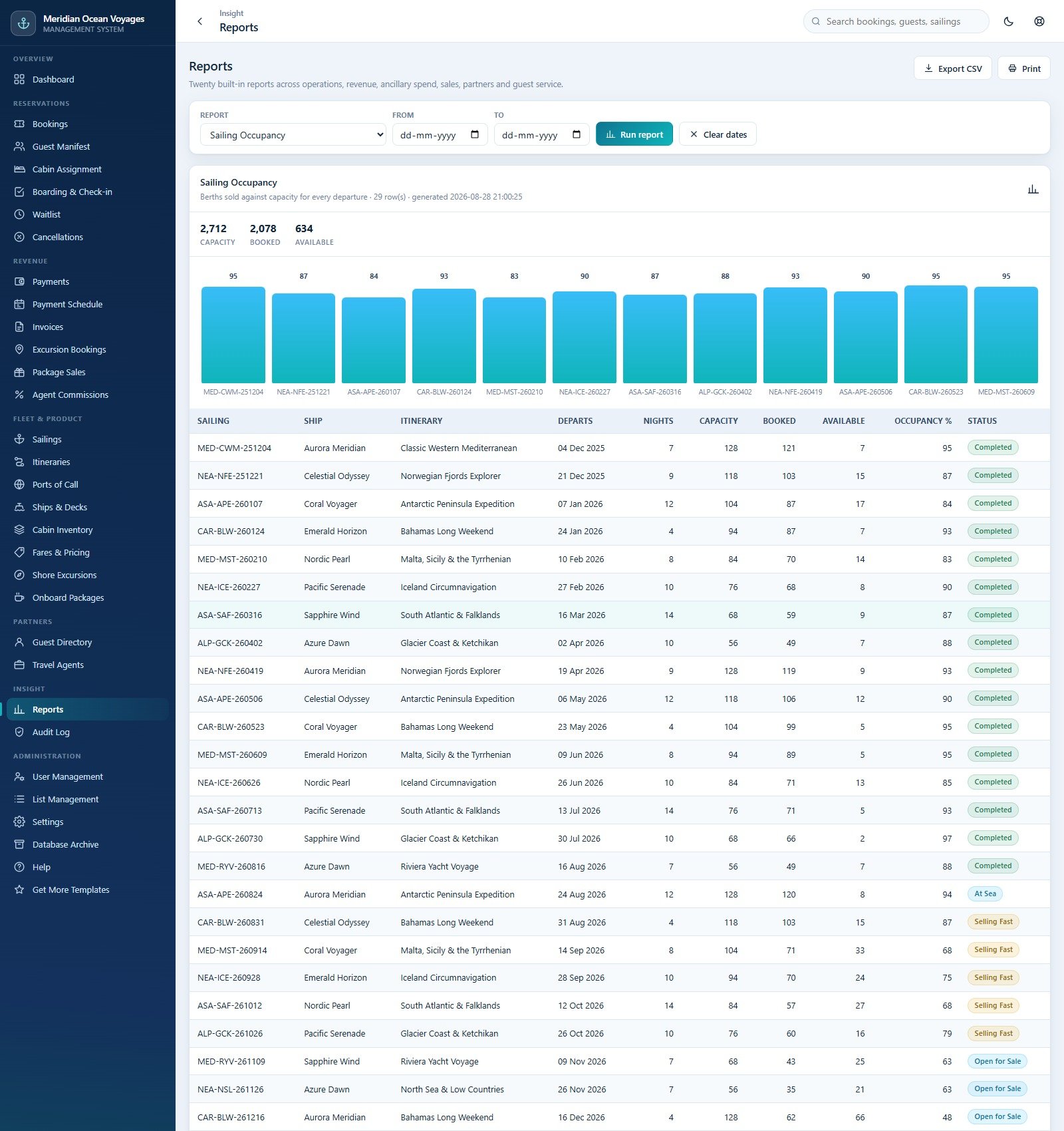
Built-in reporting workspace
Settings
Administrators configure company details, money rules, cancellation bands, printing, email, operational controls, and appearance. Validate every setting against your own contracts, jurisdictions, tax treatment, and policies.

Administrator settings and configuration
Web App vs. Spreadsheet vs. Paid Cruise Platform – Where This Fits
| Consideration | This web app | Shared spreadsheet | Paid cruise platform |
|---|---|---|---|
| Deployment | Your Google Apps Script account | Copy a workbook | Vendor implementation |
| Roles | Six seeded roles with server checks | File-level sharing | Vendor-defined permissions |
| Data model | 31 operational tables | Usually flat tables | Vendor database |
| Payments | Recording only | Manual recording | Integrations may be available |
| External inventory network | Not included | Not included | May be available |
| Customization | Source code included | Cell/formula editing | Vendor options |
Who This Template Is For – and Who It’s Not For
It fits a small cruise operator, training environment, reservation office, or developer-led implementation that wants an editable Apps Script foundation. It is not a turnkey enterprise reservation network, maritime safety system, legal-compliance service, accounting ledger, payment processor, identity-verification service, passport-control system, or substitute for professional security review.
How to Use the Web App
- Try the shared demo first with the role closest to your intended user.
- Create a new Apps Script project and paste Code.cs.txt into Code.gs.
- Create an HTML file named Index and paste Index.txt into it.
- Deploy as a web app, execute as yourself, and complete the first-run database build.
- Change every seeded password and review every setting before adding real records.
- Apply your own access, privacy, retention, backup, payment, and operational policies.
Real-World Use Cases
Reservations manager
Coordinate bookings, manifests, cabin allocation, waitlists, cancellations, and ancillary sales from one interface.
Finance officer
Track payment schedules, invoices, refunds, and agent commissions without granting fleet-edit permissions.
Port operations lead
Review boarding, cabins, ships, decks, ports, itineraries, and sailings through a focused role.
Frequently Asked Questions
Can I try it before buying?
Yes. Use the live demo above. It is shared and seeded, so never enter real information.
Does it process card payments?
No. It records payment information and status but does not connect to a gateway or move money.
Does it connect to cruise distribution systems?
No external reservation, GDS, port, identity, passport, accounting, tax, or card-processing integration is included.
Is personal-data compliance guaranteed?
No. The buyer must configure access, retention, consent, deletion, agreements, and security for applicable laws and jurisdictions.
What files are included?
The customer ZIP contains Code.cs.txt, Index.txt, and the PDF user manual.
Can I customize it?
Yes. Source code is included, but changes require Apps Script and web-development knowledge plus testing and a new deployment version.
About the Author
Built by PK – Microsoft Certified Professional with 15+ years of Excel, Google Sheets, and Power BI experience. Founder of NextGenTemplates, reaching 300K+ subscribers across YouTube channels. Every template is hand-built and tested before release.
Explore Related Templates
Compare the Co-working Space Booking Management System, Airport Transfer Management System, Backpacker Hostel Management System, and Hotel Booking Agent Data Entry System. Browse more Mini Web Apps.
Try the demo, verify the workflow, then deploy your own copy. Cruise Booking Management System Web App gives you an extensive editable foundation while keeping the implementation and operational decisions under your control.
Last updated: September 10, 2026.































Reviews
There are no reviews yet.