

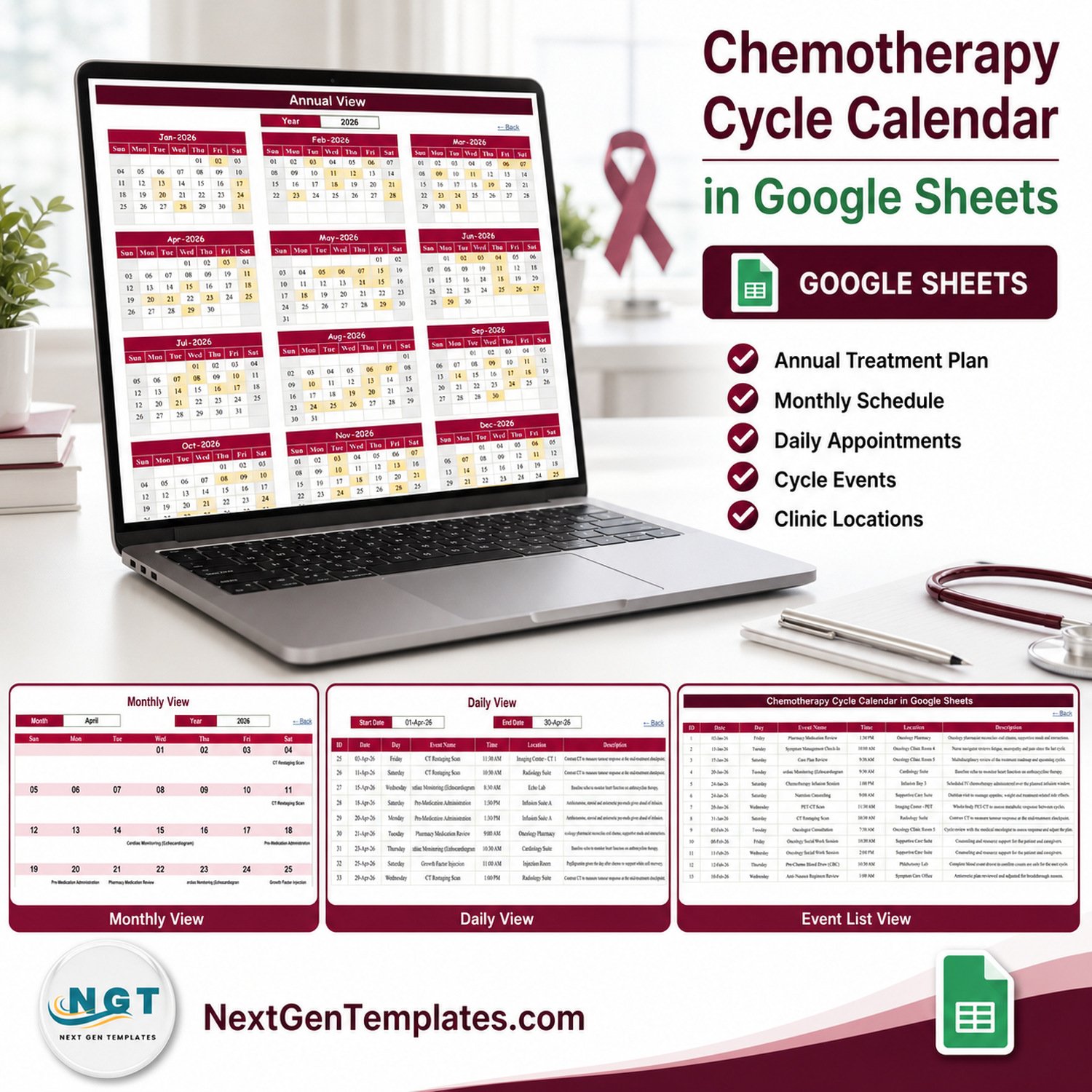

The Chemotherapy Cycle Calendar in Google Sheets is a scheduling spreadsheet with 5 working tabs, 100 sample appointment rows covering 02 January to 30 December 2026, 18 event labels, 29 named clinic locations and 250 live formulas across its Annual, Monthly and Daily views. Setup takes under 10 minutes: open the copy link in the PDF, clear the sample rows, and type your own dates.
🌍 Join 8,400+ teams in 40+ countries using NextGenTemplates to replace paid SaaS tools with one-time-purchase Excel, Google Sheets, Power BI and HTML templates.
✅ Instant download · One-time payment · No subscription · No per-user fees · Lifetime access
⚠️ Read This First — What This Template Is Not
No. The Chemotherapy Cycle Calendar in Google Sheets is not a treatment plan, a dosing or protocol calculator, a patient record, an EHR or EMR, an oncology information system, a medical device, or clinical decision support. It is a calendar. It calculates no cycle intervals, checks no drug interactions, sends no reminders or alerts, and confers no HIPAA, GDPR or any other compliance status on the person using it.
No. It should never hold patient data. A Google Sheet shared by link is not appropriate storage for identifiable health information — anyone who gets the link can read it. Keep names, identifiers, diagnoses and clinical notes in your clinical system, and use this file only for the administrative “what is booked, when, and in which room” layer. Every treatment decision, every cycle date and every safety check stays with the qualified clinicians and the systems your organisation has validated for it.
🔑 Key Features of the Chemotherapy Cycle Calendar in Google Sheets
📅 One events table drives four views. The Events tab holds exactly 100 sample rows numbered 1 to 100, and the Annual, Monthly and Daily tabs read from it live. Nothing is typed twice — edit a row in Events and all three views change on the next recalculation.
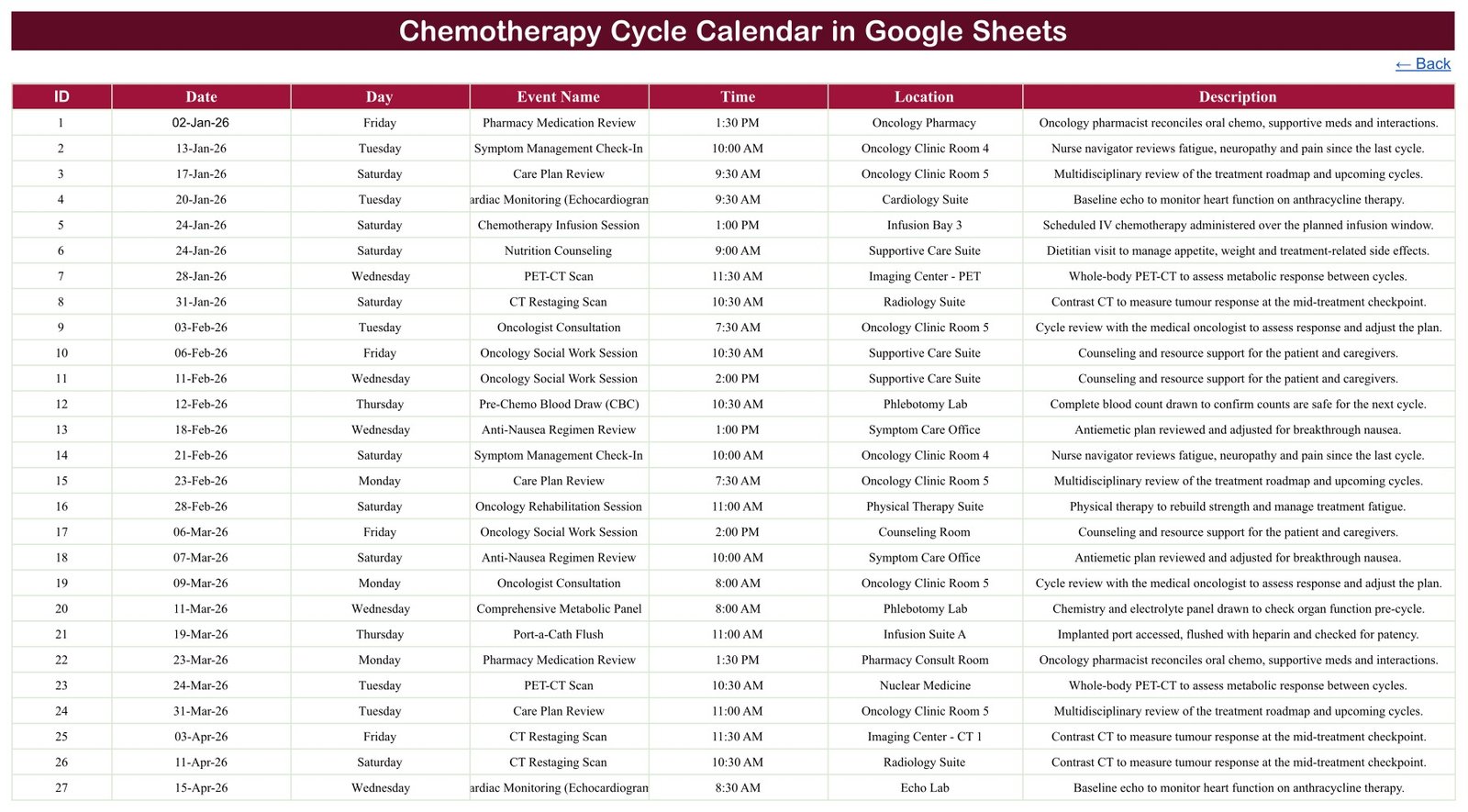
🗂️ Seven columns, deliberately administrative. ID, Date, Day, Event Name, Time, Location and Description. Across all 100 sample rows there is no patient name, no hospital or medical record number, no date of birth, no contact detail, no diagnosis and no cost column anywhere in the workbook. That absence is the design, not an oversight.
🔢 250 formulas doing the work. The Annual View carries 112 formulas, the Monthly View 75 and the Daily View 63. Annual builds twelve month grids from a single year cell; Monthly rebuilds its grid from a Month and Year picker and pulls each day’s event with a VLOOKUP; Daily filters the whole table between a Start Date and an End Date.
📍 18 event labels across 29 locations. The sample data spans infusion sessions, pre-medication administration, blood draws, metabolic panels, imaging scans, cardiac monitoring, port flushes, pharmacy medication reviews, symptom check-ins, nutrition counselling, social work sessions and rehabilitation sessions — booked into infusion bays, clinic rooms, labs, imaging suites and supportive-care rooms.
🗓️ A 36-year date range. The hidden List tab feeds the dropdowns: twelve month names and a rolling year list running from 2021 to 2056, rebuilt from YEAR(TODAY())-5. The calendar does not expire in 2026.
📦 What’s Inside the Chemotherapy Cycle Calendar in Google Sheets
Page 1: Home
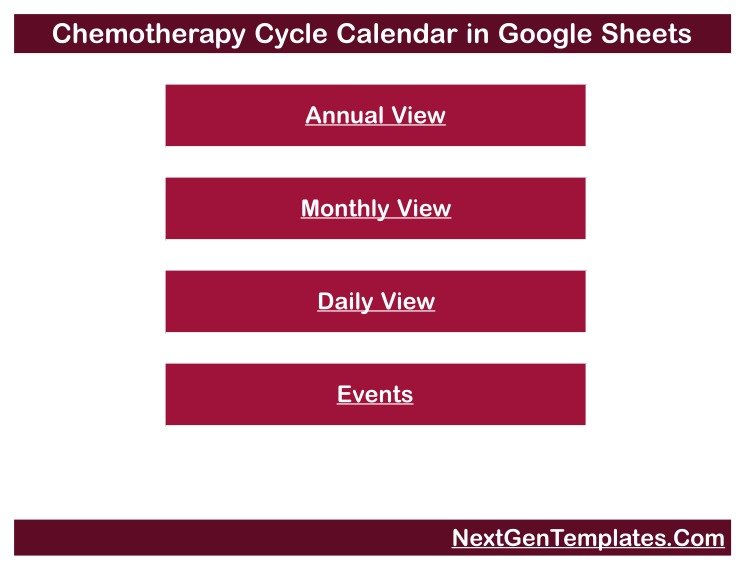
A plain navigation menu with four buttons — Annual View, Monthly View, Daily View and Events. Every other tab carries a “← Back” link that returns here, so the file is usable on a laptop without hunting through the tab strip.
Page 2: Annual View
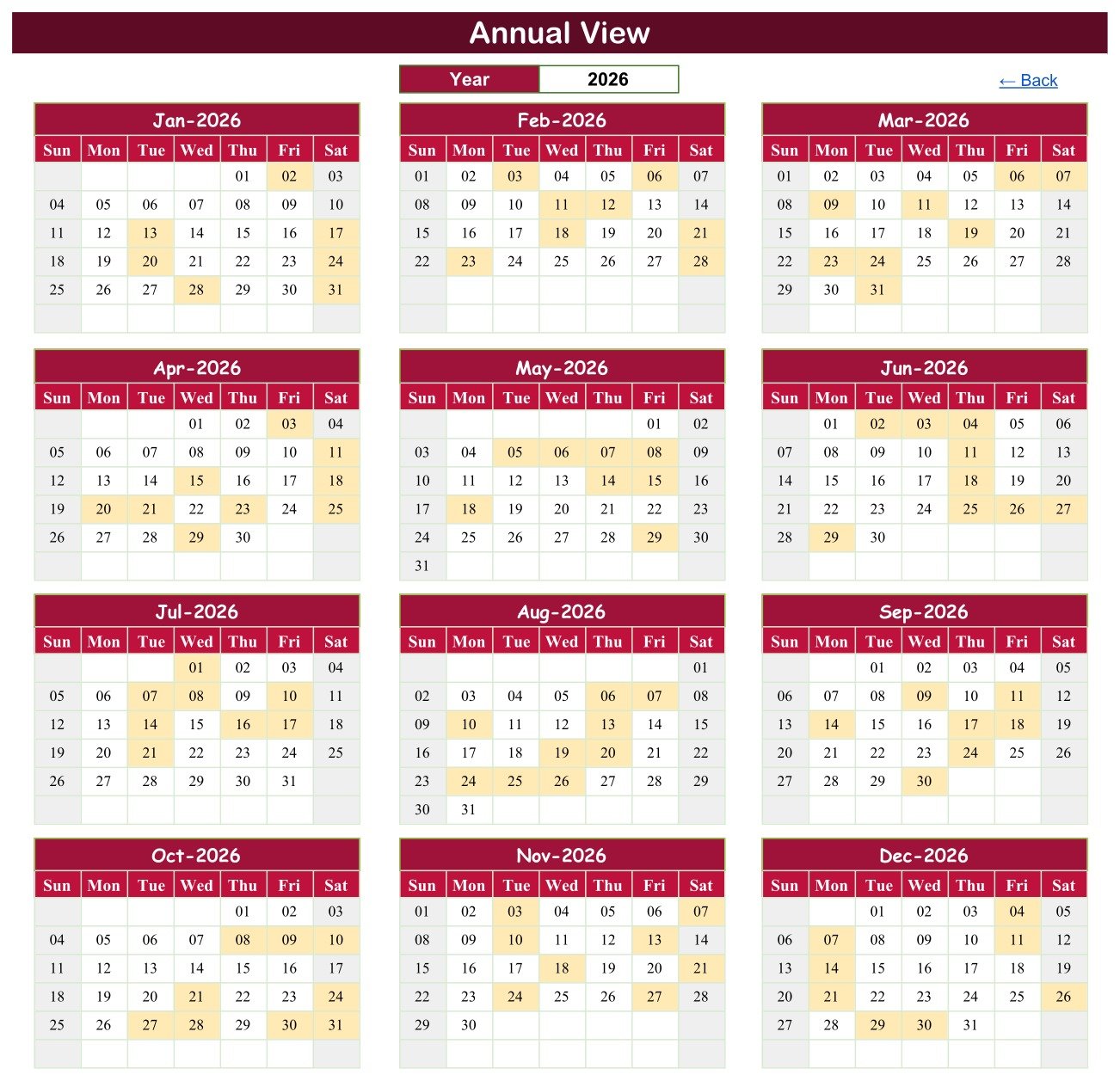
All twelve months of the chosen year in a 3×4 grid, with every booked date shaded. One Year cell drives the whole sheet, so switching from 2026 to 2027 redraws all twelve grids and re-shades them against your own rows.
Page 3: Monthly View
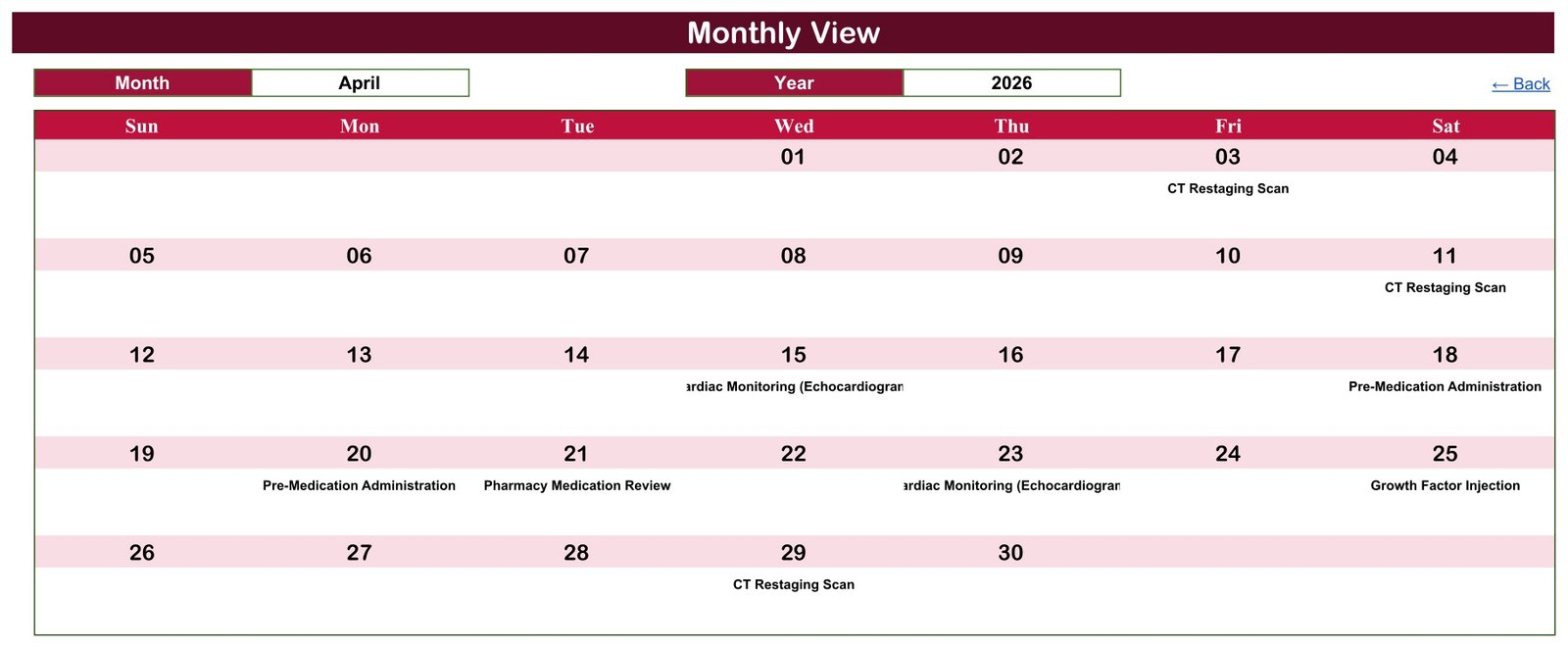
A full-width month grid with Month and Year dropdowns. Each day cell shows the event booked on that date, and where a date carries more than one entry it prints a “1 more…” counter underneath so nothing is silently hidden.
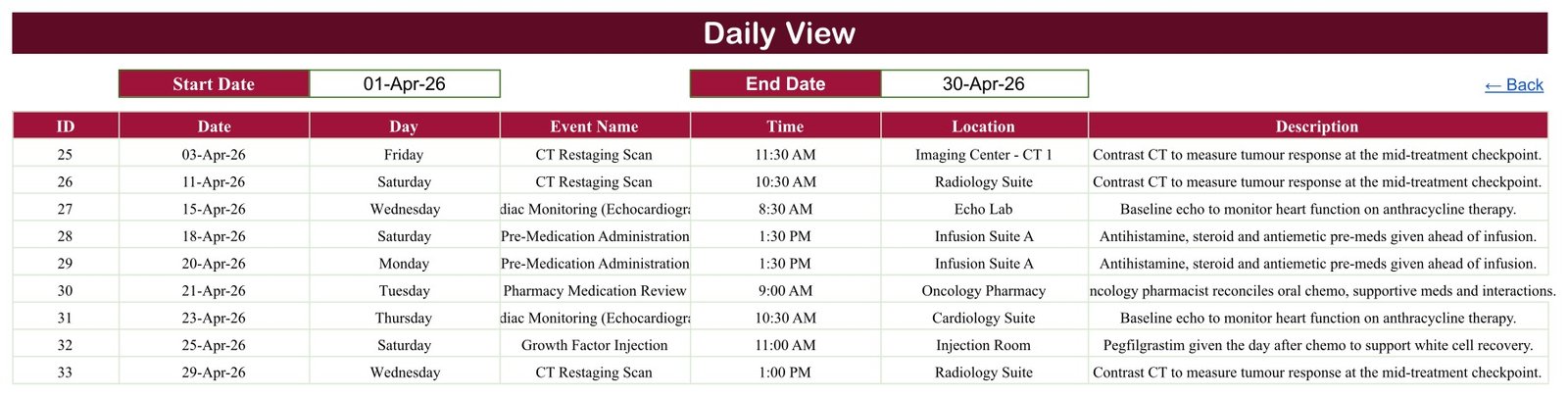
Page 4: Daily View
A Start Date and End Date pair filters the events table into a clean list — ID, Date, Day, Event Name, Time, Location and Description. Set it to a single day for a day sheet, or to a whole month to see every appointment in cycle order.
Page 5: Events
The single source of truth: 100 numbered rows, 02 January to 30 December 2026, with formulas already stretched down to row 999 so you can keep adding. Type here and every view above follows.
📊 Chemotherapy Cycle Calendar in Google Sheets vs. an Excel Calendar vs. Paid Clinic Scheduling SaaS
| Feature | Chemotherapy Cycle Calendar in Google Sheets | Microsoft Excel calendar | Paid clinic scheduling SaaS |
|---|---|---|---|
| Cost | $4.99 one-time ✅ | $5-30 one-time | $25-150 / user / month |
| Year-1 cost at 5 users | $4.99 ✅ | $5-30 | $1,500-9,000 |
| Setup time | Under 10 minutes ✅ | Under 10 minutes | Days to weeks, with onboarding |
| Real-time team collaboration | Yes, native to Google Sheets ✅ | Only via OneDrive co-authoring | Yes |
| Mobile access | Google Sheets app, free ✅ | Excel mobile app | Yes |
| Editable columns and labels | Every one of the 7 columns ✅ | Yes | Usually fixed by the vendor |
| Share with a link | Yes ✅ | Yes | Login required |
| Patient records / EHR integration | No — by design | No | Yes ✅ |
| Automated reminders and alerts | No | No | Yes ✅ |
| Double-booking prevention | No | No | Yes ✅ |
| Compliance-ready hosting for health data | No | No | Yes ✅ |
For a clinic coordinator who needs a shared, readable view of what is booked — and who already has a clinical system for everything else — the Chemotherapy Cycle Calendar in Google Sheets sits in the sweet spot. If you need records, reminders or compliance, buy the SaaS.
👥 Who This Template Is For — and Who It’s Not For
✅ Built for:
- Oncology day-unit and infusion-suite coordinators who want one shared month view instead of a printed sheet on a wall
- Small clinic administrators who need a room- and time-level booking picture that a whole team can open on a phone
- Practice managers building a lightweight administrative calendar alongside — never instead of — their clinical system
- Anyone who wants an editable Google Sheets calendar for recurring, multi-month appointment cycles of any kind
❌ Not for:
- Anyone who needs to store patient names, identifiers, diagnoses or clinical notes — this file has no place for them and no protection for them
- Teams that need automated reminders, SMS or email confirmations, or a waiting list
- Anyone expecting the file to calculate cycle intervals, check drug interactions, or flag an unsafe date. It does none of that
- Organisations that need an auditable, access-controlled, compliance-ready record. A link-shared spreadsheet is not one
- Anyone looking for clinical guidance. This is an office scheduling tool, and treatment decisions belong with your oncology team
⚙️ How to Use the Chemotherapy Cycle Calendar
- Open the PDF in your download and click the “Make a copy” link. The copy lands in your own Google Drive.
- Go to the Events tab and delete the 100 sample rows, keeping the header row and the formulas below.
- Enter your own bookings: a date, the weekday, an event label, a time, a room and a short description.
- Open Monthly View, set the Month and Year dropdowns, and check the grid matches what you entered.
- Use Daily View’s Start Date and End Date to print a day sheet or a whole-month list.
- Share the file with named colleagues rather than “anyone with the link”, and keep every identifier out of it.
💼 Real-World Use Cases
Priya coordinates a 12-chair infusion unit. She uses the Chemotherapy Cycle Calendar in Google Sheets as the unit’s shared month view: which bays are committed, which mornings are heavy, where the imaging and lab slots fall. The bookings themselves live in the hospital system; this file is the picture the team actually looks at on the ward tablet.
Daniel runs the office side of a two-consultant private practice. He keeps an internal code in the Description column rather than a name, sets Daily View to next week every Friday, and prints the list for the two nurses. Nothing identifiable ever enters the sheet.
Aisha is a caregiver keeping track for one family member. She uses the calendar privately, in her own Drive, unshared — a personal record of appointment dates, times and hospital departments so nothing is missed between visits. Her relative’s care team owns everything clinical.
🔍 Honest Limitations
Three things this file genuinely does not do, worth knowing before you buy:
- Monthly View shows only the first entry on a busy day. Its VLOOKUP returns the first matching row in the Events table, then prints a “1 more…” counter beneath it. In the sample data, 24 January and 18 September 2026 each carry two entries. Use Daily View, which filters and shows every one.
- Nothing prevents a double booking. There is no validation and no warning if you enter two events in the same room at the same time — the calendar records what you type.
- The Day column is typed text, not a formula. If you change a date, the weekday beside it will not follow. Fix it in one move: put
=IF($B4="","",TEXT($B4,"dddd"))in C4 and fill it down the column.
❓ Frequently Asked Questions
Is the Chemotherapy Cycle Calendar in Google Sheets a treatment plan or medical software?
No. The Chemotherapy Cycle Calendar in Google Sheets is a scheduling spreadsheet. It is not a treatment plan, a dosing calculator, a patient record, an EHR, an oncology information system, a medical device or clinical decision support, and it must not be used to make any clinical decision.
Does it calculate cycle dates or check drug interactions?
No. The Chemotherapy Cycle Calendar in Google Sheets calculates no cycle intervals and checks nothing. You type the dates that your oncology team has set; the file only arranges what you have typed into an annual, monthly and daily view.
Can I store patient information in it?
No, and there is nowhere to put it. The Events tab has seven administrative columns and no name, identifier, date-of-birth, contact or diagnosis field. A Google Sheet shared by link is not appropriate storage for health information — keep identifiers in your clinical system and use an internal code here.
Does the Chemotherapy Cycle Calendar in Google Sheets send reminders?
No. There are no notifications, no SMS, no email and no alerts of any kind. It is a calendar you open and read. If you need automated reminders, a paid clinic scheduling platform is the right tool.
How long does setup take?
Under 10 minutes. Open the PDF, click the copy link, clear the 100 sample rows from the Events tab and start typing your own. The Annual, Monthly and Daily views need no configuration — their 250 formulas are already in place down to row 999.
How does this compare to paid clinic scheduling software?
It is $4.99 once against $25-150 per user per month, and it does far less. The Chemotherapy Cycle Calendar in Google Sheets gives you a shared, editable calendar view. Paid platforms give you records, reminders, access control and compliant hosting, which this does not.
Do I need Excel or a subscription?
No. A free Google account is all you need. The Chemotherapy Cycle Calendar in Google Sheets runs entirely in Google Sheets, works in the free mobile app, and contains no macros, add-ons or Apps Script to install.
👤 About the Author
Built by PK — Microsoft Certified Professional with 15+ years of Excel, Google Sheets and Power BI experience. Founder of NextGenTemplates, reaching 300K+ subscribers across YouTube channels (@PK-AnExcelExpert, @NextGenTemplates, @NeoTechNavigators). Every template is hand-built and tested before release.
🔗 Explore Related Templates
Same shelf, same price, same build: the Dialysis Session Calendar in Google Sheets for recurring treatment sessions, the Patient Follow-Up Visit Calendar in Google Sheets for review appointments, the Health Checkup Package Calendar in Google Sheets, the Doctor On-Call Calendar in Google Sheets for duty rotas, and the Medical Equipment Calibration Calendar in Google Sheets for planned maintenance. A Maternity Ward Duty Calendar in Google Sheets is joining the same shelf shortly.
If you want analysis rather than a calendar, the Oncology Services Dashboard in Excel, the Oncology Services Dashboard in Power BI and the Oncology Services KPI Dashboard in Excel report on service volumes and performance. Browse the whole shelf under Google Sheets Calendars or the wider Google Sheets Templates range.
📖 Click here to read the Detailed Blog Post
🎥 Visit our YouTube channel for step-by-step video tutorials
👉 YouTube.com/@NextGenTemplates
Watch the step-by-step video Demo:
📅 Last updated: September 2026
Compatibility and Requirements
- Works in Google Sheets. You need a free Google account and a web browser, or the free Google Sheets mobile app.
- You choose the Month and Year from dropdowns on the Monthly View sheet. Google explains dropdowns in Create an in-cell dropdown list.
More Questions About This Template
Which sheets are included?
Five working tabs: Home, Annual View, Monthly View, Daily View and Events. A hidden List tab feeds the Month and Year dropdowns.
Where do I enter my appointments?
On the Events tab. Each row has an ID, Date, Day, Event Name, Time, Location and Description. The Annual, Monthly and Daily views read from this table.
How do I print one day or one month?
Open Daily View and set the Start Date and End Date. Use the same date in both for a single day, or the first and last day of a month for a full list.
Is there an Excel version?
Yes. See the Chemotherapy Cycle Calendar in Excel.
Related Calendar Templates
- Chemotherapy Cycle Calendar in Excel: the same calendar for Microsoft Excel
- Medical Appointment Calendar in Excel: a general appointment calendar in Excel
- Dynamic Holiday and Event Calendar in Google Sheets: a holiday and event calendar in Google Sheets
- Dialysis Session Calendar in Google Sheets: a calendar for recurring treatment sessions
- Google Sheets Business Pack (Pro): 14 business templates in one download
Browse all Google Sheets calendars.































Reviews
There are no reviews yet.