



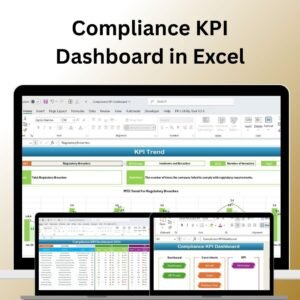
The Compliance KPI Dashboard in Excel is an essential tool designed for businesses to track and manage their compliance performance effectively. Whether you’re handling regulatory compliance, corporate governance, risk management, or industry-specific regulations, this dashboard allows you to monitor key performance indicators (KPIs) related to your business’s compliance efforts.
With real-time tracking, dynamic charts, and customizable features, this Excel dashboard is perfect for compliance officers, managers, and business owners who need to ensure adherence to laws and regulations. It provides actionable insights to streamline your compliance processes, reduce risk, and maintain up-to-date records.

Key Features of the Compliance KPI Dashboard in Excel:
📊 Comprehensive Compliance Tracking
Track essential compliance KPIs, such as audit completion rates, policy adherence, risk assessments, and regulatory violations—all in one dashboard.
📈 Real-Time Performance Monitoring
Monitor compliance performance across various departments and ensure adherence to regulatory requirements in real time, helping you stay proactive with risk management.
📅 Month-to-Date (MTD) and Year-to-Date (YTD) Analysis
Track compliance data over different periods, comparing current performance with past data to spot trends and evaluate the effectiveness of compliance strategies.
🎯 Goal Setting and Performance Comparison
Set specific compliance goals for each KPI and compare actual performance against these goals to ensure compliance initiatives are meeting organizational objectives.
🛠 Customizable Inputs
Easily input data such as audit results, risk assessments, training completion rates, and compliance violations, while customizing the dashboard to suit your organization’s compliance needs.
🔔 Conditional Formatting Alerts
Get real-time alerts using color-coded indicators to highlight any non-compliance issues or areas requiring immediate attention, such as overdue audits or unresolved violations.
💼 Risk Management Insights
Gain insights into the overall risk management process, including regulatory gaps, non-compliance areas, and improvement opportunities to maintain compliance across your business.
🚀 Why You’ll Love the Compliance KPI Dashboard in Excel:
✅ Streamline Compliance Management – Monitor the status of various compliance-related activities, such as audits, policy training, and risk assessments.
✅ Identify Compliance Gaps – Track and identify areas of non-compliance, ensuring that your business stays within regulatory frameworks and avoids penalties.
✅ Enhance Risk Management – Improve your risk management processes by tracking KPIs such as risk mitigation efforts and unresolved compliance issues.
✅ Ensure Timely Audits and Reviews – Track audit completion rates and ensure that audits are completed on time, reducing the risk of regulatory violations.
✅ User-Friendly Interface – Designed to be easy to use, even for those without technical expertise, allowing you to input data and analyze compliance performance quickly.
✅ Fully Customizable – Tailor the dashboard to meet your specific business’s compliance needs, whether you’re tracking financial regulations, data privacy compliance, or health and safety standards.
What’s Inside the Compliance KPI Dashboard in Excel:
- Audit Completion KPI: Track the completion of required audits and the percentage of audits completed on time.
- Policy Adherence KPI: Measure compliance with internal policies and procedures, ensuring employees follow company guidelines.
- Risk Assessment KPI: Monitor the status of risk assessments and identify high-risk areas requiring attention.
- Regulatory Violations KPI: Track any compliance violations, including the severity of violations and actions taken to resolve them.
- Training Compliance KPI: Measure employee participation in mandatory compliance training programs to ensure the organization stays up-to-date on regulations.
- Timely Compliance Reporting KPI: Ensure that compliance reports are submitted on time to meet regulatory requirements.
How to Use the Compliance KPI Dashboard in Excel:
1️⃣ Download the Template – Instantly access your Excel file upon purchase.
2️⃣ Input Your Compliance Data – Enter audit results, risk assessments, policy adherence data, and compliance violations into the provided fields.
3️⃣ Set Compliance Goals – Define specific KPIs for audits, training, and risk assessments to guide your compliance initiatives.
4️⃣ Track Performance – Monitor your organization’s compliance performance in real-time and make necessary adjustments to improve compliance strategies.
5️⃣ Generate Reports – Use the dashboard to generate compliance reports for internal audits, board meetings, or regulatory submissions.
Who Can Benefit from the Compliance KPI Dashboard in Excel:
- Compliance Officers
- Risk Managers
- Regulatory Affairs Teams
- Internal Auditors
- Business Owners
- Financial Compliance Teams
- HR and Training Managers
- Legal Advisors
The Compliance KPI Dashboard in Excel is the ideal solution for any organization looking to streamline its compliance processes, track key performance metrics, and improve risk management.
Click here to read the Detailed blog post
https://www.pk-anexcelexpert.com/compliance-kpi-dashboard/
Visit our YouTube channel to learn step-by-step video tutorials
Youtube.com/@PKAnExcelExpert
Compatibility and Requirements
- Works in Microsoft Excel desktop (Excel 2016 or later, or Microsoft 365).
- The dashboard uses conditional formatting to flag non-compliance items. Microsoft explains it in Use conditional formatting to highlight information in Excel.
Frequently Asked Questions
Which compliance KPIs does the dashboard track?
Six KPIs: Audit Completion, Policy Adherence, Risk Assessment, Regulatory Violations, Training Compliance and Timely Compliance Reporting.
Can I compare month-to-date and year-to-date results?
Yes. The dashboard shows MTD and YTD figures so you can compare current performance with past data and spot trends.
How does the dashboard show non-compliance?
Color-coded indicators highlight problem areas, such as overdue audits or unresolved violations, so you can see them at a glance.
Can I set my own compliance goals?
Yes. You set a goal for each KPI and the dashboard compares your actual results against it.
Is there a version for a specific compliance area?
Yes. See the Legal Compliance KPI Dashboard in Excel, the Tax Compliance KPI Dashboard in Excel and the IT and Tech Compliance KPI Dashboard in Excel.
Related Compliance Templates
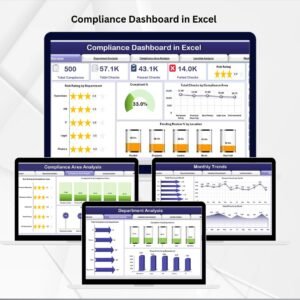
- Compliance Dashboard in Excel: another dashboard view of compliance status
- Legal Compliance KPI Dashboard in Excel: KPIs focused on legal requirements
- Legal Compliance KPI Dashboard in Power BI: the Power BI edition for legal compliance
- Compliance Audit Tracker in Excel: a tracker for audit items
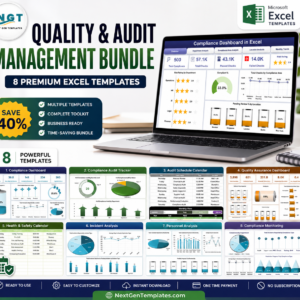
- Quality & Audit Management Bundle: 8 Excel templates for audit and quality work
Browse all Excel KPI dashboards.





























Reviews
There are no reviews yet.