

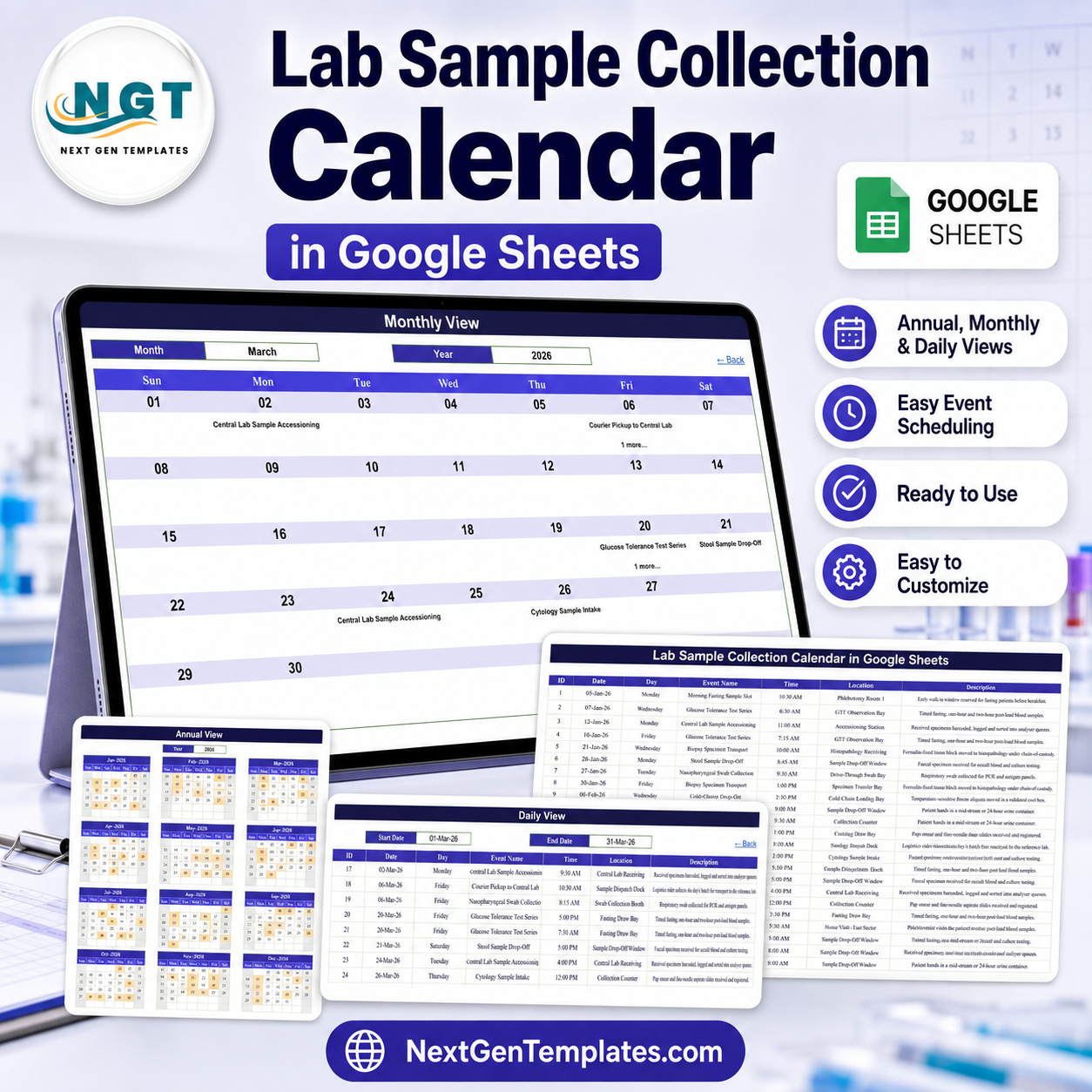

The Lab Sample Collection Calendar in Google Sheets is a ready-to-copy scheduling workbook for pathology labs, diagnostic centres, collection networks and hospital phlebotomy teams that plan draws, drop-offs, courier runs, cold-chain moves and corporate camps ahead of time. Six tabs, three linked views, one event table, and 100 sample collection rounds dated 05-Jan-2026 to 28-Dec-2026 across all twelve months, covering 15 round types in 24 named collection points. Buy it once at $4.99 (regular $8.99), open the PDF in your download, click the copy link, and the calendar lands in your own Google Drive in about two minutes. No subscription, no per-user licence.
Every weekday label in the shipped file was recomputed against its date before release: 100 rows, zero mismatches. Built and tested by NextGenTemplates, reaching 300K+ subscribers across our YouTube channels. If the file does not open or copy correctly, contact us for a replacement or a refund.
Please read this before you buy. This is a spreadsheet that holds dates, times, round names and room labels. It is not a LIMS, not a specimen-tracking or accessioning system, not a chain-of-custody register, not a results-reporting tool, not a patient record and not a diagnostic or clinical device. It carries no CLIA, CAP, ISO 15189, NABL or any other accreditation claim and provides none of the controls those standards require. Use it to plan when and where collection happens; keep specimens, results and identifiers in the validated laboratory system your lab already runs.
Key Features of the Lab Sample Collection Calendar in Google Sheets
- Three linked views off one table. Annual View, Monthly View and Daily View all read the single Events tab, so a round entered once shows up in all three.
- Six tabs, five visible. Home, Annual View, Monthly View, Daily View and Events, plus one hidden List tab that feeds the Month and Year dropdowns.
- Four navigation buttons on Home jump straight to each view, and every view carries a “Back” link home.
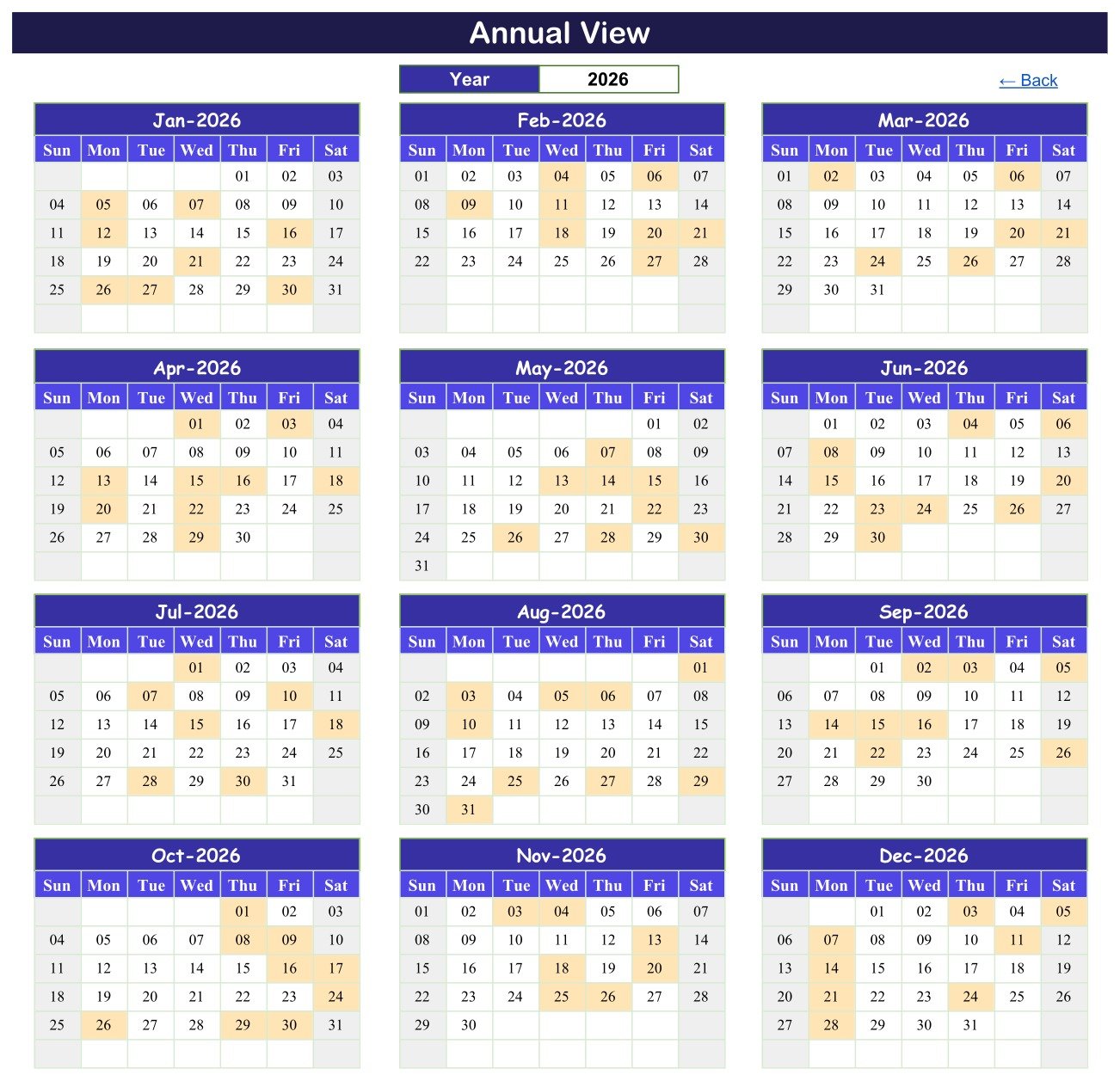
- Annual View driven by one cell. Type a year into the Year box and all twelve month grids rebuild, three across and four down, with every scheduled day shaded. In the sample data January 2026 shades the 5th, 7th, 12th, 16th, 21st, 26th, 27th and 30th.
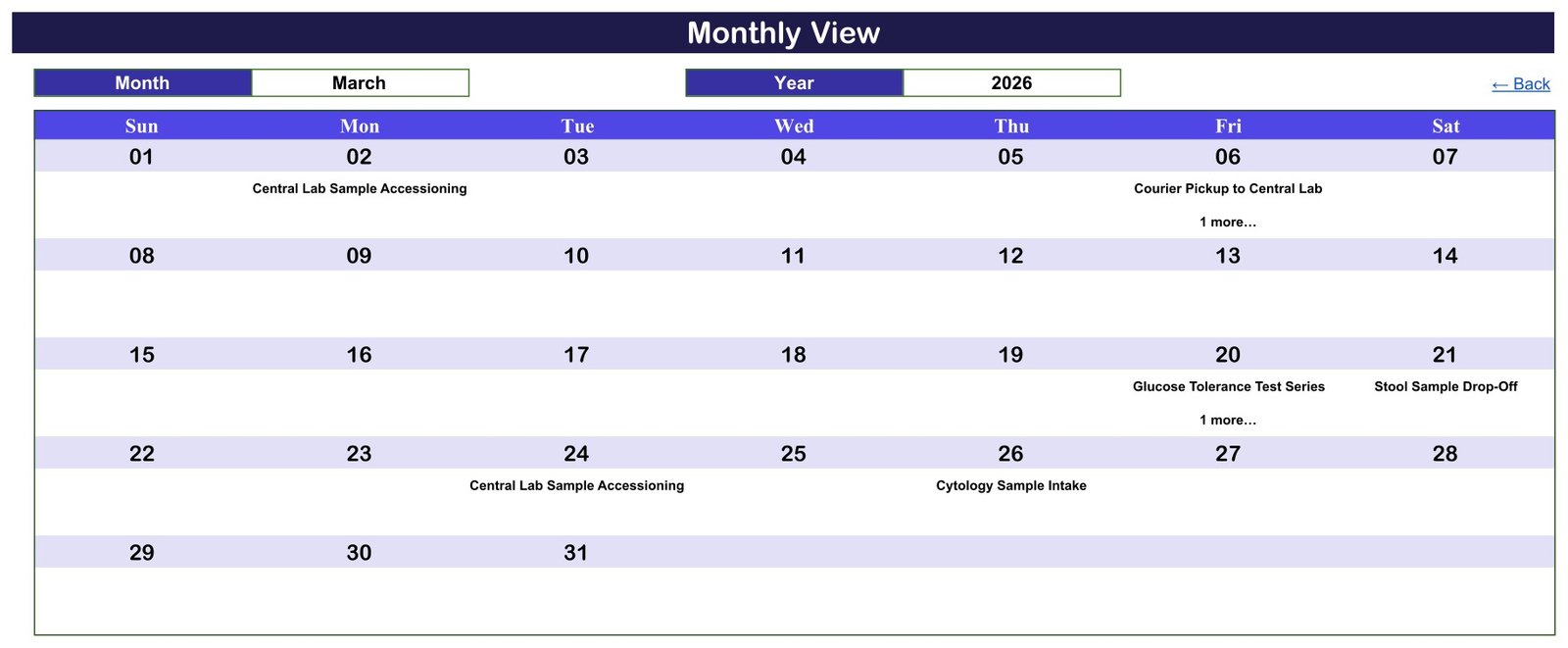
- Monthly View with Month and Year dropdowns. Pick March and 2026 and the Sun-to-Sat grid fills with that month’s rounds by date: Central Lab Sample Accessioning on the 2nd and the 24th, Courier Pickup to Central Lab on the 6th, Glucose Tolerance Test Series on the 20th, Stool Sample Drop-Off on the 21st and Cytology Sample Intake on the 26th.
- A “more” counter on busy days. The month grid prints the first round on a date and a COUNTIF underneath adds a “1 more…” note when that date carries another, so a stacked day never looks empty. In the sample year that happens on exactly four dates: 06-Mar, 20-Mar, 15-Jul and 04-Nov 2026.
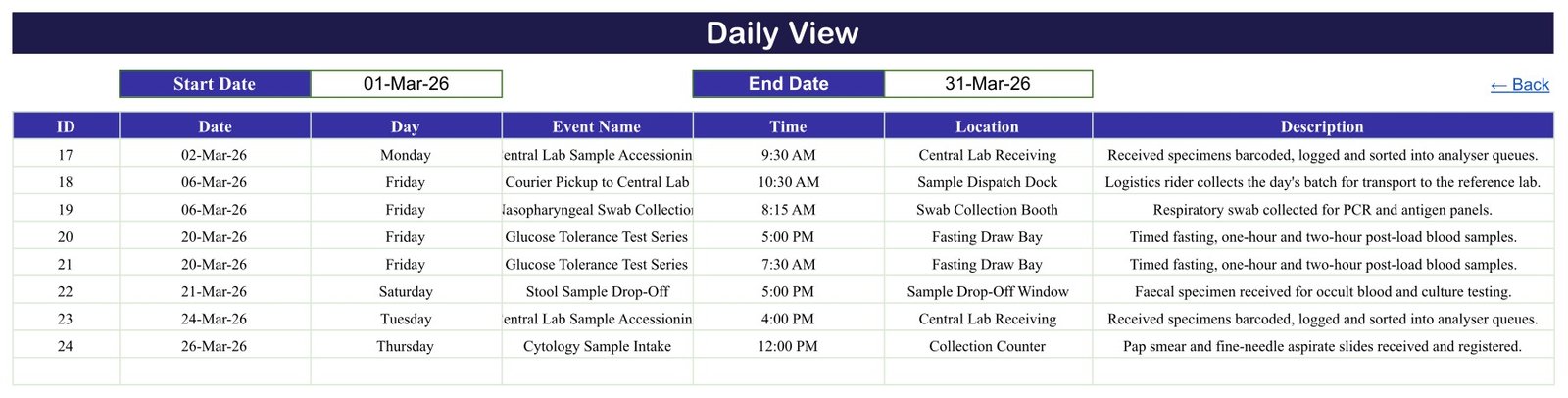
- Daily View date range. Set a Start Date and an End Date and a FILTER formula returns every round between them across all seven columns, in date order. Set it to 01-Mar-26 and 31-Mar-26 and March’s eight rounds land on one screen.
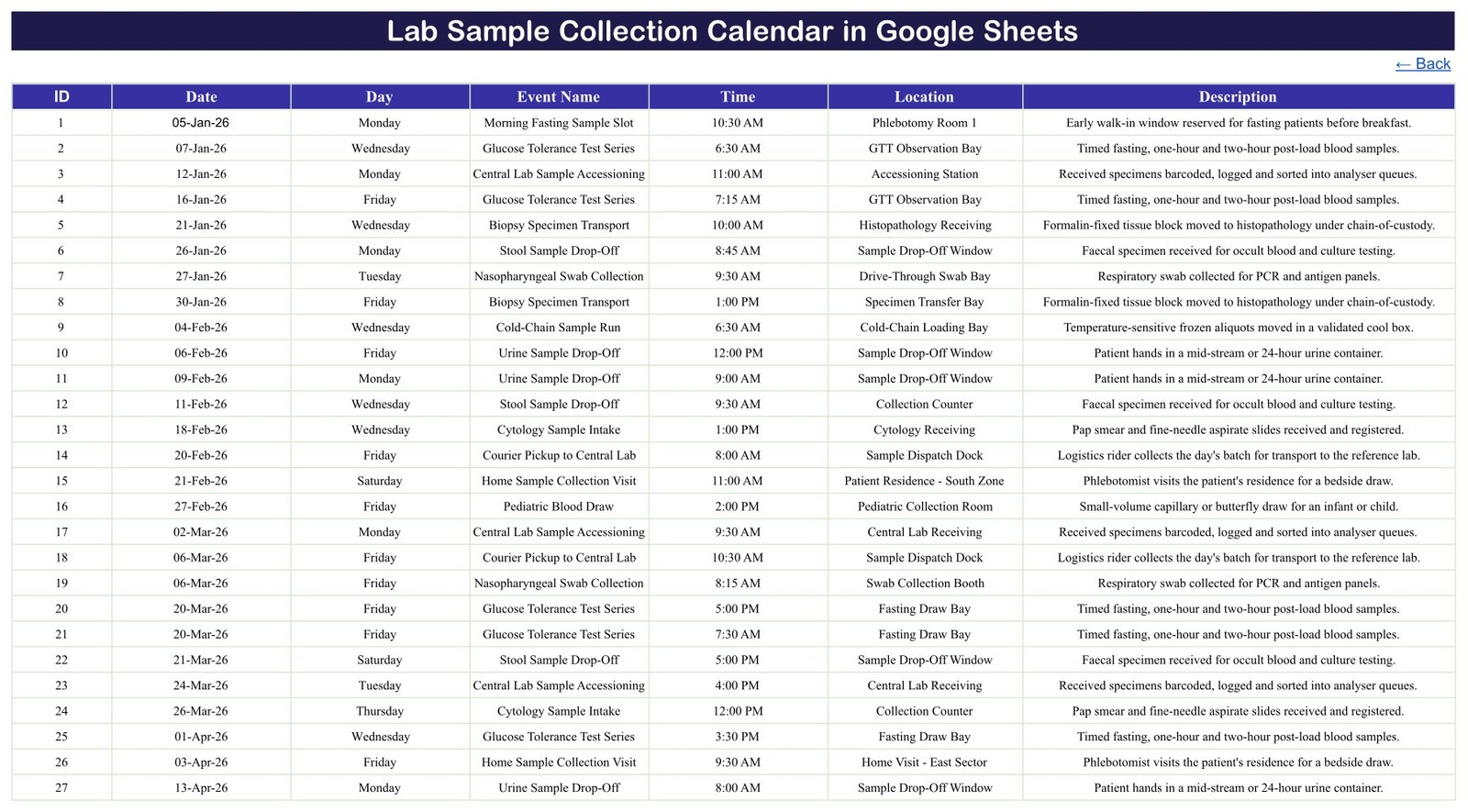
- 100 sample rounds on the Events tab, numbered 1 to 100 and dated 05-Jan-2026 to 28-Dec-2026, eight or nine a month for all twelve months, with room for roughly 896 more rows before you touch a formula.
- Seven columns and nothing else – ID, Date, Day, Event Name, Time, Location and Description. There is no patient name, patient ID, hospital number, date of birth, specimen barcode, test code or result column anywhere in the workbook. That omission is deliberate; see the section below.
- 15 round types covering the working rhythm of a collection network: Morning Fasting Sample Slot, Fasting Blood Draw, Glucose Tolerance Test Series, Pediatric Blood Draw, Blood Culture Collection, Nasopharyngeal Swab Collection, Urine Sample Drop-Off, Stool Sample Drop-Off, Cytology Sample Intake, Biopsy Specimen Transport, Cold-Chain Sample Run, Courier Pickup to Central Lab, Central Lab Sample Accessioning, Home Sample Collection Visit and Corporate Health-Camp Collection.
- 24 named collection points – Phlebotomy Room 1 and 2, Fasting Draw Bay, GTT Observation Bay, Pediatric Collection Room, Bedside Ward Collection, Collection Counter, Sample Drop-Off Window, Drive-Through Swab Bay, Swab Collection Booth, Cytology Receiving, Histopathology Receiving, Specimen Transfer Bay, Cold-Chain Loading Bay, Cold Storage Room, Sample Dispatch Dock, Courier Handover Desk, Central Lab Receiving, Accessioning Station, Corporate Camp Site – Tower A, Corporate Camp Site – Plant Floor, Employer Wellness Booth, and two zone-level home-visit labels.
- 19 start times from 6:30 AM to 5:00 PM, so the sample year reads like a real collection workload rather than filler – early fasting slots, mid-morning drop-offs, afternoon courier runs.
- 86 weekday rounds and 14 Saturday rounds, no Sundays – a six-day collection week, which is how most labs actually run.
- Weekday column that matches the calendar – all 100 sample rows carry the correct day name for their date, verified row by row before release.
- Native Google Sheets formulas only – FILTER, VLOOKUP, COUNTIF, DATE, EOMONTH, DATEVALUE, TEXT and IFERROR. No Apps Script, no macros, no add-on and no permissions prompt.
- A hidden List tab with a rolling 36-year range. The year list is built from
=YEAR(TODAY())-5and climbs from there, so the Year dropdown currently runs 2021 to 2056 and moves forward on its own. The workbook does not date itself out. - One-time price – copy it into your own Google Drive and share it with your whole collection team.
It Schedules Rounds, Not People
Open the Events tab and count the columns. There are seven: ID, Date, Day, Event Name, Time, Location and Description. There is no patient name, no patient ID, no hospital or NHS number, no date of birth, no phone number, no specimen barcode, no test code and no result – not hidden, not optional, simply absent. Across all 100 sample rows, no person is named anywhere: not a patient, not a phlebotomist, not a courier.
The thing being scheduled is a round at a place: the fasting slot in Phlebotomy Room 1, the swab bay at 8:15, the courier handover at the dispatch dock, the Tuesday camp at the plant floor. That is the whole design. A shared Google Sheet has no per-cell access control, no audit trail and no retention policy, and it is emphatically the wrong place to keep clinical identities.
Two of the 24 sample locations describe home visits at zone level – “Patient Residence – South Zone” and “Home Visit – East Sector”. No street address, postcode or contact detail appears anywhere in the file, and that is how it should stay. If your own home-collection rounds need to be distinguishable, put an internal route or job code in the Location cell and keep the code-to-address key in whatever system already holds your patient data, under its own access control. And when you share the sheet, share it with named people from your organisation rather than switching it to “anyone with the link” – link sharing turns a routing sheet into a public document the moment the URL is forwarded.
What It Does Not Do – Read This Twice
- It is not a LIMS. No worklists, no analyser interface, no order entry, no result capture, no report release, no QC.
- It does not track specimens. There is no barcode, no accession number, no aliquot, no location history and no status field. A row named “Central Lab Sample Accessioning” is a scheduled block of time at the accessioning station – the workbook performs no accessioning and records nothing that arrives.
- It is not a chain-of-custody register. Nothing is signed, timestamped, locked or attributable. Where a sample description mentions custody, that is a note about what the round involves, not a control the sheet enforces.
- It holds no patient records and reports no results. There is no field for either.
- It monitors no temperatures. A “Cold-Chain Sample Run” row is a diary entry; the sheet reads no logger and raises no excursion alert.
- It is not accredited or compliant. No CLIA, CAP, ISO 15189, ISO 17025, NABL, CQC, NABH or MHRA claim of any kind. Naming those here is a statement that it does not meet them.
- It sends no reminders. No email, no SMS, no notification. It is a spreadsheet you look at.
- It warns you about nothing. There is no overdue concept, no double-booking check, no capacity limit and no validation. Nothing stops you writing two rounds into the same bay at the same minute.
- The Day column is typed text, not a formula. The 100 shipped rows are all correct, but if you edit a date the day name beside it will not follow. See the fix in How to Use below – it is one formula.
- Monthly View shows one round per date. VLOOKUP returns the first match; the “1 more…” counter tells you something is hidden, and Daily View shows the lot.
What’s Inside the Lab Sample Collection Calendar in Google Sheets
The download is one PDF. Inside it is a “Make a copy” link to the live Google Sheet; click it and Google puts a fully editable copy in your own Drive. There is no .xlsx, no .zip and no software to install.
The workbook has six tabs:
- Home – the title bar and four navigation buttons: Annual View, Monthly View, Daily View, Events.
- Annual View – a Year cell and twelve month grids, three across and four down, Sun to Sat, with scheduled days shaded amber. Around 196 formulas rebuild the whole page from that one cell.
- Monthly View – Month and Year dropdowns feeding a DATEVALUE anchor, a Sun-to-Sat grid, a VLOOKUP against the Events tab for the round name and a COUNTIF for the “1 more…” note.
- Daily View – Start Date and End Date cells and a single FILTER over Events rows 4 to 999, returning ID, Date, Day, Event Name, Time, Location and Description.
- Events – the one table everything reads. Headers in row 3, data from row 4, 100 rounds shipped, room to about row 999.
- List (hidden) – the twelve month names and the rolling year list that feed the dropdowns.
Google Sheets Edition vs. the Excel Edition vs. Paid Lab Software – Where This Fits
There is a published Lab Sample Collection Calendar in Excel. It is not a port of this file and this is not a port of it – they were built separately, carry their own sample data and behave differently. Here is the honest comparison.
| This Google Sheets edition | The Excel edition | Paid LIMS / lab software | |
|---|---|---|---|
| Price | $8.99, on sale $4.99, one payment | $8.99, on sale $4.99, one payment | Typically four to six figures a year, per site |
| Views | Three – Annual, Monthly, Daily | Four – Annual, Monthly, Daily and a “This Month” summary page | Dozens of screens |
| Tabs | 6 (5 visible + 1 hidden List) | 7 | n/a |
| What drives the views | Live formulas – FILTER, VLOOKUP, COUNTIF, DATE, EOMONTH. Nothing to refresh, nothing to enable | VBA macros. Daily View and This Month are written by code, so macros are load-bearing and must be enabled | A database and an application server |
| Adding a round | Type into the next Events row | An Add / Update / Delete form with date and time pickers; IDs assigned for you | Order entry, usually from the LIS |
| Sample data | 100 rounds, 05-Jan to 28-Dec-2026, 15 round types, 24 collection points, 19 start times | 100 rounds, 02-Jan to 28-Dec-2026, 18 round types, 8 collection points, 44 start times | None – you load your own |
| Working week in the sample | 86 weekday and 14 Saturday rounds | All 100 on weekdays | Whatever you configure |
| Themes | One fixed indigo palette | Five switchable colour themes | Corporate branding |
| Settings panel | None needed – the Year cell, the Month/Year dropdowns and the two date cells are the controls | A Setting sheet: year 2021-2051, start month, week-start day, highlight days | Full admin console |
| Year range | Rolling – built from YEAR(TODAY())-5, currently 2021 to 2056, and it moves with the clock | Fixed 2021-2051 | Unlimited |
| Collaboration | Real time. Two phlebotomists and the courier coordinator can have it open at once, on phones | One person at a time, unless you put it on a share and take turns | Concurrent, with roles |
| Works on | Any browser, any OS, iPad and Android included | Microsoft Excel on Windows with macros enabled | Web and desktop clients |
| Delivery | A PDF carrying a “Make a copy” link | A ZIP with the .xlsm plus a 5-page manual | Implementation project |
| Specimen tracking, results, custody, accreditation | None | None | Yes – that is what you are paying for |
Buy the Google Sheets edition if the calendar has to be open on several people’s phones at once and you would rather not think about macro security. Buy the Excel edition if you want a desktop file with a data-entry form, a This Month summary page and colour themes. Buy both if you want the browser diary and the desktop workbook – the sample data differs, so they read as companions rather than copies. Buy neither instead of a LIMS: this is the plan of the day, not the system of record.
Who This Template Is For – and Who It’s Not For
It is for standalone pathology labs and diagnostic centres planning the week’s draws; collection-centre managers who need the fasting slots, drop-off windows and camp days on one page; phlebotomy supervisors covering several rooms and bays; courier and logistics coordinators scheduling pickups and cold-chain runs to the reference lab; home-collection teams planning zone routes; corporate wellness organisers running health camps at employer sites; and small hospital labs that currently keep this on a whiteboard or in a group chat.
It is not for anyone who needs specimen tracking, accessioning, chain of custody, result reporting or patient records – that is a LIMS, and this is not one. It is not for teams under an accreditation regime that requires a validated, auditable system for scheduling. It is not for anyone who wants automatic reminders or overdue alerts. And it is not for storing anything that identifies a patient.
How to Use the Lab Sample Collection Calendar in Google Sheets
- Open the PDF in your download and click the “Make a copy” link. Sign in to Google, and an editable copy lands in your own Drive. The original stays view-only for everyone else.
- Look around first. From Home, open Annual View, Monthly View and Daily View with the sample year still in place so you can see how the three connect.
- Clear the sample rounds. On the Events tab, select rows 4 to 103 and delete the contents – not the rows themselves, so the formulas that read to row 999 stay intact.
- Fix the Day column before you type anything. The shipped Day values are typed text, so an edited date leaves a stale day name behind. Put
=TEXT(B4,"dddd")in C4 and fill it down the column – after that the day name always follows the date. (Or use=ARRAYFORMULA(IF(B4:B999="","",TEXT(B4:B999,"dddd")))in C4 once.) - Enter your own rounds. ID in A, Date in B, Day from the formula in C, the round name in D, the start time in E, the collection point in F and a one-line note in G. Overwrite the 15 shipped round names and 24 location labels with your own – they are plain typed text, not a fixed list.
- Set the year on Annual View and check the shading matches your entries.
- Use Monthly View for the wall. Pick the month and year and print or cast it. Watch for the “1 more…” note on stacked dates.
- Use Daily View for the run sheet. Set a Start Date and End Date – tomorrow to tomorrow for a single day, Monday to Saturday for the week – and the FILTER output is your printable list.
- Share it properly. Use Share with specific people for your collection team rather than “anyone with the link”, and keep patient identifiers out of it entirely.
Real-World Use Cases
- A diagnostic centre’s week. Monday fasting slots in Phlebotomy Room 1, Wednesday GTT series in the observation bay, Friday courier pickup to the reference lab – one Monthly View print on the collection-room wall.
- Home-collection routing. Zone-level visits scheduled by day and time so the phlebotomist’s route is planned before the morning starts, with the addresses kept in the system that is supposed to hold them.
- Cold-chain planning. Frozen aliquot runs and loading-bay slots blocked out in advance so nobody discovers at 4 PM that the cool box has already left.
- Corporate health camps. Employer-site collection days – tower lobby on one date, plant floor on another – visible to the whole team a quarter ahead.
- Multi-site drop-off windows. Urine, stool and swab drop-off hours published per collection point so reception can answer “when can I bring it in?” without ringing the lab.
- Shift handover. Daily View printed each morning as the round sheet, so the incoming team sees the day’s plan on one page.
Frequently Asked Questions
Is this a LIMS or a specimen-tracking system?
No. It is a scheduling spreadsheet. There is no barcode, accession number, aliquot, status, worklist or result anywhere in it. It plans when and where collection happens; your validated laboratory system does everything after that.
One of the sample rounds is called “Central Lab Sample Accessioning” – does it do accessioning?
No. That is the name of a scheduled block of time at the accessioning station, in the same way “Courier Pickup to Central Lab” is the name of a time slot rather than a courier system. The workbook logs nothing that arrives, assigns no accession numbers and holds no specimen records.
Does it store patient or staff data?
No. The Events tab has seven columns and not one of them is a name, patient ID, hospital number, date of birth, phone number or diagnosis. No person is named in any of the 100 sample rows. Two location labels describe home visits at zone level only – there is no street address anywhere in the file. Please keep it that way; if you need home rounds distinguishable, use an internal route code and keep the key elsewhere.
Is it CLIA, CAP, ISO 15189 or NABL compliant?
No, and it makes no such claim. It provides none of the controls those standards require – no validation, no audit trail, no version control, no access control at cell level and no retention policy. Naming those standards here is a statement that this template does not meet them.
Do I need Apps Script, macros or an add-on?
No. The workbook runs on native Google Sheets formulas only – FILTER, VLOOKUP, COUNTIF, DATE, EOMONTH, DATEVALUE, TEXT and IFERROR. Nothing asks for permissions and nothing runs in the background. This is the main behavioural difference from the Excel edition, where VBA writes the Daily View and This Month pages.
Why doesn’t the Day name change when I edit a date?
Because the shipped Day column is typed text rather than a formula. All 100 sample rows are correct as delivered, but the label will not follow an edited date. Put =TEXT(B4,"dddd") in C4 and fill it down and the problem is gone permanently. We would rather tell you this than let you find it.
Why does Monthly View show only one round on some days?
Monthly View uses VLOOKUP, which returns the first match for a date. A COUNTIF underneath adds “1 more…” so you can see something is hidden. Open Daily View and set the range to that date to see everything on it. In the sample year this happens on four dates: 06-Mar, 20-Mar, 15-Jul and 04-Nov 2026.
Will it remind me about a round, or warn me about a clash?
No to both. It sends no email, SMS or notification, it has no concept of overdue, and nothing prevents two rounds being written into the same bay at the same time. It is a plan you read, not a system that chases you.
Can several people use it at once?
Yes – that is the main advantage of the Google Sheets edition. Share the copy with your collection team and everyone sees the same live diary on desktop or phone. Share with named people rather than “anyone with the link”.
What exactly is in the download?
One PDF. Inside it is a “Make a copy” link to the Google Sheet. Click it and Google puts an editable copy in your own Drive. There is no .xlsx, no .zip and no software to install.
Can I change the round names, times and locations?
Yes – all of it. The 15 round types and 24 collection points are plain typed text on the Events tab, not a locked list. Overwrite them with your own bays, rooms, routes and wording.
The sample data is 2026 – does it expire?
No. The 100 rounds are demonstration data for you to overwrite. The workbook itself does not date out: the hidden List tab builds its year list from YEAR(TODAY())-5 and runs 36 years forward, currently 2021 to 2056, moving on its own as the years pass.
How many rounds can it hold?
The view formulas are written against Events rows 4 to 999, so about 996 rows in total – roughly 896 free once you have cleared the 100 samples. That is several years of a busy collection centre’s diary.
What are the honest limitations?
Three views rather than four (no This Month summary page – the Excel edition has that one). One colour scheme, not five. No data-entry form; you type into the table. Monthly View shows one round per date with a counter for the rest. The Day column is typed text until you replace it with the formula above. And no reminders, no warnings, no tracking, no results.
About the Author
Built by PK – Microsoft Certified Professional with 15+ years of Excel, Google Sheets, and Power BI experience. Founder of NextGenTemplates, reaching 300K+ subscribers across YouTube channels. Every template is hand-built and tested before release.
Explore Related Templates
If you would rather have a desktop workbook than a browser sheet, the Lab Sample Collection Calendar in Excel is the same idea built as a macro-enabled workbook, with a fourth “This Month” view, an Add/Update/Delete form and five colour themes. Its sample data is its own, so the two editions are companions rather than copies.
For the rest of the laboratory and clinic diary in Google Sheets: the Medical Equipment Calibration Calendar in Google Sheets uses exactly this layout for biomedical maintenance rounds, the Pharmacy Stock Expiry Calendar in Google Sheets covers the other thing a department has to watch by date, and the Dialysis Session Calendar in Google Sheets plans recurring treatment slots.
If the people side is your problem rather than the rounds, look at the Home Nursing Visit Calendar in Google Sheets and the Blood Donation Camp Calendar in Google Sheets, which handles the camp-day logistics this calendar only blocks out. For animal practices there is the Veterinary Clinic Calendar in Google Sheets, and for keeping a personal record of appointments and results the Doctor Appointments & Medical History Tracker in Google Sheets.
Watch the step-by-step video Demo:
Watch the step-by-step video demo
Visit youtube.com/@PKAnExcelExpert for walkthroughs of our Google Sheets calendars and trackers.
Compatibility and Requirements
- Works in Google Sheets. You need a free Google account and a web browser, on desktop, iPad or Android.
- Month and Year dropdowns on Monthly View and a Start Date and End Date on Daily View control what you see. Google explains dropdowns in Create an in-cell dropdown list.
- The workbook uses native formulas only, so there is no Apps Script, add-on or permissions prompt.
































Reviews
There are no reviews yet.