



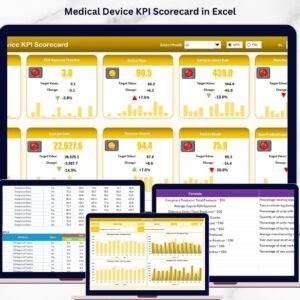
The Medical Device KPI Dashboard in Excel is a comprehensive tool designed for medical device manufacturers, suppliers, and healthcare organizations to track and optimize their key performance indicators (KPIs). This Excel-based dashboard offers a clear overview of critical metrics like product quality, production efficiency, regulatory compliance, and customer satisfaction.
With this powerful tool, you can monitor the performance of your medical device products throughout their lifecycle, from manufacturing to post-market surveillance. It allows you to stay compliant with industry regulations, improve quality standards, and enhance customer experience. This customizable dashboard provides real-time insights and helps you make data-driven decisions to optimize operations and improve business outcomes.
Key Features of the Medical Device KPI Dashboard in Excel
📊 Track Key Medical Device Metrics
Monitor essential KPIs such as production efficiency, product defect rates, regulatory compliance, and market performance. Analyze how your medical device products are performing across various stages of the product lifecycle.
📅 Real-Time Data Integration
Stay up to date with real-time data updates on production, quality control, and customer feedback. Track critical metrics as they evolve and make timely decisions to improve product quality and customer satisfaction.
📈 Quality & Compliance Monitoring
Evaluate product quality by tracking defect rates, recalls, and compliance with industry regulations. Ensure that your medical devices meet the required standards and are safe for use in the healthcare industry.
🔄 Customer Satisfaction & Feedback
Measure customer satisfaction and collect feedback to assess how well your medical devices are being received in the market. Track warranty claims, customer service issues, and support requests to identify areas for improvement.
💡 Customizable & Scalable
This dashboard is fully customizable to fit your specific medical device products and business model. Adjust KPIs, fields, and reports to match your organization’s goals and needs.
📊 Visual Data Insights & Reporting
Use graphs, charts, and data visualizations to analyze your KPIs in a more intuitive way. Visualize trends, track improvements, and share actionable insights with your team and stakeholders.
Why You’ll Love the Medical Device KPI Dashboard in Excel

✅ Optimize Manufacturing & Production Efficiency
Monitor production performance, defect rates, and regulatory compliance to ensure that your medical devices are manufactured efficiently and meet quality standards.
✅ Ensure Regulatory Compliance
Stay compliant with industry regulations by tracking compliance metrics, product defects, and recall data. This dashboard helps you meet industry standards and avoid costly non-compliance issues.
✅ Enhance Customer Satisfaction
Track customer feedback and warranty claims to ensure customer satisfaction. Improve product quality and customer service by identifying common issues and taking corrective actions.
✅ Make Data-Driven Decisions
Use real-time data to make informed decisions on product improvements, regulatory compliance, and operational efficiency. Streamline your operations to ensure that your medical devices meet market demands.
✅ Customizable to Fit Your Needs
The template can be customized to track the specific KPIs that are important for your medical device business. Whether you’re tracking sales, production, or customer feedback, this dashboard is flexible enough to adapt to your needs.
What’s Inside the Medical Device KPI Dashboard Template in Excel?
- Production Efficiency Tracker: Monitor production performance, including output rates, defect rates, and production downtime.
- Regulatory Compliance Tracker: Track compliance with industry regulations, including certifications, audits, and product recalls.
- Quality Control Metrics: Track product quality, including defect rates, inspections, and corrective actions.
- Customer Feedback & Satisfaction: Measure customer satisfaction, track warranty claims, and analyze feedback to improve product quality.
- Real-Time Data & Reporting: Get real-time updates and use data visualizations to track trends, performance, and issues.
- Customizable KPIs: Modify KPIs to suit your business’s specific needs, ensuring that the dashboard meets your exact requirements.
How to Use the Medical Device KPI Dashboard in Excel
1️⃣ Download the Template: Instantly access the Medical Device KPI Dashboard in Excel.
2️⃣ Input Your Data: Enter key data such as production metrics, customer feedback, and regulatory compliance information.
3️⃣ Track KPIs & Metrics: Use the dashboard to monitor production, quality, and customer satisfaction in real-time.
4️⃣ Evaluate Performance & Compliance: Analyze production efficiency, compliance status, and product quality to ensure your medical devices meet the required standards.
5️⃣ Generate Reports & Insights: Use visualizations to generate reports that help you make data-driven decisions to improve business performance.
Who Can Benefit from the Medical Device KPI Dashboard in Excel?
🔹 Medical Device Manufacturers & Suppliers
🔹 Quality Control & Compliance Managers
🔹 Healthcare & Medical Product Companies
🔹 Regulatory Affairs Teams
🔹 Customer Service & Support Teams
🔹 Product Managers & Business Analysts
Take control of your medical device operations and optimize your processes with the Medical Device KPI Dashboard in Excel. Track key performance metrics, ensure regulatory compliance, and improve customer satisfaction to enhance your product’s success.
Click here to read the Detailed blog post
Visit our YouTube channel to learn step-by-step video tutorials
Youtube.com/@PKAnExcelExpert
Compatibility and Requirements
- Works in Microsoft Excel desktop (Excel 2016 or later, or Microsoft 365).
- KPI trends are shown with Excel charts. Microsoft explains how they work in Create a chart from start to finish.
Frequently Asked Questions
What does the Medical Device KPI Dashboard track?
It tracks production efficiency, defect rates, regulatory compliance, recalls, customer satisfaction and warranty claims for your medical device products.
Which sections are included?
A production efficiency tracker, a regulatory compliance tracker, quality control metrics, and customer feedback and satisfaction tracking.
What data do I need to enter?
Production metrics, customer feedback and regulatory compliance information such as certifications, audits and product recalls.
Can I change the KPIs?
Yes. You can change the KPIs, fields and reports to fit your products and business model.
Related Medical Device Templates
- Medical Device KPI Dashboard in Power BI: the same KPIs in Power BI
- Medical Device KPI Dashboard in Google Sheets: a browser-based version for shared editing
- Medical Devices KPI Dashboard in Excel: another medical device KPI set in Excel
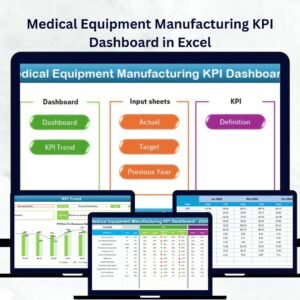
- Medical Equipment Manufacturing Dashboard in Excel: a data dashboard for equipment makers
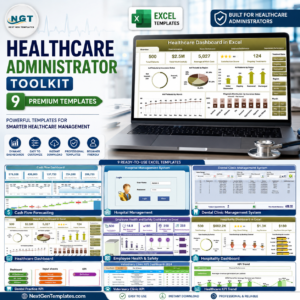
- Healthcare Administrator Toolkit: a bundle of 9 healthcare Excel templates
Browse all Excel KPI dashboards or the Excel health and safety templates.































Reviews
There are no reviews yet.