The medical devices industry operates in a high-pressure environment where precision, compliance, and performance control are non-negotiable. Every month, companies must monitor production output, quality standards, regulatory performance, and financial health. Yet many organizations still depend on scattered spreadsheets, making it difficult to track trends and identify early warning signs.
What if you could monitor MTD and YTD performance, compare Actual vs Target, and analyze Previous Year results — all inside one powerful Excel file?
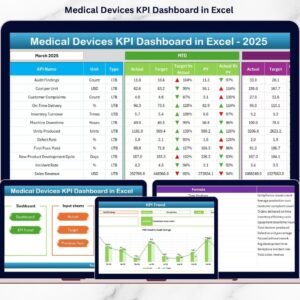
The Medical Devices KPI Dashboard in Excel is a ready-to-use, professionally structured performance tracking system built specifically for medical device manufacturers, distributors, and healthcare suppliers. It centralizes all critical KPIs into one dynamic workbook, helping leadership teams gain clarity and control instantly.
Instead of manual reporting, this dashboard provides automated calculations, visual indicators, and structured documentation — empowering your team to make faster, data-driven decisions.
🚀 Key Features of Medical Devices KPI Dashboard in Excel
✨ Dynamic MTD & YTD Tracking – Monitor monthly and yearly performance instantly.
📊 Actual vs Target Comparison – Identify performance gaps in seconds.
📈 Previous Year Comparison – Evaluate growth and performance trends.
🔄 Automatic Calculations – No manual formulas required.
📉 Trend Analysis Charts – Visualize KPI patterns clearly.
🎯 Conditional Formatting Arrows – Instantly see performance improvement or decline.
📁 7 Structured Worksheets – Fully organized for smooth navigation.
📝 KPI Documentation Sheet – Maintain clarity and audit transparency.
This dashboard is designed to simplify performance management while maintaining professional standards.

📦 What’s Inside the Medical Devices KPI Dashboard in Excel
You get a fully structured Excel workbook with 7 organized worksheets:
📌 Summary Page – Navigation hub with quick-access buttons.
📌 Dashboard Sheet – Core performance view with MTD & YTD metrics.
📌 Trend Sheet – Detailed KPI trend analysis with charts.
📌 Actual Numbers Input Sheet – Enter monthly and yearly performance data.
📌 Target Sheet – Set monthly and annual targets.
📌 Previous Year Sheet – Store historical performance numbers.
📌 KPI Definition Sheet – Document KPI names, formulas, units, and definitions.
Each sheet plays a vital role in ensuring structured reporting and performance transparency.
🛠 How to Use the Medical Devices KPI Dashboard in Excel
Using this dashboard is simple and user-friendly:
1️⃣ Enter your monthly and yearly performance numbers in the Actual Numbers Input Sheet.
2️⃣ Set your targets in the Target Sheet.
3️⃣ Input previous year numbers in the Previous Year Sheet.
4️⃣ Select the month from the drop-down (Cell D3).
5️⃣ Watch the dashboard update automatically.
The built-in formulas calculate MTD, YTD, performance variance, and trend comparisons instantly. Even users with basic Excel knowledge can operate this system effectively.
👥 Who Can Benefit from This Medical Devices KPI Dashboard in Excel
🏭 Medical Device Manufacturers
📦 Healthcare Equipment Distributors
🏥 Hospital Supply Chain Teams
📊 Operations Managers
📋 Quality & Compliance Managers
💼 Finance & Strategy Teams
👨💼 Business Owners & Executives
Whether you run a small manufacturing unit or a large-scale medical device enterprise, this dashboard provides structured visibility into operational performance.
🎯 Why This Dashboard Is a Game-Changer
Medical device companies must maintain strict quality control and regulatory compliance. A delay in production or a quality issue can impact revenue and reputation. This dashboard centralizes performance monitoring so your team can:
✔ Detect issues early
✔ Improve accountability
✔ Compare performance against goals
✔ Track compliance metrics
✔ Monitor financial KPIs
✔ Save reporting time
Instead of juggling multiple files, everything stays in one professional Excel system.
💡 Boost Operational Efficiency Today
This dashboard reduces manual work, increases transparency, and enhances decision-making. By using structured data and visual indicators, your team can act faster and manage performance more effectively.
If you want better control, improved compliance tracking, and clearer visibility into production and financial KPIs — this tool is built for you.
Click here to read the Detailed blog post
Watch the step-by-step video tutorial:
Visit our YouTube channel to learn step-by-step video tutorials
Compatibility and Requirements
- Works in Microsoft Excel desktop (Excel 2016 or later, or Microsoft 365).
- The month is picked from a drop-down list in cell D3 of the Dashboard sheet.
- To edit drop-down lists, see the Microsoft guide Create a drop-down list.
Frequently Asked Questions
What sheets come in the Medical Devices KPI Dashboard?
Seven: Summary Page, Dashboard, Trend, Actual Numbers Input, Target, Previous Year and KPI Definition.
How do I change the month shown?
Select the month from the drop-down in cell D3. The MTD and YTD figures update for that month.
What comparisons does it show?
Actual vs Target and Actual vs Previous Year for both MTD and YTD, with conditional formatting arrows that show improvement or decline.
Where do I define my KPIs?
Use the KPI Definition sheet to record each KPI name, formula, unit and definition.
Is there a Power BI version?
Yes. See the Medical Devices KPI Dashboard in Power BI.
Related Medical Device and Healthcare Templates
- Medical Devices KPI Dashboard in Power BI: the same KPIs in Power BI
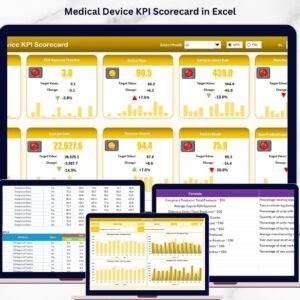
- Medical Device KPI Scorecard in Excel: a scorecard view of device KPIs
- Medical Device KPI Dashboard in Google Sheets: for teams that work online
- Healthcare KPI Dashboard In Excel: wider healthcare performance tracking
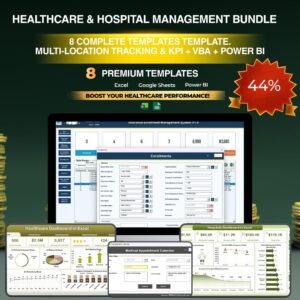
- Healthcare & Hospital Management Bundle: 8 healthcare templates in one download
Browse all Excel KPI dashboards or the Excel health and safety templates.