

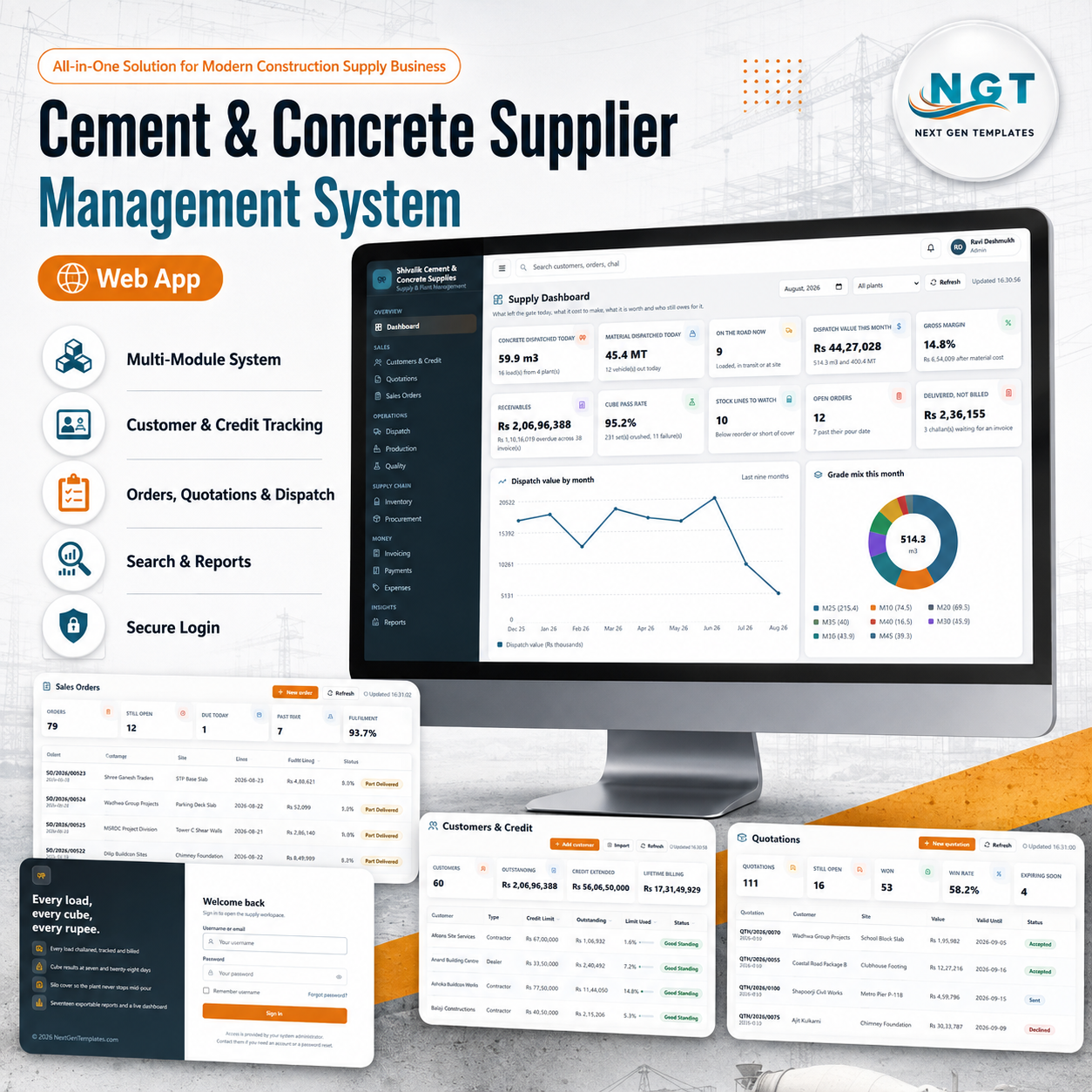
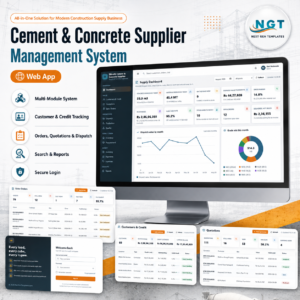
The Cement & Concrete Supplier Management System Web App is a complete Google Apps Script web application for a ready-mix and cement supply business — 22 modules, 7 roles and 17 exportable reports running on a Google Sheets database you own. It ships seeded with 12,647 rows across 31 sheets: 60 customers, 46 priced products, 12 mix designs, 2,734 delivery challans, 1,987 production batches, 663 cube tests, 521 invoices and 505 receipts, so every screen and every report is populated the first time you sign in. One payment, no per-seat fees, no subscription. Try it before you buy using the live demo below, and you get the full source code to deploy in your own Google account.
🚀 Try the Live Demo Before You Buy
We have deployed this web app in our own Google account so you can test every page, every role and every one of the 17 reports — with real sample data — before purchasing. No signup, no email required.
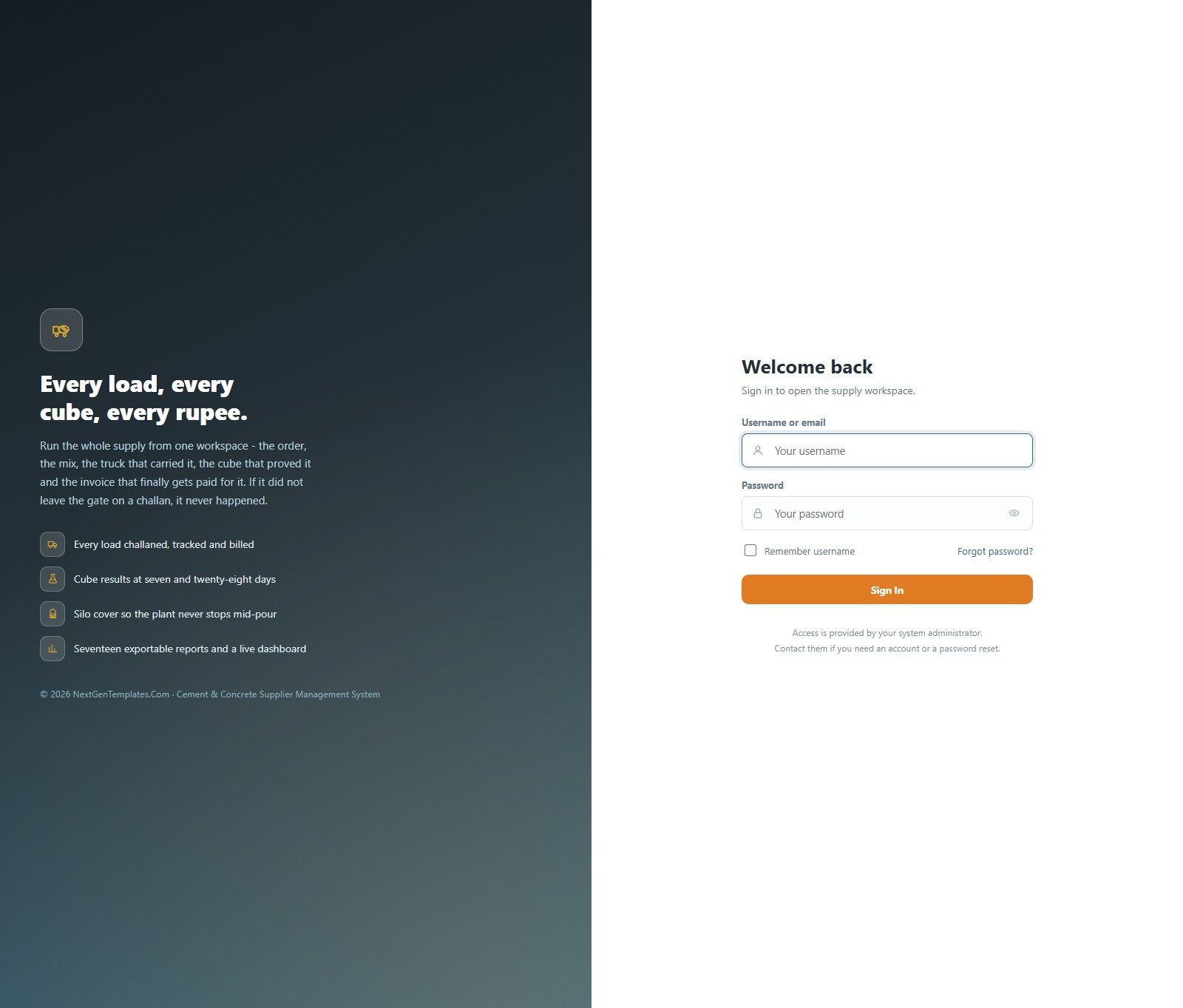
🔑 Test Login Credentials
Sign in as admin to see all 22 modules, the role editor and the database archive, or as dispatch to see how little a restricted role is shown — a dispatch supervisor loads trucks and never sees a rate or an invoice. That difference is the product.
💡 These credentials are public on purpose. They are the seeded logins of a shared demo instance that resets — not a customer’s live system. What you get after purchase: the full source code (Code.gs + Index.html) plus a step-by-step deployment guide so you can deploy your own private instance in your own Google account in under 15 minutes.
Key Features of the Cement & Concrete Supplier Management System
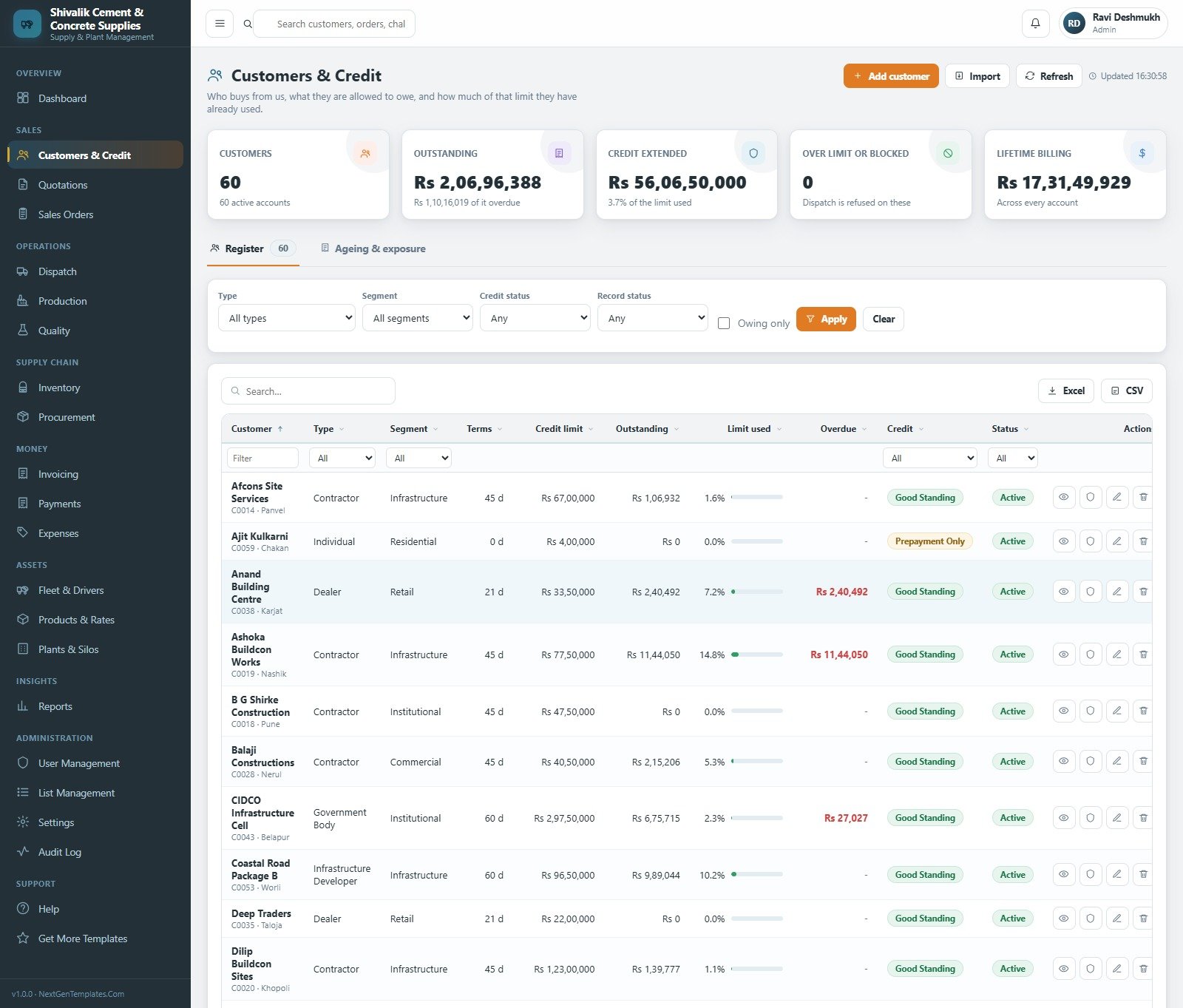
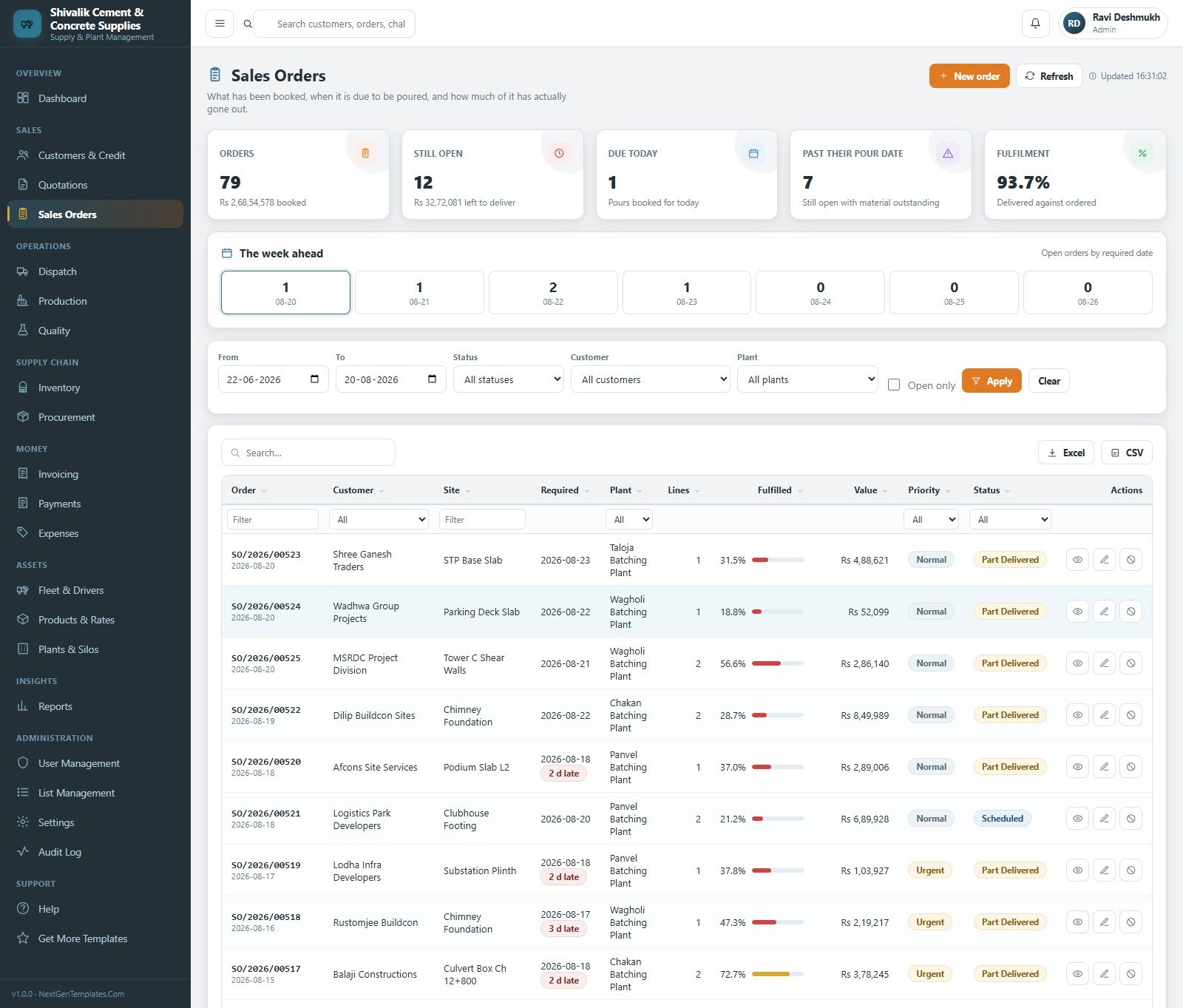
- 22 modules on one sidebar — Dashboard, Customers & Credit, Quotations, Sales Orders, Dispatch, Production, Quality, Inventory, Procurement, Invoicing, Payments, Expenses, Fleet & Drivers, Products & Rates, Plants & Silos, Reports, User Management, List Management, Settings, Audit Log, Help and Get More Templates.
- The challan is the unit of truth — quotation → sales order → delivery challan → batch → cube test → invoice → receipt. Nothing is sold until it leaves the gate on a challan, and nothing is billed twice.
- 7 roles with real separation — each role holds a module list plus Create, Edit, Delete, Export and Approve rights, re-checked on the server so a user cannot reach a module by editing the address bar.
- Credit control that blocks dispatch — every customer carries a limit, terms and live exposure. A load to a customer over their limit needs an approver, and the override is written to the audit trail with their name on it.
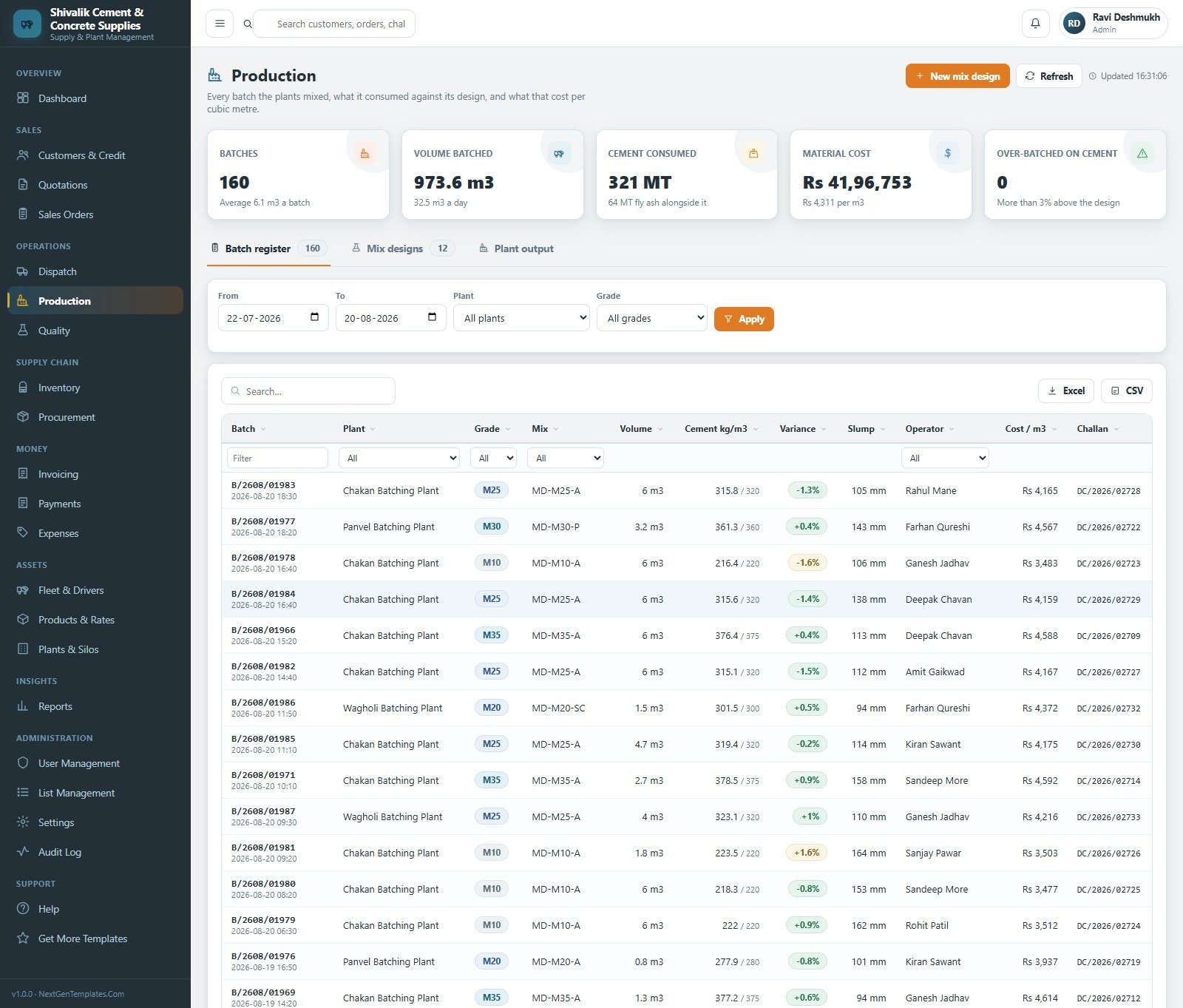
- Batch-against-design costing — 12 mix designs, cement kg/m³ actual against design, a variance percentage per batch and a cost per cubic metre the dashboard’s gross margin is computed from.
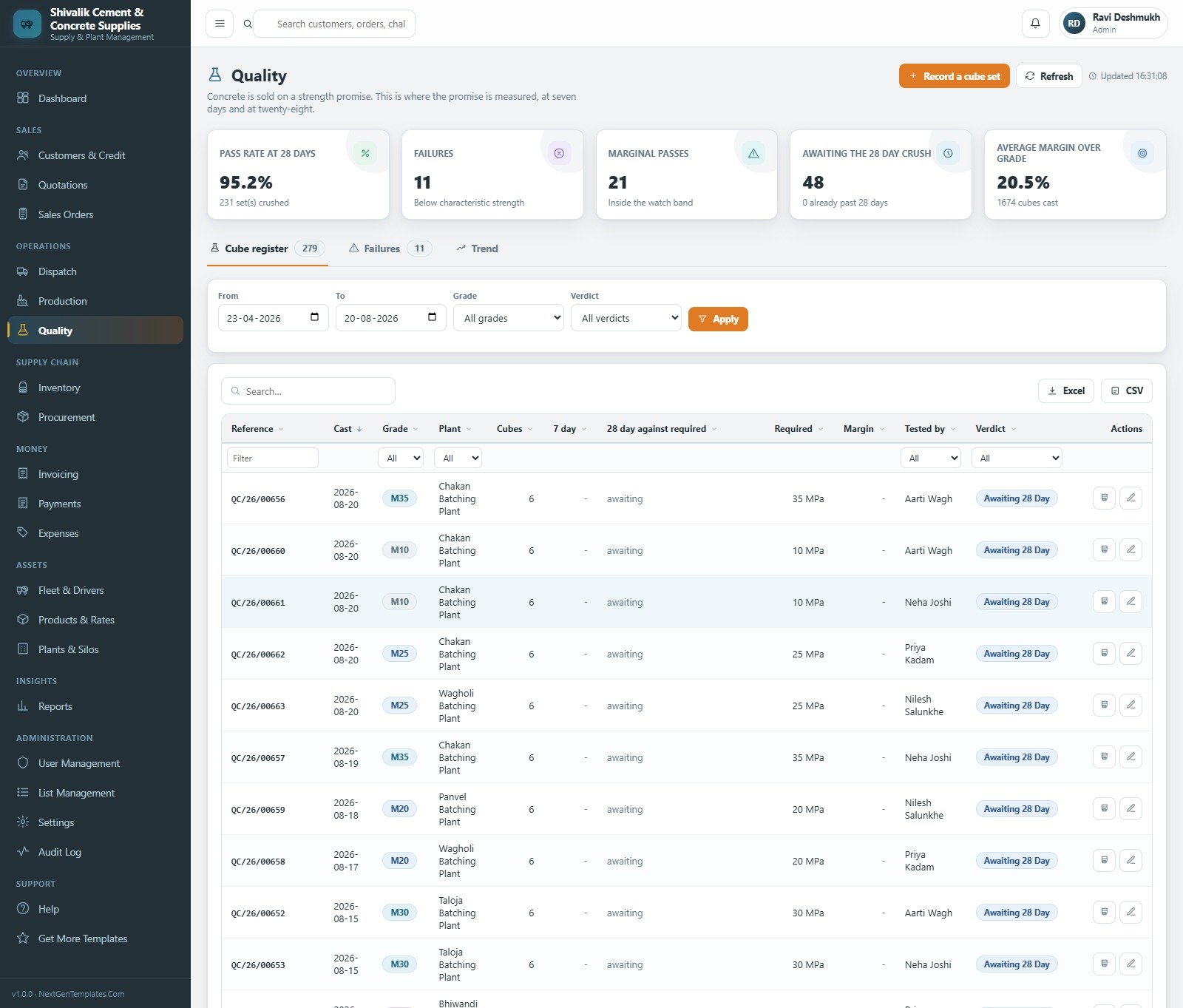
- Cube register at 7 and 28 days — pass rate, failures, marginal passes, cubes awaiting the 28-day crush and average margin over the required grade.
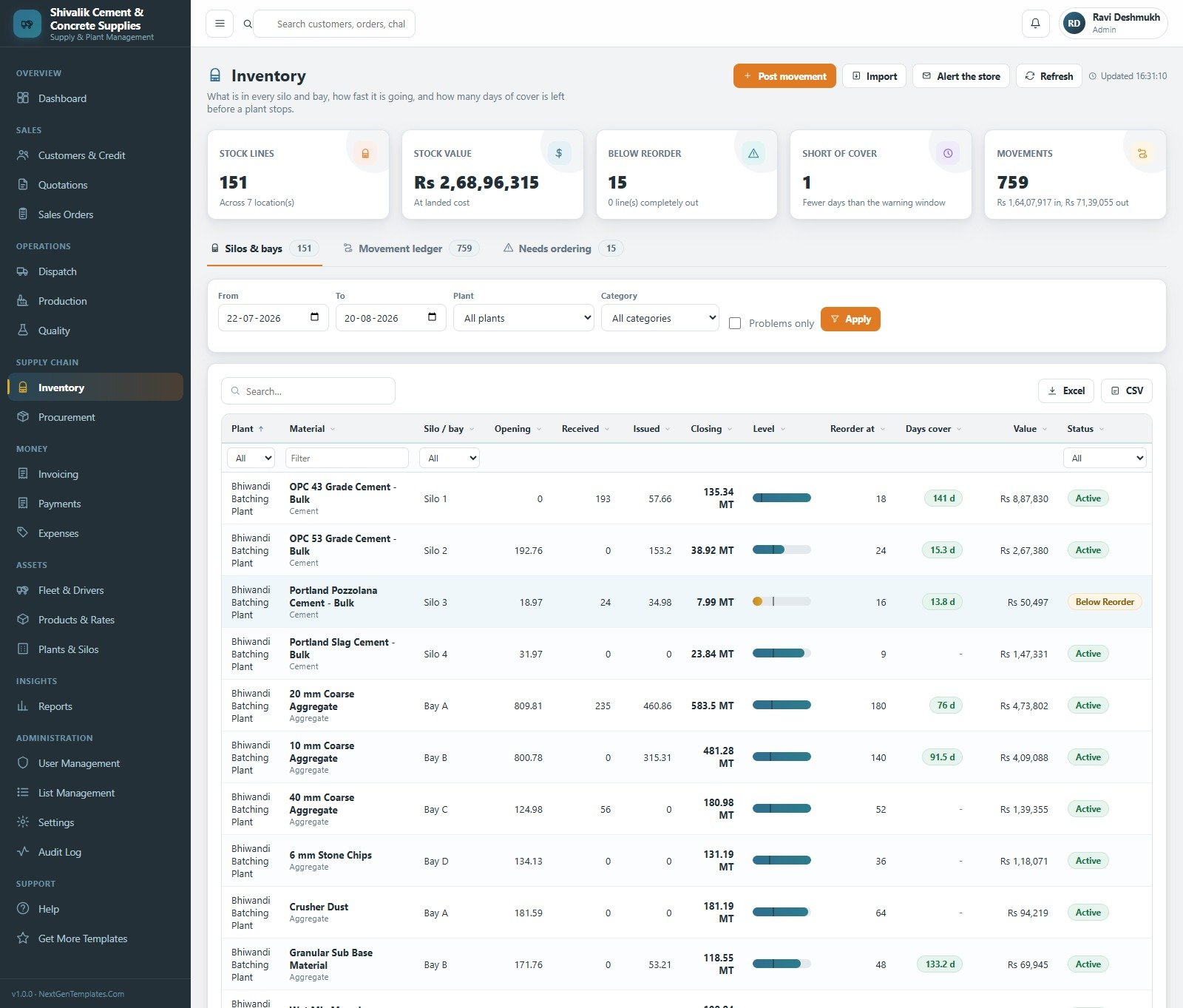
- Silo and bay stock with days of cover — 151 stock lines across 7 locations, opening/received/issued/closing, reorder levels and a warning window before a plant stops mid-pour.
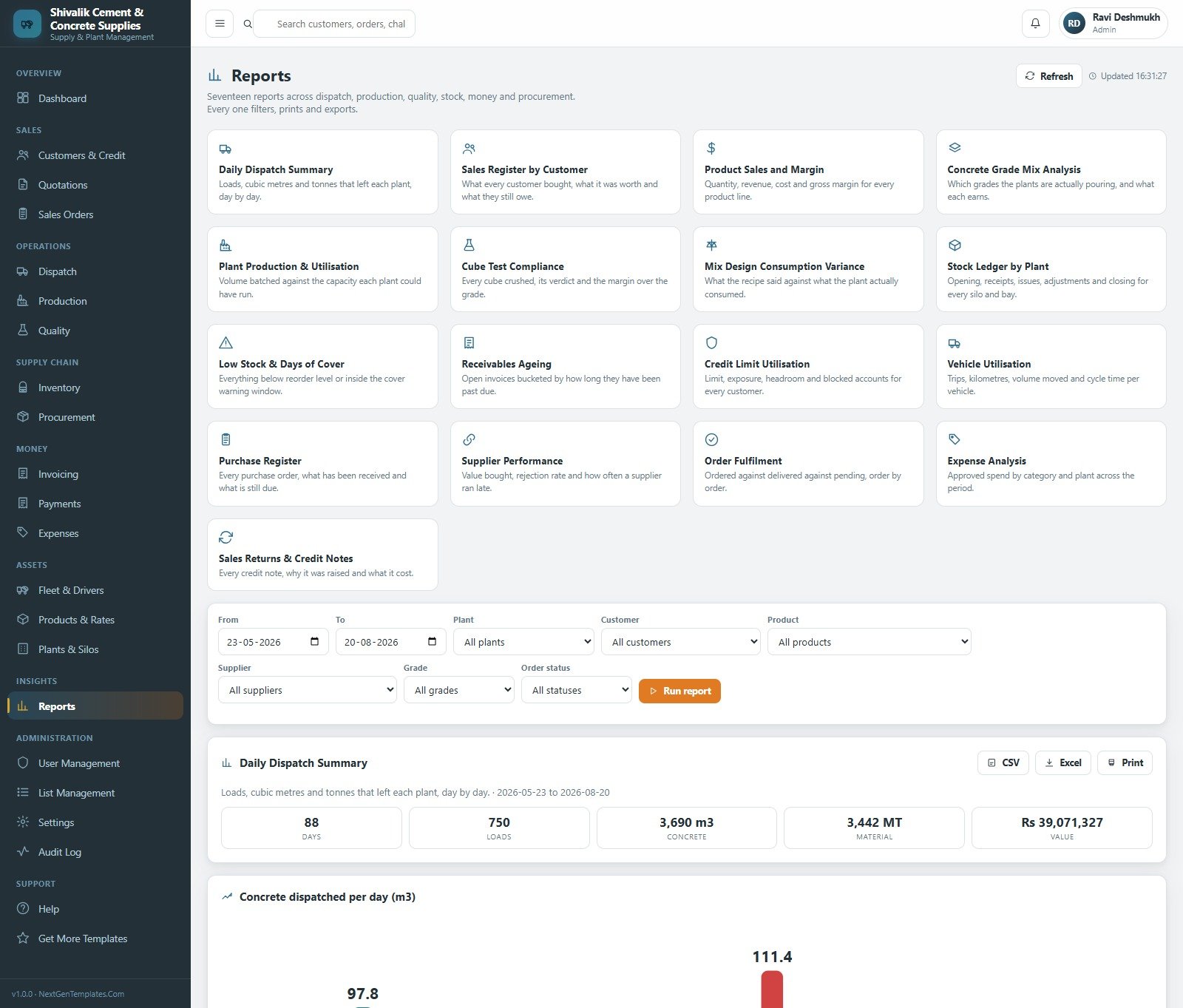
- 17 reports, each filtered, printed and exported to CSV or Excel — from Daily Dispatch Summary to Mix Design Consumption Variance and Credit Limit Utilisation.
- Printing at 3 inch, 4 inch or A4 so the same system prints a thermal gate slip and a full tax invoice.
- Yours to rebrand — five theme colours, editable business profile, 29 dropdown lists you control, plus a database archive that trims closed business out of the live file.
What’s Inside the Cement & Concrete Supplier Management System
You download a ZIP containing Code.gs, the Index HTML file, a full Word user manual and the deployment guide. Running setup() once builds the whole database — it is staged across 10 steps so a free Gmail account’s six-minute script limit cannot break it, and it resumes itself about a minute later if it runs out of budget.
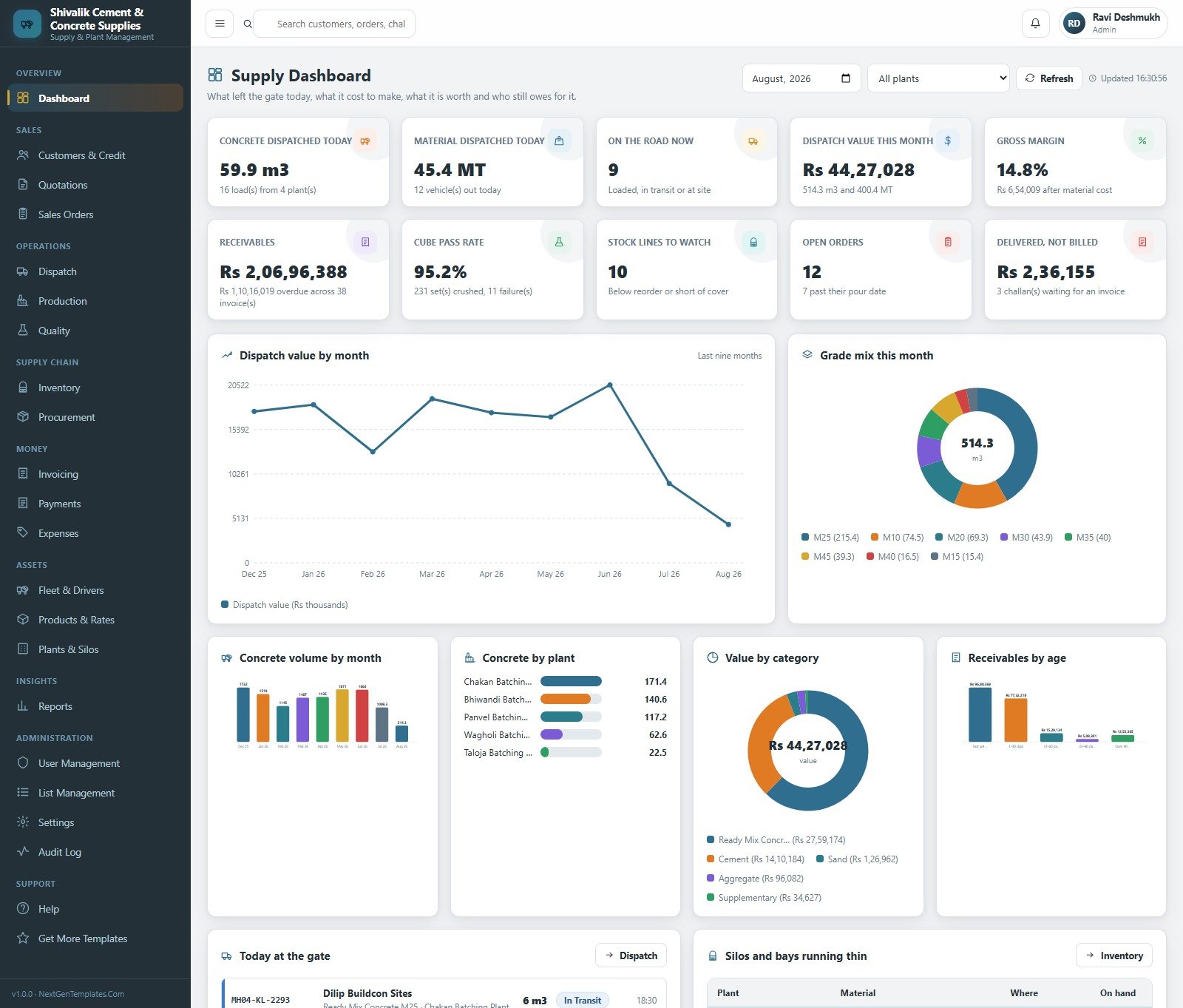
The Supply Dashboard answers the five questions a plant manager asks before nine in the morning: what went out today, what it cost, whether it passed, who owes us, and whether the silos will last the week. Ten KPI cards sit above Dispatch value by month, Grade mix this month, Concrete volume by month, Concrete by plant, Value by category and Receivables by age, with a live “Today at the gate” list and a “Silos and bays running thin” table underneath.
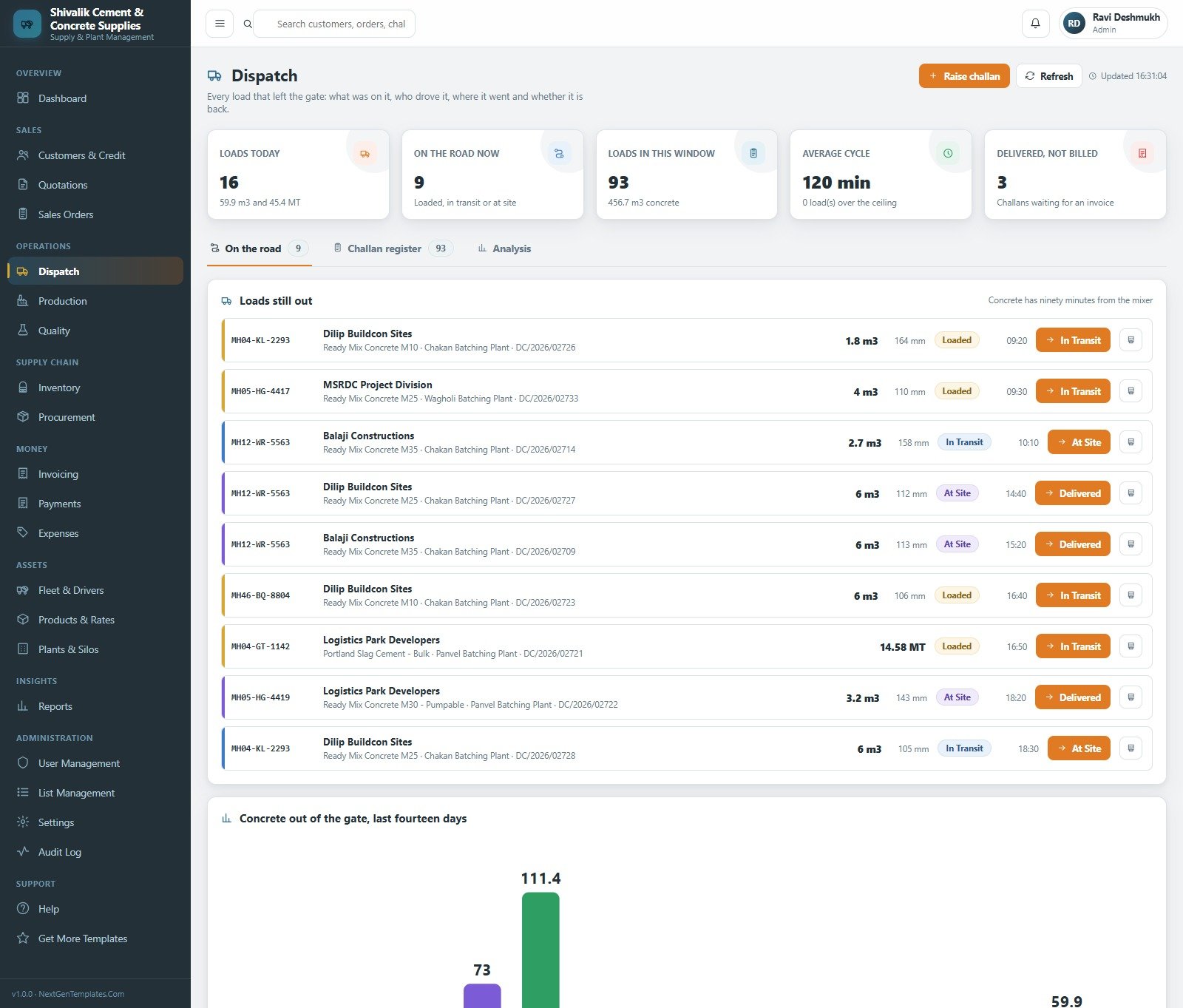
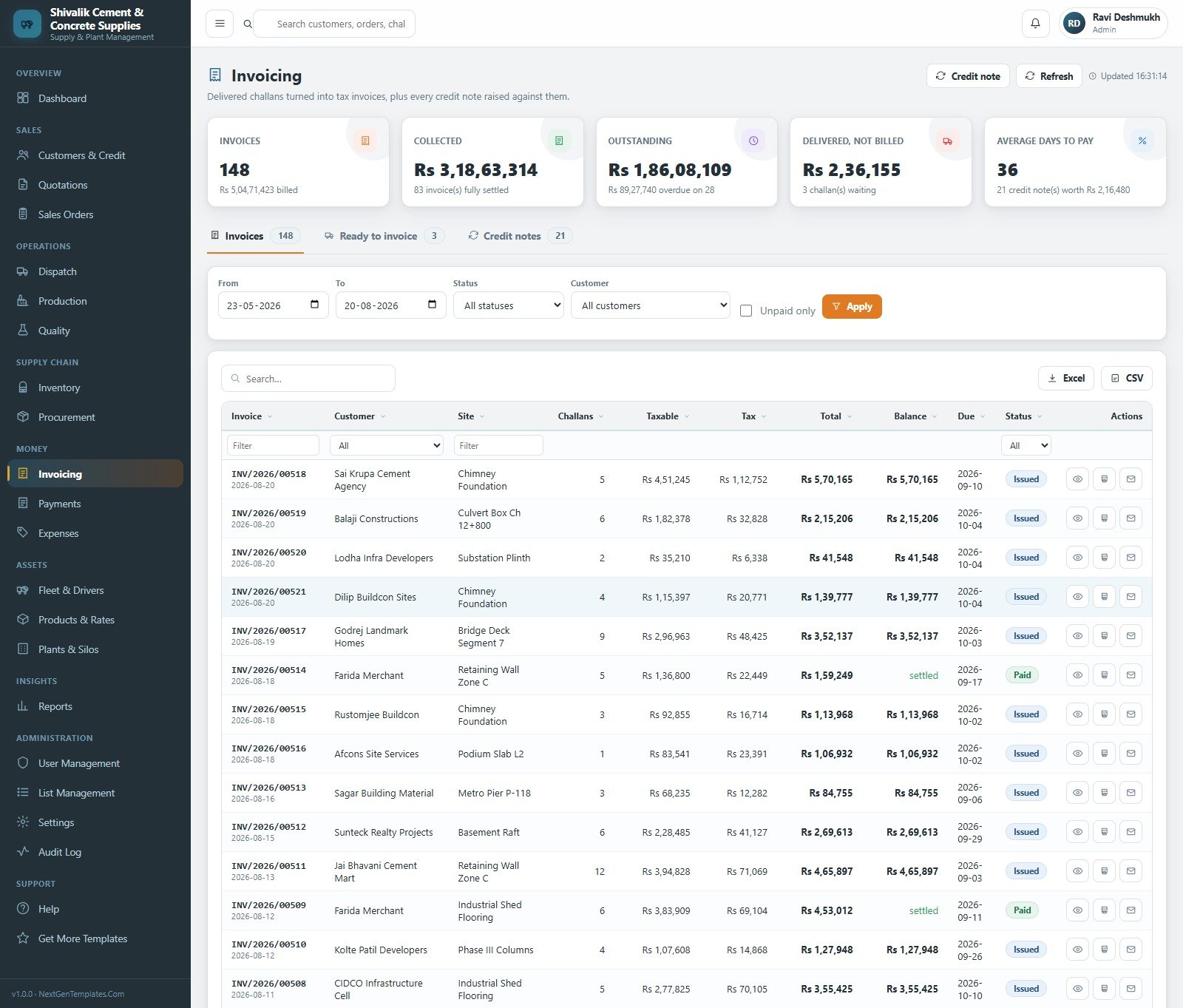
Dispatch tracks every load still on the road with its vehicle number, grade, volume, slump reading and challan, moving it Loaded → In Transit → At Site → Delivered, against a 90-minute-from-the-mixer clock and an average cycle time you set. Production logs every batch against its mix design; Quality records cube sets and their verdicts; Inventory and Procurement keep the silos filled; Invoicing, Payments and Expenses close the money loop.
Cement & Concrete Supplier Web App vs. Spreadsheets vs. Paid ERP — Where This Fits
| This Web App | Spreadsheets / Google Sheets | Paid ERP (Zoho Inventory, NetSuite) | |
|---|---|---|---|
| Cost | One payment, no renewal | Free, but you build it | Per user, per month, forever |
| Platform | Google Apps Script web app on your Drive | Sheets files | Vendor cloud |
| Setup time | Under 15 minutes, seeded | Weeks of building | Weeks of implementation |
| Real-time team collaboration | Yes — concurrent logins, server-side roles | Yes, but everyone sees everything | Yes |
| Mobile access | Yes — responsive browser app | Clumsy on phones | Yes |
| Customisable fields | Yes — you own the source | Yes | Limited to vendor options |
| Share with link | Yes — one deployment URL | Yes, file by file | Login required |
| Year-1 cost at 5 users | The price on this page | Your time | Typically four figures upward |
| Batch vs. mix-design variance | Built in, per batch | Manual | Add-on module |
| 7 & 28-day cube register | Built in, with trend | Manual | Rarely included |
| Credit block on dispatch | Built in, with approval trail | No | Yes |
Who This Template Is For — and Who It’s Not For
It is for ready-mix concrete suppliers running one to ten batching plants, cement and building-material dealers who challan and invoice daily, aggregate and crusher operators, and precast yards that need batch, cube and dispatch records in one place. It suits an owner who has outgrown a shared spreadsheet, wants role separation, and does not want another monthly bill.
It is not for you if you need automatic capture from a weighbridge or a batching-plant controller — this system records what you enter, it does not talk to plant hardware. It is not accounting software and it does not file GST returns, e-invoices or e-way bills, even though it stores GSTIN and HSN and prints tax on an invoice. It is not a testing laboratory: it is a register of cube results your engineer records, and it does not certify concrete against IS 456, ASTM C39, EN 206 or BS 8500. And if you have fewer than about twenty transactions a month, a spreadsheet is honestly enough.
How to Use the Cement & Concrete Supplier Management System
- Open the live demo above first and sign in as
admin, then again asdispatch. Ten seconds of that tells you whether the role model fits your team. - Deploy your own copy. Create a Google Sheet, open Extensions → Apps Script, paste
Code.gsand theIndexHTML file, then Deploy → New deployment → Web app, executing as you, accessible to anyone. - Run
setup()once — or press “Set up the database” on the sign-in card. It is idempotent, so you can run it as often as you like. - Change every seeded password the day you go live, then create a real account per person under User Management and disable the demo ones.
- Put your business in Settings — name, address, contact details, tax registration, printing size (3 inch, 4 inch or A4), theme colours and your own currency symbol.
- Load your own master data — Products & Rates, mix designs, plants and silos, customers with their credit limits, vehicles and drivers. The import wizard takes a spreadsheet for each.
- Work the chain daily: quote → order → raise the challan at the gate → log the batch → enter cube results the day they are crushed → invoice weekly → chase the collection worklist top down.
- Turn on the optional triggers —
dailyMaintenancerebuilds roll-ups and overdue flags,sendExpiryReminderswarns you before fitness, insurance, permit or driver licence dates pass.
Real-World Use Cases
Ravi, who owns five batching plants. He used to phone each plant for the day’s numbers. Now the dashboard shows concrete dispatched today, dispatch value for the month, gross margin after material cost and the loads still on the road, filtered by plant. Capacity utilisation on the Plants & Silos page tells him which plant is carrying the month and which is idle.
Neha, quality engineer across seven locations. She records six cubes per set, enters the 7-day and 28-day crush results, and the Failures tab surfaces anything below characteristic strength while the Trend tab shows margin over grade drifting. The Cube Test Compliance report prints for the client’s site engineer.
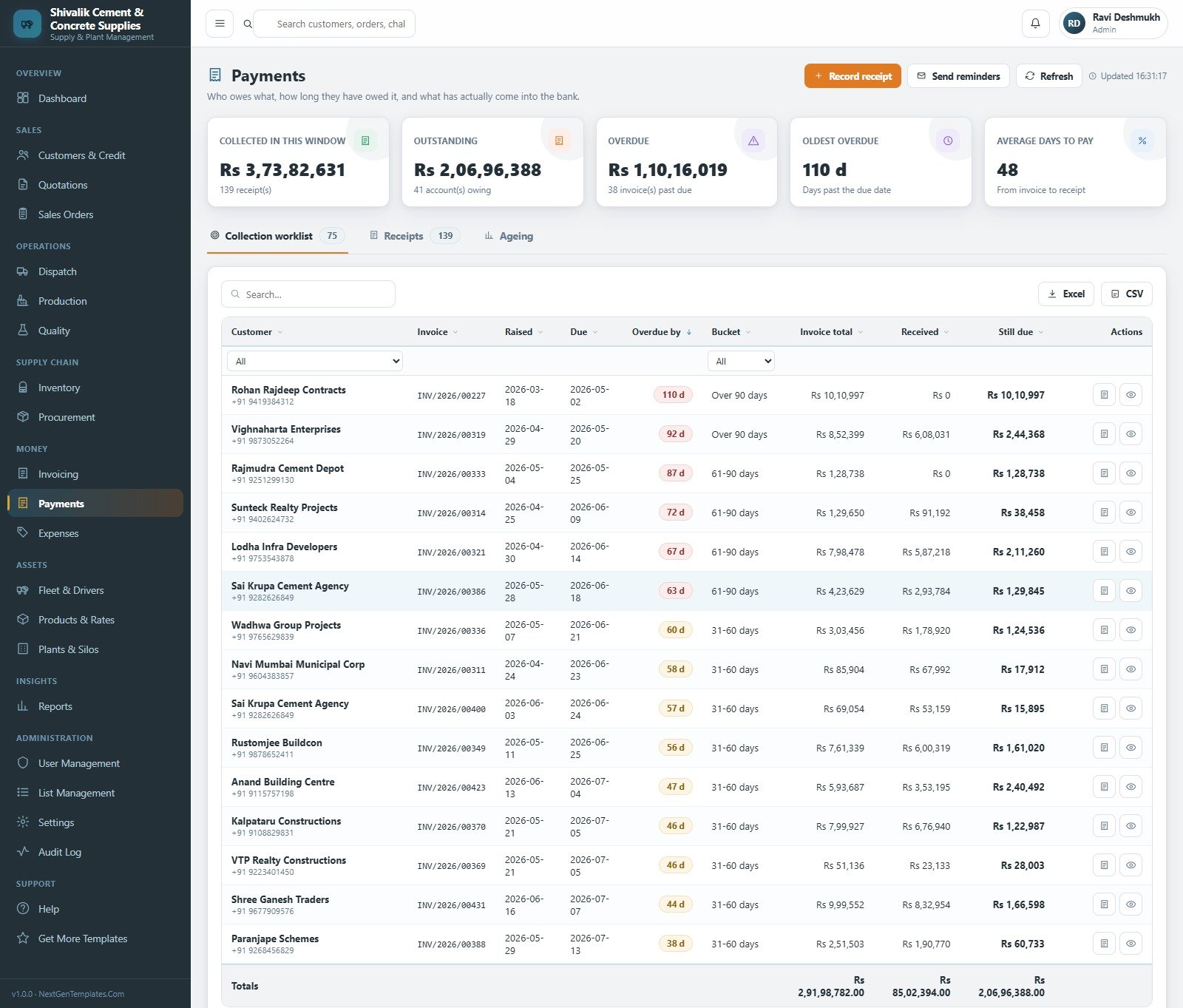
Meera, accounts officer. She opens the collection worklist sorted by days overdue, sees the oldest invoice at 110 days, records receipts against invoices, and watches “Delivered, not billed” so no challan is ever delivered and forgotten. She never sees the production screens, and the plant never sees hers.
Frequently Asked Questions
Can I try it before buying?
Yes. The live demo above is a fully seeded deployment. Sign in with any of the eight accounts listed, open every module, run the reports and print an invoice. Those credentials are public by design — the demo is a shared instance that resets, not a customer’s system.
Does this make my concrete compliant with IS 456, ASTM C39 or EN 206?
No. It is a record of the cube results your own engineer or laboratory produces. It stores them, charts the pass rate and prints the register. It does not perform, witness or certify any test, and it is not a substitute for a certified testing laboratory or for your own quality plan.
Will it connect to my weighbridge or batching-plant controller?
No. Batches, weights and slump readings are entered by a person. There is no hardware integration, and the system does not replace plant control software.
Does it file GST returns, e-invoices or e-way bills?
No. It stores GSTIN and HSN codes and prints tax lines on an invoice, but it is not accounting software and it does not submit anything to any tax portal. Export the registers and hand them to your accountant.
How many users can it handle?
It is a Google Apps Script web app on a Google Sheets database, which suits a team of roughly five to twenty-five people and a few thousand transactions a month. The built-in archive keeps the live file fast by moving closed business into a dated copy in your Drive.
Can I change the currency and the branding?
Yes. The seeded demo business is Indian, so the sample screens show that currency and number format. Settings → Business and Settings → Financial change the name, address, tax fields and currency symbol, Settings → Theme changes the five colours, and because you get the source you can change anything else.
What exactly do I download?
A ZIP with Code.gs, the Index HTML file, a complete Word user manual covering every module, and the deployment guide. No subscription, no per-seat fee, and nothing phones home.
About the Author
Built by PK – Microsoft Certified Professional with 15+ years of Excel, Google Sheets, and Power BI experience. Founder of NextGenTemplates, reaching 300K+ subscribers across YouTube channels. Every template is hand-built and tested before release.
Explore Related Templates
Working the same supply chain from a different angle? Try the Building Material Supplier Management System Web App for a dealer-side operation, or the Cement Mixer Production Dashboard in Excel and Cement Mixer Production Dashboard in Power BI if you want analysis rather than a transaction system. For a wider construction view, see the Construction Dashboard in Excel. Browse every system in the Mini Web Apps category.
One payment. Full source. Your Google account. Open the live demo, sign in as admin, and if it runs your yard the way you already work, buy it and deploy your own in under fifteen minutes. Read the full walkthrough on NeoTechNavigators.
Last updated: 21 August 2026





























Reviews
There are no reviews yet.