

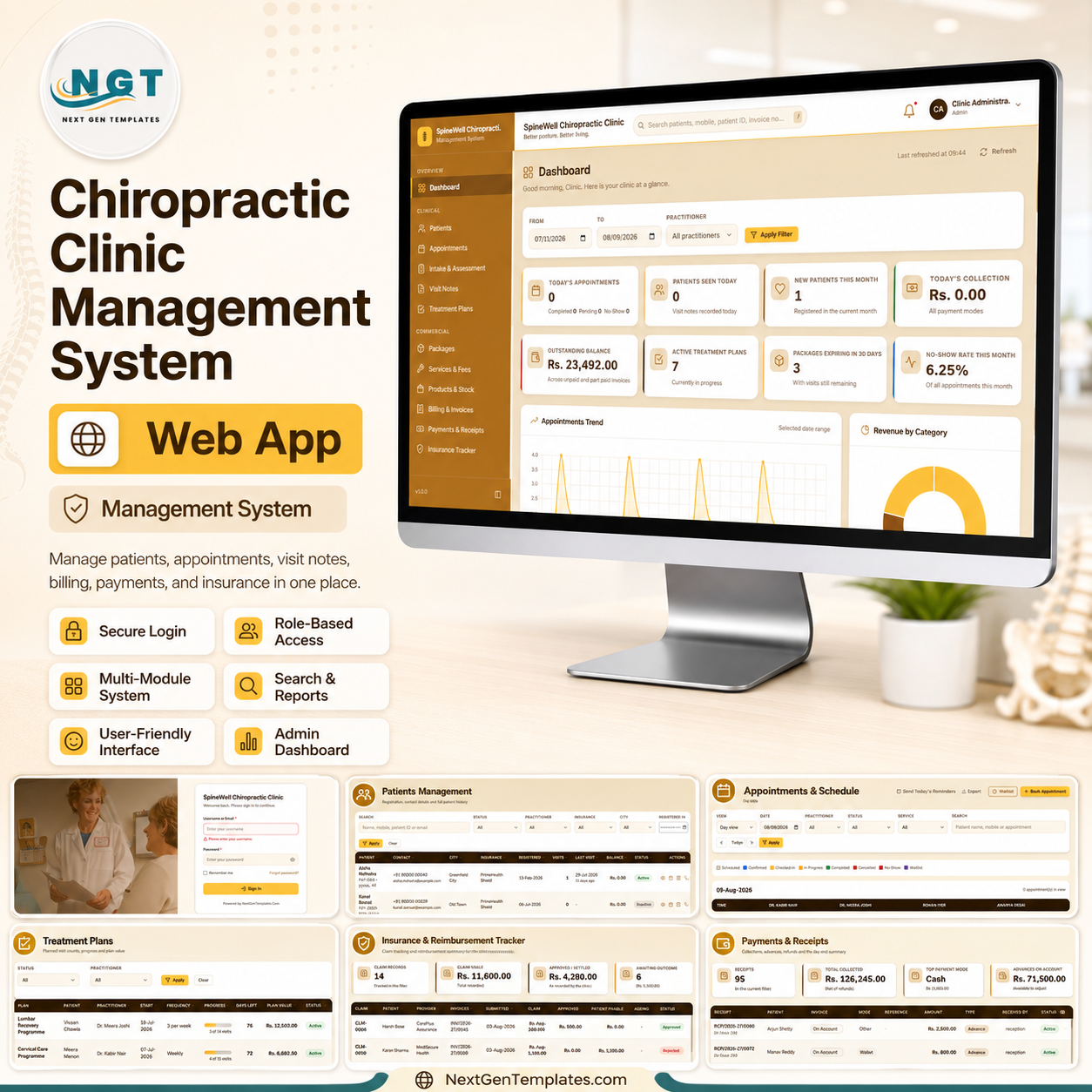
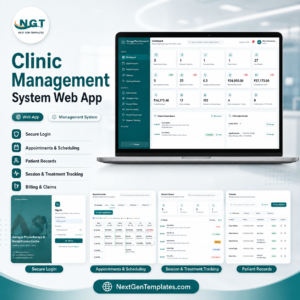
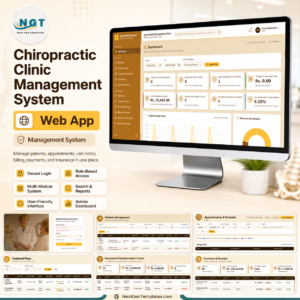
The Chiropractic Clinic Management System Web App runs 20 connected modules inside one Google Apps Script web app, with a Google Sheet as the database. It tracks 8 dashboard KPIs, records SOAP visit notes with before-and-after pain scores, and deducts visit credits from patient packages automatically when an invoice is raised. Deployment takes about 10 minutes: make a copy, deploy as a web app, sign in and start booking.
🌍 Join 8,400+ teams in 40+ countries using NextGenTemplates to replace paid SaaS tools with one-time-purchase Excel, Google Sheets, Power BI and web app templates.
✅ Instant download · One-time payment · No subscription · No per-user fees · Lifetime access
🔑 Key Features of the Chiropractic Clinic Management System Web App
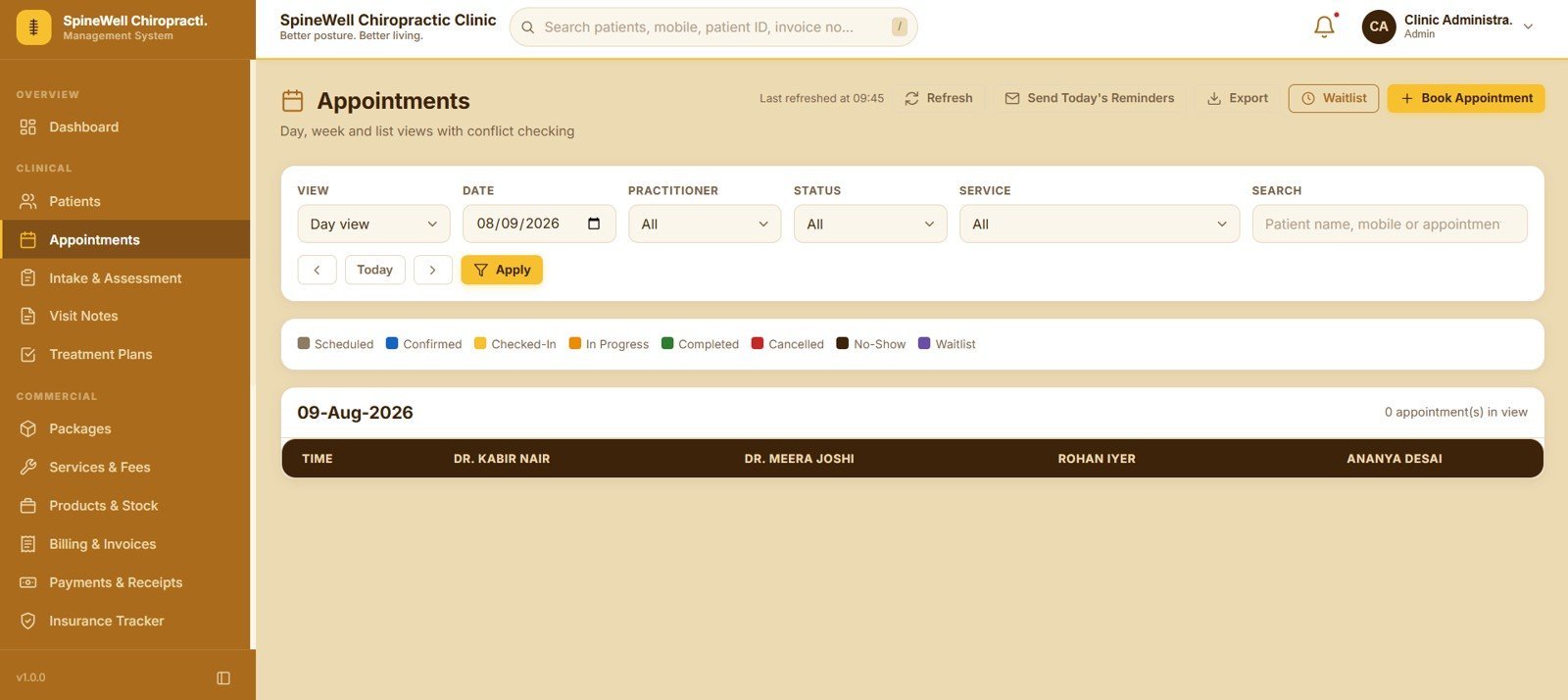
🗓️ Appointment scheduling with conflict checking. The Appointments screen offers Day, Week and List views and moves each booking through seven statuses — Scheduled, Confirmed, Checked-In, In Progress, Completed, Cancelled and No-Show. A waitlist holds overflow patients and one button sends reminders for the whole day’s list.
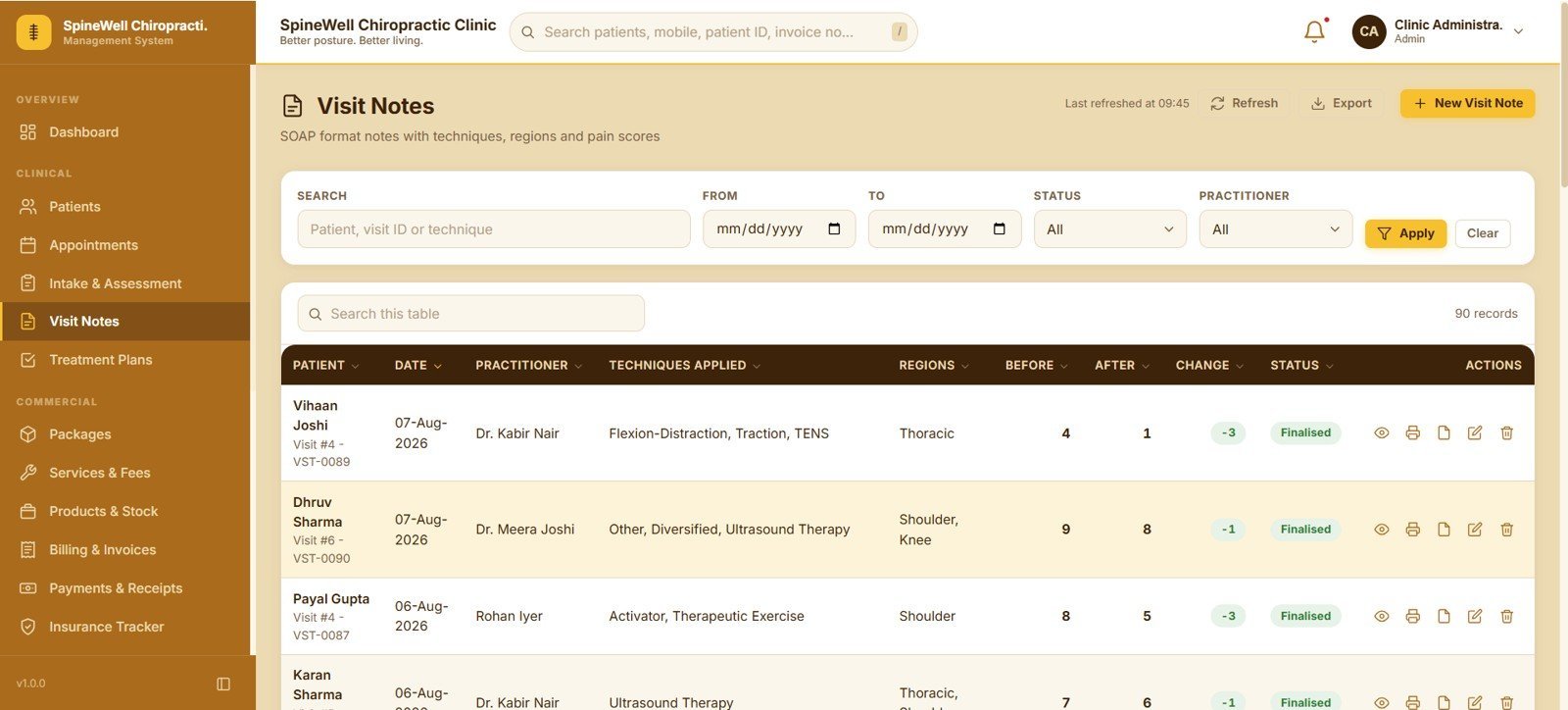
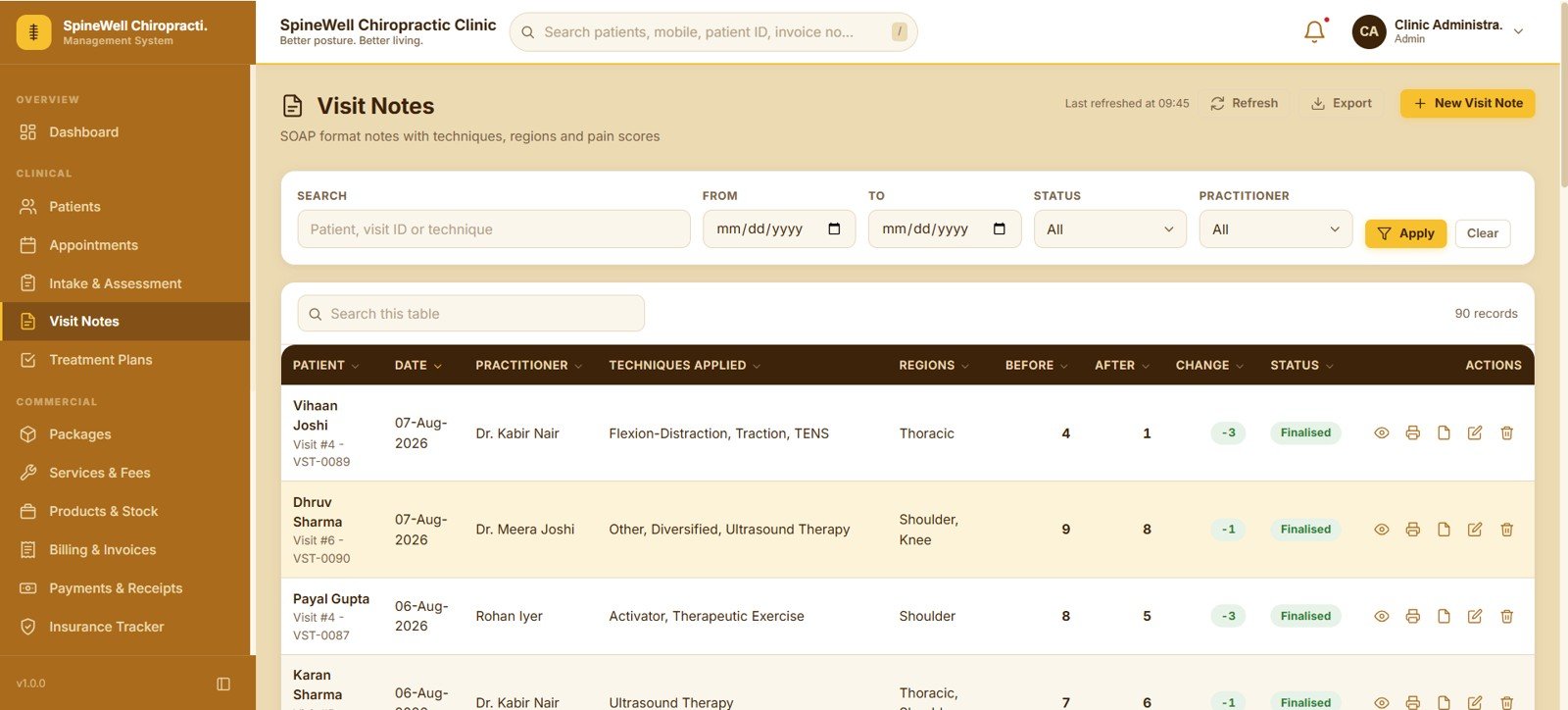
🦴 SOAP visit notes with pain scoring. Every visit note records the techniques applied, the spinal regions treated, and a before score, an after score and the change between them. Note snippets can be pre-loaded from List Management so practitioners type less between patients.
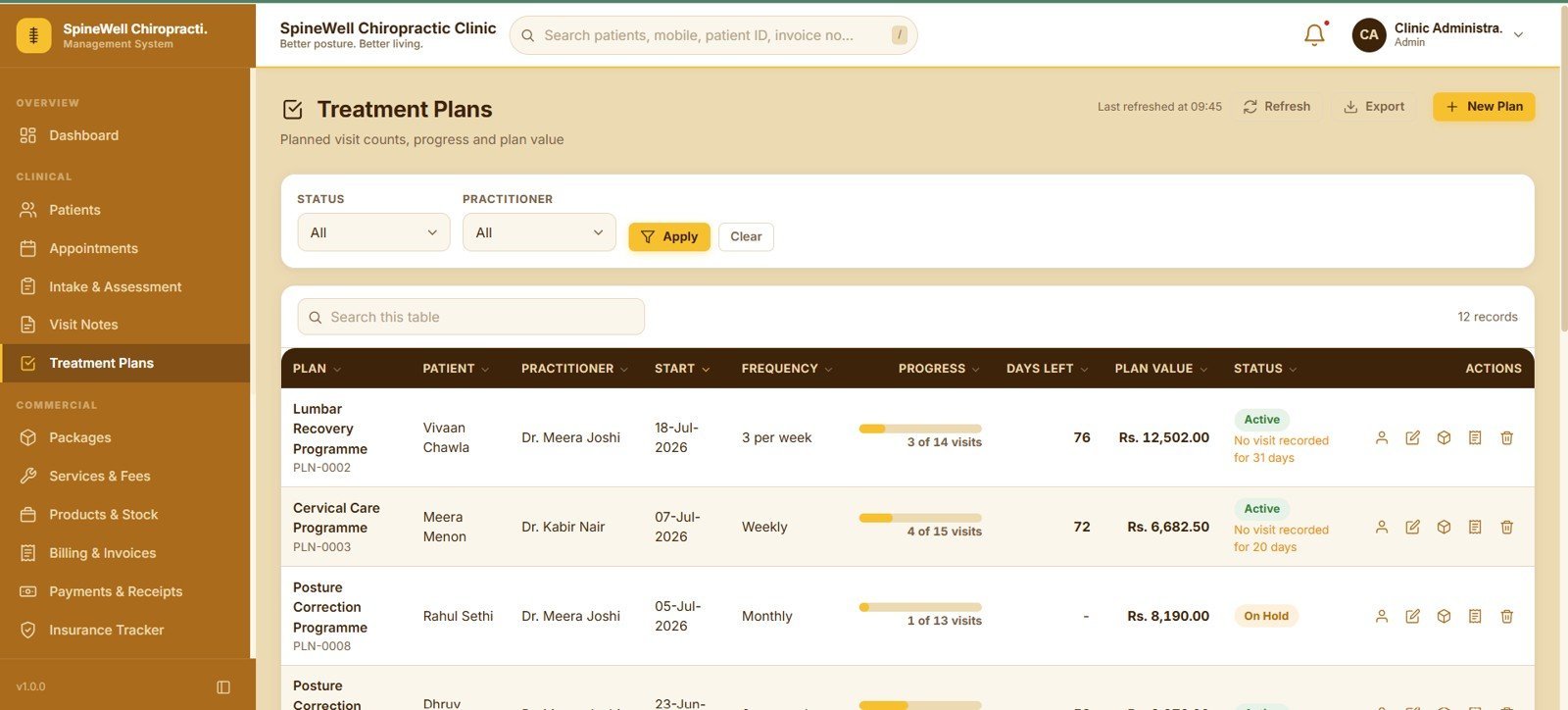
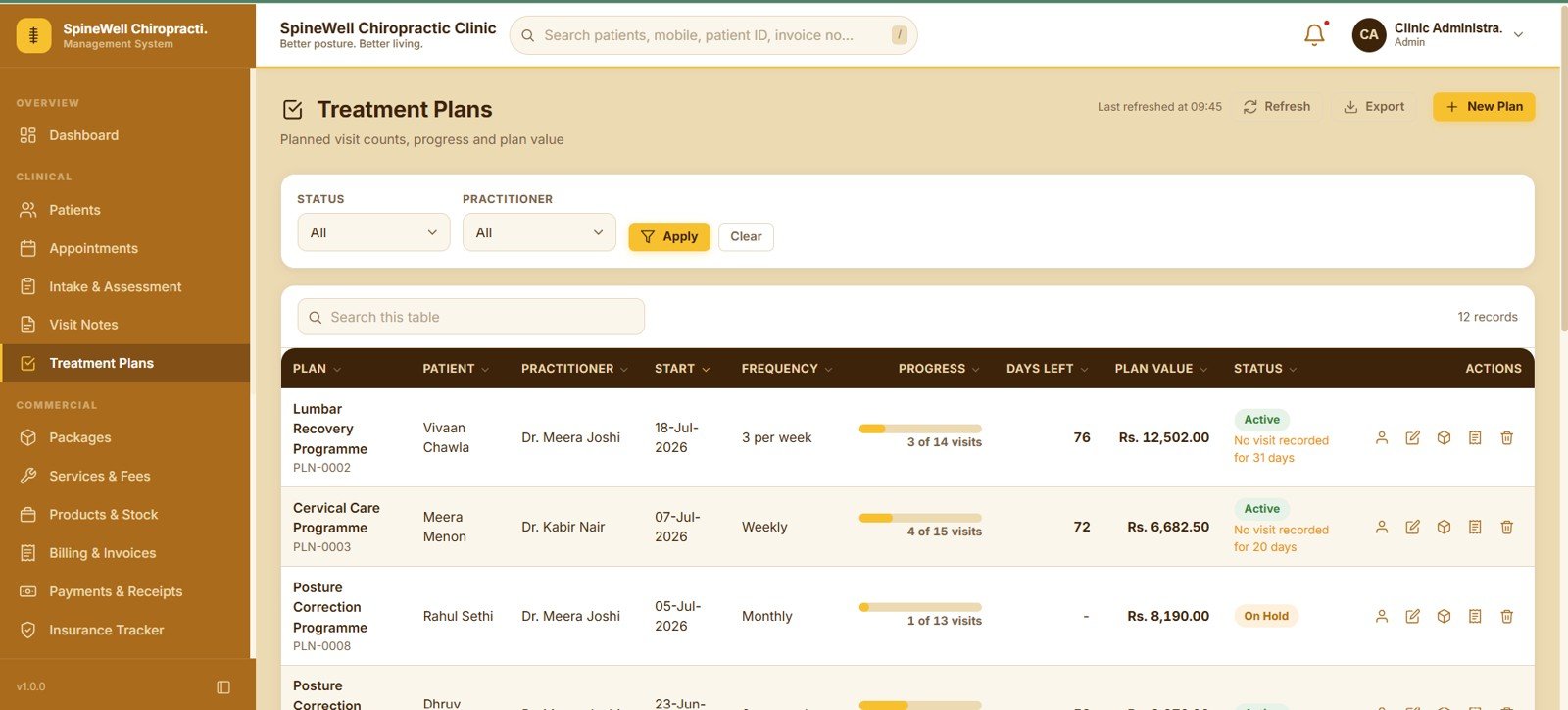
📈 Treatment plans that measure themselves. Each plan stores the planned visit count, visit frequency, start date, plan value and status, then shows a live progress figure and days remaining so front desk staff know exactly who is behind schedule.
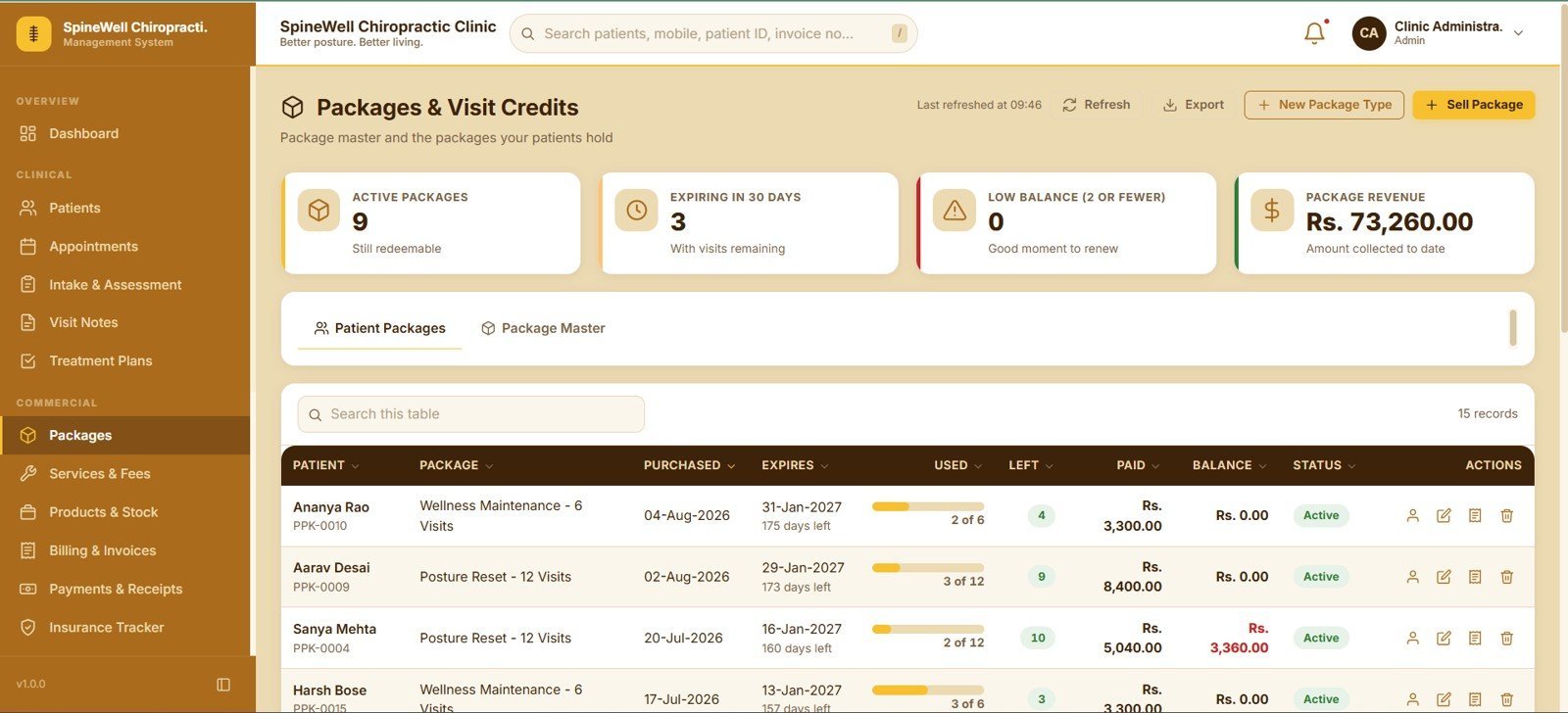
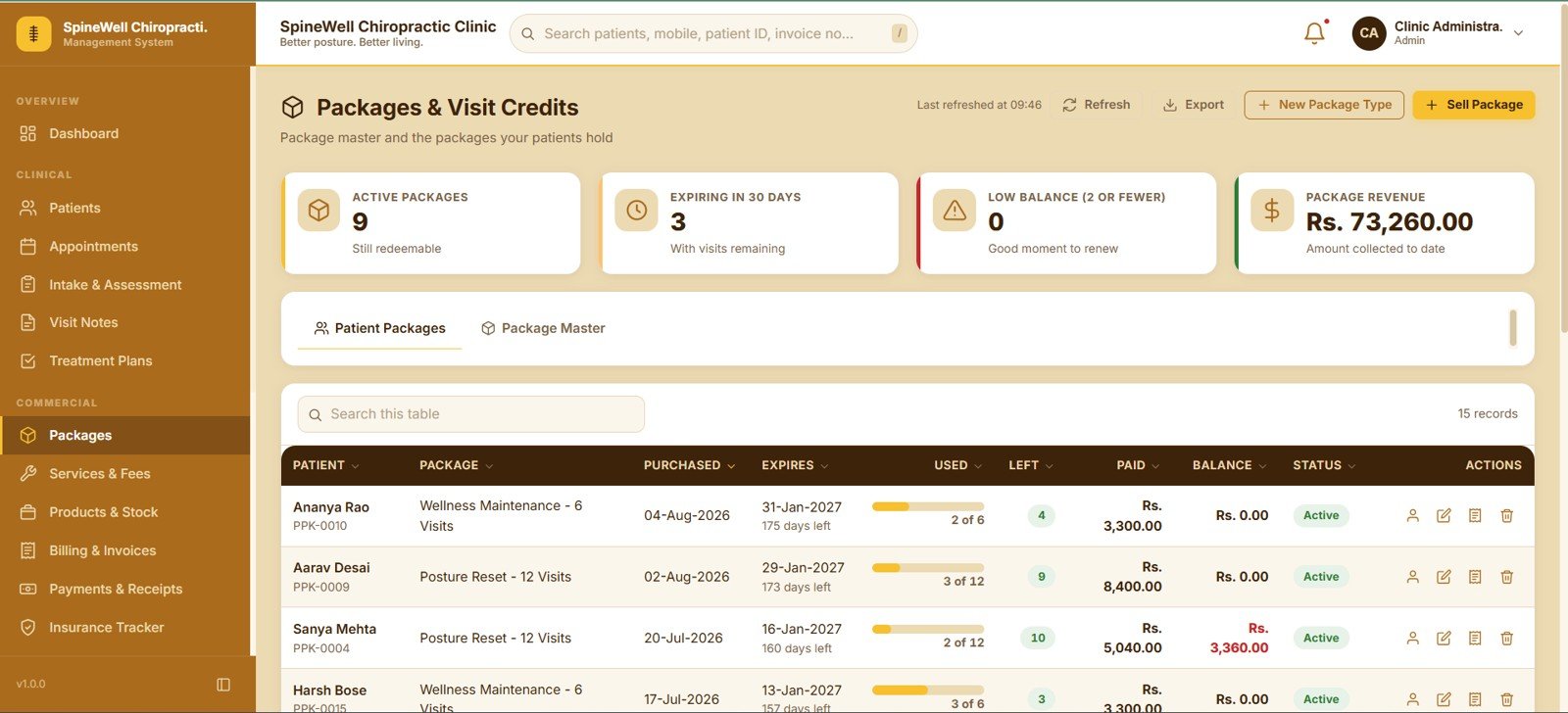
🎫 Packages and visit credits. Sell a package, and credits are deducted at billing time. Four cards track Active Packages, Expiring in 30 Days, Low Balance (2 or fewer), and Package Revenue, so nobody runs out of credits without a renewal conversation.
🧾 Billing that combines three revenue types. One invoice can carry services from the fee schedule, retail products from inventory, and package redemptions together, with sub total, discount, tax, total, paid and balance columns on every row.
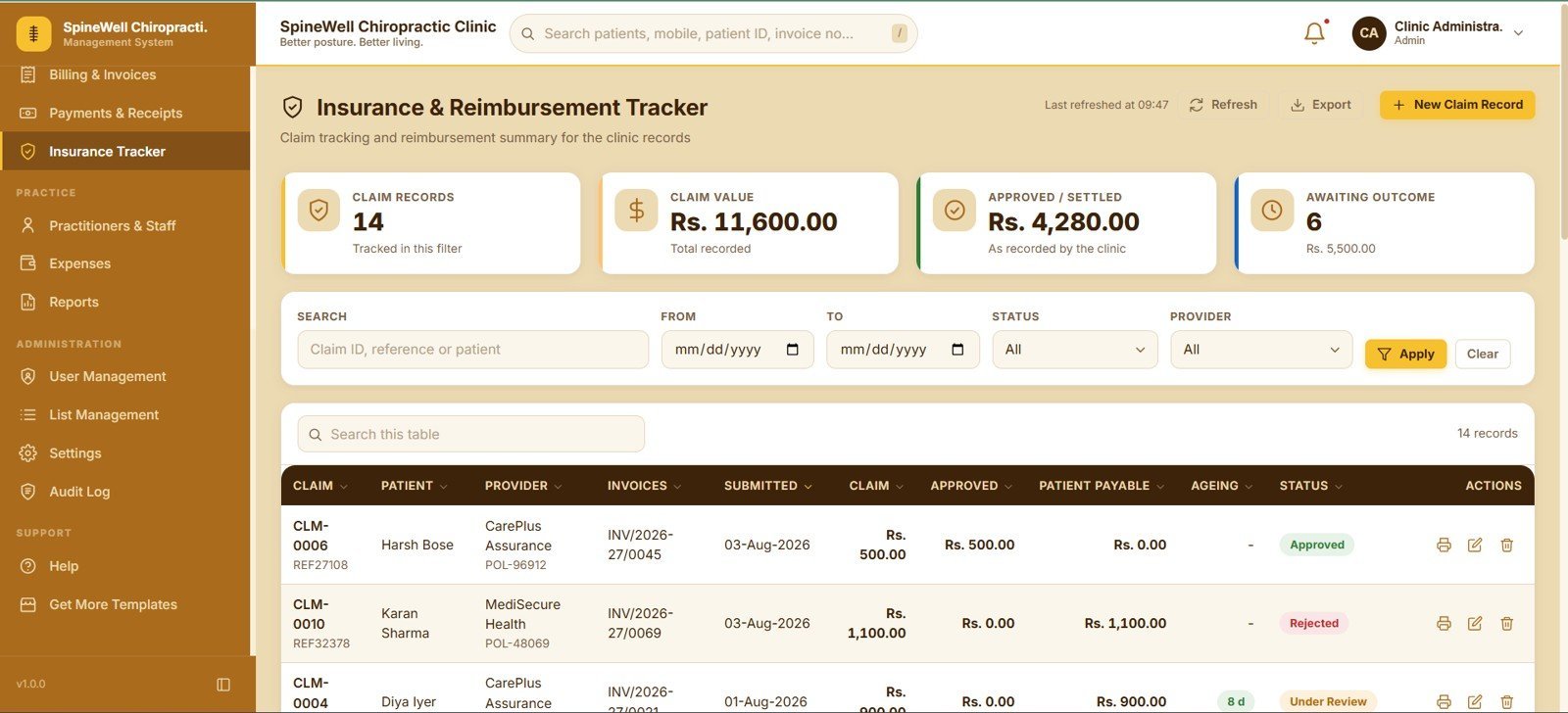
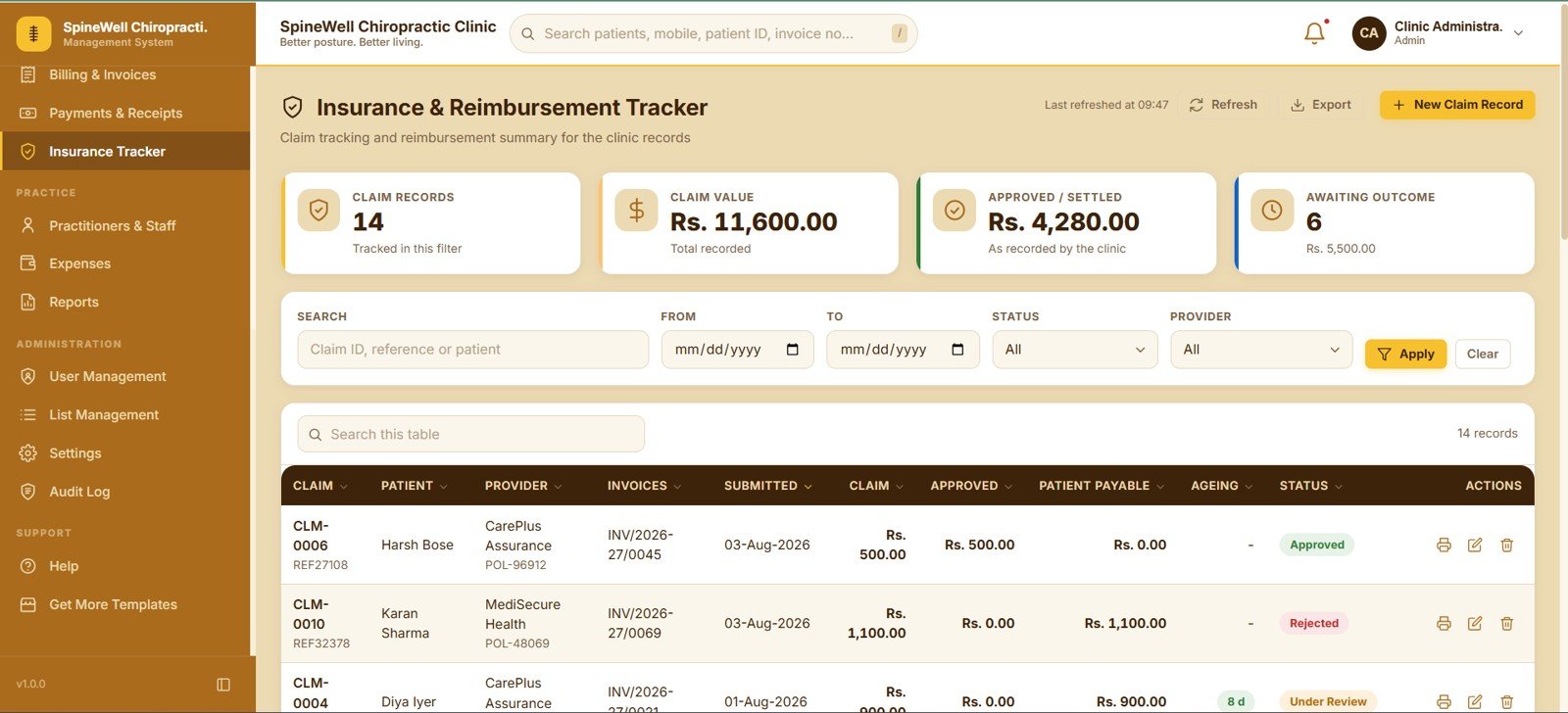
🏥 Insurance and reimbursement tracking. Claim records store the provider, linked invoices, submitted date, claim amount, approved amount, patient payable and ageing, so a clinic knows what is settled and what is still awaiting an outcome.
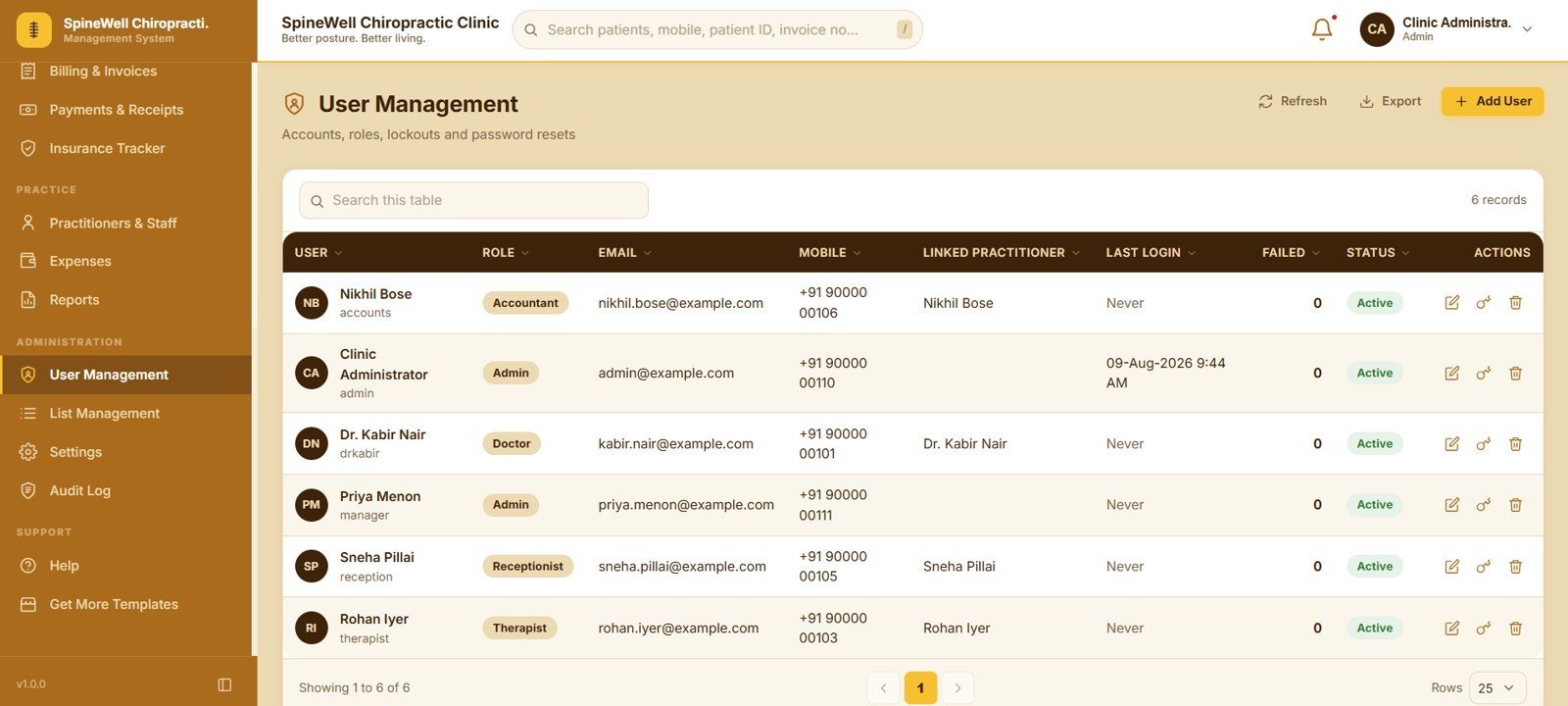
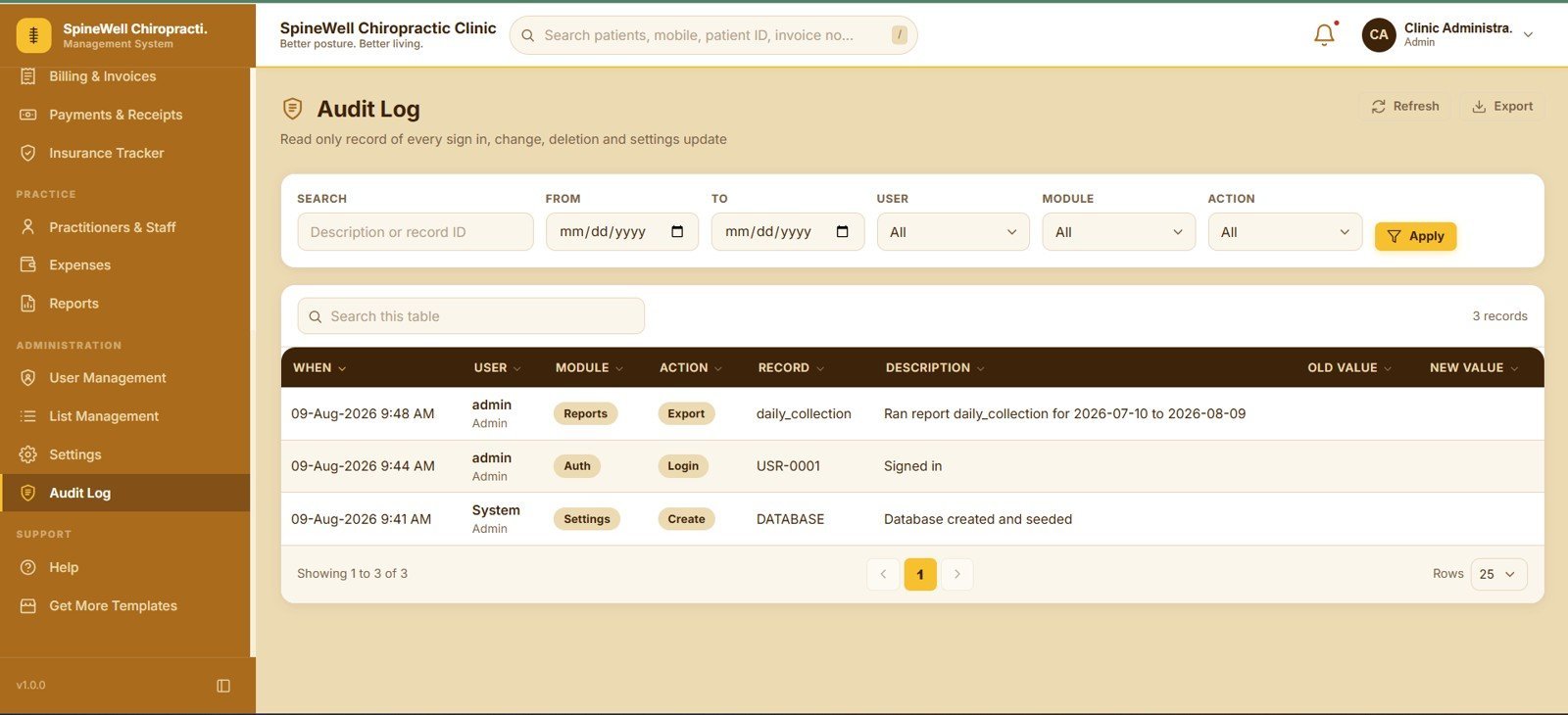
🔐 Role-based access with a full audit trail. User Management controls accounts, roles, linked practitioners, lockouts and password resets, while a read-only Audit Log stores every sign-in, edit, deletion and settings change with the old value and the new value side by side.
📦 What’s Inside the Chiropractic Clinic Management System Web App
1. Login Page
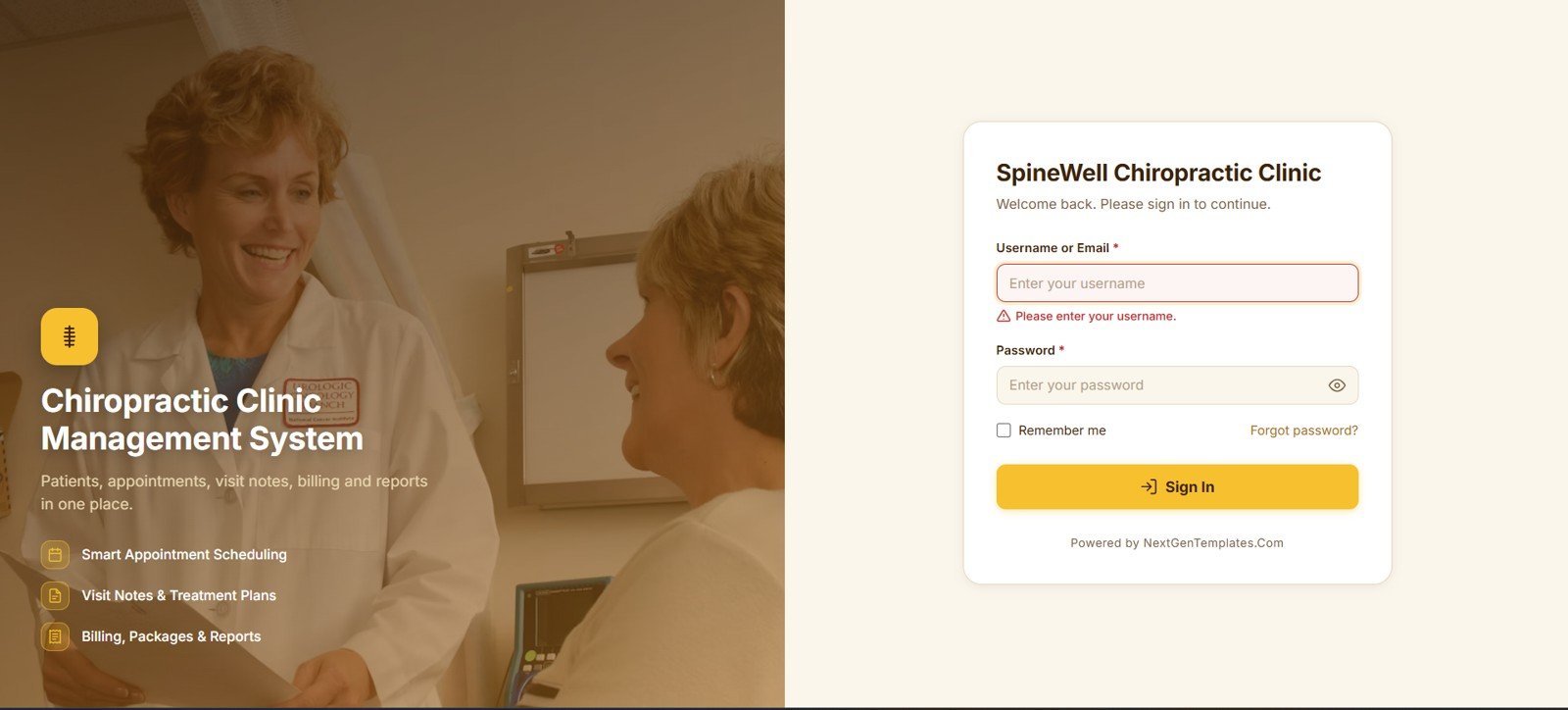
The sign-in screen for the clinic workspace, with username or email, password, a Remember Me option and a Forgot Password link. The side panel highlights the three pillars of the app — smart appointment scheduling, visit notes and treatment plans, and billing, packages and reports.
🚀 Try the Live Demo Before You Buy
We have deployed this web app in our own Google account so you can test every page, every role — with real sample data — before purchasing. No signup, no email required.
🔑 Test Login Credentials
Sign in as admin to explore full system access, or try any of the role-specific logins below — Doctor, Receptionist, Therapist, or Accountant — to see exactly what each staff role sees and can do.
💡 What you get after purchase: The full source code (Code.gs + Index.html) plus a step-by-step deployment guide so you can deploy your own private instance in your own Google account in under 15 minutes.
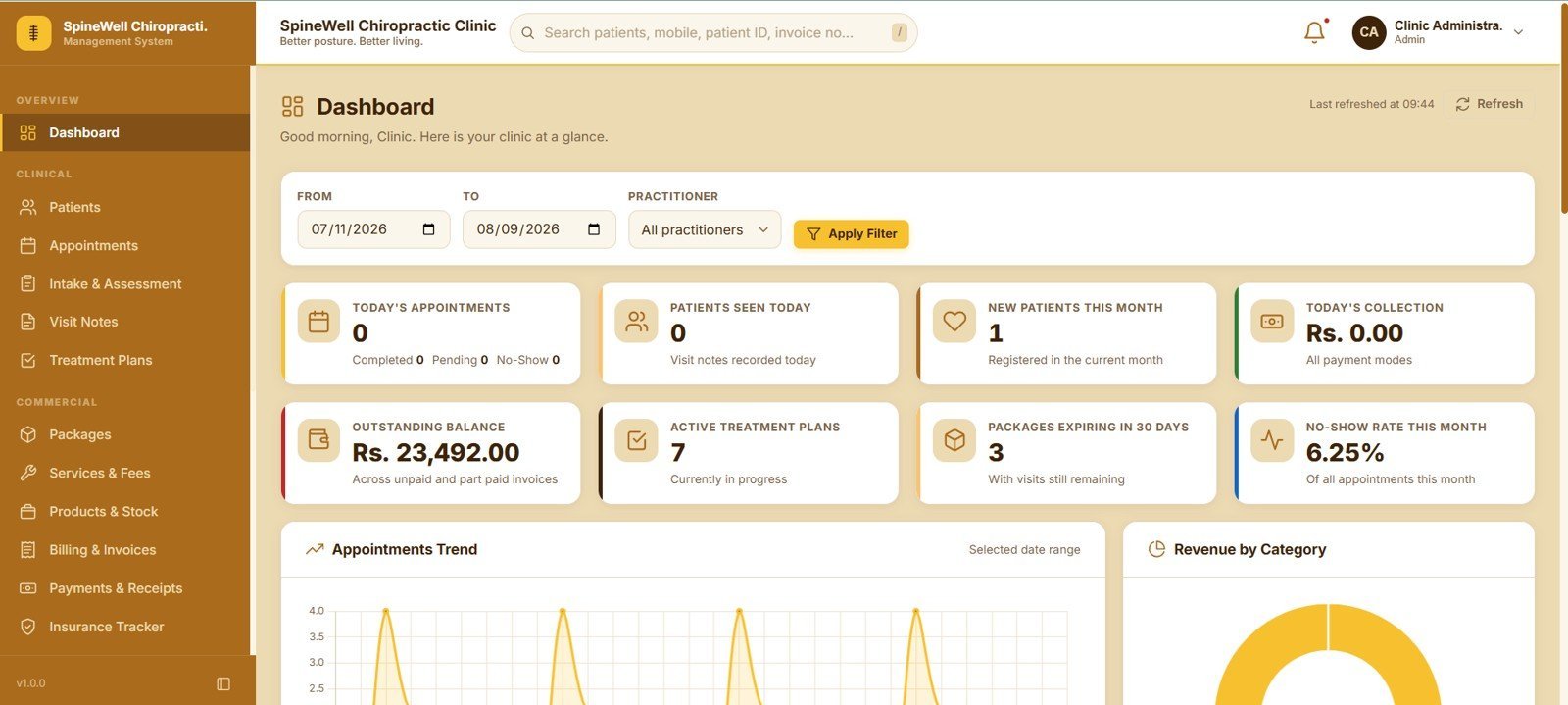
2. Dashboard
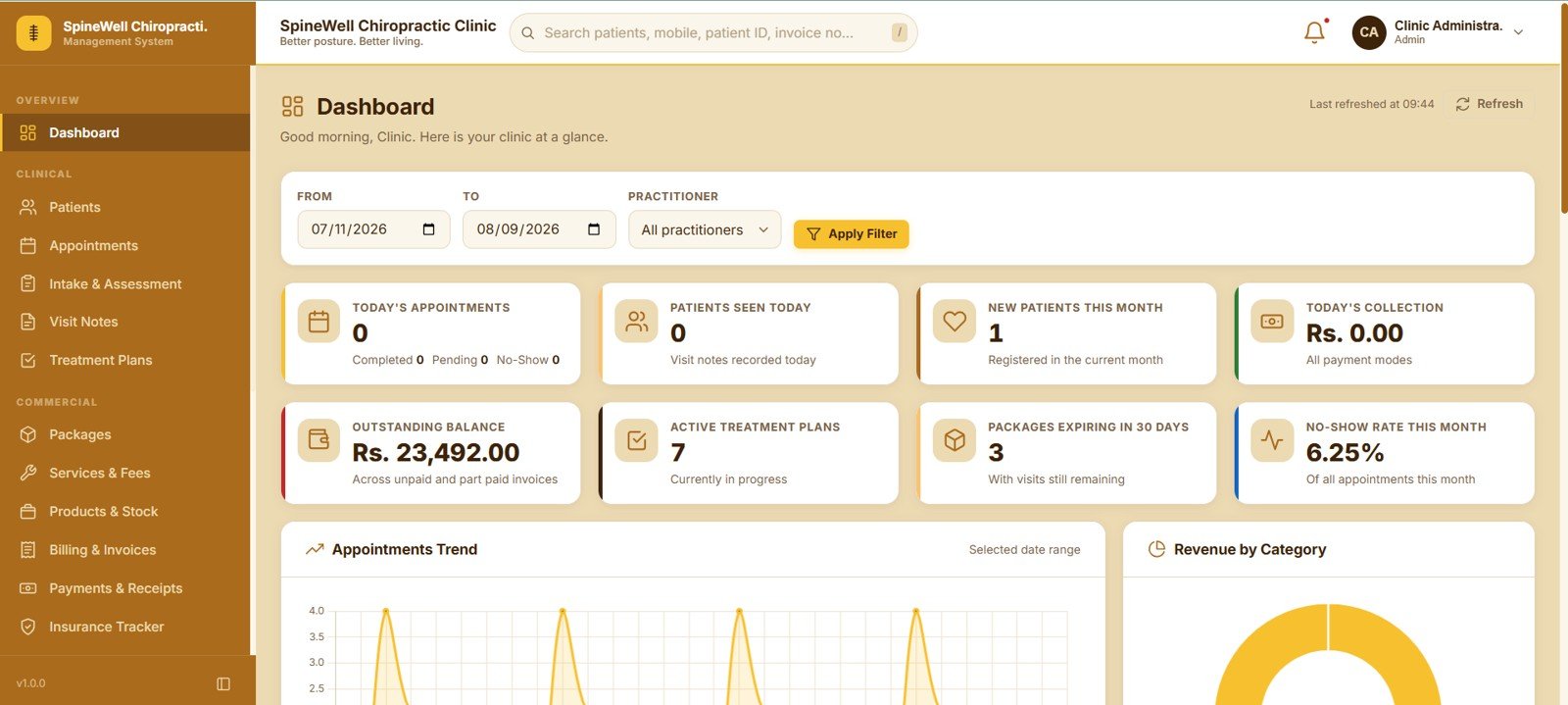
Eight cards give the state of the clinic at a glance: Today’s Appointments, Patients Seen Today, New Patients This Month, Today’s Collection, Outstanding Balance, Active Treatment Plans, Packages Expiring in 30 Days and No-Show Rate This Month. Below them sit an Appointments Trend panel and a Revenue by Category panel, all controlled by From Date, To Date and Practitioner filters.
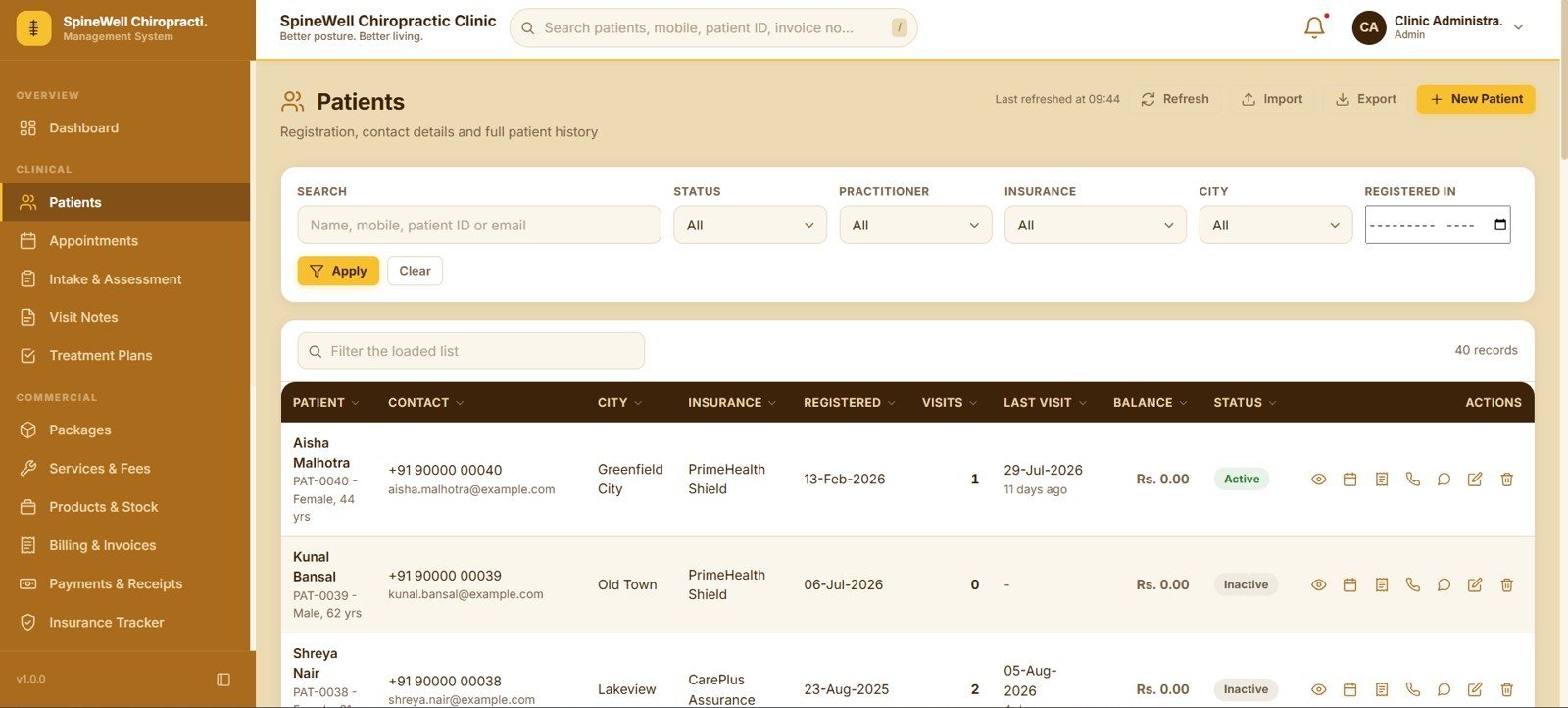
3. Patients
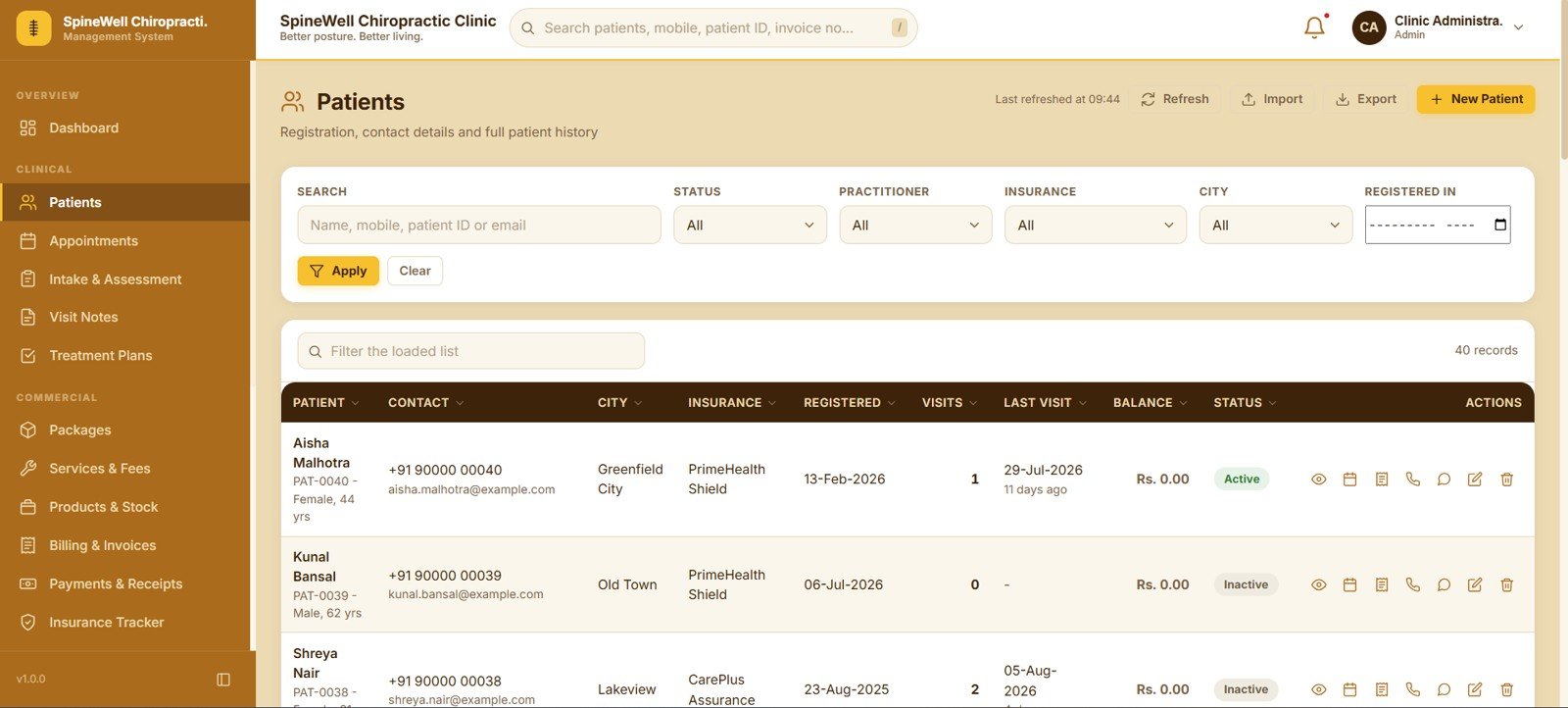
The patient register holds registration details, contact, city, insurance provider, registration date, total visits, last visit date, outstanding balance and status. Search plus Status, Practitioner, Insurance, City and Registered In filters narrow the list instantly, and Import, Export and New Patient sit in the toolbar.
4. Appointments
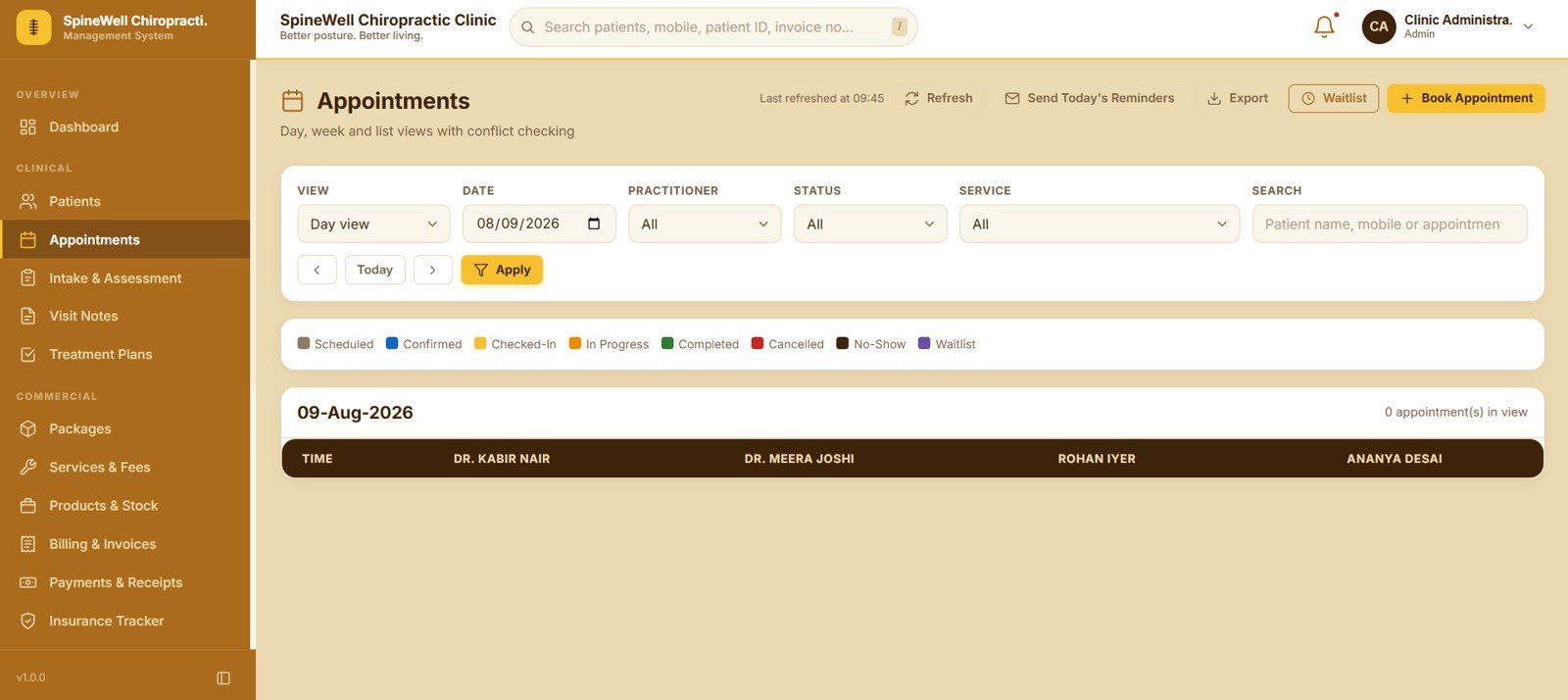
Day, Week and List views show every practitioner column side by side with time slots down the left, and the app checks for conflicts before confirming a booking. Send Today’s Reminders, Export, Waitlist and Book Appointment sit above filters for Date, Practitioner, Status and Service.
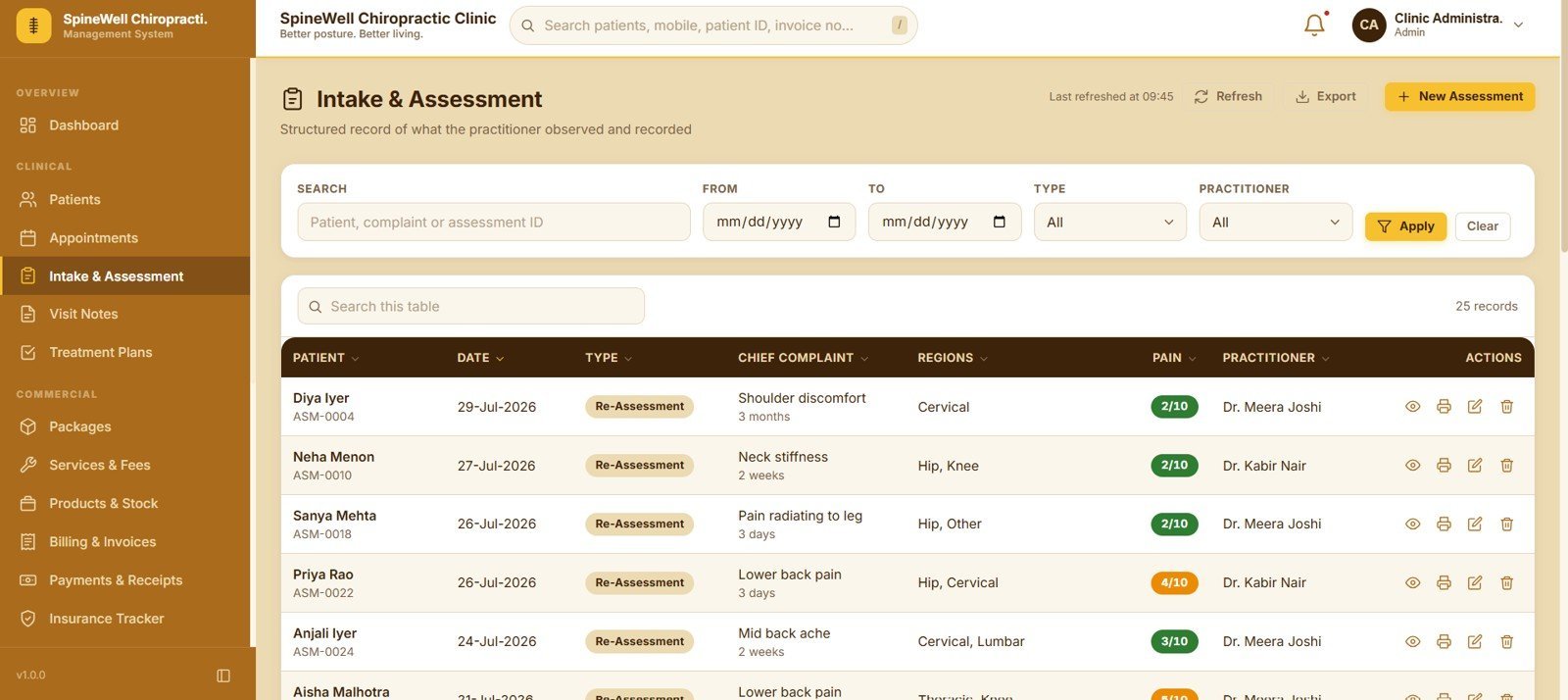
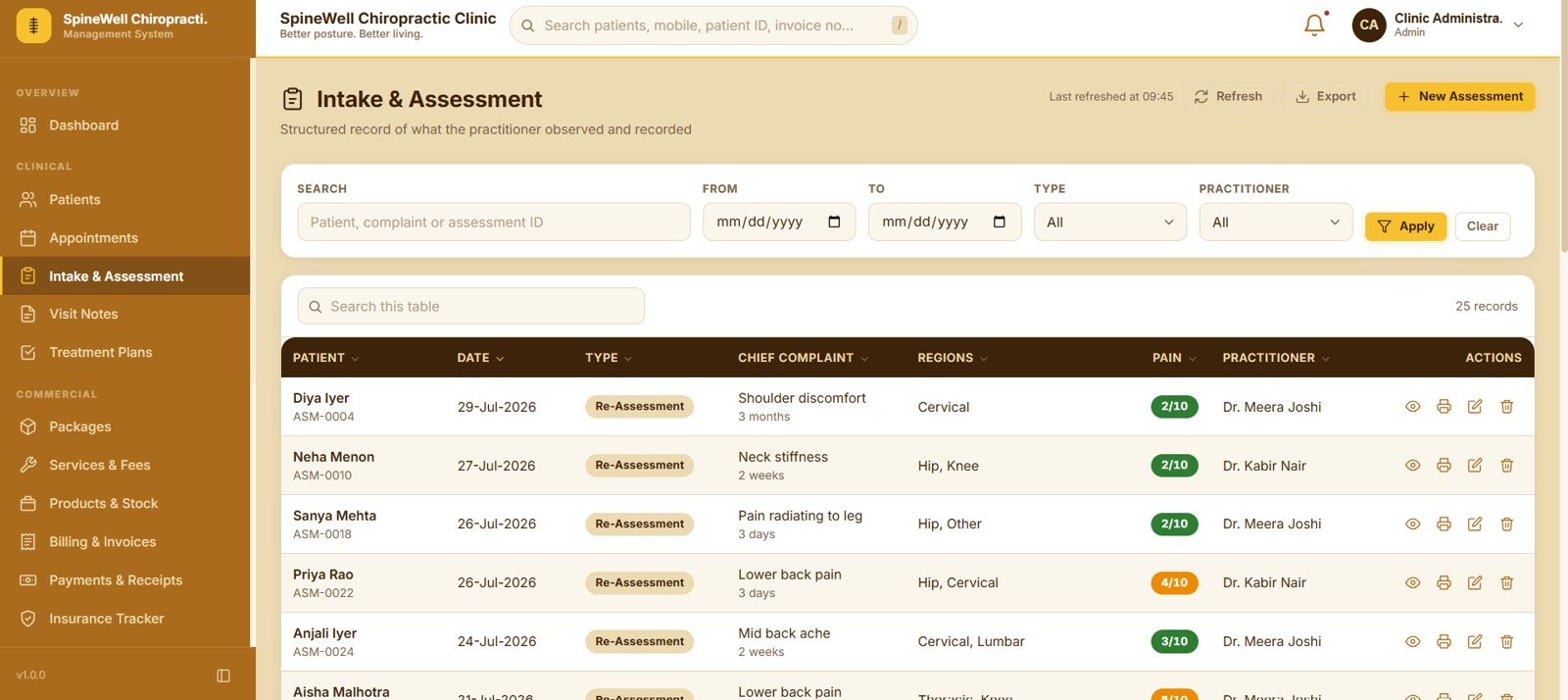
5. Intake & Assessment
This screen records what the practitioner observed at intake — patient, date, assessment type, chief complaint, affected regions, pain score and practitioner. Search, From Date, To Date, Type and Practitioner filters make it easy to pull up a patient’s assessment history before a follow-up.
6. Visit Notes
Notes follow the SOAP format and list the patient, date, practitioner, techniques applied, regions treated, before score, after score, change and note status. The before-and-after columns turn every adjustment into measurable progress you can show the patient.
7. Treatment Plans
Every plan shows the patient, practitioner, start date, visit frequency, progress against the planned visit count, days left and plan value. Status and Practitioner filters let a clinic owner review only the active plans that are falling behind.
8. Packages & Visit Credits
Two tabs separate Patient Packages from the Package Master, so you design package types once and sell them repeatedly. Each patient row shows purchase date, expiry, used credits, credits left, amount paid and balance, with cards for Active Packages, Expiring in 30 Days, Low Balance and Package Revenue.
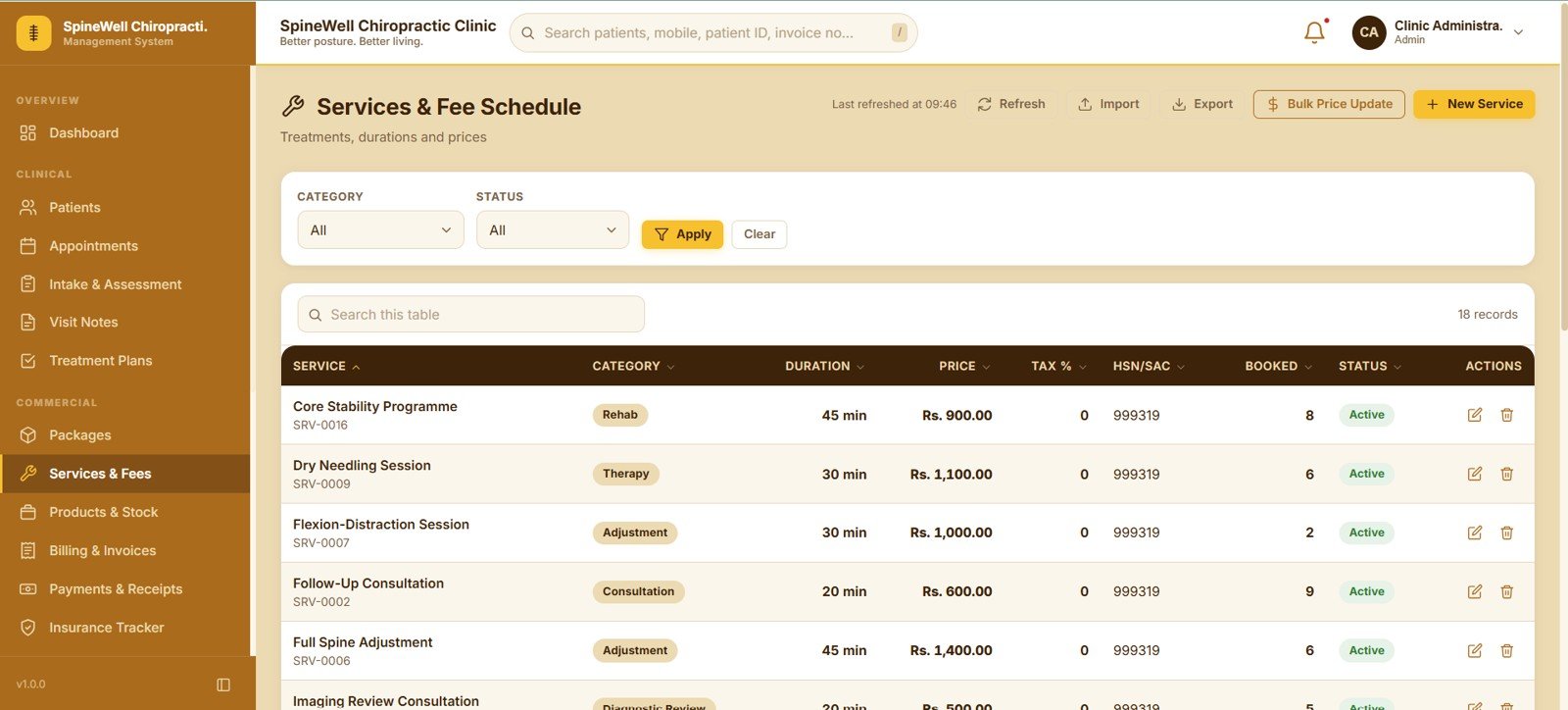
9. Services & Fee Schedule
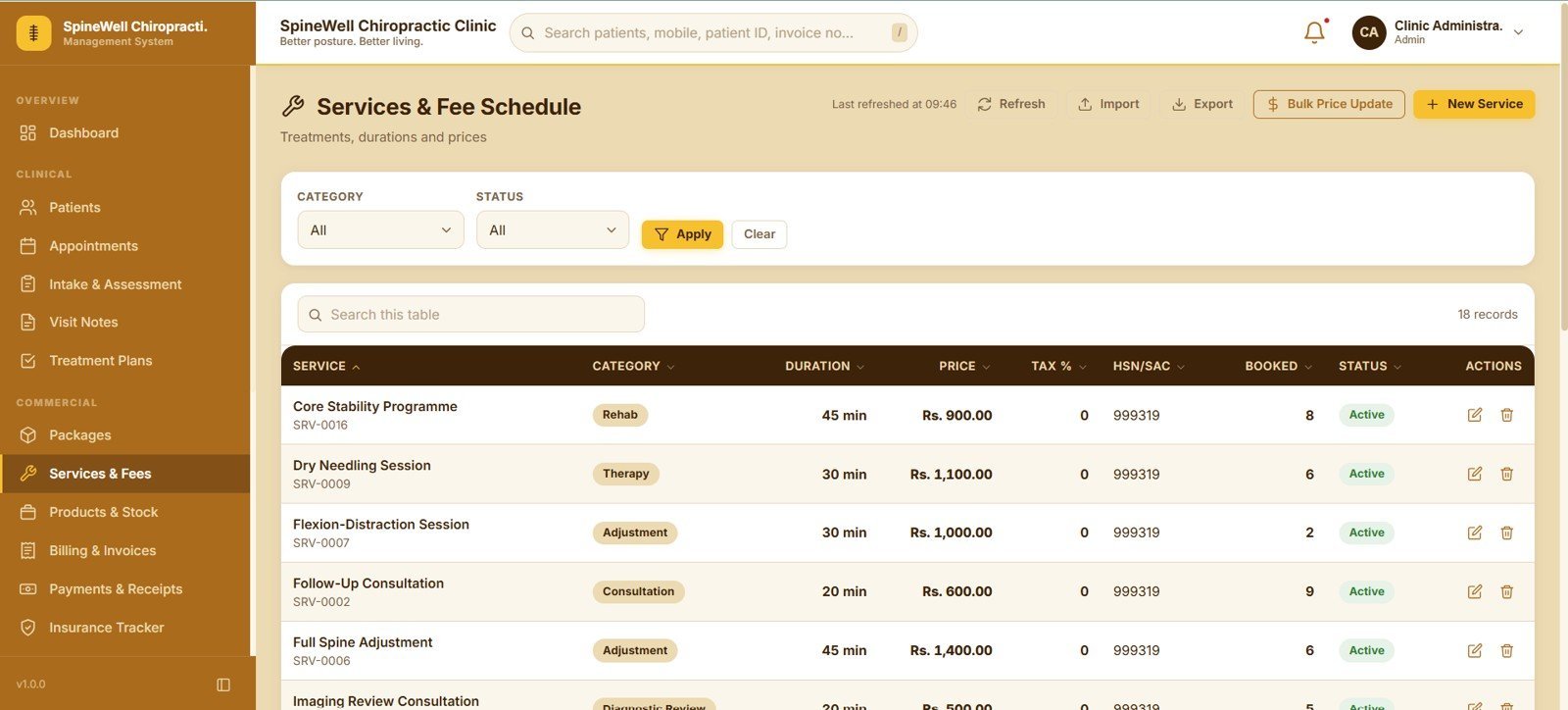
The fee schedule stores every treatment with its category, duration, price, tax percentage, HSN/SAC code, booking count and status. A Bulk Price Update control raises or lowers a whole category at once, and Import and Export handle bigger changes.
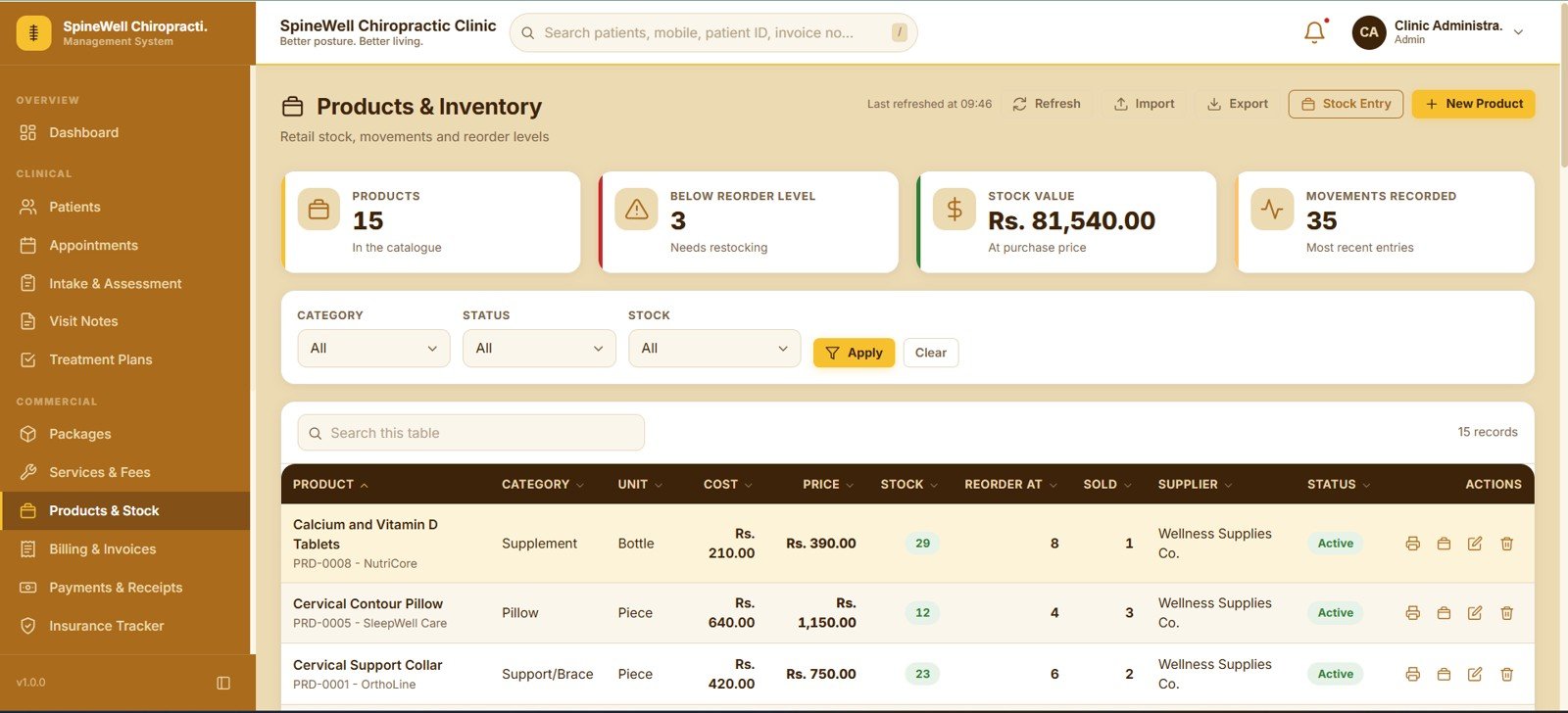
10. Products & Inventory
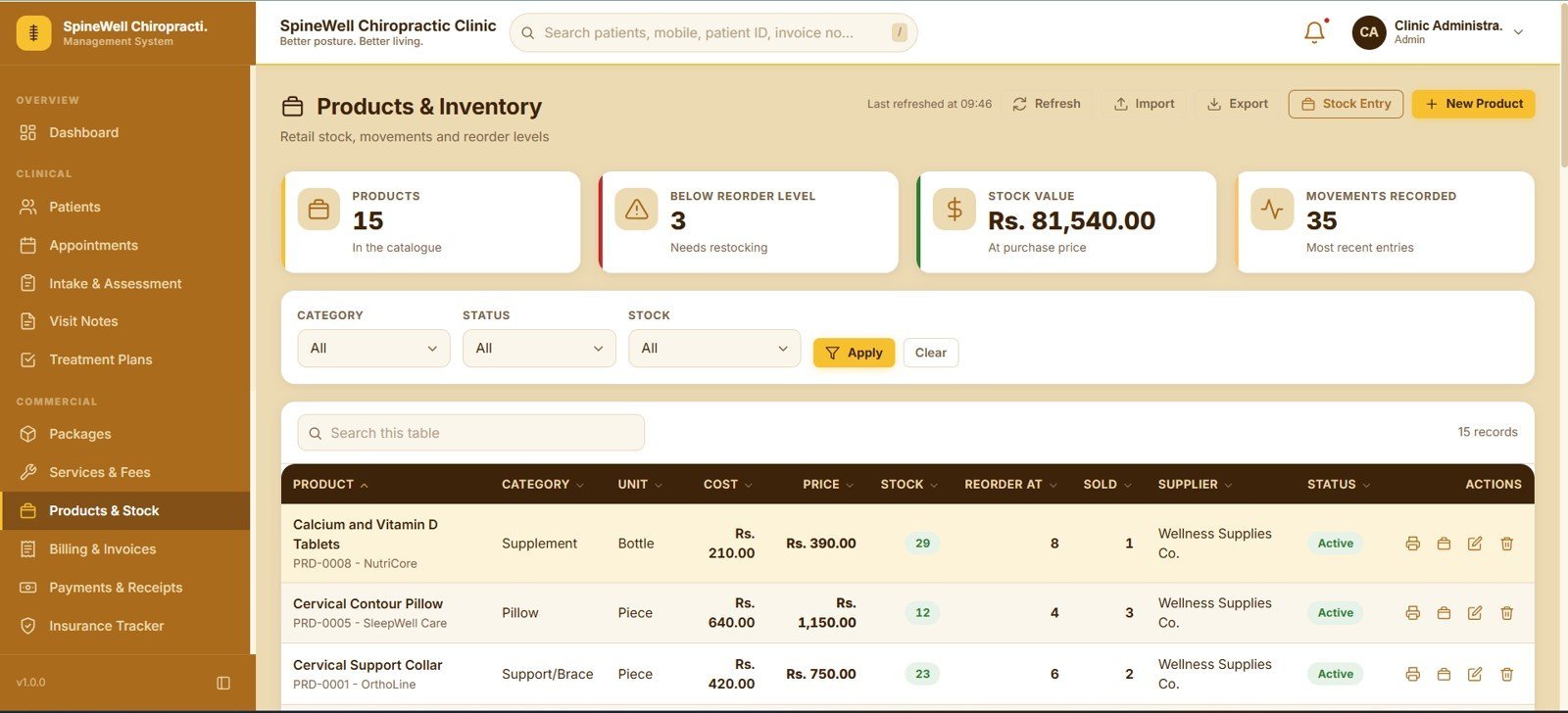
Retail items such as pillows, supports and supplements are tracked with unit, cost, price, stock on hand, reorder level, units sold and supplier. Cards summarise Products, Below Reorder Level, Stock Value and Movements Recorded, and Stock Entry logs each movement.
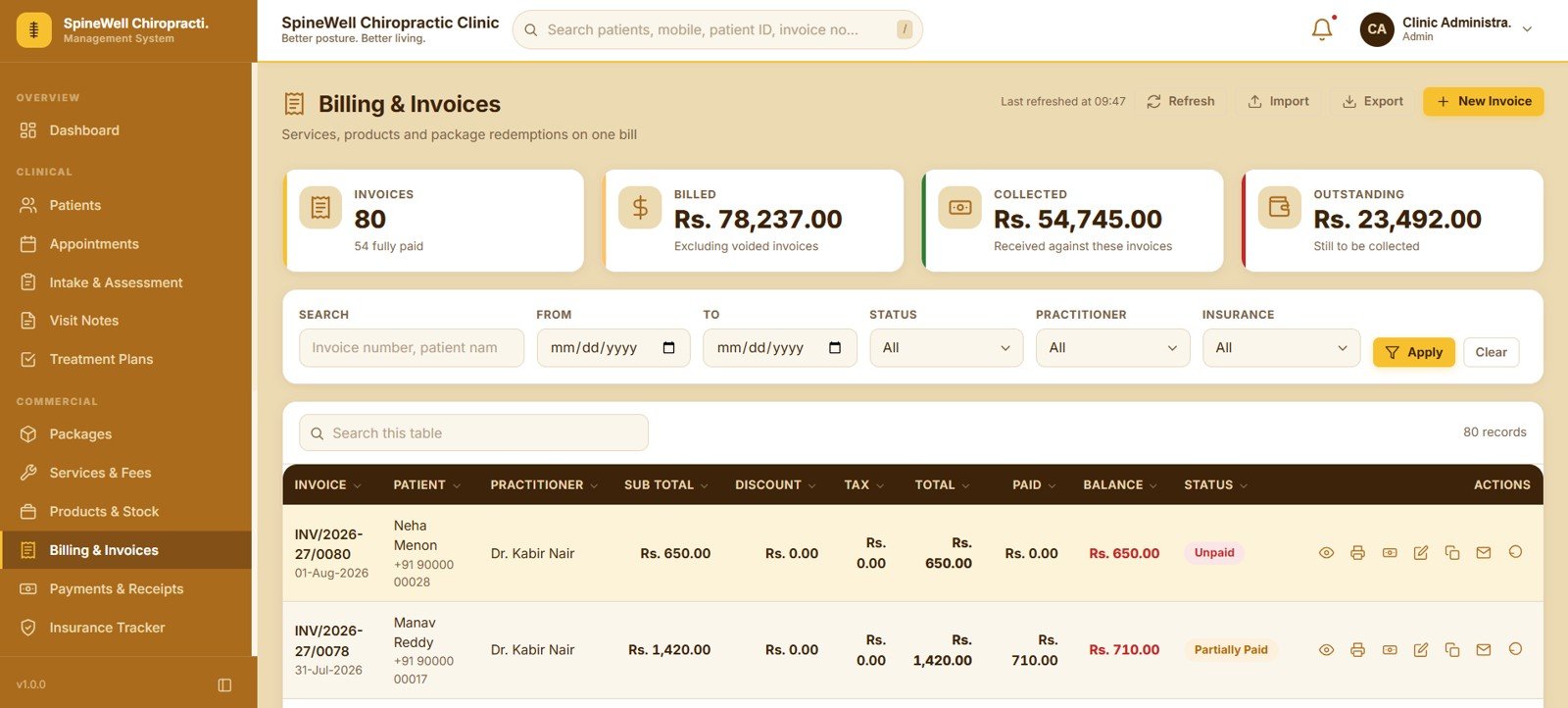
11. Billing & Invoices
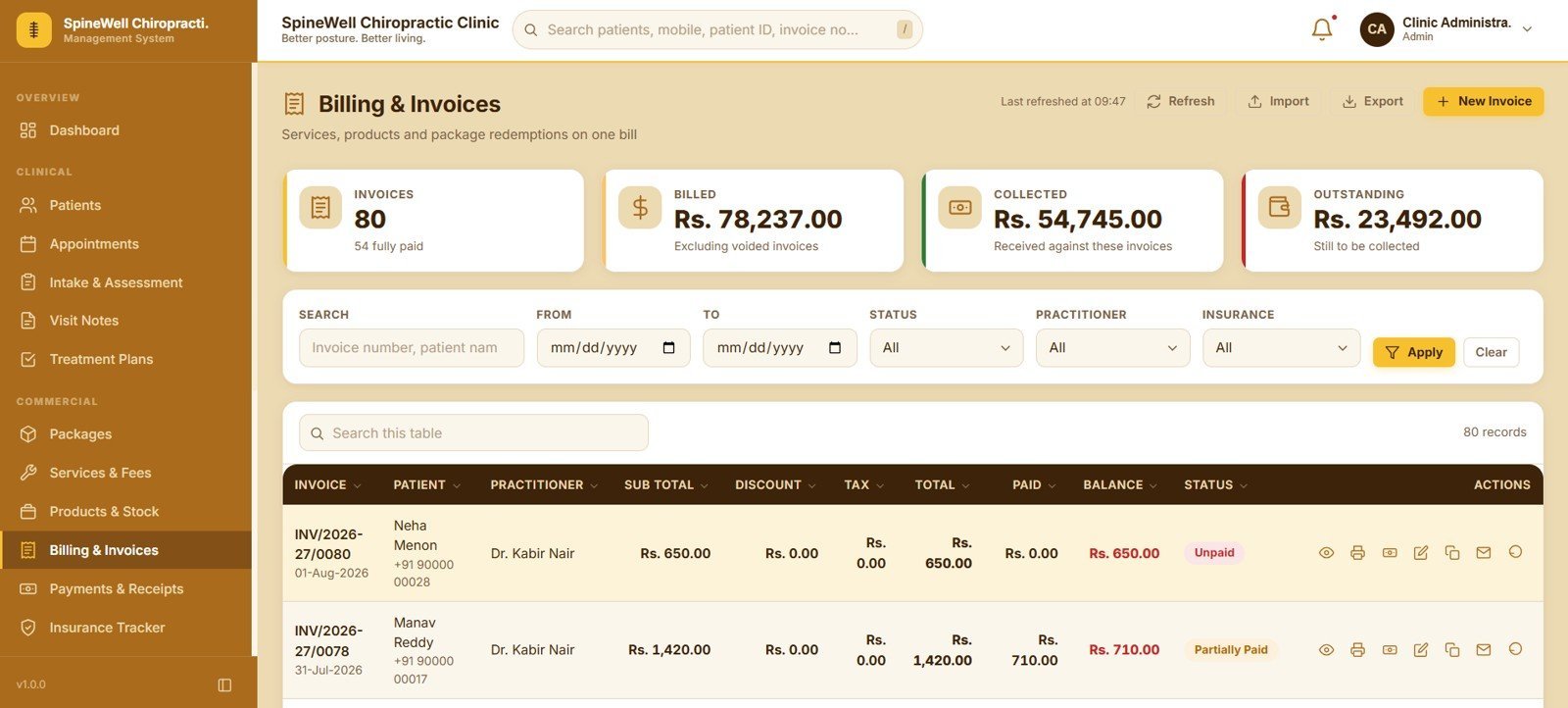
Invoices carry the patient, practitioner, sub total, discount, tax, total, paid amount, balance and status, and can mix services, retail products and package redemptions on a single bill. Cards for Invoices, Billed, Collected and Outstanding sit above Status, Practitioner and Insurance filters.
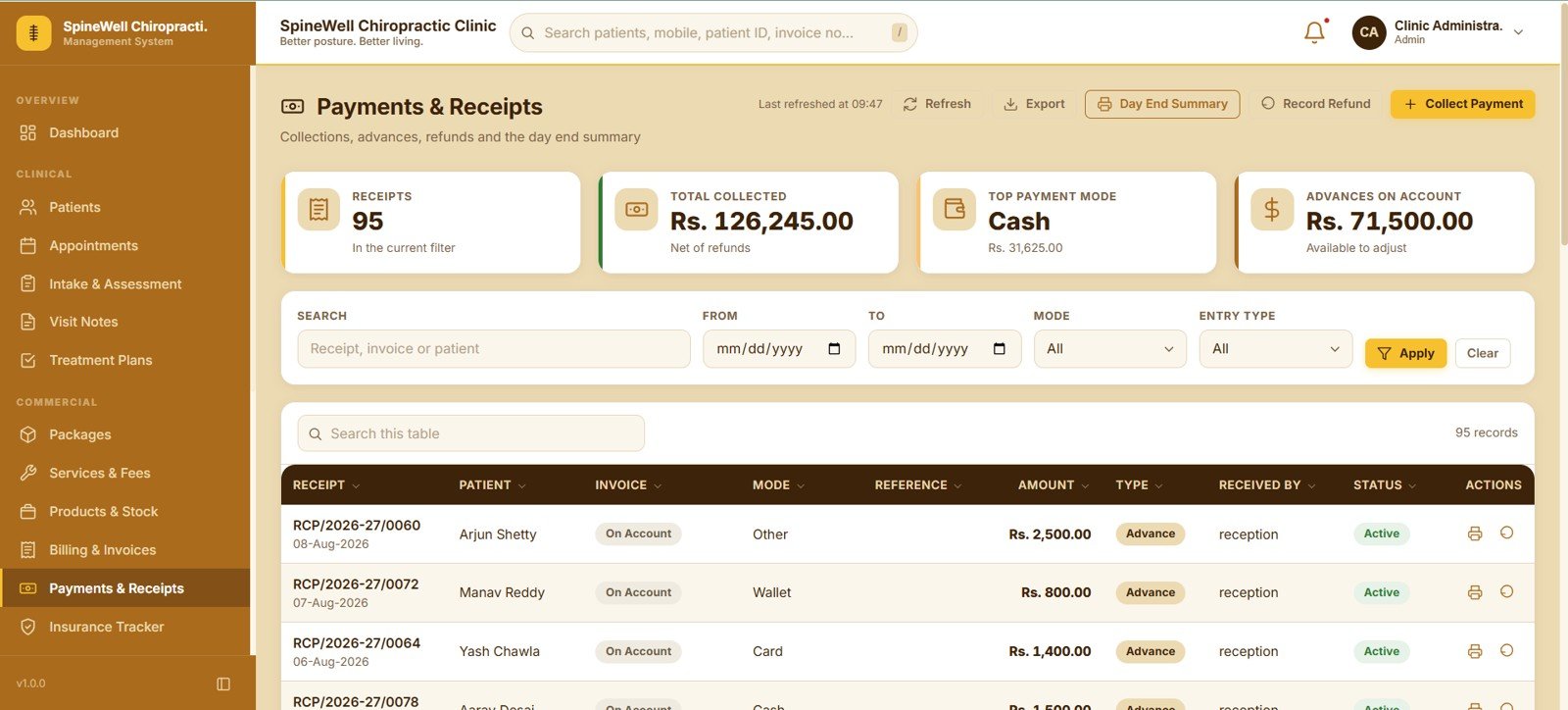
12. Payments & Receipts
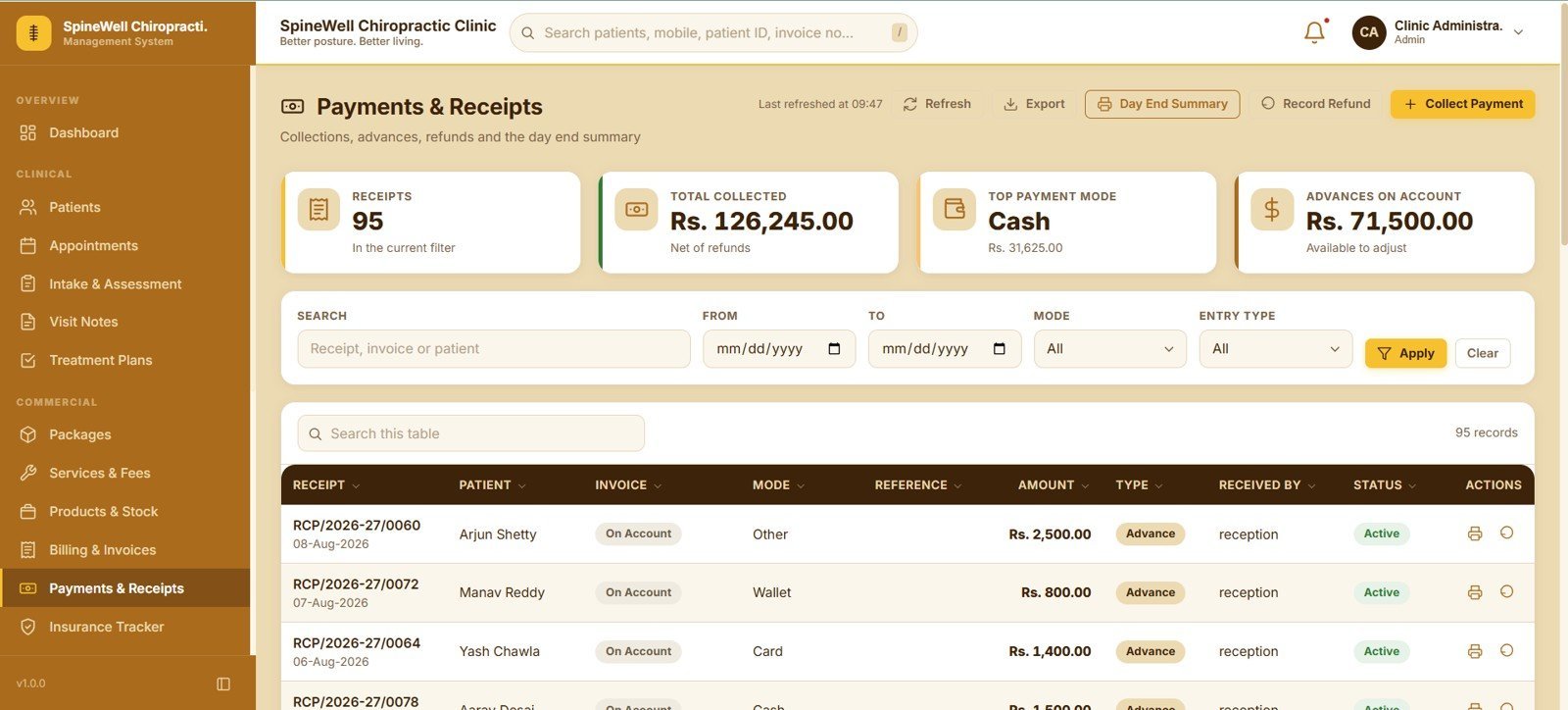
Every receipt records the patient, linked invoice, payment mode, reference, amount, entry type, who received it and status. Collect Payment, Record Refund and a printable Day End Summary make closing the till a two-minute job, with cards for Receipts, Total Collected, Top Payment Mode and Advances on Account.
13. Insurance & Reimbursement Tracker
Claim records link a patient and their invoices to a provider, then track submitted date, claim amount, approved amount, patient payable, ageing and status. Cards summarise Claim Records, Claim Value, Approved / Settled and Awaiting Outcome for the selected date range.
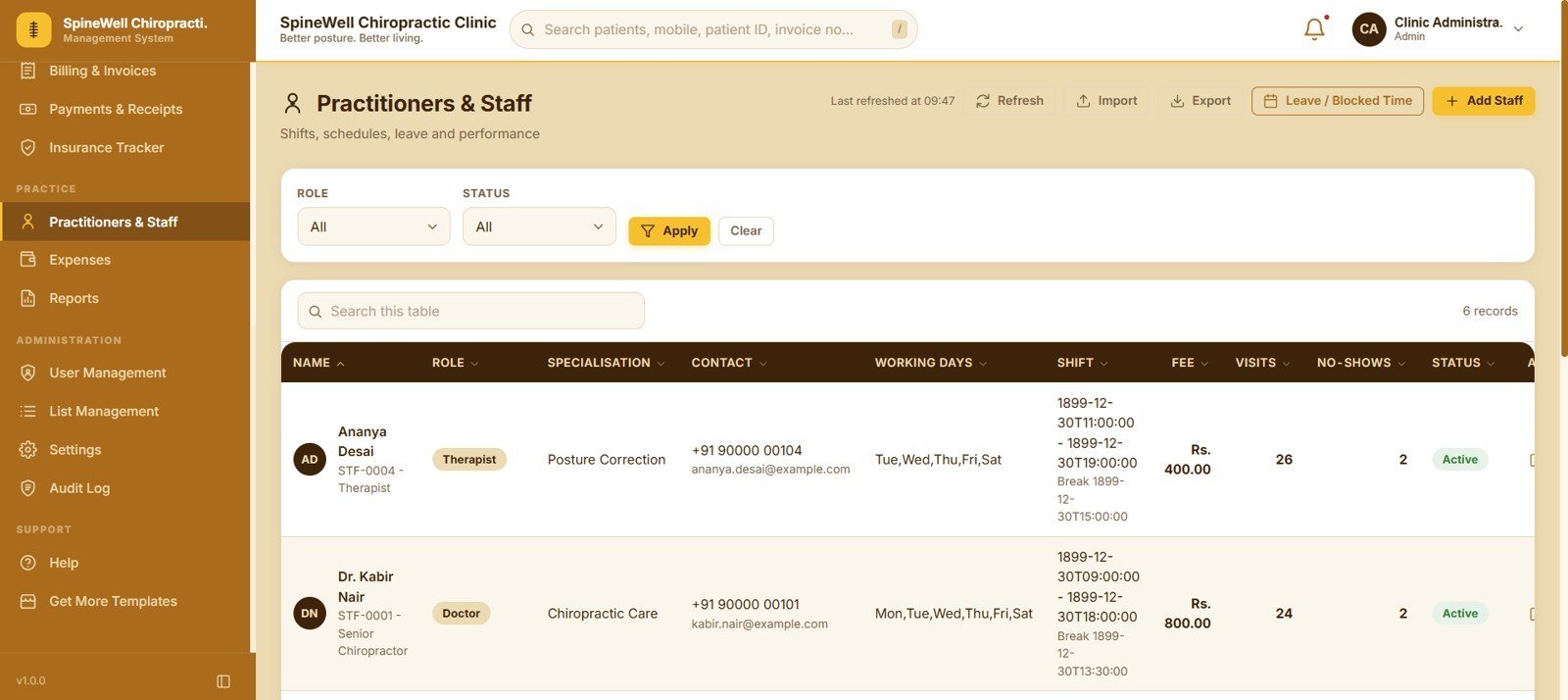
14. Practitioners & Staff
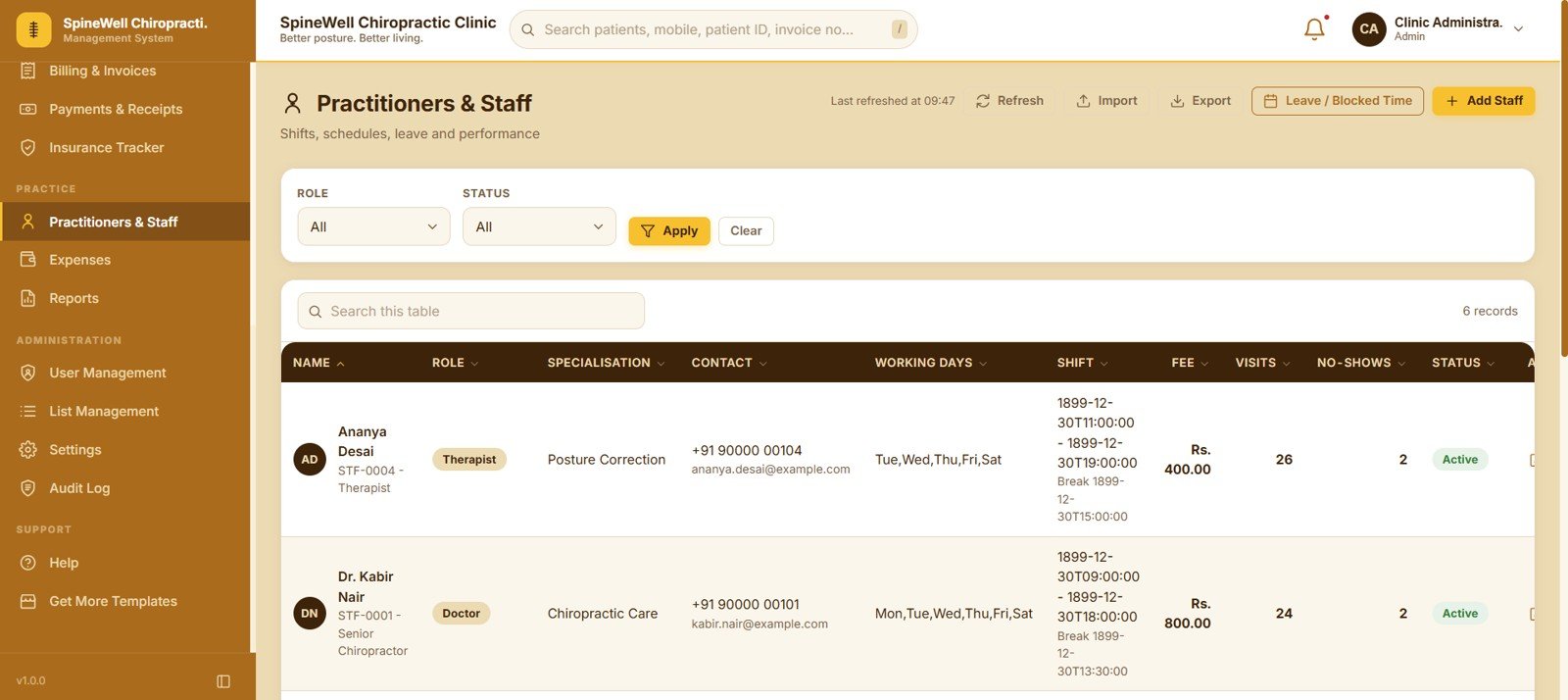
Staff records hold role, specialisation, contact, working days, shift, consultation fee, visits delivered, no-shows and status. A Leave / Blocked Time control removes a practitioner from the booking grid for the dates they are unavailable.
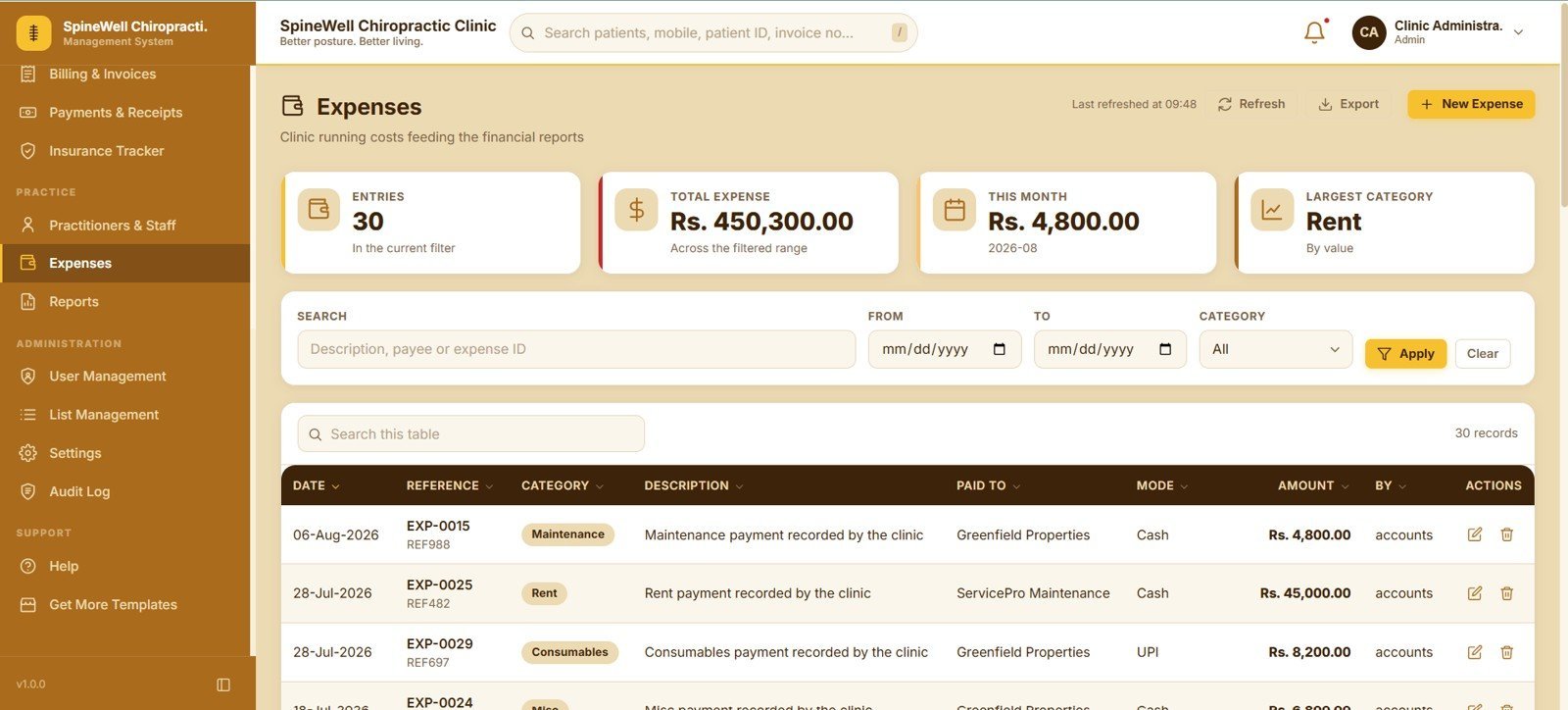
15. Expenses
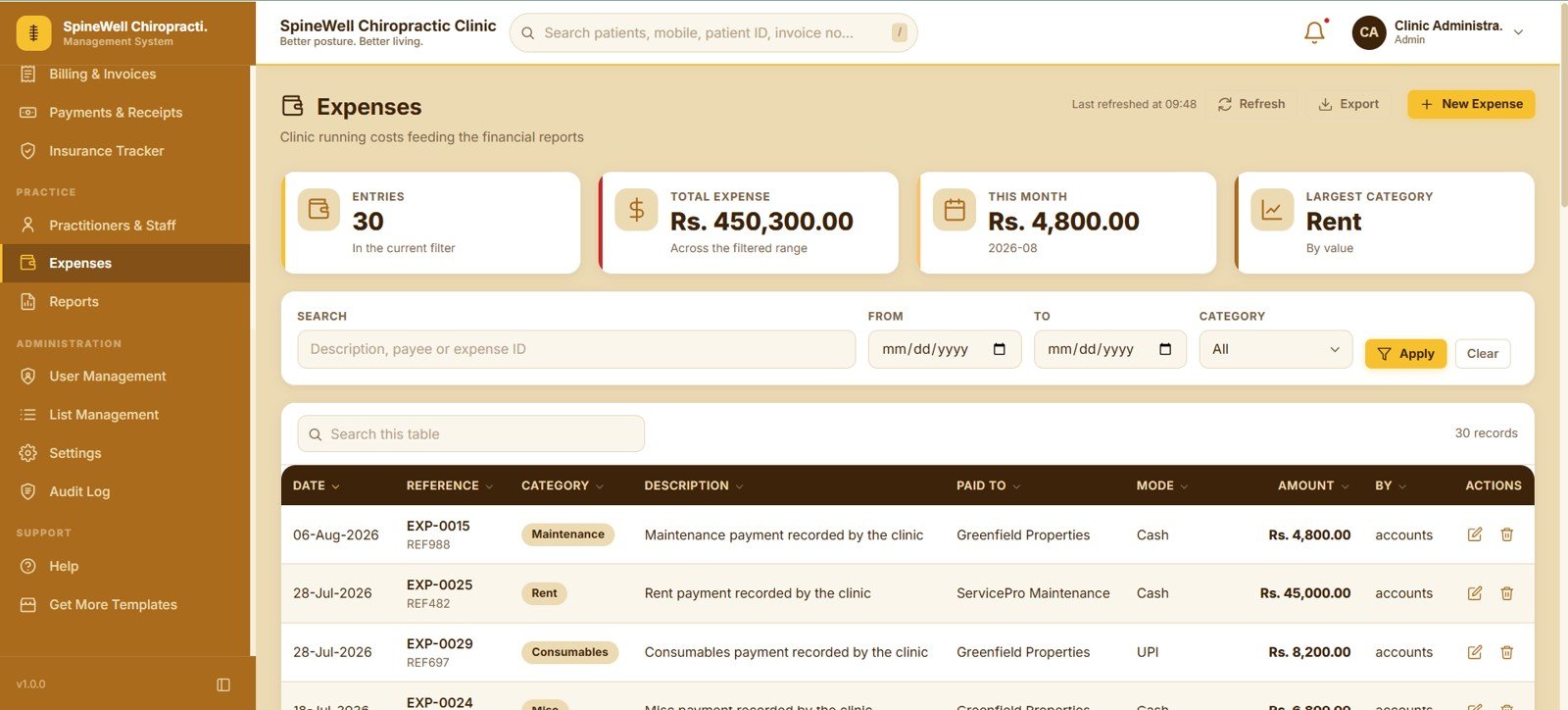
Running costs are logged with date, reference, category, description, paid-to party, payment mode, amount and the user who entered it. Cards show Entries, Total Expense, This Month and Largest Category, and every entry feeds straight into the financial reports.
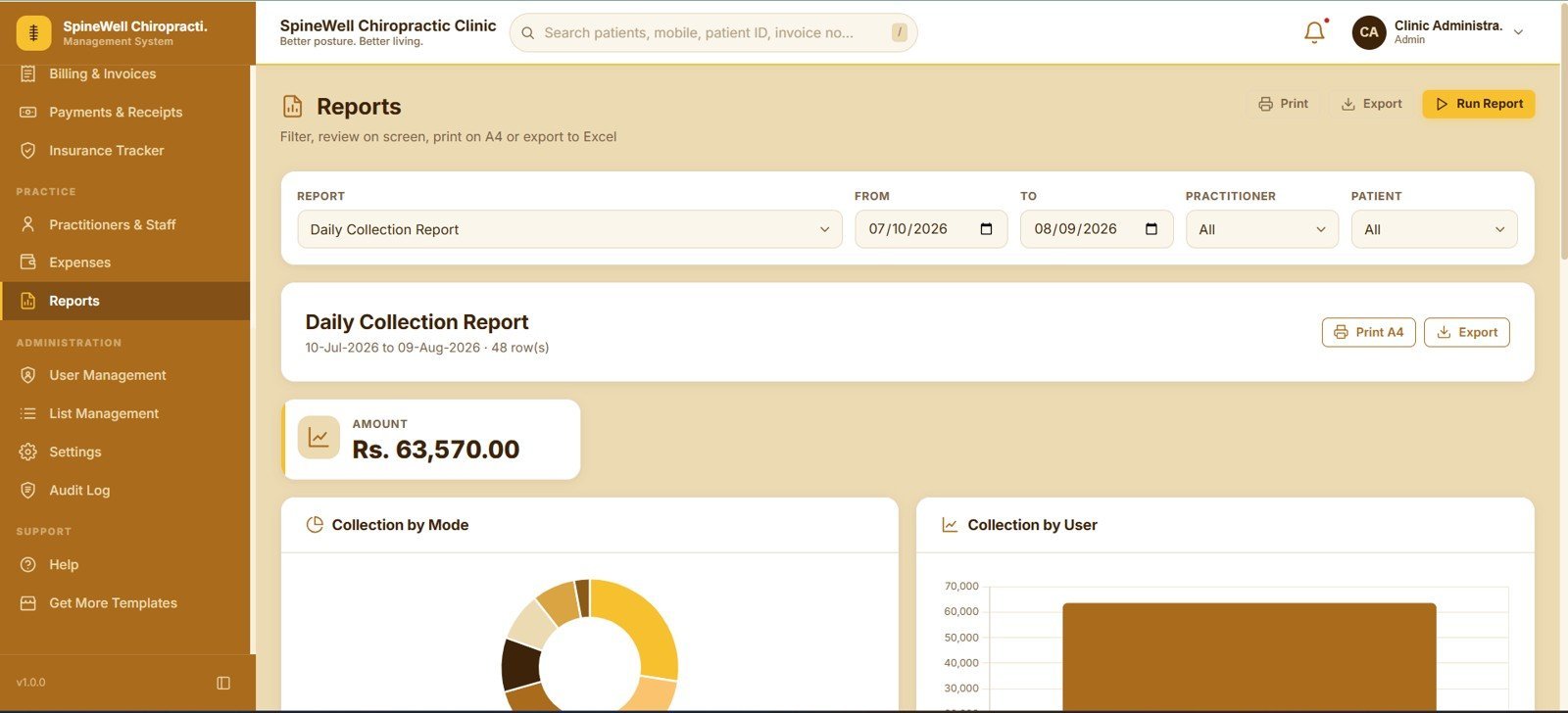
16. Reports
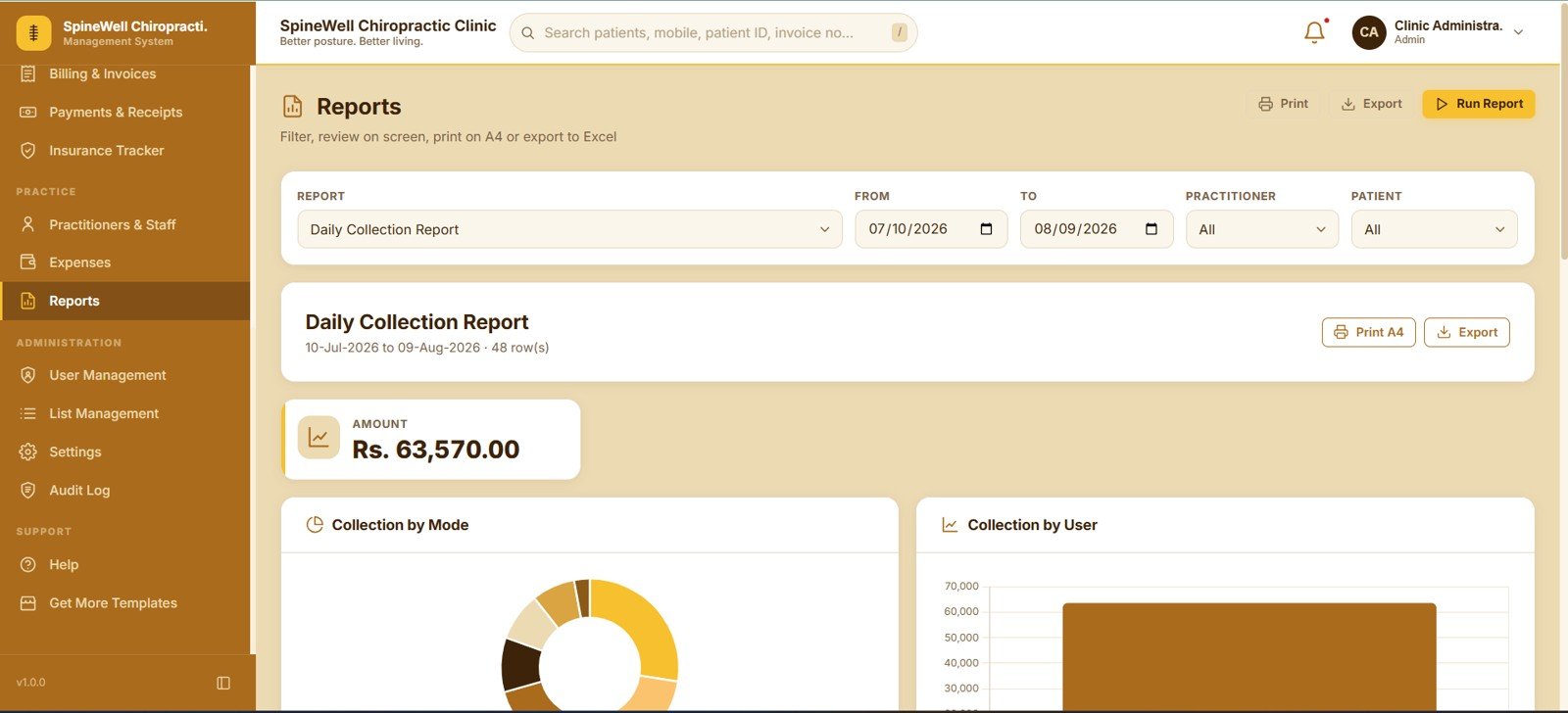
Pick a report, set From Date and To Date, narrow by practitioner or patient, then Run Report to review results on screen. The Daily Collection Report breaks takings down by Collection by Mode and Collection by User, and both Print A4 and Export are one click away.
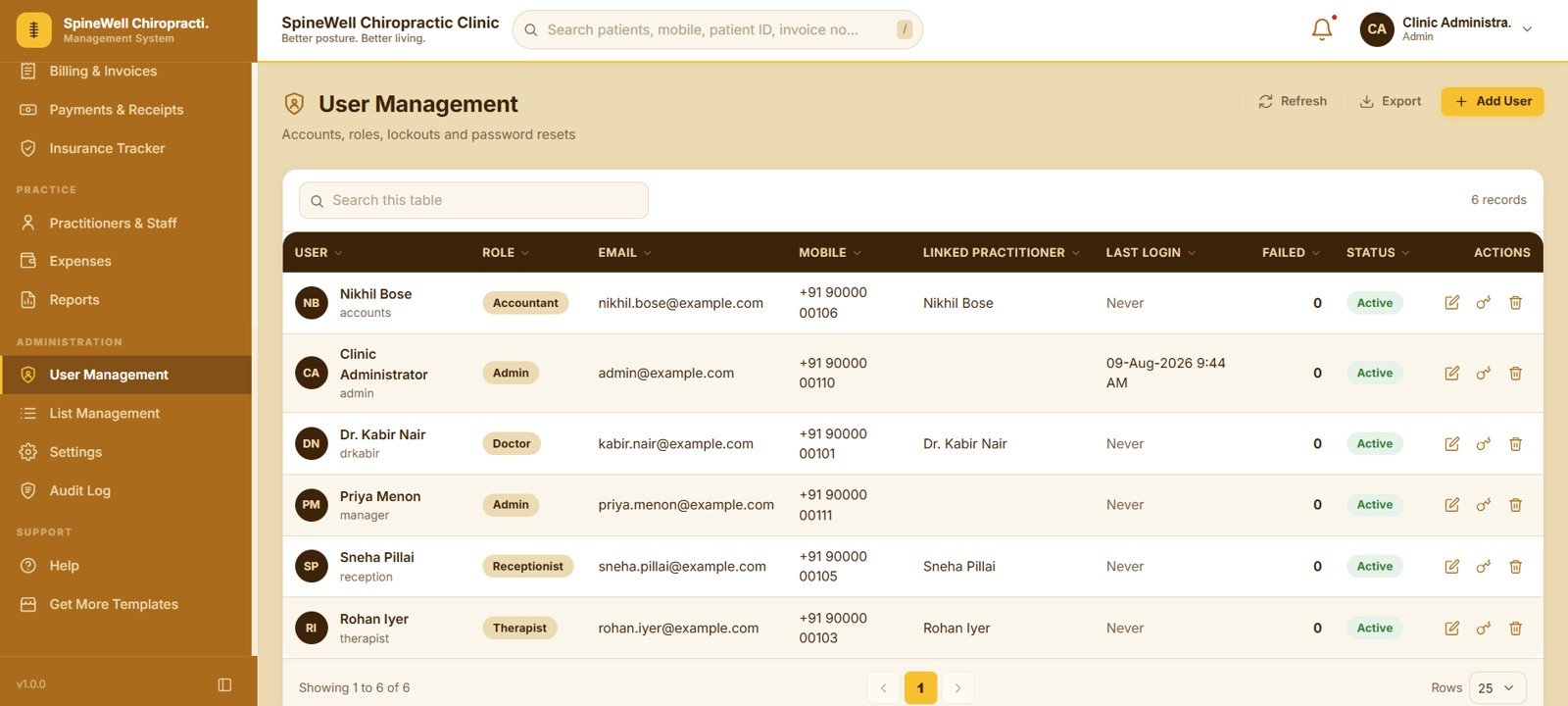
17. User Management
Admins add users, assign a role, link an account to a practitioner, and monitor last login and failed attempts. Edit, Password Reset and Delete actions sit on every row, so a locked-out receptionist is back in within seconds.
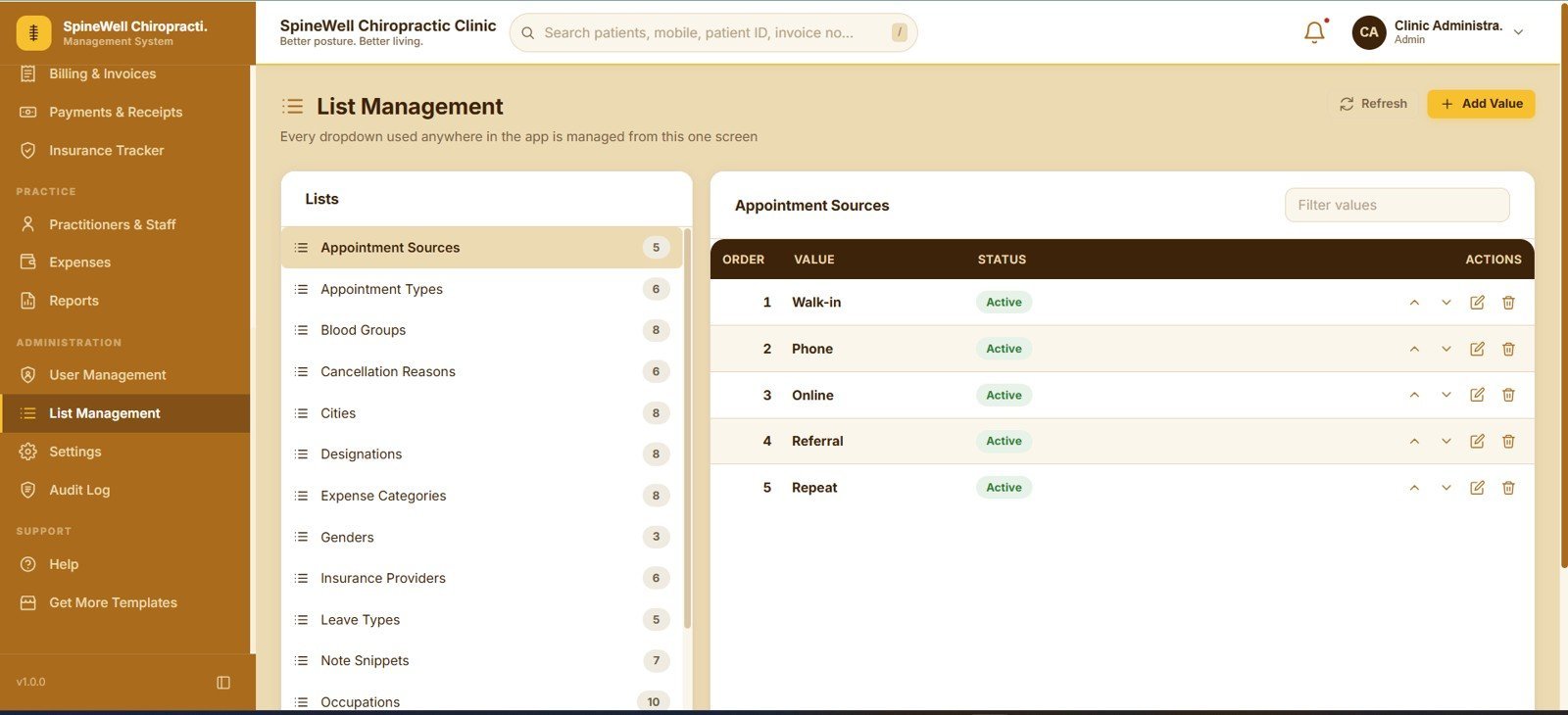
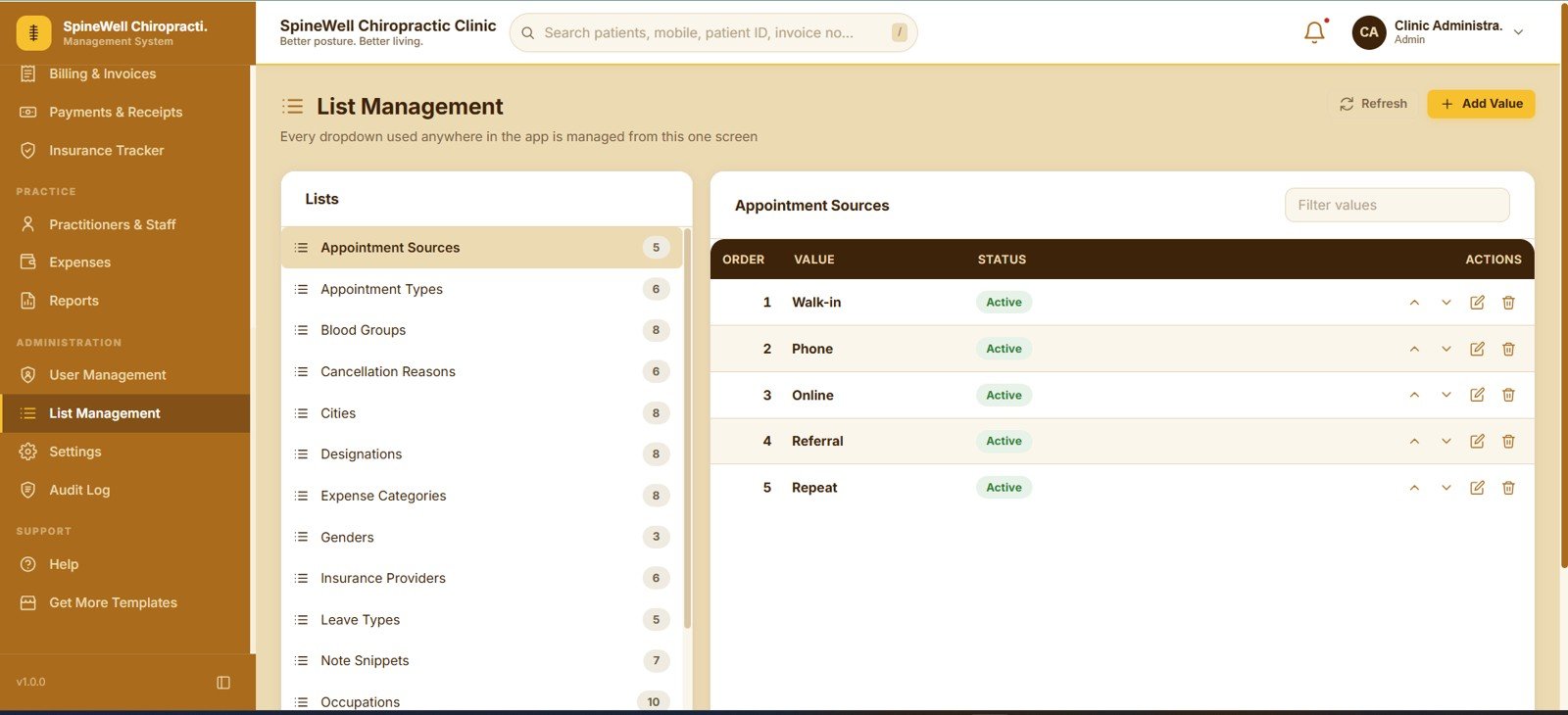
18. List Management
Every dropdown used anywhere in the app is edited from this one screen — Appointment Sources, Appointment Types, Blood Groups, Cancellation Reasons, Cities, Designations, Expense Categories, Genders, Insurance Providers, Leave Types, Note Snippets and Occupations. Each value has an order, a status and Add, Edit and Delete actions.
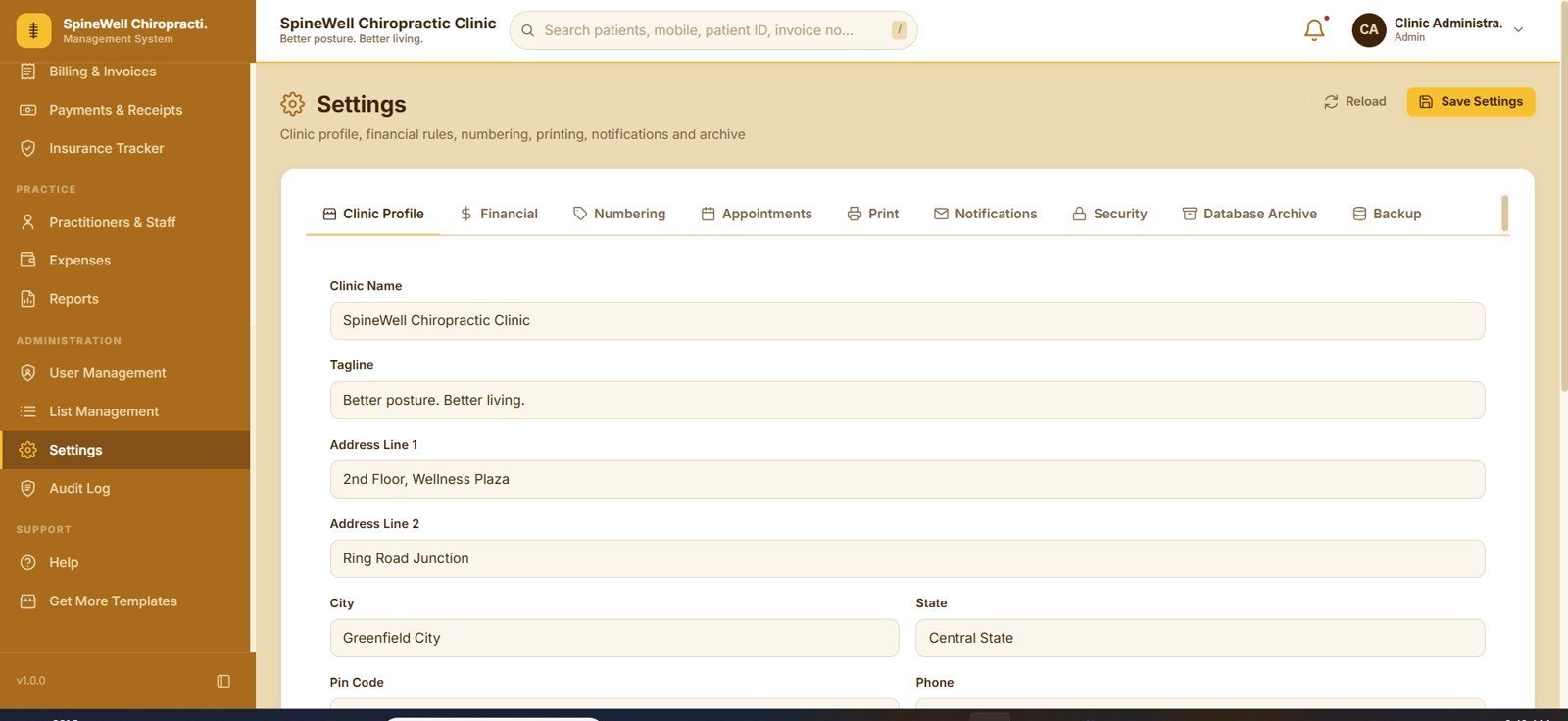
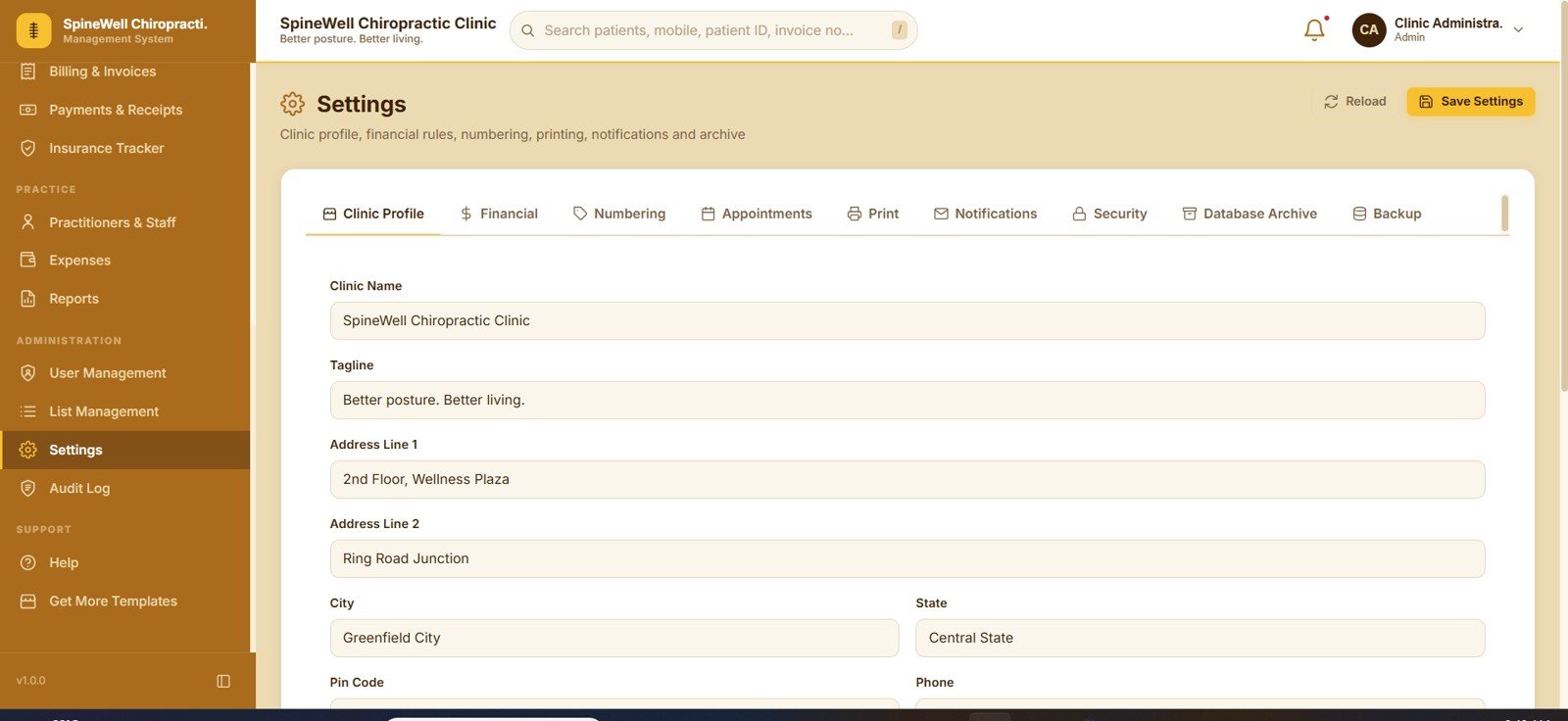
19. Settings
Nine tabs cover Clinic Profile, Financial, Numbering, Appointments, Print, Notifications, Security, Database Archive and Backup. Clinic name, tagline, address, city, state, pin code and phone flow straight onto printed invoices and receipts.
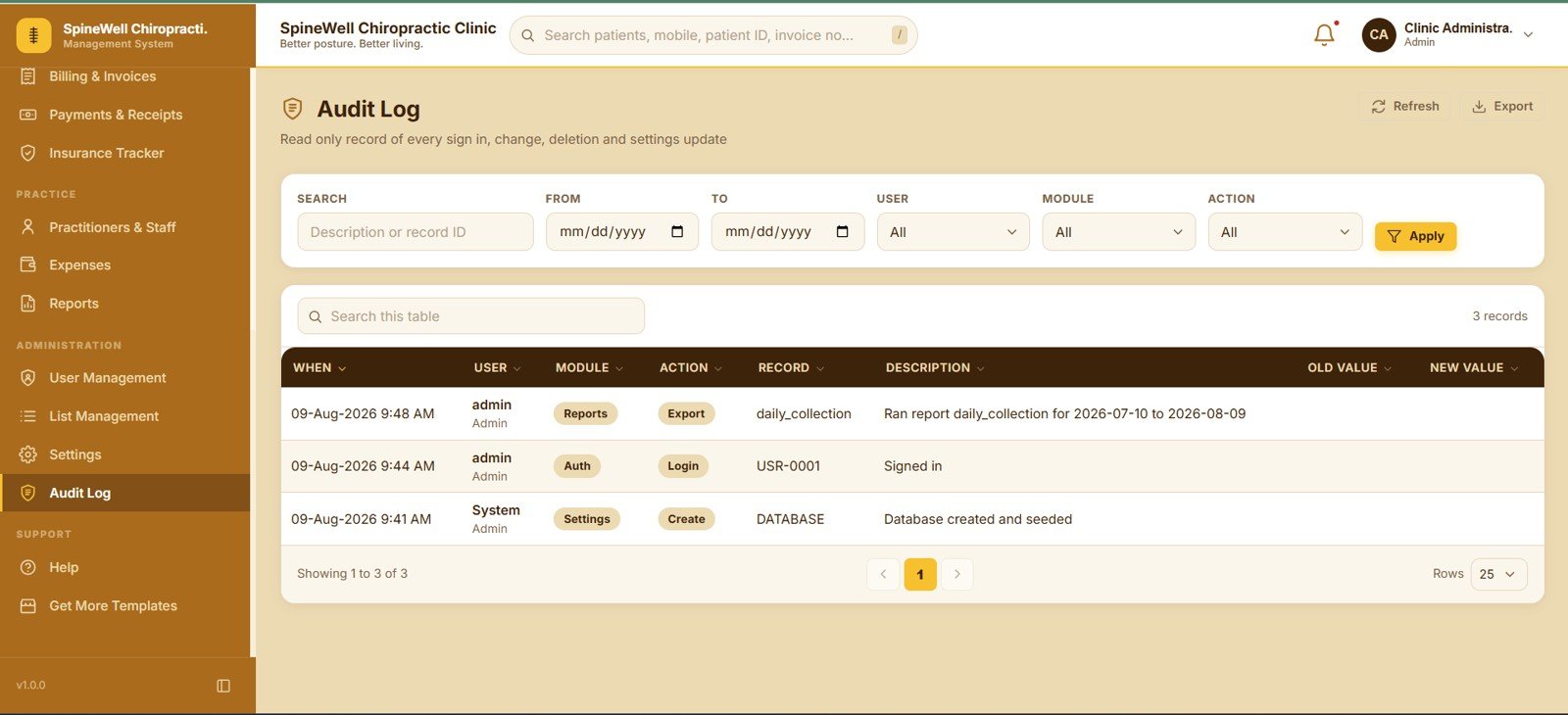
20. Audit Log
A read-only trail of every sign-in, change, deletion and settings update, showing when it happened, which user did it, the module, the action, the record, a description, and the old and new values. Search plus date, user, module and action filters make investigations quick.
📊 Chiropractic Clinic Management System Web App vs. Excel VBA Clinic System vs. Paid Chiropractic SaaS — Where This Fits
| Feature | Chiropractic Clinic Management System Web App | Excel VBA Clinic System | ChiroTouch / Jane App / Cliniko |
|---|---|---|---|
| Cost | $39.99 one-time ✅ | $6–$40 one-time | $79–$199 per month |
| Platform | Google Apps Script web app on your own Google account ✅ | Windows Excel with macros enabled | Vendor-hosted cloud |
| Setup time | About 10 minutes ✅ | Under 5 minutes | Days, often with paid onboarding |
| Real-time team collaboration | Yes, unlimited staff logins ✅ | Single machine at a time | Yes, billed per user |
| Mobile access | Yes, opens in any phone browser ✅ | No | Yes |
| Customisable fields and dropdowns | Yes, via List Management and full source code ✅ | Yes, with VBA editing | Limited to vendor settings |
| SOAP notes with pain scoring and visit packages | Both included ✅ | Rarely both | Yes, on higher tiers |
| Data ownership | Your Google Sheet, exportable any time ✅ | Your local file | Vendor database, export on request |
| Year-1 cost at 5 users | $39.99 ✅ | $6–$40 | $1,200–$5,400 |
For clinics that want multi-user scheduling, SOAP notes and package billing without a per-seat monthly bill, the Chiropractic Clinic Management System Web App sits in the sweet spot.
👥 Who This Template Is For — and Who It’s Not For
✅ This template is built for:
- Solo chiropractors and small clinics with 1–10 practitioners who are still running on paper cards or a shared spreadsheet
- Clinic owners who sell visit packages and need credits deducted automatically instead of tracked by hand
- Physiotherapy, osteopathy, sports injury and rehab practices that need the same appointment, notes and billing flow
- Front desk teams who want Day and Week booking views on a tablet without installing anything
- Anyone who wants the full Google Apps Script source so they can rename modules and add fields themselves
❌ This template is NOT for:
- Clinics that need certified HIPAA-compliant hosting, a signed BAA, or SOC 2 evidence from a vendor
- Practices that must submit electronic insurance claims directly to payers — the insurance module tracks claims for your own records, it does not file them
- Multi-site groups with 50+ practitioners and heavy concurrent write volume, where a dedicated database is a better fit
- Anyone who wants a mobile app from an app store rather than a browser-based web app
⚙️ How to Use the Chiropractic Clinic Management System Web App
- Download the ZIP after purchase and open the PDF guide inside — it contains the Google Sheet copy link and the login details.
- Click the copy link to create your own copy of the sheet and its bound Apps Script project in your Google Drive.
- In the Apps Script editor choose Deploy, then New deployment, select Web app, set access as required and authorise the script.
- Open the deployment URL and sign in with the default admin credentials from the guide.
- Go to Settings and enter your clinic name, address, phone, tax rules, invoice numbering and print options.
- Open List Management and edit the dropdowns — cities, insurance providers, appointment types, expense categories and note snippets.
- Load your Services & Fee Schedule, add practitioners under Practitioners & Staff, and create your package types in Package Master.
- Add users under User Management, change the default admin password, and start booking appointments.
💼 Real-World Use Cases
Dr. Kabir runs a two-practitioner chiropractic clinic in a suburban high street. He uses the Day view every morning to see both columns side by side, checks the No-Show Rate card at month end, and sends the day’s reminders with one click — without paying a monthly per-seat fee to a cloud vendor.
Ananya manages the front desk at a sports rehab centre. She sells 10-visit and 20-visit packages, and the Packages & Visit Credits screen tells her every morning which patients have two or fewer credits left, so renewals happen at the counter instead of over email.
Meera owns a three-branch physiotherapy practice. She runs the Daily Collection Report per practitioner, exports it to Excel, and reconciles it against the Payments & Receipts day-end summary — a task that used to mean rebuilding a spreadsheet from receipt books every evening.
❓ Frequently Asked Questions
What does the Chiropractic Clinic Management System Web App actually include?
The Chiropractic Clinic Management System Web App includes 20 modules: login, dashboard, patients, appointments, intake and assessment, visit notes, treatment plans, packages and visit credits, services and fee schedule, products and inventory, billing, payments, insurance tracker, staff, expenses, reports, user management, list management, settings and audit log.
Do I need coding knowledge to install it?
No. Setting up the Chiropractic Clinic Management System Web App takes about 10 minutes and requires no coding — you copy the Google Sheet, click Deploy in the Apps Script editor, authorise the script once, then open the resulting URL and sign in with the supplied admin credentials.
How does this compare to ChiroTouch or Jane App?
Paid chiropractic platforms charge roughly $79 to $199 per month and bill per practitioner. The Chiropractic Clinic Management System Web App is a one-time $39.99 purchase with unlimited staff logins, and your patient data stays in a Google Sheet you own and can export any time.
Can several staff members use it at the same time?
Yes. The Chiropractic Clinic Management System Web App is a multi-user web app with role-based access. User Management controls accounts, roles and linked practitioners, and every action is written to a read-only audit log with the old and new values recorded.
How do visit packages and credits work?
You define package types in the Package Master, sell one to a patient, and credits are deducted when visits are billed. The screen shows used credits, credits left, expiry and balance, plus alerts for packages expiring within 30 days or holding two or fewer credits.
Does it handle insurance claims?
The Chiropractic Clinic Management System Web App tracks claims for your own records — provider, linked invoices, submitted date, claim amount, approved amount, patient payable, ageing and status. It does not submit electronic claims to payers on your behalf.
Can I change the fields, dropdowns and clinic branding?
Yes. List Management edits every dropdown in the app from one screen, Settings holds the clinic profile, numbering and print options, and because you receive the full Google Apps Script source you can add or rename fields yourself.
👤 About the Author
Built by PK — Microsoft Certified Professional with 15+ years of Excel, Google Sheets and Power BI experience. Founder of NextGenTemplates, reaching 300K+ subscribers across YouTube channels (@PK-AnExcelExpert, @NextGenTemplates, @NeoTechNavigators). Every template is hand-built and tested before release.
🔗 Explore Related Templates
🔹 Therapy Center Management System Web App — the same appointment, session notes and package structure tuned for therapy and counselling centres.
🔹 Ayurvedic Or Homeopathy Clinic Management System Web App — patient records, prescriptions and billing for alternative medicine practices.
🔹 Pharmacy POS Web App — pair it with the clinic app if you also run a dispensing counter.
🔹 Healthcare Management Dashboard in Google Sheets — a reporting-only option if you just need the analytics layer.
🔹 Prescription Record Data Entry System in Excel — a lightweight Excel VBA companion for prescription logging.
Browse more Web App Templates or explore our Google Sheets Dashboards.
📖 Click here to read the Detailed Blog Post<
Watch the step-by-step video Demo:
🎥 Visit our YouTube channel for step-by-step video tutorials
👉 YouTube.com/@NextGenTemplates


















Reviews
There are no reviews yet.