

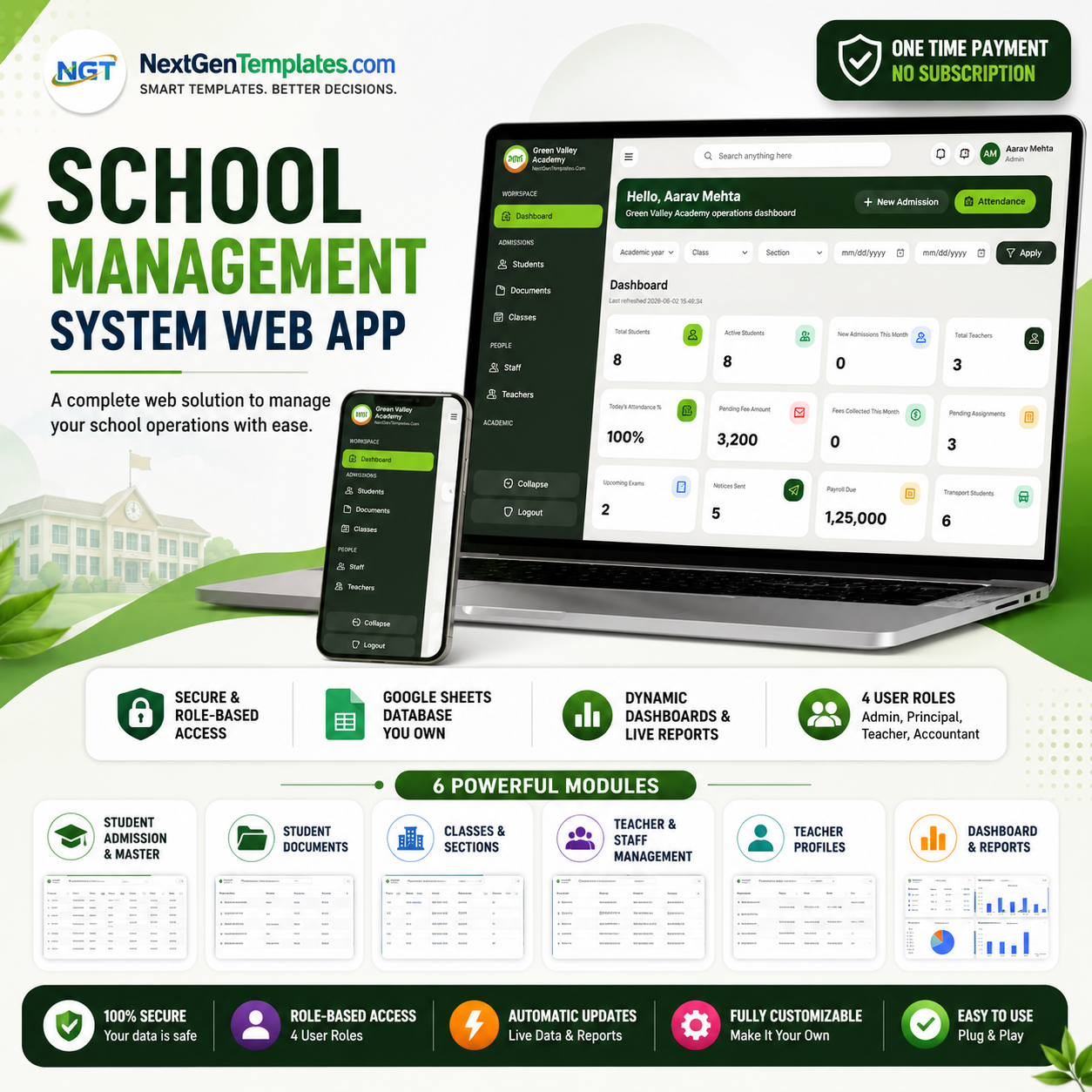
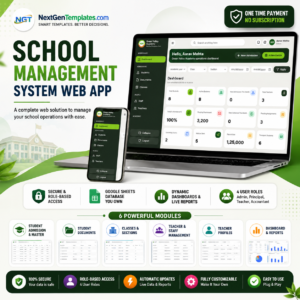
The School Management System Web App runs an entire school on a Google Sheets database: 6 connected modules, 12 live dashboard KPIs, and role-based logins for Admin, Principal, Teacher, and Accountant. You deploy your own private copy in under 10 minutes using ‘Make a Copy’ — no servers, no hosting bills, and no coding required.
🌍 Join 8,400+ teams in 40+ countries using NextGenTemplates to replace paid SaaS tools with one-time-purchase Excel, Google Sheets, Power BI, and HTML templates.
✅ Instant download · One-time payment · No subscription · No per-student fees · Lifetime access
🔑 Key Features of the School Management System Web App
📌 Six connected modules. The School Management System Web App ships with a Dashboard, Student Admission & Master, Student Documents, Classes & Sections, Teacher & Staff Management, and Teacher Profiles — every record stored in one shared Google Sheets backend so nothing falls out of sync.
📌 Twelve live KPI cards. The operations dashboard tracks Total Students, Active Students, New Admissions This Month, Total Teachers, Today’s Attendance %, Pending Fee Amount, Fees Collected This Month, Pending Assignments, Upcoming Exams, Notices Sent, Payroll Due, and Transport Students.
📌 Role-based access. Four built-in roles — Admin, Principal, Teacher, and Accountant — sign in against a Users sheet, so each staff member sees only the screens that match their job.
📌 Your data stays in your Google Drive. Because the backend is a Google Sheet you own, every student, parent, and payroll record lives in your Drive — not on a third-party vendor server.
📌 Filter by year, class, and section. Dashboard filters for Academic Year, Class, Section, and a custom date range narrow every number to the exact cohort you are reviewing.
📦 What’s Inside the School Management System Web App
Secure Login & Daily Command Center
The sign-in screen authenticates each user against the Users sheet and frames the app as a daily command center for admissions, attendance, fees, academics, payroll, and reports. Invalid or inactive accounts are blocked at the door.

🚀 Try the Live Demo Before You Buy
We have deployed this web app in our own Google account so you can test every page, every role — with real sample data — before purchasing. No signup, no email required.
🔑 Test Login Credentials
Sign in as admin for full system access, or try the principal, teacher, and accountant logins to see how role-based access changes which screens each staff member can open.
💡 What you get after purchase: The full source code (Code.gs + Index.html) plus a step-by-step deployment guide so you can deploy your own private instance in your own Google account in under 15 minutes.
Operations Dashboard with 12 Live KPIs
After login the dashboard greets the user by name and shows the 12 KPI cards plus one-tap actions for New Admission and Attendance. This is where a principal reads the whole school at a glance.

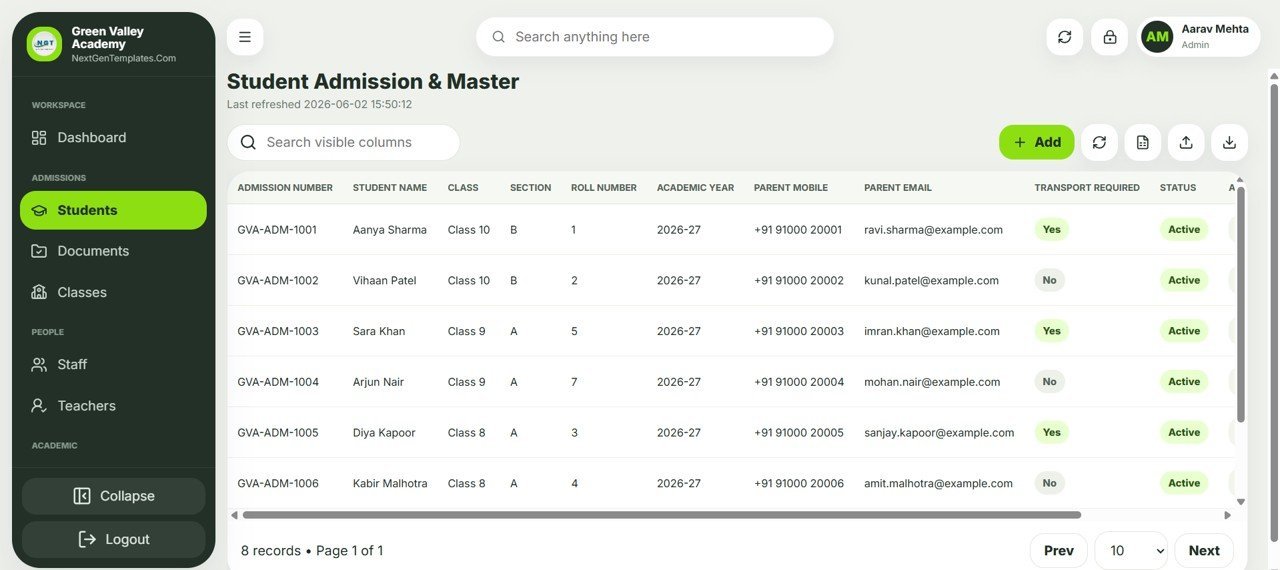
Student Admission & Master
A searchable register holds Admission Number, Student Name, Class, Section, Roll Number, Academic Year, Parent Mobile, Parent Email, Transport Required, and Status. Add, import, and export students from one toolbar.
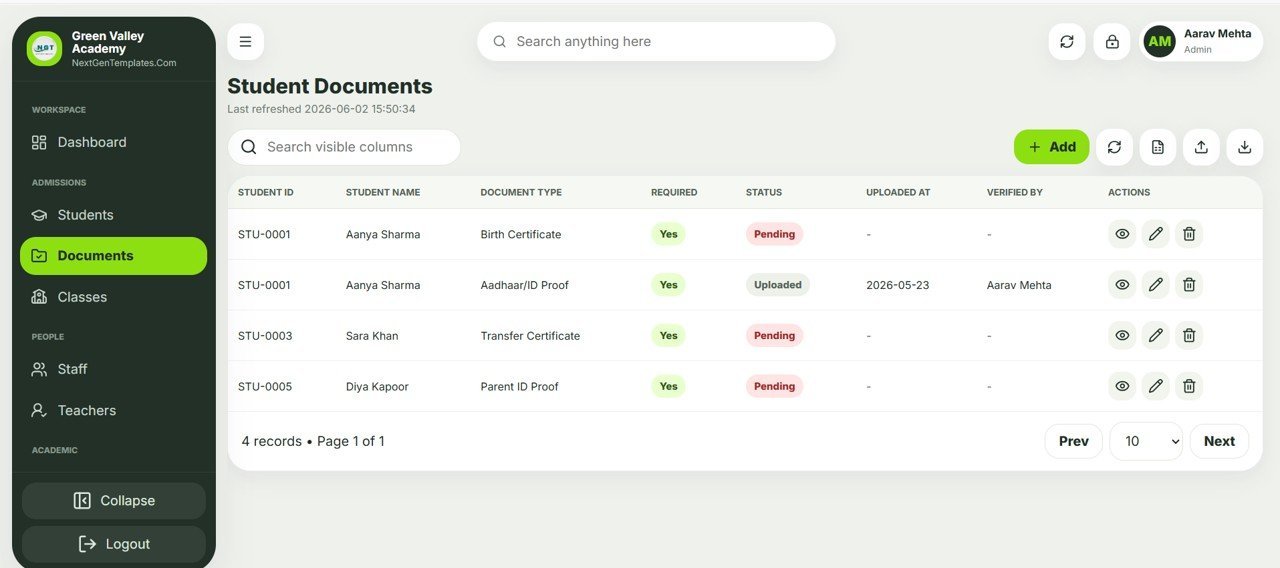
Student Documents Tracker
Track each required document — Birth Certificate, Aadhaar/ID Proof, Transfer Certificate, Parent ID Proof — with a Pending or Uploaded status, the upload date, and a Verified By name for a clean audit trail.
Classes & Sections
Define every class and section with its Class Teacher, Academic Year, Room Number, Capacity, and Active flag, so admissions and timetables always reference valid, current classes.

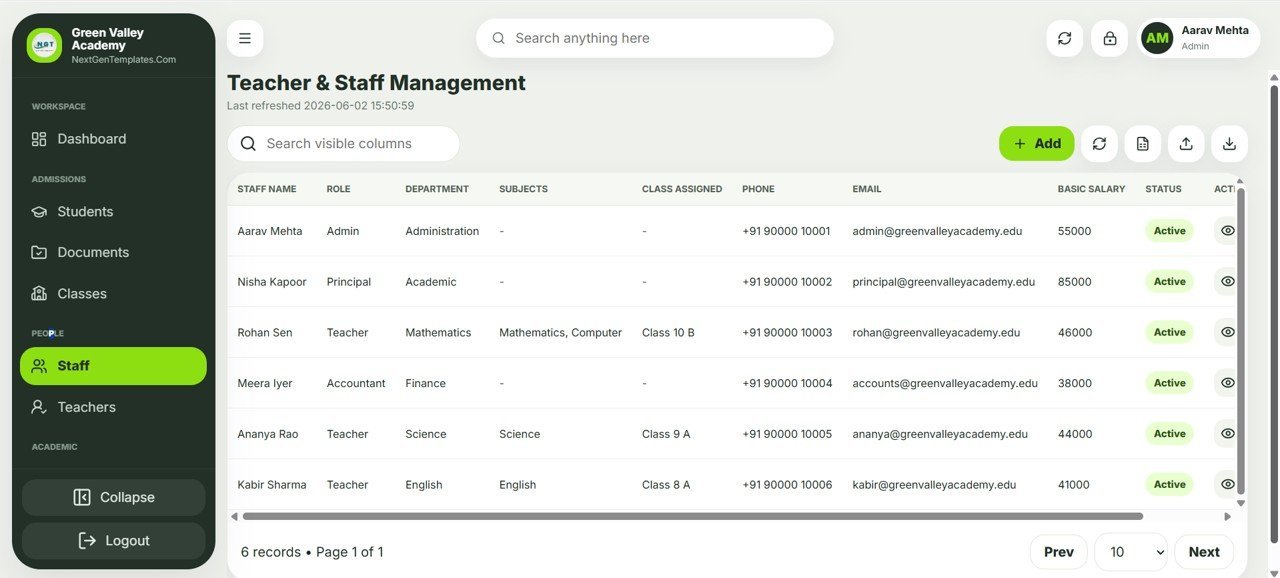
Teacher & Staff Management
One roster covers all staff: Name, Role, Department, Subjects, Class Assigned, Phone, Email, Basic Salary, and Status — the foundation for payroll calculations and role-based access.
Teacher Profiles
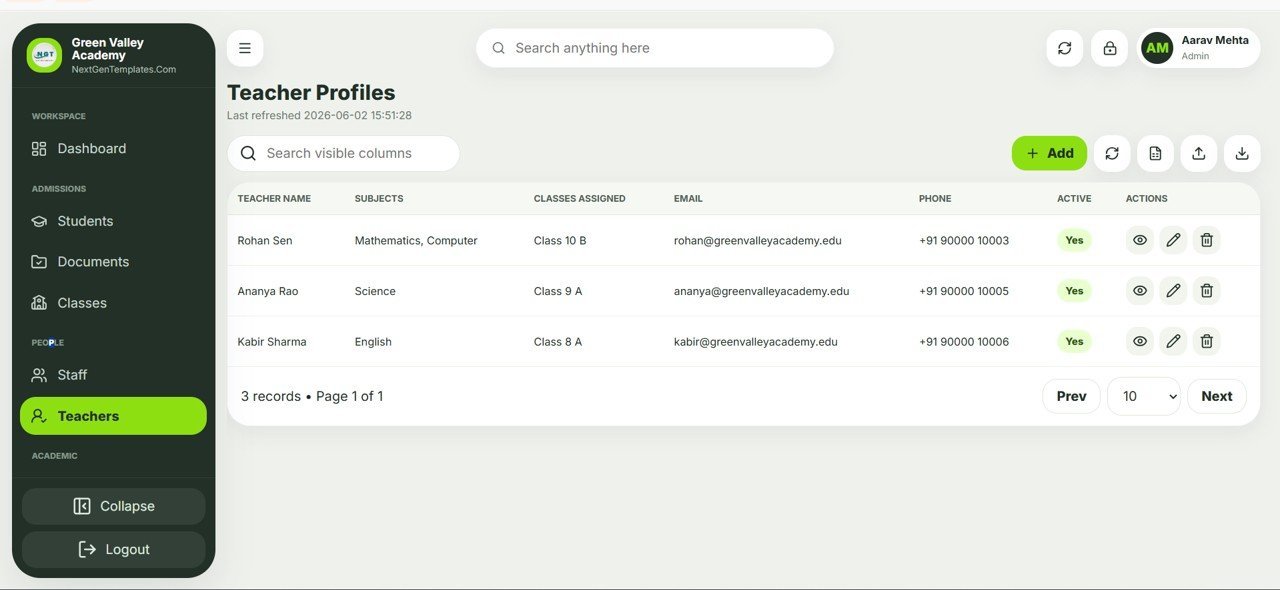
A focused teacher view lists Teacher Name, Subjects, Classes Assigned, Email, Phone, and Active status, with view, edit, and delete actions for fast academic administration.
📊 School Management System Web App vs. Excel/VBA School Tool vs. Cloud School ERP — Where This Fits
| Feature | School Management System Web App | Excel/VBA School Tool | Cloud School ERP (Fedena / Classe365) |
|---|---|---|---|
| Cost | $39.99 one-time | $20-60 one-time | $1-3 / student / year |
| Platform | Google Sheets + Apps Script web app | Desktop Excel file | Vendor cloud |
| Setup time | ✅ Under 10 minutes (Make a Copy) | Manual install + macros | Days of onboarding |
| Multi-user role-based login | ✅ Admin / Principal / Teacher / Accountant | ❌ single shared file | ✅ |
| Access from any browser or phone | ✅ | ❌ desktop only | ✅ |
| Customize fields & logic | ✅ full Apps Script source | ✅ VBA | ❌ limited |
| Data stays in your Google Drive | ✅ | ✅ local only | ❌ vendor servers |
| Per-student / per-user fees | ✅ none | ✅ none | ❌ recurring |
| Year-1 cost at 500 students | $39.99 | ~$40 | $500-1,500 |
For small and mid-size schools that want real multi-user software without the per-student bill of a cloud ERP, the School Management System Web App sits in the sweet spot.
👥 Who This Template Is For — and Who It’s Not For
✅ This template is built for:
- Independent K-12 schools, coaching centers, and academies with 50-2,000 students
- School admins and principals who want admissions, fees, and staff data in one place
- Founders who prefer a one-time purchase they can fully customize over a recurring SaaS bill
❌ This template is NOT for:
- Large districts that require SOC 2, SSO, and dedicated vendor support contracts
- Teams that refuse to use Google Workspace / Google Drive
- Schools needing built-in online payment gateways or government compliance certification out of the box
⚙️ How to Use the School Management System Web App
- Open the PDF guide in your download and click the ‘Make a Copy’ link to copy the Google Sheet and bound script to your Drive.
- In the Apps Script editor, choose Deploy > New Deployment > Web App and copy your private app URL.
- Open the Users sheet and replace the default Admin, Principal, Teacher, and Accountant logins with your own.
- Add your classes and sections, then import or add students in the Admission & Master module.
- Share the web app URL with staff — the dashboard and reports update automatically as data changes.
💼 Real-World Use Cases
Aarav runs operations at a 600-student private academy. He uses the School Management System Web App to approve new admissions, watch the daily attendance percentage, and check the pending fee amount each morning — without paying a per-student cloud ERP fee.
Nisha is the principal of a growing coaching center. She logs in with the Principal role to review teacher assignments, document verification status, and payroll due, then exports a class-wise student list for her board meeting.
Meera handles accounts for two small schools. She tracks fees collected this month and staff basic salaries across both copies of the app, keeping each school’s data in its own Google Drive for clean separation.
❓ Frequently Asked Questions
What modules does the School Management System Web App include?
The School Management System Web App includes six modules: an operations Dashboard, Student Admission & Master, Student Documents, Classes & Sections, Teacher & Staff Management, and Teacher Profiles, all backed by one Google Sheets database.
Do I need coding skills to set it up?
No. You copy the Google Sheet with ‘Make a Copy’, deploy it as a web app, and update the Users sheet. The whole School Management System Web App setup takes under 10 minutes and needs no programming.
Where is my school’s data stored?
All data in the School Management System Web App lives in a Google Sheet inside your own Google Drive. You keep full ownership of student, parent, and payroll records with no third-party vendor server.
How many users and roles are supported?
The School Management System Web App ships with four roles — Admin, Principal, Teacher, and Accountant — and you can add as many staff logins as you need in the Users sheet at no extra cost.
How does this compare to a cloud school ERP like Fedena or Classe365?
A cloud ERP typically charges $1-3 per student per year, while the School Management System Web App is a $39.99 one-time purchase you fully control. You trade vendor support for ownership and zero recurring fees.
Can I customize the fields and screens?
Yes. Because the School Management System Web App is open Google Apps Script and Google Sheets, you can rename fields, add columns, and adjust the dashboard logic to fit how your school actually works.
👤 About the Author
Built by PK — Microsoft Certified Professional with 15+ years of Excel, Google Sheets, and Power BI experience. Founder of NextGenTemplates, reaching 300K+ subscribers across YouTube channels (@PK-AnExcelExpert, @NextGenTemplates, @NeoTechNavigators). Every template is hand-built and tested before release.
🔗 Explore Related Templates
Building out your back-office? Pair this with the GST Billing System Web App for fee invoicing, the Advanced Task Management System Web App for staff to-dos, and the Incident Tracker and Report Web App for campus safety logs. Browse more in our Google Sheets Web Apps and Google Sheets templates collections.
📖 Click here to read the Detailed Blog Post
Watch the step-by-step video Demo:
🎥 Visit our YouTube channel for step-by-step video tutorials
👉 YouTube.com/@NextGenTemplates
📅 Last updated: June 2026

















Reviews
There are no reviews yet.