










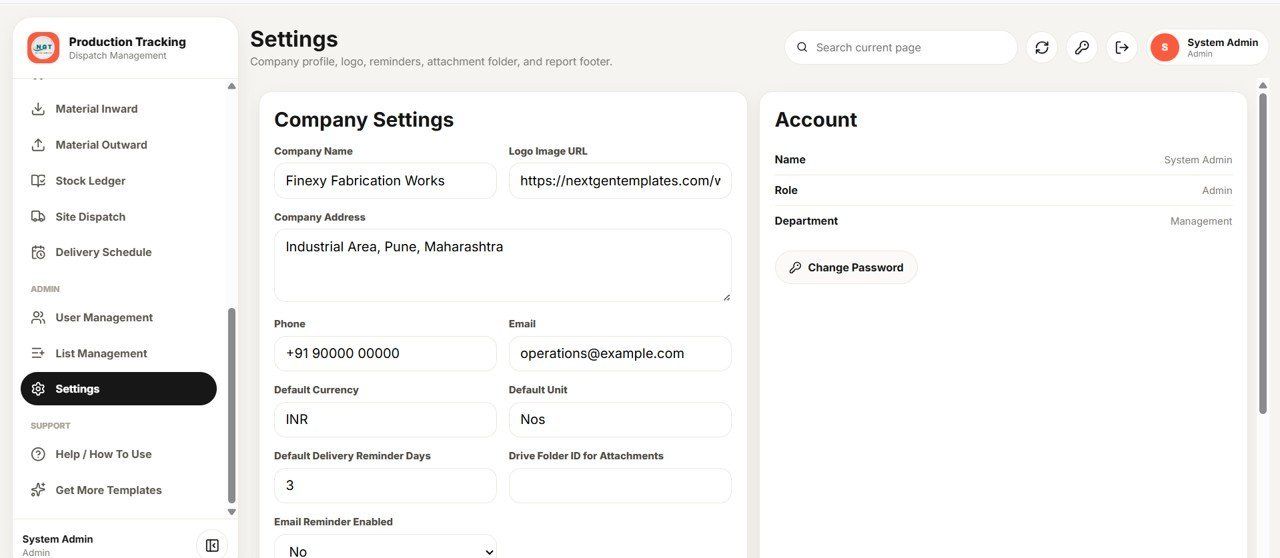

The Production Tracking and Dispatch Management System runs your entire shop floor — order intake, cutting, fabrication, welding, QC, stores and dispatch — across 21 connected modules inside one Google Sheets web app. The dashboard surfaces 18 live KPI cards, 4 analytics charts and 4 action lists, while 13 built-in reports export to Excel in one click. Six role-based logins keep every team on the right screen.
🌍 Join 8,400+ teams in 40+ countries using NextGenTemplates to replace paid SaaS tools with one-time-purchase Excel, Google Sheets, Power BI, and HTML templates.
✅ Instant access · One-time payment · No subscription · No per-user fees · Lifetime access
🔑 Key Features of the Production Tracking and Dispatch Management System
🔐 Role-based secure login. The Production Tracking and Dispatch Management System ships with six built-in roles — Admin, Production Manager, Store/Material User, QC User, Welding Supervisor and Dispatch User — so each person signs in with their own username and password and only sees the modules their job needs.
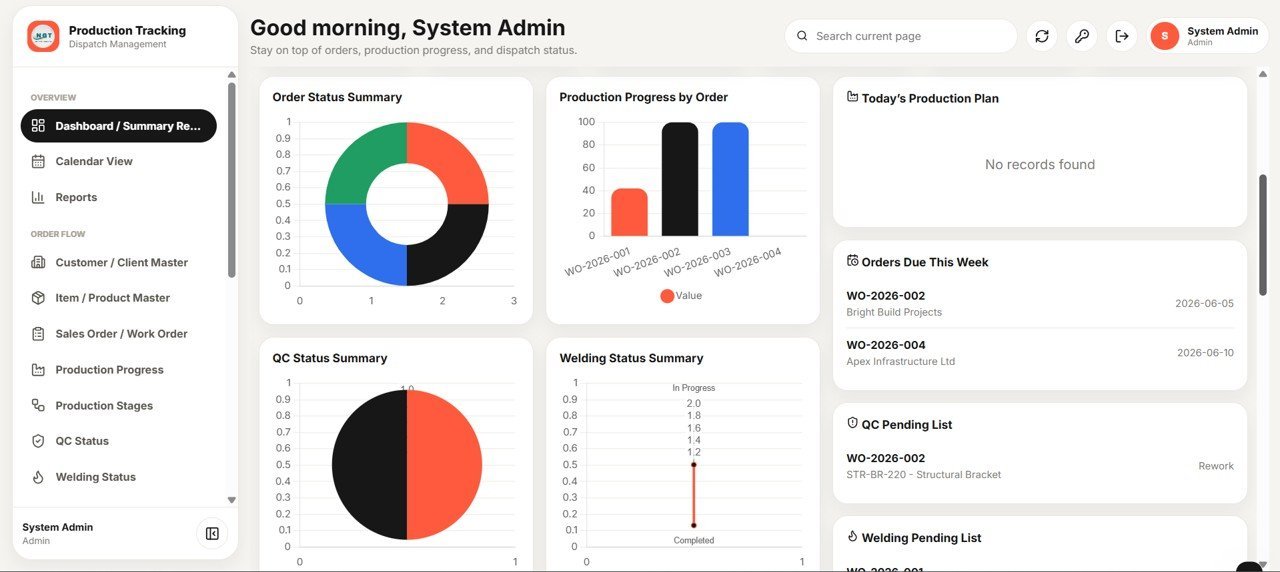
📊 18-card live dashboard. A single summary screen tracks Total, Open and In-Production orders, QC Pending/Passed/Failed, Welding Pending/Completed, Material Inward/Outward, Pending and Completed Dispatches, Delivery Delayed, Production Completion %, On-Time Delivery %, and total versus balance quantity.
🔗 Live order quantity tracking. For every work order the system tracks Ordered, Produced, QC-Passed and Dispatched quantities side by side, so balance quantity is always accurate without a single manual formula.
📦 Material control with audit trail. Material Inward and Outward entries post automatically to a Stock Ledger with running balances, reference module and negative-stock prevention when issuing to production.
📨 Dispatch and delivery built in. Generate printable dispatch challans, track balance dispatch quantity per site, and send automatic email delivery reminders against scheduled delivery dates.
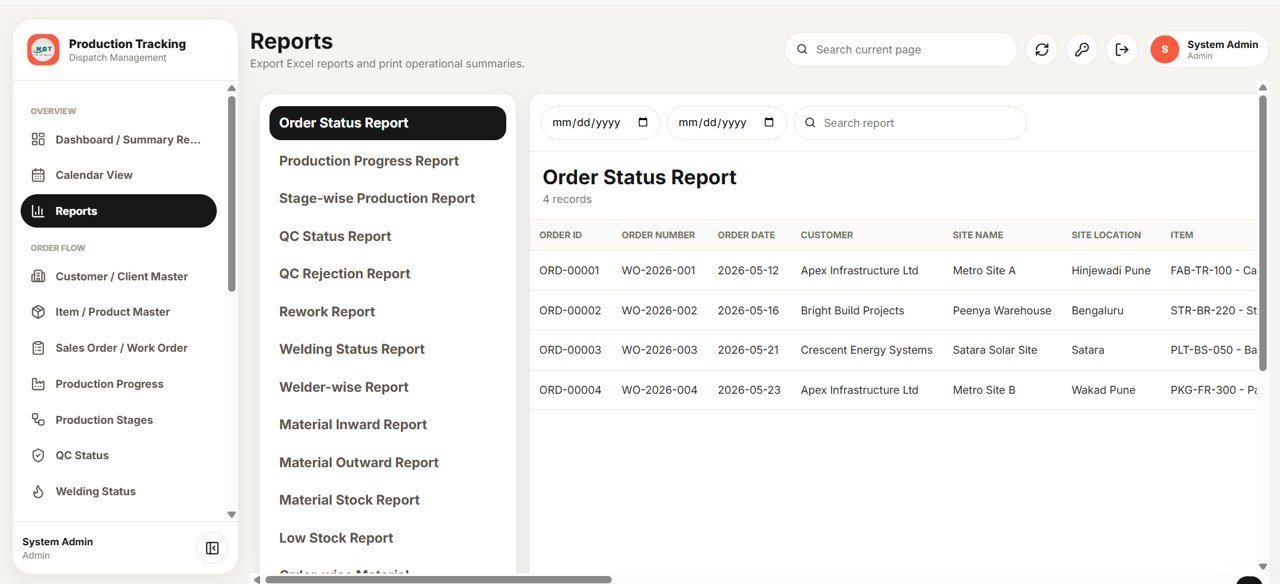
📈 13 reports + calendar. Thirteen ready reports (order status, stage-wise production, QC rejection, rework, welder-wise, material stock, low stock and more) plus a colour-coded calendar of production, QC, dispatch and delivery events — every report exports to Excel.
📦 What’s Inside the Production Tracking and Dispatch Management System
The web app is organised into 21 modules — a secure login, an analytics dashboard, master data screens, daily transaction trackers, stores, dispatch and admin tools. Here is every page in order.
Page 1: Login Page
The secure entry screen where each user signs in with an assigned username and password, with access controlled by role. It also shows a quick snapshot of Production Completion, Ready for Dispatch, QC Pending and Delayed Deliveries.

🚀 Try the Live Demo Before You Buy
We have deployed this web app in our own Google account so you can test every page, every role — with real sample data — before purchasing. No signup, no email required.
🔑 Test Login Credentials
Sign in as admin to manage the full production tracking and dispatch system, including setup, reports, users, and approvals or as production to manage production planning, shop-floor progress, material status, and dispatch coordination. Additional test roles include store / Store@123, qc / Qc@123, welding / Weld@123, dispatch / Dispatch@123, and viewer / View@123.
💡 What you get after purchase: The full source code (Code.gs + Index.html) plus a step-by-step deployment guide so you can deploy your own private instance in your own Google account in under 15 minutes.
Page 2: Dashboard / Summary Report
The command centre with 18 high-level KPI cards covering orders, production, QC, welding, material movement and dispatch. A date-range filter, refresh and print controls let managers read the whole operation in seconds.
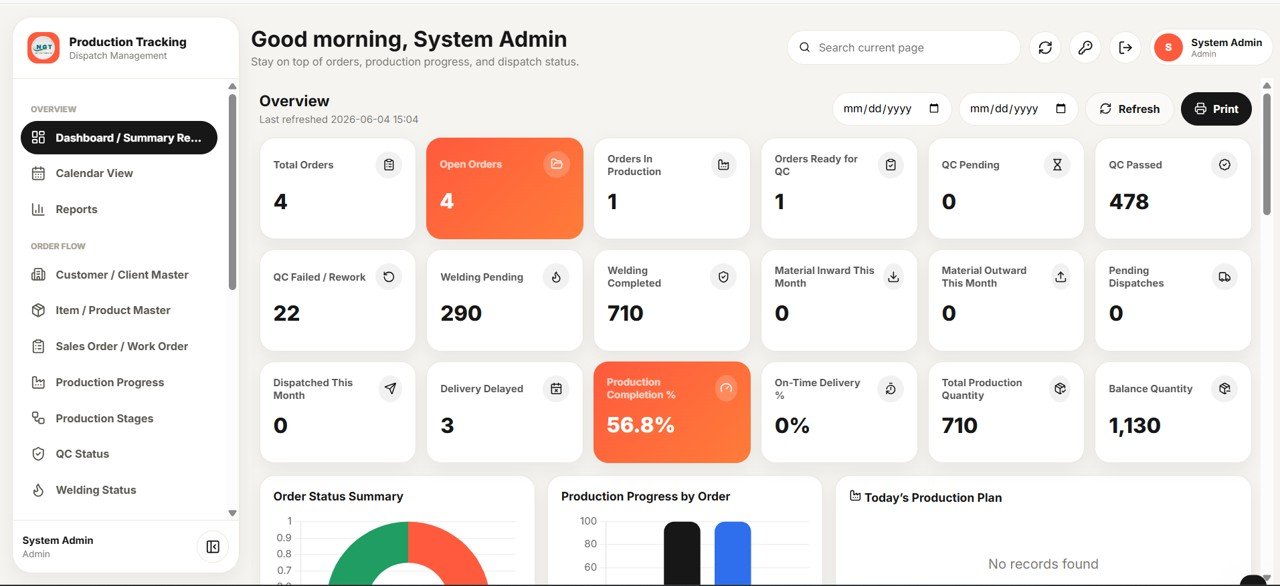
Page 3: Dashboard Charts and Action Lists
Four analytics charts — Orders by Status, Production Progress by Order, QC Quantity by Status and Welding Quantity by Status — turn raw rows into visual trends. Four action lists (Today’s Production Plan, Orders Due This Week, QC Pending List and Welding Pending List) tell the team exactly what to act on next.
Page 4: Calendar View
Production target dates, QC dates, dispatches and delivery schedules appear as colour-coded events. Filter by module or status, switch between month, week and list views, and click any event to open the underlying record.

Page 5: Reports
Thirteen reports including Order Status, Production Progress, Stage-wise Production, QC Status, QC Rejection, Rework, Welding Status, Welder-wise, Material Inward, Material Outward, Material Stock, Low Stock and Order-wise Material. Each report carries a date filter, search and one-click Excel export.

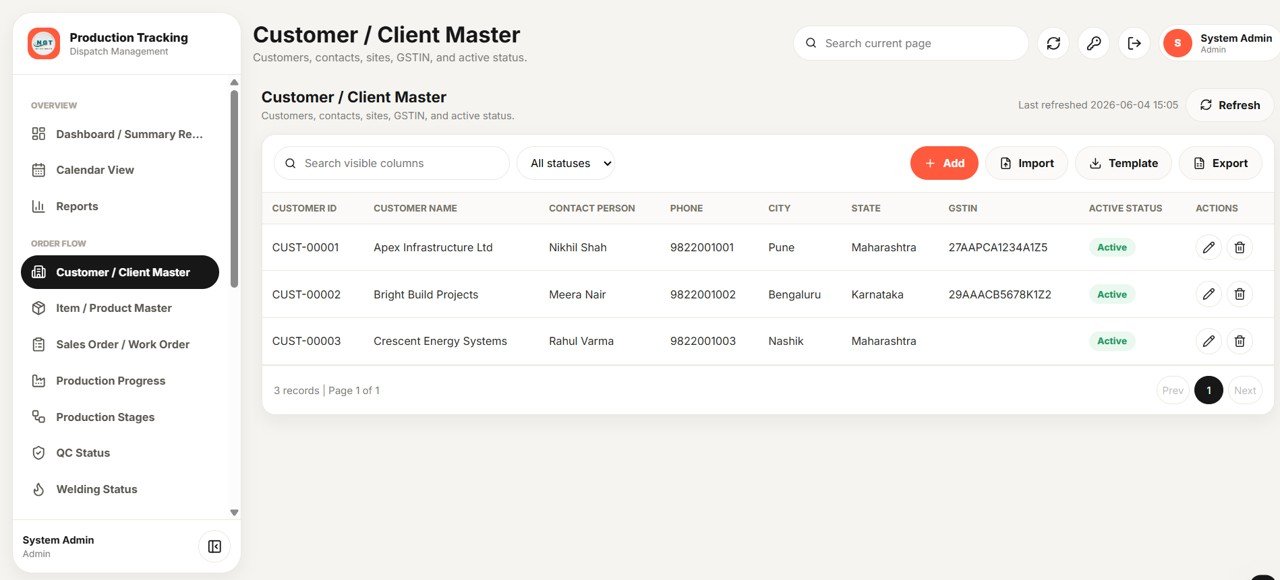
Page 6: Customer / Client Master
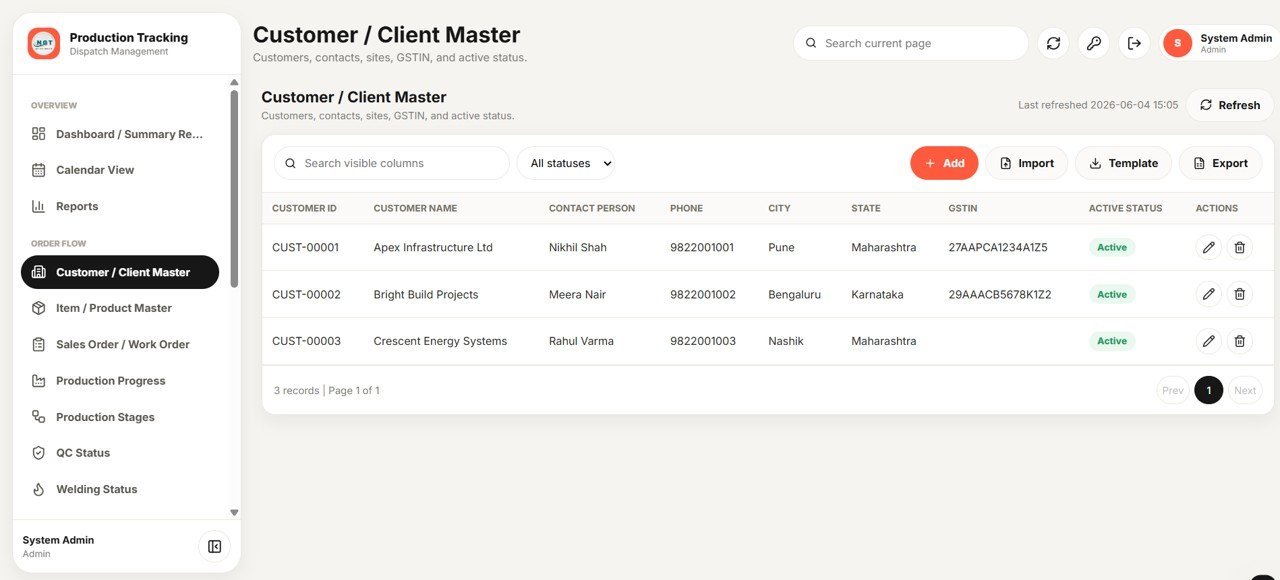
A central register of Customer ID, Name, Contact Person and Phone alongside City, State, GSTIN and Active status. Add, Import, Template-download and Export options make onboarding new clients quick.
Page 7: Item / Product Master
Defines every item with Item ID, Code, Name, Category and Unit plus a Drawing Number, and flags for Standard Welding Required and QC Required. Add, Import, Template and Export options keep the catalogue clean.

Page 8: Sales Order / Work Order Master
Captures Order Number, Order Date, Customer and Item, then tracks Ordered, Produced, QC-Passed and Dispatched quantities live as work flows through the floor. Add, Import, Template and Export options included.

Page 9: Production Progress Tracking
A daily log of Production Date, Order Number, Customer and Item with Planned, Produced and Balance quantity, plus the current Production Stage for every update — so progress against each order is always visible.

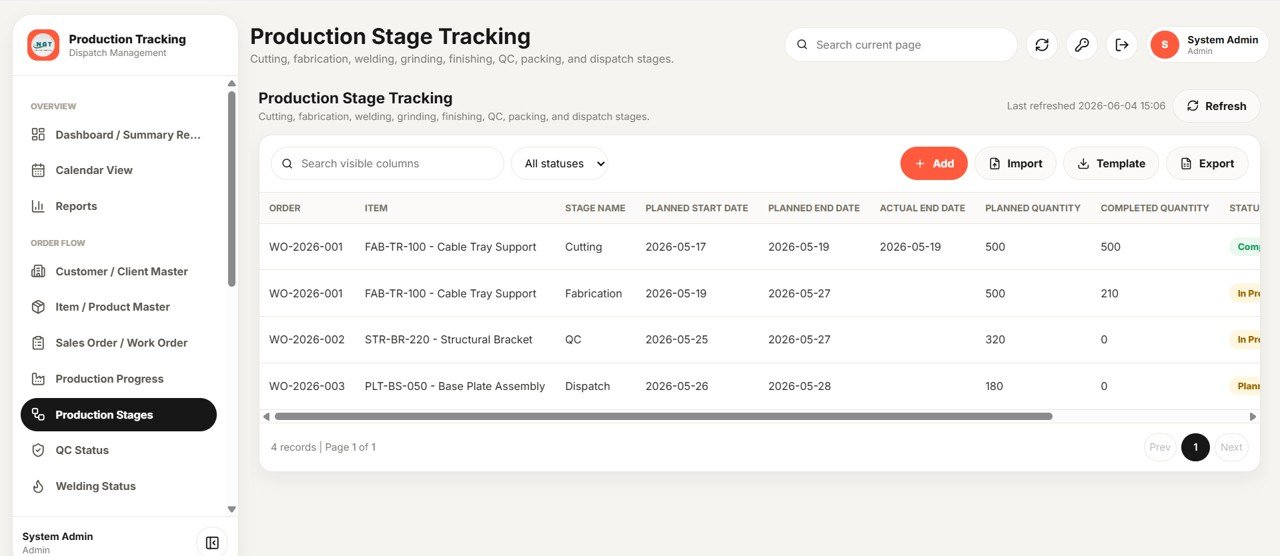
Page 10: Production Stage Tracking
Tracks stages such as Cutting, Fabrication, Welding, QC, Packing and Dispatch with Planned Start, Planned End and Actual End dates, plus Planned and Completed quantity and Status for each stage.
Page 11: QC Status Monitoring
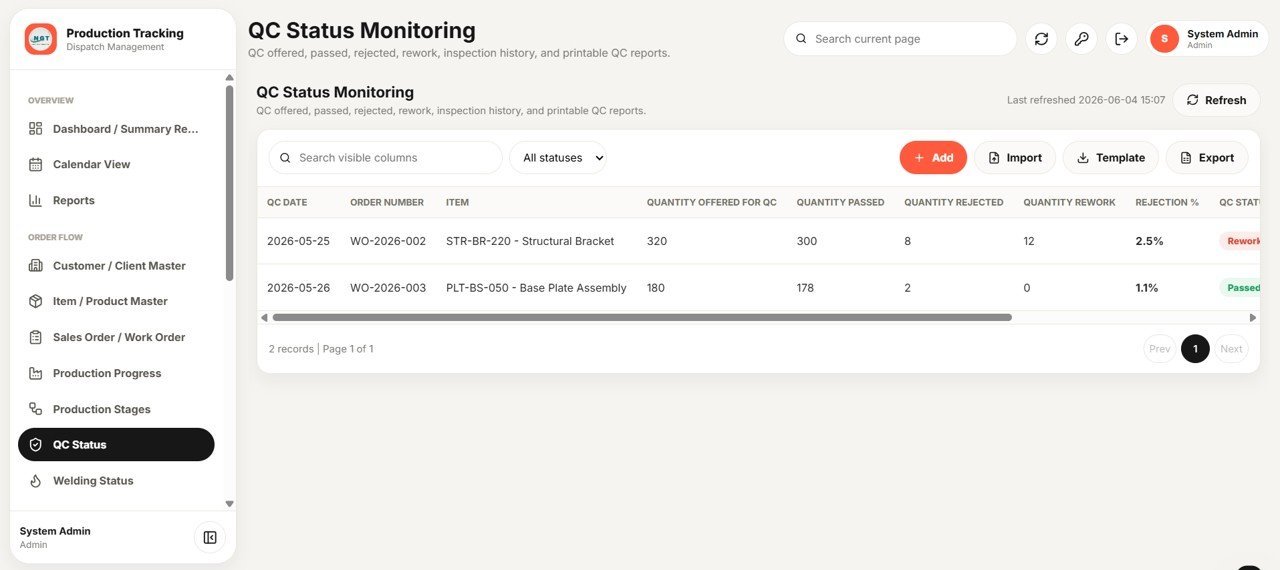
Records QC Date, Order Number and Item with Quantity Offered, Passed, Rejected and Rework. The system calculates Rejection % and QC Status automatically for every inspection.

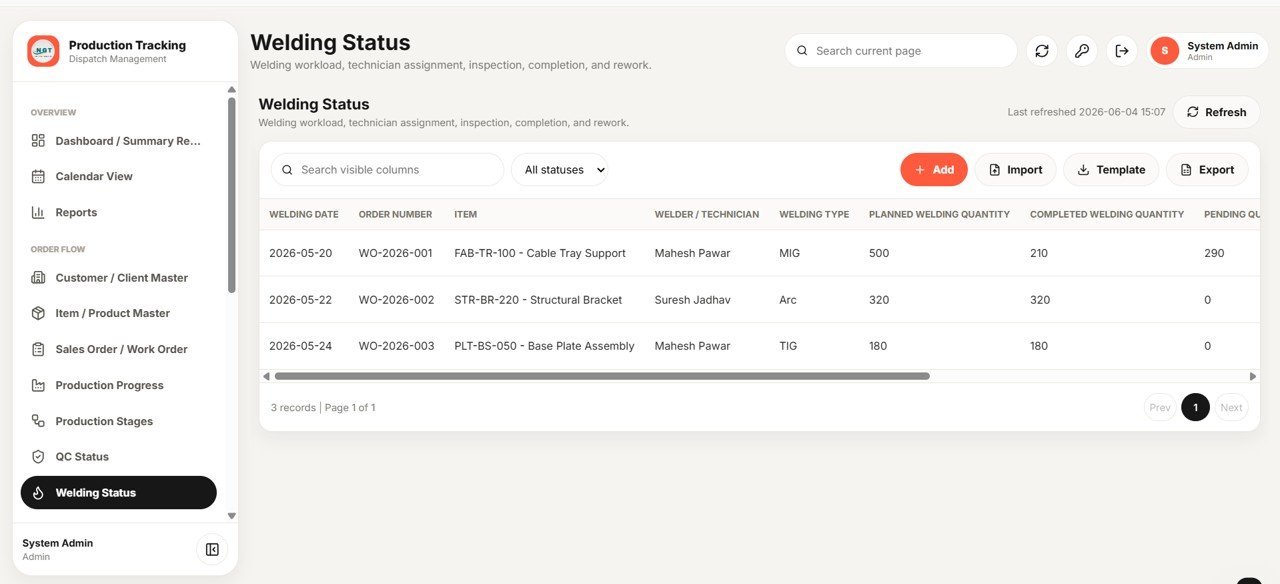
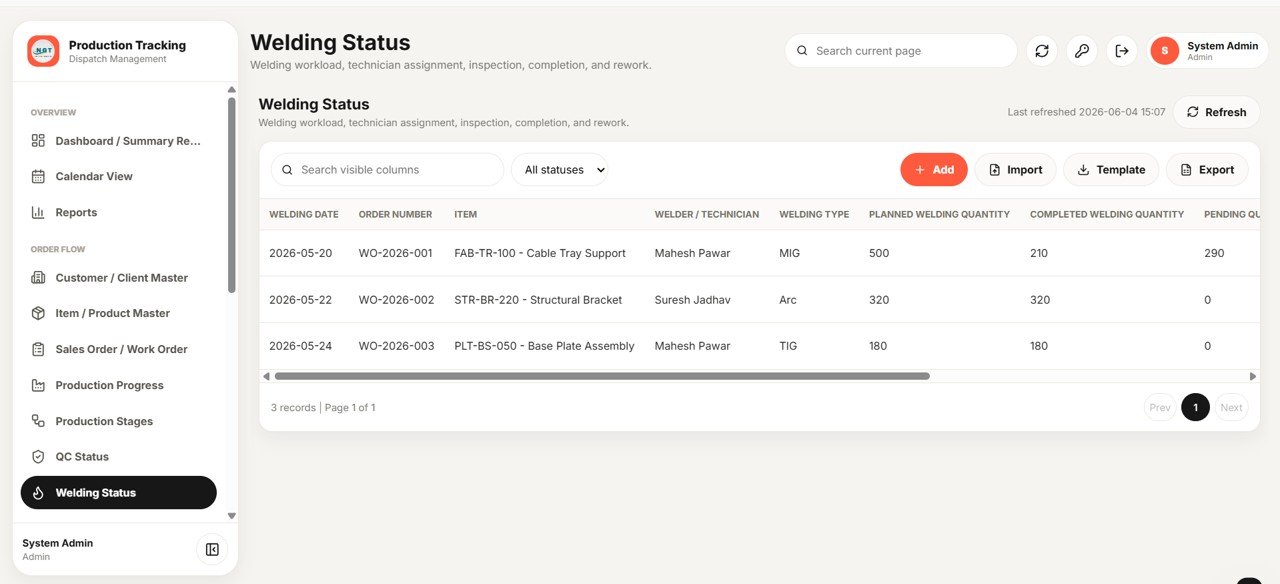
Page 12: Welding Status
Logs Welding Date, Order Number and Item, the assigned Welder/Technician and Welding Type, plus Planned, Completed and Pending welding quantity for full visibility of fabrication work.
Page 13: Material Master
Holds Material Code, Name, Type and Unit with Opening, Current and Minimum Stock, plus Supplier, Storage Location and Active status — the backbone for all inventory movement.

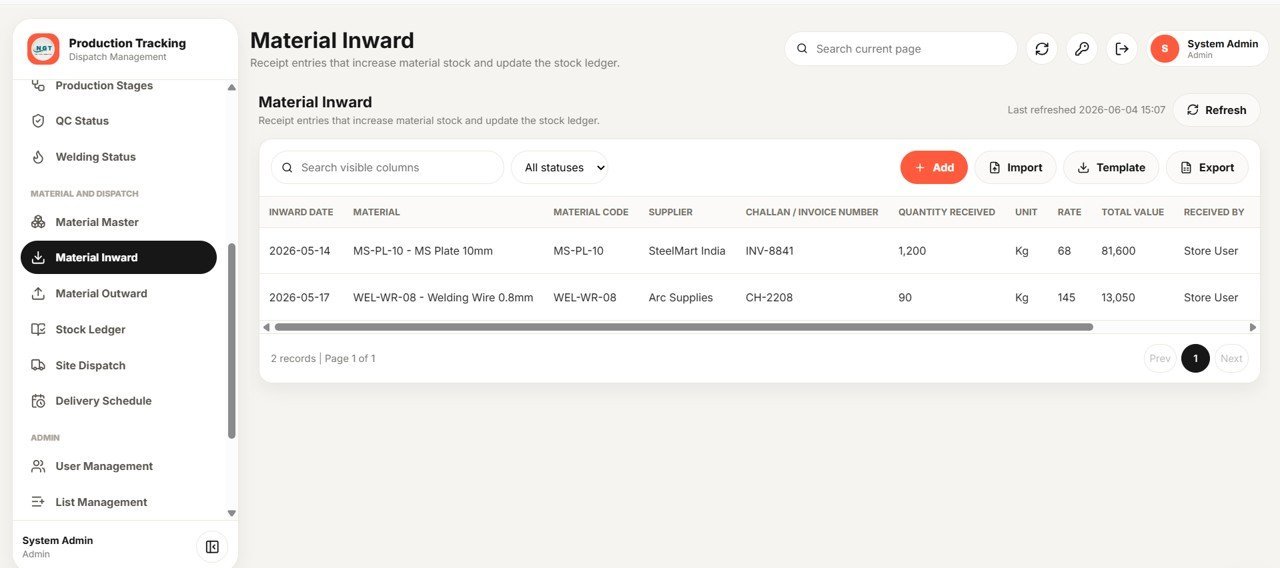
Page 14: Material Inward
Records Inward Date, Material, Supplier and Challan/Invoice Number with Quantity Received, Rate and Total Value. Stock and the Stock Ledger update automatically with every receipt.

Page 15: Material Outward / Issue to Production
Captures Outward Date, Material, Order Number and Item with Issued Quantity, Issued-To and Department. Built-in negative-stock prevention stops you from issuing more material than you hold.

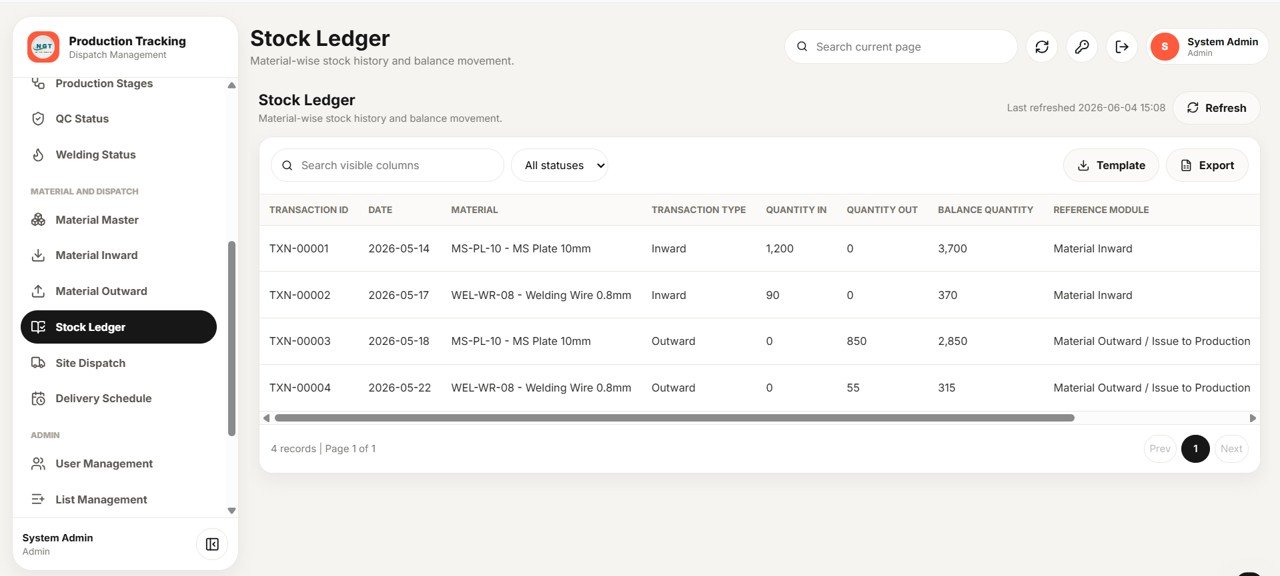
Page 16: Stock Ledger
A complete audit trail with Transaction ID, Date and Material plus Transaction Type, Quantity In, Quantity Out and running Balance Quantity, each line linked to its reference module.
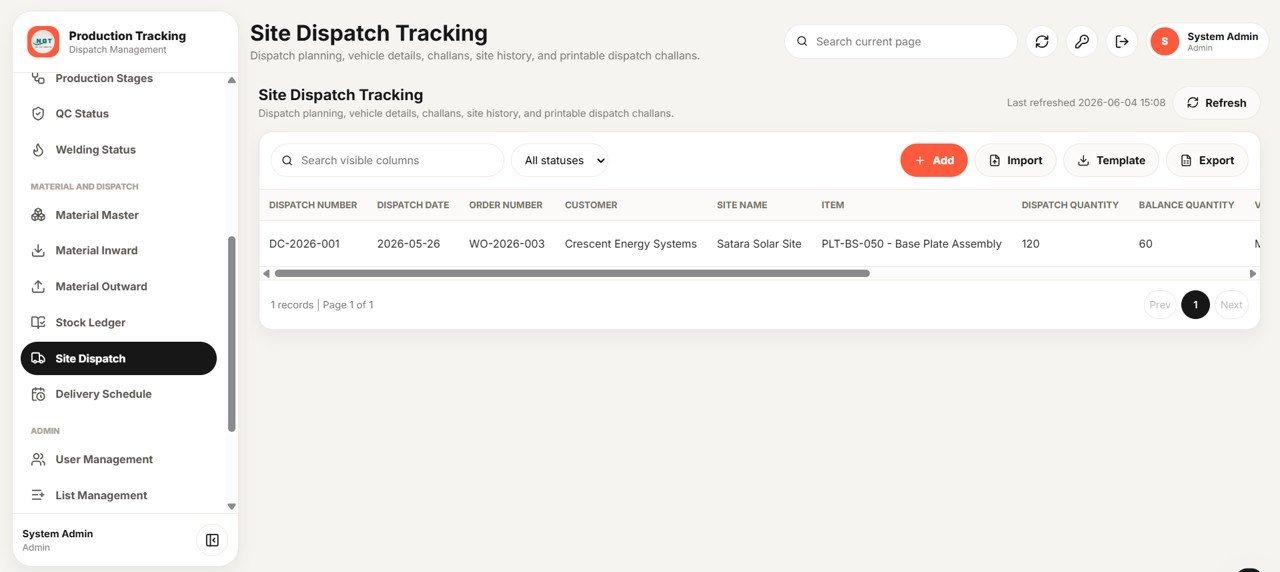
Page 17: Site Dispatch Tracking
Manages Dispatch Number, Dispatch Date, Order Number and Customer with Site Name, Item, Dispatch Quantity and Balance Quantity — and prints dispatch challans on demand.

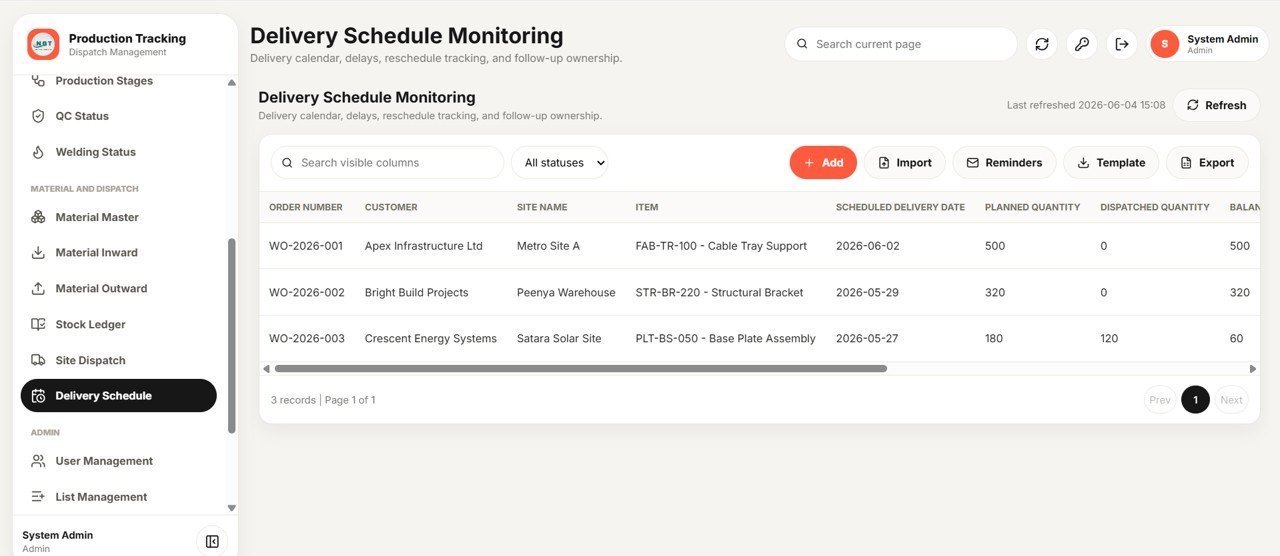
Page 18: Delivery Schedule Monitoring
Tracks Order Number, Customer, Site Name and Item against Scheduled Delivery Date with Planned, Dispatched and Balance quantity, and sends email delivery reminders so nothing slips.

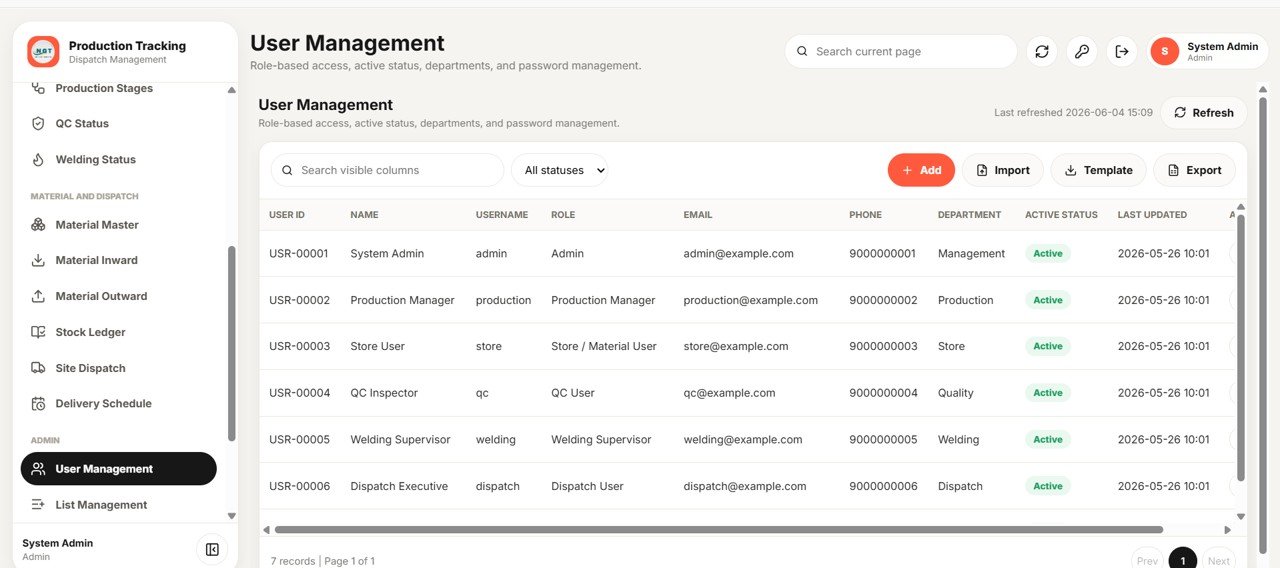
Page 19: User Management
Admins manage User ID, Name, Username, Role, Email, Phone and Department across roles such as Admin, Production Manager, Store/Material User, QC User, Welding Supervisor and Dispatch User, with Active status and password management.
Page 20: List Management
One admin screen controls the dropdown values used across every form and filter, with List Type, Value, Active status and Sort Order — so the whole system stays consistent.

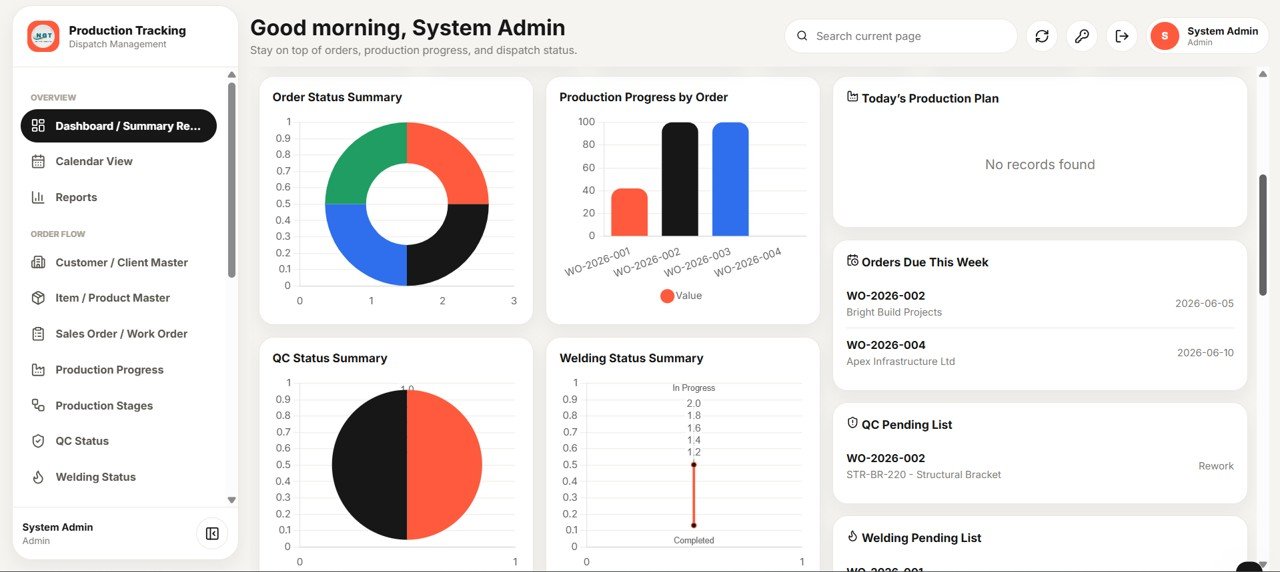
Page 21: Settings
Configure Company Name, Logo URL, Address, Phone and Email plus Default Currency, Default Unit and Default Delivery Reminder Days, with a Drive Folder ID for attachments and an email-reminder toggle.

📊 Production Tracking and Dispatch Management System vs. Excel VBA Tool vs. Paid Manufacturing SaaS — Where This Fits
| Feature | Production Tracking & Dispatch System | Excel VBA Macro Tool | Katana MRP / Odoo Manufacturing |
|---|---|---|---|
| Cost | $24.99 one-time | $15–$60 one-time | $39–$199 / user / month |
| Platform | Google Sheets web app (browser) | Desktop Excel + macros | Cloud SaaS |
| Setup time | Under 15 minutes (Make a Copy) | 1–2 hours, macro security prompts | Days of onboarding |
| Real-time multi-user access | ✅ Built-in, role-based | ❌ Single-file, easily corrupted | ✅ Yes |
| Mobile / browser access | ✅ Any device | ❌ Windows desktop only | ✅ Yes |
| Customisable fields & lists | ✅ List Management screen | ⚠️ Code edits required | ⚠️ Limited on lower tiers |
| QC, welding & dispatch in one tool | ✅ 21 modules included | ❌ Usually separate files | ✅ Yes (premium tiers) |
| Own the source code | ✅ Full Apps Script included | ✅ VBA visible | ❌ Vendor-locked |
| Year-1 cost at 5 users | $24.99 total | ~$60 total | $2,340–$11,940 |
For manufacturers who want real-time, multi-user production and dispatch control without paying per-user SaaS fees, the Production Tracking and Dispatch Management System sits in the sweet spot.
👥 Who This Template Is For — and Who It’s Not For
✅ This template is built for:
- Fabrication, structural, sheet-metal and engineering workshops running make-to-order production
- Production managers who need live order, QC, welding and dispatch status in one screen
- Stores and material teams who want inward, outward and stock ledger control with negative-stock prevention
- SMEs that want a multi-user system on Google Sheets instead of paying monthly for an MES or ERP
❌ This template is NOT for:
- Large plants that need full ERP with finance, procurement and machine-level IoT integration
- Teams that refuse to use Google Workspace or cannot run an Apps Script web app
- Process industries needing batch/recipe (BOM explosion) manufacturing rather than discrete order tracking
⚙️ How to Use the Production Tracking and Dispatch Management System
1️⃣ Open the PDF guide in your download and click the ‘Make a Copy’ link to install the system in your own Google Drive.
2️⃣ Open the bound Apps Script editor and deploy the project as a Web App, then copy the live URL.
3️⃣ In Settings, enter your company name, logo, currency, default unit and delivery-reminder days.
4️⃣ Add your users and roles in User Management, then fill the Customer, Item and Material masters.
5️⃣ Create work orders, then record daily production, QC, welding, material and dispatch entries — the dashboard, ledger and reports update automatically.
💼 Real-World Use Cases
Ramesh runs a 40-person structural fabrication workshop. He uses the Production Tracking and Dispatch Management System to see open orders, today’s production plan and QC-pending items the moment he logs in, instead of chasing four separate Excel files across the shop floor.
Priya manages stores at an engineering unit. Every material receipt and issue she records flows straight into the Stock Ledger with running balances, and negative-stock prevention stops the floor from over-issuing steel before a new inward entry is made.
Daniel heads dispatch for a make-to-order manufacturer. He prints dispatch challans per site, watches balance quantity against each delivery schedule, and lets the system email delivery reminders so customer sites are never surprised.
❓ Frequently Asked Questions
What does the Production Tracking and Dispatch Management System track?
The Production Tracking and Dispatch Management System tracks sales/work orders, daily production, production stages, QC, welding, material inward and outward, stock ledger, site dispatch and delivery schedules across 21 modules, with 18 live dashboard KPIs updating automatically.
Do I need to install any software?
No. The Production Tracking and Dispatch Management System runs entirely in Google Sheets and Apps Script. You make a copy in your own Google Drive, deploy it as a web app, and open it in any browser on desktop or mobile.
How many users and roles does it support?
It supports unlimited users across six built-in roles — Admin, Production Manager, Store/Material User, QC User, Welding Supervisor and Dispatch User — each with role-based access managed from the User Management screen.
How long does setup take?
Most teams are live in under 15 minutes: make a copy, deploy the web app, set your company details in Settings, add users, and fill the Customer, Item and Material masters. No coding is required for normal use.
How does this compare to a paid manufacturing SaaS like Katana or Odoo?
Paid MES/ERP tools typically cost $39–$199 per user per month. The Production Tracking and Dispatch Management System is a one-time $24.99 purchase with full Apps Script source you own — ideal for SMEs that want core production and dispatch control without recurring fees.
Can I customise dropdowns and fields?
Yes. The List Management screen lets admins control the dropdown values used across every form and filter, and because you receive the full Apps Script source you can extend the Production Tracking and Dispatch Management System further.
👤 About the Author
Built by PK — Microsoft Certified Professional with 15+ years of Excel, Google Sheets, and Power BI experience. Founder of NextGenTemplates, reaching 300K+ subscribers across YouTube channels (@PK-AnExcelExpert, @NextGenTemplates, @NeoTechNavigators). Every template is hand-built and tested before release.
🔗 Explore Related Templates
Pair this system with the Equipment Maintenance Management System Web App to keep machines running, the Daily Sales Purchase System Web App for procurement, and the GST Billing System Web App for invoicing dispatched goods. For issue logging, see the Incident Tracker and Report Web App, and for analytics try the Contract Manufacturing Dashboard in Google Sheets. Browse more in our Web App Templates, Google Sheets Templates and Manufacturing Templates collections.
📖 Click here to read the Detailed Blog Post<
/h3>
🎥 Visit our YouTube channel for step-by-step video tutorials
👉 YouTube.com/@NeoTechNavigators
Watch the step-by-step video tutorial:
📅 Last updated: June 2026
Compatibility and Requirements
- It runs in Google Sheets and Apps Script: you make a copy in your own Google Drive, deploy it as a web app and open it in a browser. You need a Google account.
- Google’s guide How to use Google Sheets covers the Sheets basics.

















Reviews
There are no reviews yet.