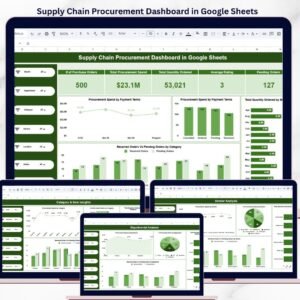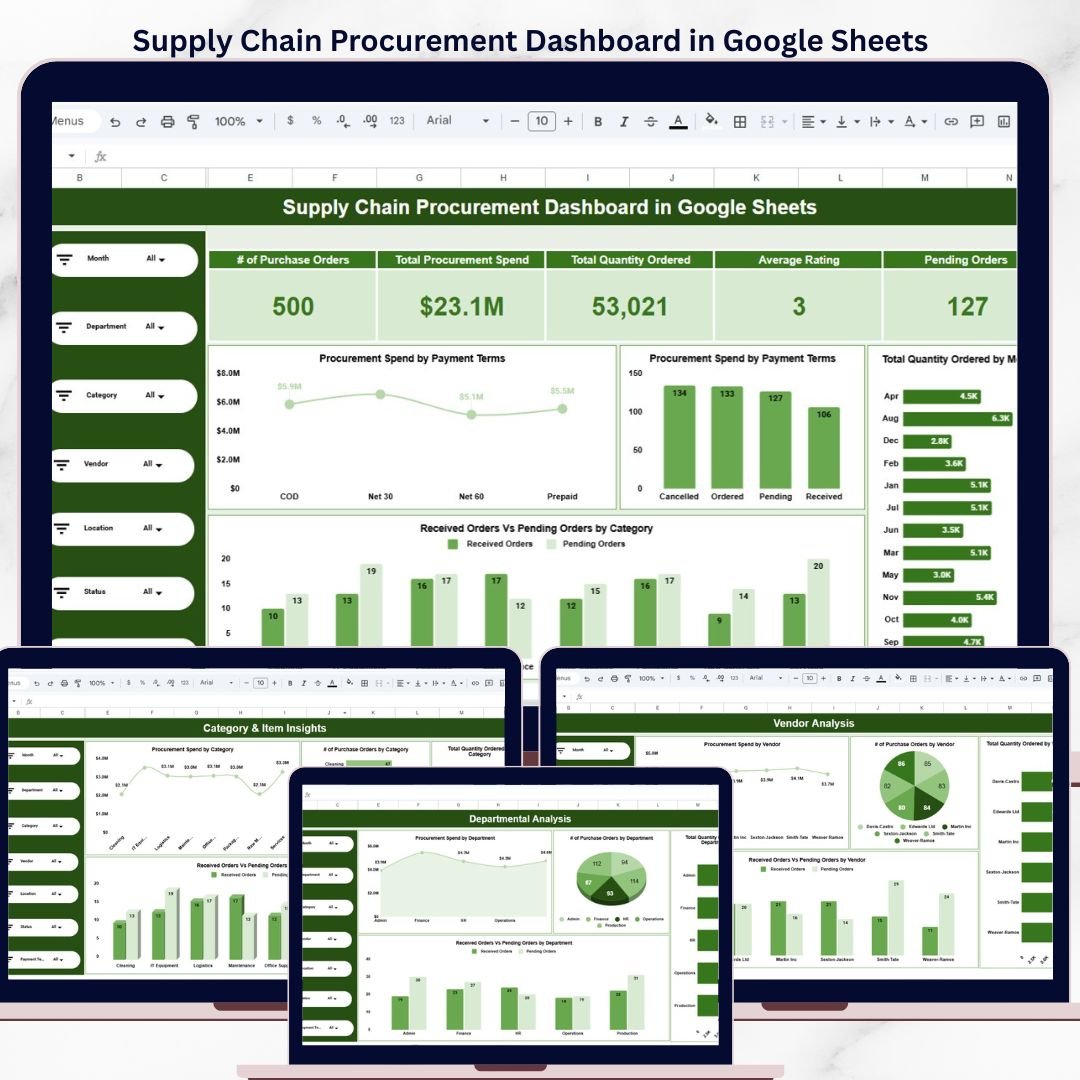
The Supply Chain Procurement Dashboard in Google Sheets tracks 5 KPI cards and 16+ interactive charts across 5 dedicated analysis pages — Overview, Departmental Analysis, Vendor Analysis, Category & Item Insights, and Location & Payment Terms. Setup takes under 10 minutes — copy the template to your Google Drive, replace the sample data, and every slicer, chart, and KPI card refreshes automatically.
🌍 Join 8,400+ teams in 40+ countries using NextGenTemplates to replace paid SaaS tools with one-time-purchase Excel, Google Sheets Dashboards, Power BI, and HTML templates.
✅ Instant download · One-time payment · No subscription · No per-user fees · Lifetime access
Supply Chain Procurement Dashboard in Google Sheets
🔑 Key Features of the Supply Chain Procurement Dashboard in Google Sheets
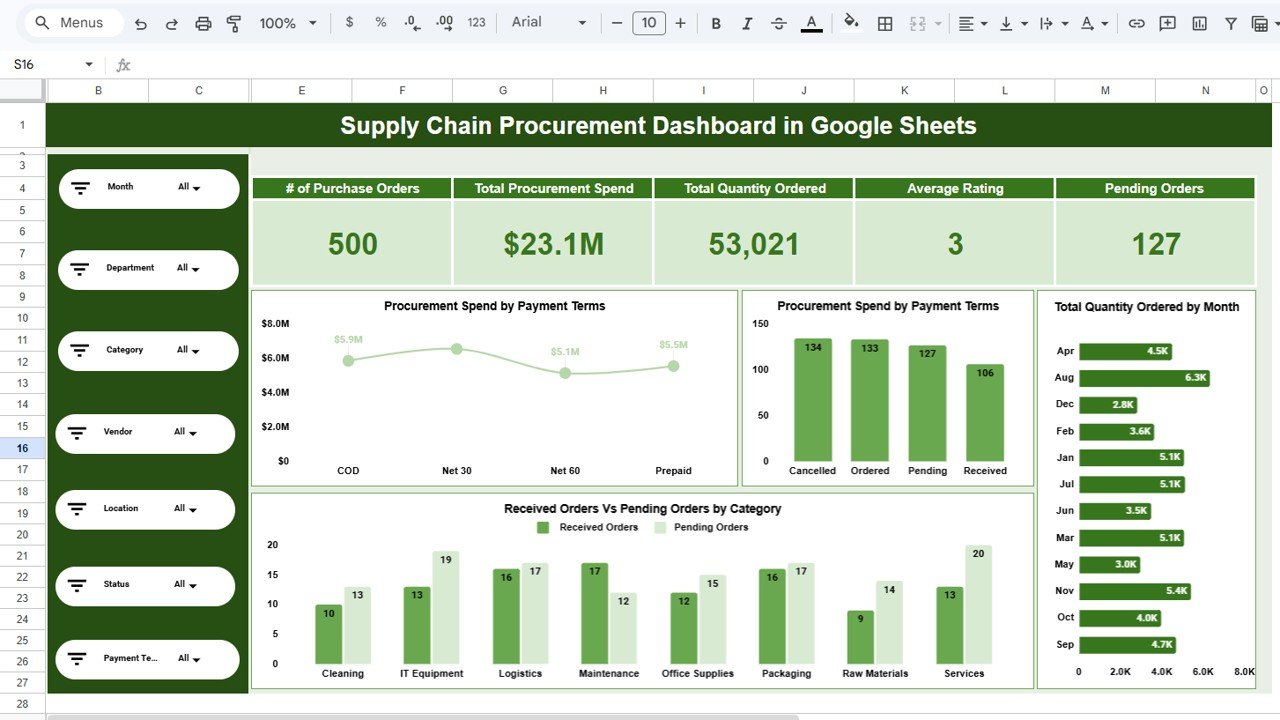
🔹 5 KPI Cards on the Overview Page — Number of Purchase Orders, Total Procurement Spend, Total Quantity Ordered, Average Rating, and Pending Orders. Procurement managers get a single-screen snapshot of purchasing activity and fulfillment status without writing a single formula.
🔹 16+ Charts across 5 Dedicated Analysis Pages covering Departmental breakdown, Vendor performance, Category-level insights, and Location & Payment Terms. Every chart respects the slicer selection so you can drill into a single department, vendor, or category and see the full picture update instantly.
🔹 Native Slicer-Driven Filtering on Every Page — apply Department, Vendor, Category, Location, or Month filters once and every visual and KPI card updates without custom scripts or macros.
🔹 Received Orders vs Pending Orders Comparison on every analysis page — instantly identify fulfillment gaps by department, vendor, category, or location and take corrective action before delays snowball.
🔹 Editable Data Sheet with Sample Records — the Data Sheet tab comes pre-loaded with realistic procurement records. Replace them with your own purchase order data and the entire dashboard recalculates automatically.
📦 What’s Inside the Supply Chain Procurement Dashboard
Page 1 — Overview: 5 KPI cards (# of Purchase Orders, Total Procurement Spend, Total Quantity Ordered, Average Rating, Pending Orders) plus 4 charts — Procurement Spend by Payment Terms, # of Purchase Orders by Status, Total Quantity Ordered by Month, and Received Orders vs Pending Orders by Category. Multiple slicers allow instant filtering across every metric.
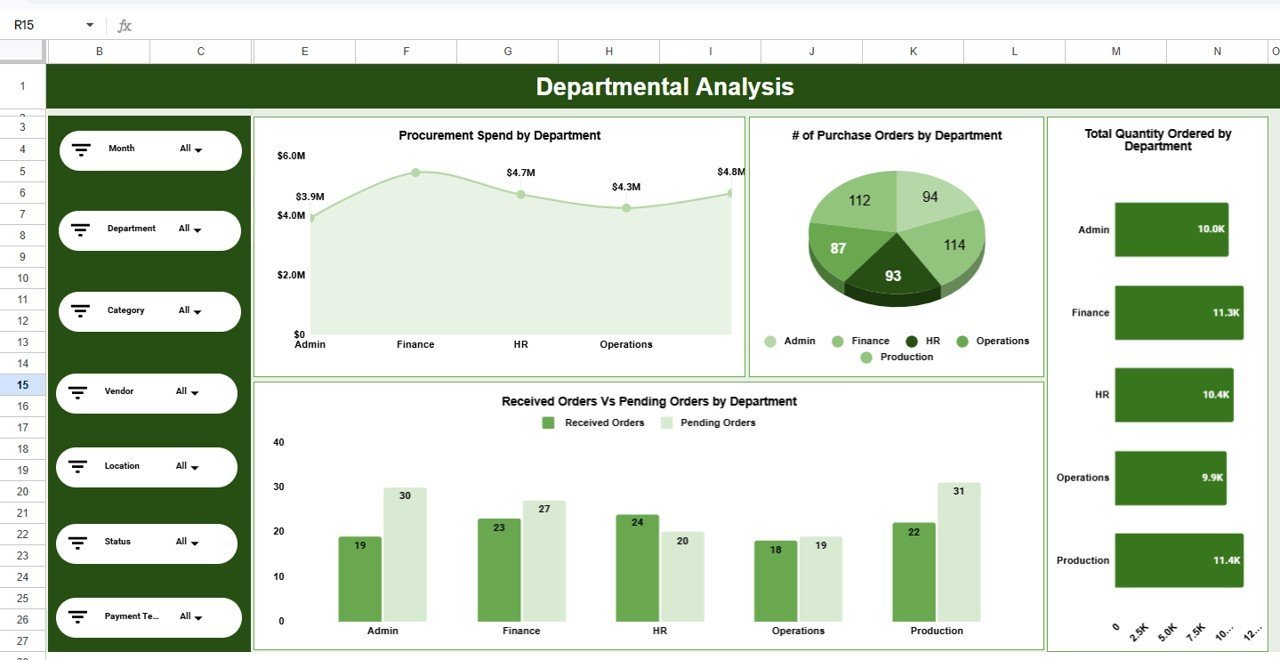
Departmental Analysis
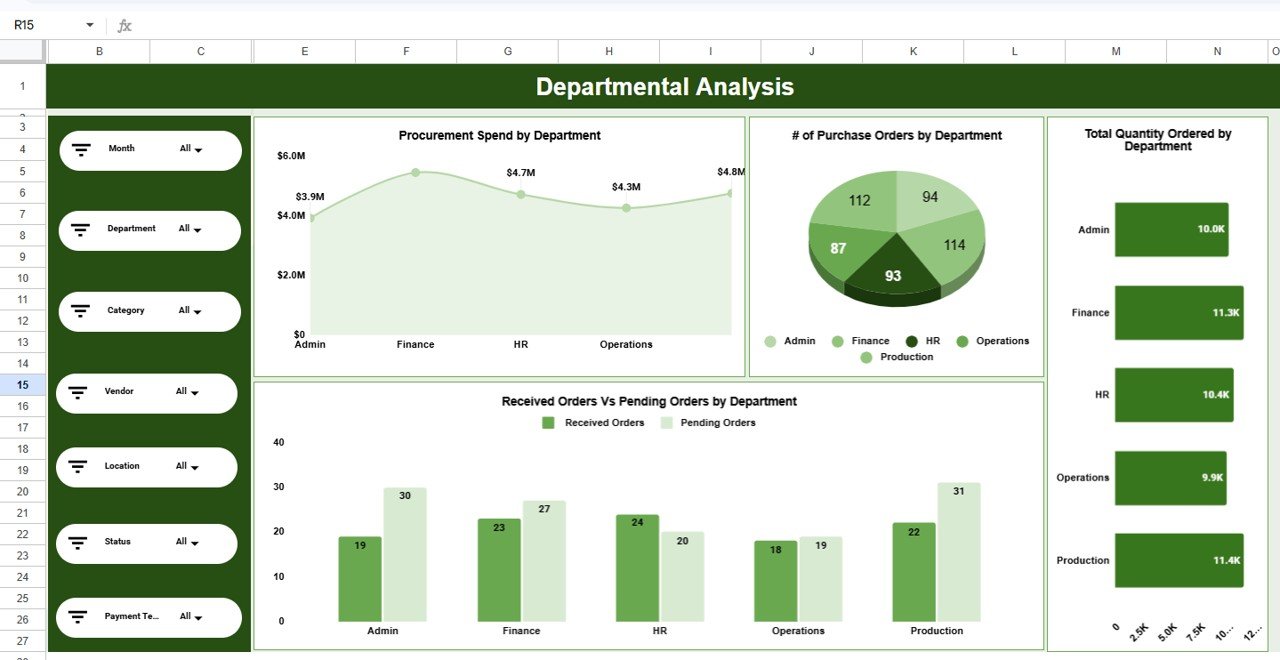
Page 2 — Departmental Analysis: 4 charts — Procurement Spend by Department, # of Purchase Orders by Department, Total Quantity Ordered by Department, and Received Orders vs Pending Orders by Department. Compare every department side-by-side to identify which teams drive the highest procurement costs.Supply Chain Procurement Dashboard in Google Sheets
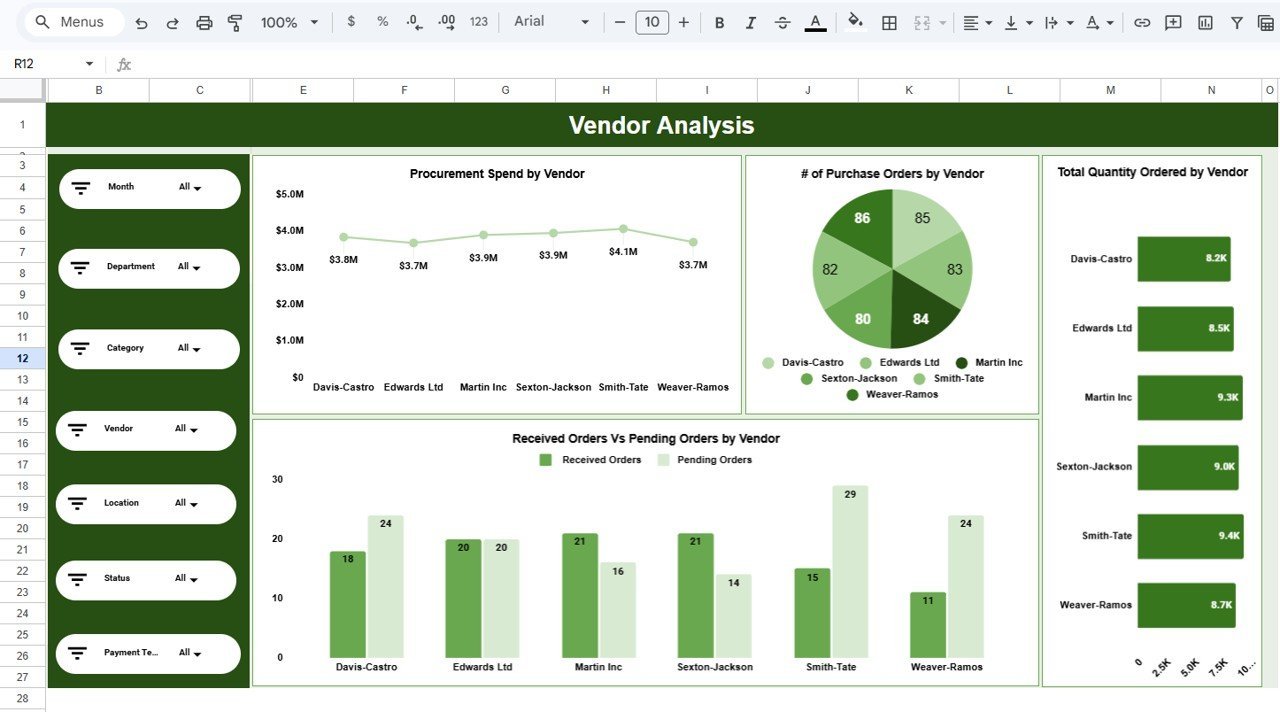
Vendor Analysis
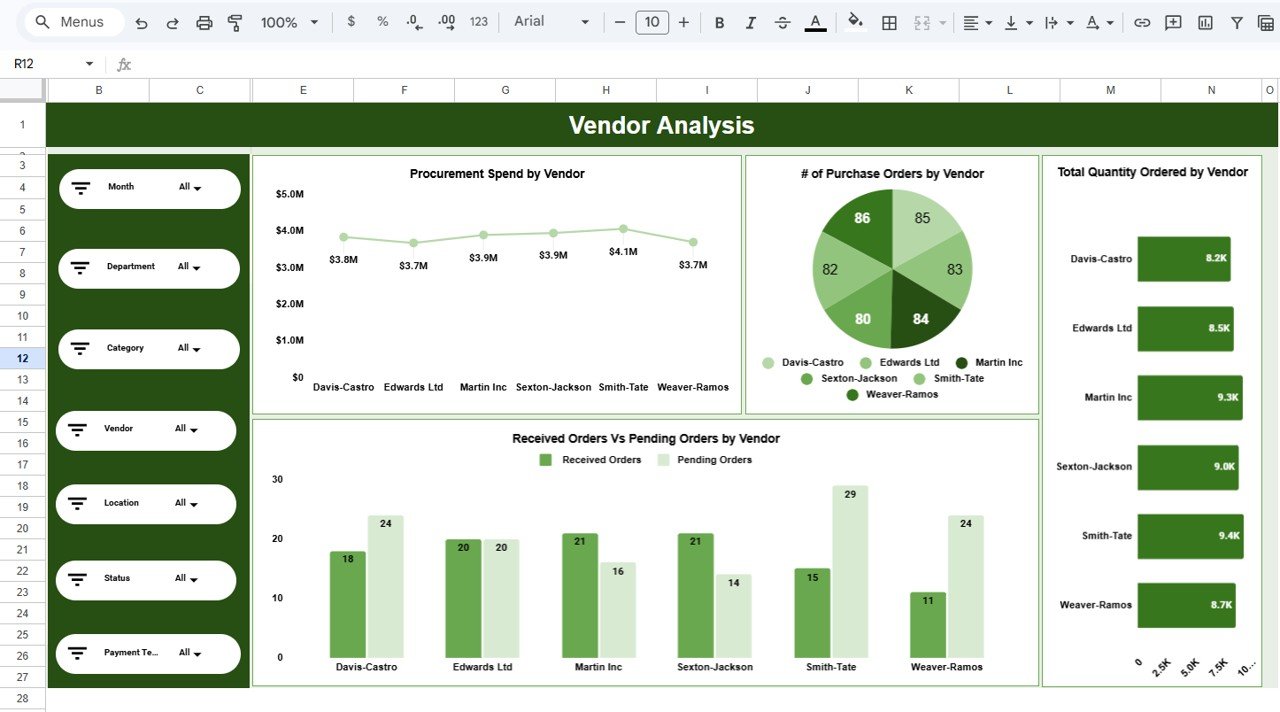
Page 3 — Vendor Analysis: 4 charts — Procurement Spend by Vendor, # of Purchase Orders by Vendor, Total Quantity Ordered by Vendor, and Received Orders vs Pending Orders by Vendor. Evaluate vendor reliability and cost-effectiveness to negotiate better contracts and reduce supply risk.
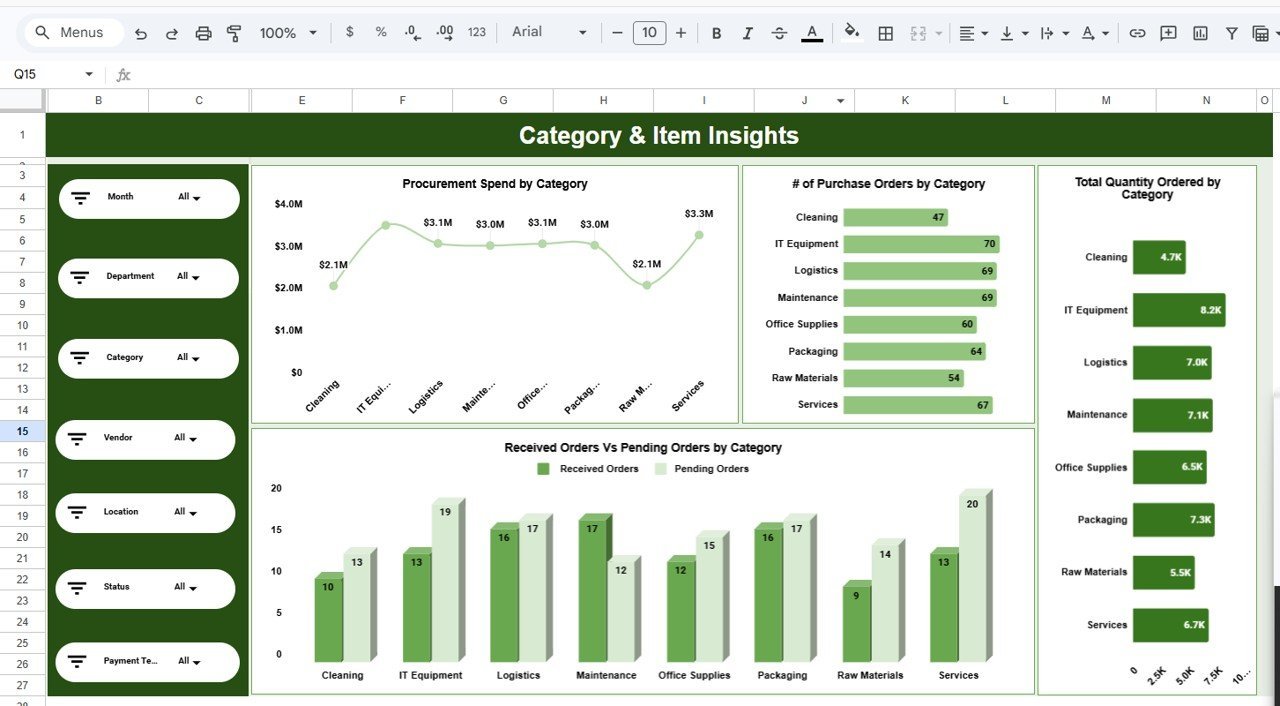
Category & Item Insights
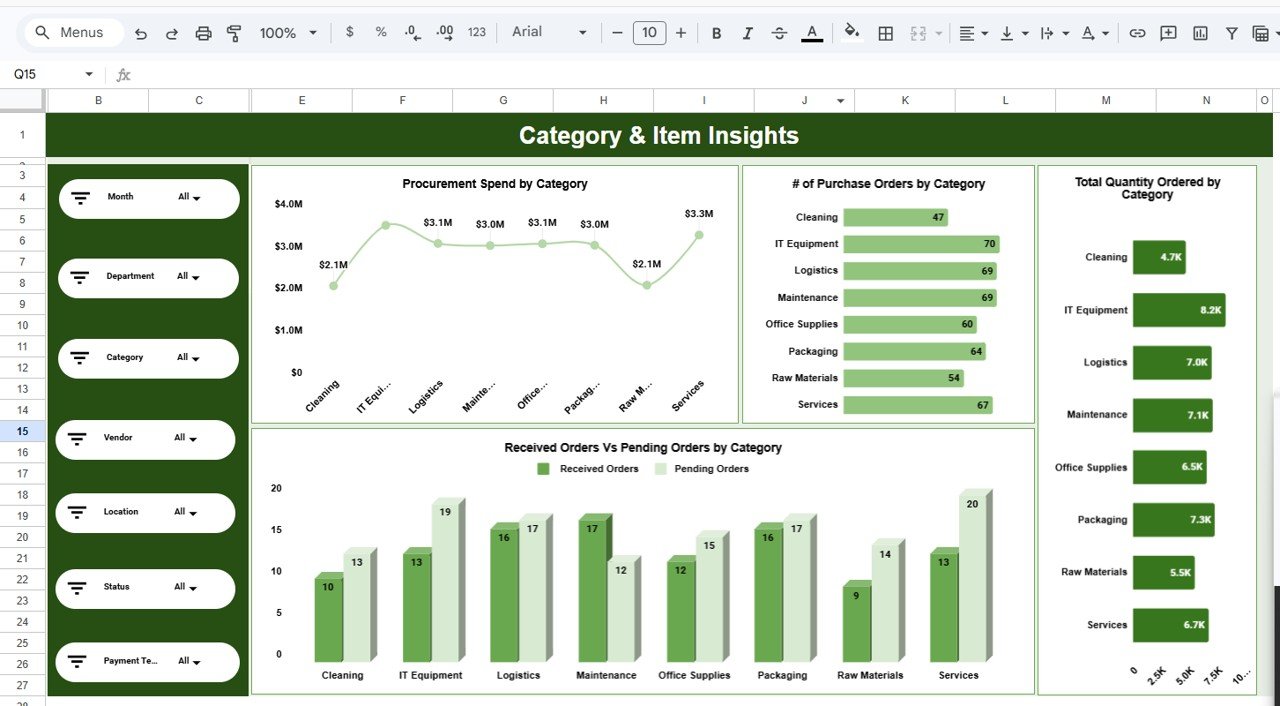
Page 4 — Category & Item Insights: 4 charts — Procurement Spend by Category, # of Purchase Orders by Category, Total Quantity Ordered by Category, and Received Orders vs Pending Orders by Category. Understand exactly which product categories consume the largest share of your budget.
Location & Payment Terms
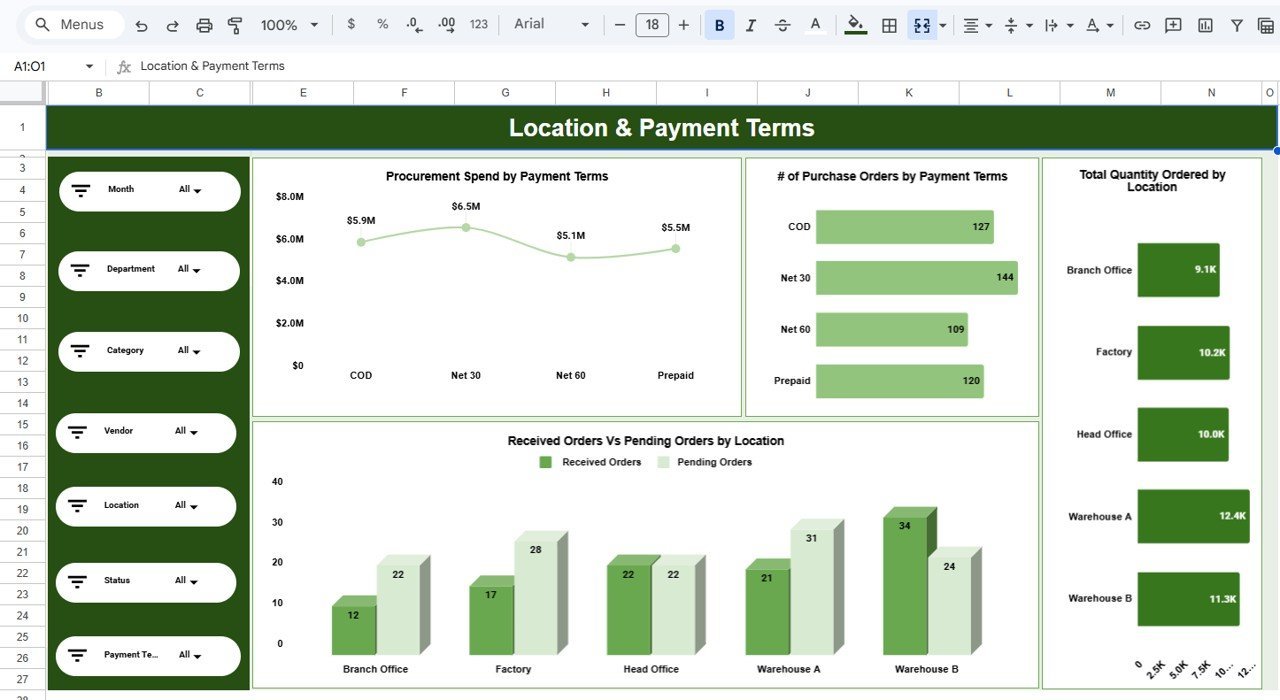
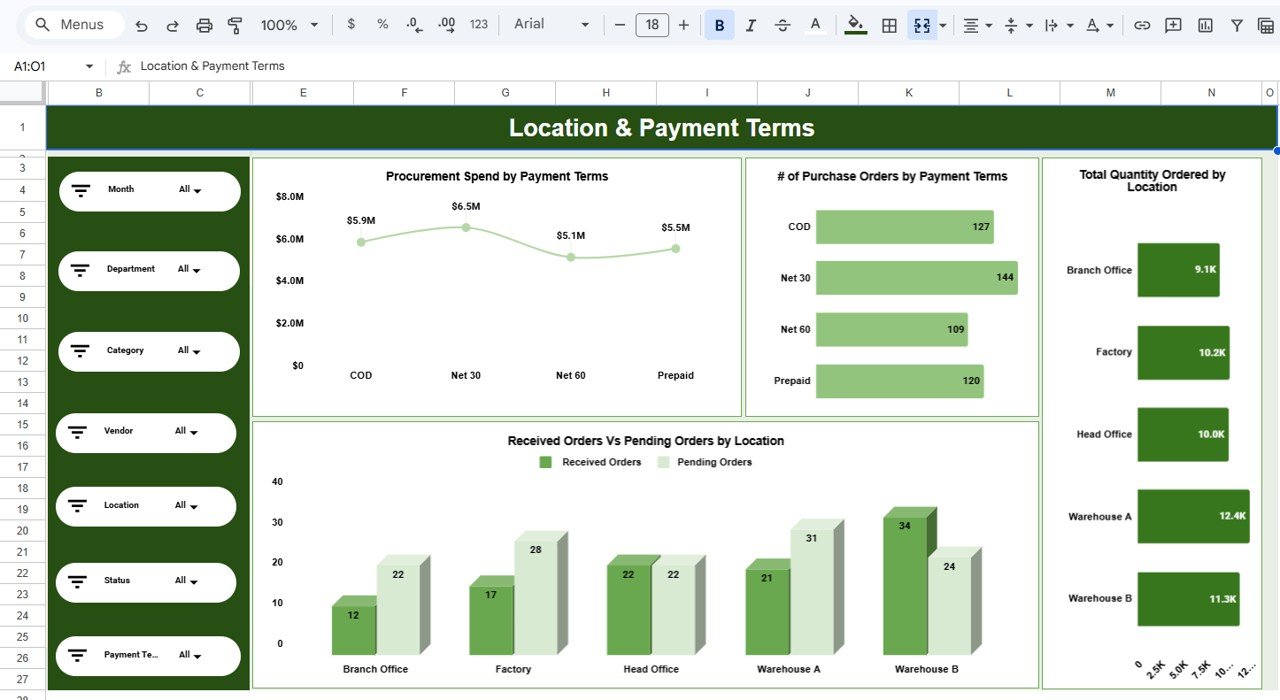
Page 5 — Location & Payment Terms: 4 charts — Procurement Spend by Payment Terms, # of Purchase Orders by Payment Terms, Total Quantity Ordered by Location, and Received Orders vs Pending Orders by Location. Spot geographic fulfillment patterns and optimize payment schedules.
Data Sheet Tab
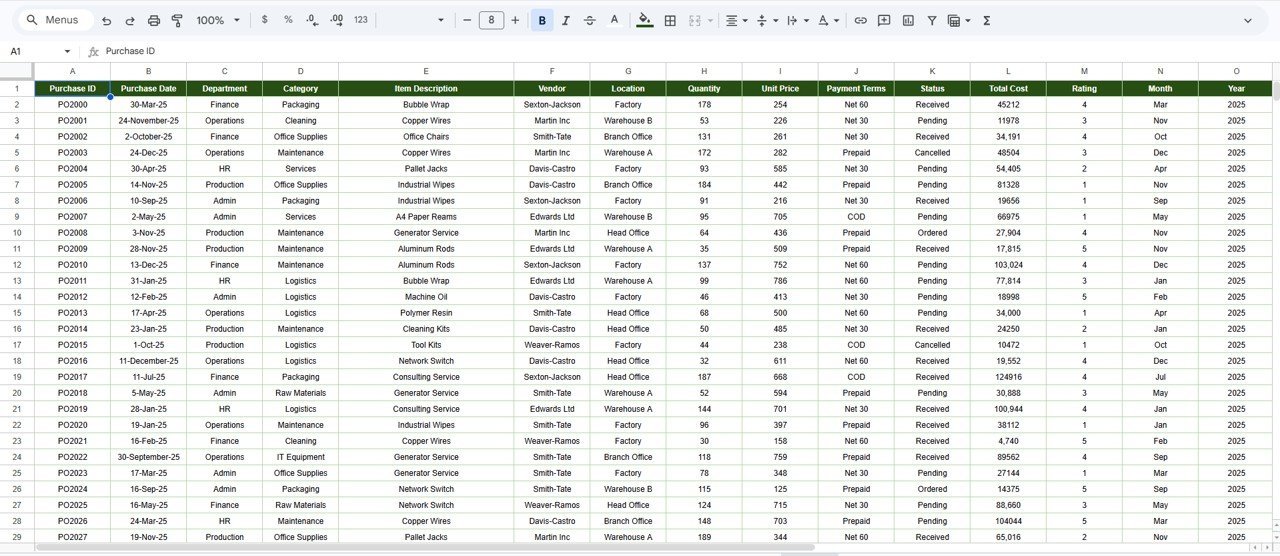
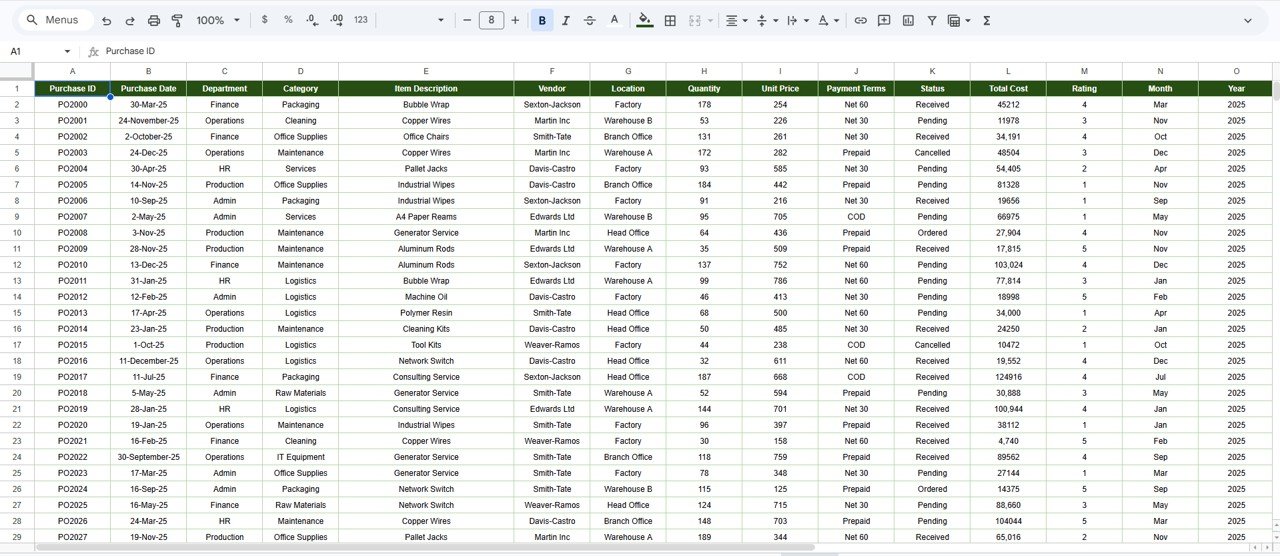
Data Sheet Tab: This is your input sheet. Add your procurement records in the same column format — Purchase Order ID, Date, Department, Vendor, Category, Item, Quantity, Unit Price, Total Spend, Payment Terms, Location, Status, and Rating. The dashboard refreshes automatically once data is entered.
📊 Supply Chain Procurement Dashboard vs. Microsoft Excel Dashboard vs. Zoho Inventory — Where This Fits
| Feature | Supply Chain Procurement Dashboard (Google Sheets) | Microsoft Excel Dashboard | Zoho Inventory / NetSuite ERP |
|---|---|---|---|
| Cost | $9.99 one-time | $15–$25 one-time (template) | $29–$249 / user / month |
| Platform | Google Sheets (browser-based) | MS Excel (desktop) | Cloud SaaS |
| Setup Time | Under 10 minutes | 15–20 minutes | Days to weeks |
| Real-Time Team Collaboration | ✅ Built-in (Google Sheets) | ❌ Needs OneDrive/SharePoint | ✅ Yes |
| Mobile Access | ✅ Google Sheets app | ⚠️ Limited (Excel mobile) | ✅ Yes |
| Customizable Fields | ✅ Fully editable | ✅ Fully editable | ⚠️ Config-dependent |
| Share with Link | ✅ One-click sharing | ❌ Needs file transfer | ✅ Role-based access |
| Year-1 Cost at 5 Users | $9.99 total | $15–$25 + Excel licenses | $1,740–$14,940 |
| Slicer-Based Filtering | ✅ Native slicers | ✅ Pivot slicers | ✅ Built-in filters |
For procurement teams that want a slicer-driven dashboard with real-time collaboration without paying per-user SaaS fees, the Supply Chain Procurement Dashboard in Google Sheets sits in the sweet spot.
👥 Who This Template Is For — and Who It’s Not For
✅ This template is built for:
- Procurement managers at small-to-mid-size companies (10–500 employees) tracking purchase orders and vendor spend
- Supply chain analysts who need a quick, collaborative dashboard without waiting for IT to set up enterprise software
- Operations leads comparing procurement costs across departments, vendors, and locations
- Startup founders managing vendor relationships and spending patterns in Google Sheets
❌ This template is NOT for:
- Enterprise procurement teams requiring automated PO workflows, three-way matching, and ERP integration — consider SAP Ariba or CoupaSupply Chain Procurement Dashboard in Google Sheets
- Organizations needing real-time API feeds from supplier systems — this is a manual-entry or CSV-import dashboard
⚙️ How to Use the Supply Chain Procurement Dashboard
1. Click the Google Sheets copy link in your download PDF to create your own editable copy in Google Drive.
2. Navigate to the Data Sheet tab and review the sample procurement records to understand the column structure.
3. Replace the sample data with your actual purchase order records — vendor names, categories, quantities, spend amounts, and statuses.
4. Return to the Overview page and use the slicers to filter by department, vendor, category, or month.
5. Explore the Departmental, Vendor, Category, and Location pages for deeper analysis.
6. Share the dashboard link with your team for real-time collaborative access.
💼 Real-World Use Cases
Ravi manages procurement at a 120-person manufacturing firm. He uses the Supply Chain Procurement Dashboard to compare vendor spend across 8 suppliers, identify which departments consistently exceed their quarterly budgets, and present monthly purchasing summaries to leadership — without paying $50/user/month for a procurement SaaS tool.
Priya runs operations at a mid-size retail chain with 3 warehouse locations. She tracks received vs pending orders by location to catch fulfillment delays before they hit store shelves. The Location & Payment Terms page helps her negotiate better Net-30 vs Net-60 terms with high-volume vendors.
Daniel is a startup COO buying raw materials from 12 vendors. He switched from scattered spreadsheets to this dashboard to get a single view of procurement spend by category. Within a week, he spotted that one category consumed 40% of the budget and renegotiated pricing with the primary supplier.
❓ Frequently Asked Questions
What KPIs does the Supply Chain Procurement Dashboard track?
The Supply Chain Procurement Dashboard tracks 5 KPI cards — Number of Purchase Orders, Total Procurement Spend, Total Quantity Ordered, Average Rating, and Pending Orders. All metrics auto-update when you replace the sample data with your own records.Supply Chain Procurement Dashboard in Google Sheets
How long does it take to set up the dashboard?
Setup takes under 10 minutes. Copy the template to your Google Drive, open the Data Sheet tab, replace the sample procurement records with your actual data, and every chart and KPI card refreshes instantly.Supply Chain Procurement Dashboard in Google Sheets
Can I share this dashboard with my team?
Yes. Since it runs in Google Sheets, you can share the dashboard link with anyone. Team members can view or edit simultaneously — no additional licenses or per-user fees required.
Does this work on mobile devices?
Yes. The Supply Chain Procurement Dashboard works on the Google Sheets mobile app for both Android and iOS. Charts and slicers remain functional on smaller screens for on-the-go procurement reviews.
How does this compare to Zoho Inventory or SAP Ariba?
Zoho Inventory starts at $29/user/month and SAP Ariba requires enterprise contracts. This dashboard costs $9.99 one-time with lifetime access — ideal for teams that need procurement visibility without committing to a SaaS subscription.
Can I add more data columns or new analysis pages?
Absolutely. The template is fully editable in Google Sheets. You can add columns to the Data Sheet, create new pivot tables, build additional chart pages, and customize slicers to match your specific procurement workflow.
What format is the data structured in?
The Data Sheet uses a flat table format with columns for PO ID, Date, Department, Vendor, Category, Item, Quantity, Unit Price, Total Spend, Payment Terms, Location, Status, and Rating. Each row represents one purchase order line item.
👤 About the Author
Built by PK — Microsoft Certified Professional with 15+ years of Excel, Google Sheets, and Power BI experience. Founder of NextGenTemplates, reaching 300K+ subscribers across YouTube channels (@PK-AnExcelExpert, @NextGenTemplates, @NeoTechNavigators). Every template is hand-built and tested before release.
🔗 Explore Related Templates
🔹 Procurement Management Dashboard in Google Sheets — A broader procurement management view with additional vendor scoring and spend allocation charts.
🔹 Distribution KPI Scorecard in Google Sheets — Track distribution performance with MTD/YTD targets and traffic-light indicators.
🔹 Warehouse Management KPI Scorecard in Google Sheets — Monitor warehouse efficiency KPIs including pick accuracy, order cycle time, and storage utilization.Supply Chain Procurement Dashboard in Google Sheets
🔹 Inventory Tracker in Google Sheets — Track stock levels, reorder points, and inventory turnover in a simple editable format.
🔹 Vendor Contract Renewal Calendar in Google Sheets — Never miss a vendor contract renewal date with automated calendar reminders.Supply Chain Procurement Dashboard in Google Sheets
🔹 Browse all Google Sheets Dashboard Templates
📖 Click here to read the Detailed Blog Post
Watch the step-by-step video tutorial:
🎥 Visit our YouTube channel for step-by-step video tutorials
👉 YouTube.com/@NextGenTemplates