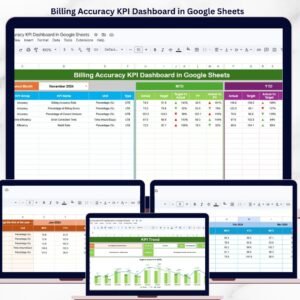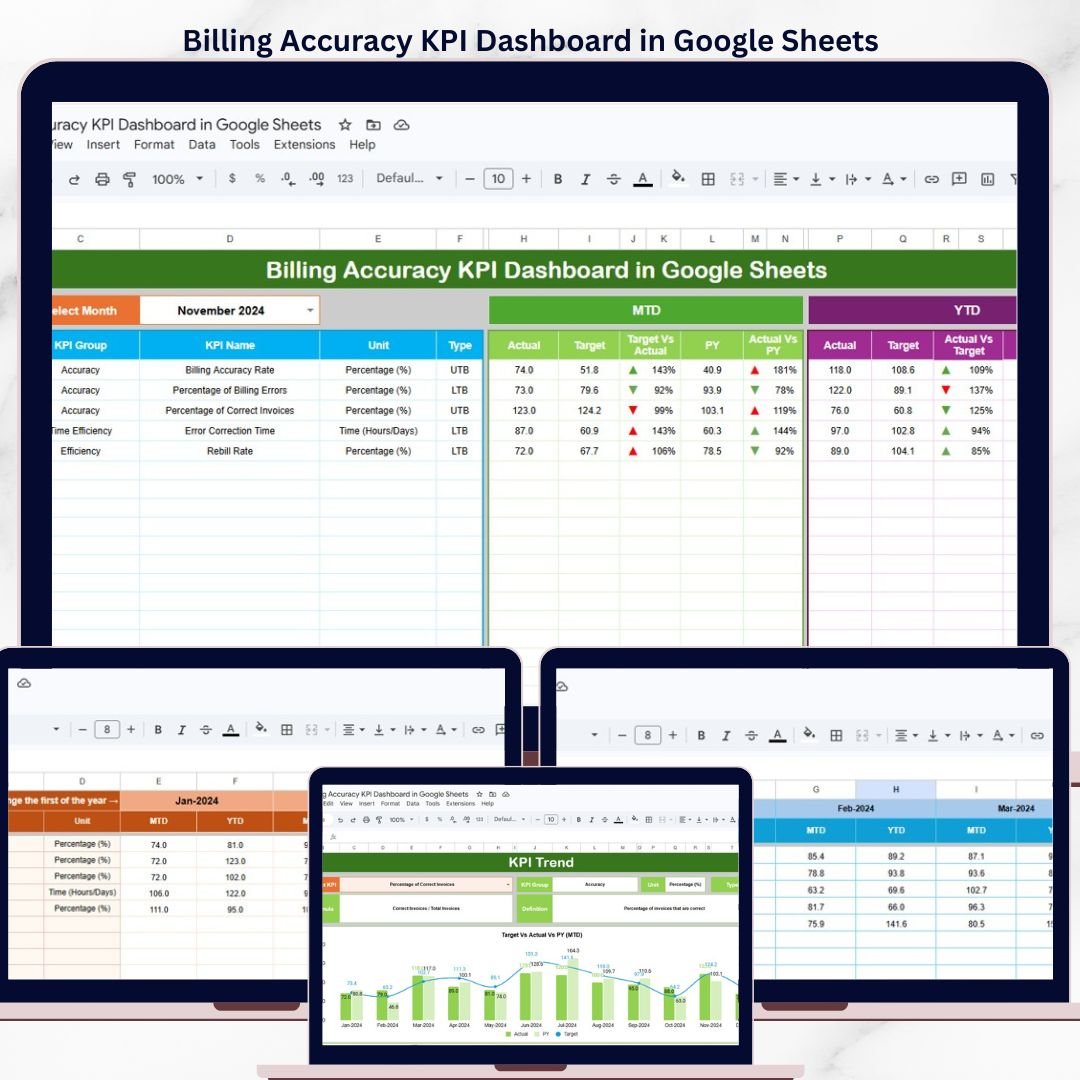
The Billing Accuracy KPI Dashboard in Google Sheets tracks billing KPIs across 6 structured worksheets, with MTD and YTD comparisons, trend charts, and conditional formatting indicators. Setup takes under 10 minutes — replace the sample data and every metric updates automatically.Billing Accuracy KPI Dashboard in Google Sheets
🌍 Join 8,400+ teams in 40+ countries using NextGenTemplates to replace paid SaaS tools with one-time-purchase Excel, Google Sheets, Power BI, and HTML templates.Billing Accuracy KPI Dashboard in Google Sheets
✅ Instant download · One-time payment · No subscription · No per-user fees · Lifetime access
🔑 Key Features of Billing Accuracy KPI Dashboard in Google Sheets
The Billing Accuracy KPI Dashboard in Google Sheets includes 6 purpose-built worksheets: a Dashboard sheet with a month dropdown for MTD and YTD views, a KPI Trend sheet with 12-month actual-vs-target-vs-prior-year trend charts, Actual Numbers Input, Target Number Input, Previous Year Number input sheets, and a KPI Definition sheet documenting every metric’s formula, group, and purpose.Billing Accuracy KPI Dashboard in Google Sheets
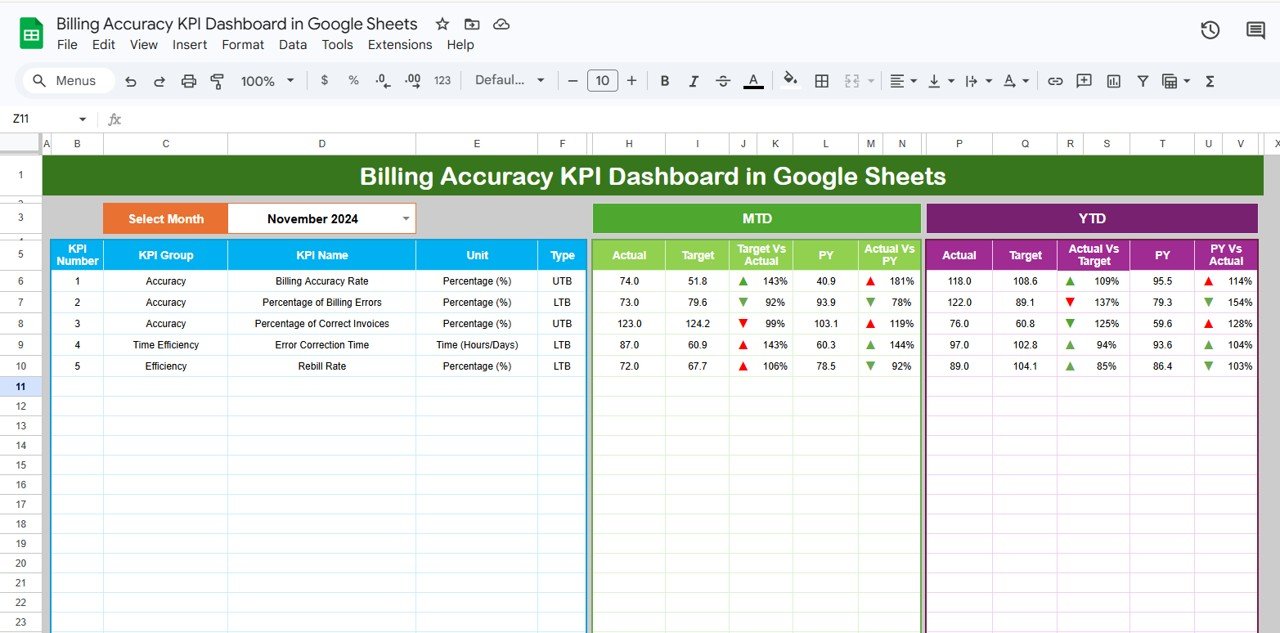
Each KPI displays its MTD Actual, Target, Previous Year values alongside Target vs Actual and PY vs Actual percentages with color-coded conditional formatting arrows — green for on-track, red for underperforming. The same structure repeats for YTD metrics, giving you both short-term and cumulative performance visibility in a single view.Billing Accuracy KPI Dashboard in Google Sheets
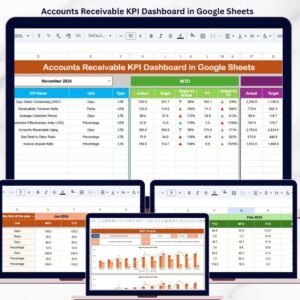
This template supports unlimited KPI customization through the KPI Definition sheet, where you control every metric’s name, group, unit, formula, and LTB/UTB classification. Whether your billing team tracks 8 KPIs or 40, the structure scales without modifications. For teams already using Google Sheets dashboards, also explore the Accounts Receivable KPI Dashboard in Google Sheets for receivables-specific metric tracking.Billing Accuracy KPI Dashboard in Google Sheets
📦 What’s Inside the Billing Accuracy KPI Dashboard
📌 Dashboard Sheet — The main performance view. Select any month from the dropdown on cell D3 and the entire dashboard refreshes with MTD Actual, Target, Previous Year data plus YTD Actual, Target, Previous Year data. Conditional formatting arrows instantly highlight whether each KPI is meeting or missing targets.
Billing Accuracy KPI Dashboard in Google Sheets
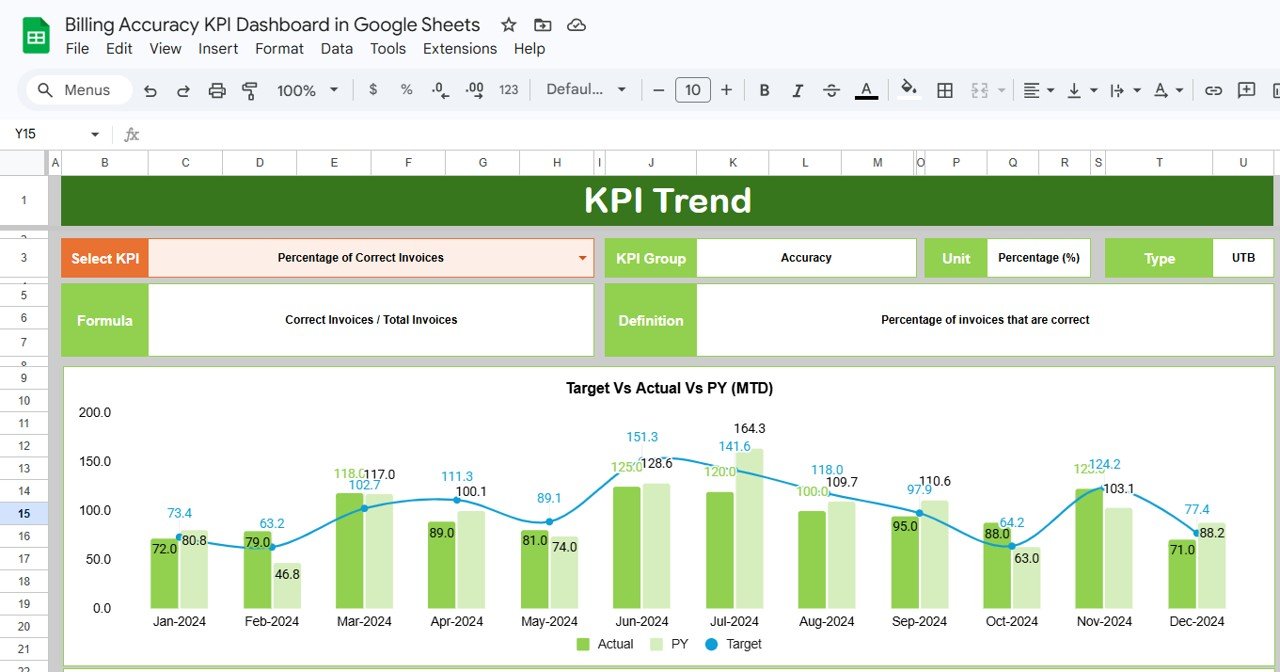
📈 KPI Trend Sheet — Select any KPI from the dropdown on cell C3 to view its KPI Group, Unit, Type (LTB or UTB), Formula, and Definition. Two trend charts display MTD and YTD performance comparing Actual, Target, and Previous Year numbers across 12 months.
KPI Trend Sheet
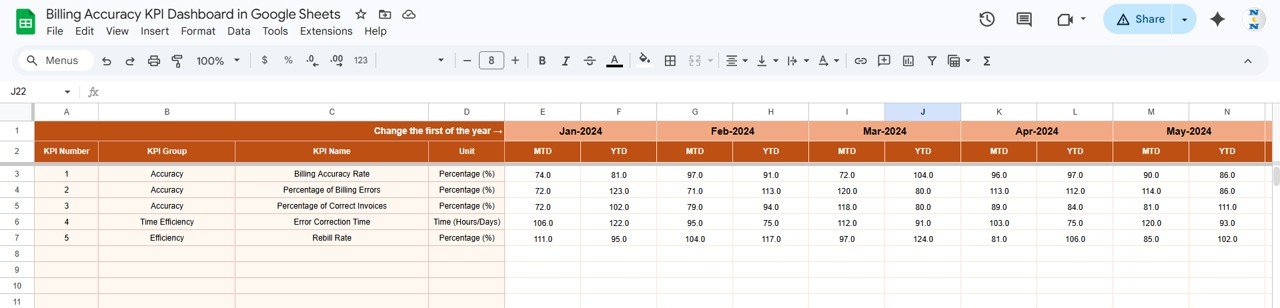
📝 Actual Numbers Input Sheet — Enter actual MTD and YTD numbers for each KPI for a particular month. Change the first month of the year on cell E1 to align the reporting period with your fiscal calendar.
Actual Numbers Input Sheet
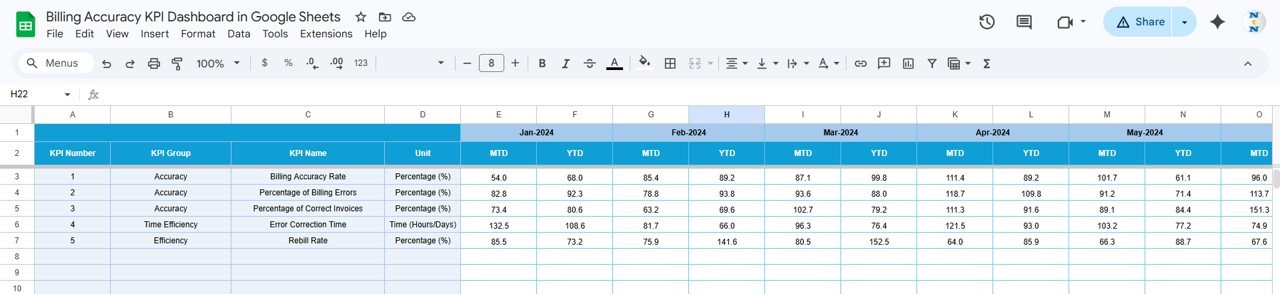
🎯 Target Number Input Sheet — Enter target MTD and YTD values for each KPI by month. The dashboard automatically calculates Target vs Actual percentages from this data.
Target Number Input Sheet
📅 Previous Year Number Sheet — Enter prior year MTD and YTD values in the same structure as current year data. This enables year-over-year comparisons on both the Dashboard and KPI Trend sheets.
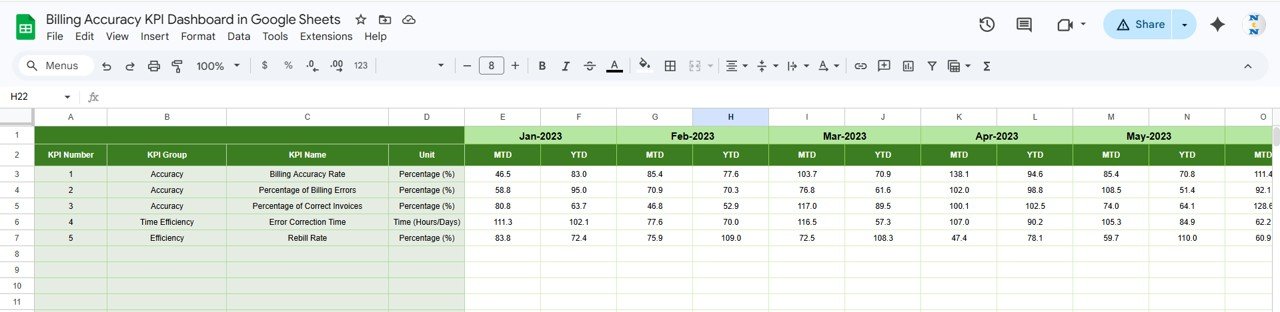
Previous Year Number Input Sheet
📘 KPI Definition Sheet — Define each KPI’s Name, Group, Unit, Formula, Definition, and Type (LTB — Lower the Better or UTB — Upper the Better). This sheet feeds metadata to the KPI Trend sheet and standardizes metric understanding across your entire billing team.
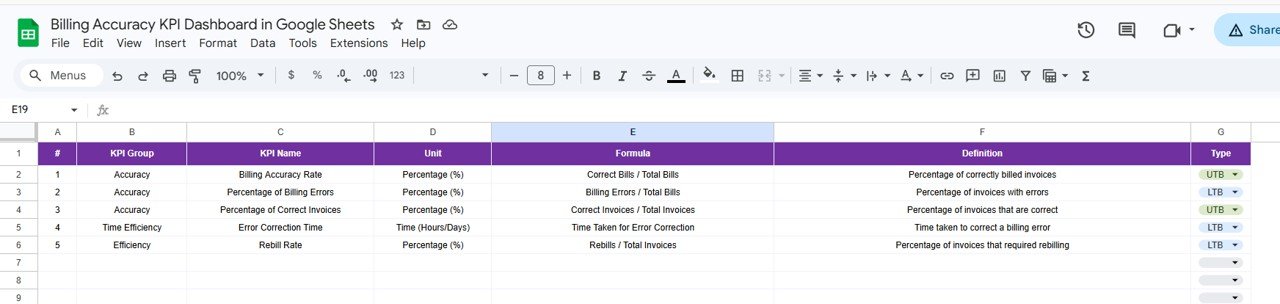
KPI Definition Sheet
📊 Billing Accuracy KPI Dashboard vs. Microsoft Excel Dashboard vs. QuickBooks Advanced — Where This Fits
| Feature | Billing Accuracy KPI Dashboard (Google Sheets) | Microsoft Excel Dashboard | QuickBooks Advanced |
|---|---|---|---|
| Cost | $8.99 one-time | $14.99+ one-time | $100-200/month |
| Platform | Google Sheets (free) | Microsoft Excel (license required) | Cloud SaaS (browser) |
| Setup Time | Under 10 minutes | 15-30 minutes | Weeks to months |
| Real-Time Collaboration | ✅ Built-in (Google Sheets) | Requires OneDrive/SharePoint | ✅ Yes |
| Mobile Access | ✅ Google Sheets app | Limited on mobile | ✅ Yes |
| Custom KPI Definitions | ✅ Dedicated sheet | Manual setup | Limited customization |
| Trend Charts | ✅ MTD + YTD built-in | Manual chart creation | ✅ Built-in reports |
| Year-1 Cost at 5 Users | $8.99 total | $14.99 + Excel licenses | $1,200-2,400 |
| No IT Department Needed | ✅ Self-service | ✅ Self-service | ❌ Admin setup required |
For teams that want structured billing KPI tracking without enterprise accounting software costs, the Billing Accuracy KPI Dashboard in Google Sheets sits in the sweet spot.
👥 Who This Template Is For — and Who It’s Not For
✅ This template is built for:
- Finance and billing managers at organizations with 10-500 employees tracking invoice accuracy, payment timeliness, and billing error rates
- Accounts receivable teams monitoring collection efficiency, dispute resolution, and aging metrics
- Healthcare billing departments tracking claim accuracy, denial rates, and resubmission turnaround
- Operations directors who need a monthly billing performance review without enterprise ERP systems
❌ This template is NOT for:
- Enterprise organizations needing real-time API integrations to SAP, Oracle, or NetSuite billing modules
- Teams requiring SOC 2 compliance, audit trails, and role-based access control for billing data
- Organizations processing 100,000+ invoices monthly that need automated data feeds
⚙️ How to Use the Billing Accuracy KPI Dashboard
- Open the PDF guide and click the Google Sheets copy link to create your editable copy in Google Drive
- Fill in the KPI Definition sheet with your billing metrics, groups, units, formulas, and LTB/UTB types
- Enter actual MTD and YTD billing performance numbers in the Actual Numbers Input sheet
- Set monthly and yearly targets in the Target Number Input sheet
- Add previous year data for year-over-year comparison in the Previous Year Number sheet
- Select any month from the Dashboard dropdown on cell D3 to view updated KPI performance
- Use the KPI Trend sheet to analyze individual metric trends over 12 months
💼 Real-World Use Cases
Priya manages billing operations at a 150-bed hospital in Hyderabad. Her team tracks 15 billing KPIs including claim accuracy rate, first-pass resolution, and denial turnaround time. Before this dashboard, monthly reporting meant consolidating data from 4 different spreadsheets. Now she enters numbers into the Actual Input sheet, and the Dashboard generates a presentation-ready view with MTD/YTD comparisons that leadership reviews in their monthly revenue cycle meeting.
David runs accounts receivable at a mid-size logistics company in Texas. He uses the KPI Trend sheet to identify which billing metrics have been declining for 3+ consecutive months — like invoice dispute rate climbing from 2.1% to 3.8% — and brings data-backed improvement plans to his CFO. The template replaced a $200/month analytics add-on with a one-time $8.99 investment.
Anita is a freelance finance consultant helping small businesses in Dubai set up billing performance tracking for the first time. She uses the KPI Definition sheet as a collaborative framework during client workshops — defining metrics before any data enters the system. Within a single week, each client has a functioning billing scorecard they maintain independently. She also recommends the Google Sheets KPI Dashboard collection for other departments.
❓ Frequently Asked Questions
What KPIs does the Billing Accuracy KPI Dashboard track?
The Billing Accuracy KPI Dashboard in Google Sheets tracks billing-related metrics you define in the KPI Definition sheet — including invoice accuracy rate, billing error percentage, collection efficiency, payment timeliness, and dispute resolution rate. You can add up to 50+ custom KPIs.
How long does setup take?
Setup takes under 10 minutes. Copy the template to your Google Drive, enter your KPI definitions, input your first month of actual and target data, and the Dashboard sheet populates automatically with MTD and YTD performance metrics.
Can I customize the KPIs for my industry?
Yes. The KPI Definition sheet lets you define any billing metric — name, group, unit, formula, and type (LTB or UTB). Healthcare billing teams, logistics companies, SaaS businesses, and professional services firms all use different KPIs, and this template adapts to all of them.
How does this compare to QuickBooks Advanced?
QuickBooks Advanced costs $100-200 per month and requires implementation time. The Billing Accuracy KPI Dashboard costs $8.99 one-time with no recurring fees. For teams that need structured KPI tracking without full accounting software overhead, this template delivers the same performance visibility at a fraction of the cost.
Does this template work on mobile devices?
Yes. Since it runs on Google Sheets, you can access the dashboard from any device using the Google Sheets app. Review billing KPI performance from your phone or tablet during meetings or while traveling.
Can multiple team members use this dashboard simultaneously?
Yes. Google Sheets supports real-time collaboration. Multiple billing team members can view the dashboard, enter data, and review trends at the same time — no file-sharing conflicts or version control issues.
What is the difference between LTB and UTB KPIs?
LTB (Lower the Better) applies to metrics like billing error rate or invoice dispute percentage — where lower numbers indicate better performance. UTB (Upper the Better) applies to metrics like collection efficiency or first-pass accuracy — where higher numbers are the goal. The dashboard uses this classification to correctly color-code performance arrows.
👤 About the Author
Built by PK — Microsoft Certified Professional with 15+ years of Excel, Google Sheets, and Power BI experience. Founder of NextGenTemplates, reaching 300K+ subscribers across YouTube channels (@PK-AnExcelExpert, @NextGenTemplates, @NeoTechNavigators). Every template is hand-built and tested before release.
🔗 Explore Related Templates
📊 Accounts Receivable KPI Dashboard in Google Sheets — Track receivables aging, collection rates, and payment trends
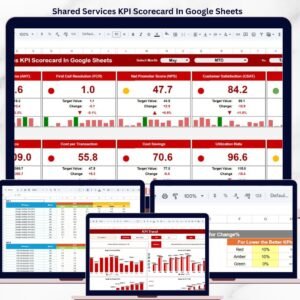
📊 Shared Services KPI Scorecard in Google Sheets — Monitor shared services performance across IT, HR, finance, and procurement
📊 Customer Engagement KPI Scorecard in Google Sheets — Track customer satisfaction, retention, and engagement metrics
📖 Click here to read the Detailed Blog Post
🎥 Visit our YouTube channel for step-by-step video tutorials
👉 YouTube.com/@NextGenTemplates