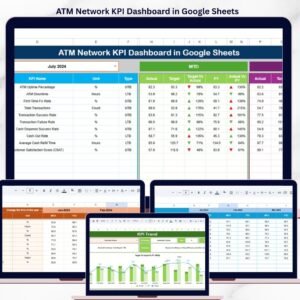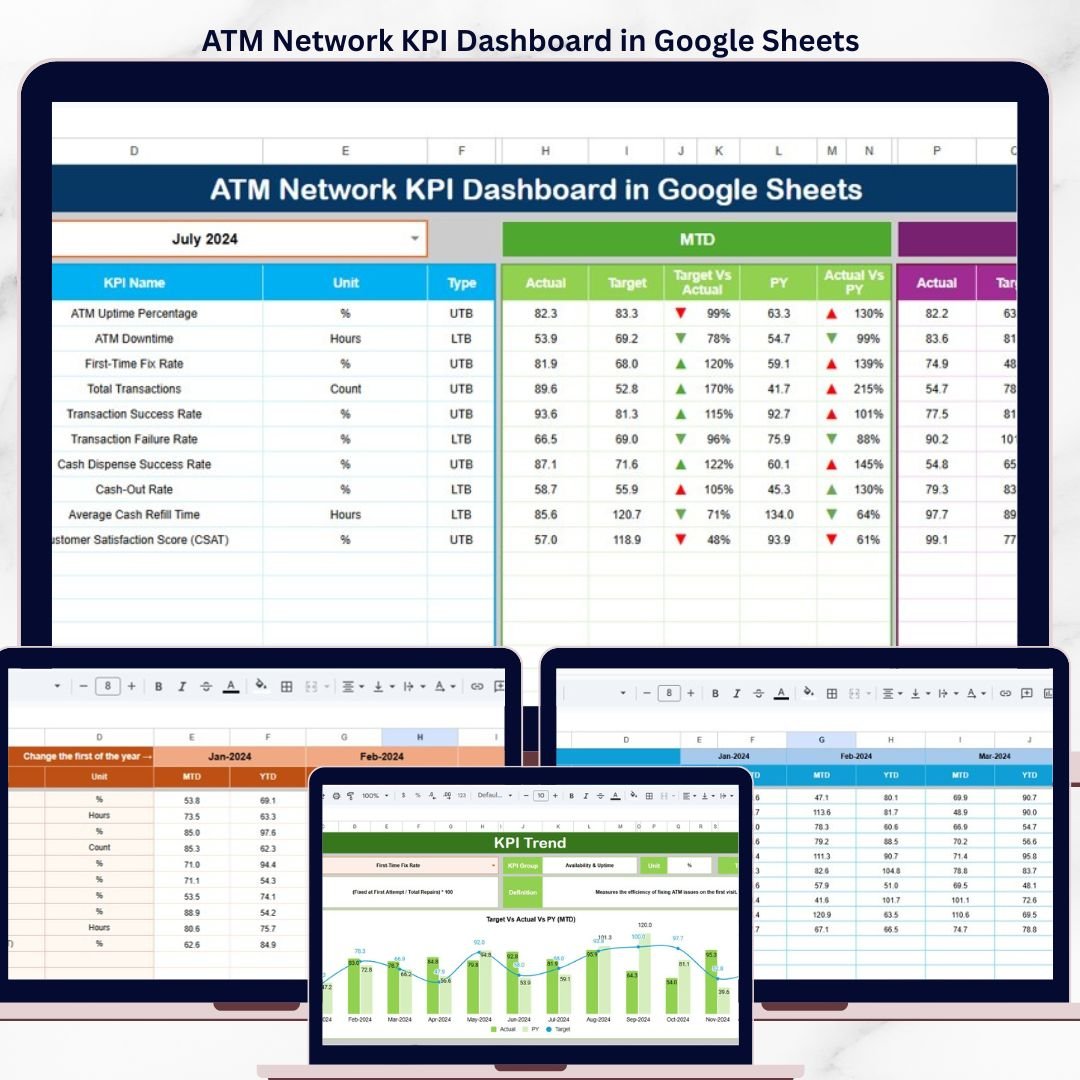
The ATM Network KPI Dashboard in Google Sheets tracks 15+ ATM operations KPIs across 6 dedicated worksheet tabs, with MTD and YTD comparisons, Actual vs Target vs Previous Year analysis, and conditional formatting up/down arrows for instant trend spotting. Setup takes under 10 minutes — replace the sample data with your own ATM network figures and every metric recalculates automatically.ATM Network KPI Dashboard in Google Sheets
🌍 Join 8,400+ teams in 40+ countries using NextGenTemplates to replace paid SaaS tools with one-time-purchase Excel, Google Sheets, Power BI, and HTML templates.ATM Network KPI Dashboard in Google Sheets
✅ Instant download · One-time payment · No subscription · No per-user fees · Lifetime accessATM Network KPI Dashboard in Google Sheets
ATM Network KPI Dashboard in Google Sheets
🔑 Key Features of ATM Network KPI Dashboard in Google Sheets
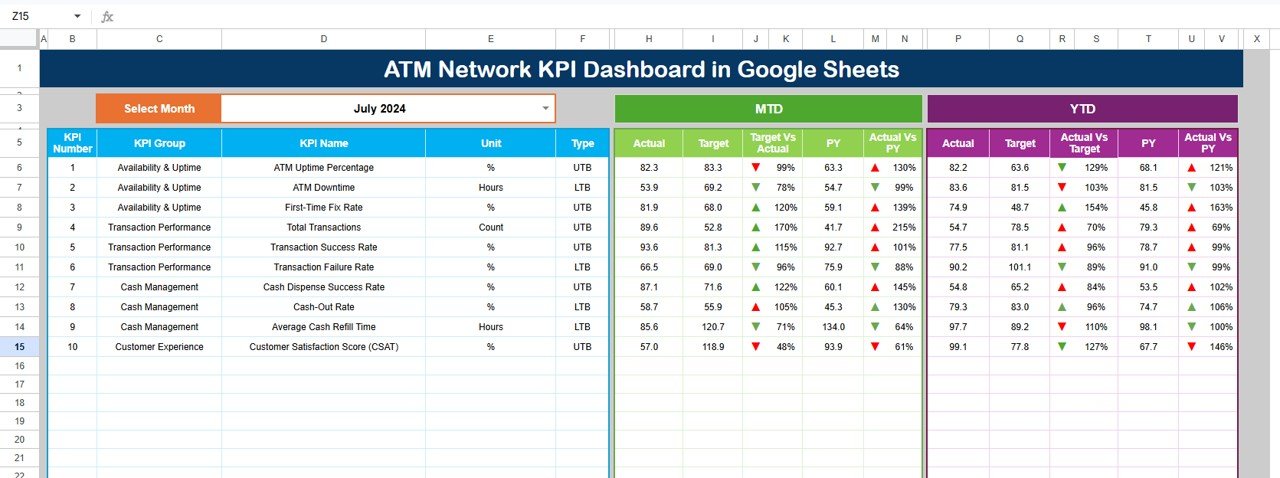
📌 Month Selector Dropdown — The Dashboard sheet includes a dropdown on cell D3 that lets you switch between any month. Every KPI value refreshes automatically based on your selection.
📌 MTD and YTD Comparison — Each KPI displays Month-to-Date Actual, Target, and Previous Year data side by side. The YTD section shows the same three columns for year-level tracking.
📌 Conditional Formatting Arrows — Target vs Actual and PY vs Actual columns use green up-arrows and red down-arrows to flag performance direction instantly. Tracks ATM uptime, transaction volume, cash replenishment efficiency, and customer complaints.
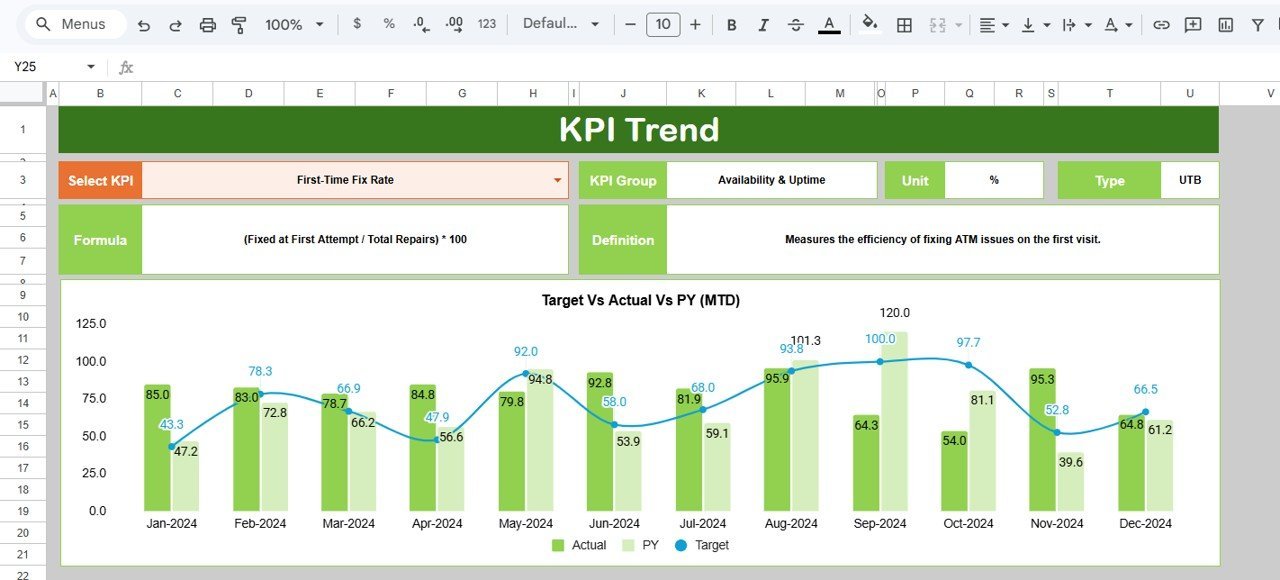
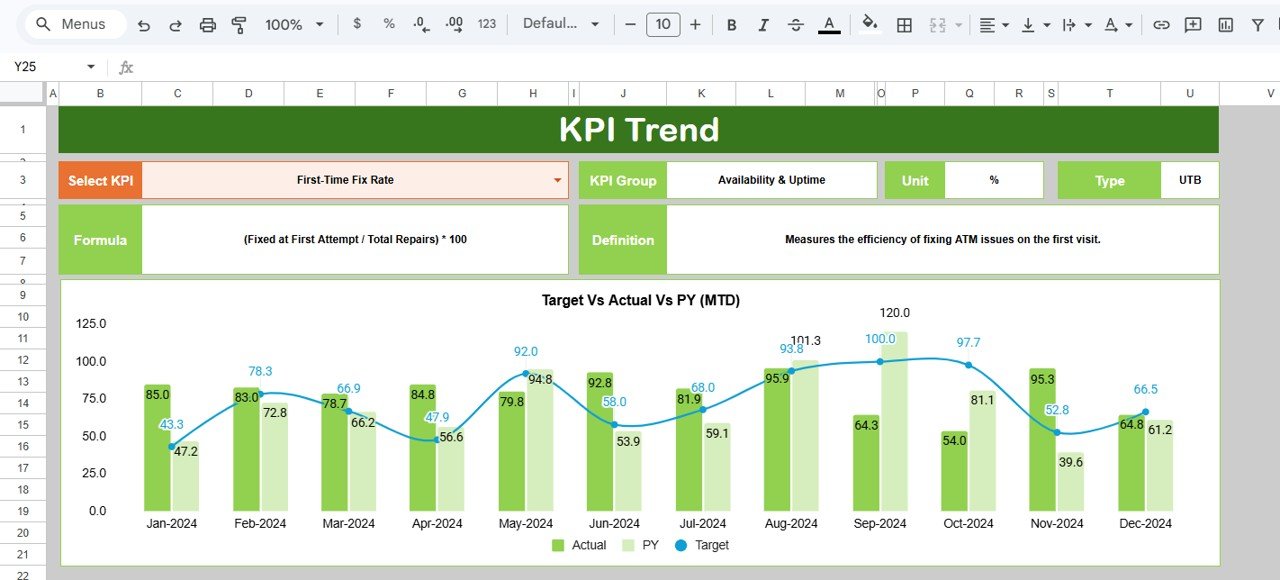
📌 KPI Trend Analysis — Select any KPI from a dropdown on cell C3 in the KPI Trend sheet. It displays KPI Group, Unit, Type (LTB/UTB), Formula, and Definition. Two trend charts show MTD and YTD performance.
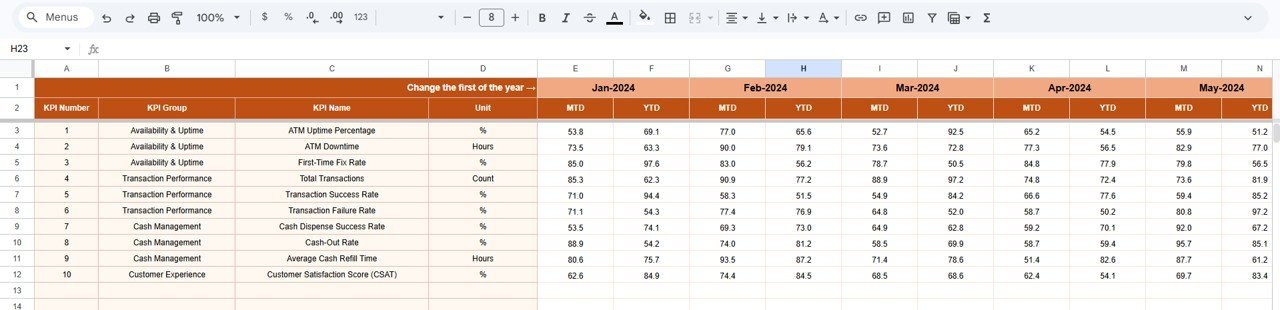
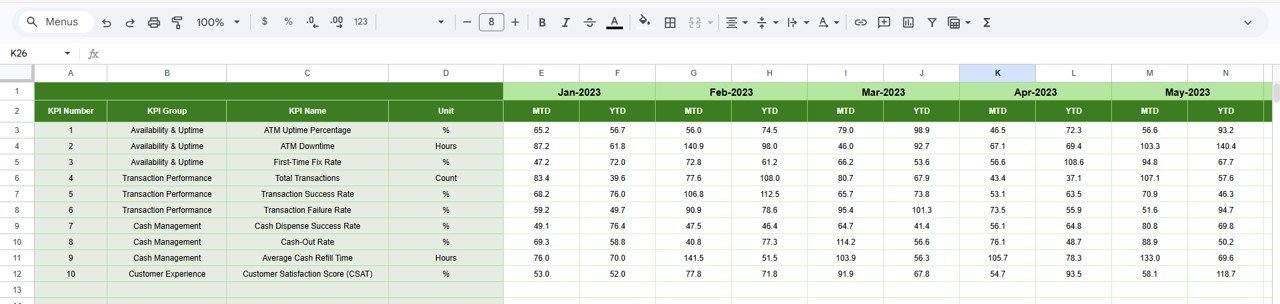
📌 Structured Data Entry — Three dedicated input sheets (Actual Numbers, Target Numbers, Previous Year) keep your data organized. Change the starting month from range E1.
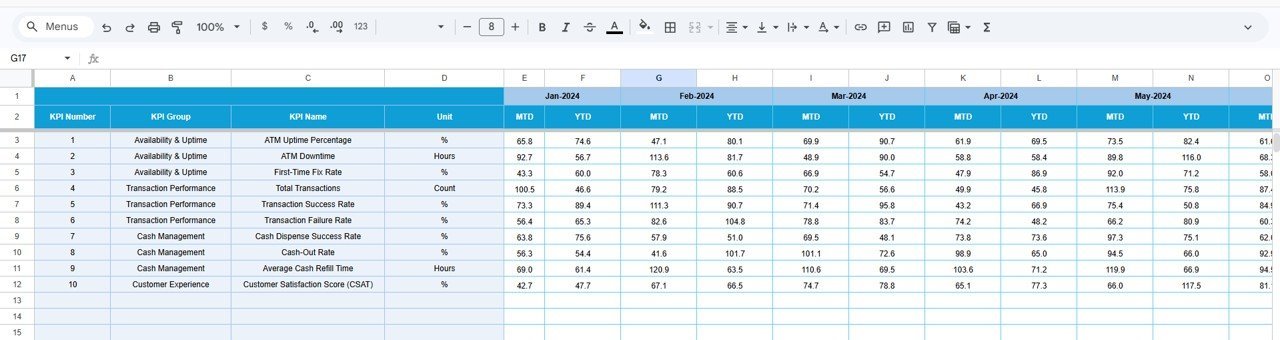
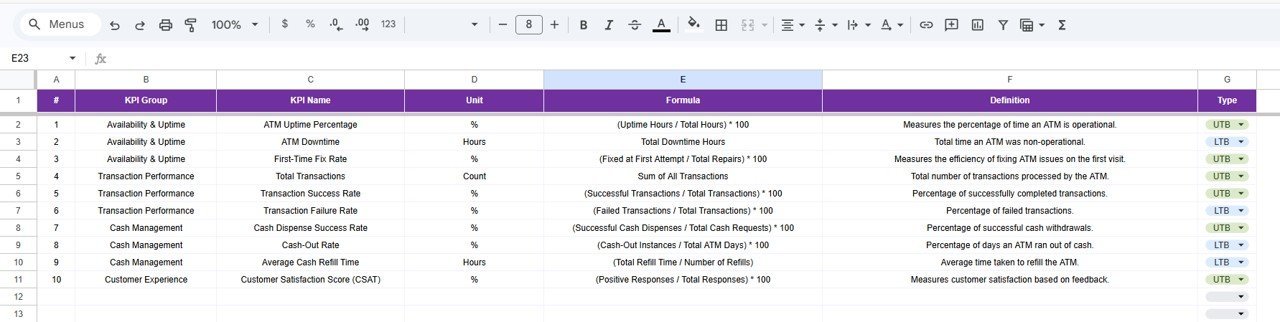
📌 KPI Definition Library — The KPI Definition sheet stores each KPI’s name, group, unit, formula, definition, and type (LTB or UTB).
📦 What’s Inside the ATM Network KPI Dashboard
📊 Dashboard Sheet — Main overview with month selector, MTD/YTD data, Target vs Actual, PY vs Actual, and conditional formatting
📈 KPI Trend Sheet — Individual KPI deep-dive with trend charts
📝 Actual Numbers Input Sheet — Enter real ATM network numbers by month
🎯 Target Number Input Sheet — Set performance targets by month
📅 Previous Year Number Sheet — Historical data for YoY comparison
📖 KPI Definition Sheet — Central reference with KPI names, groups, units, formulas, definitions, and type
KPI Trend Sheet
📊 ATM Network KPI Dashboard vs. Excel Dashboard vs. Paid ATM Monitoring SaaS
| Feature | ATM Network KPI Dashboard (Google Sheets) | Excel ATM Dashboard | NCR Atleos / Hyosung |
|---|---|---|---|
| Cost | $8.99 one-time | $15-25 one-time | $50-200/ATM/month |
| Platform | Google Sheets (browser) | Excel (desktop) | Proprietary web |
| Setup Time | Under 10 minutes | 10-15 minutes | 2-6 weeks |
| Collaboration | ✅ Built-in | ❌ Requires OneDrive | ✅ Yes |
| Mobile | ✅ Google Sheets app | Limited | ✅ Yes |
| Custom KPIs | ✅ Fully editable | ✅ Fully editable | ⚠️ Vendor-defined |
| Share with Link | ✅ One-click | ❌ File-based | ✅ Role-based |
| Year-1 Cost (5 Users) | $8.99 total | $15-25 + Office | $3,000-12,000+ |
| PY Comparison | ✅ Built-in | Varies | ✅ Yes |
For ATM ops teams wanting structured KPI tracking without enterprise pricing, this sits in the sweet spot.
👥 Who This Template Is For — and Who It’s Not For
✅ Built for:
- ATM operations managers tracking 10-500 machines across a regional or national network
- Banking and fintech teams needing monthly ATM performance reporting without vendor lock-in
- Small-to-mid-sized financial institutions replacing manual tracking with a structured KPI framework
❌ NOT for:
- Enterprise banks with 5,000+ ATMs needing real-time IoT integration and automated alerts
- Organizations requiring PCI-DSS certified cloud-hosted monitoring with audit trails
⚙️ How to Use the ATM Network KPI Dashboard
1️⃣ Open the Google Sheets file from your download PDF and make a copy to your Google Drive.
2️⃣ Go to KPI Definition sheet and enter your KPI names, groups, units, formulas, definitions, and types.
3️⃣ Navigate to Actual Numbers Input, set the first month on E1, and enter MTD and YTD actual figures.
4️⃣ Fill in Target Number Input with monthly performance targets.
5️⃣ Enter previous year numbers in the Previous Year Number sheet.
6️⃣ Switch to Dashboard, select a month from D3, and review your ATM network performance.
7️⃣ Use KPI Trend sheet to deep-dive into individual KPIs with trend charts.
💼 Real-World Use Cases
Rajesh manages ATM operations for a regional bank with 120 ATMs across 3 states. He tracks cash replenishment efficiency, uptime percentage, and transaction failure rates. Instead of paying $15,000/year for NCR monitoring, he shares this Google Sheet with regional managers.
Maria leads self-service banking at a credit union with 45 ATMs. She tracks complaint rates, resolution time, and cash-out incidents. PY comparison helps justify budget requests by showing measurable improvements.
David runs ATM ops for a fintech startup with 80+ retail ATMs. He monitors per-machine transaction volume, revenue per ATM, and maintenance costs. KPI Trend charts identify underperforming locations.
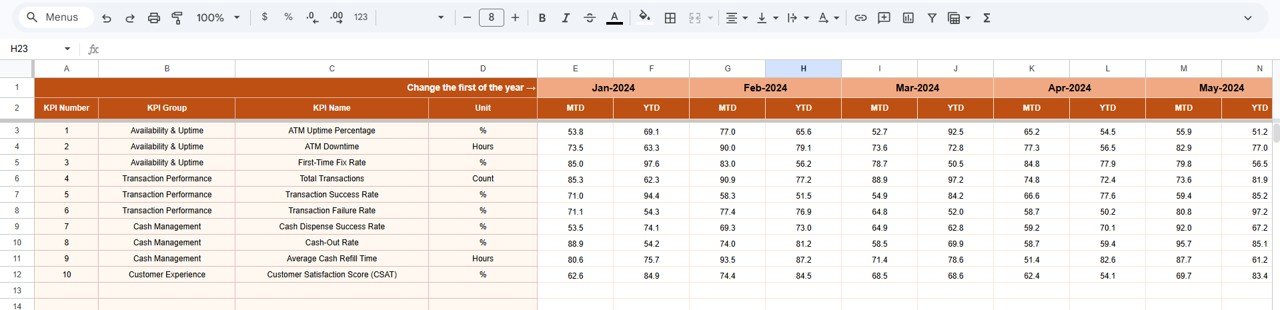
Actual Numbers Input Sheet
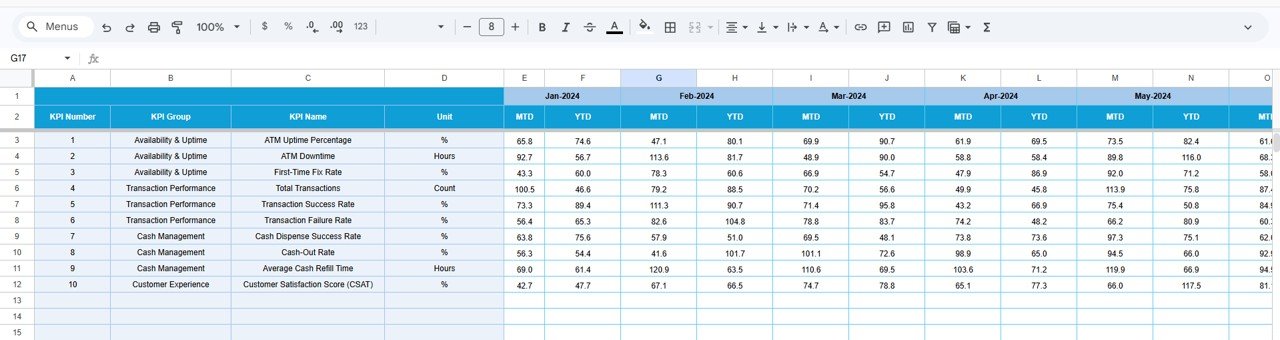
Target Number Input Sheet
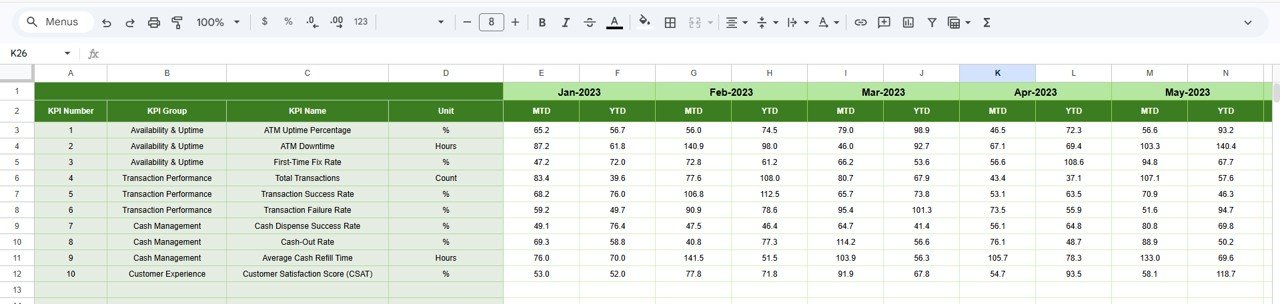
Previous Year Number Input Sheet
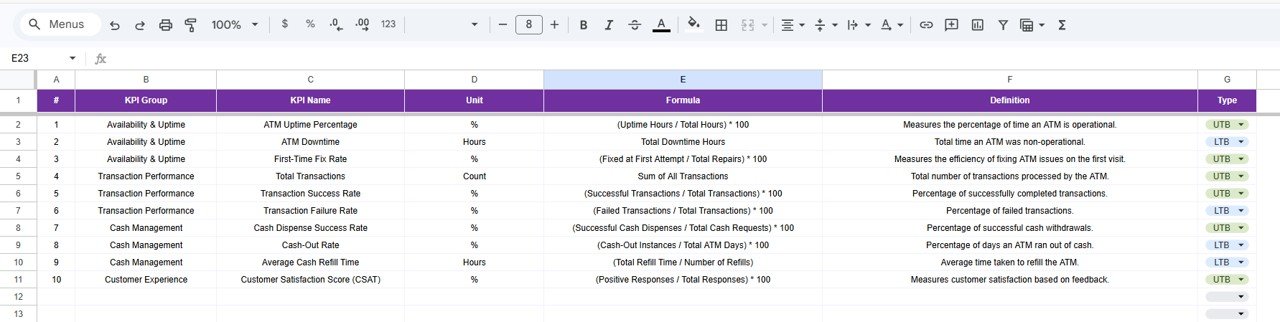
KPI Definition Sheet
❓ Frequently Asked Questions
What KPIs does the ATM Network KPI Dashboard track?
The ATM Network KPI Dashboard in Google Sheets tracks 15+ KPIs including ATM uptime, transaction volume, cash replenishment efficiency, customer complaints, and maintenance costs. All metrics update automatically when you replace sample data.
How long does setup take?
Setup takes under 10 minutes. Enter KPI definitions, fill in actual numbers and targets, and the dashboard calculates MTD, YTD, and Previous Year comparisons instantly.
Can I customize the KPIs?
Yes. The KPI Definition sheet lets you add, rename, or remove any KPI. You define group, unit, formula, and LTB/UTB type. The dashboard adapts automatically.
How does this compare to NCR Atleos?
NCR Atleos costs $50-200 per ATM per month with weeks of implementation. This template costs $8.99 one-time, sets up in 10 minutes, and provides structured KPI tracking for manual reporting.
Does this work on mobile?
Yes. View and edit on any device using the Google Sheets mobile app. Team members can access simultaneously from anywhere.
Can multiple team members collaborate?
Absolutely. Google Sheets supports real-time collaboration. Multiple users can enter data, review KPIs, and analyze trends simultaneously without version conflicts.
What if I need an Excel or Power BI version?
NextGenTemplates offers similar KPI dashboards in Excel and Power BI formats. Browse the Google Sheets KPI Dashboard category for more options.
👤 About the Author
Built by PK — Microsoft Certified Professional with 15+ years of Excel, Google Sheets, and Power BI experience. Founder of NextGenTemplates, reaching 300K+ subscribers across YouTube channels (@PK-AnExcelExpert, @NextGenTemplates, @NeoTechNavigators). Every template is hand-built and tested before release.
🔗 Explore Related Templates
📌 Satellite Communication KPI Dashboard in Google Sheets — Track satellite KPIs with MTD and YTD analysis
📌 Distribution KPI Scorecard in Google Sheets — Distribution network efficiency tracking
📌 IT KPI Scorecard in Excel — IT infrastructure KPIs including network uptime
Browse all Google Sheets KPI Dashboards →
📖 Click here to read the Detailed Blog Post
🎥 Visit our YouTube channel for step-by-step video tutorials
👉 YouTube.com/@NextGenTemplates