


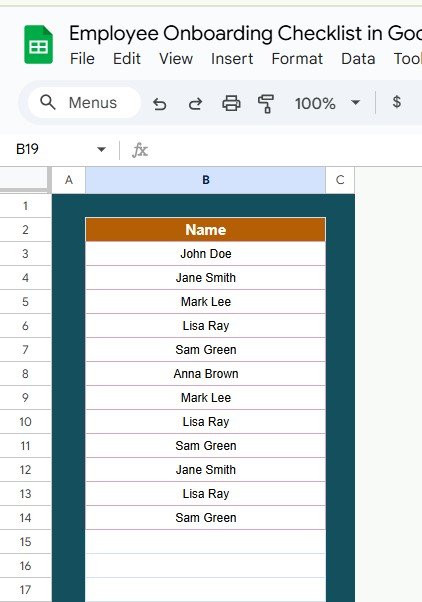

The Employee Onboarding Checklist in Google Sheets is an essential tool for businesses looking to streamline their employee onboarding process. This comprehensive checklist ensures that every new hire receives the necessary training, equipment, and information needed to integrate seamlessly into the company. The checklist is designed to keep all stakeholders on track by providing clear, organized steps, from the moment the employee is hired to their first days on the job.
With real-time collaboration, the checklist allows HR teams, managers, and new employees to stay aligned throughout the onboarding process. It is fully customizable to fit your organization’s unique needs, making it a versatile and valuable tool for teams of all sizes.

Key Features of the Employee Onboarding Checklist in Google Sheets
📌 Comprehensive Onboarding Process
The checklist covers every step of the employee onboarding process, including document submission, IT setup, introduction to company policies, training schedules, and other essential tasks. This comprehensive approach ensures that no steps are overlooked.
🛠 Customizable Tasks and Categories
You can tailor the checklist to reflect your specific onboarding procedures, whether you’re onboarding remote employees, new hires in different departments, or team members with unique roles. Add or remove tasks, adjust categories, and ensure that the checklist fits your company’s workflow.
💡 Real-Time Collaboration
Since the checklist is built in Google Sheets, it allows for real-time collaboration between HR, managers, and the new employee. Everyone involved can access and update the checklist simultaneously, making it easy to track progress and ensure smooth onboarding.
🔢 Easy Task Tracking
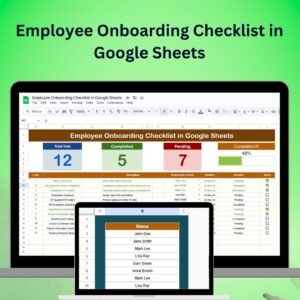
With a simple and clear layout, you can easily monitor the progress of each task. Tasks are marked as completed, in progress, or pending, giving you a quick overview of the onboarding status at any given time.
🚀 Employee Experience Focused
The checklist helps ensure that the new employee has everything they need to succeed. From setting up IT equipment to ensuring they understand company policies, this checklist provides a structured and supportive onboarding experience that helps the employee feel welcomed and informed.
📅 Seamless Scheduling
With customizable due dates and reminders, you can ensure that the onboarding process stays on track and that no task is delayed. Stay organized with due dates that automatically adjust as tasks are completed.
📊 Simple Setup and Customization
The checklist is designed for ease of use. Set it up in minutes with clear instructions, and customize it to fit your company’s specific onboarding steps. Even with minimal experience in Google Sheets, you can get the checklist up and running with ease.
🚀 Why You’ll Love the Employee Onboarding Checklist in Google Sheets
✅ Comprehensive Onboarding Process – Track every aspect of your employee’s onboarding journey. ✅ Customizable and Flexible – Tailor the checklist to your company’s specific needs. ✅ Real-Time Collaboration – Everyone involved in the process can collaborate simultaneously. ✅ Easy Task Monitoring – Track progress and ensure timely completion of tasks. ✅ Simple to Use – Quick setup and easy-to-follow customization.
📂 What’s Inside the Employee Onboarding Checklist in Google Sheets?
- Complete Onboarding Checklist: Track everything from document collection to training.
- Customizable Task Categories: Modify categories and tasks to fit your unique onboarding needs.
- Real-Time Updates: Collaborative updates and progress tracking in real-time.
- Simple Tracking: Easily monitor task status (completed, in progress, or pending).
- Seamless Scheduling: Set due dates and reminders for each onboarding task.
🔍 How to Use the Employee Onboarding Checklist in Google Sheets
1️⃣ Download the Template – Instant access to the Google Sheets template upon purchase. 2️⃣ Customize the Checklist – Adjust tasks and categories to fit your specific onboarding requirements. 3️⃣ Track Onboarding Tasks – Monitor progress and mark tasks as completed, in progress, or pending. 4️⃣ Collaborate in Real-Time – Share the checklist with HR, managers, and the new employee for seamless coordination. 5️⃣ Provide a Smooth Onboarding Experience – Use the checklist to ensure your new hire is fully equipped and informed.
🎯 Who Can Benefit from the Employee Onboarding Checklist in Google Sheets? 🔹 HR Managers
🔹 Team Leaders
🔹 Operations Managers
🔹 Hiring Teams
🔹 Small and Medium Businesses
🔹 Any business looking to improve its employee onboarding process
Ensure your new hires have a smooth and successful onboarding experience with the Employee Onboarding Checklist in Google Sheets. Keep track of every task, assign responsibilities, and collaborate in real-time with this simple, yet powerful tool.
Click here to read the Detailed blog post
https://neotechnavigators.com/employee-onboarding-checklist-in-google-sheets/
Visit our YouTube channel to learn step-by-step video tutorials
Compatibility and Requirements
- Works in Google Sheets with a free Google account and a web browser. Nothing to install.
- HR, managers and the new employee can view and update the checklist at the same time. Google explains the basics in How to use Google Sheets.
Frequently Asked Questions
Which onboarding steps does the checklist cover?
It covers document submission, IT setup, an introduction to company policies, training schedules and other onboarding tasks.
How do I mark progress on a task?
Each task is marked as completed, in progress or pending, so you can see the onboarding status at a glance.
Can I use it for remote hires or different departments?
Yes. You can add or remove tasks and change the categories to match each role, team or remote setup.
Can I set due dates for onboarding tasks?
Yes. Each task can have its own due date so the onboarding stays on schedule.
Who can work on the checklist?
Anyone you share it with, such as HR, the hiring manager and the new employee, can update it in real time.
Related Employee Onboarding Templates
- Employee Onboarding Tracker in Google Sheets: track several new hires at once
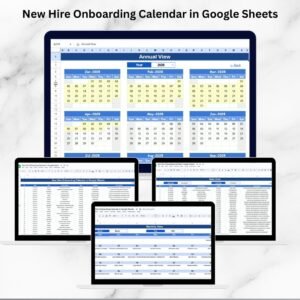
- New Hire Onboarding Calendar in Google Sheets: plan the first weeks on a calendar
- Employee Onboarding Checklist Template in Excel: the same checklist for Excel users
- Employee Onboarding Tracker in Excel: an onboarding tracker in Excel
- HR Google Sheets Pack: 10 premium HR templates for Google Sheets
Browse all Google Sheets checklists or the Google Sheets HR and payroll templates.





























Reviews
There are no reviews yet.