

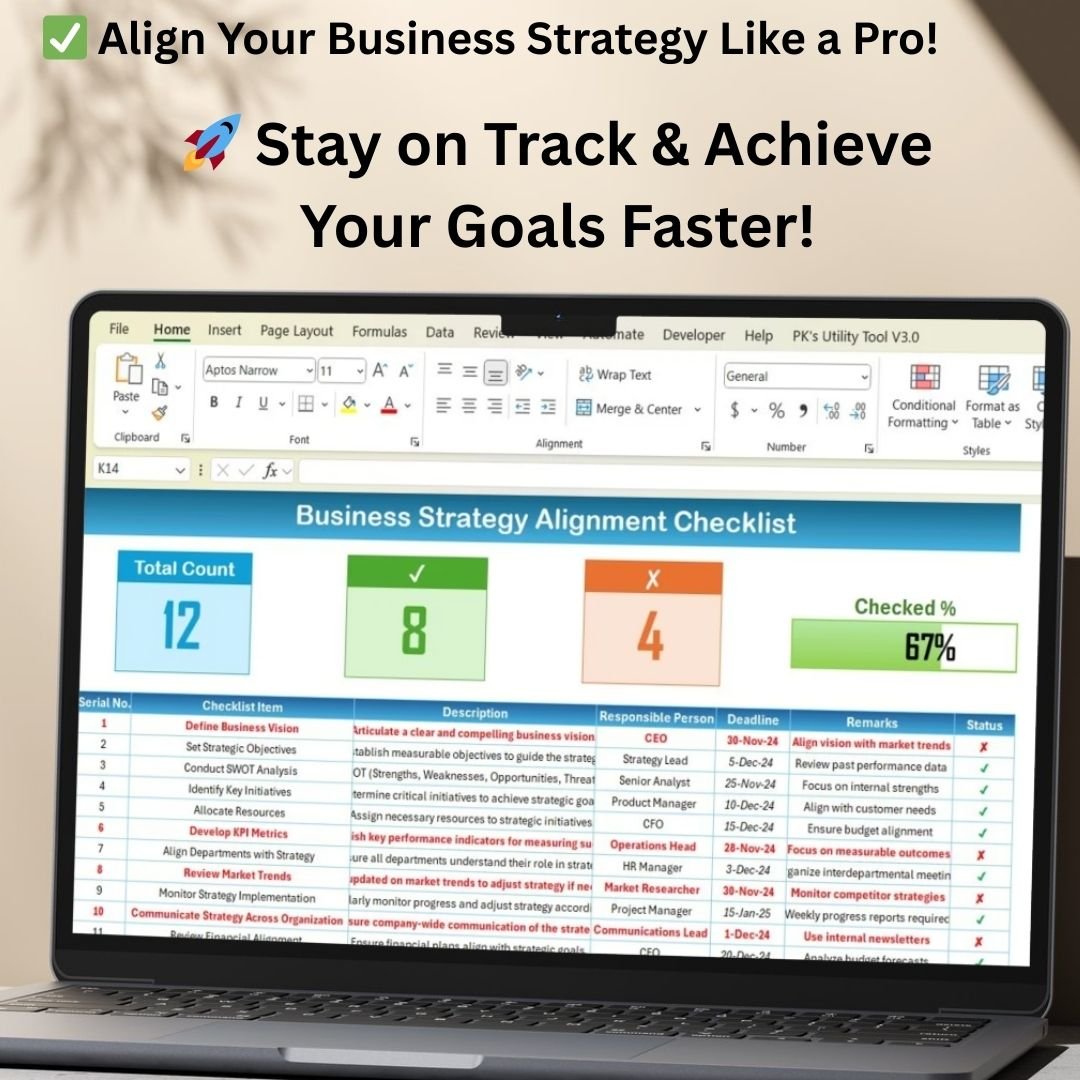

Strategic misalignment can lead to poor resource utilization, missed opportunities, and organizational inefficiencies. This Excel-based Business Strategy Alignment Checklist ensures that your strategic planning process is:
✔ Organized – Structured task management with clear deadlines.
✔ Accountable – Assigns responsibilities to specific individuals.
✔ Trackable – Displays real-time progress with a visual status update.
✔ Data-Driven – Helps teams focus on key initiatives that drive growth.
This template offers a step-by-step guide to aligning business goals with execution, ensuring teams work towards a unified vision.
Key Features of the Business Strategy Alignment Checklist
Our Business Strategy Alignment Checklist is structured across two primary worksheets to ensure efficiency and clarity:
1. Business Strategy Alignment Checklist Sheet (Main Worksheet)
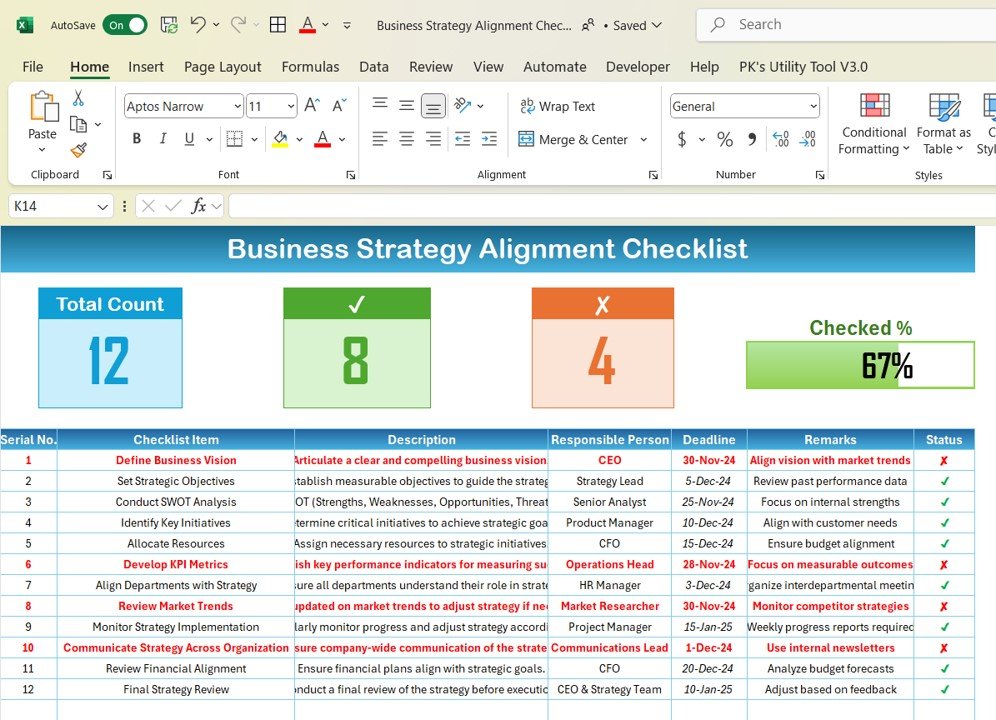
This is the core worksheet where all strategic initiatives are documented, tracked, and monitored. It consists of:
🔹 Total Count – Displays the total number of tasks in the checklist.
🔹 Checked Count – Shows how many tasks have been completed.
🔹 Crossed Count – Indicates incomplete or pending tasks.
🔹 Progress Bar – Provides a visual representation of task completion percentage.
2. List Sheet (Task Assignment & Accountability)
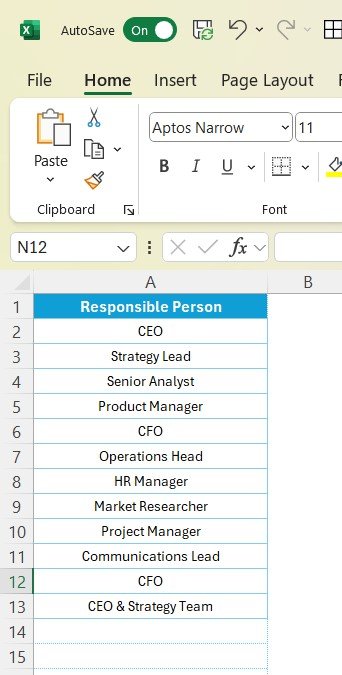
📌 The List Sheet contains a predefined list of responsible persons, ensuring that every task has an accountable owner.
📌 This feature eliminates manual data entry by using drop-down selections, reducing errors and ensuring efficient task allocation.
How Does the Business Strategy Alignment Checklist Work?
This Excel-based checklist follows a structured workflow to help businesses track and implement strategic initiatives effectively.
📌 Step 1: Define Strategic Goals
Begin by listing business objectives and linking them to specific initiatives. Each objective must have a clear description, measurable outcomes, and a deadline.
📌 Step 2: Assign Responsibility
Allocate each strategic initiative to a specific team or individual to ensure accountability. The preloaded drop-down list allows for quick and efficient assignments.
📌 Step 3: Set Deadlines & Track Progress
Each task comes with a deadline and a progress indicator. The progress bar at the top provides an instant overview of the checklist’s completion status.
📌 Step 4: Monitor & Optimize Execution
Regularly update task statuses to ensure that the execution remains on track. Teams can prioritize pending tasks and take proactive measures to address bottlenecks.
What’s Inside the Business Strategy Alignment Checklist?
This template includes 12 critical steps for business strategy alignment:
✔ Define Business Vision – Clearly articulate the long-term vision of your company.
✔ Set Strategic Objectives – Establish measurable goals that guide decision-making.
✔ Conduct SWOT Analysis – Identify Strengths, Weaknesses, Opportunities, and Threats.
✔ Identify Key Initiatives – Prioritize actions that align with business growth.
✔ Allocate Resources – Assign financial, human, and technological resources wisely.
✔ Develop KPI Metrics – Define measurable Key Performance Indicators (KPIs).
✔ Align Departments with Strategy – Ensure collaboration across departments.
✔ Review Market Trends – Stay updated on industry trends and competitor activities.
✔ Monitor Strategy Implementation – Track execution through weekly/monthly reports.
✔ Communicate Strategy Across Organization – Share insights through newsletters and company updates.
✔ Review Financial Alignment – Ensure financial goals align with strategic objectives.
✔ Conduct Final Strategy Review – Adjust strategies based on performance insights.
Benefits of Using the Business Strategy Alignment Checklist
Using this Excel template provides numerous advantages for your organization:
✅ Improves Strategic Focus: Keeps your business aligned with its vision and goals.
✅ Enhances Team Collaboration: Assigns responsibilities clearly, promoting accountability.
✅ Increases Efficiency: Helps businesses identify roadblocks and optimize execution.
✅ Visual Progress Tracking: The dashboard gives real-time updates on strategy implementation.
✅ Flexible & Customizable: Easily modify columns, add tasks, and personalize the checklist.
Who Can Use This Template?
The Business Strategy Alignment Checklist is ideal for:
✔ CEOs & Business Owners – To track company-wide strategy execution.
✔ Strategy Teams – To monitor and adjust strategic plans in real time.
✔ Project Managers – To align team objectives with business goals.
✔ Department Heads – To ensure departmental goals contribute to business success.
✔ Startups & Entrepreneurs – To maintain structured business growth planning.
Why Choose This Business Strategy Alignment Checklist?
🚀 Timesaving & Efficient – Preformatted with formulas and automated tracking.
📊 Professional & Structured – Designed for seamless implementation in any business.
💡 Simple & User-Friendly – No complex formulas or macros needed.
⚡ Instant Download & Ready to Use – Start using it right after purchase!
Take Control of Your Business Strategy Today!
The Business Strategy Alignment Checklist in Excel is your go-to tool for ensuring your company stays focused, organized, and aligned with its goals.
🔹 Format: Microsoft Excel (.xlsx)
🔹 Compatibility: Works on Excel 2013, 2016, 2019, Office 365 & Google Sheets
🔹 Instant Download: Yes
🔹 Customization: Fully Editable
Click hare to read the Detailed blog post
Visit our YouTube channel to learn step-by-step video tutorials
Frequently Asked Questions
What does the main sheet show?
Total, checked and crossed task counts, a progress bar, and the checklist of strategic tasks with owners and deadlines.
Which steps are already listed?
Twelve, from defining the business vision and setting objectives through SWOT analysis, KPI metrics and a final strategy review.
How do I assign owners?
Add names to the List sheet. They then appear in the drop-down selection on the main sheet. Microsoft explains drop-downs in Create a drop-down list.
Is there a Google Sheets version?
Yes. See the Business Strategy Alignment Checklist in Google Sheets.
Related Strategy Templates
- Business Strategy Alignment Checklist in Google Sheets: the same checklist online
- Business Strategy Outline Checklist in Excel: outline a strategy first
- Business Strategy Action Plan Checklist in Excel: turn strategy into actions
- Strategic Planning KPI Dashboard in Excel: track strategy KPIs
- Checklist & SOP Pack: 12 Excel and Google Sheets checklists in one bundle
Browse all Excel checklists or the Excel project management templates.
































Reviews
There are no reviews yet.