



Running a dental clinic efficiently requires more than clinical expertise — it demands accurate performance tracking, financial clarity, and patient satisfaction insights. The Dental Practice KPI Dashboard in Google Sheets is your all-in-one solution to monitor, analyze, and grow your practice with data-driven precision.Dental Practice KPI Dashboard in Google Sheets
This ready-to-use dashboard empowers dental professionals to visualize monthly and yearly trends, identify improvement areas, and enhance decision-making without relying on complex tools. With an interactive interface and automatic calculations, it turns your clinic’s daily data into actionable insights that help you stay ahead in today’s competitive healthcare market.Dental Practice KPI Dashboard in Google Sheets
⚙️ Key Features of Dental Practice KPI Dashboard in Google Sheets
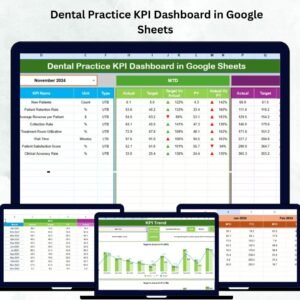
✨ 📊 Interactive Dashboard View – Get a real-time overview of Month-to-Date (MTD) and Year-to-Date (YTD) performance metrics. Compare Actual vs. Target and Previous Year vs. Current Year values with up/down arrows for quick insights.
✨ 📈 Dynamic KPI Trend Analysis – Track every KPI’s progress over time. Select any KPI from a drop-down menu to see performance charts, formulas, units, and definitions instantly.
✨ 📥 Easy Data Entry Sheets – Enter your actual, target, and previous-year data in structured tabs. The dashboard auto-updates visuals and summaries with zero coding required.
✨ ☁️ Cloud-Based Collaboration – Being Google Sheets-based means multiple users can view and edit simultaneously — ideal for team transparency and accountability.
✨ 💰 Cost-Effective & Scalable – Avoid expensive BI tools. This dashboard provides enterprise-grade insights at a fraction of the cost.
✨ 🔧 Fully Customizable – Add or remove KPIs, adjust charts, or include your brand colors effortlessly.

📂 What’s Inside the Dental Practice KPI Dashboard in Google Sheets
📌 Dashboard Sheet Tab:
The main analysis page that updates dynamically when you select a month from the drop-down in cell D3. It displays MTD and YTD values for Actual, Target, and Previous Year, with visual arrows showing performance trends.
📌 KPI Trend Sheet Tab:
Pick any KPI from the drop-down (cell C3) to view its trends over time. This page shows detailed information such as KPI Group, Unit, Formula, and Type (UTB or LTB).
📌 Actual Numbers Input Tab:
Log your clinic’s real monthly numbers here. The dashboard pulls this data to display accurate visuals automatically.
📌 Target Tab:
Set monthly and yearly goals for each KPI. This helps evaluate whether your clinic meets, exceeds, or falls short of targets.
📌 Previous Year Tab:
Record your last year’s KPI values to enable year-over-year (YoY) analysis.
📌 KPI Definition Tab:
Maintain a reference list with each KPI’s name, group, formula, and definition — ensuring consistency and clarity across your team.
🧭 How to Use the Dental Practice KPI Dashboard in Google Sheets
1️⃣ Download and Open the Template in Google Sheets.
2️⃣ Go to the KPI Definition Tab and review or modify the KPIs as needed.
3️⃣ Enter Monthly Data in the Actual, Target, and Previous Year tabs.
4️⃣ Select the Month from the drop-down on the Dashboard tab (cell D3).
5️⃣ View Real-Time Updates — all charts and metrics refresh automatically.
6️⃣ Share with Your Team for collaborative performance tracking.
It’s as simple as inputting data and watching your entire dental practice performance come alive visually!
🎯 Who Can Benefit from This Dental Practice KPI Dashboard
👩⚕️ Dentists: Gain instant insight into patient flow, treatment success, and profitability.
🧾 Practice Managers: Track team productivity and appointment efficiency.
💸 Financial Controllers: Monitor costs, revenue, and profit margins with precision.
📢 Marketing Teams: Measure new patient growth and retention trends.
🏢 Clinic Owners: Make strategic, data-driven decisions for sustainable growth.
This tool is designed for anyone who values clarity, accuracy, and growth in dental operations.
Click here to read the Detailed Blog Post
Watch the step-by-step video tutorial:
Visit our YouTube channel to learn step-by-step video tutorials YouTube.com/@PKAnExcelExpert
Compatibility and Requirements
- Works in Google Sheets with a free Google account and a web browser. No Excel installation is needed.
- The Dashboard and KPI Trend tabs use dropdowns to pick a month or a KPI. Google explains dropdowns in Create an in-cell dropdown list.
Frequently Asked Questions
Which tabs come with the dental KPI dashboard?
Six tabs: Dashboard, KPI Trend, Actual Numbers Input, Target, Previous Year and KPI Definition.
How do I change the month on the dashboard?
Pick a month from the dropdown in cell D3 on the Dashboard tab. MTD and YTD values update for that month.
What comparisons does it show?
Actual against target and current year against previous year, with up and down arrows.
Can I change the KPIs?
Yes. Edit the KPI Definition tab to add, remove or rename KPIs, with each KPI’s group, unit and formula.
Can my practice team use it together?
Yes. Share the Google Sheets file so several people can view and edit it.
Related Dental and Healthcare Templates
- Dental Practice KPI Dashboard in Excel: the same dental KPI dashboard in Excel
- Dental Practice Dashboard in Google Sheets: a dental practice dashboard in Google Sheets
- Dental Clinic Management System V1.0: a VBA system for running a dental clinic
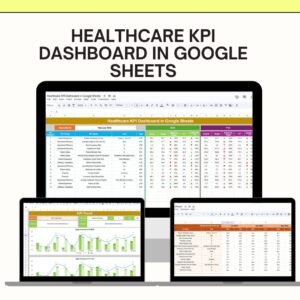
- Healthcare KPI Dashboard in Google Sheets: tracks healthcare KPIs in Google Sheets
- Healthcare & Hospital Management Bundle: eight healthcare and hospital templates in one bundle
Browse all Google Sheets KPI dashboards or the Google Sheets dashboards.











Reviews
There are no reviews yet.